"ae2217ad8e73450c"{"id":"1003005","slug":"car-configurator-template","title":"Car Configurator Template","category":"Gameplay Features","engine":"4.25+,5.0+","assetVersion":"","engineVersion":"Engine Version: 4.25+,5.0+","tag":"Gameplay Features","accent":"blue","visual":"mech","summary":"A Blueprint-driven Unreal car configurator with paint and wheel swaps, HDRI and background changes, door and light toggles, FoV control, and a Lumen level.","platform":"Unreal Engine","indexPolicy":"index","publishedAt":"2026-11-25T16:11:06.882Z","updatedAt":"2026-11-25T16:11:06.882Z","sourceNotes":[],"fileContents":[],"compatibility":["Unreal Engine","Engine Version: 4.25+,5.0+"],"featuredImage":{"alt":"Car Configurator Template","src":"/wp-content/uploads/published/2026/11/909d8c43415a-80fe433d-5a2a-43fe-bf08-a8b8cb634c25-e00e86f644.webp"},"hasDownloadLink":true,"downloads":0,"terms":[{"taxonomy":"category","slug":"gameplay-features","name":"Gameplay Features"}],"galleryImages":[{"src":"/wp-content/uploads/published/2026/11/54bc9ac81059-b95c9289-3e60-4014-88ed-af9efb311925-577b52bddf.webp","alt":"Car Configurator Template"},{"src":"/wp-content/uploads/published/2026/11/9c125f692dca-79241671-a02e-4a20-b320-dfeef15366be-b73dd8311b.webp","alt":"Car Configurator Template"},{"src":"/wp-content/uploads/published/2026/11/4216fc8a0d79-598f5fd3-349a-4ca4-88f4-b9a54829efc2-befa2b8221.webp","alt":"Car Configurator Template"},{"src":"/wp-content/uploads/published/2026/11/865b1f62bc34-b69f75fd-6e6c-45bb-a9a0-eb7b96df80c2-e494386aa6.webp","alt":"Car Configurator Template"},{"src":"/wp-content/uploads/published/2026/11/745010d992c8-fd232e27-b18e-4341-8869-159b18ca7fb2-1a4d49ef25.webp","alt":"Car Configurator Template"},{"src":"/wp-content/uploads/published/2026/11/6d5fc667ef8d-cccda7bf-87be-4d89-8d67-9956c9a604f9-4c8b5cb330.webp","alt":"Car Configurator Template"},{"src":"/wp-content/uploads/published/2026/11/0936522918ea-1c09a2ab-fad7-43d8-8c60-6f94ee667726-f1a5546901.webp","alt":"Car Configurator Template"}],"accessPanel":{"kind":"resource","title":"Get this resource","safetyNote":"Resources are manually reviewed before listing to improve quality and reduce obvious risks.","fileName":"Car Configurator Template.7z","resourceType":"Resource archive","versions":[]},"contentHtml":"\u003cp\u003eThe Car Configurator Template puts the whole interactive layer of a car presentation into Blueprint. Switching materials, switching backgrounds and swapping parts held as static meshes all run through the graph rather than a separate code layer, which means the logic stays visible and editable. A playable demo and a showcase video sit alongside the project, and the UE5 version adds a level prepared for Lumen. The scope is deliberately configurator-shaped: one car, a set of interchangeable surfaces and parts, and a handful of camera and environment controls that let a viewer build a specification.\u003c/p\u003e \u003ch2\u003eCar Paint, Wheel Paint, and Mesh Swaps in Blueprint\u003c/h2\u003e\n\u003cp\u003eThe paint side is split rather than treated as a single material change. Car paint is its own configurable item, and wheel paint is handled separately, so a viewer can vary the body finish and the wheel finish independently. Both come bundled with effects, which means the change is not simply a flat colour swap — the paint behaviour carries additional visual treatment along with the base colour.\u003c/p\u003e\n\u003cp\u003eWheels go further than colour. Changing the wheel static mesh is a distinct control, so the configurator can swap the geometry itself and not only the material sitting on it. That is a different kind of operation from a paint change, and keeping the two separate lets a build treat wheel selection as a parts decision. The same static-mesh switching approach extends to other parts of the car, since part swapping is one of the systems implemented in Blueprint.\u003c/p\u003e\n\u003cp\u003eBecause all of this sits in the graph, the underlying pattern is reusable. A material parameter change, a mesh reference swap, and the wiring that connects a UI element to either of those are the three pieces most configurators need, and here they arrive already assembled and already working against a car.\u003c/p\u003e \u003ch2\u003eEnvironment, HDRI, and Camera Controls Sharing One Blueprint\u003c/h2\u003e\n\u003cp\u003eEnvironment changes are a first-class feature rather than an afterthought. The configurator switches environments, and it switches HDRIs, so the lighting backdrop a car is presented against can be changed from inside the running scene. Backgrounds are switchable as their own item, which separates what sits behind the car from the lighting used to render it.\u003c/p\u003e\n\u003cp\u003eCamera control is included alongside those environment functions. That combination matters for presentation work, because the environment swap and the camera swap usually need to agree — a new HDRI that lights a car from one direction may want a different viewing angle. Having both driven from Blueprint keeps them in the same place instead of scattering them across separate actors and level setup.\u003c/p\u003e\n\u003cp\u003eThe camera also exposes a changeable field of view. FoV is a small control with a large effect on how a car reads: a tighter field of view compresses the body and exaggerates the front or rear, while a wider one opens up the surrounding environment. Leaving it adjustable inside the configurator hands that framing decision to whoever is using it.\u003c/p\u003e \u003ch2\u003eDoors and Lights as Toggleable States\u003c/h2\u003e\n\u003cp\u003eTwo smaller but very visible functions complete the set: opening and closing the doors, and turning the lights off and on. Both are state changes rather than material or mesh swaps, and both change the read of the car instantly in a way that a colour change cannot. Doors open and closed give two quite different silhouettes from the same camera position, and lights on and off shift where the eye goes in a darker environment.\u003c/p\u003e\n\u003cp\u003eThese toggles are the kind of detail that turns a static showcase into something a viewer can poke at. They also make good reference points, because a door animation and a light state are both common requirements in vehicle scenes and both are already wired here.\u003c/p\u003e \u003ch2\u003eThe Lumen Level in the UE5 Version\u003c/h2\u003e\n\u003cp\u003eThe UE5 version ships with a level prepared for Lumen, which puts the configurator into Unreal's dynamic global illumination and reflections pipeline. For that scene, hardware ray tracing is the recommended path — Lumen with hardware ray tracing is what the Lumen level is intended to be used with.\u003c/p\u003e\n\u003cp\u003eOne practical note carried with the package: the gallery images are not screenshots of scenes using Lumen, so a Lumen-lit view will look a little different from those stills. Anyone comparing the two should expect that difference rather than treat it as a mismatch. It is the usual gap between a conventionally lit capture and a dynamically lit real-time scene, and here it is stated up front.\u003c/p\u003e \u003ch2\u003eReusing the Configurator Template Beyond Cars\u003c/h2\u003e\n\u003cp\u003eThe obvious use is a car: a vehicle presentation where paint, wheels, doors, lights, environment and camera are all adjustable by the person viewing it. The less obvious use is everything else the same machinery fits. The template is explicitly intended as a base for other configurators — different UI configurators, and configurators for industrial products, where the same operations apply: change a surface, swap a part, change the environment, move the camera.\u003c/p\u003e\n\u003cp\u003eIt also works as a reference build. Material colour changes, mesh switching, HDRI swapping and camera control are all implemented as separate functions, so anyone writing a similar feature from scratch can look at how each one is put together and how it connects to the rest. That is a different value from using the template as-is — it is a working example of the individual pieces, not only a finished scene.\u003c/p\u003e \u003ch3\u003eWhere the Car Configurator Template Earns Its Keep\u003c/h3\u003e\n\u003cp\u003eThis suits teams that need a vehicle configurator running in Unreal without building the interaction layer from zero, and teams who want to see how material, mesh, environment and camera switching are structured in Blueprint before writing their own. The parts are already connected: paint and wheel paint with their effects, wheel meshes, other static-mesh parts, environments and HDRIs, camera control with adjustable field of view, door and light toggles, plus a Lumen-ready level in the UE5 build. What the package is set up to handle is the full loop of a viewer changing a car and seeing it respond, and it leaves the visual direction — the actual models, finishes and environments — to whoever adapts it.\u003c/p\u003e\n\n\u003ch2\u003eRelated Resources Worth Checking\u003c/h2\u003e\n\u003cul\u003e\n\u003cli\u003e\u003ca href=\"https://3dcghub.com/premium-configurator/\" rel=\"noopener noreferrer\"\u003ePremium Configurator\u003c/a\u003e\u003c/li\u003e\n\u003cli\u003e\u003ca href=\"https://3dcghub.com/advanced-fishing-template/\" rel=\"noopener noreferrer\"\u003eAdvanced Fishing Template\u003c/a\u003e\u003c/li\u003e\n\u003cli\u003e\u003ca href=\"https://3dcghub.com/modular-fps-hands/\" rel=\"noopener noreferrer\"\u003eModular FPS Hands\u003c/a\u003e\u003c/li\u003e\n\u003cli\u003e\u003ca href=\"https://3dcghub.com/basic-stealth-system/\" rel=\"noopener noreferrer\"\u003eBasic Stealth System\u003c/a\u003e\u003c/li\u003e\n\u003cli\u003e\u003ca href=\"https://3dcghub.com/air-strike/\" rel=\"noopener noreferrer\"\u003eAir Strike\u003c/a\u003e\u003c/li\u003e\n\u003c/ul\u003e","contentTextLength":6268,"navigation":{"current":39,"total":4964,"previous":{"id":"1003006","slug":"card-puzzle-template-for-pc-and-mobile","title":"Card Puzzle Template for PC and Mobile","category":"Gameplay Features","platform":"Unreal Engine","updatedAt":"2026-11-25T16:12:27.091Z"},"next":{"id":"1003004","slug":"capoeira-anim-set","title":"Capoeira Anim Set","category":"Combat","platform":"Unreal Engine","updatedAt":"2026-11-25T16:09:21.640Z"}},"relatedResources":[{"id":"1001445","slug":"premium-configurator","title":"Premium Configurator","category":"Gameplay Features","engine":"5.5+","assetVersion":"","engineVersion":"Engine Version: 5.5+","tag":"Gameplay Features","accent":"blue","visual":"mech","summary":"A deep dive into Premium Configurator for Unreal Engine, highlighting its database architecture, UI and animation presets, and version compatibility.","platform":"Unreal Engine","indexPolicy":"index","publishedAt":"2026-10-08T00:45:43.674Z","updatedAt":"2026-10-08T00:45:43.674Z","sourceNotes":[],"fileContents":[],"compatibility":["Unreal Engine","Engine Version: 5.5+"],"featuredImage":{"alt":"Premium Configurator","src":"/wp-content/uploads/published/2026/10/0c8160709c66-75dc1845-dc6d-4bb4-9175-da64145fc57f-8dd68ec1a3.webp"},"fileSizeBytes":518391310,"hasDownloadLink":true,"downloads":0},{"id":"1002976","slug":"advanced-fishing-template","title":"Advanced Fishing Template","category":"Gameplay Features","engine":"4.24+,5.0+","assetVersion":"","engineVersion":"Engine Version: 4.24+,5.0+","tag":"Gameplay Features","accent":"blue","visual":"mech","summary":"Advanced Fishing Template is a full Blueprint-based Unreal Engine 4 fishing project with 8 fish meshes, cast and reel animations and a custom ocean shader.","platform":"Unreal Engine","indexPolicy":"index","publishedAt":"2026-11-25T09:03:40.419Z","updatedAt":"2026-11-25T09:03:40.419Z","sourceNotes":[],"fileContents":[],"compatibility":["Unreal Engine","Engine Version: 4.24+,5.0+"],"featuredImage":{"alt":"Advanced Fishing Template","src":"/wp-content/uploads/published/2026/11/8cd2308ef3b8-2f3a4250-e8e8-493d-b34c-b9a4cc1bf7d4-b6e7224169.webp"},"hasDownloadLink":true,"downloads":1},{"id":"1002943","slug":"modular-fps-hands","title":"Modular FPS Hands","category":"Gameplay Features","engine":"4.22+,5.0+","assetVersion":"","engineVersion":"Engine Version: 4.22+,5.0+","tag":"Gameplay Features","accent":"blue","visual":"mech","summary":"Detailed look at Modular FPS Hands for Unreal Engine 5, featuring 93 Blueprint variables, modular clothing, procedural camo, and wear parameters.","platform":"Unreal Engine","indexPolicy":"index","publishedAt":"2026-11-21T23:30:57.151Z","updatedAt":"2026-11-21T23:30:57.151Z","sourceNotes":[],"fileContents":[],"compatibility":["Unreal Engine","Engine Version: 4.22+,5.0+"],"featuredImage":{"alt":"Modular FPS Hands","src":"/wp-content/uploads/published/2026/11/8f0569beb22a-de642fed-2efa-4338-a34a-1f85d3e324ac-0c0d0b474d.webp"},"fileSizeBytes":3722392902,"hasDownloadLink":true,"downloads":1}]}[{"id":4225,"sourceId":4225,"taxonomyId":4225,"taxonomy":"category","slug":"asset-library","name":"Asset Library","parentId":null,"count":4817,"hasChildren":true,"href":"/","seoTitle":"Free Game Assets Library | 3DCGHUB","seoDescription":"Browse free Unreal Engine, Unity, Blender assets and game development tutorials on 3DCGHUB with previews, compatibility notes, and secure downloads.","sitemapEnabled":true,"children":[{"id":4227,"sourceId":4227,"taxonomyId":4227,"taxonomy":"category","slug":"blender-add-ons-plugins","name":"Blender Add-ons \u0026 Plugins","parentId":4225,"count":10,"hasChildren":false,"href":"/category/blender-add-ons-plugins/","seoTitle":"Free Blender Add-ons \u0026 Plugins | 3DCGHUB","seoDescription":"Browse free Blender Add-ons \u0026 Plugins tools for Blender on 3DCGHUB: curated downloads with preview images, compatibility notes and secure download access.","sitemapEnabled":true},{"id":514,"sourceId":514,"taxonomyId":514,"taxonomy":"category","slug":"unity-2","name":"Unity","parentId":4225,"count":453,"hasChildren":true,"href":"/category/unity-2/","seoTitle":"Free Unity Assets | 3DCGHUB","seoDescription":"Browse free Unity resources on 3DCGHUB: curated downloads with preview images, compatibility notes and secure download access.","sitemapEnabled":true,"children":[{"id":523,"sourceId":523,"taxonomyId":523,"taxonomy":"category","slug":"2d","name":"2D","parentId":514,"count":1,"hasChildren":true,"href":"/category/2d/","seoTitle":"Free Unity 2D | 3DCGHUB","seoDescription":"Browse free 2D assets for Unity on 3DCGHUB: curated downloads with preview images, compatibility notes and secure download access.","sitemapEnabled":true},{"id":515,"sourceId":515,"taxonomyId":515,"taxonomy":"category","slug":"3d-unity-2","name":"3D","parentId":514,"count":162,"hasChildren":true,"href":"/category/3d-unity-2/","seoTitle":"Free Unity 3D Assets | 3DCGHUB","seoDescription":"Browse free 3D assets for Unity on 3DCGHUB: curated downloads with preview images, compatibility notes and secure download access.","sitemapEnabled":true},{"id":565,"sourceId":565,"taxonomyId":565,"taxonomy":"category","slug":"add-ons","name":"Add-Ons","parentId":514,"count":2,"hasChildren":false,"href":"/category/add-ons/","seoTitle":"Free Unity Add-Ons | 3DCGHUB","seoDescription":"Browse free Add-Ons assets for Unity on 3DCGHUB: curated downloads with preview images, compatibility notes and secure download access.","sitemapEnabled":true},{"id":529,"sourceId":529,"taxonomyId":529,"taxonomy":"category","slug":"audio-unity-2","name":"Audio","parentId":514,"count":1,"hasChildren":true,"href":"/category/audio-unity-2/","seoTitle":"Free Unity Audio | 3DCGHUB","seoDescription":"Browse free Audio for Unity on 3DCGHUB: curated downloads with preview images, compatibility notes and secure download access.","sitemapEnabled":true},{"id":557,"sourceId":557,"taxonomyId":557,"taxonomy":"category","slug":"templates","name":"Templates","parentId":514,"count":36,"hasChildren":true,"href":"/category/templates/","seoTitle":"Free Unity Templates | 3DCGHUB","seoDescription":"Browse free Unity project templates on 3DCGHUB. Starter kits with previews, compatibility notes, and secure download access.","sitemapEnabled":true},{"id":533,"sourceId":533,"taxonomyId":533,"taxonomy":"category","slug":"tools-unity-2","name":"Tools","parentId":514,"count":0,"hasChildren":true,"href":"/category/tools-unity-2/","sitemapEnabled":true},{"id":554,"sourceId":554,"taxonomyId":554,"taxonomy":"category","slug":"vfx-unity-2","name":"VFX","parentId":514,"count":4,"hasChildren":true,"href":"/category/vfx-unity-2/","seoTitle":"Free Unity VFX | 3DCGHUB","seoDescription":"Browse free VFX for Unity on 3DCGHUB: curated downloads with preview images, compatibility notes and secure download access.","sitemapEnabled":true}]},{"id":511,"sourceId":511,"taxonomyId":511,"taxonomy":"category","slug":"unreal-engine-2","name":"Unreal Engine","parentId":4225,"count":4355,"hasChildren":true,"href":"/category/unreal-engine-2/","seoTitle":"Free Unreal Engine Assets | 3DCGHUB","seoDescription":"Browse free Unreal Engine resources on 3DCGHUB: curated downloads with preview images, compatibility notes and secure download access.","sitemapEnabled":true,"children":[{"id":54,"sourceId":54,"taxonomyId":54,"taxonomy":"category","slug":"3d","name":"3D","parentId":511,"count":2441,"hasChildren":true,"href":"/category/3d/","seoTitle":"Free Unreal Engine 3D | 3DCGHUB","seoDescription":"Browse free 3D assets for Unreal Engine on 3DCGHUB: curated downloads with preview images, compatibility notes and secure download access.","sitemapEnabled":true},{"id":441,"sourceId":441,"taxonomyId":441,"taxonomy":"category","slug":"animations","name":"Animations","parentId":511,"count":269,"hasChildren":true,"href":"/category/animations/","seoTitle":"Free Unreal Engine Animations | 3DCGHUB","seoDescription":"Browse free Animations for Unreal Engine on 3DCGHUB: curated downloads with preview images, compatibility notes and secure download access.","sitemapEnabled":true},{"id":446,"sourceId":446,"taxonomyId":446,"taxonomy":"category","slug":"audio","name":"Audio","parentId":511,"count":63,"hasChildren":true,"href":"/category/audio/","seoTitle":"Free Unreal Engine Audio Resources | 3DCGHUB","seoDescription":"Browse free Unreal Engine audio resources including sound effects, voices, dialogue, and ambient sounds. Curated free downloads on 3DCGHUB.","sitemapEnabled":true},{"id":466,"sourceId":466,"taxonomyId":466,"taxonomy":"category","slug":"game-systems","name":"Game Systems","parentId":511,"count":381,"hasChildren":true,"href":"/category/game-systems/","seoTitle":"Free Unreal Engine Game Systems | 3DCGHUB","seoDescription":"Browse free Game Systems tools for Unreal Engine on 3DCGHUB: curated downloads with preview images, compatibility notes and secure download access.","sitemapEnabled":true},{"id":478,"sourceId":478,"taxonomyId":478,"taxonomy":"category","slug":"game-templates","name":"Game Templates","parentId":511,"count":155,"hasChildren":true,"href":"/category/game-templates/","seoTitle":"Free Unreal Engine Game Templates | 3DCGHUB","seoDescription":"Browse free Game Templates for Unreal Engine on 3DCGHUB: curated downloads with preview images, compatibility notes and secure download access.","sitemapEnabled":true},{"id":432,"sourceId":432,"taxonomyId":432,"taxonomy":"category","slug":"hdri","name":"HDRI","parentId":511,"count":6,"hasChildren":true,"href":"/category/hdri/","seoTitle":"Free Unreal Engine HDRI | 3DCGHUB","seoDescription":"Browse free Unreal Engine HDRI skies and lighting maps on 3DCGHUB. Environment lighting with previews and secure downloads.","sitemapEnabled":true},{"id":228,"sourceId":228,"taxonomyId":228,"taxonomy":"category","slug":"material-and-textures","name":"Material \u0026 Textures","parentId":511,"count":172,"hasChildren":true,"href":"/category/material-and-textures/","seoTitle":"Free Unreal Engine Material \u0026 Textures | 3DCGHUB","seoDescription":"Browse free Material \u0026 Textures for Unreal Engine on 3DCGHUB: curated downloads with preview images, compatibility notes and secure download access.","sitemapEnabled":true},{"id":298,"sourceId":298,"taxonomyId":298,"taxonomy":"category","slug":"sprites-and-flipbooks","name":"Sprites \u0026 Flipbooks","parentId":511,"count":18,"hasChildren":true,"href":"/category/sprites-and-flipbooks/","seoTitle":"Free Unreal Engine Sprites \u0026 Flipbooks | 3DCGHUB","seoDescription":"Browse free Sprites \u0026 Flipbooks assets for Unreal Engine on 3DCGHUB: curated downloads with preview images, compatibility notes and secure download access.","sitemapEnabled":true},{"id":489,"sourceId":489,"taxonomyId":489,"taxonomy":"category","slug":"tools-and-plugins","name":"Tools \u0026 Plugins","parentId":511,"count":390,"hasChildren":true,"href":"/category/tools-and-plugins/","seoTitle":"Free Unreal Engine Tools \u0026 Plugins | 3DCGHUB","seoDescription":"Browse free Tools \u0026 Plugins for Unreal Engine on 3DCGHUB: curated downloads with preview images, compatibility notes and secure download access.","sitemapEnabled":true},{"id":459,"sourceId":459,"taxonomyId":459,"taxonomy":"category","slug":"ui","name":"UI","parentId":511,"count":47,"hasChildren":true,"href":"/category/ui/","seoTitle":"Free Unreal Engine UI | 3DCGHUB","seoDescription":"Browse free UI for Unreal Engine on 3DCGHUB: curated downloads with preview images, compatibility notes and secure download access.","sitemapEnabled":true},{"id":450,"sourceId":450,"taxonomyId":450,"taxonomy":"category","slug":"vfx","name":"VFX","parentId":511,"count":413,"hasChildren":true,"href":"/category/vfx/","seoTitle":"Free Unreal Engine VFX | 3DCGHUB","seoDescription":"Browse free VFX for Unreal Engine on 3DCGHUB: curated downloads with preview images, compatibility notes and secure download access.","sitemapEnabled":true}]}]},{"id":4222,"sourceId":4222,"taxonomyId":4222,"taxonomy":"category","slug":"tutorial-library","name":"Tutorial Library","parentId":null,"count":117,"hasChildren":false,"href":"/tutorials/","seoTitle":"Free Game Development Tutorial Library | 3DCGHUB","seoDescription":"Browse free game development tutorials for Unreal Engine, Unity, Blender, and more on 3DCGHUB with practical workflows and secure downloads.","sitemapEnabled":true}]
Resource screenshots
1 / 7
Asset drops
Daily Asset Drops
Follow 3DCGHUB on Telegram for daily Unreal, Unity & Blender drops and curated CC0 releases.
Resources are manually reviewed before listing to improve quality and reduce obvious risks.
Reviewed archive
Gameplay Features
Car Configurator Template
A Blueprint-driven Unreal car configurator with paint and wheel swaps, HDRI and background changes, door and light toggles, FoV control, and a Lumen level.
The Car Configurator Template puts the whole interactive layer of a car presentation into Blueprint. Switching materials, switching backgrounds and swapping parts held as static meshes all run through the graph rather than a separate code layer, which means the logic stays visible and editable. A playable demo and a showcase video sit alongside the project, and the UE5 version adds a level prepared for Lumen. The scope is deliberately configurator-shaped: one car, a set of interchangeable surfaces and parts, and a handful of camera and environment controls that let a viewer build a specification.
Car Paint, Wheel Paint, and Mesh Swaps in Blueprint
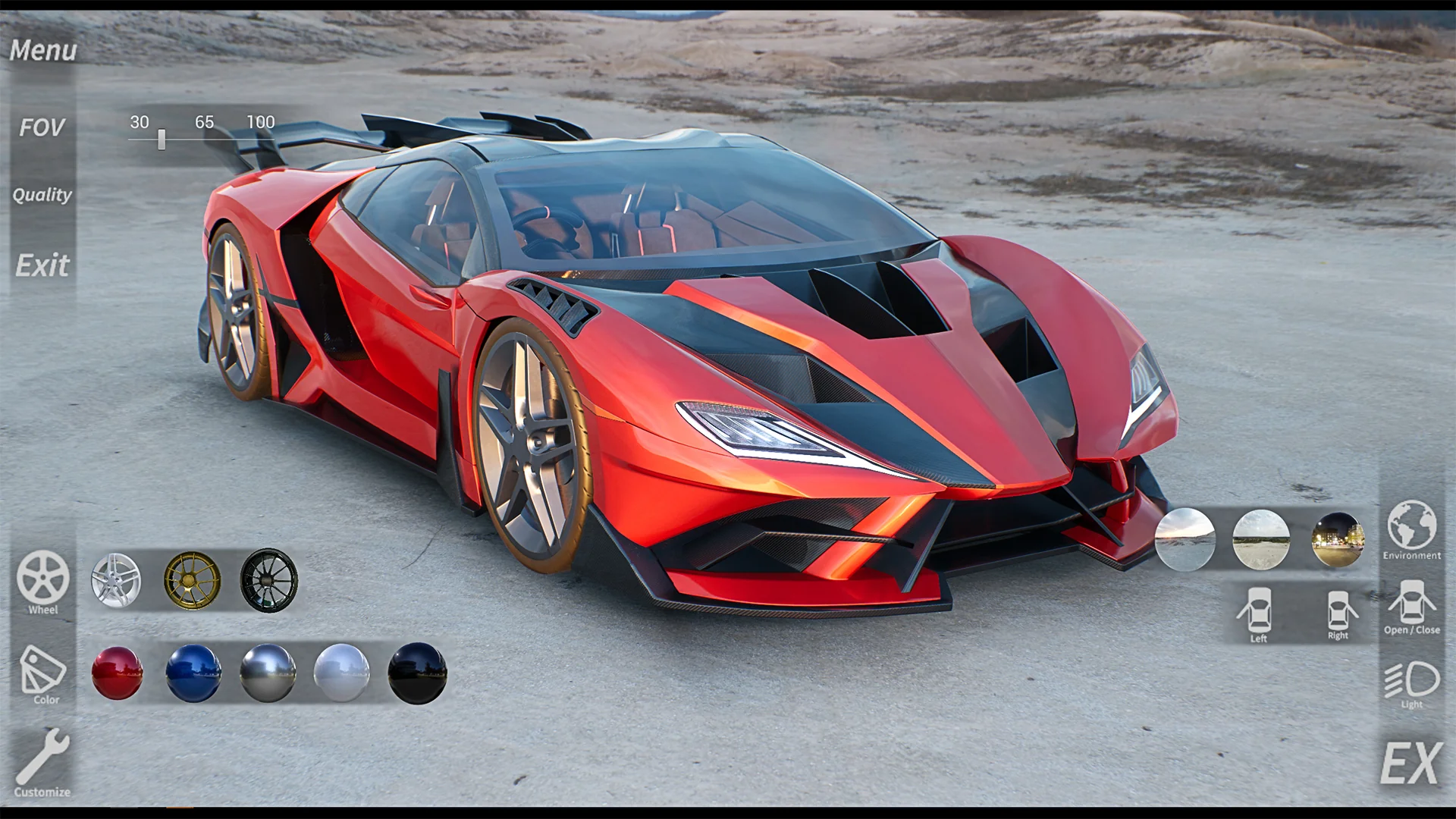
The paint side is split rather than treated as a single material change. Car paint is its own configurable item, and wheel paint is handled separately, so a viewer can vary the body finish and the wheel finish independently. Both come bundled with effects, which means the change is not simply a flat colour swap — the paint behaviour carries additional visual treatment along with the base colour.
Wheels go further than colour. Changing the wheel static mesh is a distinct control, so the configurator can swap the geometry itself and not only the material sitting on it. That is a different kind of operation from a paint change, and keeping the two separate lets a build treat wheel selection as a parts decision. The same static-mesh switching approach extends to other parts of the car, since part swapping is one of the systems implemented in Blueprint.
Because all of this sits in the graph, the underlying pattern is reusable. A material parameter change, a mesh reference swap, and the wiring that connects a UI element to either of those are the three pieces most configurators need, and here they arrive already assembled and already working against a car.
Environment, HDRI, and Camera Controls Sharing One Blueprint
Environment changes are a first-class feature rather than an afterthought. The configurator switches environments, and it switches HDRIs, so the lighting backdrop a car is presented against can be changed from inside the running scene. Backgrounds are switchable as their own item, which separates what sits behind the car from the lighting used to render it.
Camera control is included alongside those environment functions. That combination matters for presentation work, because the environment swap and the camera swap usually need to agree — a new HDRI that lights a car from one direction may want a different viewing angle. Having both driven from Blueprint keeps them in the same place instead of scattering them across separate actors and level setup.
The camera also exposes a changeable field of view. FoV is a small control with a large effect on how a car reads: a tighter field of view compresses the body and exaggerates the front or rear, while a wider one opens up the surrounding environment. Leaving it adjustable inside the configurator hands that framing decision to whoever is using it.
Doors and Lights as Toggleable States
Two smaller but very visible functions complete the set: opening and closing the doors, and turning the lights off and on. Both are state changes rather than material or mesh swaps, and both change the read of the car instantly in a way that a colour change cannot. Doors open and closed give two quite different silhouettes from the same camera position, and lights on and off shift where the eye goes in a darker environment.
These toggles are the kind of detail that turns a static showcase into something a viewer can poke at. They also make good reference points, because a door animation and a light state are both common requirements in vehicle scenes and both are already wired here.
The Lumen Level in the UE5 Version
The UE5 version ships with a level prepared for Lumen, which puts the configurator into Unreal's dynamic global illumination and reflections pipeline. For that scene, hardware ray tracing is the recommended path — Lumen with hardware ray tracing is what the Lumen level is intended to be used with.
One practical note carried with the package: the gallery images are not screenshots of scenes using Lumen, so a Lumen-lit view will look a little different from those stills. Anyone comparing the two should expect that difference rather than treat it as a mismatch. It is the usual gap between a conventionally lit capture and a dynamically lit real-time scene, and here it is stated up front.
Reusing the Configurator Template Beyond Cars
The obvious use is a car: a vehicle presentation where paint, wheels, doors, lights, environment and camera are all adjustable by the person viewing it. The less obvious use is everything else the same machinery fits. The template is explicitly intended as a base for other configurators — different UI configurators, and configurators for industrial products, where the same operations apply: change a surface, swap a part, change the environment, move the camera.
It also works as a reference build. Material colour changes, mesh switching, HDRI swapping and camera control are all implemented as separate functions, so anyone writing a similar feature from scratch can look at how each one is put together and how it connects to the rest. That is a different value from using the template as-is — it is a working example of the individual pieces, not only a finished scene.
Where the Car Configurator Template Earns Its Keep
This suits teams that need a vehicle configurator running in Unreal without building the interaction layer from zero, and teams who want to see how material, mesh, environment and camera switching are structured in Blueprint before writing their own. The parts are already connected: paint and wheel paint with their effects, wheel meshes, other static-mesh parts, environments and HDRIs, camera control with adjustable field of view, door and light toggles, plus a Lumen-ready level in the UE5 build. What the package is set up to handle is the full loop of a viewer changing a car and seeing it respond, and it leaves the visual direction — the actual models, finishes and environments — to whoever adapts it.
 Gameplay Features
 Gameplay Features
 Gameplay Features