"ae2217ad8e73450c"{"id":"1003006","slug":"card-puzzle-template-for-pc-and-mobile","title":"Card Puzzle Template for PC and Mobile","category":"Gameplay Features","engine":"4.25+,5.0+","assetVersion":"","engineVersion":"Engine Version: 4.25+,5.0+","tag":"Gameplay Features","accent":"blue","visual":"mech","summary":"A card puzzle template with commented Blueprints, swappable art and text, any-aspect-ratio support, and targets for PC, mobile, and Android.","platform":"Unreal Engine","indexPolicy":"index","publishedAt":"2026-11-25T16:12:27.091Z","updatedAt":"2026-11-25T16:12:27.091Z","sourceNotes":[],"fileContents":[],"compatibility":["Unreal Engine","Engine Version: 4.25+,5.0+"],"featuredImage":{"alt":"Card Puzzle Template for PC and Mobile","src":"/wp-content/uploads/published/2026/11/9a2f6e69243d-b1d9775b-f473-42d2-804b-36f19302612c-cb2d5227b4.webp"},"hasDownloadLink":true,"downloads":0,"terms":[{"taxonomy":"category","slug":"gameplay-features","name":"Gameplay Features"}],"galleryImages":[{"src":"/wp-content/uploads/published/2026/11/f8f6aa0651e1-50a985ec-8c73-4457-aa5f-ac4595583a2d-60d7859821.webp","alt":"Card Puzzle Template for PC and Mobile"},{"src":"/wp-content/uploads/published/2026/11/782226cee0d8-18ac376d-4582-45d1-bf48-55b2d0224f08-aec4ff15b2.webp","alt":"Card Puzzle Template for PC and Mobile"},{"src":"/wp-content/uploads/published/2026/11/f4fd2ff27a5f-b97ea785-4fb0-4ed4-8272-39ba5b28aedc-43b2850570.webp","alt":"Card Puzzle Template for PC and Mobile"},{"src":"/wp-content/uploads/published/2026/11/d6dc87a0f994-a7513665-d343-49cd-8932-ac91862f9a96-c33873bfe5.webp","alt":"Card Puzzle Template for PC and Mobile"},{"src":"/wp-content/uploads/published/2026/11/292be6e03711-1ba657d1-c16c-4601-a31c-d6d134daa0a8-dc7e66b552.webp","alt":"Card Puzzle Template for PC and Mobile"},{"src":"/wp-content/uploads/published/2026/11/096c0239ba6e-4bfab497-2e2c-4b48-bbf7-2986de61e096-88027f40f3.webp","alt":"Card Puzzle Template for PC and Mobile"}],"accessPanel":{"kind":"resource","title":"Get this resource","safetyNote":"Resources are manually reviewed before listing to improve quality and reduce obvious risks.","fileName":"Card Puzzle Template for PC and Mobile.7z","resourceType":"Resource archive","versions":[]},"contentHtml":"\u003cp\u003eA card puzzle game lives at the point where cards, text, and screen proportions meet. The Card Puzzle Template starts from that point: cards are already tied to puzzle logic, text is meant to be replaced, and the project is built to hold together on any aspect ratio screen. The result behaves like a game rather than a loose set of assets. It includes everything needed for a card puzzle project, leaving art and text as the two pieces a team supplies before the build is ready to deploy.\u003c/p\u003e \u003ch2\u003eWhat the Card Puzzle Template Hands You\u003c/h2\u003e\n\u003cp\u003eThe scope is deliberately complete. The template includes everything needed to make a card puzzle game, so the project already carries the gameplay structure and the supporting pieces that turn a concept into a running build. A developer does not start by assembling the card puzzle behavior from separate parts. Those parts arrive together.\u003c/p\u003e\n\u003cp\u003eTwo details shape how that completeness works. The Blueprints are commented and easy to understand, and the template is compatible with any aspect ratio screen. The first detail makes the logic readable; the second makes the presentation flexible. Together they define the template's character: a card puzzle project that can be opened, followed, reskinned, and shown on displays of different shapes.\u003c/p\u003e\n\u003cp\u003eThe project is also identified as a puzzle template built with Blueprints and aimed at PC, mobile, and Android. Those descriptors do not add separate features; they describe the audience and the technical layer behind the card puzzle behavior. A card puzzle template for PC and mobile is exactly what the name says: a reusable starting point for a puzzle game based on cards, with desktop and mobile deployment in view.\u003c/p\u003e \u003ch2\u003eSwapping Art and Text Into the Card Puzzle Flow\u003c/h2\u003e\n\u003cp\u003eThe creative handoff is straightforward. All a team has to do is apply its art and texts, and the game is ready to deploy. That sets the division of labor. The template owns the card puzzle behavior; the team owns the visual identity and the wording. An artist can treat the project as a frame that accepts a new set of art assets. A writer can replace the text layer without touching the underlying logic.\u003c/p\u003e\n\u003cp\u003eThis matters because the template is not asking for a rebuild. The art and text are not decorative additions bolted onto a finished demo; they are the intended input. The card puzzle structure stays in place while the surface changes. That makes the template useful for teams that already know the look and voice they want but do not want to spend early production time wiring a card puzzle from scratch.\u003c/p\u003e\n\u003cp\u003eThe ready-to-deploy state is equally specific. Once the art and texts are in, the project is not waiting on a missing gameplay module. The card puzzle template has already supplied what it considers the necessary parts. The remaining work is the work the template was designed to accept: replacing its visuals and its words with yours.\u003c/p\u003e \u003ch2\u003eCommented Blueprints as a Readable Base\u003c/h2\u003e\n\u003cp\u003eBlueprints are only useful as a starting point when they can be read. The template's Blueprints are commented and easy to understand, which changes how a developer can work with the project. Instead of opening a graph and guessing at the intent, a developer can follow the comments and see what each part is doing. That readability supports two common production needs: learning from the template and modifying it with confidence.\u003c/p\u003e\n\u003cp\u003eFor a solo developer or a small team, commented Blueprints act as documentation inside the project. The logic is not presented as an unexplained chain of nodes. The comments give the card puzzle behavior a visible structure, so changes can be made with a clear sense of where they belong. This is especially relevant when art and text replacement is only the first step and later adjustments to the puzzle flow are expected.\u003c/p\u003e\n\u003cp\u003eThe Blueprint layer also signals that the template's logic is exposed in a form developers can inspect and edit. A card puzzle template built with Blueprints gives the team a working game and a readable graph at the same time. The comments are the bridge between the two.\u003c/p\u003e \u003ch2\u003eAspect Ratio Behavior on PC and Mobile\u003c/h2\u003e\n\u003cp\u003eScreen shape is one of the quiet failure points in a card game. Cards, text, and puzzle elements need to remain coherent when the display changes. The Card Puzzle Template is compatible with any aspect ratio screen, which means the same project is intended to work across displays with different proportions. That compatibility is the feature that lets the template address PC and mobile without treating them as separate interface projects.\u003c/p\u003e\n\u003cp\u003eThe target list is PC, mobile, and Android. The template is not limited to a single fixed-resolution window. A team can approach the same card puzzle build with desktop screens and mobile screens in scope, using the aspect ratio support as the common ground. The practical benefit is that the card puzzle layout does not have to be re-authored for every screen proportion the project encounters.\u003c/p\u003e\n\u003cp\u003eThis does not turn the template into a universal UI system. It is still a card puzzle template, and its compatibility claim is about aspect ratio. But for a team planning a PC and mobile release, that claim removes a familiar source of friction. The project's screen behavior is part of the template's design, not an afterthought added after the puzzle logic is complete.\u003c/p\u003e \u003ch2\u003eWhere a Card Puzzle Template Fits a Production Plan\u003c/h2\u003e\n\u003cp\u003eThe strongest use case is a team that has art and text ready but does not have a card puzzle build. The template closes that gap in one move. It supplies the commented Blueprints, the card puzzle structure, and the aspect ratio handling; the team supplies the visual and textual identity. The project is then ready to deploy, with the template's logic still available for inspection and change.\u003c/p\u003e\n\u003cp\u003eA second use case is exploratory. A developer can open the template, read the commented Blueprints, and use the project as a reference for how a card puzzle can be assembled. Because the Blueprints are meant to be understood, the template doubles as a working explanation. The art and text replacement path is short enough that the project can be reskinned for a prototype without committing to a full production rewrite.\u003c/p\u003e\n\u003cp\u003eFor artists, the appeal is control over the surface without owning the logic. For developers, the appeal is a puzzle framework that is already commented and already aimed at PC, mobile, and Android. For a small team, those two appeals meet in the same project: the template handles the card puzzle behavior, and the team handles the art and text that make it theirs.\u003c/p\u003e\n\u003cp\u003eThe concrete takeaway is simple. A card puzzle game needs a working structure before art and text can carry it. The Card Puzzle Template provides that structure, keeps the Blueprints readable, and respects any aspect ratio screen. Teams evaluating it should look at the template as a deployable card puzzle base, not as a finished art pack. The art and text are the part left open, and that is exactly where a creative team can make the project its own.\u003c/p\u003e\n\n\u003ch2\u003eExplore Similar Assets\u003c/h2\u003e\n\u003cul\u003e\n\u003cli\u003e\u003ca href=\"https://3dcghub.com/2048-puzzle-game-template/\" rel=\"noopener noreferrer\"\u003e2048 Puzzle Game Template\u003c/a\u003e\u003c/li\u003e\n\u003cli\u003e\u003ca href=\"https://3dcghub.com/air-strike/\" rel=\"noopener noreferrer\"\u003eAir Strike\u003c/a\u003e\u003c/li\u003e\n\u003cli\u003e\u003ca href=\"https://3dcghub.com/mobile-swipe-solution-for-android-and-ios/\" rel=\"noopener noreferrer\"\u003eMobile Swipe Solution for Android and iOS\u003c/a\u003e\u003c/li\u003e\n\u003cli\u003e\u003ca href=\"https://3dcghub.com/push-push-puzzle-2d-kit/\" rel=\"noopener noreferrer\"\u003ePush Push Puzzle 2D Kit\u003c/a\u003e\u003c/li\u003e\n\u003cli\u003e\u003ca href=\"https://3dcghub.com/card-games-templates/\" rel=\"noopener noreferrer\"\u003eCard Games Templates\u003c/a\u003e\u003c/li\u003e\n\u003c/ul\u003e","contentTextLength":7142,"navigation":{"current":38,"total":4964,"previous":{"id":"1003007","slug":"ccg-toolkit","title":"CCG Toolkit","category":"Card Game","platform":"Unreal Engine","updatedAt":"2026-11-25T16:13:16.010Z"},"next":{"id":"1003005","slug":"car-configurator-template","title":"Car Configurator Template","category":"Gameplay Features","platform":"Unreal Engine","updatedAt":"2026-11-25T16:11:06.882Z"}},"relatedResources":[{"id":"10464","slug":"2048-puzzle-game-template","title":"2048 Puzzle Game Template","category":"Gameplay Features","engine":"5.3+","assetVersion":"Engine version: 5.3+","engineVersion":"4.23","tag":"Gameplay Features","accent":"blue","visual":"animation","summary":"Build your own tile-matching experience with the 2048 Puzzle Game Template. This fully commented Blueprint system is ready for deployment on Mobile, Android, and PC platforms.","platform":"Unreal Engine","indexPolicy":"noindex","publishedAt":"2026-03-03T15:27:48.000Z","updatedAt":"2026-04-19T15:50:01.000Z","sourceNotes":[],"fileContents":[],"compatibility":["Unreal Engine"],"featuredImage":{"alt":"2048 Puzzle Game Template","src":"https://3dcghub.com/wp-content/uploads/2026/03/018c8fd7-f45c-4d90-b831-7c8cda5a2b63.webp"},"fileSizeBytes":95588371,"hasDownloadLink":true,"downloads":0},{"id":"1002985","slug":"air-strike","title":"Air Strike","category":"Gameplay Features","engine":"4.19+,5.0+","assetVersion":"","engineVersion":"Engine Version: 4.19+,5.0+","tag":"Gameplay Features","accent":"blue","visual":"mech","summary":"Air Strike lets players spawn a plane from the mini map to bomb a target or drop supplies, built in Blueprints with multiplayer and mobile support.","platform":"Unreal Engine","indexPolicy":"index","publishedAt":"2026-11-25T09:49:14.550Z","updatedAt":"2026-11-25T09:49:14.550Z","sourceNotes":[],"fileContents":[],"compatibility":["Unreal Engine","Engine Version: 4.19+,5.0+"],"featuredImage":{"alt":"Air Strike","src":"/wp-content/uploads/published/2026/11/cc365b24066b-15735d0c-b2fb-43a8-959e-47a1b1b7a2e6-74eefd188c.webp"},"hasDownloadLink":true,"downloads":0},{"id":"1002328","slug":"mobile-swipe-solution-for-android-and-ios","title":"Mobile Swipe Solution for Android and iOS","category":"Gameplay Features","engine":"4.23+,5.0+","assetVersion":"","engineVersion":"Engine Version: 4.23+,5.0+","tag":"Gameplay Features","accent":"blue","visual":"luts","summary":"A Blueprint swipe input solution for Unreal Engine mobile projects, covering 4-way, diagonal, and 8-way gestures plus the settings needed before Android and iOS","platform":"Unreal Engine","indexPolicy":"index","publishedAt":"2026-11-06T06:33:26.197Z","updatedAt":"2026-11-06T06:33:26.197Z","sourceNotes":[],"fileContents":[],"compatibility":["Unreal Engine","Engine Version: 4.23+,5.0+"],"featuredImage":{"alt":"Mobile Swipe Solution for Android and iOS","src":"/wp-content/uploads/published/2026/11/3204971faae6-e82cdf98-1b30-4ded-9007-97adc75b47b6-1af30d8522.webp"},"fileSizeBytes":50891,"hasDownloadLink":true,"downloads":0}]}[{"id":4225,"sourceId":4225,"taxonomyId":4225,"taxonomy":"category","slug":"asset-library","name":"Asset Library","parentId":null,"count":4817,"hasChildren":true,"href":"/","seoTitle":"Free Game Assets Library | 3DCGHUB","seoDescription":"Browse free Unreal Engine, Unity, Blender assets and game development tutorials on 3DCGHUB with previews, compatibility notes, and secure downloads.","sitemapEnabled":true,"children":[{"id":4227,"sourceId":4227,"taxonomyId":4227,"taxonomy":"category","slug":"blender-add-ons-plugins","name":"Blender Add-ons \u0026 Plugins","parentId":4225,"count":10,"hasChildren":false,"href":"/category/blender-add-ons-plugins/","seoTitle":"Free Blender Add-ons \u0026 Plugins | 3DCGHUB","seoDescription":"Browse free Blender Add-ons \u0026 Plugins tools for Blender on 3DCGHUB: curated downloads with preview images, compatibility notes and secure download access.","sitemapEnabled":true},{"id":514,"sourceId":514,"taxonomyId":514,"taxonomy":"category","slug":"unity-2","name":"Unity","parentId":4225,"count":453,"hasChildren":true,"href":"/category/unity-2/","seoTitle":"Free Unity Assets | 3DCGHUB","seoDescription":"Browse free Unity resources on 3DCGHUB: curated downloads with preview images, compatibility notes and secure download access.","sitemapEnabled":true,"children":[{"id":523,"sourceId":523,"taxonomyId":523,"taxonomy":"category","slug":"2d","name":"2D","parentId":514,"count":1,"hasChildren":true,"href":"/category/2d/","seoTitle":"Free Unity 2D | 3DCGHUB","seoDescription":"Browse free 2D assets for Unity on 3DCGHUB: curated downloads with preview images, compatibility notes and secure download access.","sitemapEnabled":true},{"id":515,"sourceId":515,"taxonomyId":515,"taxonomy":"category","slug":"3d-unity-2","name":"3D","parentId":514,"count":162,"hasChildren":true,"href":"/category/3d-unity-2/","seoTitle":"Free Unity 3D Assets | 3DCGHUB","seoDescription":"Browse free 3D assets for Unity on 3DCGHUB: curated downloads with preview images, compatibility notes and secure download access.","sitemapEnabled":true},{"id":565,"sourceId":565,"taxonomyId":565,"taxonomy":"category","slug":"add-ons","name":"Add-Ons","parentId":514,"count":2,"hasChildren":false,"href":"/category/add-ons/","seoTitle":"Free Unity Add-Ons | 3DCGHUB","seoDescription":"Browse free Add-Ons assets for Unity on 3DCGHUB: curated downloads with preview images, compatibility notes and secure download access.","sitemapEnabled":true},{"id":529,"sourceId":529,"taxonomyId":529,"taxonomy":"category","slug":"audio-unity-2","name":"Audio","parentId":514,"count":1,"hasChildren":true,"href":"/category/audio-unity-2/","seoTitle":"Free Unity Audio | 3DCGHUB","seoDescription":"Browse free Audio for Unity on 3DCGHUB: curated downloads with preview images, compatibility notes and secure download access.","sitemapEnabled":true},{"id":557,"sourceId":557,"taxonomyId":557,"taxonomy":"category","slug":"templates","name":"Templates","parentId":514,"count":36,"hasChildren":true,"href":"/category/templates/","seoTitle":"Free Unity Templates | 3DCGHUB","seoDescription":"Browse free Unity project templates on 3DCGHUB. Starter kits with previews, compatibility notes, and secure download access.","sitemapEnabled":true},{"id":533,"sourceId":533,"taxonomyId":533,"taxonomy":"category","slug":"tools-unity-2","name":"Tools","parentId":514,"count":0,"hasChildren":true,"href":"/category/tools-unity-2/","sitemapEnabled":true},{"id":554,"sourceId":554,"taxonomyId":554,"taxonomy":"category","slug":"vfx-unity-2","name":"VFX","parentId":514,"count":4,"hasChildren":true,"href":"/category/vfx-unity-2/","seoTitle":"Free Unity VFX | 3DCGHUB","seoDescription":"Browse free VFX for Unity on 3DCGHUB: curated downloads with preview images, compatibility notes and secure download access.","sitemapEnabled":true}]},{"id":511,"sourceId":511,"taxonomyId":511,"taxonomy":"category","slug":"unreal-engine-2","name":"Unreal Engine","parentId":4225,"count":4355,"hasChildren":true,"href":"/category/unreal-engine-2/","seoTitle":"Free Unreal Engine Assets | 3DCGHUB","seoDescription":"Browse free Unreal Engine resources on 3DCGHUB: curated downloads with preview images, compatibility notes and secure download access.","sitemapEnabled":true,"children":[{"id":54,"sourceId":54,"taxonomyId":54,"taxonomy":"category","slug":"3d","name":"3D","parentId":511,"count":2441,"hasChildren":true,"href":"/category/3d/","seoTitle":"Free Unreal Engine 3D | 3DCGHUB","seoDescription":"Browse free 3D assets for Unreal Engine on 3DCGHUB: curated downloads with preview images, compatibility notes and secure download access.","sitemapEnabled":true},{"id":441,"sourceId":441,"taxonomyId":441,"taxonomy":"category","slug":"animations","name":"Animations","parentId":511,"count":269,"hasChildren":true,"href":"/category/animations/","seoTitle":"Free Unreal Engine Animations | 3DCGHUB","seoDescription":"Browse free Animations for Unreal Engine on 3DCGHUB: curated downloads with preview images, compatibility notes and secure download access.","sitemapEnabled":true},{"id":446,"sourceId":446,"taxonomyId":446,"taxonomy":"category","slug":"audio","name":"Audio","parentId":511,"count":63,"hasChildren":true,"href":"/category/audio/","seoTitle":"Free Unreal Engine Audio Resources | 3DCGHUB","seoDescription":"Browse free Unreal Engine audio resources including sound effects, voices, dialogue, and ambient sounds. Curated free downloads on 3DCGHUB.","sitemapEnabled":true},{"id":466,"sourceId":466,"taxonomyId":466,"taxonomy":"category","slug":"game-systems","name":"Game Systems","parentId":511,"count":381,"hasChildren":true,"href":"/category/game-systems/","seoTitle":"Free Unreal Engine Game Systems | 3DCGHUB","seoDescription":"Browse free Game Systems tools for Unreal Engine on 3DCGHUB: curated downloads with preview images, compatibility notes and secure download access.","sitemapEnabled":true},{"id":478,"sourceId":478,"taxonomyId":478,"taxonomy":"category","slug":"game-templates","name":"Game Templates","parentId":511,"count":155,"hasChildren":true,"href":"/category/game-templates/","seoTitle":"Free Unreal Engine Game Templates | 3DCGHUB","seoDescription":"Browse free Game Templates for Unreal Engine on 3DCGHUB: curated downloads with preview images, compatibility notes and secure download access.","sitemapEnabled":true},{"id":432,"sourceId":432,"taxonomyId":432,"taxonomy":"category","slug":"hdri","name":"HDRI","parentId":511,"count":6,"hasChildren":true,"href":"/category/hdri/","seoTitle":"Free Unreal Engine HDRI | 3DCGHUB","seoDescription":"Browse free Unreal Engine HDRI skies and lighting maps on 3DCGHUB. Environment lighting with previews and secure downloads.","sitemapEnabled":true},{"id":228,"sourceId":228,"taxonomyId":228,"taxonomy":"category","slug":"material-and-textures","name":"Material \u0026 Textures","parentId":511,"count":172,"hasChildren":true,"href":"/category/material-and-textures/","seoTitle":"Free Unreal Engine Material \u0026 Textures | 3DCGHUB","seoDescription":"Browse free Material \u0026 Textures for Unreal Engine on 3DCGHUB: curated downloads with preview images, compatibility notes and secure download access.","sitemapEnabled":true},{"id":298,"sourceId":298,"taxonomyId":298,"taxonomy":"category","slug":"sprites-and-flipbooks","name":"Sprites \u0026 Flipbooks","parentId":511,"count":18,"hasChildren":true,"href":"/category/sprites-and-flipbooks/","seoTitle":"Free Unreal Engine Sprites \u0026 Flipbooks | 3DCGHUB","seoDescription":"Browse free Sprites \u0026 Flipbooks assets for Unreal Engine on 3DCGHUB: curated downloads with preview images, compatibility notes and secure download access.","sitemapEnabled":true},{"id":489,"sourceId":489,"taxonomyId":489,"taxonomy":"category","slug":"tools-and-plugins","name":"Tools \u0026 Plugins","parentId":511,"count":390,"hasChildren":true,"href":"/category/tools-and-plugins/","seoTitle":"Free Unreal Engine Tools \u0026 Plugins | 3DCGHUB","seoDescription":"Browse free Tools \u0026 Plugins for Unreal Engine on 3DCGHUB: curated downloads with preview images, compatibility notes and secure download access.","sitemapEnabled":true},{"id":459,"sourceId":459,"taxonomyId":459,"taxonomy":"category","slug":"ui","name":"UI","parentId":511,"count":47,"hasChildren":true,"href":"/category/ui/","seoTitle":"Free Unreal Engine UI | 3DCGHUB","seoDescription":"Browse free UI for Unreal Engine on 3DCGHUB: curated downloads with preview images, compatibility notes and secure download access.","sitemapEnabled":true},{"id":450,"sourceId":450,"taxonomyId":450,"taxonomy":"category","slug":"vfx","name":"VFX","parentId":511,"count":413,"hasChildren":true,"href":"/category/vfx/","seoTitle":"Free Unreal Engine VFX | 3DCGHUB","seoDescription":"Browse free VFX for Unreal Engine on 3DCGHUB: curated downloads with preview images, compatibility notes and secure download access.","sitemapEnabled":true}]}]},{"id":4222,"sourceId":4222,"taxonomyId":4222,"taxonomy":"category","slug":"tutorial-library","name":"Tutorial Library","parentId":null,"count":117,"hasChildren":false,"href":"/tutorials/","seoTitle":"Free Game Development Tutorial Library | 3DCGHUB","seoDescription":"Browse free game development tutorials for Unreal Engine, Unity, Blender, and more on 3DCGHUB with practical workflows and secure downloads.","sitemapEnabled":true}]
Resource screenshots
1 / 6
Asset drops
Daily Asset Drops
Follow 3DCGHUB on Telegram for daily Unreal, Unity & Blender drops and curated CC0 releases.
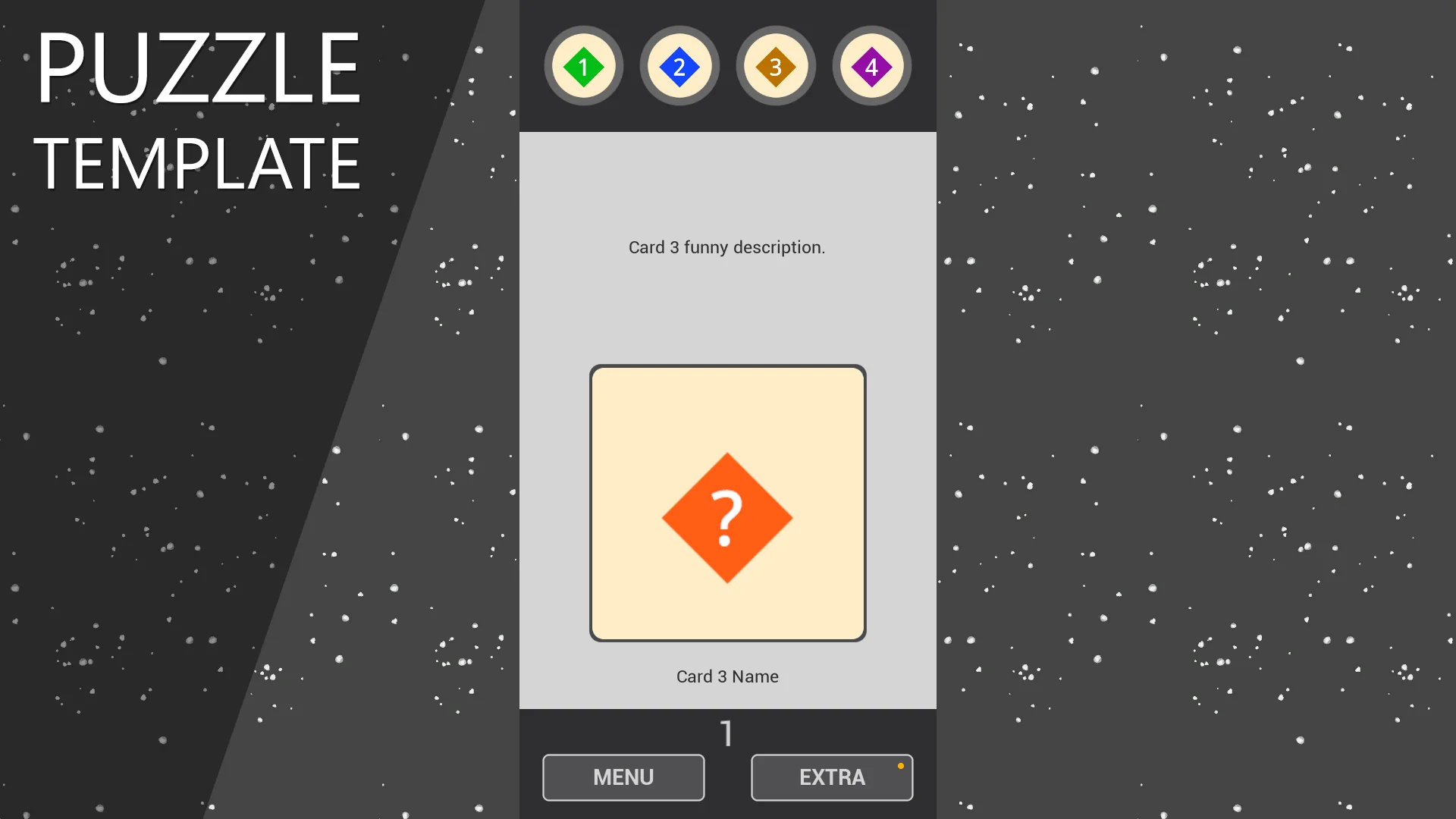
A card puzzle game lives at the point where cards, text, and screen proportions meet. The Card Puzzle Template starts from that point: cards are already tied to puzzle logic, text is meant to be replaced, and the project is built to hold together on any aspect ratio screen. The result behaves like a game rather than a loose set of assets. It includes everything needed for a card puzzle project, leaving art and text as the two pieces a team supplies before the build is ready to deploy.
What the Card Puzzle Template Hands You
The scope is deliberately complete. The template includes everything needed to make a card puzzle game, so the project already carries the gameplay structure and the supporting pieces that turn a concept into a running build. A developer does not start by assembling the card puzzle behavior from separate parts. Those parts arrive together.
Two details shape how that completeness works. The Blueprints are commented and easy to understand, and the template is compatible with any aspect ratio screen. The first detail makes the logic readable; the second makes the presentation flexible. Together they define the template's character: a card puzzle project that can be opened, followed, reskinned, and shown on displays of different shapes.
The project is also identified as a puzzle template built with Blueprints and aimed at PC, mobile, and Android. Those descriptors do not add separate features; they describe the audience and the technical layer behind the card puzzle behavior. A card puzzle template for PC and mobile is exactly what the name says: a reusable starting point for a puzzle game based on cards, with desktop and mobile deployment in view.
Swapping Art and Text Into the Card Puzzle Flow
The creative handoff is straightforward. All a team has to do is apply its art and texts, and the game is ready to deploy. That sets the division of labor. The template owns the card puzzle behavior; the team owns the visual identity and the wording. An artist can treat the project as a frame that accepts a new set of art assets. A writer can replace the text layer without touching the underlying logic.
This matters because the template is not asking for a rebuild. The art and text are not decorative additions bolted onto a finished demo; they are the intended input. The card puzzle structure stays in place while the surface changes. That makes the template useful for teams that already know the look and voice they want but do not want to spend early production time wiring a card puzzle from scratch.
The ready-to-deploy state is equally specific. Once the art and texts are in, the project is not waiting on a missing gameplay module. The card puzzle template has already supplied what it considers the necessary parts. The remaining work is the work the template was designed to accept: replacing its visuals and its words with yours.
Commented Blueprints as a Readable Base
Blueprints are only useful as a starting point when they can be read. The template's Blueprints are commented and easy to understand, which changes how a developer can work with the project. Instead of opening a graph and guessing at the intent, a developer can follow the comments and see what each part is doing. That readability supports two common production needs: learning from the template and modifying it with confidence.
For a solo developer or a small team, commented Blueprints act as documentation inside the project. The logic is not presented as an unexplained chain of nodes. The comments give the card puzzle behavior a visible structure, so changes can be made with a clear sense of where they belong. This is especially relevant when art and text replacement is only the first step and later adjustments to the puzzle flow are expected.
The Blueprint layer also signals that the template's logic is exposed in a form developers can inspect and edit. A card puzzle template built with Blueprints gives the team a working game and a readable graph at the same time. The comments are the bridge between the two.
Aspect Ratio Behavior on PC and Mobile
Screen shape is one of the quiet failure points in a card game. Cards, text, and puzzle elements need to remain coherent when the display changes. The Card Puzzle Template is compatible with any aspect ratio screen, which means the same project is intended to work across displays with different proportions. That compatibility is the feature that lets the template address PC and mobile without treating them as separate interface projects.
The target list is PC, mobile, and Android. The template is not limited to a single fixed-resolution window. A team can approach the same card puzzle build with desktop screens and mobile screens in scope, using the aspect ratio support as the common ground. The practical benefit is that the card puzzle layout does not have to be re-authored for every screen proportion the project encounters.
This does not turn the template into a universal UI system. It is still a card puzzle template, and its compatibility claim is about aspect ratio. But for a team planning a PC and mobile release, that claim removes a familiar source of friction. The project's screen behavior is part of the template's design, not an afterthought added after the puzzle logic is complete.
Where a Card Puzzle Template Fits a Production Plan
The strongest use case is a team that has art and text ready but does not have a card puzzle build. The template closes that gap in one move. It supplies the commented Blueprints, the card puzzle structure, and the aspect ratio handling; the team supplies the visual and textual identity. The project is then ready to deploy, with the template's logic still available for inspection and change.
A second use case is exploratory. A developer can open the template, read the commented Blueprints, and use the project as a reference for how a card puzzle can be assembled. Because the Blueprints are meant to be understood, the template doubles as a working explanation. The art and text replacement path is short enough that the project can be reskinned for a prototype without committing to a full production rewrite.
For artists, the appeal is control over the surface without owning the logic. For developers, the appeal is a puzzle framework that is already commented and already aimed at PC, mobile, and Android. For a small team, those two appeals meet in the same project: the template handles the card puzzle behavior, and the team handles the art and text that make it theirs.
The concrete takeaway is simple. A card puzzle game needs a working structure before art and text can carry it. The Card Puzzle Template provides that structure, keeps the Blueprints readable, and respects any aspect ratio screen. Teams evaluating it should look at the template as a deployable card puzzle base, not as a finished art pack. The art and text are the part left open, and that is exactly where a creative team can make the project its own.
 Gameplay Features
 Gameplay Features
 Gameplay Features