"1f00f67f9253451b"{"id":"1000935","slug":"advanced-lock-on-system","title":"Advanced Lock-on System","category":"Gameplay Features","engine":"5.1+","assetVersion":"","engineVersion":"Engine Version: 5.1+","tag":"Gameplay Features","accent":"blue","visual":"mech","summary":"Shooter toolkit with Tracking, Lock-on, and Prediction Systems. Targets any Actor, displays markers and info, supports auto aim and homing projectiles.","platform":"Unreal Engine","publishedAt":"2026-08-10T02:44:44.426Z","updatedAt":"2026-08-10T02:44:44.426Z","sourceNotes":[],"fileContents":[],"compatibility":["Unreal Engine","Engine Version: 5.1+"],"featuredImage":{"alt":"Advanced Lock-on System","src":"/wp-content/uploads/published/2026/08/a65d18b23b10-defd2078-21d1-4fb9-b55a-97cf5a676530-0a400ee090.webp"},"hasDownloadLink":true,"downloads":0,"terms":[{"taxonomy":"category","slug":"gameplay-features","name":"Gameplay Features"}],"galleryImages":[{"src":"/wp-content/uploads/published/2026/08/a4dc16be1a34-59ad6816-f151-41df-9337-f4c2fd5af047-33ab2bf717.webp","alt":"Advanced Lock-on System"},{"src":"/wp-content/uploads/published/2026/08/4ee7898e0cbc-ed246468-f24d-4bd0-8328-fd2af58264d3-8cfa8f3fec.webp","alt":"Advanced Lock-on System"},{"src":"/wp-content/uploads/published/2026/08/0963bb9eb9e7-96ad832a-c92d-4c20-8605-a67f421288d3-af5ded4e3a.webp","alt":"Advanced Lock-on System"},{"src":"/wp-content/uploads/published/2026/08/54980776379c-65e58db5-95eb-4d64-b675-24e4f6c9fe3a-033fcc409f.webp","alt":"Advanced Lock-on System"},{"src":"/wp-content/uploads/published/2026/08/37171d169ff6-38091687-a865-4739-bd79-ae98eaeb1345-4b4f2abfd7.webp","alt":"Advanced Lock-on System"},{"src":"/wp-content/uploads/published/2026/08/0ea4878a861d-260f7136-34c1-46b9-b73f-dc1ed0cace3c-83f958746c.webp","alt":"Advanced Lock-on System"},{"src":"/wp-content/uploads/published/2026/08/a94cff3605f8-02a1f204-d285-4cf5-8c5f-9316b4eec397-6450c7a393.webp","alt":"Advanced Lock-on System"},{"src":"/wp-content/uploads/published/2026/08/4b408a42129c-7b83a4a9-9ce5-4beb-8675-efed83d6a3d9-e63f313375.webp","alt":"Advanced Lock-on System"},{"src":"/wp-content/uploads/published/2026/08/93201d7ec17d-b983f891-c242-4baf-8348-f478bba907e7-1bee0bd65d.webp","alt":"Advanced Lock-on System"},{"src":"/wp-content/uploads/published/2026/08/9ca7090375de-77153797-7765-4dfa-bcbe-6e011a44039f-96d2c267e9.webp","alt":"Advanced Lock-on System"}],"accessPanel":{"kind":"resource","title":"Download this resource","eyebrow":"Free Download","message":"Log in or create a free account to start your download.","fileName":"AdvancedLockonSystem.7z","safetyNote":"Resources are manually reviewed before listing to improve quality and reduce obvious risks.","actionLabel":"Download Free","resourceType":"Resource archive"},"contentHtml":"\u003cp\u003eThe \u003cem\u003eAdvanced Lock-on System\u003c/em\u003e presents a complete targeting handoff for shooter projects. The package includes a Preview Video, a Playable Demo, and Documentation, so the 1st step is usually watching the demo to see how the 3 systems behave in a live scene. From there, the Documentation walks through the setup, and the systems themselves handle targeting, projectile guidance, and intercept prediction in 1 place. For a team working on a 1st-Person Shooter (FPS) or a 3rd-Person Shooter, that means the aiming loop is not scattered across separate scripts: the marker, the projectile behavior, and the aim calculation are tied together by the same asset.\u003c/p\u003e\n\n\u003ch2\u003eTargeting Any \u003ccode\u003eActor\u003c/code\u003e, Independent of the Camera Viewpoint\u003c/h2\u003e\n\n\u003cp\u003eThe targeting layer is based on the \u003ccode\u003eActor\u003c/code\u003e type. With simple settings, any object in the game world can become a target. There is no restriction to 1 single character class or a specific enemy type; the same setup can point at a soldier, a vehicle, or any other \u003ccode\u003eActor\u003c/code\u003e that matters in a scene. This keeps the asset adaptable for different shooter projects, covering hostile units, friendly units, pickups, and objectives with the same \u003ccode\u003eLock-On\u003c/code\u003e logic.\u003c/p\u003e\n\n\u003cp\u003eThe camera viewpoint is not part of the targeting calculation. The system works the same regardless of the viewpoint of the camera, so changing the camera angle or distance does not change how the system acquires a target. The marker and the \u003ccode\u003eLock-On\u003c/code\u003e behavior stay consistent whether the player is looking from a close view or a wider view, which removes a common source of friction in 1st-Person and 3rd-Person Shooter development. It also means the same targeting setup can be reused in different game modes that use different camera perspectives.\u003c/p\u003e\n\n\u003ch2\u003e\u003ccode\u003eTracking System\u003c/code\u003e: Markers and Target Information\u003c/h2\u003e\n\n\u003cp\u003eThe \u003ccode\u003eTracking System\u003c/code\u003e takes care of the visual side of targeting. It displays targets with markers, so a tracked \u003ccode\u003eActor\u003c/code\u003e is clearly indicated on the screen. In addition to the marker, it displays information about the target. For a shooter, that means the Heads-Up Display (HUD) can carry both a positional cue and a data readout for the same target, all coming from 1 tracking component. The marker tells the player where to look, while the information gives context about what is being looked at.\u003c/p\u003e\n\n\u003cp\u003eSince the \u003ccode\u003eTracking System\u003c/code\u003e is 1 of 3 systems in the asset, it can be paired with the \u003ccode\u003eLock-On System\u003c/code\u003e or the \u003ccode\u003ePrediction System\u003c/code\u003e. The marker, the target information, the projectile behavior, and the aim point all live in the same package. This structure is useful when a target needs to appear on the \u003ccode\u003eHUD\u003c/code\u003e before the player decides whether to lock a shot onto it. Tracking provides the awareness layer, and the other 2 systems consume the same tracked target to produce firing assistance.\u003c/p\u003e\n\n\u003ch2\u003e\u003ccode\u003eLock-On System\u003c/code\u003e: \u003ccode\u003eAuto Aim\u003c/code\u003e and 3 Homing Modes\u003c/h2\u003e\n\n\u003cp\u003eThe \u003ccode\u003eLock-On System\u003c/code\u003e provides 4 types of functions for projectiles. \u003ccode\u003eAuto Aim\u003c/code\u003e is placed on the direct fire projectile side, giving a weapon a straightforward way to hit a selected target. The other 3 functions are \u003ccode\u003eLock-On\u003c/code\u003e types for homing projectiles. That split lets the asset cover both a simple direct shot and guided shots that continue to track the \u003ccode\u003eActor\u003c/code\u003e after launch. The distinction matters because direct fire and homing fire place different requirements on the projectile controller.\u003c/p\u003e\n\n\u003cp\u003eWith \u003ccode\u003eAuto Aim\u003c/code\u003e, the direct fire projectile is handled as 1 single aiming event. The 3 \u003ccode\u003eLock-On\u003c/code\u003e modes, by contrast, handle projectiles that need to adjust their course in flight. A shooter can therefore use the same \u003ccode\u003eLock-On System\u003c/code\u003e for a quick direct-fire weapon and for homing projectiles that chase an \u003ccode\u003eActor\u003c/code\u003e as it moves. Instead of maintaining separate aiming code for each projectile family, the system offers a shared interface that exposes the 4 projectile functions.\u003c/p\u003e\n\n\u003ch2\u003e\u003ccode\u003ePrediction System\u003c/code\u003e: The Intercept Point\u003c/h2\u003e\n\n\u003cp\u003eThe \u003ccode\u003ePrediction System\u003c/code\u003e answers the question of where a projectile will meet a target. It predicts the location that the projectile can intercept the target, which is different from the target's current position whenever the target is moving. That intercept point is calculated ahead of time, giving the shooter a concrete point to aim at. Rather than placing a reticle on the moving \u003ccode\u003eActor\u003c/code\u003e and hoping it stays in the same spot, the system moves the aim point to the predicted meeting location.\u003c/p\u003e\n\n\u003cp\u003eThe predicted location is displayed on the screen, so the player can see it as part of the \u003ccode\u003eHUD\u003c/code\u003e. The system can also automatically aim at that location. This combines a visual cue with an automatic firing solution, which is especially useful for a weapon or turret that needs to correct for target movement before the projectile is launched. The displayed point and the point used for automatic aiming are the same, so what the player sees is what the shot uses.\u003c/p\u003e\n\n\u003ch2\u003eDocumentation, Demo, and \u003cem\u003eCIWS Turrets\u003c/em\u003e Compatibility\u003c/h2\u003e\n\n\u003cp\u003eThe asset ships with a Preview Video, a Playable Demo, and Documentation. The Playable Demo gives a hands-on look at the \u003ccode\u003eTracking System\u003c/code\u003e, \u003ccode\u003eLock-On System\u003c/code\u003e, and \u003ccode\u003ePrediction System\u003c/code\u003e in a live scene, while the Documentation covers how to apply the systems to your own \u003ccode\u003eActors\u003c/code\u003e and projectiles. The included tags point to \u003ccode\u003eBlueprint\u003c/code\u003e and User Interface (UI) as the implementation layers, which fits the \u003ccode\u003eHUD\u003c/code\u003e-focused marker and target-information work. The \u003ccode\u003eUI\u003c/code\u003e side handles the markers and intercept point on screen, while the \u003ccode\u003eBlueprint\u003c/code\u003e logic controls the targeting and prediction behavior.\u003c/p\u003e\n\n\u003cp\u003eThe package also lists compatibility with \u003cem\u003eCIWS Turrets\u003c/em\u003e. That makes the asset a candidate for projects that already use \u003cem\u003eCIWS Turrets\u003c/em\u003e as the firing platform. The \u003ccode\u003eTracking System\u003c/code\u003e, \u003ccode\u003eLock-On System\u003c/code\u003e, and \u003ccode\u003ePrediction System\u003c/code\u003e functions can be combined with that turret setup without pulling in a separate targeting solution. For a project building turret-based defenses around a shooter, this is a direct integration point that shortens the setup path.\u003c/p\u003e\n\n\u003cp\u003eWhere the asset earns its place is in the way the 3 systems line up. \u003ccode\u003eTracking System\u003c/code\u003e puts a marker and target information on screen. \u003ccode\u003eLock-On System\u003c/code\u003e translates that tracked \u003ccode\u003eActor\u003c/code\u003e into 1 of 4 projectile functions. \u003ccode\u003ePrediction System\u003c/code\u003e calculates the right aim point and can apply it automatically. Because the entire chain works with any \u003ccode\u003eActor\u003c/code\u003e and is independent of the camera viewpoint, the same logic can be moved from a Player-Character Shooter to a Turret-Based Shooter with limited rework. The Playable Demo and Documentation cover the setup path, and the \u003cem\u003eCIWS Turrets\u003c/em\u003e compatibility gives teams a known starting point for production.\u003c/p\u003e\n\n\u003ch2\u003eRelated Resources Worth Checking\u003c/h2\u003e\n\u003cul\u003e\n\u003cli\u003e\u003ca href=\"https://3dcghub.com/inventory-system-pro/\" title=\"Inventory System Pro\"\u003eInventory System Pro\u003c/a\u003e\u003c/li\u003e\n\u003cli\u003e\u003ca href=\"https://3dcghub.com/dynamic-grass-system/\" title=\"Dynamic Grass System\"\u003eDynamic Grass System\u003c/a\u003e\u003c/li\u003e\n\u003cli\u003e\u003ca href=\"https://3dcghub.com/advanced-riding-locomotion-system-riding-system/\" title=\"Advanced Riding Locomotion System (Riding System)\"\u003eAdvanced Riding Locomotion System (Riding System)\u003c/a\u003e\u003c/li\u003e\n\u003cli\u003e\u003ca href=\"https://3dcghub.com/traffic-ai-system/\" title=\"Traffic AI System\"\u003eTraffic AI System\u003c/a\u003e\u003c/li\u003e\n\u003cli\u003e\u003ca href=\"https://3dcghub.com/time-system/\" title=\"Time System\"\u003eTime System\u003c/a\u003e\u003c/li\u003e\n\u003c/ul\u003e","contentTextLength":6602,"navigation":{"current":394,"total":3222,"previous":{"id":"1000936","slug":"ai-shooter","title":"AI Shooter","category":"Gameplay Features","platform":"Unreal Engine","updatedAt":"2026-08-10T02:47:39.341Z"},"next":{"id":"1000934","slug":"brushify-canyons-pack","title":"Brushify - Canyons Pack","category":"Desert","platform":"Unreal Engine","updatedAt":"2026-08-10T02:36:50.580Z"}},"relatedResources":[{"id":"1000843","slug":"inventory-system-pro","title":"Inventory System Pro","category":"Gameplay Features","engine":"5.3+","assetVersion":"","engineVersion":"Engine Version: 5.3+","tag":"Gameplay Features","accent":"blue","visual":"mech","summary":"Blueprint-based inventory system with containers, items, currency, password locks, pickups, placement, attributes, save and load, debug, and full gamepad suppor","platform":"Unreal Engine","publishedAt":"2026-08-04T07:04:21.447Z","updatedAt":"2026-08-04T07:04:21.447Z","sourceNotes":[],"fileContents":[],"compatibility":["Unreal Engine","Engine Version: 5.3+"],"featuredImage":{"alt":"Inventory System Pro","src":"/wp-content/uploads/published/2026/08/0272982d06f7-73374eb4-ee1a-45be-8136-70fe8fcd8780-540b7cdf52.webp"},"hasDownloadLink":true,"downloads":1},{"id":"1000551","slug":"traffic-ai-system","title":"Traffic AI System","category":"Gameplay Features","engine":"5.1+","assetVersion":"","engineVersion":"Engine Version: 5.1+","tag":"Gameplay Features","accent":"blue","visual":"mech","summary":"A Blueprint-based AI traffic system for Unreal Engine 5.1–5.7 using splines for road generation and distance-based vehicle spawning for automotive scenes.","platform":"Unreal Engine","publishedAt":"2026-07-15T06:39:21.636Z","updatedAt":"2026-07-15T06:39:21.636Z","sourceNotes":[],"fileContents":[],"compatibility":["Unreal Engine","Engine Version: 5.1+"],"featuredImage":{"alt":"Traffic AI System","src":"/wp-content/uploads/published/2026/07/e074d7d2d020-30e2fb25-5755-4221-9664-6f688036b241-00f296e3db.webp"},"hasDownloadLink":true,"downloads":7},{"id":"1001034","slug":"hyper-scalable-interaction-system-v4","title":"Hyper Scalable Interaction System v4","category":"Gameplay Features","engine":"5.7+","assetVersion":"Asset Version: v4","engineVersion":"Engine Version: 5.7+","tag":"Gameplay Features","accent":"blue","visual":"mech","summary":"Plug-and-play interaction for any Unreal Engine actor with prompts, progress bars, conditions, and network replication for Adventure, RPG, Co-op, and Simulation","platform":"Unreal Engine","publishedAt":"2026-08-25T11:18:18.819Z","updatedAt":"2026-08-25T11:18:18.819Z","sourceNotes":[],"fileContents":[],"compatibility":["Unreal Engine","Asset Version: v4","Engine Version: 5.7+"],"featuredImage":{"alt":"Hyper Scalable Interaction System v4","src":"/wp-content/uploads/published/2026/08/7bc00c753bb2-66597fe3-a933-47a3-b023-6e95ce537263-e5174f5999.webp"},"hasDownloadLink":true,"downloads":1}]}
Gameplay Features
Advanced Lock-on System
Shooter toolkit with Tracking, Lock-on, and Prediction Systems. Targets any Actor, displays markers and info, supports auto aim and homing projectiles.
The Advanced Lock-on System presents a complete targeting handoff for shooter projects. The package includes a Preview Video, a Playable Demo, and Documentation, so the 1st step is usually watching the demo to see how the 3 systems behave in a live scene. From there, the Documentation walks through the setup, and the systems themselves handle targeting, projectile guidance, and intercept prediction in 1 place. For a team working on a 1st-Person Shooter (FPS) or a 3rd-Person Shooter, that means the aiming loop is not scattered across separate scripts: the marker, the projectile behavior, and the aim calculation are tied together by the same asset.
Targeting Any Actor, Independent of the Camera Viewpoint
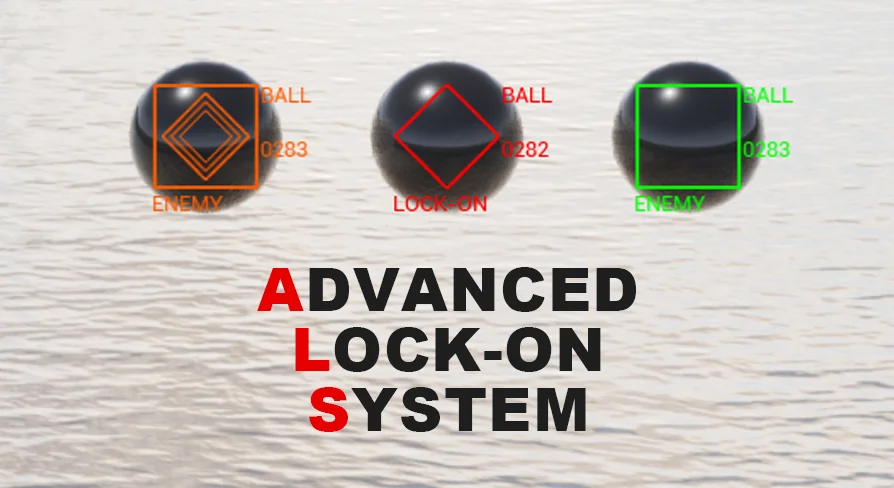
The targeting layer is based on the Actor type. With simple settings, any object in the game world can become a target. There is no restriction to 1 single character class or a specific enemy type; the same setup can point at a soldier, a vehicle, or any other Actor that matters in a scene. This keeps the asset adaptable for different shooter projects, covering hostile units, friendly units, pickups, and objectives with the same Lock-On logic.
The camera viewpoint is not part of the targeting calculation. The system works the same regardless of the viewpoint of the camera, so changing the camera angle or distance does not change how the system acquires a target. The marker and the Lock-On behavior stay consistent whether the player is looking from a close view or a wider view, which removes a common source of friction in 1st-Person and 3rd-Person Shooter development. It also means the same targeting setup can be reused in different game modes that use different camera perspectives.
Tracking System: Markers and Target Information
The Tracking System takes care of the visual side of targeting. It displays targets with markers, so a tracked Actor is clearly indicated on the screen. In addition to the marker, it displays information about the target. For a shooter, that means the Heads-Up Display (HUD) can carry both a positional cue and a data readout for the same target, all coming from 1 tracking component. The marker tells the player where to look, while the information gives context about what is being looked at.
Since the Tracking System is 1 of 3 systems in the asset, it can be paired with the Lock-On System or the Prediction System. The marker, the target information, the projectile behavior, and the aim point all live in the same package. This structure is useful when a target needs to appear on the HUD before the player decides whether to lock a shot onto it. Tracking provides the awareness layer, and the other 2 systems consume the same tracked target to produce firing assistance.
Lock-On System: Auto Aim and 3 Homing Modes
The Lock-On System provides 4 types of functions for projectiles. Auto Aim is placed on the direct fire projectile side, giving a weapon a straightforward way to hit a selected target. The other 3 functions are Lock-On types for homing projectiles. That split lets the asset cover both a simple direct shot and guided shots that continue to track the Actor after launch. The distinction matters because direct fire and homing fire place different requirements on the projectile controller.
With Auto Aim, the direct fire projectile is handled as 1 single aiming event. The 3 Lock-On modes, by contrast, handle projectiles that need to adjust their course in flight. A shooter can therefore use the same Lock-On System for a quick direct-fire weapon and for homing projectiles that chase an Actor as it moves. Instead of maintaining separate aiming code for each projectile family, the system offers a shared interface that exposes the 4 projectile functions.
Prediction System: The Intercept Point
The Prediction System answers the question of where a projectile will meet a target. It predicts the location that the projectile can intercept the target, which is different from the target's current position whenever the target is moving. That intercept point is calculated ahead of time, giving the shooter a concrete point to aim at. Rather than placing a reticle on the moving Actor and hoping it stays in the same spot, the system moves the aim point to the predicted meeting location.
The predicted location is displayed on the screen, so the player can see it as part of the HUD. The system can also automatically aim at that location. This combines a visual cue with an automatic firing solution, which is especially useful for a weapon or turret that needs to correct for target movement before the projectile is launched. The displayed point and the point used for automatic aiming are the same, so what the player sees is what the shot uses.
Documentation, Demo, and CIWS Turrets Compatibility
The asset ships with a Preview Video, a Playable Demo, and Documentation. The Playable Demo gives a hands-on look at the Tracking System, Lock-On System, and Prediction System in a live scene, while the Documentation covers how to apply the systems to your own Actors and projectiles. The included tags point to Blueprint and User Interface (UI) as the implementation layers, which fits the HUD-focused marker and target-information work. The UI side handles the markers and intercept point on screen, while the Blueprint logic controls the targeting and prediction behavior.
The package also lists compatibility with CIWS Turrets. That makes the asset a candidate for projects that already use CIWS Turrets as the firing platform. The Tracking System, Lock-On System, and Prediction System functions can be combined with that turret setup without pulling in a separate targeting solution. For a project building turret-based defenses around a shooter, this is a direct integration point that shortens the setup path.
Where the asset earns its place is in the way the 3 systems line up. Tracking System puts a marker and target information on screen. Lock-On System translates that tracked Actor into 1 of 4 projectile functions. Prediction System calculates the right aim point and can apply it automatically. Because the entire chain works with any Actor and is independent of the camera viewpoint, the same logic can be moved from a Player-Character Shooter to a Turret-Based Shooter with limited rework. The Playable Demo and Documentation cover the setup path, and the CIWS Turrets compatibility gives teams a known starting point for production.
 Gameplay Features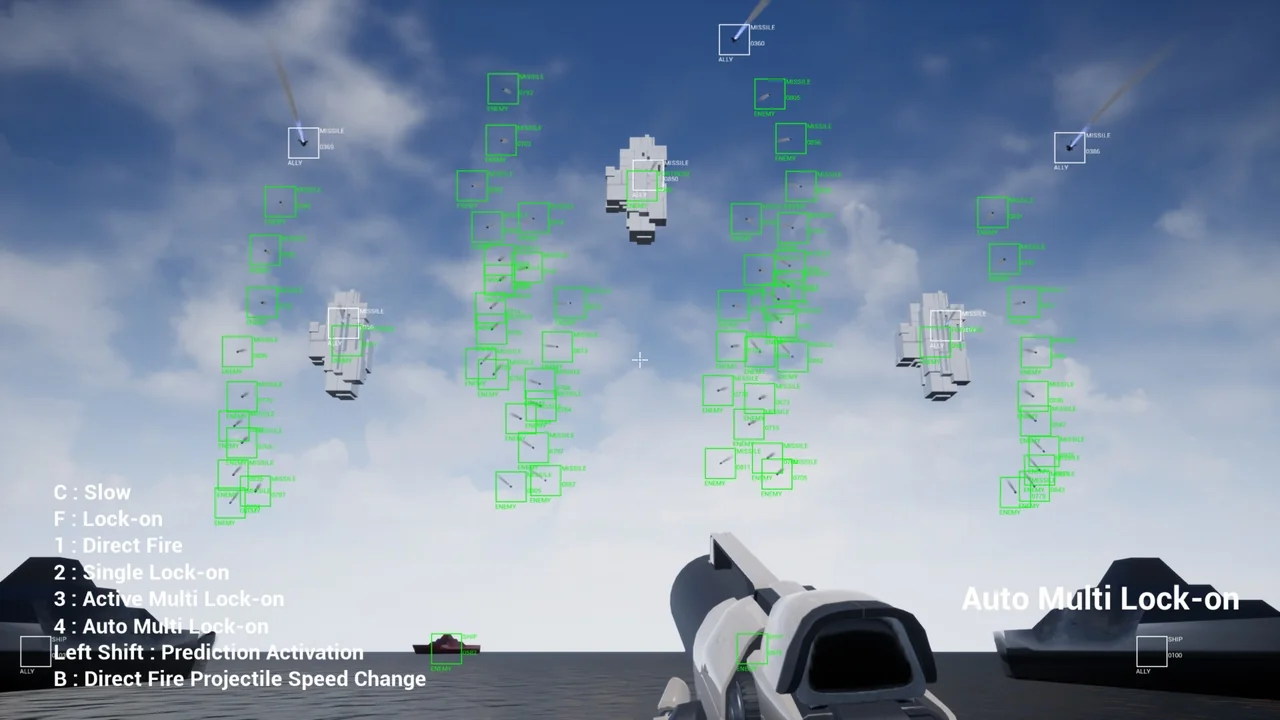
 Gameplay Features
 Gameplay Features
 Gameplay Features