"d4769ebd8b229f47"{"id":"1002092","slug":"lock-on-targeting-system","title":"Lock-on Targeting System","category":"Gameplay Features","engine":"4.27+,5.0+","assetVersion":"","engineVersion":"Engine Version: 4.27+,5.0+","tag":"Gameplay Features","accent":"blue","visual":"mech","summary":"Explore the multi-perspective architecture, component design, ALSV4 integration, and version history of the Unreal Engine Lock-on Targeting System.","platform":"Unreal Engine","publishedAt":"2026-10-29T08:38:16.858Z","updatedAt":"2026-10-29T08:38:16.858Z","sourceNotes":[],"fileContents":[],"compatibility":["Unreal Engine","Engine Version: 4.27+,5.0+"],"featuredImage":{"alt":"Lock-on Targeting System","src":"/wp-content/uploads/published/2026/10/037777339a70-5c412253-a505-42e0-9a09-9d2e9422e3a6-2210d303b0.webp"},"hasDownloadLink":true,"downloads":0,"terms":[{"taxonomy":"category","slug":"gameplay-features","name":"Gameplay Features"}],"galleryImages":[{"src":"/wp-content/uploads/published/2026/10/5ece01cc5dc5-52e46f80-4a1c-4adc-a170-7e67e729ffff-97327299a5.webp","alt":"Lock-on Targeting System"},{"src":"/wp-content/uploads/published/2026/10/1f3818981bde-75b94cfb-aedf-464e-9052-68b2dd87d9ad-32f6dc2a86.webp","alt":"Lock-on Targeting System"},{"src":"/wp-content/uploads/published/2026/10/a68ebc812d89-2c761bc2-6c69-4b66-be40-6d1f3e6b7d6b-3eaa78993c.webp","alt":"Lock-on Targeting System"},{"src":"/wp-content/uploads/published/2026/10/55594f06a9f3-e3f7eac7-7cd0-475d-b73f-b30132cd501a-bd5c8d0464.webp","alt":"Lock-on Targeting System"},{"src":"/wp-content/uploads/published/2026/10/fba5d2ebb211-5b016123-2af9-4165-bf54-2d663ed8f64c-079f90070a.webp","alt":"Lock-on Targeting System"},{"src":"/wp-content/uploads/published/2026/10/faf3c7392a47-b900704a-a9ad-49a8-92ab-5e631d38323b-fdbec9be9a.webp","alt":"Lock-on Targeting System"},{"src":"/wp-content/uploads/published/2026/10/65c4e3490d44-dc318ada-0d55-4eb2-aefd-998afb07b917-d0ceb3a54f.webp","alt":"Lock-on Targeting System"},{"src":"/wp-content/uploads/published/2026/10/f2aeeedb4655-78991975-6739-47b7-b84a-039a21dced6d-0a0c99a347.webp","alt":"Lock-on Targeting System"},{"src":"/wp-content/uploads/published/2026/10/1b4049e48fd8-374df110-0c2f-4774-902d-00e0af4dc65d-e555a82d50.webp","alt":"Lock-on Targeting System"}],"accessPanel":{"kind":"resource","title":"Download this resource","eyebrow":"Free Download","message":"Log in or create a free account to start your download.","fileName":"Lock-on Targeting System.7z","safetyNote":"Resources are manually reviewed before listing to improve quality and reduce obvious risks.","actionLabel":"Download Free","resourceType":"Resource archive"},"contentHtml":"\u003cp\u003eFast-paced combat encounters rely heavily on how smoothly a player can identify, acquire, and cycle between hostile entities. In complex combat spaces—whether managing tight melee encounters in an over-the-shoulder view, clearing rooms from a first-person perspective, or tracking crowds from an isometric overhead angle—the mechanics governing actor focus dictate the flow of engagement. The Lock-on Targeting System addresses these design requirements across Unreal Engine projects through a dedicated Blueprint and particle workflow engineered to accommodate varied camera perspectives, input paradigms, and networked environments.\u003c/p\u003e \u003ch2\u003eCamera Modes, Splitscreen, and Networked Multi-Perspective Support\u003c/h2\u003e \u003cp\u003eGameplay frameworks frequently struggle when adapting targeting routines to alternate camera projections or local multiplayer displays. This system includes native compatibility for four distinct gameplay frameworks: third-person perspective, first-person view, top-down layouts, and splitscreen configurations. Each viewpoint brings unique spatial challenges for vector calculations and focus detection.\u003c/p\u003e \u003cp\u003eIn third-person scenarios, target locking typically centers on balancing orbit cameras with character rotation. In first-person setups, the targeting system aligns cleanly with the player's direct line of sight without obscuring weapon meshes or interfering with micro-aiming inputs. Top-down setups require tracking targets along horizontal ground planes where elevation discrepancies can otherwise break focus routines.\u003c/p\u003e \u003cp\u003eFor couch co-op and local competitive titles, native splitscreen support ensures that multiple viewports process distinct target-tracking loops simultaneously without cross-contaminating player view matrices or screen-space coordinates. Alongside local multi-display capability, the system natively handles network games, ensuring replication and state synchronization operate correctly between client instances and the server during target designation.\u003c/p\u003e \u003ch2\u003eThe Two-Component Architecture for Player Input and Targets\u003c/h2\u003e \u003cp\u003eAt the center of the system is a modular split utilizing two core components: one handling player input and the second managing the targets themselves.\u003c/p\u003e \u003cp\u003eIsolating the targeting mechanism into separate components eliminates the need to bloat core character classes with custom traces, arrays, and cycle logic. The player input component attaches to the controlling pawn or player controller. Its primary responsibility is capturing lock-on triggers, calculating potential candidates within range or view, handling rotation commands, and processing switching gestures. Because the logic is self-contained within this component, configuring input events remains cleanly separated from base movement trees.\u003c/p\u003e \u003cp\u003eThe target component attaches to any actor capable of being locked onto, including enemies, destructible objects, interactive props, or objective nodes. Any entity hosting this component becomes immediately visible to the player component's acquisition checks. This setup allows level designers and gameplay programmers to establish targetable actors throughout a map without writing unique interface functions or casting repeatedly to specific enemy parent classes.\u003c/p\u003e \u003ch2\u003eDirectional Target Switching and Distance Checker Configuration\u003c/h2\u003e \u003cp\u003eCombat flow breaks quickly if cycling between multiple targets feels rigid or unpredictable. A core feature of the system allows players to switch targets in any direction. Rather than confining cycling to a simple next-in-index array loop, the player input component evaluates spatial positions relative to the current focus, letting the player flick or switch left, right, up, or down toward specific surrounding foes.\u003c/p\u003e \u003cp\u003eRange management is equally adaptable. The package includes an option to turn off the distance checker entirely. When the distance checker is active, the system enforces strict proximity thresholds, breaking a lock if a target escapes beyond a designated boundary or refusing acquisition if a target is too far away. Disabling this distance check opens up alternative game design possibilities, such as continuous long-range vehicle tracking, persistent sniper locks, or stylized arena combat where targets remain held regardless of traversal distance until manually cleared or broken by other mechanics.\u003c/p\u003e \u003cp\u003eVisual feedback is reinforced through integrated Blueprint logic paired with particle elements. When an actor is locked, visual cues and particle indicators provide immediate clarification on which enemy holds focus, maintaining visual coherence amidst busy particle-heavy combat sequences.\u003c/p\u003e \u003ch2\u003eALSV4 Integration, Advanced Photo Mode, and Unreal Engine Versions\u003c/h2\u003e \u003cp\u003eProduction cycles often require integration with established locomotion frameworks and community-standard character systems. The Lock-on Targeting System features documented integration with Advanced Locomotion System V4 (ALSV4). Combining locked focus with ALSV4 enables characters to blend directional strafing, procedural turn-in-place mechanics, and responsive foot placement seamlessly while facing an acquired opponent.\u003c/p\u003e \u003cp\u003eThe system also carries compatibility with Advanced Photo Mode, allowing virtual photographers and cutscene creators to manage target-locked actors cleanly without breaking presentation or camera overrides.\u003c/p\u003e \u003cp\u003eThe codebase has evolved through sustained engine releases, with specific builds available across Unreal Engine versions:\u003c/p\u003e \u003cul\u003e \u003cli\u003e\u003cstrong\u003eVersion 4.0:\u003c/strong\u003e Supports Unreal Engine 4.26 through Unreal Engine 5.3 (released January 9, 2023). This iteration includes written and video documentation, a dedicated V4.0 demo, integration guides for ALSV4, and a structured Q\u0026amp;A section.\u003c/li\u003e \u003cli\u003e\u003cstrong\u003eVersion 3.0:\u003c/strong\u003e Serves Unreal Engine 4.24 through UE 4.25, supported by written documentation, video walkthroughs, and ALSV4 implementation material.\u003c/li\u003e \u003cli\u003e\u003cstrong\u003eVersion 2.0:\u003c/strong\u003e Covers Unreal Engine 4.17 through UE 4.23, complete with dedicated video documentation covering the core mechanics.\u003c/li\u003e\n\u003c/ul\u003e \u003ch2\u003eTarget Project Applications\u003c/h2\u003e \u003cp\u003eTeams building combat-heavy titles stand to gain the most from this targeting implementation. Action RPG developers using third-person setups can deploy the directional target-switching framework immediately to replicate responsive arena brawling. Similarly, studios creating local splitscreen arena fighters or co-op dungeon crawlers benefit from the native multi-viewport support, avoiding the intricate mathematical refactoring usually required to isolate targeting matrices across split screens.\u003c/p\u003e \u003cp\u003eFor projects already leveraging ALSV4 for locomotion, the pre-configured integration eliminates weeks of alignment work between strafing states and targeting locks. The modular two-component layout, paired with optional distance checking and versatile perspective support, provides a stable, battle-tested solution for titles across the Unreal Engine 4 and Unreal Engine 5 ecosystem.\u003c/p\u003e\n\n\u003ch2\u003eRelated Resources Worth Checking\u003c/h2\u003e\n\u003cul\u003e\n\u003cli\u003e\u003ca href=\"https://3dcghub.com/freeflow-combat/\" title=\"Freeflow Combat\"\u003eFreeflow Combat\u003c/a\u003e\u003c/li\u003e\n\u003cli\u003e\u003ca href=\"https://3dcghub.com/inventory-system-pro/\" title=\"Inventory System Pro\"\u003eInventory System Pro\u003c/a\u003e\u003c/li\u003e\n\u003cli\u003e\u003ca href=\"https://3dcghub.com/advanced-lock-on-system/\" title=\"Advanced Lock-on System\"\u003eAdvanced Lock-on System\u003c/a\u003e\u003c/li\u003e\n\u003cli\u003e\u003ca href=\"https://3dcghub.com/uaim-advanced-lock-on-targeting-and-prediction-system/\" title=\"uAim - Advanced Lock-On Targeting and Prediction System\"\u003euAim - Advanced Lock-On Targeting and Prediction System\u003c/a\u003e\u003c/li\u003e\n\u003cli\u003e\u003ca href=\"https://3dcghub.com/fade-camera-occluders/\" title=\"Fade Camera Occluders\"\u003eFade Camera Occluders\u003c/a\u003e\u003c/li\u003e\n\u003c/ul\u003e","contentTextLength":7013,"navigation":{"current":46,"total":4063,"previous":{"id":"1002093","slug":"low-poly-animated-modern-guns-pack","title":"Low Poly Animated - Modern Guns Pack","category":"Weapons \u0026 Combat","platform":"Unreal Engine","updatedAt":"2026-10-29T08:39:17.612Z"},"next":{"id":"1002091","slug":"lock-system","title":"Lock System","category":"Game Mechanics","platform":"Unreal Engine","updatedAt":"2026-10-29T08:36:15.335Z"}},"relatedResources":[{"id":"10858","slug":"freeflow-combat","title":"Freeflow Combat","category":"Gameplay Features","engine":"4.27,5.0+","assetVersion":"Engine version: 4.27,5.0+","engineVersion":"4.27","tag":"Gameplay Features","accent":"blue","visual":"city","summary":"Freeflow Combat offers a comprehensive modular framework for creating fluid, superhero-style combat. It features smart targeting, coordinated group AI, and cinematic finishers to streamline game development.","platform":"Unreal Engine","publishedAt":"2026-03-03T16:25:04.000Z","updatedAt":"2026-04-19T15:49:55.000Z","sourceNotes":[],"fileContents":[],"compatibility":["Unreal Engine","Engine version: 4.27,5.0+"],"featuredImage":{"alt":"Freeflow Combat","src":"https://3dcghub.com/wp-content/uploads/2026/03/796e8d94-436a-4186-83b5-a3597b87b3ab.webp"},"hasDownloadLink":true,"downloads":2},{"id":"1002135","slug":"orbit-camera","title":"Orbit Camera","category":"Gameplay Features","engine":"5.1+","assetVersion":"","engineVersion":"Engine Version: 5.1+","tag":"Gameplay Features","accent":"blue","visual":"mech","summary":"Explore the Orbit Camera pawn blueprint, featuring custom pivot targeting, dolly zooms, camera switching transitions, and a clean screenshot album.","platform":"Unreal Engine","publishedAt":"2026-10-29T09:23:20.322Z","updatedAt":"2026-10-29T09:23:20.322Z","sourceNotes":[],"fileContents":[],"compatibility":["Unreal Engine","Engine Version: 5.1+"],"featuredImage":{"alt":"Orbit Camera","src":"/wp-content/uploads/published/2026/10/e324a714a1c3-3b75bef2-164f-4162-916b-96dc9e94da5f-912c0b74b8.webp"},"hasDownloadLink":true,"downloads":0},{"id":"1000843","slug":"inventory-system-pro","title":"Inventory System Pro","category":"Gameplay Features","engine":"5.3+","assetVersion":"","engineVersion":"Engine Version: 5.3+","tag":"Gameplay Features","accent":"blue","visual":"mech","summary":"Blueprint-based inventory system with containers, items, currency, password locks, pickups, placement, attributes, save and load, debug, and full gamepad suppor","platform":"Unreal Engine","publishedAt":"2026-08-04T07:04:21.447Z","updatedAt":"2026-08-04T07:04:21.447Z","sourceNotes":[],"fileContents":[],"compatibility":["Unreal Engine","Engine Version: 5.3+"],"featuredImage":{"alt":"Inventory System Pro","src":"/wp-content/uploads/published/2026/08/0272982d06f7-73374eb4-ee1a-45be-8136-70fe8fcd8780-540b7cdf52.webp"},"hasDownloadLink":true,"downloads":1}]}
Gameplay Features
Lock-on Targeting System
Explore the multi-perspective architecture, component design, ALSV4 integration, and version history of the Unreal Engine Lock-on Targeting System.
Fast-paced combat encounters rely heavily on how smoothly a player can identify, acquire, and cycle between hostile entities. In complex combat spaces—whether managing tight melee encounters in an over-the-shoulder view, clearing rooms from a first-person perspective, or tracking crowds from an isometric overhead angle—the mechanics governing actor focus dictate the flow of engagement. The Lock-on Targeting System addresses these design requirements across Unreal Engine projects through a dedicated Blueprint and particle workflow engineered to accommodate varied camera perspectives, input paradigms, and networked environments.
Camera Modes, Splitscreen, and Networked Multi-Perspective Support
Gameplay frameworks frequently struggle when adapting targeting routines to alternate camera projections or local multiplayer displays. This system includes native compatibility for four distinct gameplay frameworks: third-person perspective, first-person view, top-down layouts, and splitscreen configurations. Each viewpoint brings unique spatial challenges for vector calculations and focus detection.
In third-person scenarios, target locking typically centers on balancing orbit cameras with character rotation. In first-person setups, the targeting system aligns cleanly with the player's direct line of sight without obscuring weapon meshes or interfering with micro-aiming inputs. Top-down setups require tracking targets along horizontal ground planes where elevation discrepancies can otherwise break focus routines.
For couch co-op and local competitive titles, native splitscreen support ensures that multiple viewports process distinct target-tracking loops simultaneously without cross-contaminating player view matrices or screen-space coordinates. Alongside local multi-display capability, the system natively handles network games, ensuring replication and state synchronization operate correctly between client instances and the server during target designation.
The Two-Component Architecture for Player Input and Targets
At the center of the system is a modular split utilizing two core components: one handling player input and the second managing the targets themselves.
Isolating the targeting mechanism into separate components eliminates the need to bloat core character classes with custom traces, arrays, and cycle logic. The player input component attaches to the controlling pawn or player controller. Its primary responsibility is capturing lock-on triggers, calculating potential candidates within range or view, handling rotation commands, and processing switching gestures. Because the logic is self-contained within this component, configuring input events remains cleanly separated from base movement trees.
The target component attaches to any actor capable of being locked onto, including enemies, destructible objects, interactive props, or objective nodes. Any entity hosting this component becomes immediately visible to the player component's acquisition checks. This setup allows level designers and gameplay programmers to establish targetable actors throughout a map without writing unique interface functions or casting repeatedly to specific enemy parent classes.
Directional Target Switching and Distance Checker Configuration
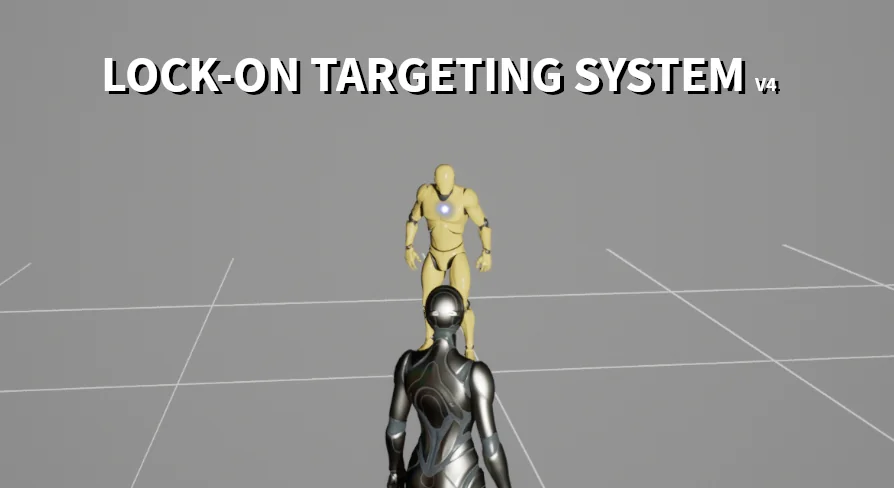
Combat flow breaks quickly if cycling between multiple targets feels rigid or unpredictable. A core feature of the system allows players to switch targets in any direction. Rather than confining cycling to a simple next-in-index array loop, the player input component evaluates spatial positions relative to the current focus, letting the player flick or switch left, right, up, or down toward specific surrounding foes.
Range management is equally adaptable. The package includes an option to turn off the distance checker entirely. When the distance checker is active, the system enforces strict proximity thresholds, breaking a lock if a target escapes beyond a designated boundary or refusing acquisition if a target is too far away. Disabling this distance check opens up alternative game design possibilities, such as continuous long-range vehicle tracking, persistent sniper locks, or stylized arena combat where targets remain held regardless of traversal distance until manually cleared or broken by other mechanics.
Visual feedback is reinforced through integrated Blueprint logic paired with particle elements. When an actor is locked, visual cues and particle indicators provide immediate clarification on which enemy holds focus, maintaining visual coherence amidst busy particle-heavy combat sequences.
ALSV4 Integration, Advanced Photo Mode, and Unreal Engine Versions
Production cycles often require integration with established locomotion frameworks and community-standard character systems. The Lock-on Targeting System features documented integration with Advanced Locomotion System V4 (ALSV4). Combining locked focus with ALSV4 enables characters to blend directional strafing, procedural turn-in-place mechanics, and responsive foot placement seamlessly while facing an acquired opponent.
The system also carries compatibility with Advanced Photo Mode, allowing virtual photographers and cutscene creators to manage target-locked actors cleanly without breaking presentation or camera overrides.
The codebase has evolved through sustained engine releases, with specific builds available across Unreal Engine versions:
Version 4.0: Supports Unreal Engine 4.26 through Unreal Engine 5.3 (released January 9, 2023). This iteration includes written and video documentation, a dedicated V4.0 demo, integration guides for ALSV4, and a structured Q&A section.
Version 3.0: Serves Unreal Engine 4.24 through UE 4.25, supported by written documentation, video walkthroughs, and ALSV4 implementation material.
Version 2.0: Covers Unreal Engine 4.17 through UE 4.23, complete with dedicated video documentation covering the core mechanics.
Target Project Applications
Teams building combat-heavy titles stand to gain the most from this targeting implementation. Action RPG developers using third-person setups can deploy the directional target-switching framework immediately to replicate responsive arena brawling. Similarly, studios creating local splitscreen arena fighters or co-op dungeon crawlers benefit from the native multi-viewport support, avoiding the intricate mathematical refactoring usually required to isolate targeting matrices across split screens.
For projects already leveraging ALSV4 for locomotion, the pre-configured integration eliminates weeks of alignment work between strafing states and targeting locks. The modular two-component layout, paired with optional distance checking and versatile perspective support, provides a stable, battle-tested solution for titles across the Unreal Engine 4 and Unreal Engine 5 ecosystem.
 Gameplay Features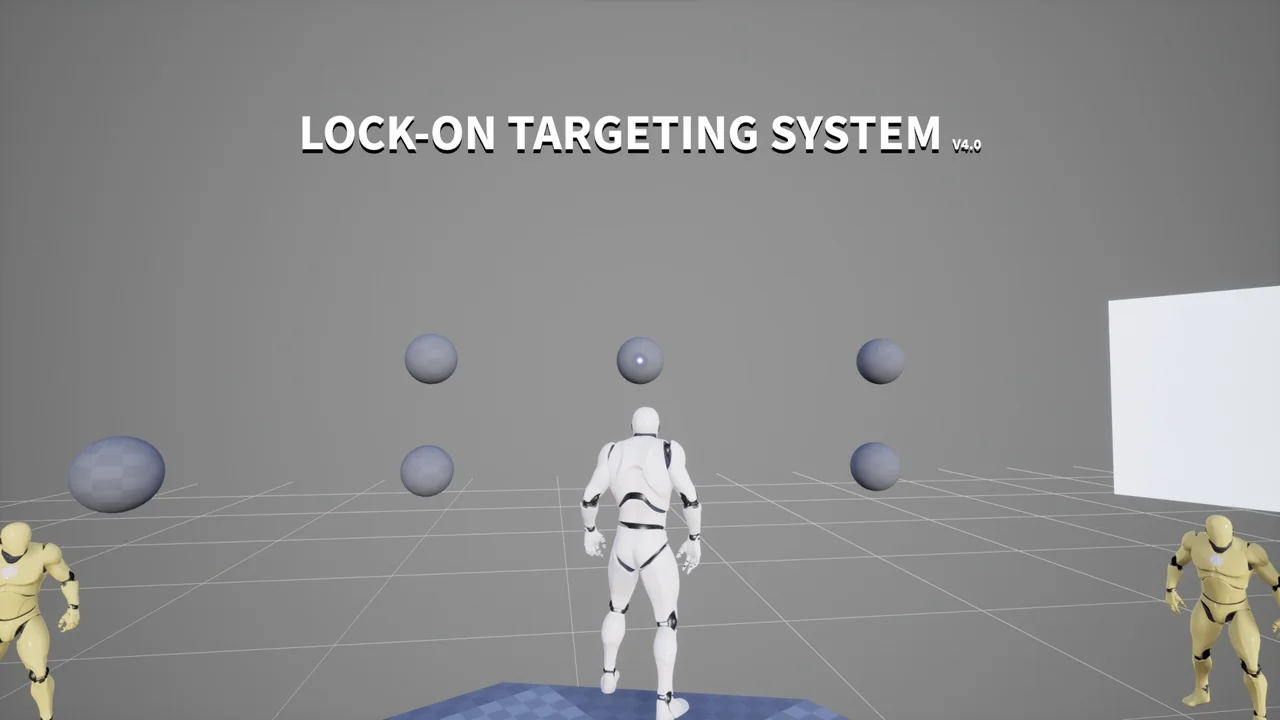
 Gameplay Features
 Gameplay Features
 Gameplay Features