"1f00f67f9253451b"{"id":"1000936","slug":"ai-shooter","title":"AI Shooter","category":"Gameplay Features","engine":"5.3+","assetVersion":"","engineVersion":"Engine Version: 5.3+","tag":"Gameplay Features","accent":"blue","visual":"mech","summary":"AI Shooter is a starter pack for shooting-game AI, covering patrolling, flanking, cover seeking, sight, hearing, damage, and touch behaviors.","platform":"Unreal Engine","publishedAt":"2026-08-10T02:47:39.341Z","updatedAt":"2026-08-10T02:47:39.341Z","sourceNotes":[],"fileContents":[],"compatibility":["Unreal Engine","Engine Version: 5.3+"],"featuredImage":{"alt":"AI Shooter","src":"/wp-content/uploads/published/2026/08/4b2c0a56342a-043d1833-9b88-46a2-9b9f-3c2f0a0dc80a-2bfb059ea5.webp"},"hasDownloadLink":true,"downloads":1,"terms":[{"taxonomy":"category","slug":"gameplay-features","name":"Gameplay Features"}],"galleryImages":[{"src":"/wp-content/uploads/published/2026/08/6727e455d8b2-5c7774a4-be3d-4076-b1de-b5d98e0666a7-59a15d2629.webp","alt":"AI Shooter"},{"src":"/wp-content/uploads/published/2026/08/634d544d1382-b62d6854-c919-42ff-afc4-268ddb132bbb-d24e66e9ee.webp","alt":"AI Shooter"},{"src":"/wp-content/uploads/published/2026/08/2093748ffa7f-3a1a0d41-f4a4-4df3-8d74-e99e9757a437-32bdae86d4.webp","alt":"AI Shooter"},{"src":"/wp-content/uploads/published/2026/08/137d2eb30fa3-03d2891a-5eb0-48bd-82af-f347ca97e089-f7fd0a330b.webp","alt":"AI Shooter"},{"src":"/wp-content/uploads/published/2026/08/2af0241f203c-5f653d3e-abc1-438c-88f9-fd6145ad100e-3e0246d28e.webp","alt":"AI Shooter"},{"src":"/wp-content/uploads/published/2026/08/8dbd4abb4685-36c469f4-b744-486c-bc29-c81327a2edb0-bc43f2293c.webp","alt":"AI Shooter"},{"src":"/wp-content/uploads/published/2026/08/2a84dc03ed55-5ac1ffd5-159b-4746-aee4-6bdc796fe1fa-416c766f37.webp","alt":"AI Shooter"},{"src":"/wp-content/uploads/published/2026/08/07ee19c10ef1-86917a25-7f64-4523-953b-281e5180090e-a8c97d21cb.webp","alt":"AI Shooter"},{"src":"/wp-content/uploads/published/2026/08/5e428eea0c03-df119ae0-dc2f-43c0-a805-df1867da108c-b78a0834fa.webp","alt":"AI Shooter"}],"accessPanel":{"kind":"resource","title":"Download this resource","eyebrow":"Free Download","message":"Log in or create a free account to start your download.","fileName":"AIShooter.7z","safetyNote":"Resources are manually reviewed before listing to improve quality and reduce obvious risks.","actionLabel":"Download Free","resourceType":"Resource archive"},"contentHtml":"\u003cp\u003e\u003cem\u003eAI Shooter\u003c/em\u003e is a Starter Pack aimed at teams who need a working Artificial Intelligence (AI) layout for combat scenarios. It is built for shooting games, and its feature set directly targets the kinds of behavior that make enemy soldiers feel active and aware: \u003ccode\u003eShooting\u003c/code\u003e, \u003ccode\u003eSeeking Cover\u003c/code\u003e, \u003ccode\u003ePatrolling\u003c/code\u003e, \u003ccode\u003eFlanking\u003c/code\u003e, \u003ccode\u003eSight Perception\u003c/code\u003e, \u003ccode\u003eHearing\u003c/code\u003e, \u003ccode\u003eDamage\u003c/code\u003e, and \u003ccode\u003eTouch\u003c/code\u003e. These are the verbs that drive a firefight, and the pack provides them as a starting point rather than a finished, deeply customized system.\u003c/p\u003e\n\n\u003ch2\u003eA Starter Pack for Shooters\u003c/h2\u003e\n\n\u003cp\u003eAs a Starter Pack, \u003cem\u003eAI Shooter\u003c/em\u003e is about giving a project a usable foundation before the team customizes it. The pack does not pretend to be a fully polished, production-ready AI. Instead, it brings together the basic actions that any AI-controlled soldier needs to participate in an encounter. The included behaviors let an enemy move through a Map, react to the player, and fight back in a plausible way. That makes it a practical jumping-off point for prototypes, jam builds, or 1st passes on a Combat Level.\u003c/p\u003e\n\n\u003cp\u003eThe scope is deliberately compact. Rather than trying to solve every edge case in a shooter, it focuses on the core loop: the AI spots the player, decides what to do about it, and then commits to an action. The behaviors are the building blocks for that decision cycle.\u003c/p\u003e\n\n\u003ch2\u003eThe Behavior Set: Patrolling, Cover, and Flanking\u003c/h2\u003e\n\n\u003cp\u003eAt the heart of \u003cem\u003eAI Shooter\u003c/em\u003e are 3 movement-based behaviors that define how an AI soldier occupies a space. \u003ccode\u003ePatrolling\u003c/code\u003e creates a baseline state where the AI moves along a set path, watching for threats. That gives the world a sense of life before the player is even detected. \u003ccode\u003eSeeking Cover\u003c/code\u003e flips the AI into a defensive mode; when the player is known, the AI will move toward positions that offer protection from incoming fire. \u003ccode\u003eFlanking\u003c/code\u003e is the aggressive counterpart, sending the AI off to the side to attack from an unexpected angle. Together, these behaviors allow a group of AI to approach a firefight from different directions instead of charging straight at the player.\u003c/p\u003e\n\n\u003cp\u003eThe \u003ccode\u003eShooting\u003c/code\u003e behavior covers the offensive side. Once the AI has a clear line of sight and a valid target, it can open fire. The inclusion of both \u003ccode\u003eSeeking Cover\u003c/code\u003e and \u003ccode\u003eFlanking\u003c/code\u003e suggests that the AI is meant to be more tactical than a simple turret. Whether the AI chooses to hunker down or circle around will depend on the situation, and the pack gives developers a starting point for balancing those decisions.\u003c/p\u003e\n\n\u003ch2\u003ePerception Layers: Sight, Hearing, and Touch\u003c/h2\u003e\n\n\u003cp\u003e\u003cem\u003eAI Shooter\u003c/em\u003e does not rely on 1 single detection method. It includes multiple perception channels so that the AI can respond to a player in different ways. \u003ccode\u003eSight Perception\u003c/code\u003e lets the AI actively see the player, meaning distance, line of sight, and likely Field of View (FOV) come into play. \u003ccode\u003eHearing\u003c/code\u003e provides an alternative route to detection: the AI can respond to sound even when it does not have a direct visual on the player. \u003ccode\u003eTouch\u003c/code\u003e broadens the approach further, covering situations where the AI is made aware of the player through direct physical contact or proximity. In practice, this means a player who is sneaking behind a soldier might be discovered by sound, while a player who is actively visible draws a sight-based reaction. These layers make the AI feel less mechanical and more aware of its surroundings.\u003c/p\u003e\n\n\u003ch2\u003e\u003ccode\u003eBlueprint\u003c/code\u003e Foundations for FPS and 3rd-Person\u003c/h2\u003e\n\n\u003cp\u003e\u003cem\u003eAI Shooter\u003c/em\u003e is tagged with a set of keywords that situate it in the shooting-game ecosystem: \u003cem\u003eFps\u003c/em\u003e, \u003cem\u003ePerson\u003c/em\u003e, \u003cem\u003eSystem\u003c/em\u003e, \u003cem\u003eTree\u003c/em\u003e, \u003cem\u003eShooter\u003c/em\u003e, \u003cem\u003eSoldier\u003c/em\u003e, \u003cem\u003eBehavior\u003c/em\u003e, \u003cem\u003eThirdperson\u003c/em\u003e, \u003cem\u003eAI\u003c/em\u003e, \u003cem\u003eCombat\u003c/em\u003e, \u003cem\u003eWeapon\u003c/em\u003e, and \u003cem\u003eBlueprint\u003c/em\u003e. The \u003cem\u003eBlueprint\u003c/em\u003e tag is particularly relevant, as it indicates the system is shaped by Unreal Engine's Visual Scripting tool. That makes the asset approachable for developers who prefer to iterate on AI logic without diving into raw C++, and it also means the behaviors are likely represented as nodes that can be inspected and modified in the Editor. The presence of both \u003cem\u003eFps\u003c/em\u003e and \u003cem\u003eThirdperson\u003c/em\u003e tags suggests the pack is not locked to 1 camera mode, so it can serve projects that move between 1st-Person and 3rd-Person perspectives.\u003c/p\u003e\n\n\u003cp\u003eThe \u003cem\u003eTree\u003c/em\u003e tag hints at a \u003ccode\u003eBehavior Tree\u003c/code\u003e structure, which is a common pattern for organizing AI decision-making. If that is the case, the behaviors in \u003cem\u003eAI Shooter\u003c/em\u003e likely map onto a tree layout where task priorities are explicit and easy to rearrange. That kind of structure helps a developer understand why an AI picks 1 behavior over another, and it makes the pack easier to extend with new actions later.\u003c/p\u003e\n\n\u003ch2\u003eShaping Combat Encounters\u003c/h2\u003e\n\n\u003cp\u003eWhat stands out about \u003cem\u003eAI Shooter\u003c/em\u003e is how the pieces fit together. A \u003ccode\u003ePatrolling\u003c/code\u003e soldier is not just a walking target; it is using \u003ccode\u003eSight Perception\u003c/code\u003e and \u003ccode\u003eHearing\u003c/code\u003e to catch the player before the player catches it. When combat starts, the soldier can fall back to \u003ccode\u003eSeeking Cover\u003c/code\u003e or try to \u003ccode\u003eFlank\u003c/code\u003e, which changes how the player has to engage. A 1 single enemy becomes unpredictable, and a group of enemies can create a more layered encounter where some push forward while others hold back. The \u003ccode\u003eDamage\u003c/code\u003e and \u003ccode\u003eTouch\u003c/code\u003e aspects complete the loop, ensuring that the AI understands when it is hit and when it makes contact.\u003c/p\u003e\n\n\u003cp\u003eFor developers, the value is in the working baseline. Instead of wiring up perception, Locomotion, and combat from scratch, \u003cem\u003eAI Shooter\u003c/em\u003e offers a foundation that can be tested, tweaked, and expanded. The Starter Pack nature means it fits best early in development, when the goal is to get a playable encounter running and then refine it based on how it feels.\u003c/p\u003e\n\n\u003cp\u003eIn a project where AI soldiers need to move, react, and fight without feeling like simple target dummies, \u003cem\u003eAI Shooter\u003c/em\u003e provides the essential behavior set to build from. It covers the ground between idle \u003ccode\u003ePatrolling\u003c/code\u003e and active combat, and it does so with a structure that is easy to open up and reshape.\u003c/p\u003e\n\n\u003ch2\u003eContinue Browsing Similar Packs\u003c/h2\u003e\n\u003cul\u003e\n\u003cli\u003e\u003ca href=\"https://3dcghub.com/traffic-ai-system/\" title=\"Traffic AI System\"\u003eTraffic AI System\u003c/a\u003e\u003c/li\u003e\n\u003cli\u003e\u003ca href=\"https://3dcghub.com/open-world-ai-spawn-system/\" title=\"Open World AI Spawn System\"\u003eOpen World AI Spawn System\u003c/a\u003e\u003c/li\u003e\n\u003cli\u003e\u003ca href=\"https://3dcghub.com/city-traffic-pro/\" title=\"City Traffic Pro\"\u003eCity Traffic Pro\u003c/a\u003e\u003c/li\u003e\n\u003cli\u003e\u003ca href=\"https://3dcghub.com/dup-single-player-shooter-g-a-s-p-metahuman/\" title=\"Dup - SINGLE PLAYER - Shooter G.A.S.P. MetaHuman\"\u003eDup - SINGLE PLAYER - Shooter G.A.S.P. MetaHuman\u003c/a\u003e\u003c/li\u003e\n\u003cli\u003e\u003ca href=\"https://3dcghub.com/multiplayer-tps-basic/\" title=\"Multiplayer TPS Basic\"\u003eMultiplayer TPS Basic\u003c/a\u003e\u003c/li\u003e\n\u003c/ul\u003e","contentTextLength":5938,"navigation":{"current":393,"total":3222,"previous":{"id":"1000937","slug":"allosaurus-dinosaur-character-rig-and-animations","title":"Allosaurus Dinosaur Character Rig and Animations","category":"Creatures \u0026 Monsters","platform":"Unreal Engine","updatedAt":"2026-08-10T02:52:27.202Z"},"next":{"id":"1000935","slug":"advanced-lock-on-system","title":"Advanced Lock-on System","category":"Gameplay Features","platform":"Unreal Engine","updatedAt":"2026-08-10T02:44:44.426Z"}},"relatedResources":[{"id":"1001053","slug":"general-ai-framework","title":"General AI Framework","category":"Gameplay Features","engine":"5.1+","assetVersion":"","engineVersion":"Engine Version: 5.1+","tag":"Gameplay Features","accent":"blue","visual":"mech","summary":"A Blueprint-based behavior tree framework for Unreal Engine that lets you create different AI types and controllers by reusing and improving the provided trees.","platform":"Unreal Engine","publishedAt":"2026-08-30T13:43:01.611Z","updatedAt":"2026-08-30T13:43:01.611Z","sourceNotes":[],"fileContents":[],"compatibility":["Unreal Engine","Engine Version: 5.1+"],"featuredImage":{"alt":"General AI Framework","src":"/wp-content/uploads/published/2026/08/cd24555bec89-94932f98-7717-4639-99ff-b9756efb05f9-a53d62fd3a.webp"},"hasDownloadLink":true,"downloads":1},{"id":"1000551","slug":"traffic-ai-system","title":"Traffic AI System","category":"Gameplay Features","engine":"5.1+","assetVersion":"","engineVersion":"Engine Version: 5.1+","tag":"Gameplay Features","accent":"blue","visual":"mech","summary":"A Blueprint-based AI traffic system for Unreal Engine 5.1–5.7 using splines for road generation and distance-based vehicle spawning for automotive scenes.","platform":"Unreal Engine","publishedAt":"2026-07-15T06:39:21.636Z","updatedAt":"2026-07-15T06:39:21.636Z","sourceNotes":[],"fileContents":[],"compatibility":["Unreal Engine","Engine Version: 5.1+"],"featuredImage":{"alt":"Traffic AI System","src":"/wp-content/uploads/published/2026/07/e074d7d2d020-30e2fb25-5755-4221-9664-6f688036b241-00f296e3db.webp"},"hasDownloadLink":true,"downloads":7},{"id":"1001116","slug":"natural-movement-ai-smoothing-system","title":"Natural Movement - AI Smoothing System","category":"Gameplay Features","engine":"5.4+","assetVersion":"","engineVersion":"Engine Version: 5.4+","tag":"Gameplay Features","accent":"blue","visual":"mech","summary":"Blueprint-only AI smoothing system that keeps pathfinding routes intact, adds natural pace with context steering, and supports integration into other movement s","platform":"Unreal Engine","publishedAt":"2026-09-07T12:42:25.716Z","updatedAt":"2026-09-07T12:42:25.716Z","sourceNotes":[],"fileContents":[],"compatibility":["Unreal Engine","Engine Version: 5.4+"],"featuredImage":{"alt":"Natural Movement - AI Smoothing System","src":"/wp-content/uploads/published/2026/09/9891761589ed-ab3e2950-9c24-43b4-a483-136199d78147-547b954e11.webp"},"hasDownloadLink":true,"downloads":0}]}
Gameplay Features
AI Shooter
AI Shooter is a starter pack for shooting-game AI, covering patrolling, flanking, cover seeking, sight, hearing, damage, and touch behaviors.
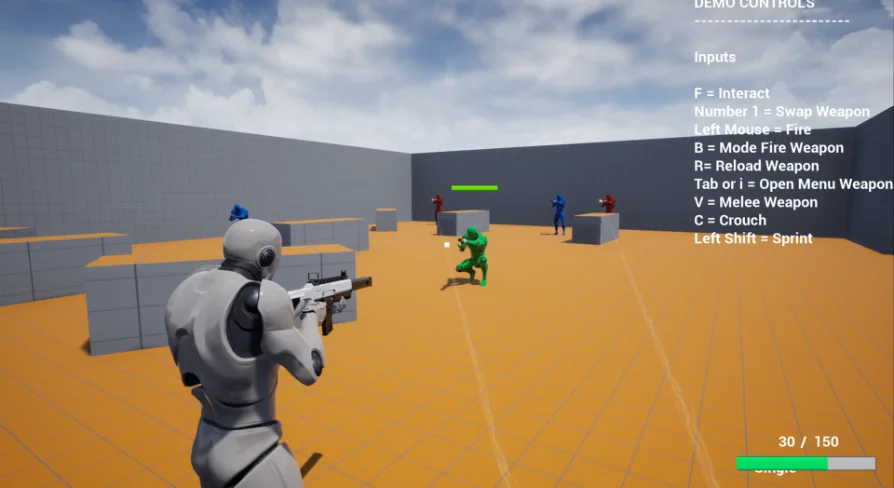
AI Shooter is a Starter Pack aimed at teams who need a working Artificial Intelligence (AI) layout for combat scenarios. It is built for shooting games, and its feature set directly targets the kinds of behavior that make enemy soldiers feel active and aware: Shooting, Seeking Cover, Patrolling, Flanking, Sight Perception, Hearing, Damage, and Touch. These are the verbs that drive a firefight, and the pack provides them as a starting point rather than a finished, deeply customized system.
A Starter Pack for Shooters
As a Starter Pack, AI Shooter is about giving a project a usable foundation before the team customizes it. The pack does not pretend to be a fully polished, production-ready AI. Instead, it brings together the basic actions that any AI-controlled soldier needs to participate in an encounter. The included behaviors let an enemy move through a Map, react to the player, and fight back in a plausible way. That makes it a practical jumping-off point for prototypes, jam builds, or 1st passes on a Combat Level.
The scope is deliberately compact. Rather than trying to solve every edge case in a shooter, it focuses on the core loop: the AI spots the player, decides what to do about it, and then commits to an action. The behaviors are the building blocks for that decision cycle.
The Behavior Set: Patrolling, Cover, and Flanking
At the heart of AI Shooter are 3 movement-based behaviors that define how an AI soldier occupies a space. Patrolling creates a baseline state where the AI moves along a set path, watching for threats. That gives the world a sense of life before the player is even detected. Seeking Cover flips the AI into a defensive mode; when the player is known, the AI will move toward positions that offer protection from incoming fire. Flanking is the aggressive counterpart, sending the AI off to the side to attack from an unexpected angle. Together, these behaviors allow a group of AI to approach a firefight from different directions instead of charging straight at the player.
The Shooting behavior covers the offensive side. Once the AI has a clear line of sight and a valid target, it can open fire. The inclusion of both Seeking Cover and Flanking suggests that the AI is meant to be more tactical than a simple turret. Whether the AI chooses to hunker down or circle around will depend on the situation, and the pack gives developers a starting point for balancing those decisions.
Perception Layers: Sight, Hearing, and Touch
AI Shooter does not rely on 1 single detection method. It includes multiple perception channels so that the AI can respond to a player in different ways. Sight Perception lets the AI actively see the player, meaning distance, line of sight, and likely Field of View (FOV) come into play. Hearing provides an alternative route to detection: the AI can respond to sound even when it does not have a direct visual on the player. Touch broadens the approach further, covering situations where the AI is made aware of the player through direct physical contact or proximity. In practice, this means a player who is sneaking behind a soldier might be discovered by sound, while a player who is actively visible draws a sight-based reaction. These layers make the AI feel less mechanical and more aware of its surroundings.
Blueprint Foundations for FPS and 3rd-Person
AI Shooter is tagged with a set of keywords that situate it in the shooting-game ecosystem: Fps, Person, System, Tree, Shooter, Soldier, Behavior, Thirdperson, AI, Combat, Weapon, and Blueprint. The Blueprint tag is particularly relevant, as it indicates the system is shaped by Unreal Engine's Visual Scripting tool. That makes the asset approachable for developers who prefer to iterate on AI logic without diving into raw C++, and it also means the behaviors are likely represented as nodes that can be inspected and modified in the Editor. The presence of both Fps and Thirdperson tags suggests the pack is not locked to 1 camera mode, so it can serve projects that move between 1st-Person and 3rd-Person perspectives.
The Tree tag hints at a Behavior Tree structure, which is a common pattern for organizing AI decision-making. If that is the case, the behaviors in AI Shooter likely map onto a tree layout where task priorities are explicit and easy to rearrange. That kind of structure helps a developer understand why an AI picks 1 behavior over another, and it makes the pack easier to extend with new actions later.
Shaping Combat Encounters
What stands out about AI Shooter is how the pieces fit together. A Patrolling soldier is not just a walking target; it is using Sight Perception and Hearing to catch the player before the player catches it. When combat starts, the soldier can fall back to Seeking Cover or try to Flank, which changes how the player has to engage. A 1 single enemy becomes unpredictable, and a group of enemies can create a more layered encounter where some push forward while others hold back. The Damage and Touch aspects complete the loop, ensuring that the AI understands when it is hit and when it makes contact.
For developers, the value is in the working baseline. Instead of wiring up perception, Locomotion, and combat from scratch, AI Shooter offers a foundation that can be tested, tweaked, and expanded. The Starter Pack nature means it fits best early in development, when the goal is to get a playable encounter running and then refine it based on how it feels.
In a project where AI soldiers need to move, react, and fight without feeling like simple target dummies, AI Shooter provides the essential behavior set to build from. It covers the ground between idle Patrolling and active combat, and it does so with a structure that is easy to open up and reshape.
 Gameplay Features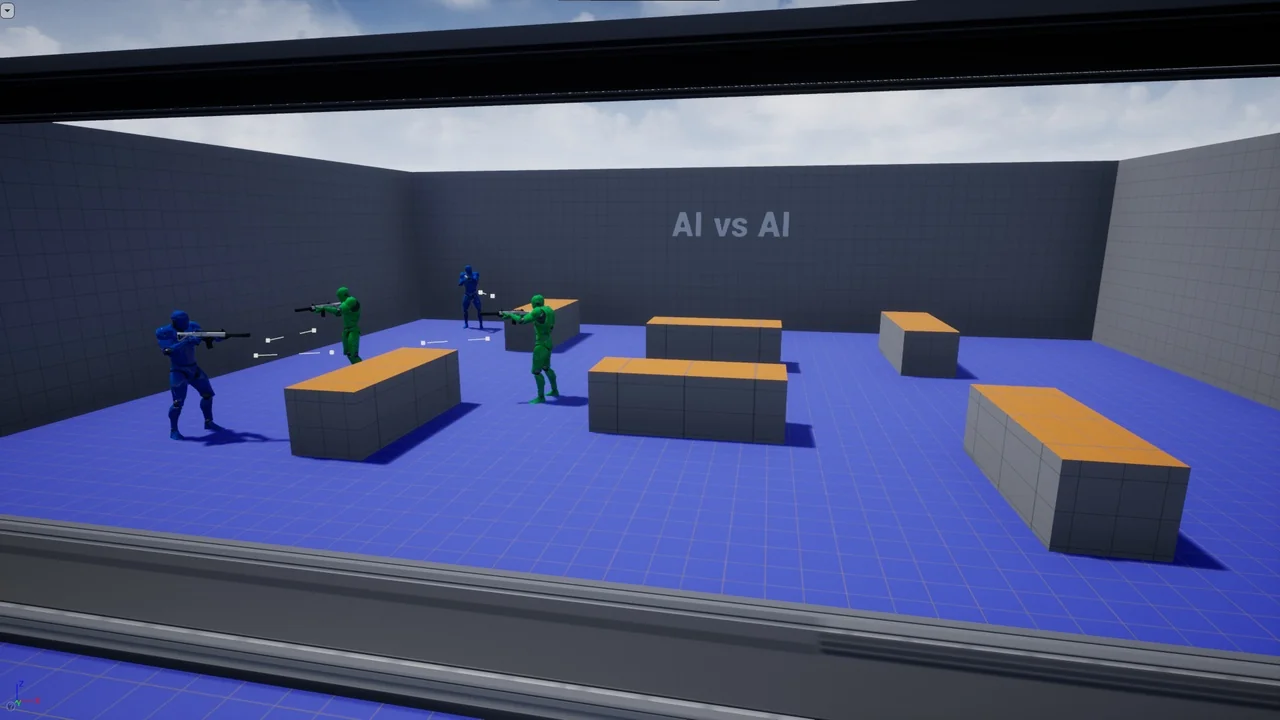
 Gameplay Features
 Gameplay Features
 Gameplay Features