"7066dd76da796369"{"id":"1001154","slug":"unreal-engine-5-lighting-fundamentals","title":"Unreal Engine 5 Lighting Fundamentals","category":"Unreal Engine","engine":"File Content: video + English subtitles","assetVersion":"Video Language: English","engineVersion":"File Content: video + English subtitles","tag":"Unreal Engine","accent":"blue","visual":"mech","summary":"Explore Unreal Engine 5 lighting fundamentals with Charleston Silverman, covering Lumen, static baking, GPU Lightmass, path tracing, and volumetric setups.","platform":"Unreal Engine","publishedAt":"2026-09-10T23:53:02.795Z","updatedAt":"2026-09-10T23:53:02.795Z","sourceNotes":[],"fileContents":[],"compatibility":["Unreal Engine","Video Language: English","File Content: video + English subtitles"],"featuredImage":{"alt":"Unreal Engine 5 Lighting Fundamentals","src":"/wp-content/uploads/published/2026/09/0c699397d659-chs05-af19b25552.webp"},"hasDownloadLink":true,"downloads":0,"terms":[{"taxonomy":"category","slug":"tutoriallibrary-unrealengine","name":"Unreal Engine"}],"galleryImages":[{"src":"/wp-content/uploads/published/2026/09/43d3cab85e10-1920-3e41702bab.webp","alt":"Unreal Engine 5 Lighting Fundamentals"},{"src":"/wp-content/uploads/published/2026/09/5dc6a0f20b4c-1920-4ace3cf914.webp","alt":"Unreal Engine 5 Lighting Fundamentals"},{"src":"/wp-content/uploads/published/2026/09/beb5dbf63f2a-1920-8b6405ad71.webp","alt":"Unreal Engine 5 Lighting Fundamentals"},{"src":"/wp-content/uploads/published/2026/09/bc854e312b8c-1920-672f0ce65a.webp","alt":"Unreal Engine 5 Lighting Fundamentals"},{"src":"/wp-content/uploads/published/2026/09/b65b95a7d1a0-1920-b27774be4f.webp","alt":"Unreal Engine 5 Lighting Fundamentals"},{"src":"/wp-content/uploads/published/2026/09/696d106eb203-1920-2f129ce14a.webp","alt":"Unreal Engine 5 Lighting Fundamentals"},{"src":"/wp-content/uploads/published/2026/09/4154389657de-1920-146b4d4618.webp","alt":"Unreal Engine 5 Lighting Fundamentals"},{"src":"/wp-content/uploads/published/2026/09/42c19e168cd9-1920-41f24d1d18.webp","alt":"Unreal Engine 5 Lighting Fundamentals"},{"src":"/wp-content/uploads/published/2026/09/ffc2de213402-1920-821ef1ded9.webp","alt":"Unreal Engine 5 Lighting Fundamentals"}],"accessPanel":{"kind":"resource","title":"Download this resource","eyebrow":"Free Download","message":"Log in or create a free account to start your download.","fileName":"Unreal Engine 5 - Lighting Fundamentals.7z","safetyNote":"Resources are manually reviewed before listing to improve quality and reduce obvious risks.","actionLabel":"Download Free","resourceType":"Resource archive"},"contentHtml":"\u003ch2\u003eEstablishing Grounded Illumination and Light Actor Foundations\u003c/h2\u003e\u003cp\u003eWorking inside Unreal Engine 5 requires an understanding of how light behaves physically across geometry before relying on complex shaders or heavy post-processing volumes. Initial project setup benefits from treating illumination as an extension of real-world optics rather than an assembly of artificial workarounds. Rather than dropping arbitrary fill lights into dark recesses of an environment, setting correct source radius configurations on primary light sources mimics genuine light dispersion. This physically grounded methodology provides softer, more natural falloff while maintaining realistic contrast across both dynamic and precomputed setups.\u003c/p\u003e\u003cp\u003eUnderstanding static principles remains fundamental even with modern dynamic engines available. Projects targeting specific hardware targets, performance thresholds, or mobile platforms frequently rely on precomputed visibility and irradiance data. Establishing core light actor placement with deliberate physical dimensions ensures that whether an artist relies on Lumen or traditional precomputation, surfaces respond with believable bounce, contact shadows, and luminance distributions across the scene.\u003c/p\u003e\u003ch2\u003eDirectional, Spotlight, and Rect Light Implementations\u003c/h2\u003e\u003cp\u003eThe core suite of direct light actors serves distinct geometric and storytelling roles inside a level. Directional lights govern world-scale sun and moon illumination, driving atmospheric depth and serving as the primary source for volumetric light shafts. Aligning directional light angles with atmospheric fog parameters creates defined sunbeams cutting through interior openings or dense terrain.\u003c/p\u003e\u003cp\u003eSpotlights provide focused conical distribution, suited for task lights, flashlights, or overhead fixtures where directional cone angles, inner cone falloff, and penumbra shaping dictate the visual mood. Rect lights introduce planar illumination, mimicking studio softboxes, fluorescent ceiling panels, or architectural window frames. Utilizing rect lights for texture projection allows artists to cast complex window patterns or broken silhouettes directly across walls and floors without introducing extra shadow-casting geometry, keeping environmental illumination sharp and efficient.\u003c/p\u003e\u003ch2\u003eEnvironmental Lighting with Skylights and HDRI Backdrops\u003c/h2\u003e\u003cp\u003eAmbient illumination across large environments relies on balanced environmental actors. The Skylight actor functions as the primary vehicle for image-based lighting, capturing distant sky contributions and reprojecting ambient radiance into occluded corners. When tuned properly, it eliminates pitch-black shadows without flattening the contrast across surfaces.\u003c/p\u003e\u003cp\u003eFor enclosed studio scenes, asset showcases, or vehicle presentations, the HDRI Backdrop actor pairs image-based lighting directly with an integrated projection dome. This setup anchors 3D assets into realistic panoramic surroundings, aligning the ground projection, shadow capture, and background perspective simultaneously. Portfolio presentations and client reviews benefit heavily from this unified approach, as lighting direction, reflection captures, and background visual detail match naturally without requiring manual alignment across separate atmospheric volumes.\u003c/p\u003e\u003ch2\u003eStatic Lighting Workflows, GPU Lightmass, and Path Tracing\u003c/h2\u003e\u003cp\u003eDespite the prominence of real-time global illumination, precomputed lighting remains essential for architectural visualization, mobile development, and performance-critical simulations. Producing clean baked lighting requires careful technical preparation:\u003c/p\u003e\u003cul\u003e\u003cli\u003eConsistent lightmap density across adjacent assets to prevent mismatched shadow resolutions and texel seams.\u003c/li\u003e\u003cli\u003eClean, non-overlapping secondary UV layouts dedicated strictly to light baking to eliminate shadow bleeding.\u003c/li\u003e\u003cli\u003eStrategic configuration of indirect bounce intensities to simulate multi-bounce diffusion through enclosed architecture.\u003c/li\u003e\u003c/ul\u003e\u003cp\u003eGPU Lightmass accelerates static lighting calculation by leveraging ray-tracing hardware directly on modern graphics cards. It shortens turnaround times compared to legacy CPU-based solvers, provided indirect lighting values and sample counts are configured to prevent artifacting. When the target shifts from real-time execution to offline presentation renders, the Path Tracer provides ground-truth ray tracing inside Unreal Engine. Enabling ray-tracing features at project inception prevents unexpected shader recompilations and allows developers to alternate between GPU Lightmass for performant static baking and Path Tracing for portfolio-grade still renders.\u003c/p\u003e\u003ch2\u003eLumen Global Illumination, Volumetric Effects, and Procedural Light Functions\u003c/h2\u003e\u003cp\u003eUnreal Engine 5’s Lumen architecture delivers real-time diffuse indirect bounces and rough reflections, dynamically updating as light sources or scene geometry transform. While Lumen provides real-time global illumination that outpaces traditional ray-tracing pipelines in runtime efficiency, atmospheric presence often demands additional volumetric treatment. Crafting volumetric illumination through custom particle systems gives artists precise control over localized dust motes, heavy mist, and cinematic god rays without driving performance down through excessive global fog densities.\u003c/p\u003e\u003cp\u003eFine details depend on material-driven and profile-based additions. IES profiles apply measured photometric distribution patterns to spotlights and point lights, replicating real-world bulb casings and lens imperfections. For specialized effects, light functions map dynamic materials to light emissions, enabling animated caustics, flickering projector screens, or moving cloud shadows across vast landscapes. Pairing dynamic emissive materials with Lumen allows glowing props, neon strips, and industrial monitors to contribute active bounce light into immediate surroundings without placing extra direct actors.\u003c/p\u003e\u003ch2\u003eChamber Scene Practice and Production Optimization\u003c/h2\u003e\u003cp\u003ePractical application of these lighting tools comes together through the included chamber and cave project files. Working within an enclosed rocky structure allows artists to test the interaction between directional sunlight filtering through cave openings, subtle skylight bounce, localized volumetric particle fog, and artificial interior fixtures. Balancing these sources within a single playable environment demonstrates the performance trade-offs between dynamic Lumen calculations, emissive surfaces, and precomputed static lightmaps.\u003c/p\u003e\u003cp\u003eMaintaining target framerates across complex levels requires monitoring light counts, restricting overlapping attenuation radii, and adjusting shadow map resolutions alongside post-processing values. Whether an artist is transitioning from Unreal Engine 4 into Unreal Engine 5 or establishing baseline workflows for interactive production, combining physical light placement, measured IES profiles, and tuned post-process volumes creates performant, production-ready visuals.\u003c/p\u003e\n\n\u003ch2\u003eExplore Similar Assets\u003c/h2\u003e\n\u003cul\u003e\n\u003cli\u003e\u003ca href=\"https://3dcghub.com/aaa-game-environment-creation-in-unreal-engine-5/\" title=\"AAA Game Environment Creation in Unreal Engine 5\"\u003eAAA Game Environment Creation in Unreal Engine 5\u003c/a\u003e\u003c/li\u003e\n\u003cli\u003e\u003ca href=\"https://3dcghub.com/create-a-first-person-shooter-fps-game-in-unreal-engine-5/\" title=\"Create a First Person Shooter (FPS) Game in Unreal Engine 5\"\u003eCreate a First Person Shooter (FPS) Game in Unreal Engine 5\u003c/a\u003e\u003c/li\u003e\n\u003cli\u003e\u003ca href=\"https://3dcghub.com/real-time-automotive-rendering-1001/\" title=\"Real-Time Automotive Rendering 1001\"\u003eReal-Time Automotive Rendering 1001\u003c/a\u003e\u003c/li\u003e\n\u003cli\u003e\u003ca href=\"https://3dcghub.com/unreal-engine-5-scenebuilding-crash-course/\" title=\"Unreal Engine 5 Scenebuilding Crash Course\"\u003eUnreal Engine 5 Scenebuilding Crash Course\u003c/a\u003e\u003c/li\u003e\n\u003cli\u003e\u003ca href=\"https://3dcghub.com/ultimate-lighting-essentials-in-unreal-engine-5-5/\" title=\"Ultimate Lighting Essentials in Unreal Engine 5.5\"\u003eUltimate Lighting Essentials in Unreal Engine 5.5\u003c/a\u003e\u003c/li\u003e\n\u003c/ul\u003e","contentTextLength":7201,"navigation":{"current":988,"total":4016,"previous":{"id":"1001153","slug":"easily-create-captivating-environments-in-unreal-engine","title":"Easily Create Captivating Environments in Unreal Engine","category":"Unreal Engine","platform":"Unreal Engine","updatedAt":"2026-09-10T23:57:53.448Z"},"next":{"id":"1001150","slug":"waterline-pro-6","title":"Waterline PRO 6","category":"Engine Tools","platform":"Unreal Engine","updatedAt":"2026-09-10T13:07:23.062Z"}},"relatedResources":[{"id":"1000145","slug":"aaa-game-environment-creation-in-unreal-engine-5","title":"AAA Game Environment Creation in Unreal Engine 5","category":"Unreal Engine","engine":"File Content: video + English subtitles","assetVersion":"Video Language: English","engineVersion":"File Content: video + English subtitles","tag":"Unreal Engine","accent":"blue","visual":"city","summary":"A beginner Unreal Engine 5 course focused on AAA environment set dressing, art fundamentals, design theory, and lighting for stronger scenes.","platform":"Unreal Engine","publishedAt":"2026-06-13T08:44:03.779Z","updatedAt":"2026-06-13T08:44:03.779Z","sourceNotes":[],"fileContents":[],"compatibility":["Unreal Engine","Video Language: English","File Content: video + English subtitles"],"featuredImage":{"alt":"AAA Game Environment Creation in Unreal Engine 5","src":"/wp-content/uploads/published/2026/06/2e2726eb21ab-6708657-817a-8e95909d91.webp"},"hasDownloadLink":true,"downloads":2},{"id":"1000181","slug":"unreal-engine-5-blender-environment-design-for-beginners","title":"Unreal Engine 5 + Blender Environment Design For Beginners","category":"Unreal Engine","engine":"File Content: video + English subtitles","assetVersion":"Video Language: English","engineVersion":"File Content: video + English subtitles","tag":"Unreal Engine","accent":"blue","visual":"city","summary":"A beginner course focused on creating a factory interior with Blender and Unreal Engine 5, covering modular modeling, materials, lighting, and level assembly.","platform":"Unreal Engine","publishedAt":"2026-06-21T04:53:10.052Z","updatedAt":"2026-10-03T14:08:40.296Z","sourceNotes":[],"fileContents":[],"compatibility":["Blender","Video Language: English","File Content: video + English subtitles"],"featuredImage":{"alt":"Unreal Engine 5 + Blender Environment Design For Beginners","src":"/wp-content/uploads/published/2026/06/629c97a3fbc5-6468489-877c-9382f24713.webp"},"hasDownloadLink":true,"downloads":0},{"id":"1000074","slug":"mastering-c-for-unreal-engine-beginner-to-pro","title":"Mastering C++ for Unreal Engine (Beginner to Pro)","category":"Unreal Engine","engine":"File Content: video + English subtitles","assetVersion":"Video Language: English","engineVersion":"File Content: video + English subtitles","tag":"Unreal Engine","accent":"blue","visual":"mech","summary":"A 2h 38m Unreal Engine course covering C++ fundamentals, Blueprint vs. C++, inheritance, polymorphism, and portfolio-focused learning.","platform":"Unreal Engine","publishedAt":"2026-06-03T19:10:43.171Z","updatedAt":"2026-10-03T14:08:34.462Z","sourceNotes":[],"fileContents":[],"compatibility":["Unreal Engine","Video Language: English","File Content: video + English subtitles"],"featuredImage":{"alt":"Mastering C++ for Unreal Engine (Beginner to Pro)","src":"/wp-content/uploads/published/2026/06/ae0733ebb4c3-5628295-27dd-3-6f9cb8e8dd.webp"},"hasDownloadLink":true,"downloads":0}]}
Unreal Engine
Unreal Engine 5 Lighting Fundamentals
Explore Unreal Engine 5 lighting fundamentals with Charleston Silverman, covering Lumen, static baking, GPU Lightmass, path tracing, and volumetric setups.
Category:Unreal EnginePlatform: Unreal EngineVideo Language: EnglishFile Content: video + English subtitlesPublished: Sep 10, 2026
Unreal Engine
Resource overview
Establishing Grounded Illumination and Light Actor Foundations
Working inside Unreal Engine 5 requires an understanding of how light behaves physically across geometry before relying on complex shaders or heavy post-processing volumes. Initial project setup benefits from treating illumination as an extension of real-world optics rather than an assembly of artificial workarounds. Rather than dropping arbitrary fill lights into dark recesses of an environment, setting correct source radius configurations on primary light sources mimics genuine light dispersion. This physically grounded methodology provides softer, more natural falloff while maintaining realistic contrast across both dynamic and precomputed setups.
Understanding static principles remains fundamental even with modern dynamic engines available. Projects targeting specific hardware targets, performance thresholds, or mobile platforms frequently rely on precomputed visibility and irradiance data. Establishing core light actor placement with deliberate physical dimensions ensures that whether an artist relies on Lumen or traditional precomputation, surfaces respond with believable bounce, contact shadows, and luminance distributions across the scene.
Directional, Spotlight, and Rect Light Implementations
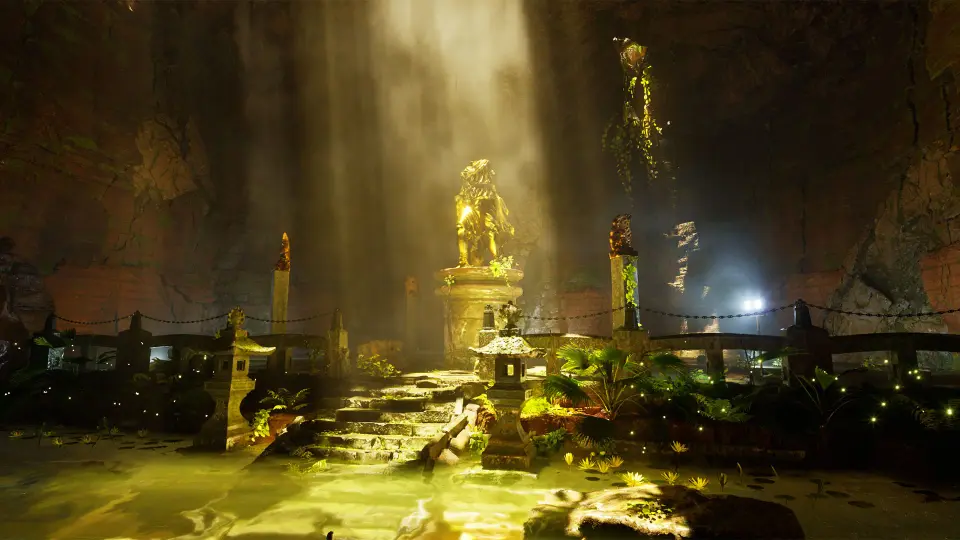
The core suite of direct light actors serves distinct geometric and storytelling roles inside a level. Directional lights govern world-scale sun and moon illumination, driving atmospheric depth and serving as the primary source for volumetric light shafts. Aligning directional light angles with atmospheric fog parameters creates defined sunbeams cutting through interior openings or dense terrain.
Spotlights provide focused conical distribution, suited for task lights, flashlights, or overhead fixtures where directional cone angles, inner cone falloff, and penumbra shaping dictate the visual mood. Rect lights introduce planar illumination, mimicking studio softboxes, fluorescent ceiling panels, or architectural window frames. Utilizing rect lights for texture projection allows artists to cast complex window patterns or broken silhouettes directly across walls and floors without introducing extra shadow-casting geometry, keeping environmental illumination sharp and efficient.
Environmental Lighting with Skylights and HDRI Backdrops
Ambient illumination across large environments relies on balanced environmental actors. The Skylight actor functions as the primary vehicle for image-based lighting, capturing distant sky contributions and reprojecting ambient radiance into occluded corners. When tuned properly, it eliminates pitch-black shadows without flattening the contrast across surfaces.
For enclosed studio scenes, asset showcases, or vehicle presentations, the HDRI Backdrop actor pairs image-based lighting directly with an integrated projection dome. This setup anchors 3D assets into realistic panoramic surroundings, aligning the ground projection, shadow capture, and background perspective simultaneously. Portfolio presentations and client reviews benefit heavily from this unified approach, as lighting direction, reflection captures, and background visual detail match naturally without requiring manual alignment across separate atmospheric volumes.
Static Lighting Workflows, GPU Lightmass, and Path Tracing
Despite the prominence of real-time global illumination, precomputed lighting remains essential for architectural visualization, mobile development, and performance-critical simulations. Producing clean baked lighting requires careful technical preparation:
Consistent lightmap density across adjacent assets to prevent mismatched shadow resolutions and texel seams.
Clean, non-overlapping secondary UV layouts dedicated strictly to light baking to eliminate shadow bleeding.
Strategic configuration of indirect bounce intensities to simulate multi-bounce diffusion through enclosed architecture.
GPU Lightmass accelerates static lighting calculation by leveraging ray-tracing hardware directly on modern graphics cards. It shortens turnaround times compared to legacy CPU-based solvers, provided indirect lighting values and sample counts are configured to prevent artifacting. When the target shifts from real-time execution to offline presentation renders, the Path Tracer provides ground-truth ray tracing inside Unreal Engine. Enabling ray-tracing features at project inception prevents unexpected shader recompilations and allows developers to alternate between GPU Lightmass for performant static baking and Path Tracing for portfolio-grade still renders.
Lumen Global Illumination, Volumetric Effects, and Procedural Light Functions
Unreal Engine 5’s Lumen architecture delivers real-time diffuse indirect bounces and rough reflections, dynamically updating as light sources or scene geometry transform. While Lumen provides real-time global illumination that outpaces traditional ray-tracing pipelines in runtime efficiency, atmospheric presence often demands additional volumetric treatment. Crafting volumetric illumination through custom particle systems gives artists precise control over localized dust motes, heavy mist, and cinematic god rays without driving performance down through excessive global fog densities.
Fine details depend on material-driven and profile-based additions. IES profiles apply measured photometric distribution patterns to spotlights and point lights, replicating real-world bulb casings and lens imperfections. For specialized effects, light functions map dynamic materials to light emissions, enabling animated caustics, flickering projector screens, or moving cloud shadows across vast landscapes. Pairing dynamic emissive materials with Lumen allows glowing props, neon strips, and industrial monitors to contribute active bounce light into immediate surroundings without placing extra direct actors.
Chamber Scene Practice and Production Optimization
Practical application of these lighting tools comes together through the included chamber and cave project files. Working within an enclosed rocky structure allows artists to test the interaction between directional sunlight filtering through cave openings, subtle skylight bounce, localized volumetric particle fog, and artificial interior fixtures. Balancing these sources within a single playable environment demonstrates the performance trade-offs between dynamic Lumen calculations, emissive surfaces, and precomputed static lightmaps.
Maintaining target framerates across complex levels requires monitoring light counts, restricting overlapping attenuation radii, and adjusting shadow map resolutions alongside post-processing values. Whether an artist is transitioning from Unreal Engine 4 into Unreal Engine 5 or establishing baseline workflows for interactive production, combining physical light placement, measured IES profiles, and tuned post-process volumes creates performant, production-ready visuals.
 Unreal Engine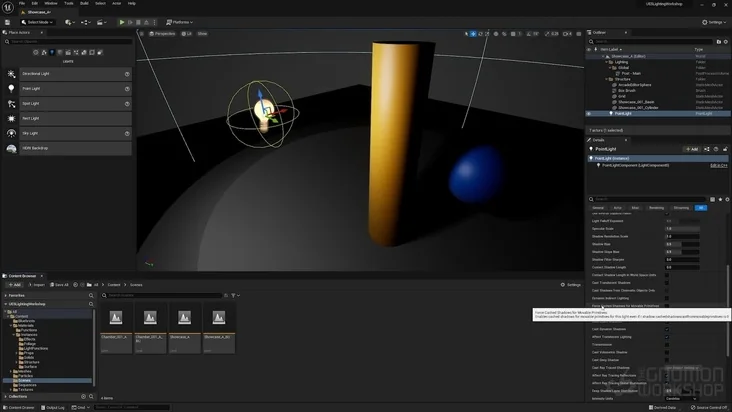
 Unreal Engine
 Unreal Engine
 Unreal Engine