"7066dd76da796369"{"id":"1001153","slug":"easily-create-captivating-environments-in-unreal-engine","title":"Easily Create Captivating Environments in Unreal Engine","category":"Unreal Engine","engine":"File Content: video + English subtitles","assetVersion":"Video Language: English","engineVersion":"File Content: video + English subtitles","tag":"Unreal Engine","accent":"blue","visual":"city","summary":"Learn to build photorealistic environments in Unreal Engine 4 using Quixel Megascans, structured map layout, foliage placement, and post-processing.","platform":"Unreal Engine","publishedAt":"2026-09-10T23:37:52.970Z","updatedAt":"2026-09-10T23:57:53.448Z","sourceNotes":[],"fileContents":[],"compatibility":["Unreal Engine","Video Language: English","File Content: video + English subtitles"],"featuredImage":{"alt":"Easily Create Captivating Environments in Unreal Engine","src":"/wp-content/uploads/published/2026/09/9c0b1db53d69-708b68fb1c82-w1200-3350e4d46d.webp"},"hasDownloadLink":true,"downloads":1,"terms":[{"taxonomy":"category","slug":"tutoriallibrary-unrealengine","name":"Unreal Engine"}],"galleryImages":[],"accessPanel":{"kind":"resource","title":"Download this resource","eyebrow":"Free Download","message":"Log in or create a free account to start your download.","fileName":"Easily Create Captivating Environments in Unreal Engine.7z","safetyNote":"Resources are manually reviewed before listing to improve quality and reduce obvious risks.","actionLabel":"Download Free","resourceType":"Resource archive"},"contentHtml":"\u003ch2\u003eEnvironment Art Without Workflow Friction\u003c/h2\u003e\n\u003cp\u003eAssembling a believable 3D world quickly often stalls when artists get trapped in technical configuration rather than creative iteration. Easily Create Captivating Environments in Unreal Engine addresses this challenge directly, demonstrating how to construct a photorealistic exterior scene inside Unreal Engine 4 by drawing on the extensive Megascans library. The training runs for 1 hour and 22 minutes across self-paced sessions, targeting intermediate-level artists who already grasp fundamental real-time concepts but want a faster, more intuitive path to a finished visual piece.\u003c/p\u003e\n\u003cp\u003eRather than bogging down in complex external modeling pipelines or custom shader authoring, the workflow prioritizes the creative aspects of game art. The instruction centers around using high-fidelity scanned surfaces and 3D meshes to assemble a cohesive set, giving artists room to experiment with visual rhythm, massing, and natural scattering. Unreal Engine 4.26 or higher serves as the base production platform, capitalizing on stable map handling and real-time viewport tools to keep the creative loop immediate and responsive.\u003c/p\u003e \u003ch2\u003eQuixel Bridge Setup and Asset Ingestion\u003c/h2\u003e\n\u003cp\u003eThe foundation of this rapid construction method relies on integrating Quixel Bridge directly with Unreal Engine. By linking a Quixel Megascans account through Bridge, scan data moves straight into the active project directory without manual texture hookups or custom material network assembly. Setting up this link properly ensures that surface albedo, normal maps, roughness channels, and displacement data align with the engine's physical rendering standards right on import.\u003c/p\u003e\n\u003cp\u003eOnce the bridge connection operates smoothly, the initial scene setup begins inside an empty Unreal Engine map. Establishing correct level settings early eliminates unexpected lighting discrepancies later when dense geometry enters the viewport. By removing friction during asset ingestion, the artist can select, download, and test rocks, ground surfaces, and structural components instantly inside the level viewport, checking scale and surface behavior under live engine lighting.\u003c/p\u003e \u003ch2\u003eLaying the Foundations and Managing Scene Scale\u003c/h2\u003e\n\u003cp\u003eCreating believable natural terrain requires dividing a large space into manageable sections. Instead of scattering assets at random, the curriculum guides artists through laying the foundations by blocking out large structural components first. Primary rock faces, foundational ground meshes, and large focal props are placed to establish elevation changes and sightlines before any fine dressing takes place.\u003c/p\u003e\n\u003cp\u003eBreaking up environment design into distinct stages keeps the viewport organized and prevents visual clutter. Working from large primary shapes down to secondary forms ensures that the spatial distribution remains legible. Artists learn to frame the main perspective early, anchoring the composition with substantial environmental anchors that give the landscape weight and believable geology before intermediate foliage or fine debris are introduced.\u003c/p\u003e \u003ch2\u003eAdding Greenery and Organic Layering\u003c/h2\u003e\n\u003cp\u003eA sterile landscape transforms into a living scene through the deliberate application of foliage. The class details methods for introducing greenery onto bare stone and soil foundations, balancing clusters of plants against open rock faces to maintain natural negative space. Adding greenery involves more than dropping individual models across a surface; it requires an eye for natural growth patterns, moisture accumulation, and visual hierarchy.\u003c/p\u003e\n\u003cp\u003eBy blending scanned plant species with varying heights, broadleaf volumes, and subtle tonal differences, the terrain gains believable depth. Placing ground cover along the borders where large boulders meet the ground masks abrupt geometric intersections, embedding hard surfaces into the natural bedding. This organic dressing phase bridges the gap between raw blocked-in geo and a convincing natural ecosystem.\u003c/p\u003e \u003ch2\u003eCompositional Tweaks and Post-Processing Effects\u003c/h2\u003e\n\u003cp\u003eThe transition from a raw asset scatter to a captivating scene depends heavily on final compositional adjustments and camera tuning. Compositional tweaks involve refining sightlines, shifting key props to guide the viewer's gaze, and eliminating distracting high-contrast areas that break the scene's focal hierarchy. Small adjustments to camera angle, lens focal length, and prop orientation dramatically alter the perceived scale of the surrounding environment.\u003c/p\u003e\n\u003cp\u003eOnce the physical composition holds together, the project moves into in-engine post-processing. Unreal Engine provides extensive post-processing volumes that govern color grading, exposure ranges, depth of field, bloom, and ambient occlusion. Applying these visual adjustments binds the disparate Megascans assets into a unified color palette and cohesive atmospheric tone. The final pass harmonizes lighting intensity, soft shadow roll-off, and subtle photographic traits to produce an evocative portfolio-ready image directly from the real-time viewport.\u003c/p\u003e \u003ch2\u003eIntermediate Environment Creation in Practice\u003c/h2\u003e\n\u003cp\u003eThis intermediate walkthrough operates as a direct bridge between basic software familiarity and polished world design. By stripping out pipeline overhead and leaning entirely on ready-to-use scans, artists can concentrate on lighting, silhouette design, and scene balance. The structured path—moving through Bridge configuration, map initialization, foundational blocking, plant distribution, composition balancing, and final post-processing—delivers a repeatable technique for generating natural vistas inside modern game engines without wasting production time.\u003c/p\u003e\n\n\u003ch2\u003eRelated Resources Worth Checking\u003c/h2\u003e\n\u003cul\u003e\n\u003cli\u003e\u003ca href=\"https://3dcghub.com/unreal-engine-5-6-build-an-action-rpg-using-lyra-framework/\" title=\"Unreal Engine 5.6 - Build an Action RPG using Lyra Framework\"\u003eUnreal Engine 5.6 - Build an Action RPG using Lyra Framework\u003c/a\u003e\u003c/li\u003e\n\u003cli\u003e\u003ca href=\"https://3dcghub.com/unreal-blueprints-create-games-with-visual-scripting-in-unreal-5-6/\" title=\"Unreal Blueprints: Create Games with Visual Scripting in Unreal 5.6\"\u003eUnreal Blueprints: Create Games with Visual Scripting in Unreal 5.6\u003c/a\u003e\u003c/li\u003e\n\u003cli\u003e\u003ca href=\"https://3dcghub.com/how-to-create-a-movie-in-unreal-engine-5-beginners-edition/\" title=\"How to create a movie in Unreal Engine 5 Beginners Edition\"\u003eHow to create a movie in Unreal Engine 5 Beginners Edition\u003c/a\u003e\u003c/li\u003e\n\u003cli\u003e\u003ca href=\"https://3dcghub.com/create-a-first-person-shooter-fps-game-in-unreal-engine-5/\" title=\"Create a First Person Shooter (FPS) Game in Unreal Engine 5\"\u003eCreate a First Person Shooter (FPS) Game in Unreal Engine 5\u003c/a\u003e\u003c/li\u003e\n\u003cli\u003e\u003ca href=\"https://3dcghub.com/learn-how-to-create-a-survival-horror-in-unreal-engine/\" title=\"Learn How To Create A Survival Horror In Unreal Engine\"\u003eLearn How To Create A Survival Horror In Unreal Engine\u003c/a\u003e\u003c/li\u003e\n\u003c/ul\u003e","contentTextLength":5991,"navigation":{"current":987,"total":4016,"previous":{"id":"1001155","slug":"unreal-engine-5-blueprint-fundamentals","title":"Unreal Engine 5 Blueprint Fundamentals","category":"Unreal Engine","platform":"Unreal Engine","updatedAt":"2026-09-11T00:33:21.500Z"},"next":{"id":"1001154","slug":"unreal-engine-5-lighting-fundamentals","title":"Unreal Engine 5 Lighting Fundamentals","category":"Unreal Engine","platform":"Unreal Engine","updatedAt":"2026-09-10T23:53:02.795Z"}},"relatedResources":[{"id":"1000749","slug":"unreal-engine-5-6-build-an-action-rpg-using-lyra-framework","title":"Unreal Engine 5.6 - Build an Action RPG using Lyra Framework","category":"Unreal Engine","engine":"File Content: video + English subtitles","assetVersion":"Video Language: English","engineVersion":"File Content: video + English subtitles","tag":"Unreal Engine","accent":"blue","visual":"mech","summary":"Build a complete Action RPG in Unreal Engine 5.6 using the Lyra Framework. Create melee, archer, and magic abilities, enemy AI with State Trees, and automated l","platform":"Unreal Engine","publishedAt":"2026-07-27T13:40:29.223Z","updatedAt":"2026-07-27T13:40:29.223Z","sourceNotes":[],"fileContents":[],"compatibility":["Unreal Engine","Video Language: English","File Content: video + English subtitles"],"featuredImage":{"alt":"Unreal Engine 5.6 - Build an Action RPG using Lyra Framework","src":"/wp-content/uploads/published/2026/07/be02053c81e1-6801271-d252-3-f82b10130c.webp"},"hasDownloadLink":true,"downloads":0},{"id":"1000910","slug":"unreal-blueprints-create-games-with-visual-scripting-in-unreal-5-6","title":"Unreal Blueprints: Create Games with Visual Scripting in Unreal 5.6","category":"Unreal Engine","engine":"File Content: video + English subtitles","assetVersion":"Video Language: English","engineVersion":"File Content: video + English subtitles","tag":"Unreal Engine","accent":"blue","visual":"mech","summary":"Build three complete games—Marble Run, Crystal Caverns, and Mars Marine—using Unreal 5.6's Blueprint visual scripting. A beginner-friendly course from GameDev.t","platform":"Unreal Engine","publishedAt":"2026-08-06T13:20:33.760Z","updatedAt":"2026-08-06T13:20:33.760Z","sourceNotes":[],"fileContents":[],"compatibility":["Unreal Engine","Video Language: English","File Content: video + English subtitles"],"featuredImage":{"alt":"Unreal Blueprints: Create Games with Visual Scripting in Unreal 5.6","src":"/wp-content/uploads/published/2026/08/8a135189a0df-ragzbmpcjb5j-2f97113de1.webp"},"hasDownloadLink":true,"downloads":3},{"id":"1000744","slug":"how-to-create-a-movie-in-unreal-engine-5-beginners-edition","title":"How to create a movie in Unreal Engine 5 Beginners Edition","category":"Unreal Engine","engine":"File Content: video + English subtitles","assetVersion":"Video Language: English","engineVersion":"File Content: video + English subtitles","tag":"Unreal Engine","accent":"blue","visual":"mech","summary":"A beginner-level UE5 course on creating CG animation, migrating projects, importing motion capture, and working with MetaHumans.","platform":"Unreal Engine","publishedAt":"2026-07-27T12:07:40.122Z","updatedAt":"2026-07-27T12:07:40.122Z","sourceNotes":[],"fileContents":[],"compatibility":["Unreal Engine","Video Language: English","File Content: video + English subtitles"],"featuredImage":{"alt":"How to create a movie in Unreal Engine 5 Beginners Edition","src":"/wp-content/uploads/published/2026/07/a207ba37646d-4192342-4b9b-11-973394dbfe.webp"},"hasDownloadLink":true,"downloads":4}]}
Unreal Engine
Easily Create Captivating Environments in Unreal Engine
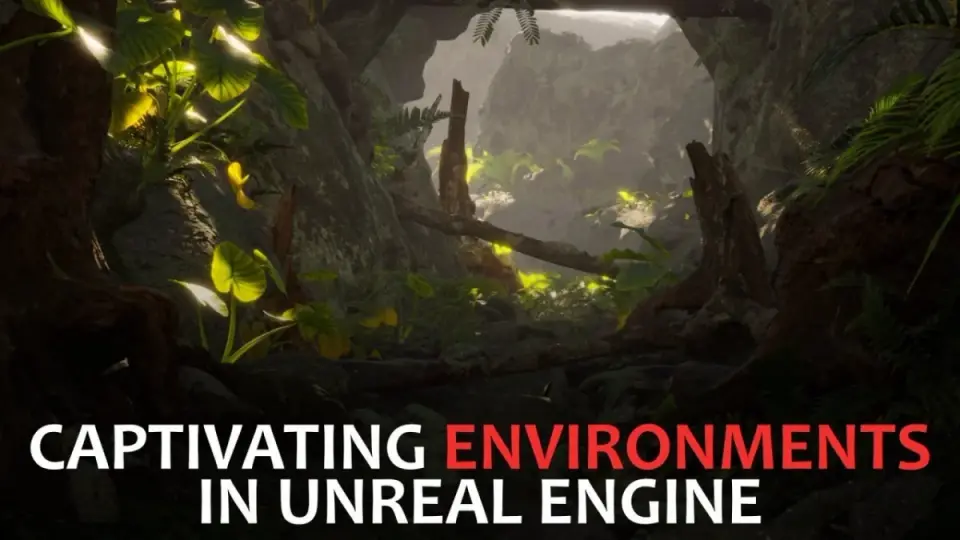
Learn to build photorealistic environments in Unreal Engine 4 using Quixel Megascans, structured map layout, foliage placement, and post-processing.
Category:Unreal EnginePlatform: Unreal EngineVideo Language: EnglishFile Content: video + English subtitlesPublished: Sep 10, 2026
Unreal Engine
Resource overview
Environment Art Without Workflow Friction
Assembling a believable 3D world quickly often stalls when artists get trapped in technical configuration rather than creative iteration. Easily Create Captivating Environments in Unreal Engine addresses this challenge directly, demonstrating how to construct a photorealistic exterior scene inside Unreal Engine 4 by drawing on the extensive Megascans library. The training runs for 1 hour and 22 minutes across self-paced sessions, targeting intermediate-level artists who already grasp fundamental real-time concepts but want a faster, more intuitive path to a finished visual piece.
Rather than bogging down in complex external modeling pipelines or custom shader authoring, the workflow prioritizes the creative aspects of game art. The instruction centers around using high-fidelity scanned surfaces and 3D meshes to assemble a cohesive set, giving artists room to experiment with visual rhythm, massing, and natural scattering. Unreal Engine 4.26 or higher serves as the base production platform, capitalizing on stable map handling and real-time viewport tools to keep the creative loop immediate and responsive.
Quixel Bridge Setup and Asset Ingestion
The foundation of this rapid construction method relies on integrating Quixel Bridge directly with Unreal Engine. By linking a Quixel Megascans account through Bridge, scan data moves straight into the active project directory without manual texture hookups or custom material network assembly. Setting up this link properly ensures that surface albedo, normal maps, roughness channels, and displacement data align with the engine's physical rendering standards right on import.
Once the bridge connection operates smoothly, the initial scene setup begins inside an empty Unreal Engine map. Establishing correct level settings early eliminates unexpected lighting discrepancies later when dense geometry enters the viewport. By removing friction during asset ingestion, the artist can select, download, and test rocks, ground surfaces, and structural components instantly inside the level viewport, checking scale and surface behavior under live engine lighting.
Laying the Foundations and Managing Scene Scale
Creating believable natural terrain requires dividing a large space into manageable sections. Instead of scattering assets at random, the curriculum guides artists through laying the foundations by blocking out large structural components first. Primary rock faces, foundational ground meshes, and large focal props are placed to establish elevation changes and sightlines before any fine dressing takes place.
Breaking up environment design into distinct stages keeps the viewport organized and prevents visual clutter. Working from large primary shapes down to secondary forms ensures that the spatial distribution remains legible. Artists learn to frame the main perspective early, anchoring the composition with substantial environmental anchors that give the landscape weight and believable geology before intermediate foliage or fine debris are introduced.
Adding Greenery and Organic Layering
A sterile landscape transforms into a living scene through the deliberate application of foliage. The class details methods for introducing greenery onto bare stone and soil foundations, balancing clusters of plants against open rock faces to maintain natural negative space. Adding greenery involves more than dropping individual models across a surface; it requires an eye for natural growth patterns, moisture accumulation, and visual hierarchy.
By blending scanned plant species with varying heights, broadleaf volumes, and subtle tonal differences, the terrain gains believable depth. Placing ground cover along the borders where large boulders meet the ground masks abrupt geometric intersections, embedding hard surfaces into the natural bedding. This organic dressing phase bridges the gap between raw blocked-in geo and a convincing natural ecosystem.
Compositional Tweaks and Post-Processing Effects
The transition from a raw asset scatter to a captivating scene depends heavily on final compositional adjustments and camera tuning. Compositional tweaks involve refining sightlines, shifting key props to guide the viewer's gaze, and eliminating distracting high-contrast areas that break the scene's focal hierarchy. Small adjustments to camera angle, lens focal length, and prop orientation dramatically alter the perceived scale of the surrounding environment.
Once the physical composition holds together, the project moves into in-engine post-processing. Unreal Engine provides extensive post-processing volumes that govern color grading, exposure ranges, depth of field, bloom, and ambient occlusion. Applying these visual adjustments binds the disparate Megascans assets into a unified color palette and cohesive atmospheric tone. The final pass harmonizes lighting intensity, soft shadow roll-off, and subtle photographic traits to produce an evocative portfolio-ready image directly from the real-time viewport.
Intermediate Environment Creation in Practice
This intermediate walkthrough operates as a direct bridge between basic software familiarity and polished world design. By stripping out pipeline overhead and leaning entirely on ready-to-use scans, artists can concentrate on lighting, silhouette design, and scene balance. The structured path—moving through Bridge configuration, map initialization, foundational blocking, plant distribution, composition balancing, and final post-processing—delivers a repeatable technique for generating natural vistas inside modern game engines without wasting production time.
 Unreal Engine
 Unreal Engine
 Unreal Engine
 Unreal Engine