"26aaab8a5d5ed4fc"{"id":"1001010","slug":"procedural-moss-and-snow","title":"Procedural Moss \u0026 Snow","category":"Procedural Systems","engine":"5.0+","assetVersion":"","engineVersion":"Engine Version: 5.0+","tag":"Procedural Systems","accent":"blue","visual":"mech","summary":"A blueprint tool that generates high-detail moss and snow meshes over static scenes with dynamic mesh actors, Nanite baking, and custom coverage options.","platform":"Unreal Engine","publishedAt":"2026-08-22T13:12:00.826Z","updatedAt":"2026-08-22T13:12:00.826Z","sourceNotes":[],"fileContents":[],"compatibility":["Unreal Engine","Engine Version: 5.0+"],"featuredImage":{"alt":"Procedural Moss \u0026 Snow","src":"/wp-content/uploads/published/2026/08/30656a053baa-9fd2bb1c-b2b6-4507-9f9e-03747ecbdd29-ef95eecb95.webp"},"hasDownloadLink":true,"downloads":1,"terms":[{"taxonomy":"category","slug":"procedural-systems","name":"Procedural Systems"}],"galleryImages":[{"src":"/wp-content/uploads/published/2026/08/9102f00d3c0c-7ed8885e-e04e-416e-980c-ef46ff4c7ebf-04388be967.webp","alt":"Procedural Moss \u0026 Snow"},{"src":"/wp-content/uploads/published/2026/08/0cff55e61489-05963680-3214-4b49-8f63-87b8a64e1dab-a890349ad8.webp","alt":"Procedural Moss \u0026 Snow"},{"src":"/wp-content/uploads/published/2026/08/1ac3c9aef1e4-1ec3a8b7-da9d-4523-9d58-51dc653c6b08-3cfeddddfe.webp","alt":"Procedural Moss \u0026 Snow"},{"src":"/wp-content/uploads/published/2026/08/b779353e3cb7-81ef205e-a884-4d88-a973-6473c38b6c62-63e8fcbc47.webp","alt":"Procedural Moss \u0026 Snow"},{"src":"/wp-content/uploads/published/2026/08/62aaec1c1bf4-809e3827-be65-456f-a684-b10c66e3d7be-d9049e4996.webp","alt":"Procedural Moss \u0026 Snow"},{"src":"/wp-content/uploads/published/2026/08/6f26b3d04fee-b7faca4d-5d53-4b3f-90e3-dccda75750cf-69adead583.webp","alt":"Procedural Moss \u0026 Snow"},{"src":"/wp-content/uploads/published/2026/08/a95bf6c7a273-fb57637b-443a-41b0-8a84-2ec591b98250-d4cf7d13d1.webp","alt":"Procedural Moss \u0026 Snow"},{"src":"/wp-content/uploads/published/2026/08/daba7a0b2069-bb22ff7e-95e2-4ef6-9386-437f4bb30ca0-f1a4b9bf3a.webp","alt":"Procedural Moss \u0026 Snow"},{"src":"/wp-content/uploads/published/2026/08/b226fcf5f2c5-f3bd2a78-0a0a-4bc7-8785-50d8c5c88936-579c509c79.webp","alt":"Procedural Moss \u0026 Snow"},{"src":"/wp-content/uploads/published/2026/08/894da851fc21-bdef2870-bc1b-46e8-9ae0-6313bbb09cd9-8642472c37.webp","alt":"Procedural Moss \u0026 Snow"}],"accessPanel":{"kind":"resource","title":"Download this resource","eyebrow":"Free Download","message":"Log in or create a free account to start your download.","fileName":"Content.7z","safetyNote":"Resources are manually reviewed before listing to improve quality and reduce obvious risks.","actionLabel":"Download Free","resourceType":"Resource archive"},"contentHtml":"\u003cp\u003eGenerating believable moss and snow across existing scene geometry usually means sculpting in an external DCC or layering displacement maps that are hard to control. This blueprint tool sidesteps that by working directly inside Unreal Engine, using dynamic mesh actors and tiling displacement information to create high-detail moss and snow meshes on top of static actors. It is explicitly built for non-runtime use, so the output is intended to be static meshes—either Nanite or non-Nanite—rather than deformable real-time geometry.\u003c/p\u003e \u003ch2\u003eActivate Geometry Script Before Anything Else\u003c/h2\u003e\n\u003cp\u003eBefore adding the tool to a project, the Geometry Script plugin must be activated in the editor. That is a hard prerequisite because the entire generation pipeline relies on Epic's geometry script features. The tool also currently works only with static scene elements and actors; it does not deform along with anything dynamic or skeletal in nature. For the same underlying reason, it does not work with landscape, as Epic's geometry script features do not yet support landscape terrain.\u003c/p\u003e\n\u003cp\u003eThere is a practical detail to keep in mind if you load the example map. All examples in that map have been baked down before packaging to reduce initial map opening times. If you want to adjust any of those examples, you have to run the Unbake feature first. This matters for iterating: the map opens fast, but the editable dynamic geometry is intentionally tucked away until you explicitly unbake it.\u003c/p\u003e \u003ch2\u003eDynamic Mesh Actors and Tiling Displacement: How It Works\u003c/h2\u003e\n\u003cp\u003eThe core workflow uses new dynamic mesh actors in combination with tiling displacement information to generate complex geometry over existing scenes. Rather than sending geometry out to a modeling package and importing it back, the tool constructs the moss or snow surface in-engine. That leaves many times faster than generating custom content in external DCCs, which makes iteration more practical when you are testing multiple coverage densities or tile sizes.\u003c/p\u003e\n\u003cp\u003eControl is handled through parametric settings that users can customize for a broad spectrum of content targets. The tool exposes multiple scene sampling behaviors, giving flexibility for different use cases, and offers a high degree of control over mesh fidelity so you can match performance targets for a given project. A built-in timer function details construction times, which helps you understand the iteration implications of particularly expensive operations before committing to them.\u003c/p\u003e \u003ch2\u003eBaking Dynamic Geometry to Static Nanite Meshes\u003c/h2\u003e\n\u003cp\u003eOnce the generated moss or snow looks correct, the tool can bake that dynamic geometry down to static mesh actors while keeping the workflow non-destructive. This is a central feature because the tool is not meant for real-time generation; it is meant to produce final assets that you can use in the level. Baking to Nanite meshes is supported, which aligns with the tool's expectation that you are working at high detail and using Nanite to handle that density efficiently.\u003c/p\u003e\n\u003cp\u003eThe non-destructive aspect means you can keep the original dynamic setup and adjust parameters after baking, then re-bake as needed. On top of that, the tool allows for propagation of instance meshes over the surface of the generated geometry. That is useful when you want extra detail like small twigs, pebbles, or grass blades scattered across the moss or snow without merging them into the main mesh.\u003c/p\u003e \u003ch2\u003eCoverage Algorithms and Remesh Controls Added in V1.1\u003c/h2\u003e\n\u003cp\u003eUpdate V1.1 introduced several options that change how the tool distributes points and rebuilds the mesh. Two coverage algorithms are now available. The original algorithm is called Random Vector and it generates point placements in a more organic, random pattern. This is described as best for things like moss, where a natural scattered look is desired. The newer Cubic Grid placement was created specifically for snow, where you want a more even distribution of coverage across the surface.\u003c/p\u003e\n\u003cp\u003eThe update also added new remesh options. The existing Cell Resolution setting can now be supplemented with exposed Cell Grid options, which maintain a more consistent voxelized mesh resolution regardless of the size of the coverage area. The tradeoff is that generation times can be longer for larger meshes. Alongside those remesh changes, post displacement smoothing options were added that allow you to smooth the mesh after height displacement is applied. There is also UV offsetting in addition to scaling, which is useful for hiding seams that appear when displacing a texture with large details on a box-mapped surface.\u003c/p\u003e\n\u003cp\u003eTwo new material examples were included in this update: coins and alien. The tool's generated meshes currently rely on box-map UV projections, so for textures like the alien example that carry large, obvious information, seams may appear in some cases. Adjusting UV offset and scale values can partially mitigate those seams, which is exactly why the UV offsetting control was added.\u003c/p\u003e \u003ch2\u003eThe 5.1.1 UV Bug and the Bake Mesh Node Fix\u003c/h2\u003e\n\u003cp\u003eUpdate V1.1.1 addressed a version-specific bug that appeared when baking to a static Nanite mesh in Unreal Engine 5.1. The baking process caused UV issues because a geometry script node in 5.1.1 used deprecated settings. The fix requires a small manual adjustment if you are porting the tool from 5.0 to 5.1. In the blueprint tool, open the Bake Mesh function and locate the Copy Mesh to Static Mesh node. Disconnect the Nanite bool variable from the DEPRECATED NANITE SETTINGS Enabled input and reconnect it to the corresponding Options Nanite Settings Enabled bool input just below. Once that connection is updated, baking to Nanite meshes no longer distort the UVs.\u003c/p\u003e\n\u003cp\u003eThis narrow fix matters for anyone moving between engine versions. The tool's behavior is otherwise consistent, but the 5.1.1 geometry script node change is exactly the kind of subtle deprecation that can produce hard-to-track artifacts in baked assets.\u003c/p\u003e \u003ch2\u003eDemo Content, Custom Textures, and What Is Not Included\u003c/h2\u003e\n\u003cp\u003eThe package includes demo content for both moss and snow, used with different kinds of actors so you can see how the tool reacts to varied scene geometry. There are also preset asset examples for each of the four material types shown in the tool, located under the Preset folder. The system can work with custom-authored textures and materials as well, so you are not locked into the demo assets. It can also accept source content from popular services like Megascans, which fits into the same tiling displacement workflow.\u003c/p\u003e\n\u003cp\u003eOne important distinction: the presentation images in the marketplace listing use Megascans assets that are not included in the package. Megascans meshes and textures are shown for demonstration only. The tool itself performs the generation, but those specific decorative assets do not ship with it. In-engine documentation is included, with examples and demos of all blueprints and features inside the package.\u003c/p\u003e\n\u003cp\u003eAt its core, Procedural Moss \u0026 Snow fills a specific spot in a static-mesh pipeline. It generates dense, Nanite-friendly moss and snow surfaces over existing static geometry quickly, gives you parametric control over coverage and fidelity, and then bakes the result down for final use. Just remember the prerequisites: Geometry Script activated, static actors only, and no landscape support. If you follow those constraints, the tool offers a fast route to high-detail environmental coverage without leaving the editor.\u003c/p\u003e\n\n\u003ch2\u003eExplore Similar Assets\u003c/h2\u003e\n\u003cul\u003e\n\u003cli\u003e\u003ca href=\"https://3dcghub.com/procedural-mesh-blueprint/\" title=\"Procedural Mesh Blueprint\"\u003eProcedural Mesh Blueprint\u003c/a\u003e\u003c/li\u003e\n\u003cli\u003e\u003ca href=\"https://3dcghub.com/natural-pcg-tools/\" title=\"Natural PCG Tools\"\u003eNatural PCG Tools\u003c/a\u003e\u003c/li\u003e\n\u003cli\u003e\u003ca href=\"https://3dcghub.com/snow-blowing-landscape-effect/\" title=\"Snow Blowing Landscape Effect\"\u003eSnow Blowing Landscape Effect\u003c/a\u003e\u003c/li\u003e\n\u003cli\u003e\u003ca href=\"https://3dcghub.com/calysto-village-procedural-villages-farms-with-pcg/\" title=\"Calysto Village Procedural villages, farms with PCG\"\u003eCalysto Village Procedural villages, farms with PCG\u003c/a\u003e\u003c/li\u003e\n\u003cli\u003e\u003ca href=\"https://3dcghub.com/autoenv-procedural-rock-cliffs/\" title=\"AutoEnv Procedural Rock Cliffs\"\u003eAutoEnv Procedural Rock Cliffs\u003c/a\u003e\u003c/li\u003e\n\u003c/ul\u003e","contentTextLength":7633,"navigation":{"current":508,"total":3400,"previous":{"id":"1001011","slug":"procedural-turn-in-place-system","title":"Procedural Turn in Place System","category":"Animations","platform":"Unreal Engine","updatedAt":"2026-08-22T13:14:55.097Z"},"next":{"id":"1001009","slug":"pool-arcade-and-bar-item-pack","title":"Pool Arcade and Bar Item Pack","category":"Recreational","platform":"Unreal Engine","updatedAt":"2026-08-22T13:07:20.173Z"}},"relatedResources":[{"id":"1000855","slug":"natural-pcg-tools","title":"Natural PCG Tools","category":"Procedural Systems","engine":"5.5+","assetVersion":"","engineVersion":"Engine Version: 5.5+","tag":"Procedural Systems","accent":"blue","visual":"mech","summary":"UE5.6+ procedural tool built on PCG and blueprints. Version 1.7 adds mesh and snow projection, spline scattering, exclusion, and scriptable tool modes.","platform":"Unreal Engine","publishedAt":"2026-08-04T17:03:37.725Z","updatedAt":"2026-08-04T17:03:37.725Z","sourceNotes":[],"fileContents":[],"compatibility":["Unreal Engine","Engine Version: 5.5+"],"featuredImage":{"alt":"Natural PCG Tools","src":"/wp-content/uploads/published/2026/08/319c7a1f5f63-bdb23e53-6e77-4e4d-82bf-ee5135349816-edc8098835.webp"},"hasDownloadLink":true,"downloads":1},{"id":"27443","slug":"procedural-mesh-blueprint","title":"Procedural Mesh Blueprint","category":"Procedural Systems","engine":"V2","assetVersion":"Engine version: 5.4+","engineVersion":"Asset Version: V2","tag":"Procedural Systems","accent":"blue","visual":"animation","summary":"Procedural Mesh Blueprint uses PCG to place child meshes on a parent mesh with a drag-and-drop workflow for environment artists. It focuses on overgrown details such as moss, grass, ivy, vines, and roots, while also supporting conversion back to static meshes.","platform":"Unreal Engine","publishedAt":"2026-04-25T12:18:37.000Z","updatedAt":"2026-07-05T06:17:14.277Z","sourceNotes":[],"fileContents":[],"compatibility":["Unreal Engine","Engine version: 5.4+","Asset Version: V2"],"featuredImage":{"alt":"Procedural Mesh Blueprint","src":"https://3dcghub.com/wp-content/uploads/2026/04/9f239b1c495b_e8794242-68b2-45e1-84c7-de84a7b8a153.webp"},"hasDownloadLink":true,"downloads":0},{"id":"11573","slug":"snow-blowing-landscape-effect","title":"Snow Blowing Landscape Effect","category":"Procedural Systems","engine":"5.4+","assetVersion":"Engine version: 5.4+","engineVersion":"5.3","tag":"Procedural Systems","accent":"blue","visual":"city","summary":"Enhance your digital environments with the Snow Blowing Landscape Effect. This user-friendly Blueprint offers six customizable presets and a simple drag-and-drop workflow for high-impact results.","platform":"Unreal Engine","publishedAt":"2026-03-05T17:50:21.000Z","updatedAt":"2026-04-19T15:48:10.000Z","sourceNotes":[],"fileContents":[],"compatibility":["Unreal Engine","Engine version: 5.4+"],"featuredImage":{"alt":"Snow Blowing Landscape Effect","src":"https://3dcghub.com/wp-content/uploads/2026/03/2492e059-5d92-49c7-94c8-4b848d873d01.webp"},"hasDownloadLink":true,"downloads":0}]}
Procedural Systems
Procedural Moss & Snow
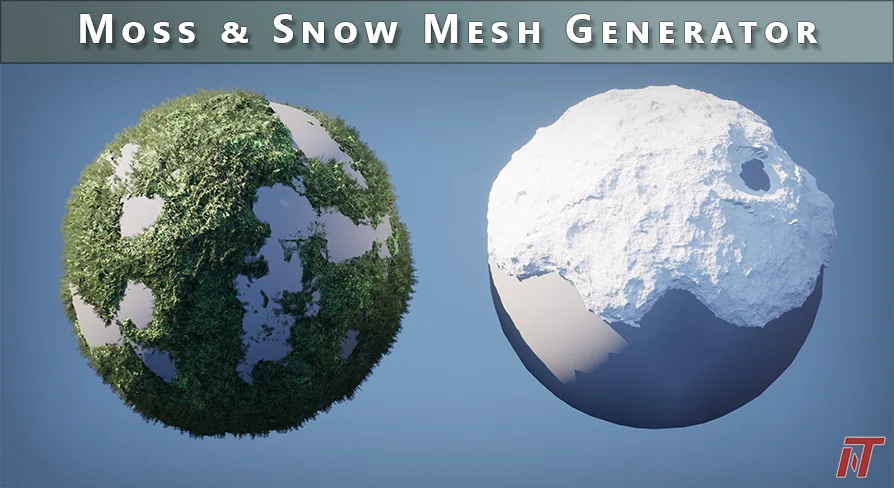
A blueprint tool that generates high-detail moss and snow meshes over static scenes with dynamic mesh actors, Nanite baking, and custom coverage options.
Generating believable moss and snow across existing scene geometry usually means sculpting in an external DCC or layering displacement maps that are hard to control. This blueprint tool sidesteps that by working directly inside Unreal Engine, using dynamic mesh actors and tiling displacement information to create high-detail moss and snow meshes on top of static actors. It is explicitly built for non-runtime use, so the output is intended to be static meshes—either Nanite or non-Nanite—rather than deformable real-time geometry.
Activate Geometry Script Before Anything Else
Before adding the tool to a project, the Geometry Script plugin must be activated in the editor. That is a hard prerequisite because the entire generation pipeline relies on Epic's geometry script features. The tool also currently works only with static scene elements and actors; it does not deform along with anything dynamic or skeletal in nature. For the same underlying reason, it does not work with landscape, as Epic's geometry script features do not yet support landscape terrain.
There is a practical detail to keep in mind if you load the example map. All examples in that map have been baked down before packaging to reduce initial map opening times. If you want to adjust any of those examples, you have to run the Unbake feature first. This matters for iterating: the map opens fast, but the editable dynamic geometry is intentionally tucked away until you explicitly unbake it.
Dynamic Mesh Actors and Tiling Displacement: How It Works
The core workflow uses new dynamic mesh actors in combination with tiling displacement information to generate complex geometry over existing scenes. Rather than sending geometry out to a modeling package and importing it back, the tool constructs the moss or snow surface in-engine. That leaves many times faster than generating custom content in external DCCs, which makes iteration more practical when you are testing multiple coverage densities or tile sizes.
Control is handled through parametric settings that users can customize for a broad spectrum of content targets. The tool exposes multiple scene sampling behaviors, giving flexibility for different use cases, and offers a high degree of control over mesh fidelity so you can match performance targets for a given project. A built-in timer function details construction times, which helps you understand the iteration implications of particularly expensive operations before committing to them.
Baking Dynamic Geometry to Static Nanite Meshes
Once the generated moss or snow looks correct, the tool can bake that dynamic geometry down to static mesh actors while keeping the workflow non-destructive. This is a central feature because the tool is not meant for real-time generation; it is meant to produce final assets that you can use in the level. Baking to Nanite meshes is supported, which aligns with the tool's expectation that you are working at high detail and using Nanite to handle that density efficiently.
The non-destructive aspect means you can keep the original dynamic setup and adjust parameters after baking, then re-bake as needed. On top of that, the tool allows for propagation of instance meshes over the surface of the generated geometry. That is useful when you want extra detail like small twigs, pebbles, or grass blades scattered across the moss or snow without merging them into the main mesh.
Coverage Algorithms and Remesh Controls Added in V1.1
Update V1.1 introduced several options that change how the tool distributes points and rebuilds the mesh. Two coverage algorithms are now available. The original algorithm is called Random Vector and it generates point placements in a more organic, random pattern. This is described as best for things like moss, where a natural scattered look is desired. The newer Cubic Grid placement was created specifically for snow, where you want a more even distribution of coverage across the surface.
The update also added new remesh options. The existing Cell Resolution setting can now be supplemented with exposed Cell Grid options, which maintain a more consistent voxelized mesh resolution regardless of the size of the coverage area. The tradeoff is that generation times can be longer for larger meshes. Alongside those remesh changes, post displacement smoothing options were added that allow you to smooth the mesh after height displacement is applied. There is also UV offsetting in addition to scaling, which is useful for hiding seams that appear when displacing a texture with large details on a box-mapped surface.
Two new material examples were included in this update: coins and alien. The tool's generated meshes currently rely on box-map UV projections, so for textures like the alien example that carry large, obvious information, seams may appear in some cases. Adjusting UV offset and scale values can partially mitigate those seams, which is exactly why the UV offsetting control was added.
The 5.1.1 UV Bug and the Bake Mesh Node Fix
Update V1.1.1 addressed a version-specific bug that appeared when baking to a static Nanite mesh in Unreal Engine 5.1. The baking process caused UV issues because a geometry script node in 5.1.1 used deprecated settings. The fix requires a small manual adjustment if you are porting the tool from 5.0 to 5.1. In the blueprint tool, open the Bake Mesh function and locate the Copy Mesh to Static Mesh node. Disconnect the Nanite bool variable from the DEPRECATED NANITE SETTINGS Enabled input and reconnect it to the corresponding Options Nanite Settings Enabled bool input just below. Once that connection is updated, baking to Nanite meshes no longer distort the UVs.
This narrow fix matters for anyone moving between engine versions. The tool's behavior is otherwise consistent, but the 5.1.1 geometry script node change is exactly the kind of subtle deprecation that can produce hard-to-track artifacts in baked assets.
Demo Content, Custom Textures, and What Is Not Included
The package includes demo content for both moss and snow, used with different kinds of actors so you can see how the tool reacts to varied scene geometry. There are also preset asset examples for each of the four material types shown in the tool, located under the Preset folder. The system can work with custom-authored textures and materials as well, so you are not locked into the demo assets. It can also accept source content from popular services like Megascans, which fits into the same tiling displacement workflow.
One important distinction: the presentation images in the marketplace listing use Megascans assets that are not included in the package. Megascans meshes and textures are shown for demonstration only. The tool itself performs the generation, but those specific decorative assets do not ship with it. In-engine documentation is included, with examples and demos of all blueprints and features inside the package.
At its core, Procedural Moss & Snow fills a specific spot in a static-mesh pipeline. It generates dense, Nanite-friendly moss and snow surfaces over existing static geometry quickly, gives you parametric control over coverage and fidelity, and then bakes the result down for final use. Just remember the prerequisites: Geometry Script activated, static actors only, and no landscape support. If you follow those constraints, the tool offers a fast route to high-detail environmental coverage without leaving the editor.
 Procedural Systems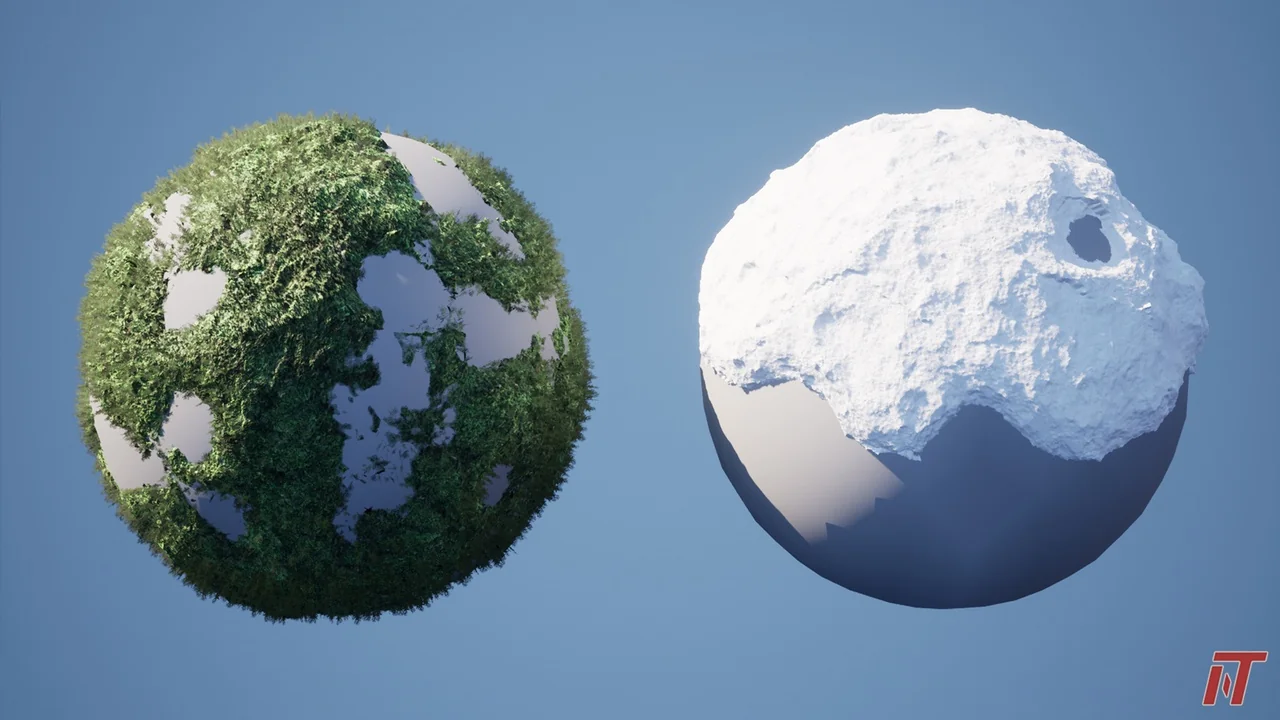
 Procedural Systems
 Procedural Systems
 Procedural Systems