"26aaab8a5d5ed4fc"{"id":"1001011","slug":"procedural-turn-in-place-system","title":"Procedural Turn in Place System","category":"Animations","engine":"5.1+","assetVersion":"","engineVersion":"Engine Version: 5.1+","tag":"Animations","accent":"blue","visual":"animation","summary":"IK-based turn-in-place for UE4/UE5 humanoids with auto foot projection, customizable curves, strafing set, Control Rig setup, and replication.","platform":"Unreal Engine","publishedAt":"2026-08-22T13:14:55.097Z","updatedAt":"2026-08-22T13:14:55.097Z","sourceNotes":[],"fileContents":[],"compatibility":["Unreal Engine","Engine Version: 5.1+"],"featuredImage":{"alt":"Procedural Turn in Place System","src":"/wp-content/uploads/published/2026/08/58b7c31ef80f-667a563c-7f44-4f12-b33a-40d2aeab67cf-3a9009c480.webp"},"hasDownloadLink":true,"downloads":5,"terms":[{"taxonomy":"category","slug":"animations-game-systems","name":"Animations"}],"galleryImages":[{"src":"/wp-content/uploads/published/2026/08/05bcd37b9faf-ffb064ef-8d53-42d0-b7fd-112e06c5af3f-d5d7e27245.webp","alt":"Procedural Turn in Place System"},{"src":"/wp-content/uploads/published/2026/08/da3e3f639a37-c5905f33-26f0-4fd6-8c5b-44b8787f5a2b-b045b0d088.webp","alt":"Procedural Turn in Place System"},{"src":"/wp-content/uploads/published/2026/08/f60dd6701733-b41ba4e0-79b6-4745-a20c-2e9df77ac8ee-4ae886f48d.webp","alt":"Procedural Turn in Place System"}],"accessPanel":{"kind":"resource","title":"Download this resource","eyebrow":"Free Download","message":"Log in or create a free account to start your download.","fileName":"Content.7z","safetyNote":"Resources are manually reviewed before listing to improve quality and reduce obvious risks.","actionLabel":"Download Free","resourceType":"Resource archive"},"contentHtml":"\u003cp\u003eAny character that can stand still can eventually need to turn on the spot. The Procedural Turn in Place System gives UE4 and UE5 humanoid characters an IK-based turning motion that works at any required angle. Instead of playing a fixed 90-degree or 180-degree turn, the system projects where the feet should land over the next two to three steps, then rotates the character while moving the feet toward those positions.\u003c/p\u003e\u003cp\u003eThe design centers on keeping the character grounded. Foot positions are generated for the steps required to execute the turn, so the body rotation and step motion happen together rather than as a slide-and-turn. Because the step calculation follows the rotation angle, the same system handles a tiny stance adjustment and a complete reversal without needing separate animation clips.\u003c/p\u003e\u003cp\u003eThis makes it applicable to a wide set of real-time scenes: a guard changing watch position, an NPC turning to face the player during dialogue, a character re-aiming, or a player avatar rotating while idle. Since the system adapts to any idle animation already present in the project, it does not require a specific animation set to be useful. It also works with any UE4 or UE5 based character, so the same turn logic can move from a default mannequin to a project-specific humanoid without an engine migration.\u003c/p\u003e\u003ch2\u003eStep calculation, timing curves, and character weight\u003c/h2\u003e\u003cp\u003eThe steps are not random or hard-coded. They are automatically calculated based on the rotation angle, and the developer can configure the main parameters that shape the turn: max rotation range, step height, duration, timing, and cooldown. Those values control how far the turn can procedurally cover, how high the feet lift, how long each step takes, and how quickly a new turn can begin.\u003c/p\u003e\u003cp\u003eStep Duration is set with intuitive curves, which opens up a wide range of motion styles. A standard character can rotate at normal speed, while a larger character such as a giant mannequin can rotate slowly, making the turn feel heavy and deliberate. The same curve setup can convey weight, size, and general physical presence without adding new animation assets. The curves also allow the turn to speed up or slow down across a single step rather than playing at a uniform rate.\u003c/p\u003e\u003cp\u003eStep height also scales to the character's proportions. It adjusts automatically, and it can be customized inside the control rig using distance curves. That gives the integration the dual benefit of working out of the box for a default mannequin and offering fine control when a project needs a particular foot lift.\u003c/p\u003e\u003ch2\u003eIntegration path: Control Rig node, Actor Component, and blueprint functions\u003c/h2\u003e\u003cp\u003eThe implementation is shaped by a small set of moving parts: a Control Rig node, an Actor Component, and a few simple functions copied into the character blueprint. This keeps the system modular rather than burying the logic inside a single animation blueprint. Adding the node and component, then pasting the functions into the character blueprint, is enough to get the procedural turn running.\u003c/p\u003e\u003cp\u003eBecause the required work is limited to those three pieces, the system can be implemented in a few minutes in a new character-based project. There is no need to restructure an entire animation blueprint or replace an existing locomotion setup. The Control Rig node, the Actor Component, and the blueprint functions work together to project the feet and rotate the body while keeping the turn response tied to the character's existing movement.\u003c/p\u003e\u003cp\u003eDocumentation covers the setup from multiple angles. A complete 12-page PDF provides detailed written instructions, while video tutorials walk through the same process visually. The package also includes the older Features \u0026amp; Integration Guide and an Updated Integration Tutorial, plus a separate integration update for the TopDown template. That top-down support is especially useful for projects where the camera sits above the character and foot sliding is more noticeable when rotating the character toward a movement direction. The mix of written and video material makes the system approachable for developers who are still getting familiar with Control Rig, as well as those who want a quick drop-in behavior.\u003c/p\u003e\u003ch2\u003eExtras included: strafing set, AimOffset, and bow basics\u003c/h2\u003e\u003cp\u003eThe package extends beyond turn-in-place behavior. It includes 16 strafing animations, with 8 on the UE5 mannequin and 8 retargeted for other skeletons. Some additional Idle Animations are supplied as examples, so the system can be tested with a stable loop before the developer drops in their own locomotion.\u003c/p\u003e\u003cp\u003eAn AimOffset solution is also included, and it does not require additional animations to work. This is a straightforward fit for a character who needs to adjust aim while staying roughly in place. Basic bow and arrow meshes are part of the package, giving a simple test setup for the turning, strafing, and aim offset systems together.\u003c/p\u003e\u003ch2\u003eFully replicated and ready for networked projects\u003c/h2\u003e\u003cp\u003eThe system is now fully replicated, which makes it suitable for multiplayer or networked character-based projects. Because turn-in-place data is replicated, the procedural motion can stay consistent across clients instead of only being calculated locally. This is a notable feature for projects where character facing and foot placement are part of the gameplay or visual synchronization.\u003c/p\u003e\u003cp\u003eThe approach also has a clear design lineage. It was inspired by the 2014 GDC talk \"An Indie Approach to Procedural Animation\" by David Rosen, which demonstrated how procedural rules can replace heavy animation libraries with small, responsive logic. The turn-in-place system follows that same idea: generate foot placement from a few parameters, and let the character's weight and timing come through in the curves.\u003c/p\u003e\u003ch2\u003eWhere the system fits best\u003c/h2\u003e\u003cp\u003eThe Procedural Turn in Place System is most valuable in UE4 or UE5 projects shaped by humanoid characters that need to rotate without breaking the illusion of grounded motion. Since it works with any idle animation and can be adjusted through curves, it fits into both rapid prototypes and polished productions. Developers working on top-down games, dialogue-driven NPCs, or replicated multiplayer worlds will benefit from a turn solution that does not rely on a fixed set of turn animation clips.\u003c/p\u003e\n\n\u003ch2\u003eExplore Similar Assets\u003c/h2\u003e\n\u003cul\u003e\n\u003cli\u003eProcedural Weapon Animation System\u003c/li\u003e\n\u003cli\u003e\u003ca href=\"https://3dcghub.com/procedural-mesh-blueprint/\" title=\"Procedural Mesh Blueprint\"\u003eProcedural Mesh Blueprint\u003c/a\u003e\u003c/li\u003e\n\u003cli\u003e\u003ca href=\"https://3dcghub.com/crossroad-generator/\" title=\"Crossroad Generator\"\u003eCrossroad Generator\u003c/a\u003e\u003c/li\u003e\n\u003cli\u003e\u003ca href=\"https://3dcghub.com/turn-based-jrpg-template/\" title=\"Turn-Based jRPG Template\"\u003eTurn-Based jRPG Template\u003c/a\u003e\u003c/li\u003e\n\u003cli\u003e\u003ca href=\"https://3dcghub.com/cinematic-car-rig-ccr/\" title=\"Cinematic Car Rig (CCR)\"\u003eCinematic Car Rig (CCR)\u003c/a\u003e\u003c/li\u003e\n\u003c/ul\u003e","contentTextLength":6436,"navigation":{"current":507,"total":3400,"previous":{"id":"1001012","slug":"rog-creatures-wolf","title":"ROG Creatures: Wolf","category":"Animals","platform":"Unreal Engine","updatedAt":"2026-08-22T13:20:07.614Z"},"next":{"id":"1001010","slug":"procedural-moss-and-snow","title":"Procedural Moss \u0026 Snow","category":"Procedural Systems","platform":"Unreal Engine","updatedAt":"2026-08-22T13:12:00.826Z"}},"relatedResources":[{"id":"28604","slug":"crossroad-generator","title":"Crossroad Generator","category":"Procedural Systems","engine":"5.2+","assetVersion":"Engine version: 5.2+","engineVersion":"","tag":"Procedural Systems","accent":"blue","visual":"animation","summary":"Crossroad Generator turns road layout work into a fast in-editor workflow inside Unreal Engine 5. It focuses on procedural street infrastructure, from crossroads and bridges to sidewalks, guardrails, signs, and power lines, while also supporting landscape d...","platform":"Unreal Engine","publishedAt":"2026-05-17T14:06:52.000Z","updatedAt":"2026-05-17T14:06:53.000Z","sourceNotes":[],"fileContents":[],"compatibility":["Unreal Engine","Engine version: 5.2+"],"featuredImage":{"alt":"Crossroad Generator","src":"https://3dcghub.com/wp-content/uploads/2026/05/1d8705b678ec_331a5188-8aeb-45e7-98d2-a7863a4aab3f.webp"},"hasDownloadLink":true,"downloads":4},{"id":"27443","slug":"procedural-mesh-blueprint","title":"Procedural Mesh Blueprint","category":"Procedural Systems","engine":"V2","assetVersion":"Engine version: 5.4+","engineVersion":"Asset Version: V2","tag":"Procedural Systems","accent":"blue","visual":"animation","summary":"Procedural Mesh Blueprint uses PCG to place child meshes on a parent mesh with a drag-and-drop workflow for environment artists. It focuses on overgrown details such as moss, grass, ivy, vines, and roots, while also supporting conversion back to static meshes.","platform":"Unreal Engine","publishedAt":"2026-04-25T12:18:37.000Z","updatedAt":"2026-07-05T06:17:14.277Z","sourceNotes":[],"fileContents":[],"compatibility":["Unreal Engine","Engine version: 5.4+","Asset Version: V2"],"featuredImage":{"alt":"Procedural Mesh Blueprint","src":"https://3dcghub.com/wp-content/uploads/2026/04/9f239b1c495b_e8794242-68b2-45e1-84c7-de84a7b8a153.webp"},"hasDownloadLink":true,"downloads":0},{"id":"1001290","slug":"turn-based-rpg-template","title":"Turn-Based RPG Template","category":"Game Systems","engine":"5.0+","assetVersion":"","engineVersion":"Engine Version: 5.0+","tag":"Game Systems","accent":"blue","visual":"mech","summary":"Examine the Turn-Based RPG Template for Unreal Engine, featuring 100% Blueprints, grid movement, drag-and-drop units, waves, and stat-driven combat.","platform":"Unreal Engine","publishedAt":"2026-10-01T12:58:01.677Z","updatedAt":"2026-10-01T12:58:01.677Z","sourceNotes":[],"fileContents":[],"compatibility":["Unreal Engine","Engine Version: 5.0+"],"featuredImage":{"alt":"Turn-Based RPG Template","src":"/wp-content/uploads/published/2026/10/1845fc93c5bf-25c342ea-39ca-48b7-850f-9de8db58cc0e-2e246803c1.webp"},"hasDownloadLink":true,"downloads":0}]}
Animations
Procedural Turn in Place System
IK-based turn-in-place for UE4/UE5 humanoids with auto foot projection, customizable curves, strafing set, Control Rig setup, and replication.
Category:Unreal Engine,AnimationsPlatform: Unreal EngineEngine Version: 5.1+Published: Aug 22, 2026
Animations
Resource overview
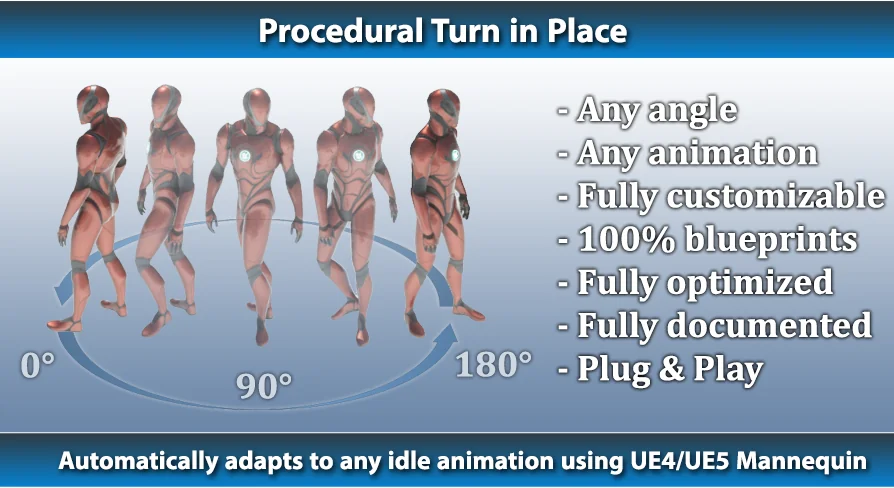
Any character that can stand still can eventually need to turn on the spot. The Procedural Turn in Place System gives UE4 and UE5 humanoid characters an IK-based turning motion that works at any required angle. Instead of playing a fixed 90-degree or 180-degree turn, the system projects where the feet should land over the next two to three steps, then rotates the character while moving the feet toward those positions.
The design centers on keeping the character grounded. Foot positions are generated for the steps required to execute the turn, so the body rotation and step motion happen together rather than as a slide-and-turn. Because the step calculation follows the rotation angle, the same system handles a tiny stance adjustment and a complete reversal without needing separate animation clips.
This makes it applicable to a wide set of real-time scenes: a guard changing watch position, an NPC turning to face the player during dialogue, a character re-aiming, or a player avatar rotating while idle. Since the system adapts to any idle animation already present in the project, it does not require a specific animation set to be useful. It also works with any UE4 or UE5 based character, so the same turn logic can move from a default mannequin to a project-specific humanoid without an engine migration.
Step calculation, timing curves, and character weight
The steps are not random or hard-coded. They are automatically calculated based on the rotation angle, and the developer can configure the main parameters that shape the turn: max rotation range, step height, duration, timing, and cooldown. Those values control how far the turn can procedurally cover, how high the feet lift, how long each step takes, and how quickly a new turn can begin.
Step Duration is set with intuitive curves, which opens up a wide range of motion styles. A standard character can rotate at normal speed, while a larger character such as a giant mannequin can rotate slowly, making the turn feel heavy and deliberate. The same curve setup can convey weight, size, and general physical presence without adding new animation assets. The curves also allow the turn to speed up or slow down across a single step rather than playing at a uniform rate.
Step height also scales to the character's proportions. It adjusts automatically, and it can be customized inside the control rig using distance curves. That gives the integration the dual benefit of working out of the box for a default mannequin and offering fine control when a project needs a particular foot lift.
Integration path: Control Rig node, Actor Component, and blueprint functions
The implementation is shaped by a small set of moving parts: a Control Rig node, an Actor Component, and a few simple functions copied into the character blueprint. This keeps the system modular rather than burying the logic inside a single animation blueprint. Adding the node and component, then pasting the functions into the character blueprint, is enough to get the procedural turn running.
Because the required work is limited to those three pieces, the system can be implemented in a few minutes in a new character-based project. There is no need to restructure an entire animation blueprint or replace an existing locomotion setup. The Control Rig node, the Actor Component, and the blueprint functions work together to project the feet and rotate the body while keeping the turn response tied to the character's existing movement.
Documentation covers the setup from multiple angles. A complete 12-page PDF provides detailed written instructions, while video tutorials walk through the same process visually. The package also includes the older Features & Integration Guide and an Updated Integration Tutorial, plus a separate integration update for the TopDown template. That top-down support is especially useful for projects where the camera sits above the character and foot sliding is more noticeable when rotating the character toward a movement direction. The mix of written and video material makes the system approachable for developers who are still getting familiar with Control Rig, as well as those who want a quick drop-in behavior.
Extras included: strafing set, AimOffset, and bow basics
The package extends beyond turn-in-place behavior. It includes 16 strafing animations, with 8 on the UE5 mannequin and 8 retargeted for other skeletons. Some additional Idle Animations are supplied as examples, so the system can be tested with a stable loop before the developer drops in their own locomotion.
An AimOffset solution is also included, and it does not require additional animations to work. This is a straightforward fit for a character who needs to adjust aim while staying roughly in place. Basic bow and arrow meshes are part of the package, giving a simple test setup for the turning, strafing, and aim offset systems together.
Fully replicated and ready for networked projects
The system is now fully replicated, which makes it suitable for multiplayer or networked character-based projects. Because turn-in-place data is replicated, the procedural motion can stay consistent across clients instead of only being calculated locally. This is a notable feature for projects where character facing and foot placement are part of the gameplay or visual synchronization.
The approach also has a clear design lineage. It was inspired by the 2014 GDC talk "An Indie Approach to Procedural Animation" by David Rosen, which demonstrated how procedural rules can replace heavy animation libraries with small, responsive logic. The turn-in-place system follows that same idea: generate foot placement from a few parameters, and let the character's weight and timing come through in the curves.
Where the system fits best
The Procedural Turn in Place System is most valuable in UE4 or UE5 projects shaped by humanoid characters that need to rotate without breaking the illusion of grounded motion. Since it works with any idle animation and can be adjusted through curves, it fits into both rapid prototypes and polished productions. Developers working on top-down games, dialogue-driven NPCs, or replicated multiplayer worlds will benefit from a turn solution that does not rely on a fixed set of turn animation clips.
 Animations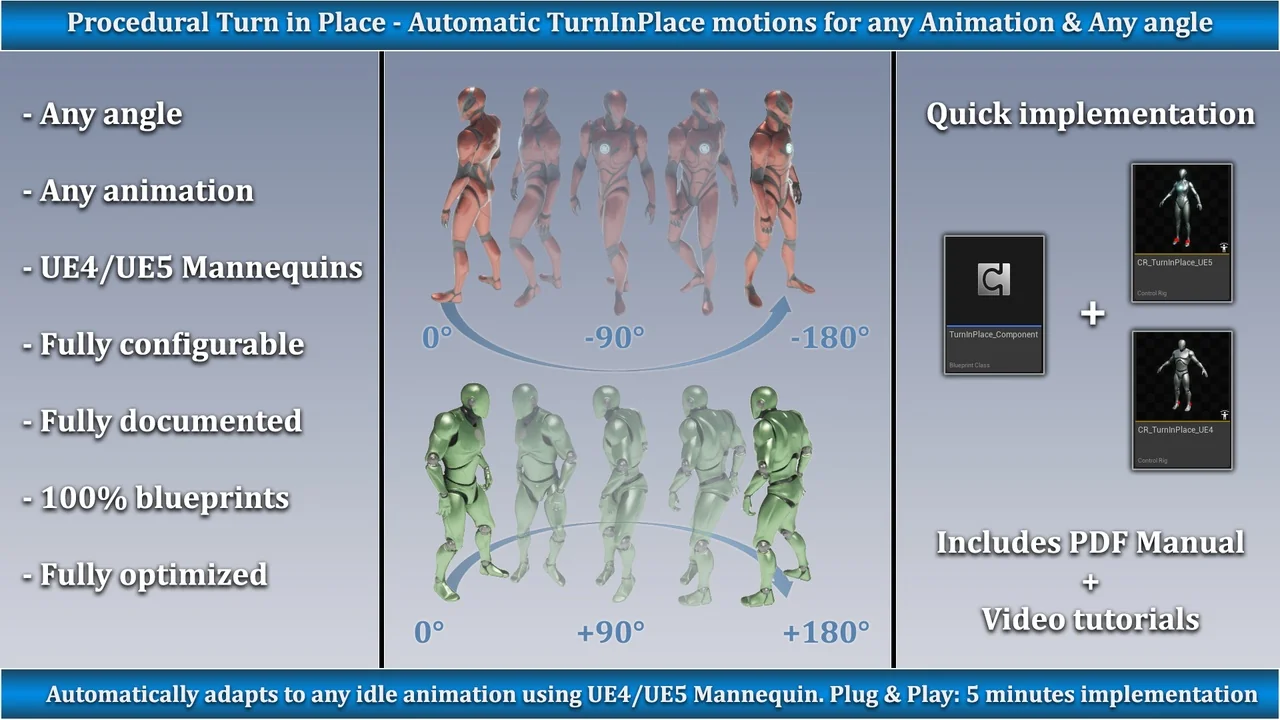
 Procedural Systems
 Procedural Systems
 Game Systems