"ae2217ad8e73450c"{"id":"1003017","slug":"classic-shooter","title":"Classic Shooter","category":"Shooter","engine":"4.19+,5.0+","assetVersion":"","engineVersion":"Engine Version: 4.19+,5.0+","tag":"Shooter","accent":"blue","visual":"mech","summary":"Classic Shooter is an FPS blueprint template with seven weapons, eight AI enemies, level assets, pickups, menus, and over 15 hours of node-by-node tutorials.","platform":"Unreal Engine","indexPolicy":"index","publishedAt":"2026-11-25T16:20:51.736Z","updatedAt":"2026-11-25T16:20:51.736Z","sourceNotes":[],"fileContents":[],"compatibility":["Unreal Engine","Engine Version: 4.19+,5.0+"],"featuredImage":{"alt":"Classic Shooter","src":"/wp-content/uploads/published/2026/11/c0cb796c51de-b71548e4-d933-4f07-aa84-6268029aceaa-98a4eec3a3.webp"},"hasDownloadLink":true,"downloads":0,"terms":[{"taxonomy":"category","slug":"shooter","name":"Shooter"}],"galleryImages":[{"src":"/wp-content/uploads/published/2026/11/5721d245180d-56a0ff0b-92fd-4c34-8d80-2972ed2a77d0-cc7afe97e8.webp","alt":"Classic Shooter"},{"src":"/wp-content/uploads/published/2026/11/2914a5e5e383-afb18641-ad17-49f6-94f3-cb1f985e9681-71d2eb667c.webp","alt":"Classic Shooter"},{"src":"/wp-content/uploads/published/2026/11/801e95c16fdc-05ec7a3d-cfdb-44f6-8e97-1ede0a7c209b-5c7a26887d.webp","alt":"Classic Shooter"},{"src":"/wp-content/uploads/published/2026/11/3f7fa231e0cd-6061b648-7dab-4512-991f-673e4ff48145-c0fa484da7.webp","alt":"Classic Shooter"},{"src":"/wp-content/uploads/published/2026/11/e461b3fec350-a0e792e3-2233-4ee2-a9c3-ad28559c1d62-500849e89c.webp","alt":"Classic Shooter"},{"src":"/wp-content/uploads/published/2026/11/441e4bc2aae4-17f07d1c-35c5-48ac-82ee-be64b11decb9-aae0d0a10e.webp","alt":"Classic Shooter"},{"src":"/wp-content/uploads/published/2026/11/2c111d5ca272-78beb3ef-238c-492f-a13d-a0c7c3dc0f01-dbd5ac852b.webp","alt":"Classic Shooter"}],"accessPanel":{"kind":"resource","title":"Get this resource","safetyNote":"Resources are manually reviewed before listing to improve quality and reduce obvious risks.","fileName":"Classic Shooter.7z","resourceType":"Resource archive","versions":[]},"contentHtml":"\u003cp\u003eThe first decision Classic Shooter helps with is not a weapon stat or a menu colour. It is the shape of a play space. A short corridor that ends at a switch, a courtyard with a spawning pentagram at its centre, a sealed room where a Rocket Demon Boss waits — those are the kinds of scenes the kit is put together to furnish.\u003c/p\u003e \u003cp\u003eThe name sets the tone. The tag set — FPS, System, Template, Shooter, Starter, Doom, Kit, Pack, Weapon, Blueprint — points to a first-person shooter starter based on Blueprint logic rather than a modern military sim. The contents follow that line: a weapon roster, enemy AI, level furniture, pickups, a menu shell, and a tutorial series that walks through the whole thing node by node.\u003c/p\u003e \u003ch2\u003eScene Shapes That Suit Classic Shooter\u003c/h2\u003e \u003cp\u003eClassic Shooter covers the corridor, the arena, and the boss chamber without forcing a single layout. Doors, switches, moving objects, secret areas, spawning pentagrams, and exploding barrels give a level designer the connective tissue between fights. A pentagram can mark where monsters enter. A switch can change the state of a room. A door can divide one encounter from the next. A barrel can turn a quiet corner into a hazard. A secret area can reward a player who looks beyond the obvious route.\u003c/p\u003e \u003cp\u003eThat mix suits maps built from a sequence of readable rooms. One room can introduce a weapon; the next can test it against a named enemy; a third can hide a pickup behind a switch. The kit does not dictate the floor plan, but it supplies the parts that make a floor plan feel like a classic shooter rather than a flat kill box.\u003c/p\u003e \u003ch2\u003eClassic Shooter's Seven-Weapon Spread\u003c/h2\u003e \u003cp\u003eThe weapon list runs from Fists and Pistol through Shotgun and Double Shotgun to Minigun, Plasmagun, and Bazooka. That is seven entries, and the spread is broad enough to support different combat rhythms: a basic fallback, two shotgun choices, a rapid-fire heavy, an energy weapon, and an explosive launcher.\u003c/p\u003e \u003cp\u003eA developer can use that range to pace weapon introduction across a level set. Fists and Pistol can anchor the opening. Shotgun and Double Shotgun can carry the middle. Minigun, Plasmagun, and Bazooka can define the later, louder encounters. The kit does not need to use every weapon in every map; the point is that the roster is already varied enough to let a designer choose which fights belong to which tool.\u003c/p\u003e \u003ch2\u003eEight AI Enemies and the Encounters They Suggest\u003c/h2\u003e \u003cp\u003eThe enemy roster includes Fire Demon, Shotgun Shooter, Flamethrowers Shooter, Homing Missile Demon, Melee Monster, Zombie, Green Fire Demon, and Rocket Demon Boss. All are listed with AI, which means a map maker can populate rooms with opponents that act rather than static props. The names also give encounter planning a vocabulary: a shotgun exchange, a flamethrower threat, a homing-missile problem, a melee rush, a zombie presence, a fire demon variant, and a boss that closes a level.\u003c/p\u003e \u003cp\u003eThose roles can be mixed by room. A corridor with a Shotgun Shooter asks for different movement than a hall with a Homing Missile Demon. A Melee Monster can pressure a doorway; a Flamethrowers Shooter can hold a space. The Rocket Demon Boss gives a map a natural summit, while the Zombie and the two fire demon types can fill the earlier spaces. Because the AI is part of the package, the work shifts from scripting every opponent from scratch to placing and combining the enemies already in the roster.\u003c/p\u003e \u003ch2\u003ePentagrams, Switches, and the Level-Clear Count\u003c/h2\u003e \u003cp\u003eMonster spawning pentagrams are the clearest sign that the level assets are meant to be used, not just looked at. They give a visible origin point for enemies, which makes a room readable before the fight begins. Doors and switches then give the player something to operate between fights. The objects moving blueprint adds motion to a scene, whether that motion is part of a route or an obstacle. Exploding barrels sit in the same layer: simple level objects with a combat consequence.\u003c/p\u003e \u003cp\u003eSecrets and counts tie those pieces together. A secret area gives a map somewhere to hide an item or a route, and the level-clear report tracks monsters, items, and secrets. That turns a finished level into something a player can measure: how many enemies were cleared, how many items were found, how many secrets were uncovered. It is a small loop, but it is the loop that makes a classic shooter replayable. A designer can build a straightforward route and then use the count to reward a more thorough pass.\u003c/p\u003e \u003ch2\u003eThe Pickup and Menu Layer Around the Fighting\u003c/h2\u003e \u003cp\u003eThe pickup list covers several kinds of support. Medkits and Potions are recovery items; Armor and Invulnerability are protective pickups; Mega Health is a larger health item; Keys give the map a collectible progression piece; and Berserk comes with regeneration. The names alone make the pickup economy legible: some items patch up damage, some prevent it, some open routes, and one changes the terms of a fight by adding regeneration.\u003c/p\u003e \u003cp\u003eThe menus complete the shell around the game. Main Menu, Pause Menu, Games, Graphics, Sound Options, and Game Over menu cover the screens a player expects to move through before, during, and after a session. Graphics and Sound Options give the project a settings layer. Pause and Game Over give the combat loop a clean stop and restart point. A developer can spend time on level pacing and enemy placement instead of rebuilding those screens from zero.\u003c/p\u003e \u003ch2\u003eWhat the Classic Shooter Tutorials and Project Files Add\u003c/h2\u003e \u003cp\u003eThe tutorial series is the part that turns the package from a set of assets into something a developer can learn. Over 15 hours of video cover the entire pack node by node. That level of detail matters for a Blueprint-based shooter, where the value is not only in the visible weapons and enemies but in how the pieces are wired together. A developer can follow the series, then adjust the logic to fit a different map or a different combat rhythm.\u003c/p\u003e \u003cp\u003eBlender and Substance Painter files are included, so the art side is not a closed box. The current version is v1.51, built for engine v4.19 and above. A v1.5 demo exists, the overview and full tutorial series are marked v1.1, and Bloom is a game based on the pack. Those version notes are useful for anyone matching the kit to an existing project or checking how the package has changed over time. The files and tutorials also make the kit easier to extend: a team can study the existing weapons, enemies, and level assets, then build new content in the same style.\u003c/p\u003e \u003cp\u003eClassic Shooter is best suited to a developer who wants a Doom-flavoured FPS foundation with a full combat loop: weapons, AI enemies, level pieces, pickups, menus, and a tutorial path that explains the wiring. A project that needs only a single weapon and a flat arena will find more here than it needs. A project that wants corridors, secret rooms, key pickups, explosive barrels, waves of demons, and a boss at the end has the parts in one place.\u003c/p\u003e\n\n\u003ch2\u003eMore From The Same Workflow\u003c/h2\u003e\n\u003cul\u003e\n\u003cli\u003e\u003ca href=\"https://3dcghub.com/ultimate-shooter-kit/\" rel=\"noopener noreferrer\"\u003eUltimate Shooter Kit\u003c/a\u003e\u003c/li\u003e\n\u003cli\u003e\u003ca href=\"https://3dcghub.com/multiplayer-top-down-shooter-template/\" rel=\"noopener noreferrer\"\u003eMultiplayer Top Down Shooter Template\u003c/a\u003e\u003c/li\u003e\n\u003cli\u003e\u003ca href=\"https://3dcghub.com/defender-top-down-shooter-v3-3/\" rel=\"noopener noreferrer\"\u003eDefender: Top-Down Shooter v3.3\u003c/a\u003e\u003c/li\u003e\n\u003cli\u003e\u003ca href=\"https://3dcghub.com/tvtps/\" rel=\"noopener noreferrer\"\u003eTVTPS\u003c/a\u003e\u003c/li\u003e\n\u003cli\u003e\u003ca href=\"https://3dcghub.com/battle-of-drones-multiplayer/\" rel=\"noopener noreferrer\"\u003eBattle of Drones Multiplayer\u003c/a\u003e\u003c/li\u003e\n\u003c/ul\u003e","contentTextLength":7035,"navigation":{"current":27,"total":4964,"previous":{"id":"1003018","slug":"classic-survival-horror-template","title":"Classic Survival Horror Template","category":"Action-Adventure","platform":"Unreal Engine","updatedAt":"2026-11-25T16:21:34.856Z"},"next":{"id":"1003016","slug":"city-builder-template","title":"City Builder Template","category":"City Builder","platform":"Unreal Engine","updatedAt":"2026-11-25T16:20:06.085Z"}},"relatedResources":[{"id":"1001127","slug":"ultimate-shooter-kit","title":"Ultimate Shooter Kit","category":"Shooter","engine":"5.3+","assetVersion":"Asset Version: v2","engineVersion":"Engine Version: 5.3+","tag":"Shooter","accent":"blue","visual":"mech","summary":"Ultimate Shooter Kit is a multiplayer-ready shooter template with menu, quest, inventory/weapon systems, and respawn support for Blueprint users.","platform":"Unreal Engine","indexPolicy":"index","publishedAt":"2026-09-07T13:39:36.666Z","updatedAt":"2026-09-07T13:39:36.666Z","sourceNotes":[],"fileContents":[],"compatibility":["Unreal Engine","Asset Version: v2","Engine Version: 5.3+"],"featuredImage":{"alt":"Ultimate Shooter Kit","src":"/wp-content/uploads/published/2026/09/f05ddf518181-a408d89b-9e9a-4002-9eec-3901d33e8fc9-157b96f106.webp"},"fileSizeBytes":636951546,"hasDownloadLink":true,"downloads":3},{"id":"1000017","slug":"multiplayer-top-down-shooter-template","title":"Multiplayer Top Down Shooter Template","category":"Shooter","engine":"5.6+","assetVersion":"","engineVersion":"5.6+","tag":"Shooter","accent":"blue","visual":"mech","summary":"A fully replicated Unreal Engine top-down shooter template with CommonUI menus, Blueprint systems, Data Asset weapons, AI, inventory, and extraction flow.","platform":"Unreal Engine","indexPolicy":"index","publishedAt":"2026-05-20T05:15:14.777Z","updatedAt":"2026-05-20T05:16:19.037Z","sourceNotes":[],"fileContents":[],"compatibility":["Unreal Engine","Engine version: 5.6+"],"featuredImage":{"alt":"Multiplayer Top Down Shooter Template","src":"/wp-content/uploads/published/2026/05/628e19ac7f6c-f5f74f7a-553a-4b1b-a68f-c192a9f2c3b9-16d99edf05.webp"},"fileSizeBytes":1531966046,"hasDownloadLink":true,"downloads":5},{"id":"27084","slug":"defender-top-down-shooter-v3-3","title":"Defender: Top-Down Shooter v3.3","category":"Shooter","engine":"5.6+","assetVersion":"Engine version: 5.6+","engineVersion":"Asset Version:3.0","tag":"Shooter","accent":"blue","visual":"city","summary":"Defender is a modular twin-stick action RPG framework built in Blueprints for single-player or local co-op top-down shooters. The v3.3 update adds Chaos Destructibles, a settings menu, broader localization support, new Niagara VFX, and camera and loot refin...","platform":"Unreal Engine","indexPolicy":"index","publishedAt":"2026-04-21T08:45:51.000Z","updatedAt":"2026-04-21T08:45:52.000Z","sourceNotes":[],"fileContents":[],"compatibility":["Unreal Engine","Engine version: 5.6+"],"featuredImage":{"alt":"Defender: Top-Down Shooter v3.3","src":"https://3dcghub.com/wp-content/uploads/2026/04/9d6a76e610b3_a7f6f336-a646-4f95-b616-48b1d2c83b76.webp"},"fileSizeBytes":1903977843,"hasDownloadLink":true,"downloads":3}]}[{"id":4225,"sourceId":4225,"taxonomyId":4225,"taxonomy":"category","slug":"asset-library","name":"Asset Library","parentId":null,"count":4817,"hasChildren":true,"href":"/","seoTitle":"Free Game Assets Library | 3DCGHUB","seoDescription":"Browse free Unreal Engine, Unity, Blender assets and game development tutorials on 3DCGHUB with previews, compatibility notes, and secure downloads.","sitemapEnabled":true,"children":[{"id":4227,"sourceId":4227,"taxonomyId":4227,"taxonomy":"category","slug":"blender-add-ons-plugins","name":"Blender Add-ons \u0026 Plugins","parentId":4225,"count":10,"hasChildren":false,"href":"/category/blender-add-ons-plugins/","seoTitle":"Free Blender Add-ons \u0026 Plugins | 3DCGHUB","seoDescription":"Browse free Blender Add-ons \u0026 Plugins tools for Blender on 3DCGHUB: curated downloads with preview images, compatibility notes and secure download access.","sitemapEnabled":true},{"id":514,"sourceId":514,"taxonomyId":514,"taxonomy":"category","slug":"unity-2","name":"Unity","parentId":4225,"count":453,"hasChildren":true,"href":"/category/unity-2/","seoTitle":"Free Unity Assets | 3DCGHUB","seoDescription":"Browse free Unity resources on 3DCGHUB: curated downloads with preview images, compatibility notes and secure download access.","sitemapEnabled":true,"children":[{"id":523,"sourceId":523,"taxonomyId":523,"taxonomy":"category","slug":"2d","name":"2D","parentId":514,"count":1,"hasChildren":true,"href":"/category/2d/","seoTitle":"Free Unity 2D | 3DCGHUB","seoDescription":"Browse free 2D assets for Unity on 3DCGHUB: curated downloads with preview images, compatibility notes and secure download access.","sitemapEnabled":true},{"id":515,"sourceId":515,"taxonomyId":515,"taxonomy":"category","slug":"3d-unity-2","name":"3D","parentId":514,"count":162,"hasChildren":true,"href":"/category/3d-unity-2/","seoTitle":"Free Unity 3D Assets | 3DCGHUB","seoDescription":"Browse free 3D assets for Unity on 3DCGHUB: curated downloads with preview images, compatibility notes and secure download access.","sitemapEnabled":true},{"id":565,"sourceId":565,"taxonomyId":565,"taxonomy":"category","slug":"add-ons","name":"Add-Ons","parentId":514,"count":2,"hasChildren":false,"href":"/category/add-ons/","seoTitle":"Free Unity Add-Ons | 3DCGHUB","seoDescription":"Browse free Add-Ons assets for Unity on 3DCGHUB: curated downloads with preview images, compatibility notes and secure download access.","sitemapEnabled":true},{"id":529,"sourceId":529,"taxonomyId":529,"taxonomy":"category","slug":"audio-unity-2","name":"Audio","parentId":514,"count":1,"hasChildren":true,"href":"/category/audio-unity-2/","seoTitle":"Free Unity Audio | 3DCGHUB","seoDescription":"Browse free Audio for Unity on 3DCGHUB: curated downloads with preview images, compatibility notes and secure download access.","sitemapEnabled":true},{"id":557,"sourceId":557,"taxonomyId":557,"taxonomy":"category","slug":"templates","name":"Templates","parentId":514,"count":36,"hasChildren":true,"href":"/category/templates/","seoTitle":"Free Unity Templates | 3DCGHUB","seoDescription":"Browse free Unity project templates on 3DCGHUB. Starter kits with previews, compatibility notes, and secure download access.","sitemapEnabled":true},{"id":533,"sourceId":533,"taxonomyId":533,"taxonomy":"category","slug":"tools-unity-2","name":"Tools","parentId":514,"count":0,"hasChildren":true,"href":"/category/tools-unity-2/","sitemapEnabled":true},{"id":554,"sourceId":554,"taxonomyId":554,"taxonomy":"category","slug":"vfx-unity-2","name":"VFX","parentId":514,"count":4,"hasChildren":true,"href":"/category/vfx-unity-2/","seoTitle":"Free Unity VFX | 3DCGHUB","seoDescription":"Browse free VFX for Unity on 3DCGHUB: curated downloads with preview images, compatibility notes and secure download access.","sitemapEnabled":true}]},{"id":511,"sourceId":511,"taxonomyId":511,"taxonomy":"category","slug":"unreal-engine-2","name":"Unreal Engine","parentId":4225,"count":4355,"hasChildren":true,"href":"/category/unreal-engine-2/","seoTitle":"Free Unreal Engine Assets | 3DCGHUB","seoDescription":"Browse free Unreal Engine resources on 3DCGHUB: curated downloads with preview images, compatibility notes and secure download access.","sitemapEnabled":true,"children":[{"id":54,"sourceId":54,"taxonomyId":54,"taxonomy":"category","slug":"3d","name":"3D","parentId":511,"count":2441,"hasChildren":true,"href":"/category/3d/","seoTitle":"Free Unreal Engine 3D | 3DCGHUB","seoDescription":"Browse free 3D assets for Unreal Engine on 3DCGHUB: curated downloads with preview images, compatibility notes and secure download access.","sitemapEnabled":true},{"id":441,"sourceId":441,"taxonomyId":441,"taxonomy":"category","slug":"animations","name":"Animations","parentId":511,"count":269,"hasChildren":true,"href":"/category/animations/","seoTitle":"Free Unreal Engine Animations | 3DCGHUB","seoDescription":"Browse free Animations for Unreal Engine on 3DCGHUB: curated downloads with preview images, compatibility notes and secure download access.","sitemapEnabled":true},{"id":446,"sourceId":446,"taxonomyId":446,"taxonomy":"category","slug":"audio","name":"Audio","parentId":511,"count":63,"hasChildren":true,"href":"/category/audio/","seoTitle":"Free Unreal Engine Audio Resources | 3DCGHUB","seoDescription":"Browse free Unreal Engine audio resources including sound effects, voices, dialogue, and ambient sounds. Curated free downloads on 3DCGHUB.","sitemapEnabled":true},{"id":466,"sourceId":466,"taxonomyId":466,"taxonomy":"category","slug":"game-systems","name":"Game Systems","parentId":511,"count":381,"hasChildren":true,"href":"/category/game-systems/","seoTitle":"Free Unreal Engine Game Systems | 3DCGHUB","seoDescription":"Browse free Game Systems tools for Unreal Engine on 3DCGHUB: curated downloads with preview images, compatibility notes and secure download access.","sitemapEnabled":true},{"id":478,"sourceId":478,"taxonomyId":478,"taxonomy":"category","slug":"game-templates","name":"Game Templates","parentId":511,"count":155,"hasChildren":true,"href":"/category/game-templates/","seoTitle":"Free Unreal Engine Game Templates | 3DCGHUB","seoDescription":"Browse free Game Templates for Unreal Engine on 3DCGHUB: curated downloads with preview images, compatibility notes and secure download access.","sitemapEnabled":true},{"id":432,"sourceId":432,"taxonomyId":432,"taxonomy":"category","slug":"hdri","name":"HDRI","parentId":511,"count":6,"hasChildren":true,"href":"/category/hdri/","seoTitle":"Free Unreal Engine HDRI | 3DCGHUB","seoDescription":"Browse free Unreal Engine HDRI skies and lighting maps on 3DCGHUB. Environment lighting with previews and secure downloads.","sitemapEnabled":true},{"id":228,"sourceId":228,"taxonomyId":228,"taxonomy":"category","slug":"material-and-textures","name":"Material \u0026 Textures","parentId":511,"count":172,"hasChildren":true,"href":"/category/material-and-textures/","seoTitle":"Free Unreal Engine Material \u0026 Textures | 3DCGHUB","seoDescription":"Browse free Material \u0026 Textures for Unreal Engine on 3DCGHUB: curated downloads with preview images, compatibility notes and secure download access.","sitemapEnabled":true},{"id":298,"sourceId":298,"taxonomyId":298,"taxonomy":"category","slug":"sprites-and-flipbooks","name":"Sprites \u0026 Flipbooks","parentId":511,"count":18,"hasChildren":true,"href":"/category/sprites-and-flipbooks/","seoTitle":"Free Unreal Engine Sprites \u0026 Flipbooks | 3DCGHUB","seoDescription":"Browse free Sprites \u0026 Flipbooks assets for Unreal Engine on 3DCGHUB: curated downloads with preview images, compatibility notes and secure download access.","sitemapEnabled":true},{"id":489,"sourceId":489,"taxonomyId":489,"taxonomy":"category","slug":"tools-and-plugins","name":"Tools \u0026 Plugins","parentId":511,"count":390,"hasChildren":true,"href":"/category/tools-and-plugins/","seoTitle":"Free Unreal Engine Tools \u0026 Plugins | 3DCGHUB","seoDescription":"Browse free Tools \u0026 Plugins for Unreal Engine on 3DCGHUB: curated downloads with preview images, compatibility notes and secure download access.","sitemapEnabled":true},{"id":459,"sourceId":459,"taxonomyId":459,"taxonomy":"category","slug":"ui","name":"UI","parentId":511,"count":47,"hasChildren":true,"href":"/category/ui/","seoTitle":"Free Unreal Engine UI | 3DCGHUB","seoDescription":"Browse free UI for Unreal Engine on 3DCGHUB: curated downloads with preview images, compatibility notes and secure download access.","sitemapEnabled":true},{"id":450,"sourceId":450,"taxonomyId":450,"taxonomy":"category","slug":"vfx","name":"VFX","parentId":511,"count":413,"hasChildren":true,"href":"/category/vfx/","seoTitle":"Free Unreal Engine VFX | 3DCGHUB","seoDescription":"Browse free VFX for Unreal Engine on 3DCGHUB: curated downloads with preview images, compatibility notes and secure download access.","sitemapEnabled":true}]}]},{"id":4222,"sourceId":4222,"taxonomyId":4222,"taxonomy":"category","slug":"tutorial-library","name":"Tutorial Library","parentId":null,"count":117,"hasChildren":false,"href":"/tutorials/","seoTitle":"Free Game Development Tutorial Library | 3DCGHUB","seoDescription":"Browse free game development tutorials for Unreal Engine, Unity, Blender, and more on 3DCGHUB with practical workflows and secure downloads.","sitemapEnabled":true}]
Resource screenshots
1 / 7
Asset drops
Daily Asset Drops
Follow 3DCGHUB on Telegram for daily Unreal, Unity & Blender drops and curated CC0 releases.
Resources are manually reviewed before listing to improve quality and reduce obvious risks.
Reviewed archive
Shooter
Classic Shooter
Classic Shooter is an FPS blueprint template with seven weapons, eight AI enemies, level assets, pickups, menus, and over 15 hours of node-by-node tutorials.
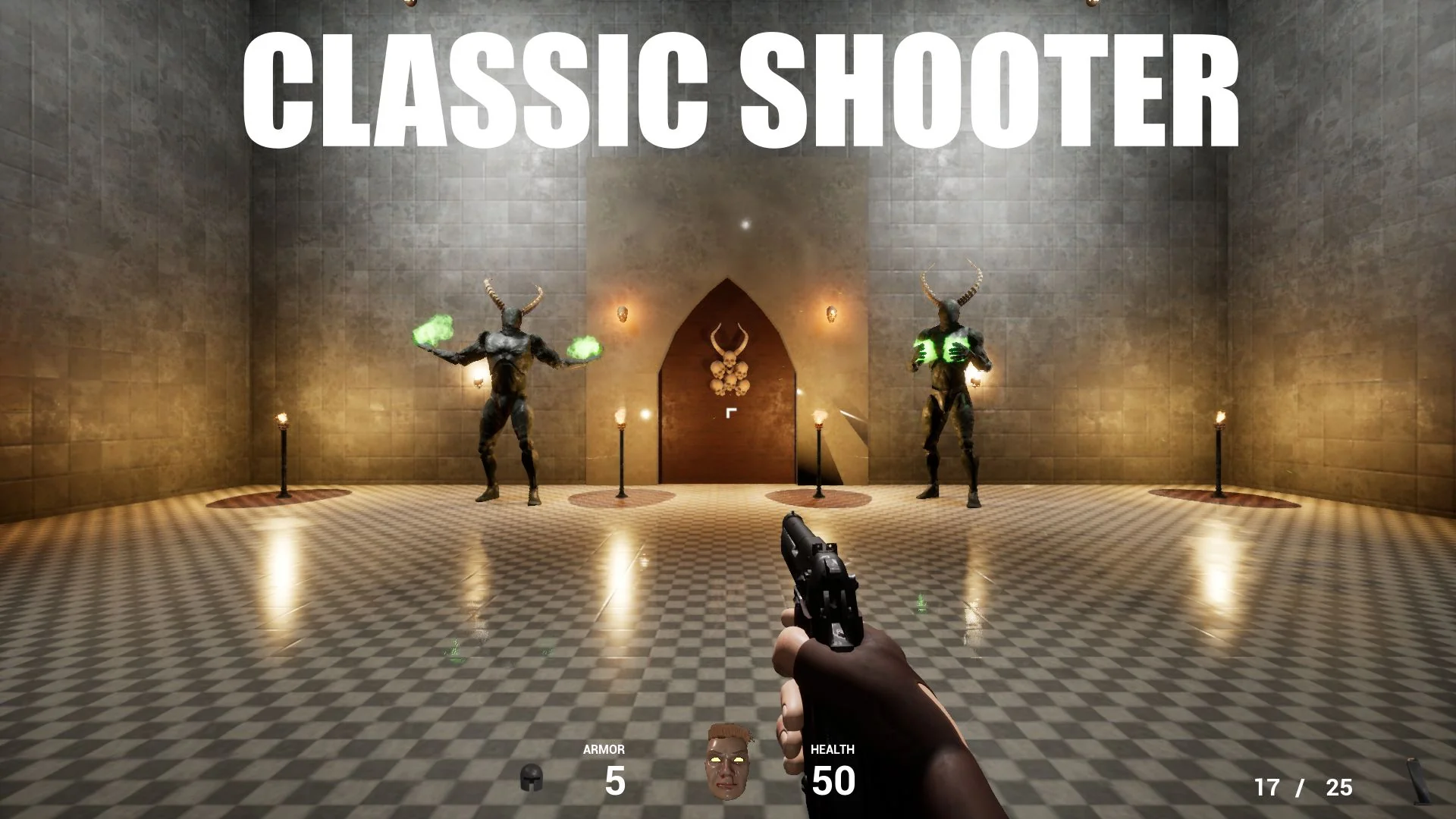
The first decision Classic Shooter helps with is not a weapon stat or a menu colour. It is the shape of a play space. A short corridor that ends at a switch, a courtyard with a spawning pentagram at its centre, a sealed room where a Rocket Demon Boss waits — those are the kinds of scenes the kit is put together to furnish.
The name sets the tone. The tag set — FPS, System, Template, Shooter, Starter, Doom, Kit, Pack, Weapon, Blueprint — points to a first-person shooter starter based on Blueprint logic rather than a modern military sim. The contents follow that line: a weapon roster, enemy AI, level furniture, pickups, a menu shell, and a tutorial series that walks through the whole thing node by node.
Scene Shapes That Suit Classic Shooter
Classic Shooter covers the corridor, the arena, and the boss chamber without forcing a single layout. Doors, switches, moving objects, secret areas, spawning pentagrams, and exploding barrels give a level designer the connective tissue between fights. A pentagram can mark where monsters enter. A switch can change the state of a room. A door can divide one encounter from the next. A barrel can turn a quiet corner into a hazard. A secret area can reward a player who looks beyond the obvious route.
That mix suits maps built from a sequence of readable rooms. One room can introduce a weapon; the next can test it against a named enemy; a third can hide a pickup behind a switch. The kit does not dictate the floor plan, but it supplies the parts that make a floor plan feel like a classic shooter rather than a flat kill box.
Classic Shooter's Seven-Weapon Spread
The weapon list runs from Fists and Pistol through Shotgun and Double Shotgun to Minigun, Plasmagun, and Bazooka. That is seven entries, and the spread is broad enough to support different combat rhythms: a basic fallback, two shotgun choices, a rapid-fire heavy, an energy weapon, and an explosive launcher.
A developer can use that range to pace weapon introduction across a level set. Fists and Pistol can anchor the opening. Shotgun and Double Shotgun can carry the middle. Minigun, Plasmagun, and Bazooka can define the later, louder encounters. The kit does not need to use every weapon in every map; the point is that the roster is already varied enough to let a designer choose which fights belong to which tool.
Eight AI Enemies and the Encounters They Suggest
The enemy roster includes Fire Demon, Shotgun Shooter, Flamethrowers Shooter, Homing Missile Demon, Melee Monster, Zombie, Green Fire Demon, and Rocket Demon Boss. All are listed with AI, which means a map maker can populate rooms with opponents that act rather than static props. The names also give encounter planning a vocabulary: a shotgun exchange, a flamethrower threat, a homing-missile problem, a melee rush, a zombie presence, a fire demon variant, and a boss that closes a level.
Those roles can be mixed by room. A corridor with a Shotgun Shooter asks for different movement than a hall with a Homing Missile Demon. A Melee Monster can pressure a doorway; a Flamethrowers Shooter can hold a space. The Rocket Demon Boss gives a map a natural summit, while the Zombie and the two fire demon types can fill the earlier spaces. Because the AI is part of the package, the work shifts from scripting every opponent from scratch to placing and combining the enemies already in the roster.
Pentagrams, Switches, and the Level-Clear Count
Monster spawning pentagrams are the clearest sign that the level assets are meant to be used, not just looked at. They give a visible origin point for enemies, which makes a room readable before the fight begins. Doors and switches then give the player something to operate between fights. The objects moving blueprint adds motion to a scene, whether that motion is part of a route or an obstacle. Exploding barrels sit in the same layer: simple level objects with a combat consequence.
Secrets and counts tie those pieces together. A secret area gives a map somewhere to hide an item or a route, and the level-clear report tracks monsters, items, and secrets. That turns a finished level into something a player can measure: how many enemies were cleared, how many items were found, how many secrets were uncovered. It is a small loop, but it is the loop that makes a classic shooter replayable. A designer can build a straightforward route and then use the count to reward a more thorough pass.
The Pickup and Menu Layer Around the Fighting
The pickup list covers several kinds of support. Medkits and Potions are recovery items; Armor and Invulnerability are protective pickups; Mega Health is a larger health item; Keys give the map a collectible progression piece; and Berserk comes with regeneration. The names alone make the pickup economy legible: some items patch up damage, some prevent it, some open routes, and one changes the terms of a fight by adding regeneration.
The menus complete the shell around the game. Main Menu, Pause Menu, Games, Graphics, Sound Options, and Game Over menu cover the screens a player expects to move through before, during, and after a session. Graphics and Sound Options give the project a settings layer. Pause and Game Over give the combat loop a clean stop and restart point. A developer can spend time on level pacing and enemy placement instead of rebuilding those screens from zero.
What the Classic Shooter Tutorials and Project Files Add
The tutorial series is the part that turns the package from a set of assets into something a developer can learn. Over 15 hours of video cover the entire pack node by node. That level of detail matters for a Blueprint-based shooter, where the value is not only in the visible weapons and enemies but in how the pieces are wired together. A developer can follow the series, then adjust the logic to fit a different map or a different combat rhythm.
Blender and Substance Painter files are included, so the art side is not a closed box. The current version is v1.51, built for engine v4.19 and above. A v1.5 demo exists, the overview and full tutorial series are marked v1.1, and Bloom is a game based on the pack. Those version notes are useful for anyone matching the kit to an existing project or checking how the package has changed over time. The files and tutorials also make the kit easier to extend: a team can study the existing weapons, enemies, and level assets, then build new content in the same style.
Classic Shooter is best suited to a developer who wants a Doom-flavoured FPS foundation with a full combat loop: weapons, AI enemies, level pieces, pickups, menus, and a tutorial path that explains the wiring. A project that needs only a single weapon and a flat arena will find more here than it needs. A project that wants corridors, secret rooms, key pickups, explosive barrels, waves of demons, and a boss at the end has the parts in one place.
 Shooter
 Shooter
 Shooter