"ae2217ad8e73450c"{"id":"1003018","slug":"classic-survival-horror-template","title":"Classic Survival Horror Template","category":"Action-Adventure","engine":"4.25+,5.0+","assetVersion":"","engineVersion":"Engine Version: 4.25+,5.0+","tag":"Action-Adventure","accent":"blue","visual":"mech","summary":"Blueprint-built survival horror template with weapons, supplies, keys, files, notes, flashlight, camera angles, interactable places, map, and test enemies.","platform":"Unreal Engine","indexPolicy":"index","publishedAt":"2026-11-25T16:21:34.856Z","updatedAt":"2026-11-25T16:21:34.856Z","sourceNotes":[],"fileContents":[],"compatibility":["Unreal Engine","Engine Version: 4.25+,5.0+"],"featuredImage":{"alt":"Classic Survival Horror Template","src":"/wp-content/uploads/published/2026/11/a5267af64a82-71ebd4e1-4b6d-43d0-9123-a1c3be8f331c-958bd1aca9.webp"},"hasDownloadLink":true,"downloads":0,"terms":[{"taxonomy":"category","slug":"action-adventure","name":"Action-Adventure"}],"galleryImages":[{"src":"/wp-content/uploads/published/2026/11/11c64893362c-c07510ea-d2a6-4187-a199-bda90b0d3338-ef96f0f9c4.webp","alt":"Classic Survival Horror Template"},{"src":"/wp-content/uploads/published/2026/11/7e7cd1ef60a9-833f5388-4e37-45ba-893e-90f73a3ba00e-4262d818fc.webp","alt":"Classic Survival Horror Template"},{"src":"/wp-content/uploads/published/2026/11/d25a5b598218-c18faca3-ce12-4c18-81d3-a1b41b2b0a4c-f779b3bb1b.webp","alt":"Classic Survival Horror Template"},{"src":"/wp-content/uploads/published/2026/11/b8fad11c278f-1598284b-dc9a-41ed-9334-a495b37f6ad4-c38dc4baa5.webp","alt":"Classic Survival Horror Template"},{"src":"/wp-content/uploads/published/2026/11/4895adee4226-c706302e-2957-47d5-855e-39aa81f07283-e17f04827c.webp","alt":"Classic Survival Horror Template"},{"src":"/wp-content/uploads/published/2026/11/3eedead6ac6d-0a585a32-ce9b-42dc-b91b-10e78e701caa-116e642bf3.webp","alt":"Classic Survival Horror Template"},{"src":"/wp-content/uploads/published/2026/11/d670e6376237-f800d067-6e59-4397-bac1-c97ca357eef7-424e103f31.webp","alt":"Classic Survival Horror Template"}],"accessPanel":{"kind":"resource","title":"Get this resource","safetyNote":"Resources are manually reviewed before listing to improve quality and reduce obvious risks.","fileName":"Classic Survival Horror Template.7z","resourceType":"Resource archive","versions":[]},"contentHtml":"\u003cp\u003eClassic Survival Horror Template collects the working parts of a survival horror project in one Blueprint-built package: weapons, supplies, files, notes, keys, a flashlight, camera angles, interactable places, a map, and test enemies. Its tags place it under Action, Shooter, Old, Blueprint, Horror, and School. The range is broad for a single template, covering combat, item and document content, light, view control, environmental interaction, navigation, and enemy testing.\u003c/p\u003e \u003ch2\u003eThe Survival Horror Template's Included Parts\u003c/h2\u003e\n\u003cp\u003eThe included list is the clearest statement of scope. Weapons and enemies sit at the combat end. Supplies, keys, files, and notes cover the material a player handles or reads. The flashlight, camera angles, interactable places, and map address how a project presents space, light, and points of contact. None of these are presented as separate extras; they are the named contents of the template.\u003c/p\u003e\n\u003cp\u003eThat spread has a practical consequence. A creator looking for a single prop or one isolated mechanic is looking at the wrong scale. This is a framework with several layers of play already represented: something to fight with, something to manage, something to read, something to carry as a key item, something to light the way, a way to frame the view, places to interact with, a map to orient by, and enemies to test against. The template is not a blank project with a genre label attached; the label is backed by a concrete set of parts.\u003c/p\u003e \u003ch2\u003eWeapons, Supplies, Keys, and Written Material\u003c/h2\u003e\n\u003cp\u003eWeapons and supplies are listed separately, which keeps combat and resources from collapsing into one category. The same separation applies to keys, files, and notes. Keys are their own entry in the set; files and notes are their own written-material entries. A project can therefore treat each as a distinct content type instead of forcing every item into a single generic slot.\u003c/p\u003e\n\u003cp\u003eFiles and notes give the template a place for written content. They sit alongside the playable elements rather than outside them. Supplies add a resource layer to the item set, while keys add a key-item layer. The exact balance between those layers is left to the project, but the template supplies the categories themselves.\u003c/p\u003e \u003ch2\u003eBlueprint-Only Logic and What It Changes\u003c/h2\u003e\n\u003cp\u003eThe template is 100% made with Blueprints. That single fact shapes how the package is handled. The gameplay logic stays in Blueprint graphs, so edits and inspection happen in the visual scripting environment rather than through a separate code layer. For a team already building in Blueprints, this keeps the template inside the same authoring model as the rest of the project.\u003c/p\u003e\n\u003cp\u003eThe Blueprint tag is not just a technical footnote; it is one of the resource's public descriptors. It tells a creator that the systems are exposed as Blueprint assets. In practice, that means the template can be opened, read, and changed at the graph level. A project does not have to reverse-engineer a compiled black box to understand what the template is doing. The visual scripting approach also makes the boundaries between the listed parts easier to see: weapons, supplies, keys, files, notes, flashlight, camera angles, interactable places, map, and test enemies all belong to the same Blueprint-built structure.\u003c/p\u003e \u003ch2\u003eCamera Angles, Interactable Places, and the Map\u003c/h2\u003e\n\u003cp\u003eCamera angles are named as a distinct element, and interactable places are named separately from the map. That separation is useful to keep in view. Camera angles concern how the game is framed. Interactable places concern where the player can act on the environment. The map concerns spatial reference. The flashlight adds a light source to the same exploration layer, and it is listed as its own item rather than being absorbed into the scenery.\u003c/p\u003e\n\u003cp\u003eFor a survival horror project, those pieces do different jobs. A camera angle establishes the view. An interactable place gives the view somewhere to lead. The map gives the player a way to relate one place to another. The flashlight changes how the player sees the space. Because the template includes all four, a creator can work on presentation and navigation as connected concerns rather than treating them as unrelated additions. The camera is not just a default view, the map is not tacked on as an extra, and the flashlight is not just a prop; each is part of the template's stated content.\u003c/p\u003e \u003ch2\u003eTest Enemies and the School-Tagged Horror Scope\u003c/h2\u003e\n\u003cp\u003eThe enemies in the template are explicitly test enemies. That label sets the right expectation. They are present for testing the combat and interaction structure, not as a final enemy library. A creator can use them to exercise weapons and the surrounding systems while deciding what the project's own enemies should be. The distinction is small in wording but important in planning: test enemies are scaffolding, and the template says so.\u003c/p\u003e\n\u003cp\u003eThe tags add another layer of context. Action and Shooter fit the presence of weapons and enemies. Horror fits the survival horror framework. Old points to an older style, and School adds a specific thematic marker. Blueprint identifies the implementation approach. Together, the tags give a quick read on the template's genre and technical character without replacing the detailed contents list. The School tag is especially telling because it narrows the otherwise broad horror label toward a particular setting and era.\u003c/p\u003e \u003ch2\u003eClassic Survival Horror Template as a Working Structure\u003c/h2\u003e\n\u003cp\u003eThe strongest way to read the package is as a working structure with named modules. Weapons handle the combat surface. Supplies and keys handle item categories. Files and notes handle written material. The flashlight, camera angles, interactable places, and map handle exploration and presentation. Test enemies provide something to test against. That is a coherent spread for a survival horror starting point, and it is all built with Blueprints.\u003c/p\u003e\n\u003cp\u003eSupporting material is split between a tutorial playlist and a demonstration video, which gives a creator two ways to approach the template: follow the hints and tutorials or watch the demonstration to see the pieces working together. The template's scope is already clear from its contents, but those materials make the intended workflow easier to inspect before a project adopts it.\u003c/p\u003e\n\u003cp\u003eThe package is set up to handle the foundational survival horror pieces: combat, resources, key items, documents, light, camera framing, interaction points, a map, and test enemies. A project can begin from those systems instead of assembling each one from scratch. The Blueprint-only build keeps that starting structure editable in visual scripting, and the tags give it a clear position among action, shooter, old-school, horror, and school-themed resources.\u003c/p\u003e\n\n\u003ch2\u003eMore From The Same Workflow\u003c/h2\u003e\n\u003cul\u003e\n\u003cli\u003e\u003ca href=\"https://3dcghub.com/modern-survival-horror-framework/\" rel=\"noopener noreferrer\"\u003eModern Survival Horror Framework\u003c/a\u003e\u003c/li\u003e\n\u003cli\u003e\u003ca href=\"https://3dcghub.com/advanced-asymmetrical-multiplayer-template/\" rel=\"noopener noreferrer\"\u003eAdvanced Asymmetrical Multiplayer Template\u003c/a\u003e\u003c/li\u003e\n\u003cli\u003e\u003ca href=\"https://3dcghub.com/advanced-survival-horror/\" rel=\"noopener noreferrer\"\u003eAdvanced Survival Horror\u003c/a\u003e\u003c/li\u003e\n\u003cli\u003e\u003ca href=\"https://3dcghub.com/classic-survival-horror-framework-v2/\" rel=\"noopener noreferrer\"\u003eClassic Survival Horror Framework V2\u003c/a\u003e\u003c/li\u003e\n\u003cli\u003e\u003ca href=\"https://3dcghub.com/survival-horror-inventory-props-pack/\" rel=\"noopener noreferrer\"\u003eSurvival Horror Inventory Props Pack\u003c/a\u003e\u003c/li\u003e\n\u003c/ul\u003e","contentTextLength":6910,"navigation":{"current":26,"total":4964,"previous":{"id":"1003019","slug":"clazy-runner-action-pack","title":"CLazy Runner Action Pack","category":"Locomotion / Gaits","platform":"Unreal Engine","updatedAt":"2026-11-25T16:22:40.962Z"},"next":{"id":"1003017","slug":"classic-shooter","title":"Classic Shooter","category":"Shooter","platform":"Unreal Engine","updatedAt":"2026-11-25T16:20:51.736Z"}},"relatedResources":[{"id":"1001898","slug":"modern-survival-horror-framework","title":"Modern Survival Horror Framework","category":"Action-Adventure","engine":"5.8+","assetVersion":"","engineVersion":"Engine Version: 5.8+","tag":"Action-Adventure","accent":"blue","visual":"mech","summary":"An Unreal Engine framework featuring Motion Matching locomotion, grid inventory, enemy AI, and modular systems for third-person survival horror games.","platform":"Unreal Engine","indexPolicy":"index","publishedAt":"2026-10-22T11:37:21.304Z","updatedAt":"2026-10-22T11:37:21.304Z","sourceNotes":[],"fileContents":[],"compatibility":["Unreal Engine","Engine Version: 5.8+"],"featuredImage":{"alt":"Modern Survival Horror Framework","src":"/wp-content/uploads/published/2026/10/77d0793bac37-ebd2bece-1fbf-4d5a-b1a7-cc8dd57631eb-fcf413f24e.webp"},"fileSizeBytes":2190193664,"hasDownloadLink":true,"downloads":5},{"id":"1002574","slug":"advanced-asymmetrical-multiplayer-template","title":"Advanced Asymmetrical Multiplayer Template","category":"Action-Adventure","engine":"5.0+","assetVersion":"","engineVersion":"Engine Version: 5.0+","tag":"Action-Adventure","accent":"blue","visual":"mech","summary":"Explore the Advanced Asymmetrical Multiplayer Template, offering a 4 vs 1 survival horror framework, custom perspectives, and Blueprint networking.","platform":"Unreal Engine","indexPolicy":"index","publishedAt":"2026-11-13T20:13:09.696Z","updatedAt":"2026-11-13T20:13:09.696Z","sourceNotes":[],"fileContents":[],"compatibility":["Unreal Engine","Engine Version: 5.0+"],"featuredImage":{"alt":"Advanced Asymmetrical Multiplayer Template","src":"/wp-content/uploads/published/2026/11/0ee25474a0b8-3617e541-bae5-451b-8057-c9ae9698bff4-2480d8ee2f.webp"},"fileSizeBytes":529829261,"hasDownloadLink":true,"downloads":0},{"id":"1001786","slug":"advanced-survival-horror","title":"Advanced Survival Horror","category":"Action-Adventure","engine":"5.4+","assetVersion":"","engineVersion":"Engine Version: 5.4+","tag":"Action-Adventure","accent":"blue","visual":"mech","summary":"A comprehensive breakdown of the Advanced Survival Horror template, covering its Blueprint mechanics, puzzles, inventory, combat, and traversal systems.","platform":"Unreal Engine","indexPolicy":"index","publishedAt":"2026-10-21T07:39:38.733Z","updatedAt":"2026-10-21T07:39:38.733Z","sourceNotes":[],"fileContents":[],"compatibility":["Unreal Engine","Engine Version: 5.4+"],"featuredImage":{"alt":"Advanced Survival Horror","src":"/wp-content/uploads/published/2026/10/05196d52fc48-bef95558-8d8c-4c14-a9d6-5eca2b82646d-ed3a16f175.webp"},"fileSizeBytes":45541040,"hasDownloadLink":true,"downloads":0}]}[{"id":4225,"sourceId":4225,"taxonomyId":4225,"taxonomy":"category","slug":"asset-library","name":"Asset Library","parentId":null,"count":4817,"hasChildren":true,"href":"/","seoTitle":"Free Game Assets Library | 3DCGHUB","seoDescription":"Browse free Unreal Engine, Unity, Blender assets and game development tutorials on 3DCGHUB with previews, compatibility notes, and secure downloads.","sitemapEnabled":true,"children":[{"id":4227,"sourceId":4227,"taxonomyId":4227,"taxonomy":"category","slug":"blender-add-ons-plugins","name":"Blender Add-ons \u0026 Plugins","parentId":4225,"count":10,"hasChildren":false,"href":"/category/blender-add-ons-plugins/","seoTitle":"Free Blender Add-ons \u0026 Plugins | 3DCGHUB","seoDescription":"Browse free Blender Add-ons \u0026 Plugins tools for Blender on 3DCGHUB: curated downloads with preview images, compatibility notes and secure download access.","sitemapEnabled":true},{"id":514,"sourceId":514,"taxonomyId":514,"taxonomy":"category","slug":"unity-2","name":"Unity","parentId":4225,"count":453,"hasChildren":true,"href":"/category/unity-2/","seoTitle":"Free Unity Assets | 3DCGHUB","seoDescription":"Browse free Unity resources on 3DCGHUB: curated downloads with preview images, compatibility notes and secure download access.","sitemapEnabled":true,"children":[{"id":523,"sourceId":523,"taxonomyId":523,"taxonomy":"category","slug":"2d","name":"2D","parentId":514,"count":1,"hasChildren":true,"href":"/category/2d/","seoTitle":"Free Unity 2D | 3DCGHUB","seoDescription":"Browse free 2D assets for Unity on 3DCGHUB: curated downloads with preview images, compatibility notes and secure download access.","sitemapEnabled":true},{"id":515,"sourceId":515,"taxonomyId":515,"taxonomy":"category","slug":"3d-unity-2","name":"3D","parentId":514,"count":162,"hasChildren":true,"href":"/category/3d-unity-2/","seoTitle":"Free Unity 3D Assets | 3DCGHUB","seoDescription":"Browse free 3D assets for Unity on 3DCGHUB: curated downloads with preview images, compatibility notes and secure download access.","sitemapEnabled":true},{"id":565,"sourceId":565,"taxonomyId":565,"taxonomy":"category","slug":"add-ons","name":"Add-Ons","parentId":514,"count":2,"hasChildren":false,"href":"/category/add-ons/","seoTitle":"Free Unity Add-Ons | 3DCGHUB","seoDescription":"Browse free Add-Ons assets for Unity on 3DCGHUB: curated downloads with preview images, compatibility notes and secure download access.","sitemapEnabled":true},{"id":529,"sourceId":529,"taxonomyId":529,"taxonomy":"category","slug":"audio-unity-2","name":"Audio","parentId":514,"count":1,"hasChildren":true,"href":"/category/audio-unity-2/","seoTitle":"Free Unity Audio | 3DCGHUB","seoDescription":"Browse free Audio for Unity on 3DCGHUB: curated downloads with preview images, compatibility notes and secure download access.","sitemapEnabled":true},{"id":557,"sourceId":557,"taxonomyId":557,"taxonomy":"category","slug":"templates","name":"Templates","parentId":514,"count":36,"hasChildren":true,"href":"/category/templates/","seoTitle":"Free Unity Templates | 3DCGHUB","seoDescription":"Browse free Unity project templates on 3DCGHUB. Starter kits with previews, compatibility notes, and secure download access.","sitemapEnabled":true},{"id":533,"sourceId":533,"taxonomyId":533,"taxonomy":"category","slug":"tools-unity-2","name":"Tools","parentId":514,"count":0,"hasChildren":true,"href":"/category/tools-unity-2/","sitemapEnabled":true},{"id":554,"sourceId":554,"taxonomyId":554,"taxonomy":"category","slug":"vfx-unity-2","name":"VFX","parentId":514,"count":4,"hasChildren":true,"href":"/category/vfx-unity-2/","seoTitle":"Free Unity VFX | 3DCGHUB","seoDescription":"Browse free VFX for Unity on 3DCGHUB: curated downloads with preview images, compatibility notes and secure download access.","sitemapEnabled":true}]},{"id":511,"sourceId":511,"taxonomyId":511,"taxonomy":"category","slug":"unreal-engine-2","name":"Unreal Engine","parentId":4225,"count":4355,"hasChildren":true,"href":"/category/unreal-engine-2/","seoTitle":"Free Unreal Engine Assets | 3DCGHUB","seoDescription":"Browse free Unreal Engine resources on 3DCGHUB: curated downloads with preview images, compatibility notes and secure download access.","sitemapEnabled":true,"children":[{"id":54,"sourceId":54,"taxonomyId":54,"taxonomy":"category","slug":"3d","name":"3D","parentId":511,"count":2441,"hasChildren":true,"href":"/category/3d/","seoTitle":"Free Unreal Engine 3D | 3DCGHUB","seoDescription":"Browse free 3D assets for Unreal Engine on 3DCGHUB: curated downloads with preview images, compatibility notes and secure download access.","sitemapEnabled":true},{"id":441,"sourceId":441,"taxonomyId":441,"taxonomy":"category","slug":"animations","name":"Animations","parentId":511,"count":269,"hasChildren":true,"href":"/category/animations/","seoTitle":"Free Unreal Engine Animations | 3DCGHUB","seoDescription":"Browse free Animations for Unreal Engine on 3DCGHUB: curated downloads with preview images, compatibility notes and secure download access.","sitemapEnabled":true},{"id":446,"sourceId":446,"taxonomyId":446,"taxonomy":"category","slug":"audio","name":"Audio","parentId":511,"count":63,"hasChildren":true,"href":"/category/audio/","seoTitle":"Free Unreal Engine Audio Resources | 3DCGHUB","seoDescription":"Browse free Unreal Engine audio resources including sound effects, voices, dialogue, and ambient sounds. Curated free downloads on 3DCGHUB.","sitemapEnabled":true},{"id":466,"sourceId":466,"taxonomyId":466,"taxonomy":"category","slug":"game-systems","name":"Game Systems","parentId":511,"count":381,"hasChildren":true,"href":"/category/game-systems/","seoTitle":"Free Unreal Engine Game Systems | 3DCGHUB","seoDescription":"Browse free Game Systems tools for Unreal Engine on 3DCGHUB: curated downloads with preview images, compatibility notes and secure download access.","sitemapEnabled":true},{"id":478,"sourceId":478,"taxonomyId":478,"taxonomy":"category","slug":"game-templates","name":"Game Templates","parentId":511,"count":155,"hasChildren":true,"href":"/category/game-templates/","seoTitle":"Free Unreal Engine Game Templates | 3DCGHUB","seoDescription":"Browse free Game Templates for Unreal Engine on 3DCGHUB: curated downloads with preview images, compatibility notes and secure download access.","sitemapEnabled":true},{"id":432,"sourceId":432,"taxonomyId":432,"taxonomy":"category","slug":"hdri","name":"HDRI","parentId":511,"count":6,"hasChildren":true,"href":"/category/hdri/","seoTitle":"Free Unreal Engine HDRI | 3DCGHUB","seoDescription":"Browse free Unreal Engine HDRI skies and lighting maps on 3DCGHUB. Environment lighting with previews and secure downloads.","sitemapEnabled":true},{"id":228,"sourceId":228,"taxonomyId":228,"taxonomy":"category","slug":"material-and-textures","name":"Material \u0026 Textures","parentId":511,"count":172,"hasChildren":true,"href":"/category/material-and-textures/","seoTitle":"Free Unreal Engine Material \u0026 Textures | 3DCGHUB","seoDescription":"Browse free Material \u0026 Textures for Unreal Engine on 3DCGHUB: curated downloads with preview images, compatibility notes and secure download access.","sitemapEnabled":true},{"id":298,"sourceId":298,"taxonomyId":298,"taxonomy":"category","slug":"sprites-and-flipbooks","name":"Sprites \u0026 Flipbooks","parentId":511,"count":18,"hasChildren":true,"href":"/category/sprites-and-flipbooks/","seoTitle":"Free Unreal Engine Sprites \u0026 Flipbooks | 3DCGHUB","seoDescription":"Browse free Sprites \u0026 Flipbooks assets for Unreal Engine on 3DCGHUB: curated downloads with preview images, compatibility notes and secure download access.","sitemapEnabled":true},{"id":489,"sourceId":489,"taxonomyId":489,"taxonomy":"category","slug":"tools-and-plugins","name":"Tools \u0026 Plugins","parentId":511,"count":390,"hasChildren":true,"href":"/category/tools-and-plugins/","seoTitle":"Free Unreal Engine Tools \u0026 Plugins | 3DCGHUB","seoDescription":"Browse free Tools \u0026 Plugins for Unreal Engine on 3DCGHUB: curated downloads with preview images, compatibility notes and secure download access.","sitemapEnabled":true},{"id":459,"sourceId":459,"taxonomyId":459,"taxonomy":"category","slug":"ui","name":"UI","parentId":511,"count":47,"hasChildren":true,"href":"/category/ui/","seoTitle":"Free Unreal Engine UI | 3DCGHUB","seoDescription":"Browse free UI for Unreal Engine on 3DCGHUB: curated downloads with preview images, compatibility notes and secure download access.","sitemapEnabled":true},{"id":450,"sourceId":450,"taxonomyId":450,"taxonomy":"category","slug":"vfx","name":"VFX","parentId":511,"count":413,"hasChildren":true,"href":"/category/vfx/","seoTitle":"Free Unreal Engine VFX | 3DCGHUB","seoDescription":"Browse free VFX for Unreal Engine on 3DCGHUB: curated downloads with preview images, compatibility notes and secure download access.","sitemapEnabled":true}]}]},{"id":4222,"sourceId":4222,"taxonomyId":4222,"taxonomy":"category","slug":"tutorial-library","name":"Tutorial Library","parentId":null,"count":117,"hasChildren":false,"href":"/tutorials/","seoTitle":"Free Game Development Tutorial Library | 3DCGHUB","seoDescription":"Browse free game development tutorials for Unreal Engine, Unity, Blender, and more on 3DCGHUB with practical workflows and secure downloads.","sitemapEnabled":true}]
Resource screenshots
1 / 7
Asset drops
Daily Asset Drops
Follow 3DCGHUB on Telegram for daily Unreal, Unity & Blender drops and curated CC0 releases.
Resources are manually reviewed before listing to improve quality and reduce obvious risks.
Reviewed archive
Action-Adventure
Classic Survival Horror Template
Blueprint-built survival horror template with weapons, supplies, keys, files, notes, flashlight, camera angles, interactable places, map, and test enemies.
Classic Survival Horror Template collects the working parts of a survival horror project in one Blueprint-built package: weapons, supplies, files, notes, keys, a flashlight, camera angles, interactable places, a map, and test enemies. Its tags place it under Action, Shooter, Old, Blueprint, Horror, and School. The range is broad for a single template, covering combat, item and document content, light, view control, environmental interaction, navigation, and enemy testing.
The Survival Horror Template's Included Parts
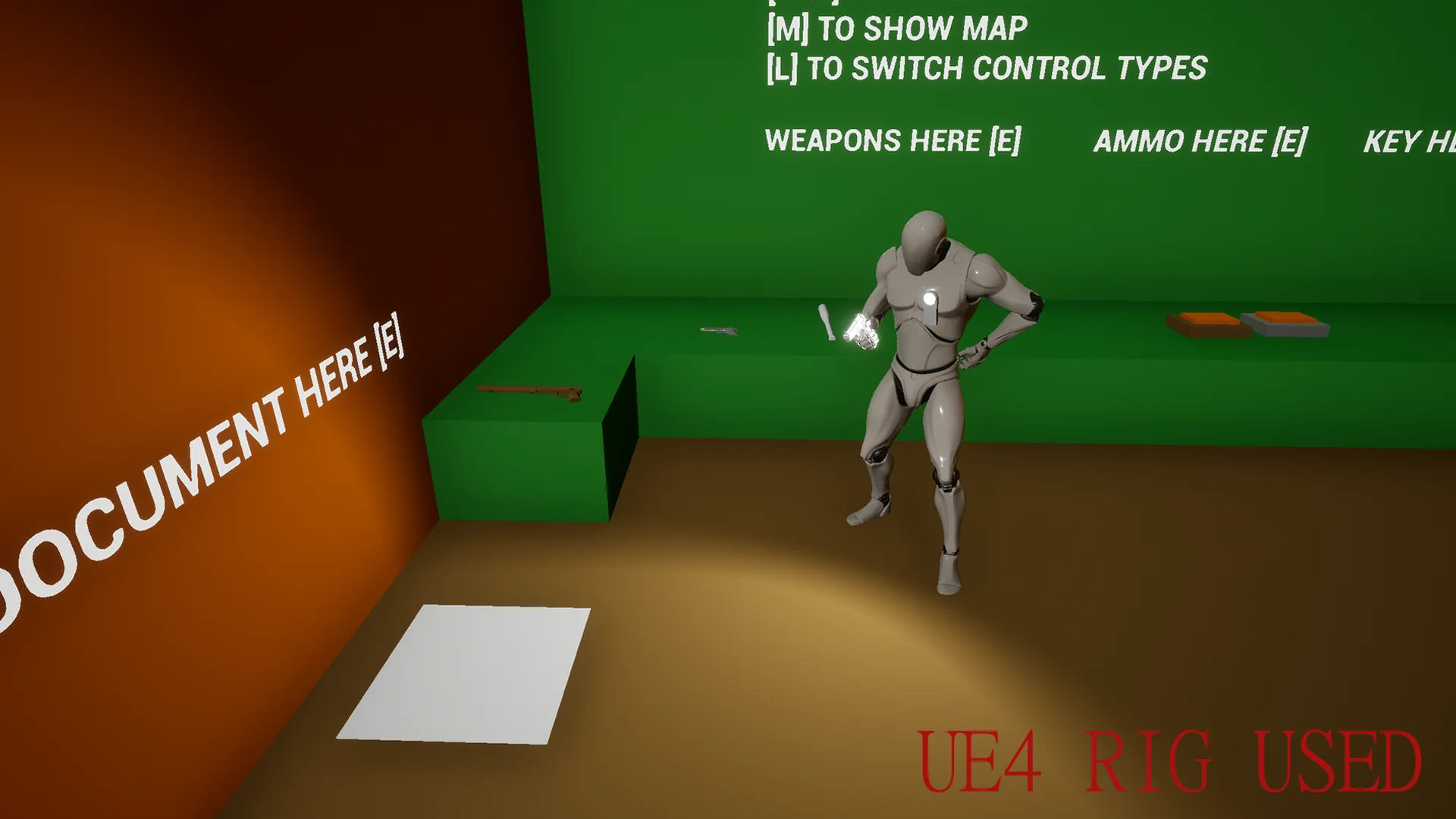
The included list is the clearest statement of scope. Weapons and enemies sit at the combat end. Supplies, keys, files, and notes cover the material a player handles or reads. The flashlight, camera angles, interactable places, and map address how a project presents space, light, and points of contact. None of these are presented as separate extras; they are the named contents of the template.
That spread has a practical consequence. A creator looking for a single prop or one isolated mechanic is looking at the wrong scale. This is a framework with several layers of play already represented: something to fight with, something to manage, something to read, something to carry as a key item, something to light the way, a way to frame the view, places to interact with, a map to orient by, and enemies to test against. The template is not a blank project with a genre label attached; the label is backed by a concrete set of parts.
Weapons, Supplies, Keys, and Written Material
Weapons and supplies are listed separately, which keeps combat and resources from collapsing into one category. The same separation applies to keys, files, and notes. Keys are their own entry in the set; files and notes are their own written-material entries. A project can therefore treat each as a distinct content type instead of forcing every item into a single generic slot.
Files and notes give the template a place for written content. They sit alongside the playable elements rather than outside them. Supplies add a resource layer to the item set, while keys add a key-item layer. The exact balance between those layers is left to the project, but the template supplies the categories themselves.
Blueprint-Only Logic and What It Changes
The template is 100% made with Blueprints. That single fact shapes how the package is handled. The gameplay logic stays in Blueprint graphs, so edits and inspection happen in the visual scripting environment rather than through a separate code layer. For a team already building in Blueprints, this keeps the template inside the same authoring model as the rest of the project.
The Blueprint tag is not just a technical footnote; it is one of the resource's public descriptors. It tells a creator that the systems are exposed as Blueprint assets. In practice, that means the template can be opened, read, and changed at the graph level. A project does not have to reverse-engineer a compiled black box to understand what the template is doing. The visual scripting approach also makes the boundaries between the listed parts easier to see: weapons, supplies, keys, files, notes, flashlight, camera angles, interactable places, map, and test enemies all belong to the same Blueprint-built structure.
Camera Angles, Interactable Places, and the Map
Camera angles are named as a distinct element, and interactable places are named separately from the map. That separation is useful to keep in view. Camera angles concern how the game is framed. Interactable places concern where the player can act on the environment. The map concerns spatial reference. The flashlight adds a light source to the same exploration layer, and it is listed as its own item rather than being absorbed into the scenery.
For a survival horror project, those pieces do different jobs. A camera angle establishes the view. An interactable place gives the view somewhere to lead. The map gives the player a way to relate one place to another. The flashlight changes how the player sees the space. Because the template includes all four, a creator can work on presentation and navigation as connected concerns rather than treating them as unrelated additions. The camera is not just a default view, the map is not tacked on as an extra, and the flashlight is not just a prop; each is part of the template's stated content.
Test Enemies and the School-Tagged Horror Scope
The enemies in the template are explicitly test enemies. That label sets the right expectation. They are present for testing the combat and interaction structure, not as a final enemy library. A creator can use them to exercise weapons and the surrounding systems while deciding what the project's own enemies should be. The distinction is small in wording but important in planning: test enemies are scaffolding, and the template says so.
The tags add another layer of context. Action and Shooter fit the presence of weapons and enemies. Horror fits the survival horror framework. Old points to an older style, and School adds a specific thematic marker. Blueprint identifies the implementation approach. Together, the tags give a quick read on the template's genre and technical character without replacing the detailed contents list. The School tag is especially telling because it narrows the otherwise broad horror label toward a particular setting and era.
Classic Survival Horror Template as a Working Structure
The strongest way to read the package is as a working structure with named modules. Weapons handle the combat surface. Supplies and keys handle item categories. Files and notes handle written material. The flashlight, camera angles, interactable places, and map handle exploration and presentation. Test enemies provide something to test against. That is a coherent spread for a survival horror starting point, and it is all built with Blueprints.
Supporting material is split between a tutorial playlist and a demonstration video, which gives a creator two ways to approach the template: follow the hints and tutorials or watch the demonstration to see the pieces working together. The template's scope is already clear from its contents, but those materials make the intended workflow easier to inspect before a project adopts it.
The package is set up to handle the foundational survival horror pieces: combat, resources, key items, documents, light, camera framing, interaction points, a map, and test enemies. A project can begin from those systems instead of assembling each one from scratch. The Blueprint-only build keeps that starting structure editable in visual scripting, and the tags give it a clear position among action, shooter, old-school, horror, and school-themed resources.
 Action-Adventure
 Action-Adventure
 Action-Adventure