"ae2217ad8e73450c"{"id":"1003016","slug":"city-builder-template","title":"City Builder Template","category":"City Builder","engine":"4.25+,5.0+","assetVersion":"","engineVersion":"Engine Version: 4.25+,5.0+","tag":"City Builder","accent":"blue","visual":"city","summary":"A Blueprint city-building template with residential and commercial buildings on a shared base class, two currencies, and road and building destruction.","platform":"Unreal Engine","indexPolicy":"index","publishedAt":"2026-11-25T16:20:06.085Z","updatedAt":"2026-11-25T16:20:06.085Z","sourceNotes":[],"fileContents":[],"compatibility":["Unreal Engine","Engine Version: 4.25+,5.0+"],"featuredImage":{"alt":"City Builder Template","src":"/wp-content/uploads/published/2026/11/ab475dd1cc88-82a6a07e-77be-4b61-8aa1-20dd0aeef47d-3d36c93ace.webp"},"hasDownloadLink":true,"downloads":0,"terms":[{"taxonomy":"category","slug":"city-builder","name":"City Builder"}],"galleryImages":[{"src":"/wp-content/uploads/published/2026/11/cc7d92d20c8c-f8a22a1f-d386-476c-972e-71b288a24400-883968d546.webp","alt":"City Builder Template"},{"src":"/wp-content/uploads/published/2026/11/c8980495fbb9-173af213-f43e-465d-864d-4232b363cf76-c487db1808.webp","alt":"City Builder Template"},{"src":"/wp-content/uploads/published/2026/11/e49b136ce6fb-2427dfed-3f16-4d15-aa1e-4fa52080f2b3-e4207d27b4.webp","alt":"City Builder Template"},{"src":"/wp-content/uploads/published/2026/11/e6523db2a5ea-bc877ffe-6b0f-4ae4-b1c1-4d377f9ef1ae-c2b87b5633.webp","alt":"City Builder Template"},{"src":"/wp-content/uploads/published/2026/11/9eea6bcf0094-2b997405-b31b-4125-b104-980905550136-68d72074c6.webp","alt":"City Builder Template"},{"src":"/wp-content/uploads/published/2026/11/445a1b756f11-e48b1c38-4d35-4ae0-8e3f-70f8227eccda-d017061029.webp","alt":"City Builder Template"},{"src":"/wp-content/uploads/published/2026/11/b3edbbc00471-4318271b-56d3-4507-9599-d03e4662de2a-6ded3021ce.webp","alt":"City Builder Template"}],"accessPanel":{"kind":"resource","title":"Get this resource","safetyNote":"Resources are manually reviewed before listing to improve quality and reduce obvious risks.","fileName":"City Builder Template.7z","resourceType":"Resource archive","versions":[]},"contentHtml":"\u003ch2\u003eA City Sim Stalls in the Same Place Every Time\u003c/h2\u003e\n\u003cp\u003eThe first stretch of a city-building project usually disappears into structure rather than gameplay. Someone has to decide how buildings are classified, how a new type gets added without copying the same logic a second time, and how a second currency lives alongside the first without the economy turning into a knot. City Builder Template takes that groundwork as its starting point rather than leaving it to the first week of production.\u003c/p\u003e\n\u003cp\u003eTwo building types are already in place, both sitting on a shared base class, and a two-currency setup is supported from the outset. What that leaves is the part that is genuinely specific to your game: the rules, the content, the feel of the city.\u003c/p\u003e \u003ch2\u003eResidential and Commercial Buildings, One Parent Class\u003c/h2\u003e\n\u003cp\u003eThe template ships with two building types, residential and commercial. Neither exists as an isolated actor. Both are derived from a base class, so the behaviour they have in common sits at one level and the differences between them sit below it.\u003c/p\u003e\n\u003cp\u003eThat arrangement is more useful than it looks at a glance. The two buildings work as examples of a pattern: anything a residential block and a commercial block share is handled where they meet, while anything that separates them stays in the subtype. When a rule changes for every building in the city, the base is the place to change it, and both existing types follow without being touched individually.\u003c/p\u003e \u003ch3\u003eExtending the Builder With New Building Types\u003c/h3\u003e\n\u003cp\u003eThe base class exists explicitly so new building types can be created easily. Growth becomes a matter of extending downward rather than rebuilding sideways — a new type inherits the shared foundation and adds only what makes it distinct.\u003c/p\u003e\n\u003cp\u003eThe tag set, which lists Template, Building, Industrial and Simulation alongside Blueprint, points at the kind of city this is meant to become and hints at the direction a third or fourth type might take. The hierarchy is what keeps those additions inexpensive. Without it, every new structure means repeating the same plumbing from scratch.\u003c/p\u003e \u003ch2\u003eTwo Currencies, Two Different Sources\u003c/h2\u003e\n\u003cp\u003eTwo currencies are supported out of the box: normal and premium. The split is not cosmetic. Normal currency is earned in game, tied to play itself. Premium currency is deliberately left open — the developer decides how players obtain it, whether that means a real-money transaction, a trading system, or another route entirely.\u003c/p\u003e\n\u003cp\u003eKeeping the two separate means the progression economy and the premium channel do not have to share a single balance. A designer can tune how quickly normal currency accumulates through play without disturbing the premium side, and can shape the premium route to fit whatever model the game uses.\u003c/p\u003e\n\u003cp\u003eWhat the template supplies is the division itself, plus the support that makes both currencies work as separate tracks. What sits on either side — the sources, the sinks, the pace — remains a design decision rather than something fixed in advance.\u003c/p\u003e \u003ch2\u003eDestroying Roads and Buildings\u003c/h2\u003e\n\u003cp\u003eA video update added the ability to destroy roads and buildings. That one capability changes the character of the whole template, because the city stops being a one-way layout. Whatever a player puts down can be taken away again. Roads are included alongside the buildings, so the network connecting everything is as editable as the structures standing on it.\u003c/p\u003e\n\u003cp\u003eFor a simulation, that opens the door to replanning. A district that no longer works can be cleared. A route laid out badly can be removed rather than lived with. Because the two building types already share a base class, the city can grow and shrink around the same underlying structure instead of treating demolition as a special case bolted on afterward.\u003c/p\u003e\n\u003cp\u003eA video preview shows the template in motion, and the newer video covers the destruction feature specifically — useful for judging how removal reads in practice before committing to a layout system.\u003c/p\u003e \u003ch2\u003eUsing Your Own Models in the Template\u003c/h2\u003e\n\u003cp\u003eThe two buildings are not intended to dictate art direction. A tutorial walks through using your own models, which makes the shipped residential and commercial pieces effectively placeholders for your own architecture.\u003c/p\u003e\n\u003cp\u003eHere the base class pays off a second time. Swapping models is an art-side operation; the building logic stays where it is, and the hierarchy does not need to be rethought just because the geometry changed. A team with an established look can bring its own meshes into the scene and keep the classification, the currencies, and the destruction behaviour that the template already carries.\u003c/p\u003e\n\u003cp\u003eFor an artist joining a project mid-production, that is the practical entry point. The tutorial defines the handoff between the model and the systems already in place, so new assets slot into a working city rather than requiring a parallel test scene.\u003c/p\u003e \u003ch2\u003eWhere It Fits in a Production\u003c/h2\u003e\n\u003cp\u003eThe Blueprint tag places these systems in a visual scripting context rather than a code-only package, which suits teams that want to open logic up and read it directly while iterating. Combined with the Building, Industrial and Simulation tags, it describes a template aimed squarely at the management side of a city game: structures, growth, currency, and the ability to undo what has been laid down.\u003c/p\u003e\n\u003cp\u003eThat makes it a reasonable foundation for a prototype or a vertical slice, where the question is whether the loop holds together — place a building, earn normal currency, extend the city, tear something down — before a full art pass exists. It also suits smaller simulation projects that need a working building hierarchy without building one from zero.\u003c/p\u003e\n\u003cp\u003eThe most natural fit is a project that already knows what its city should look like but wants the classification, the currency split, and the demolition rules resolved first. Bring the models through the tutorial, derive a third building type from the base class when the city needs one, and decide how premium currency is earned. The template covers the structure underneath; the city itself is whatever gets placed on top of it.\u003c/p\u003e\n\n\u003ch2\u003eRelated Resources Worth Checking\u003c/h2\u003e\n\u003cul\u003e\n\u003cli\u003e\u003ca href=\"https://3dcghub.com/tycoon-template/\" rel=\"noopener noreferrer\"\u003eTycoon Template\u003c/a\u003e\u003c/li\u003e\n\u003cli\u003e\u003ca href=\"https://3dcghub.com/assetsville-town-2-modular-county/\" rel=\"noopener noreferrer\"\u003eAssetsville Town 2 - Modular County\u003c/a\u003e\u003c/li\u003e\n\u003cli\u003e\u003ca href=\"https://3dcghub.com/postsoviet-city-pack/\" rel=\"noopener noreferrer\"\u003ePostSoviet City Pack\u003c/a\u003e\u003c/li\u003e\n\u003cli\u003e\u003ca href=\"https://3dcghub.com/dystopian-city-environment-cyberpunk-cyberpunk-city-cyberpunk-buildings/\" rel=\"noopener noreferrer\"\u003eDystopian City Environment (Cyberpunk, Cyberpunk City, Cyberpunk Buildings)\u003c/a\u003e\u003c/li\u003e\n\u003cli\u003e\u003ca href=\"https://3dcghub.com/industrial-city-mega-pack-jan-16-2022-update/\" rel=\"noopener noreferrer\"\u003eIndustrial City Mega Pack / Jan 16, 2022 Update\u003c/a\u003e\u003c/li\u003e\n\u003c/ul\u003e","contentTextLength":6273,"navigation":{"current":28,"total":4964,"previous":{"id":"1003017","slug":"classic-shooter","title":"Classic Shooter","category":"Shooter","platform":"Unreal Engine","updatedAt":"2026-11-25T16:20:51.736Z"},"next":{"id":"1003015","slug":"cinematic-targeting","title":"Cinematic Targeting","category":"Gameplay Features","platform":"Unreal Engine","updatedAt":"2026-11-25T16:19:25.233Z"}},"relatedResources":[{"id":"1002873","slug":"tycoon-template","title":"Tycoon Template","category":"City Builder","engine":"5.6+","assetVersion":"Asset Version: 1.5","engineVersion":"Engine Version: 5.6+","tag":"City Builder","accent":"blue","visual":"city","summary":"Examine the Tycoon Template for Unreal Engine, covering blueprint architectures, park finances, visitor queue logic, staff simulation, and placement systems.","platform":"Unreal Engine","indexPolicy":"index","publishedAt":"2026-11-20T18:07:20.448Z","updatedAt":"2026-11-20T18:07:20.448Z","sourceNotes":[],"fileContents":[],"compatibility":["Unreal Engine","Asset Version: 1.5","Engine Version: 5.6+"],"featuredImage":{"alt":"Tycoon Template","src":"/wp-content/uploads/published/2026/11/7ee3d173b20d-de35be2f-b3b2-4e8f-8365-cb2483169d44-439d291d03.webp"},"fileSizeBytes":895283236,"hasDownloadLink":true,"downloads":0},{"id":"7018","slug":"assetsville-town-2-modular-county","title":"Assetsville Town 2 - Modular County","category":"Cities","engine":"4.26+,5.0+","assetVersion":"Engine version: 4.26+,5.0+","engineVersion":"4.26","tag":"Cities","accent":"blue","visual":"city","summary":"Create expansive and detailed urban environments with ease using this modular county pack. It features advanced blueprints for roads, parcels, and vehicles to speed up your workflow.","platform":"Unreal Engine","indexPolicy":"noindex","publishedAt":"2026-02-20T16:51:03.000Z","updatedAt":"2026-04-19T15:56:04.000Z","sourceNotes":[],"fileContents":[],"compatibility":["Unreal Engine","Engine version: 4.26+,5.0+"],"featuredImage":{"alt":"Assetsville Town 2 - Modular County","src":"https://3dcghub.com/wp-content/uploads/2026/02/998c76a0-64c0-4175-a23c-9aeb7cec59f3.webp"},"fileSizeBytes":179290779,"hasDownloadLink":true,"downloads":0},{"id":"1001413","slug":"postsoviet-city-pack","title":"PostSoviet City Pack","category":"Cities","engine":"4.26+,5.0+","assetVersion":"","engineVersion":"Engine Version: 4.26+,5.0+","tag":"Cities","accent":"blue","visual":"city","summary":"Construct authentic post-Soviet city environments using modular building segments, materials for fake interiors, roads, playgrounds, and utility mains.","platform":"Unreal Engine","indexPolicy":"index","publishedAt":"2026-10-05T06:21:00.890Z","updatedAt":"2026-10-05T06:21:00.890Z","sourceNotes":[],"fileContents":[],"compatibility":["Unreal Engine","Engine Version: 4.26+,5.0+"],"featuredImage":{"alt":"PostSoviet City Pack","src":"/wp-content/uploads/published/2026/10/638a9faee0c2-e2ee2726-9118-4949-9f85-7f90e6a51a7b-b1934f9667.webp"},"fileSizeBytes":4217066067,"hasDownloadLink":true,"downloads":2}]}[{"id":4225,"sourceId":4225,"taxonomyId":4225,"taxonomy":"category","slug":"asset-library","name":"Asset Library","parentId":null,"count":4817,"hasChildren":true,"href":"/","seoTitle":"Free Game Assets Library | 3DCGHUB","seoDescription":"Browse free Unreal Engine, Unity, Blender assets and game development tutorials on 3DCGHUB with previews, compatibility notes, and secure downloads.","sitemapEnabled":true,"children":[{"id":4227,"sourceId":4227,"taxonomyId":4227,"taxonomy":"category","slug":"blender-add-ons-plugins","name":"Blender Add-ons \u0026 Plugins","parentId":4225,"count":10,"hasChildren":false,"href":"/category/blender-add-ons-plugins/","seoTitle":"Free Blender Add-ons \u0026 Plugins | 3DCGHUB","seoDescription":"Browse free Blender Add-ons \u0026 Plugins tools for Blender on 3DCGHUB: curated downloads with preview images, compatibility notes and secure download access.","sitemapEnabled":true},{"id":514,"sourceId":514,"taxonomyId":514,"taxonomy":"category","slug":"unity-2","name":"Unity","parentId":4225,"count":453,"hasChildren":true,"href":"/category/unity-2/","seoTitle":"Free Unity Assets | 3DCGHUB","seoDescription":"Browse free Unity resources on 3DCGHUB: curated downloads with preview images, compatibility notes and secure download access.","sitemapEnabled":true,"children":[{"id":523,"sourceId":523,"taxonomyId":523,"taxonomy":"category","slug":"2d","name":"2D","parentId":514,"count":1,"hasChildren":true,"href":"/category/2d/","seoTitle":"Free Unity 2D | 3DCGHUB","seoDescription":"Browse free 2D assets for Unity on 3DCGHUB: curated downloads with preview images, compatibility notes and secure download access.","sitemapEnabled":true},{"id":515,"sourceId":515,"taxonomyId":515,"taxonomy":"category","slug":"3d-unity-2","name":"3D","parentId":514,"count":162,"hasChildren":true,"href":"/category/3d-unity-2/","seoTitle":"Free Unity 3D Assets | 3DCGHUB","seoDescription":"Browse free 3D assets for Unity on 3DCGHUB: curated downloads with preview images, compatibility notes and secure download access.","sitemapEnabled":true},{"id":565,"sourceId":565,"taxonomyId":565,"taxonomy":"category","slug":"add-ons","name":"Add-Ons","parentId":514,"count":2,"hasChildren":false,"href":"/category/add-ons/","seoTitle":"Free Unity Add-Ons | 3DCGHUB","seoDescription":"Browse free Add-Ons assets for Unity on 3DCGHUB: curated downloads with preview images, compatibility notes and secure download access.","sitemapEnabled":true},{"id":529,"sourceId":529,"taxonomyId":529,"taxonomy":"category","slug":"audio-unity-2","name":"Audio","parentId":514,"count":1,"hasChildren":true,"href":"/category/audio-unity-2/","seoTitle":"Free Unity Audio | 3DCGHUB","seoDescription":"Browse free Audio for Unity on 3DCGHUB: curated downloads with preview images, compatibility notes and secure download access.","sitemapEnabled":true},{"id":557,"sourceId":557,"taxonomyId":557,"taxonomy":"category","slug":"templates","name":"Templates","parentId":514,"count":36,"hasChildren":true,"href":"/category/templates/","seoTitle":"Free Unity Templates | 3DCGHUB","seoDescription":"Browse free Unity project templates on 3DCGHUB. Starter kits with previews, compatibility notes, and secure download access.","sitemapEnabled":true},{"id":533,"sourceId":533,"taxonomyId":533,"taxonomy":"category","slug":"tools-unity-2","name":"Tools","parentId":514,"count":0,"hasChildren":true,"href":"/category/tools-unity-2/","sitemapEnabled":true},{"id":554,"sourceId":554,"taxonomyId":554,"taxonomy":"category","slug":"vfx-unity-2","name":"VFX","parentId":514,"count":4,"hasChildren":true,"href":"/category/vfx-unity-2/","seoTitle":"Free Unity VFX | 3DCGHUB","seoDescription":"Browse free VFX for Unity on 3DCGHUB: curated downloads with preview images, compatibility notes and secure download access.","sitemapEnabled":true}]},{"id":511,"sourceId":511,"taxonomyId":511,"taxonomy":"category","slug":"unreal-engine-2","name":"Unreal Engine","parentId":4225,"count":4355,"hasChildren":true,"href":"/category/unreal-engine-2/","seoTitle":"Free Unreal Engine Assets | 3DCGHUB","seoDescription":"Browse free Unreal Engine resources on 3DCGHUB: curated downloads with preview images, compatibility notes and secure download access.","sitemapEnabled":true,"children":[{"id":54,"sourceId":54,"taxonomyId":54,"taxonomy":"category","slug":"3d","name":"3D","parentId":511,"count":2441,"hasChildren":true,"href":"/category/3d/","seoTitle":"Free Unreal Engine 3D | 3DCGHUB","seoDescription":"Browse free 3D assets for Unreal Engine on 3DCGHUB: curated downloads with preview images, compatibility notes and secure download access.","sitemapEnabled":true},{"id":441,"sourceId":441,"taxonomyId":441,"taxonomy":"category","slug":"animations","name":"Animations","parentId":511,"count":269,"hasChildren":true,"href":"/category/animations/","seoTitle":"Free Unreal Engine Animations | 3DCGHUB","seoDescription":"Browse free Animations for Unreal Engine on 3DCGHUB: curated downloads with preview images, compatibility notes and secure download access.","sitemapEnabled":true},{"id":446,"sourceId":446,"taxonomyId":446,"taxonomy":"category","slug":"audio","name":"Audio","parentId":511,"count":63,"hasChildren":true,"href":"/category/audio/","seoTitle":"Free Unreal Engine Audio Resources | 3DCGHUB","seoDescription":"Browse free Unreal Engine audio resources including sound effects, voices, dialogue, and ambient sounds. Curated free downloads on 3DCGHUB.","sitemapEnabled":true},{"id":466,"sourceId":466,"taxonomyId":466,"taxonomy":"category","slug":"game-systems","name":"Game Systems","parentId":511,"count":381,"hasChildren":true,"href":"/category/game-systems/","seoTitle":"Free Unreal Engine Game Systems | 3DCGHUB","seoDescription":"Browse free Game Systems tools for Unreal Engine on 3DCGHUB: curated downloads with preview images, compatibility notes and secure download access.","sitemapEnabled":true},{"id":478,"sourceId":478,"taxonomyId":478,"taxonomy":"category","slug":"game-templates","name":"Game Templates","parentId":511,"count":155,"hasChildren":true,"href":"/category/game-templates/","seoTitle":"Free Unreal Engine Game Templates | 3DCGHUB","seoDescription":"Browse free Game Templates for Unreal Engine on 3DCGHUB: curated downloads with preview images, compatibility notes and secure download access.","sitemapEnabled":true},{"id":432,"sourceId":432,"taxonomyId":432,"taxonomy":"category","slug":"hdri","name":"HDRI","parentId":511,"count":6,"hasChildren":true,"href":"/category/hdri/","seoTitle":"Free Unreal Engine HDRI | 3DCGHUB","seoDescription":"Browse free Unreal Engine HDRI skies and lighting maps on 3DCGHUB. Environment lighting with previews and secure downloads.","sitemapEnabled":true},{"id":228,"sourceId":228,"taxonomyId":228,"taxonomy":"category","slug":"material-and-textures","name":"Material \u0026 Textures","parentId":511,"count":172,"hasChildren":true,"href":"/category/material-and-textures/","seoTitle":"Free Unreal Engine Material \u0026 Textures | 3DCGHUB","seoDescription":"Browse free Material \u0026 Textures for Unreal Engine on 3DCGHUB: curated downloads with preview images, compatibility notes and secure download access.","sitemapEnabled":true},{"id":298,"sourceId":298,"taxonomyId":298,"taxonomy":"category","slug":"sprites-and-flipbooks","name":"Sprites \u0026 Flipbooks","parentId":511,"count":18,"hasChildren":true,"href":"/category/sprites-and-flipbooks/","seoTitle":"Free Unreal Engine Sprites \u0026 Flipbooks | 3DCGHUB","seoDescription":"Browse free Sprites \u0026 Flipbooks assets for Unreal Engine on 3DCGHUB: curated downloads with preview images, compatibility notes and secure download access.","sitemapEnabled":true},{"id":489,"sourceId":489,"taxonomyId":489,"taxonomy":"category","slug":"tools-and-plugins","name":"Tools \u0026 Plugins","parentId":511,"count":390,"hasChildren":true,"href":"/category/tools-and-plugins/","seoTitle":"Free Unreal Engine Tools \u0026 Plugins | 3DCGHUB","seoDescription":"Browse free Tools \u0026 Plugins for Unreal Engine on 3DCGHUB: curated downloads with preview images, compatibility notes and secure download access.","sitemapEnabled":true},{"id":459,"sourceId":459,"taxonomyId":459,"taxonomy":"category","slug":"ui","name":"UI","parentId":511,"count":47,"hasChildren":true,"href":"/category/ui/","seoTitle":"Free Unreal Engine UI | 3DCGHUB","seoDescription":"Browse free UI for Unreal Engine on 3DCGHUB: curated downloads with preview images, compatibility notes and secure download access.","sitemapEnabled":true},{"id":450,"sourceId":450,"taxonomyId":450,"taxonomy":"category","slug":"vfx","name":"VFX","parentId":511,"count":413,"hasChildren":true,"href":"/category/vfx/","seoTitle":"Free Unreal Engine VFX | 3DCGHUB","seoDescription":"Browse free VFX for Unreal Engine on 3DCGHUB: curated downloads with preview images, compatibility notes and secure download access.","sitemapEnabled":true}]}]},{"id":4222,"sourceId":4222,"taxonomyId":4222,"taxonomy":"category","slug":"tutorial-library","name":"Tutorial Library","parentId":null,"count":117,"hasChildren":false,"href":"/tutorials/","seoTitle":"Free Game Development Tutorial Library | 3DCGHUB","seoDescription":"Browse free game development tutorials for Unreal Engine, Unity, Blender, and more on 3DCGHUB with practical workflows and secure downloads.","sitemapEnabled":true}]
Resource screenshots
1 / 7
Asset drops
Daily Asset Drops
Follow 3DCGHUB on Telegram for daily Unreal, Unity & Blender drops and curated CC0 releases.
Resources are manually reviewed before listing to improve quality and reduce obvious risks.
Reviewed archive
City Builder
City Builder Template
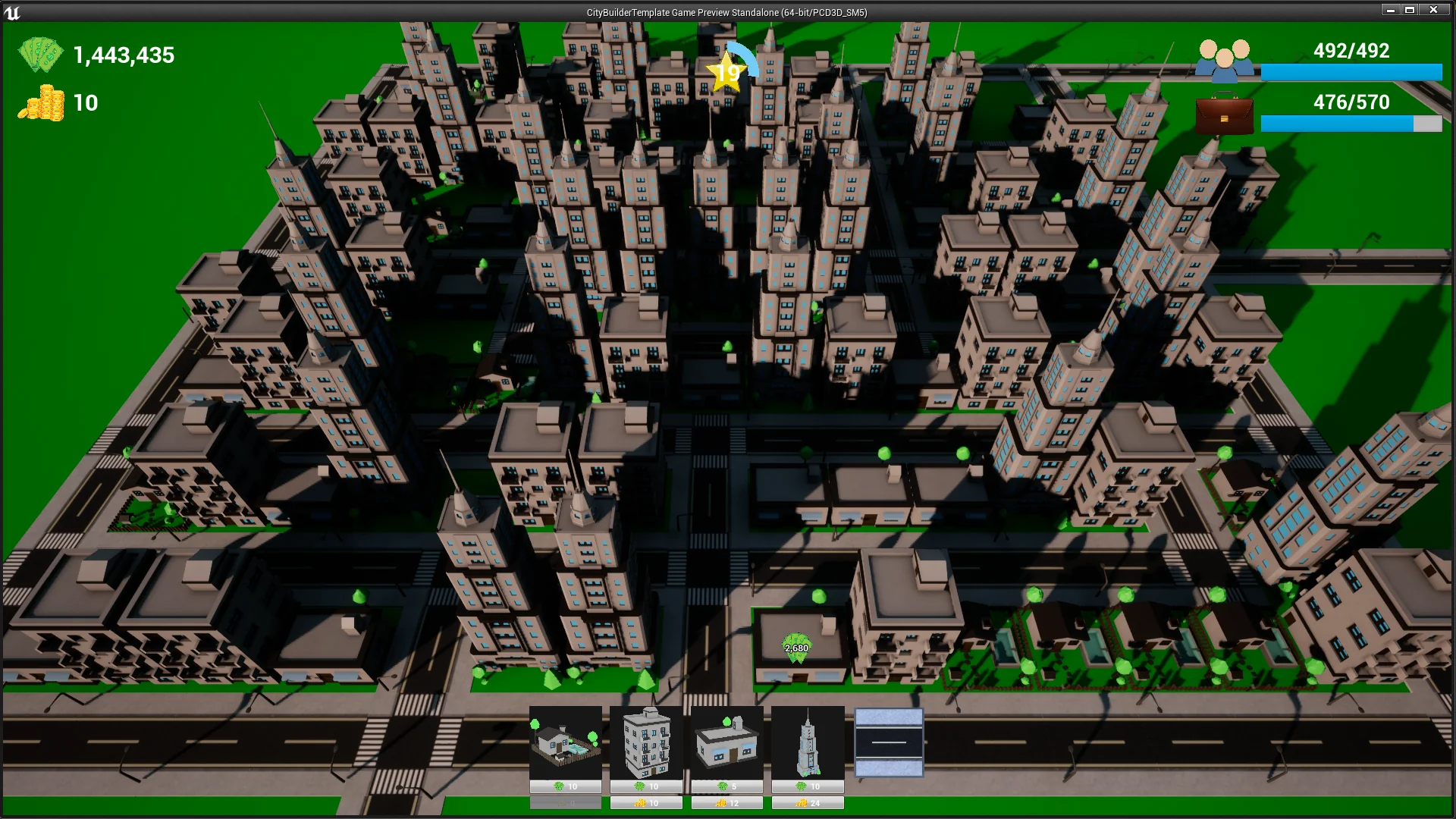
A Blueprint city-building template with residential and commercial buildings on a shared base class, two currencies, and road and building destruction.
The first stretch of a city-building project usually disappears into structure rather than gameplay. Someone has to decide how buildings are classified, how a new type gets added without copying the same logic a second time, and how a second currency lives alongside the first without the economy turning into a knot. City Builder Template takes that groundwork as its starting point rather than leaving it to the first week of production.
Two building types are already in place, both sitting on a shared base class, and a two-currency setup is supported from the outset. What that leaves is the part that is genuinely specific to your game: the rules, the content, the feel of the city.
Residential and Commercial Buildings, One Parent Class
The template ships with two building types, residential and commercial. Neither exists as an isolated actor. Both are derived from a base class, so the behaviour they have in common sits at one level and the differences between them sit below it.
That arrangement is more useful than it looks at a glance. The two buildings work as examples of a pattern: anything a residential block and a commercial block share is handled where they meet, while anything that separates them stays in the subtype. When a rule changes for every building in the city, the base is the place to change it, and both existing types follow without being touched individually.
Extending the Builder With New Building Types
The base class exists explicitly so new building types can be created easily. Growth becomes a matter of extending downward rather than rebuilding sideways — a new type inherits the shared foundation and adds only what makes it distinct.
The tag set, which lists Template, Building, Industrial and Simulation alongside Blueprint, points at the kind of city this is meant to become and hints at the direction a third or fourth type might take. The hierarchy is what keeps those additions inexpensive. Without it, every new structure means repeating the same plumbing from scratch.
Two Currencies, Two Different Sources
Two currencies are supported out of the box: normal and premium. The split is not cosmetic. Normal currency is earned in game, tied to play itself. Premium currency is deliberately left open — the developer decides how players obtain it, whether that means a real-money transaction, a trading system, or another route entirely.
Keeping the two separate means the progression economy and the premium channel do not have to share a single balance. A designer can tune how quickly normal currency accumulates through play without disturbing the premium side, and can shape the premium route to fit whatever model the game uses.
What the template supplies is the division itself, plus the support that makes both currencies work as separate tracks. What sits on either side — the sources, the sinks, the pace — remains a design decision rather than something fixed in advance.
Destroying Roads and Buildings
A video update added the ability to destroy roads and buildings. That one capability changes the character of the whole template, because the city stops being a one-way layout. Whatever a player puts down can be taken away again. Roads are included alongside the buildings, so the network connecting everything is as editable as the structures standing on it.
For a simulation, that opens the door to replanning. A district that no longer works can be cleared. A route laid out badly can be removed rather than lived with. Because the two building types already share a base class, the city can grow and shrink around the same underlying structure instead of treating demolition as a special case bolted on afterward.
A video preview shows the template in motion, and the newer video covers the destruction feature specifically — useful for judging how removal reads in practice before committing to a layout system.
Using Your Own Models in the Template
The two buildings are not intended to dictate art direction. A tutorial walks through using your own models, which makes the shipped residential and commercial pieces effectively placeholders for your own architecture.
Here the base class pays off a second time. Swapping models is an art-side operation; the building logic stays where it is, and the hierarchy does not need to be rethought just because the geometry changed. A team with an established look can bring its own meshes into the scene and keep the classification, the currencies, and the destruction behaviour that the template already carries.
For an artist joining a project mid-production, that is the practical entry point. The tutorial defines the handoff between the model and the systems already in place, so new assets slot into a working city rather than requiring a parallel test scene.
Where It Fits in a Production
The Blueprint tag places these systems in a visual scripting context rather than a code-only package, which suits teams that want to open logic up and read it directly while iterating. Combined with the Building, Industrial and Simulation tags, it describes a template aimed squarely at the management side of a city game: structures, growth, currency, and the ability to undo what has been laid down.
That makes it a reasonable foundation for a prototype or a vertical slice, where the question is whether the loop holds together — place a building, earn normal currency, extend the city, tear something down — before a full art pass exists. It also suits smaller simulation projects that need a working building hierarchy without building one from zero.
The most natural fit is a project that already knows what its city should look like but wants the classification, the currency split, and the demolition rules resolved first. Bring the models through the tutorial, derive a third building type from the base class when the city needs one, and decide how premium currency is earned. The template covers the structure underneath; the city itself is whatever gets placed on top of it.
 City Builder
 Cities
 Cities