"ae2217ad8e73450c"{"id":"1003015","slug":"cinematic-targeting","title":"Cinematic Targeting","category":"Gameplay Features","engine":"4.22+,5.0+","assetVersion":"","engineVersion":"Engine Version: 4.22+,5.0+","tag":"Gameplay Features","accent":"blue","visual":"mech","summary":"Three slow-motion, sound-driven enemy AI kill types with 90% of the logic in a 3D widget you add to your AI, without projectile or line tracing.","platform":"Unreal Engine","indexPolicy":"index","publishedAt":"2026-11-25T16:19:25.233Z","updatedAt":"2026-11-25T16:19:25.233Z","sourceNotes":[],"fileContents":[],"compatibility":["Unreal Engine","Engine Version: 4.22+,5.0+"],"featuredImage":{"alt":"Cinematic Targeting","src":"/wp-content/uploads/published/2026/11/b7eba8781ad0-26208bd6-f2c7-4f9a-8d18-2d4fa05bdf57-3b14fc6a17.webp"},"hasDownloadLink":true,"downloads":0,"terms":[{"taxonomy":"category","slug":"gameplay-features","name":"Gameplay Features"}],"galleryImages":[{"src":"/wp-content/uploads/published/2026/11/46f1dc0fb8d9-69e57ff5-ef12-4451-abf3-1af97851aefb-56b65b4392.webp","alt":"Cinematic Targeting"},{"src":"/wp-content/uploads/published/2026/11/90ddbf3f5201-a03fd5f8-6c18-4c60-955f-0f4642d99d56-ad093194c7.webp","alt":"Cinematic Targeting"},{"src":"/wp-content/uploads/published/2026/11/abb6c78256e0-97ec4c6a-3ef6-4944-80f1-76564b6cc4f6-ab0cafc4ae.webp","alt":"Cinematic Targeting"},{"src":"/wp-content/uploads/published/2026/11/e832789de778-a30df6c3-1f6e-4132-8534-d1948e06fe47-06d02fb6aa.webp","alt":"Cinematic Targeting"},{"src":"/wp-content/uploads/published/2026/11/0896b93acbad-04e321a2-4e87-45a8-afc1-6148689490cd-0a9872408a.webp","alt":"Cinematic Targeting"},{"src":"/wp-content/uploads/published/2026/11/551cfebdfbd2-d24891c1-0e11-423b-9952-3d8e3b4bc9b3-4a50ca646a.webp","alt":"Cinematic Targeting"},{"src":"/wp-content/uploads/published/2026/11/9075e0e21815-c48a6f33-c208-40dd-8d6a-ad4efc097065-2815e1aa07.webp","alt":"Cinematic Targeting"}],"accessPanel":{"kind":"resource","title":"Get this resource","safetyNote":"Resources are manually reviewed before listing to improve quality and reduce obvious risks.","fileName":"Cinematic Targeting.7z","resourceType":"Resource archive","versions":[]},"contentHtml":"\u003ch2\u003eWhere a limb shot turns into a staged kill\u003c/h2\u003e\n\u003cp\u003eA firefight usually resolves in a handful of frames: the shot connects, the enemy AI reacts, the encounter moves on. Cinematic Targeting is aimed at the moment when that exchange needs to stretch. A shot finds an enemy's limb, the action drops into slow motion, a sound effect lands, and the AI dies in a way that is meant to be watched. The package holds three types of spectacular killings, each involving limb shots and each presented with slow motion and sound effects.\u003c/p\u003e\n\u003cp\u003eThat places it in scenes where one kill has to register above the noise. A player clearing the last enemy from a room, a close-range exchange in a corridor, a takedown moment inside an otherwise ordinary combat sequence — these are the places where a standard death can pass by and a directed kill can give the encounter a beat. It also suits demonstration sequences and combat prototypes where the developer wants to show how enemy AI deaths can be framed rather than simply triggered. The effect is not a general combat overhaul; it is a way to treat specific enemy AI deaths as set pieces.\u003c/p\u003e \u003ch2\u003eCinematic Targeting's three kill types, minus projectile and line tracing\u003c/h2\u003e\n\u003cp\u003eThere are three types of spectacular killings in the package. Each one involves shooting an enemy AI in the limb, and each one uses slow motion with sound effects to sell the result. Three types give a developer room to vary the payoff. The same enemy AI can go down in more than one way, so repeated combat does not have to return the identical visual and audio treatment every time a limb shot connects.\u003c/p\u003e\n\u003cp\u003eJust as important is what the system leaves out. It does not use projectile or line tracing. A typical shooting setup often depends on a projectile actor travelling toward a target or a line trace checking what the shot hit; Cinematic Targeting avoids both. The kill logic is not routed through those systems. Instead, 90% of the code sits in a 3D widget. That single fact shapes how the package is used and where it fits into an existing project.\u003c/p\u003e \u003ch2\u003eThe 3D widget at the center of Cinematic Targeting\u003c/h2\u003e\n\u003cp\u003eBecause most of the code is in a 3D widget, the integration point is the AI itself. You add the widget to your AI, and the widget carries the bulk of the behavior that produces the slow-motion, sound-driven kill. For a developer with enemy AI already moving through a level, that is a contained way to attach the effect. The work is concentrated in one component rather than scattered across a wide set of unrelated systems.\u003c/p\u003e\n\u003cp\u003eThe widget also keeps the package close to the character it belongs to. The effect is not applied from a distance through a projectile or a trace; it is attached to the AI and runs from there. That makes the setup easier to reason about when a project already has its own shooting logic, and it makes the three kill types easier to place on specific enemies. The widget is easy to add to your AI, and the 90% figure explains why: most of what makes the effect work travels with the widget.\u003c/p\u003e \u003ch2\u003eSlow motion and sound carry the weight\u003c/h2\u003e\n\u003cp\u003eThe three killings are cinematic, slow-motion events, and sound is part of how they land. Slow motion changes the pace of the moment, and sound effects give it an audible shape. The two elements arrive together: the stretched timing lets the limb shot read, and the audio gives the kill a clear point of impact. Without either, the same death would be a different, smaller event.\u003c/p\u003e\n\u003cp\u003eThis is where the cinematic label earns its place. The package is not only changing what happens to the enemy AI; it is changing how long the player sees it happen and what they hear while it does. A limb shot that would normally be one part of a busy exchange becomes the focus for a beat. The sound effect carries across the slowdown, so the kill has a beginning and an end beyond one frame of impact. For projects that want enemy deaths to feel deliberate, that combination is the core of the resource.\u003c/p\u003e \u003ch2\u003eFitting Cinematic Targeting around existing AI combat\u003c/h2\u003e\n\u003cp\u003eProjects rarely build their combat from a single system, and Cinematic Targeting is narrow by design. It does not bring projectile or line tracing with it, so it does not compete with the shooting setup a project already uses. That separation is useful in a shooter where hit detection and weapon behavior are already in place: the package can sit on the enemy AI side, attached through the 3D widget, while the rest of the combat continues to work as before.\u003c/p\u003e\n\u003cp\u003eThe three kill types also make the package easier to place selectively. A developer can decide which enemy AI should carry the widget and which should not, or use the widget where a particular encounter calls for a more theatrical death. Because most of the code lives in the widget, that decision is tied to the AI rather than to the player's weapon. The package therefore fits projects that want stylized enemy deaths without turning every firefight into a slow-motion sequence.\u003c/p\u003e \u003ch2\u003eWho gets the most from Cinematic Targeting\u003c/h2\u003e\n\u003cp\u003eThe clearest fit is a project with enemy AI and shooting, where the developer wants a handful of kills to land with more force than the surrounding combat. A Blueprint-based workflow is a natural home for it, given the Blueprint tag, and the 3D widget gives that workflow a single place to attach the effect to an AI character.\u003c/p\u003e\n\u003cp\u003eDevelopers who already have their own projectile or line-trace shooting system may find the package's separate path useful because it does not ask them to replace that system. The 3D widget attaches to the AI, 90% of the code comes with it, and the three kill types sit alongside the existing combat rather than rebuilding it. For a small team or a solo developer who wants stylized, slow-motion enemy deaths without building the presentation from scratch, that combination is the main draw.\u003c/p\u003e\n\n\u003ch2\u003eMore From The Same Workflow\u003c/h2\u003e\n\u003cul\u003e\n\u003cli\u003e\u003ca href=\"https://3dcghub.com/freeflow-combat/\" rel=\"noopener noreferrer\"\u003eFreeflow Combat\u003c/a\u003e\u003c/li\u003e\n\u003cli\u003e\u003ca href=\"https://3dcghub.com/auto-instance/\" rel=\"noopener noreferrer\"\u003eAuto Instance\u003c/a\u003e\u003c/li\u003e\n\u003cli\u003e\u003ca href=\"https://3dcghub.com/target-lock-system/\" rel=\"noopener noreferrer\"\u003eTarget Lock System\u003c/a\u003e\u003c/li\u003e\n\u003cli\u003e\u003ca href=\"https://3dcghub.com/lock-on-targeting-system/\" rel=\"noopener noreferrer\"\u003eLock-on Targeting System\u003c/a\u003e\u003c/li\u003e\n\u003cli\u003e\u003ca href=\"https://3dcghub.com/cinematic-duel-system/\" rel=\"noopener noreferrer\"\u003eCinematic Duel System\u003c/a\u003e\u003c/li\u003e\n\u003c/ul\u003e","contentTextLength":5910,"navigation":{"current":29,"total":4964,"previous":{"id":"1003016","slug":"city-builder-template","title":"City Builder Template","category":"City Builder","platform":"Unreal Engine","updatedAt":"2026-11-25T16:20:06.085Z"},"next":{"id":"1003014","slug":"character-stats-kit","title":"Character Stats Kit","category":"Gameplay Features","platform":"Unreal Engine","updatedAt":"2026-11-25T16:18:43.371Z"}},"relatedResources":[{"id":"10858","slug":"freeflow-combat","title":"Freeflow Combat","category":"Gameplay Features","engine":"4.27,5.0+","assetVersion":"Engine version: 4.27,5.0+","engineVersion":"4.27","tag":"Gameplay Features","accent":"blue","visual":"city","summary":"Freeflow Combat offers a comprehensive modular framework for creating fluid, superhero-style combat. It features smart targeting, coordinated group AI, and cinematic finishers to streamline game development.","platform":"Unreal Engine","indexPolicy":"noindex","publishedAt":"2026-03-03T16:25:04.000Z","updatedAt":"2026-04-19T15:49:55.000Z","sourceNotes":[],"fileContents":[],"compatibility":["Unreal Engine","Engine version: 4.27,5.0+"],"featuredImage":{"alt":"Freeflow Combat","src":"https://3dcghub.com/wp-content/uploads/2026/03/796e8d94-436a-4186-83b5-a3597b87b3ab.webp"},"fileSizeBytes":58082021,"hasDownloadLink":true,"downloads":2},{"id":"1002294","slug":"auto-instance","title":"Auto Instance","category":"Gameplay Features","engine":"4.26+,5.0+","assetVersion":"","engineVersion":"Engine Version: 4.26+,5.0+","tag":"Gameplay Features","accent":"blue","visual":"mech","summary":"Auto Instance converts Static Mesh Actors in existing levels into Hierarchical or Instanced Static Mesh actors, with a threshold and one-click targeting.","platform":"Unreal Engine","indexPolicy":"index","publishedAt":"2026-11-04T05:22:04.042Z","updatedAt":"2026-11-04T05:22:04.042Z","sourceNotes":[],"fileContents":[],"compatibility":["Unreal Engine","Engine Version: 4.26+,5.0+"],"featuredImage":{"alt":"Auto Instance","src":"/wp-content/uploads/published/2026/11/b31daade89b7-1334a2ea-c735-4714-adcd-9c437d80b7aa-7a48a60d94.webp"},"fileSizeBytes":647205,"hasDownloadLink":true,"downloads":1},{"id":"1002228","slug":"target-lock-system","title":"Target Lock System","category":"Gameplay Features","engine":"4.26+,5.0+","assetVersion":"","engineVersion":"Engine Version: 4.26+,5.0+","tag":"Gameplay Features","accent":"blue","visual":"mech","summary":"Explore the Blueprint-based Target Lock System for Unreal Engine, featuring multiplayer replication, Souls-like targeting logic, and a basic damage setup.","platform":"Unreal Engine","indexPolicy":"index","publishedAt":"2026-10-29T15:27:07.100Z","updatedAt":"2026-10-29T15:27:07.100Z","sourceNotes":[],"fileContents":[],"compatibility":["Unreal Engine","Engine Version: 4.26+,5.0+"],"featuredImage":{"alt":"Target Lock System","src":"/wp-content/uploads/published/2026/10/5649fa496f95-c155a574-3d0b-4c3a-8a6d-9a6e0ce45b2c-8bf36d7b80.webp"},"fileSizeBytes":50214033,"hasDownloadLink":true,"downloads":0}]}[{"id":4225,"sourceId":4225,"taxonomyId":4225,"taxonomy":"category","slug":"asset-library","name":"Asset Library","parentId":null,"count":4817,"hasChildren":true,"href":"/","seoTitle":"Free Game Assets Library | 3DCGHUB","seoDescription":"Browse free Unreal Engine, Unity, Blender assets and game development tutorials on 3DCGHUB with previews, compatibility notes, and secure downloads.","sitemapEnabled":true,"children":[{"id":4227,"sourceId":4227,"taxonomyId":4227,"taxonomy":"category","slug":"blender-add-ons-plugins","name":"Blender Add-ons \u0026 Plugins","parentId":4225,"count":10,"hasChildren":false,"href":"/category/blender-add-ons-plugins/","seoTitle":"Free Blender Add-ons \u0026 Plugins | 3DCGHUB","seoDescription":"Browse free Blender Add-ons \u0026 Plugins tools for Blender on 3DCGHUB: curated downloads with preview images, compatibility notes and secure download access.","sitemapEnabled":true},{"id":514,"sourceId":514,"taxonomyId":514,"taxonomy":"category","slug":"unity-2","name":"Unity","parentId":4225,"count":453,"hasChildren":true,"href":"/category/unity-2/","seoTitle":"Free Unity Assets | 3DCGHUB","seoDescription":"Browse free Unity resources on 3DCGHUB: curated downloads with preview images, compatibility notes and secure download access.","sitemapEnabled":true,"children":[{"id":523,"sourceId":523,"taxonomyId":523,"taxonomy":"category","slug":"2d","name":"2D","parentId":514,"count":1,"hasChildren":true,"href":"/category/2d/","seoTitle":"Free Unity 2D | 3DCGHUB","seoDescription":"Browse free 2D assets for Unity on 3DCGHUB: curated downloads with preview images, compatibility notes and secure download access.","sitemapEnabled":true},{"id":515,"sourceId":515,"taxonomyId":515,"taxonomy":"category","slug":"3d-unity-2","name":"3D","parentId":514,"count":162,"hasChildren":true,"href":"/category/3d-unity-2/","seoTitle":"Free Unity 3D Assets | 3DCGHUB","seoDescription":"Browse free 3D assets for Unity on 3DCGHUB: curated downloads with preview images, compatibility notes and secure download access.","sitemapEnabled":true},{"id":565,"sourceId":565,"taxonomyId":565,"taxonomy":"category","slug":"add-ons","name":"Add-Ons","parentId":514,"count":2,"hasChildren":false,"href":"/category/add-ons/","seoTitle":"Free Unity Add-Ons | 3DCGHUB","seoDescription":"Browse free Add-Ons assets for Unity on 3DCGHUB: curated downloads with preview images, compatibility notes and secure download access.","sitemapEnabled":true},{"id":529,"sourceId":529,"taxonomyId":529,"taxonomy":"category","slug":"audio-unity-2","name":"Audio","parentId":514,"count":1,"hasChildren":true,"href":"/category/audio-unity-2/","seoTitle":"Free Unity Audio | 3DCGHUB","seoDescription":"Browse free Audio for Unity on 3DCGHUB: curated downloads with preview images, compatibility notes and secure download access.","sitemapEnabled":true},{"id":557,"sourceId":557,"taxonomyId":557,"taxonomy":"category","slug":"templates","name":"Templates","parentId":514,"count":36,"hasChildren":true,"href":"/category/templates/","seoTitle":"Free Unity Templates | 3DCGHUB","seoDescription":"Browse free Unity project templates on 3DCGHUB. Starter kits with previews, compatibility notes, and secure download access.","sitemapEnabled":true},{"id":533,"sourceId":533,"taxonomyId":533,"taxonomy":"category","slug":"tools-unity-2","name":"Tools","parentId":514,"count":0,"hasChildren":true,"href":"/category/tools-unity-2/","sitemapEnabled":true},{"id":554,"sourceId":554,"taxonomyId":554,"taxonomy":"category","slug":"vfx-unity-2","name":"VFX","parentId":514,"count":4,"hasChildren":true,"href":"/category/vfx-unity-2/","seoTitle":"Free Unity VFX | 3DCGHUB","seoDescription":"Browse free VFX for Unity on 3DCGHUB: curated downloads with preview images, compatibility notes and secure download access.","sitemapEnabled":true}]},{"id":511,"sourceId":511,"taxonomyId":511,"taxonomy":"category","slug":"unreal-engine-2","name":"Unreal Engine","parentId":4225,"count":4355,"hasChildren":true,"href":"/category/unreal-engine-2/","seoTitle":"Free Unreal Engine Assets | 3DCGHUB","seoDescription":"Browse free Unreal Engine resources on 3DCGHUB: curated downloads with preview images, compatibility notes and secure download access.","sitemapEnabled":true,"children":[{"id":54,"sourceId":54,"taxonomyId":54,"taxonomy":"category","slug":"3d","name":"3D","parentId":511,"count":2441,"hasChildren":true,"href":"/category/3d/","seoTitle":"Free Unreal Engine 3D | 3DCGHUB","seoDescription":"Browse free 3D assets for Unreal Engine on 3DCGHUB: curated downloads with preview images, compatibility notes and secure download access.","sitemapEnabled":true},{"id":441,"sourceId":441,"taxonomyId":441,"taxonomy":"category","slug":"animations","name":"Animations","parentId":511,"count":269,"hasChildren":true,"href":"/category/animations/","seoTitle":"Free Unreal Engine Animations | 3DCGHUB","seoDescription":"Browse free Animations for Unreal Engine on 3DCGHUB: curated downloads with preview images, compatibility notes and secure download access.","sitemapEnabled":true},{"id":446,"sourceId":446,"taxonomyId":446,"taxonomy":"category","slug":"audio","name":"Audio","parentId":511,"count":63,"hasChildren":true,"href":"/category/audio/","seoTitle":"Free Unreal Engine Audio Resources | 3DCGHUB","seoDescription":"Browse free Unreal Engine audio resources including sound effects, voices, dialogue, and ambient sounds. Curated free downloads on 3DCGHUB.","sitemapEnabled":true},{"id":466,"sourceId":466,"taxonomyId":466,"taxonomy":"category","slug":"game-systems","name":"Game Systems","parentId":511,"count":381,"hasChildren":true,"href":"/category/game-systems/","seoTitle":"Free Unreal Engine Game Systems | 3DCGHUB","seoDescription":"Browse free Game Systems tools for Unreal Engine on 3DCGHUB: curated downloads with preview images, compatibility notes and secure download access.","sitemapEnabled":true},{"id":478,"sourceId":478,"taxonomyId":478,"taxonomy":"category","slug":"game-templates","name":"Game Templates","parentId":511,"count":155,"hasChildren":true,"href":"/category/game-templates/","seoTitle":"Free Unreal Engine Game Templates | 3DCGHUB","seoDescription":"Browse free Game Templates for Unreal Engine on 3DCGHUB: curated downloads with preview images, compatibility notes and secure download access.","sitemapEnabled":true},{"id":432,"sourceId":432,"taxonomyId":432,"taxonomy":"category","slug":"hdri","name":"HDRI","parentId":511,"count":6,"hasChildren":true,"href":"/category/hdri/","seoTitle":"Free Unreal Engine HDRI | 3DCGHUB","seoDescription":"Browse free Unreal Engine HDRI skies and lighting maps on 3DCGHUB. Environment lighting with previews and secure downloads.","sitemapEnabled":true},{"id":228,"sourceId":228,"taxonomyId":228,"taxonomy":"category","slug":"material-and-textures","name":"Material \u0026 Textures","parentId":511,"count":172,"hasChildren":true,"href":"/category/material-and-textures/","seoTitle":"Free Unreal Engine Material \u0026 Textures | 3DCGHUB","seoDescription":"Browse free Material \u0026 Textures for Unreal Engine on 3DCGHUB: curated downloads with preview images, compatibility notes and secure download access.","sitemapEnabled":true},{"id":298,"sourceId":298,"taxonomyId":298,"taxonomy":"category","slug":"sprites-and-flipbooks","name":"Sprites \u0026 Flipbooks","parentId":511,"count":18,"hasChildren":true,"href":"/category/sprites-and-flipbooks/","seoTitle":"Free Unreal Engine Sprites \u0026 Flipbooks | 3DCGHUB","seoDescription":"Browse free Sprites \u0026 Flipbooks assets for Unreal Engine on 3DCGHUB: curated downloads with preview images, compatibility notes and secure download access.","sitemapEnabled":true},{"id":489,"sourceId":489,"taxonomyId":489,"taxonomy":"category","slug":"tools-and-plugins","name":"Tools \u0026 Plugins","parentId":511,"count":390,"hasChildren":true,"href":"/category/tools-and-plugins/","seoTitle":"Free Unreal Engine Tools \u0026 Plugins | 3DCGHUB","seoDescription":"Browse free Tools \u0026 Plugins for Unreal Engine on 3DCGHUB: curated downloads with preview images, compatibility notes and secure download access.","sitemapEnabled":true},{"id":459,"sourceId":459,"taxonomyId":459,"taxonomy":"category","slug":"ui","name":"UI","parentId":511,"count":47,"hasChildren":true,"href":"/category/ui/","seoTitle":"Free Unreal Engine UI | 3DCGHUB","seoDescription":"Browse free UI for Unreal Engine on 3DCGHUB: curated downloads with preview images, compatibility notes and secure download access.","sitemapEnabled":true},{"id":450,"sourceId":450,"taxonomyId":450,"taxonomy":"category","slug":"vfx","name":"VFX","parentId":511,"count":413,"hasChildren":true,"href":"/category/vfx/","seoTitle":"Free Unreal Engine VFX | 3DCGHUB","seoDescription":"Browse free VFX for Unreal Engine on 3DCGHUB: curated downloads with preview images, compatibility notes and secure download access.","sitemapEnabled":true}]}]},{"id":4222,"sourceId":4222,"taxonomyId":4222,"taxonomy":"category","slug":"tutorial-library","name":"Tutorial Library","parentId":null,"count":117,"hasChildren":false,"href":"/tutorials/","seoTitle":"Free Game Development Tutorial Library | 3DCGHUB","seoDescription":"Browse free game development tutorials for Unreal Engine, Unity, Blender, and more on 3DCGHUB with practical workflows and secure downloads.","sitemapEnabled":true}]
Resource screenshots
1 / 7
Asset drops
Daily Asset Drops
Follow 3DCGHUB on Telegram for daily Unreal, Unity & Blender drops and curated CC0 releases.
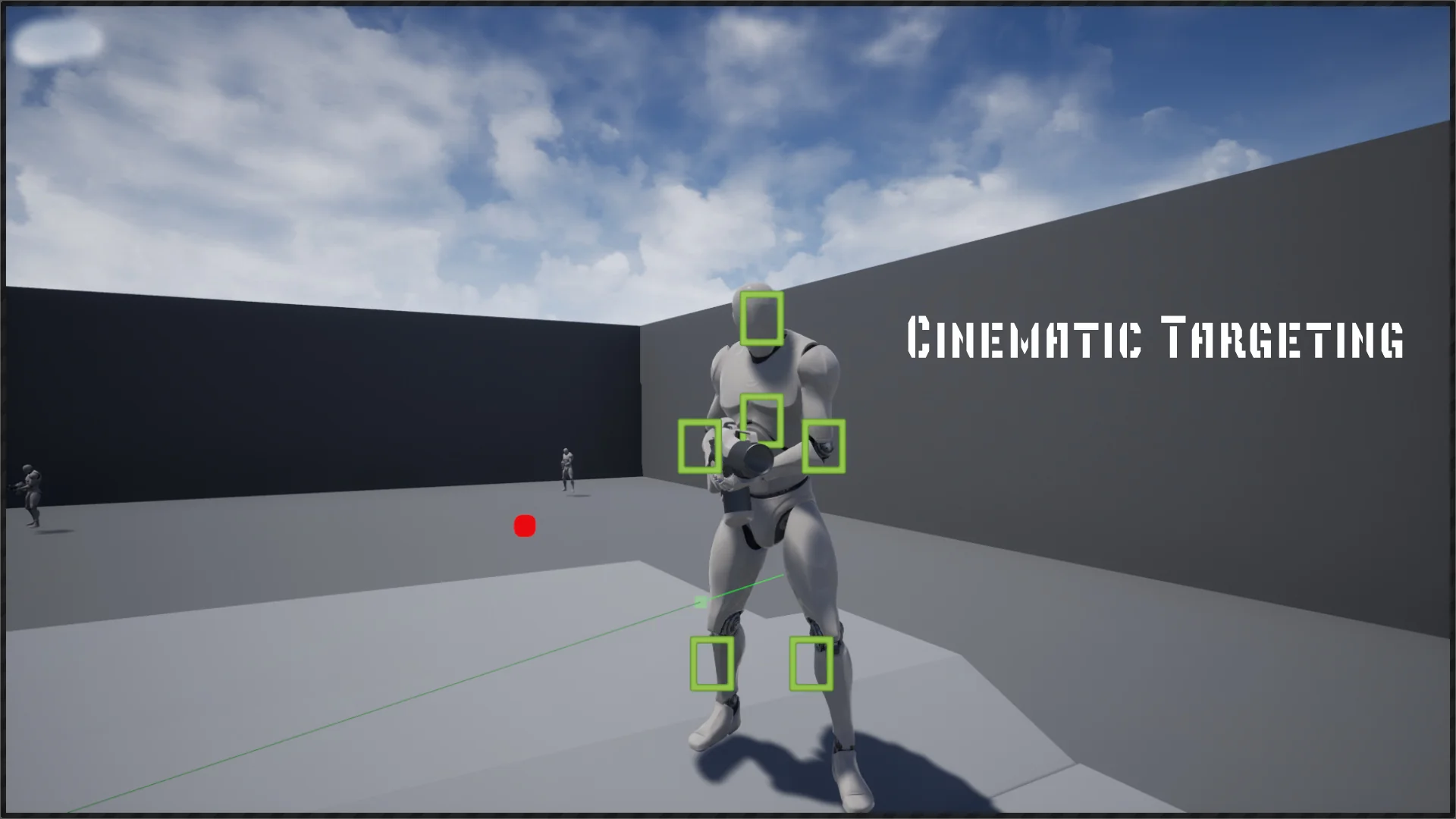
A firefight usually resolves in a handful of frames: the shot connects, the enemy AI reacts, the encounter moves on. Cinematic Targeting is aimed at the moment when that exchange needs to stretch. A shot finds an enemy's limb, the action drops into slow motion, a sound effect lands, and the AI dies in a way that is meant to be watched. The package holds three types of spectacular killings, each involving limb shots and each presented with slow motion and sound effects.
That places it in scenes where one kill has to register above the noise. A player clearing the last enemy from a room, a close-range exchange in a corridor, a takedown moment inside an otherwise ordinary combat sequence — these are the places where a standard death can pass by and a directed kill can give the encounter a beat. It also suits demonstration sequences and combat prototypes where the developer wants to show how enemy AI deaths can be framed rather than simply triggered. The effect is not a general combat overhaul; it is a way to treat specific enemy AI deaths as set pieces.
Cinematic Targeting's three kill types, minus projectile and line tracing
There are three types of spectacular killings in the package. Each one involves shooting an enemy AI in the limb, and each one uses slow motion with sound effects to sell the result. Three types give a developer room to vary the payoff. The same enemy AI can go down in more than one way, so repeated combat does not have to return the identical visual and audio treatment every time a limb shot connects.
Just as important is what the system leaves out. It does not use projectile or line tracing. A typical shooting setup often depends on a projectile actor travelling toward a target or a line trace checking what the shot hit; Cinematic Targeting avoids both. The kill logic is not routed through those systems. Instead, 90% of the code sits in a 3D widget. That single fact shapes how the package is used and where it fits into an existing project.
The 3D widget at the center of Cinematic Targeting
Because most of the code is in a 3D widget, the integration point is the AI itself. You add the widget to your AI, and the widget carries the bulk of the behavior that produces the slow-motion, sound-driven kill. For a developer with enemy AI already moving through a level, that is a contained way to attach the effect. The work is concentrated in one component rather than scattered across a wide set of unrelated systems.
The widget also keeps the package close to the character it belongs to. The effect is not applied from a distance through a projectile or a trace; it is attached to the AI and runs from there. That makes the setup easier to reason about when a project already has its own shooting logic, and it makes the three kill types easier to place on specific enemies. The widget is easy to add to your AI, and the 90% figure explains why: most of what makes the effect work travels with the widget.
Slow motion and sound carry the weight
The three killings are cinematic, slow-motion events, and sound is part of how they land. Slow motion changes the pace of the moment, and sound effects give it an audible shape. The two elements arrive together: the stretched timing lets the limb shot read, and the audio gives the kill a clear point of impact. Without either, the same death would be a different, smaller event.
This is where the cinematic label earns its place. The package is not only changing what happens to the enemy AI; it is changing how long the player sees it happen and what they hear while it does. A limb shot that would normally be one part of a busy exchange becomes the focus for a beat. The sound effect carries across the slowdown, so the kill has a beginning and an end beyond one frame of impact. For projects that want enemy deaths to feel deliberate, that combination is the core of the resource.
Fitting Cinematic Targeting around existing AI combat
Projects rarely build their combat from a single system, and Cinematic Targeting is narrow by design. It does not bring projectile or line tracing with it, so it does not compete with the shooting setup a project already uses. That separation is useful in a shooter where hit detection and weapon behavior are already in place: the package can sit on the enemy AI side, attached through the 3D widget, while the rest of the combat continues to work as before.
The three kill types also make the package easier to place selectively. A developer can decide which enemy AI should carry the widget and which should not, or use the widget where a particular encounter calls for a more theatrical death. Because most of the code lives in the widget, that decision is tied to the AI rather than to the player's weapon. The package therefore fits projects that want stylized enemy deaths without turning every firefight into a slow-motion sequence.
Who gets the most from Cinematic Targeting
The clearest fit is a project with enemy AI and shooting, where the developer wants a handful of kills to land with more force than the surrounding combat. A Blueprint-based workflow is a natural home for it, given the Blueprint tag, and the 3D widget gives that workflow a single place to attach the effect to an AI character.
Developers who already have their own projectile or line-trace shooting system may find the package's separate path useful because it does not ask them to replace that system. The 3D widget attaches to the AI, 90% of the code comes with it, and the three kill types sit alongside the existing combat rather than rebuilding it. For a small team or a solo developer who wants stylized, slow-motion enemy deaths without building the presentation from scratch, that combination is the main draw.
 Gameplay Features
 Gameplay Features
 Gameplay Features