"ae2217ad8e73450c"{"id":"1003013","slug":"character-skills","title":"Character Skills","category":"Gameplay Features","engine":"4.25+,5.0+","assetVersion":"","engineVersion":"Engine Version: 4.25+,5.0+","tag":"Gameplay Features","accent":"blue","visual":"character","summary":"A playable skill project with a skill designer, traversal and magic abilities, reactive enemies, and integration tutorials for third-person projects.","platform":"Unreal Engine","indexPolicy":"index","publishedAt":"2026-11-25T16:17:59.912Z","updatedAt":"2026-11-25T16:17:59.912Z","sourceNotes":[],"fileContents":[],"compatibility":["Unreal Engine","Engine Version: 4.25+,5.0+"],"featuredImage":{"alt":"Character Skills","src":"/wp-content/uploads/published/2026/11/ba038871b38f-71b88c50-8cde-4a25-a56b-27c3684fcd7d-524337273d.webp"},"hasDownloadLink":true,"downloads":0,"terms":[{"taxonomy":"category","slug":"gameplay-features","name":"Gameplay Features"}],"galleryImages":[{"src":"/wp-content/uploads/published/2026/11/ddbf06081d77-4474a269-9e09-4a76-bfed-1109abb1a033-a552dca23a.webp","alt":"Character Skills"},{"src":"/wp-content/uploads/published/2026/11/aec466d1a83f-e69f7fb3-5bbb-4e51-b8a0-3a1133e25536-f7cac118fc.webp","alt":"Character Skills"},{"src":"/wp-content/uploads/published/2026/11/8d51cfb7d9bb-a7e1966e-a084-41b2-8887-18bf6b954392-96a7fd4d6c.webp","alt":"Character Skills"},{"src":"/wp-content/uploads/published/2026/11/d815ec63eb73-dcf431b0-5f5b-4d94-a5a3-ff8aeb89aa2f-3760d1b6ff.webp","alt":"Character Skills"},{"src":"/wp-content/uploads/published/2026/11/794a982bd621-2f482cdf-f8de-4fa5-bac4-84fd9b162b8e-e843ce297f.webp","alt":"Character Skills"},{"src":"/wp-content/uploads/published/2026/11/4bad4c2dd35a-5ebe6744-21b7-41ba-956b-093215bed835-08bc7b5c93.webp","alt":"Character Skills"},{"src":"/wp-content/uploads/published/2026/11/5b0f53d5b9f6-3a3226e2-5dc3-434c-a325-5bcfc98300b1-0d42ea3fbf.webp","alt":"Character Skills"}],"accessPanel":{"kind":"resource","title":"Get this resource","safetyNote":"Resources are manually reviewed before listing to improve quality and reduce obvious risks.","fileName":"Character Skills.7z","resourceType":"Resource archive","versions":[]},"contentHtml":"\u003cp\u003eWater sections, flight paths, dash gaps, vertical routes, elemental combat, and a healing item can all appear in the same level. Character Skills is aimed at that kind of project: a playable demonstration of a character who can swim, fly, sprint, dodge, use telekinesis, jump, cast elemental magic, teleport, fight in melee, and recover with a first aid kit. It is not a single effect or a single animation. The package includes a skill designer and a set of finished skills, with a video demonstration showing the result in motion.\u003c/p\u003e \u003ch2\u003eWhere Character Skills Fits in a Project\u003c/h2\u003e\n\u003cp\u003eThink of Character Skills as an ability sandbox with a visible construction layer. One part is the skill designer; the other is the finished roster. The distinction is practical. A developer can play the demonstration to see how the skills behave in motion, then inspect the settings behind them. Each skill carries extensive settings and includes effects, sounds, and animations, so the package covers both the mechanical entry and the presentation attached to it.\u003c/p\u003e\n\u003cp\u003eBecause the project was created with the possibility of adding it to any other project, it is meant to travel. The integration tutorials reinforce that intent. This is not a closed demo that only works as a standalone scene. The system is presented as something that can be moved into an existing project and adapted there, with the Third Person project serving as the main example.\u003c/p\u003e\n\u003cp\u003eThe reactive enemies give the project a second layer. Instead of judging a skill only by the character's animation or effect, a developer can see how an enemy answers it. That makes the project useful at the stage where a team needs to prove that abilities coexist: movement, magic, combat, and support all in one scene, with something on the other side reacting to them.\u003c/p\u003e \u003ch2\u003eThe Character Skills Roster and What Each One Covers\u003c/h2\u003e\n\u003cp\u003eThe roster is broad enough to cover several kinds of play. Movement, magic, close combat, and support each have entries, and the skills are named plainly enough to understand their place in a scene.\u003c/p\u003e \u003ch3\u003eSwimming, Flying, Sprinting, and the Rest of the Movement Set\u003c/h3\u003e\n\u003cp\u003eSwimming and Flying cover two distinct modes of travel. Sprint is the speed skill. Dodging, listed as Dash, is the evasion entry. Super Jump and Air Jump address vertical movement, with Air Jump specifically tied to jumping while airborne. Teleportation provides a separate repositioning option. These are separate skills rather than one generic movement switch, and each has its own settings, effects, sounds, and animations.\u003c/p\u003e\n\u003cp\u003eFor a level designer, that group maps onto common scene problems: a water route, an aerial route, a long run, a gap that needs a dash, a high ledge, a jump that continues in the air, and an instant reposition. The names do not need to be translated into a different vocabulary; Swimming handles swimming, Flying handles flight, and Teleportation handles teleporting. The detail that matters is that each one is built as its own skill with its own presentation.\u003c/p\u003e \u003ch3\u003eTelekinesis and the Elemental Magic Split\u003c/h3\u003e\n\u003cp\u003eTelekinesis is the interactive skill in the set. The project includes a tutorial dedicated to interactive interaction with telekinesis, which makes it the ability most directly tied to handling something in the scene rather than only moving the character. The tutorial sits alongside the skill itself, so the interaction side is treated as part of the package.\u003c/p\u003e\n\u003cp\u003eElemental Magic is split into Fire, Ice, and Electricity. Those three elements are separate entries under the same magic skill. Teleportation and the elemental spells sit alongside the movement skills, which means a single character can switch from traversal to spellcasting without leaving the roster. The magic group is not one generic spell; Fire, Ice, and Electricity each appear as named parts of the set.\u003c/p\u003e \u003ch3\u003eMelee and the First Aid Kit\u003c/h3\u003e\n\u003cp\u003eMelee covers close-range fighting. First Aid Kit is the support entry, a healing item turned into a character skill. Having both in the same project is useful when a scene needs more than movement and magic: a character can fight at close range and recover afterward. Both sit in the same roster as the traversal and spell skills, and both carry the same pattern of settings, effects, sounds, and animations.\u003c/p\u003e\n\u003cp\u003eThe range of the roster is the point. A project that only needs Swimming or Flying can still use the rest as reference, and a project that needs a combat loop can look at Melee, Dodging, Elemental Magic, and First Aid Kit together.\u003c/p\u003e \u003ch2\u003eEnemies That React to Character Skills\u003c/h2\u003e\n\u003cp\u003eTwo enemies are included: a monster and a flying turret. Both react to the character's skills. That detail changes how the project can be read. The enemies are not static props; their reactions give the skills a visible consequence in the demo. A developer testing a skill can watch the effect on the character and the response from the enemy in the same scene.\u003c/p\u003e\n\u003cp\u003eThe flying turret adds an airborne enemy to the mix. The monster provides a second enemy profile. For a skill demo, that is enough to show that the abilities are meant to be used against something, not only displayed in an empty test room. The reactions also make the project more useful for checking how effects, sounds, and animations read during play, because there is an opposing element in the scene.\u003c/p\u003e \u003ch2\u003eBringing Character Skills Into Another Project\u003c/h2\u003e\n\u003cp\u003eIntegration is a stated part of the package, not an extra. The tutorials cover three routes. One shows how to integrate the system with another project using the Third Person project as the example. Another covers interactive interaction with telekinesis. A third covers integrating Character Skills into the Character Interaction project. Each route addresses a different starting point: a general third-person setup, a specific telekinesis interaction, and a combination with another character-focused project.\u003c/p\u003e\n\u003cp\u003eMore tutorials are planned. The project updates are meant to carry the content from those tutorials as well. Named topics include a fire grenade and a melee weapon with combo and lootboxes. That means the skill set is not frozen at the initial roster; the tutorial material is intended to feed back into the project. A developer using the project can follow those additions as they arrive, while a developer who needs the current set can work with the skills and the three integration paths covered by the tutorials.\u003c/p\u003e \u003ch2\u003eWho Gets the Most From Character Skills\u003c/h2\u003e\n\u003cp\u003eA solo developer assembling a third-person character with several movement modes will find the traversal group immediately relevant. A combat designer can look at Melee, Dodging, Elemental Magic, and the reactive enemies. A programmer or technical designer interested in the construction side can study the skill designer and the settings attached to each ability. A team already using Character Interaction has a direct integration path through the matching tutorial.\u003c/p\u003e\n\u003cp\u003eCharacter Skills is most useful when the goal is a working collection beyond one isolated ability. The roster is broad enough to populate a demo level with swimming, flight, sprinting, dashing, jumping, teleporting, magic, melee, and healing, and the enemies give those actions something to act against. The skill designer and integration tutorials keep the project from being only a showcase. For a developer who wants to see how multiple character skills, their effects, sounds, and animations can coexist in one project, Character Skills provides that complete view.\u003c/p\u003e\n\n\u003ch2\u003eMore From The Same Workflow\u003c/h2\u003e\n\u003cul\u003e\n\u003cli\u003e\u003ca href=\"https://3dcghub.com/close-combat-fighter/\" rel=\"noopener noreferrer\"\u003eClose Combat: Fighter\u003c/a\u003e\u003c/li\u003e\n\u003cli\u003e\u003ca href=\"https://3dcghub.com/super-powers/\" rel=\"noopener noreferrer\"\u003eSuper Powers\u003c/a\u003e\u003c/li\u003e\n\u003cli\u003e\u003ca href=\"https://3dcghub.com/ghost-trails/\" rel=\"noopener noreferrer\"\u003eGhost Trails\u003c/a\u003e\u003c/li\u003e\n\u003cli\u003e\u003ca href=\"https://3dcghub.com/fight-game-select-character/\" rel=\"noopener noreferrer\"\u003eFight Game Select Character\u003c/a\u003e\u003c/li\u003e\n\u003cli\u003e\u003ca href=\"https://3dcghub.com/virtual-reality-character-flying/\" rel=\"noopener noreferrer\"\u003eVirtual Reality Character Flying\u003c/a\u003e\u003c/li\u003e\n\u003c/ul\u003e","contentTextLength":7579,"navigation":{"current":31,"total":4964,"previous":{"id":"1003014","slug":"character-stats-kit","title":"Character Stats Kit","category":"Gameplay Features","platform":"Unreal Engine","updatedAt":"2026-11-25T16:18:43.371Z"},"next":{"id":"1003012","slug":"character-selection-plus","title":"Character Selection Plus","category":"Characters \u0026 Creatures","platform":"Unreal Engine","updatedAt":"2026-11-25T16:17:14.123Z"}},"relatedResources":[{"id":"1003014","slug":"character-stats-kit","title":"Character Stats Kit","category":"Gameplay Features","engine":"4.15+,5.0+","assetVersion":"","engineVersion":"Engine Version: 4.15+,5.0+","tag":"Gameplay Features","accent":"blue","visual":"character","summary":"Character Stats Kit supplies over 40 Blueprint nodes for classes, reputations, leveling, skill points, and passive mana, health, and hunger behaviour.","platform":"Unreal Engine","indexPolicy":"index","publishedAt":"2026-11-25T16:18:43.371Z","updatedAt":"2026-11-25T16:18:43.371Z","sourceNotes":[],"fileContents":[],"compatibility":["Unreal Engine","Engine Version: 4.15+,5.0+"],"featuredImage":{"alt":"Character Stats Kit","src":"/wp-content/uploads/published/2026/11/3ca1118ad267-732e4075-df26-42cd-870b-bf3f5093fdd8-b1302dfe55.webp"},"hasDownloadLink":true,"downloads":0},{"id":"10677","slug":"close-combat-fighter","title":"Close Combat: Fighter","category":"Gameplay Features","engine":"4.26+,5.0+","assetVersion":"Engine version: 4.26+,5.0+","engineVersion":"4.18","tag":"Gameplay Features","accent":"blue","visual":"animation","summary":"Close Combat: Fighter provides a versatile foundation for developers building action-packed titles. This template includes essential systems for movement, skills, and character progression.","platform":"Unreal Engine","indexPolicy":"noindex","publishedAt":"2026-03-03T15:58:31.000Z","updatedAt":"2026-04-19T15:49:57.000Z","sourceNotes":[],"fileContents":[],"compatibility":["Unreal Engine","Engine version: 4.26+,5.0+"],"featuredImage":{"alt":"Close Combat: Fighter","src":"https://3dcghub.com/wp-content/uploads/2026/03/4de6eeb7-9df9-4c76-9a99-8058524224ee.webp"},"fileSizeBytes":1532743621,"hasDownloadLink":true,"downloads":1},{"id":"1002844","slug":"super-powers","title":"Super Powers","category":"Gameplay Features","engine":"4.25+,5.0+","assetVersion":"","engineVersion":"Engine Version: 4.25+,5.0+","tag":"Gameplay Features","accent":"blue","visual":"mech","summary":"Explore the Super Powers asset framework featuring multiplayer-ready skills, elemental flame, force fields, flying, and time-manipulation blueprints.","platform":"Unreal Engine","indexPolicy":"index","publishedAt":"2026-11-20T12:25:43.122Z","updatedAt":"2026-11-20T12:25:43.122Z","sourceNotes":[],"fileContents":[],"compatibility":["Unreal Engine","Engine Version: 4.25+,5.0+"],"featuredImage":{"alt":"Super Powers","src":"/wp-content/uploads/published/2026/11/8a53dd7e701c-b4c77631-1777-4172-b265-e78e11c6fbd5-30ec06796b.webp"},"fileSizeBytes":37168551,"hasDownloadLink":true,"downloads":0}]}[{"id":4225,"sourceId":4225,"taxonomyId":4225,"taxonomy":"category","slug":"asset-library","name":"Asset Library","parentId":null,"count":4817,"hasChildren":true,"href":"/","seoTitle":"Free Game Assets Library | 3DCGHUB","seoDescription":"Browse free Unreal Engine, Unity, Blender assets and game development tutorials on 3DCGHUB with previews, compatibility notes, and secure downloads.","sitemapEnabled":true,"children":[{"id":4227,"sourceId":4227,"taxonomyId":4227,"taxonomy":"category","slug":"blender-add-ons-plugins","name":"Blender Add-ons \u0026 Plugins","parentId":4225,"count":10,"hasChildren":false,"href":"/category/blender-add-ons-plugins/","seoTitle":"Free Blender Add-ons \u0026 Plugins | 3DCGHUB","seoDescription":"Browse free Blender Add-ons \u0026 Plugins tools for Blender on 3DCGHUB: curated downloads with preview images, compatibility notes and secure download access.","sitemapEnabled":true},{"id":514,"sourceId":514,"taxonomyId":514,"taxonomy":"category","slug":"unity-2","name":"Unity","parentId":4225,"count":453,"hasChildren":true,"href":"/category/unity-2/","seoTitle":"Free Unity Assets | 3DCGHUB","seoDescription":"Browse free Unity resources on 3DCGHUB: curated downloads with preview images, compatibility notes and secure download access.","sitemapEnabled":true,"children":[{"id":523,"sourceId":523,"taxonomyId":523,"taxonomy":"category","slug":"2d","name":"2D","parentId":514,"count":1,"hasChildren":true,"href":"/category/2d/","seoTitle":"Free Unity 2D | 3DCGHUB","seoDescription":"Browse free 2D assets for Unity on 3DCGHUB: curated downloads with preview images, compatibility notes and secure download access.","sitemapEnabled":true},{"id":515,"sourceId":515,"taxonomyId":515,"taxonomy":"category","slug":"3d-unity-2","name":"3D","parentId":514,"count":162,"hasChildren":true,"href":"/category/3d-unity-2/","seoTitle":"Free Unity 3D Assets | 3DCGHUB","seoDescription":"Browse free 3D assets for Unity on 3DCGHUB: curated downloads with preview images, compatibility notes and secure download access.","sitemapEnabled":true},{"id":565,"sourceId":565,"taxonomyId":565,"taxonomy":"category","slug":"add-ons","name":"Add-Ons","parentId":514,"count":2,"hasChildren":false,"href":"/category/add-ons/","seoTitle":"Free Unity Add-Ons | 3DCGHUB","seoDescription":"Browse free Add-Ons assets for Unity on 3DCGHUB: curated downloads with preview images, compatibility notes and secure download access.","sitemapEnabled":true},{"id":529,"sourceId":529,"taxonomyId":529,"taxonomy":"category","slug":"audio-unity-2","name":"Audio","parentId":514,"count":1,"hasChildren":true,"href":"/category/audio-unity-2/","seoTitle":"Free Unity Audio | 3DCGHUB","seoDescription":"Browse free Audio for Unity on 3DCGHUB: curated downloads with preview images, compatibility notes and secure download access.","sitemapEnabled":true},{"id":557,"sourceId":557,"taxonomyId":557,"taxonomy":"category","slug":"templates","name":"Templates","parentId":514,"count":36,"hasChildren":true,"href":"/category/templates/","seoTitle":"Free Unity Templates | 3DCGHUB","seoDescription":"Browse free Unity project templates on 3DCGHUB. Starter kits with previews, compatibility notes, and secure download access.","sitemapEnabled":true},{"id":533,"sourceId":533,"taxonomyId":533,"taxonomy":"category","slug":"tools-unity-2","name":"Tools","parentId":514,"count":0,"hasChildren":true,"href":"/category/tools-unity-2/","sitemapEnabled":true},{"id":554,"sourceId":554,"taxonomyId":554,"taxonomy":"category","slug":"vfx-unity-2","name":"VFX","parentId":514,"count":4,"hasChildren":true,"href":"/category/vfx-unity-2/","seoTitle":"Free Unity VFX | 3DCGHUB","seoDescription":"Browse free VFX for Unity on 3DCGHUB: curated downloads with preview images, compatibility notes and secure download access.","sitemapEnabled":true}]},{"id":511,"sourceId":511,"taxonomyId":511,"taxonomy":"category","slug":"unreal-engine-2","name":"Unreal Engine","parentId":4225,"count":4355,"hasChildren":true,"href":"/category/unreal-engine-2/","seoTitle":"Free Unreal Engine Assets | 3DCGHUB","seoDescription":"Browse free Unreal Engine resources on 3DCGHUB: curated downloads with preview images, compatibility notes and secure download access.","sitemapEnabled":true,"children":[{"id":54,"sourceId":54,"taxonomyId":54,"taxonomy":"category","slug":"3d","name":"3D","parentId":511,"count":2441,"hasChildren":true,"href":"/category/3d/","seoTitle":"Free Unreal Engine 3D | 3DCGHUB","seoDescription":"Browse free 3D assets for Unreal Engine on 3DCGHUB: curated downloads with preview images, compatibility notes and secure download access.","sitemapEnabled":true},{"id":441,"sourceId":441,"taxonomyId":441,"taxonomy":"category","slug":"animations","name":"Animations","parentId":511,"count":269,"hasChildren":true,"href":"/category/animations/","seoTitle":"Free Unreal Engine Animations | 3DCGHUB","seoDescription":"Browse free Animations for Unreal Engine on 3DCGHUB: curated downloads with preview images, compatibility notes and secure download access.","sitemapEnabled":true},{"id":446,"sourceId":446,"taxonomyId":446,"taxonomy":"category","slug":"audio","name":"Audio","parentId":511,"count":63,"hasChildren":true,"href":"/category/audio/","seoTitle":"Free Unreal Engine Audio Resources | 3DCGHUB","seoDescription":"Browse free Unreal Engine audio resources including sound effects, voices, dialogue, and ambient sounds. Curated free downloads on 3DCGHUB.","sitemapEnabled":true},{"id":466,"sourceId":466,"taxonomyId":466,"taxonomy":"category","slug":"game-systems","name":"Game Systems","parentId":511,"count":381,"hasChildren":true,"href":"/category/game-systems/","seoTitle":"Free Unreal Engine Game Systems | 3DCGHUB","seoDescription":"Browse free Game Systems tools for Unreal Engine on 3DCGHUB: curated downloads with preview images, compatibility notes and secure download access.","sitemapEnabled":true},{"id":478,"sourceId":478,"taxonomyId":478,"taxonomy":"category","slug":"game-templates","name":"Game Templates","parentId":511,"count":155,"hasChildren":true,"href":"/category/game-templates/","seoTitle":"Free Unreal Engine Game Templates | 3DCGHUB","seoDescription":"Browse free Game Templates for Unreal Engine on 3DCGHUB: curated downloads with preview images, compatibility notes and secure download access.","sitemapEnabled":true},{"id":432,"sourceId":432,"taxonomyId":432,"taxonomy":"category","slug":"hdri","name":"HDRI","parentId":511,"count":6,"hasChildren":true,"href":"/category/hdri/","seoTitle":"Free Unreal Engine HDRI | 3DCGHUB","seoDescription":"Browse free Unreal Engine HDRI skies and lighting maps on 3DCGHUB. Environment lighting with previews and secure downloads.","sitemapEnabled":true},{"id":228,"sourceId":228,"taxonomyId":228,"taxonomy":"category","slug":"material-and-textures","name":"Material \u0026 Textures","parentId":511,"count":172,"hasChildren":true,"href":"/category/material-and-textures/","seoTitle":"Free Unreal Engine Material \u0026 Textures | 3DCGHUB","seoDescription":"Browse free Material \u0026 Textures for Unreal Engine on 3DCGHUB: curated downloads with preview images, compatibility notes and secure download access.","sitemapEnabled":true},{"id":298,"sourceId":298,"taxonomyId":298,"taxonomy":"category","slug":"sprites-and-flipbooks","name":"Sprites \u0026 Flipbooks","parentId":511,"count":18,"hasChildren":true,"href":"/category/sprites-and-flipbooks/","seoTitle":"Free Unreal Engine Sprites \u0026 Flipbooks | 3DCGHUB","seoDescription":"Browse free Sprites \u0026 Flipbooks assets for Unreal Engine on 3DCGHUB: curated downloads with preview images, compatibility notes and secure download access.","sitemapEnabled":true},{"id":489,"sourceId":489,"taxonomyId":489,"taxonomy":"category","slug":"tools-and-plugins","name":"Tools \u0026 Plugins","parentId":511,"count":390,"hasChildren":true,"href":"/category/tools-and-plugins/","seoTitle":"Free Unreal Engine Tools \u0026 Plugins | 3DCGHUB","seoDescription":"Browse free Tools \u0026 Plugins for Unreal Engine on 3DCGHUB: curated downloads with preview images, compatibility notes and secure download access.","sitemapEnabled":true},{"id":459,"sourceId":459,"taxonomyId":459,"taxonomy":"category","slug":"ui","name":"UI","parentId":511,"count":47,"hasChildren":true,"href":"/category/ui/","seoTitle":"Free Unreal Engine UI | 3DCGHUB","seoDescription":"Browse free UI for Unreal Engine on 3DCGHUB: curated downloads with preview images, compatibility notes and secure download access.","sitemapEnabled":true},{"id":450,"sourceId":450,"taxonomyId":450,"taxonomy":"category","slug":"vfx","name":"VFX","parentId":511,"count":413,"hasChildren":true,"href":"/category/vfx/","seoTitle":"Free Unreal Engine VFX | 3DCGHUB","seoDescription":"Browse free VFX for Unreal Engine on 3DCGHUB: curated downloads with preview images, compatibility notes and secure download access.","sitemapEnabled":true}]}]},{"id":4222,"sourceId":4222,"taxonomyId":4222,"taxonomy":"category","slug":"tutorial-library","name":"Tutorial Library","parentId":null,"count":117,"hasChildren":false,"href":"/tutorials/","seoTitle":"Free Game Development Tutorial Library | 3DCGHUB","seoDescription":"Browse free game development tutorials for Unreal Engine, Unity, Blender, and more on 3DCGHUB with practical workflows and secure downloads.","sitemapEnabled":true}]
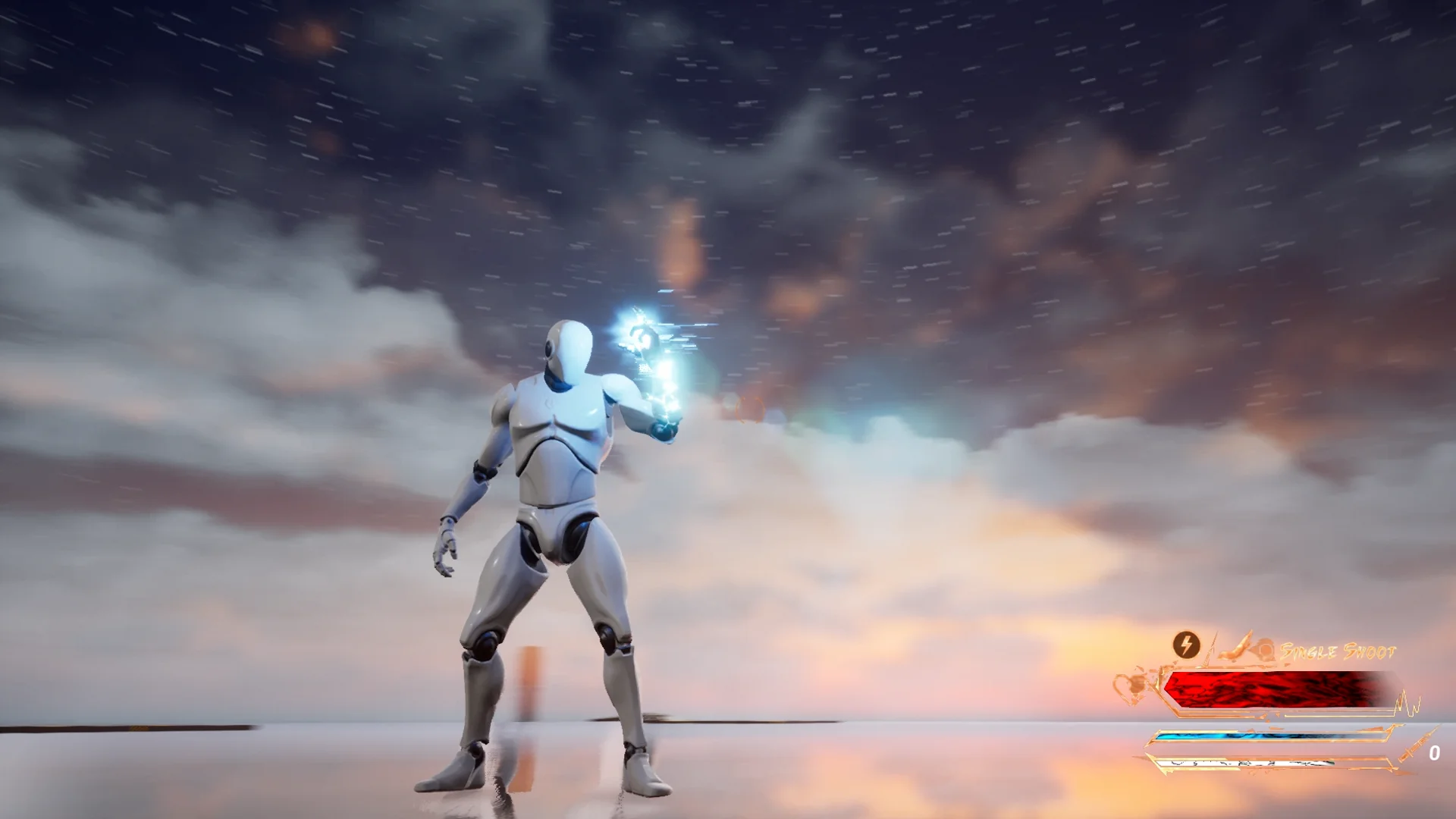
Resource screenshots
1 / 7
Asset drops
Daily Asset Drops
Follow 3DCGHUB on Telegram for daily Unreal, Unity & Blender drops and curated CC0 releases.
Water sections, flight paths, dash gaps, vertical routes, elemental combat, and a healing item can all appear in the same level. Character Skills is aimed at that kind of project: a playable demonstration of a character who can swim, fly, sprint, dodge, use telekinesis, jump, cast elemental magic, teleport, fight in melee, and recover with a first aid kit. It is not a single effect or a single animation. The package includes a skill designer and a set of finished skills, with a video demonstration showing the result in motion.
Where Character Skills Fits in a Project
Think of Character Skills as an ability sandbox with a visible construction layer. One part is the skill designer; the other is the finished roster. The distinction is practical. A developer can play the demonstration to see how the skills behave in motion, then inspect the settings behind them. Each skill carries extensive settings and includes effects, sounds, and animations, so the package covers both the mechanical entry and the presentation attached to it.
Because the project was created with the possibility of adding it to any other project, it is meant to travel. The integration tutorials reinforce that intent. This is not a closed demo that only works as a standalone scene. The system is presented as something that can be moved into an existing project and adapted there, with the Third Person project serving as the main example.
The reactive enemies give the project a second layer. Instead of judging a skill only by the character's animation or effect, a developer can see how an enemy answers it. That makes the project useful at the stage where a team needs to prove that abilities coexist: movement, magic, combat, and support all in one scene, with something on the other side reacting to them.
The Character Skills Roster and What Each One Covers
The roster is broad enough to cover several kinds of play. Movement, magic, close combat, and support each have entries, and the skills are named plainly enough to understand their place in a scene.
Swimming, Flying, Sprinting, and the Rest of the Movement Set
Swimming and Flying cover two distinct modes of travel. Sprint is the speed skill. Dodging, listed as Dash, is the evasion entry. Super Jump and Air Jump address vertical movement, with Air Jump specifically tied to jumping while airborne. Teleportation provides a separate repositioning option. These are separate skills rather than one generic movement switch, and each has its own settings, effects, sounds, and animations.
For a level designer, that group maps onto common scene problems: a water route, an aerial route, a long run, a gap that needs a dash, a high ledge, a jump that continues in the air, and an instant reposition. The names do not need to be translated into a different vocabulary; Swimming handles swimming, Flying handles flight, and Teleportation handles teleporting. The detail that matters is that each one is built as its own skill with its own presentation.
Telekinesis and the Elemental Magic Split
Telekinesis is the interactive skill in the set. The project includes a tutorial dedicated to interactive interaction with telekinesis, which makes it the ability most directly tied to handling something in the scene rather than only moving the character. The tutorial sits alongside the skill itself, so the interaction side is treated as part of the package.
Elemental Magic is split into Fire, Ice, and Electricity. Those three elements are separate entries under the same magic skill. Teleportation and the elemental spells sit alongside the movement skills, which means a single character can switch from traversal to spellcasting without leaving the roster. The magic group is not one generic spell; Fire, Ice, and Electricity each appear as named parts of the set.
Melee and the First Aid Kit
Melee covers close-range fighting. First Aid Kit is the support entry, a healing item turned into a character skill. Having both in the same project is useful when a scene needs more than movement and magic: a character can fight at close range and recover afterward. Both sit in the same roster as the traversal and spell skills, and both carry the same pattern of settings, effects, sounds, and animations.
The range of the roster is the point. A project that only needs Swimming or Flying can still use the rest as reference, and a project that needs a combat loop can look at Melee, Dodging, Elemental Magic, and First Aid Kit together.
Enemies That React to Character Skills
Two enemies are included: a monster and a flying turret. Both react to the character's skills. That detail changes how the project can be read. The enemies are not static props; their reactions give the skills a visible consequence in the demo. A developer testing a skill can watch the effect on the character and the response from the enemy in the same scene.
The flying turret adds an airborne enemy to the mix. The monster provides a second enemy profile. For a skill demo, that is enough to show that the abilities are meant to be used against something, not only displayed in an empty test room. The reactions also make the project more useful for checking how effects, sounds, and animations read during play, because there is an opposing element in the scene.
Bringing Character Skills Into Another Project
Integration is a stated part of the package, not an extra. The tutorials cover three routes. One shows how to integrate the system with another project using the Third Person project as the example. Another covers interactive interaction with telekinesis. A third covers integrating Character Skills into the Character Interaction project. Each route addresses a different starting point: a general third-person setup, a specific telekinesis interaction, and a combination with another character-focused project.
More tutorials are planned. The project updates are meant to carry the content from those tutorials as well. Named topics include a fire grenade and a melee weapon with combo and lootboxes. That means the skill set is not frozen at the initial roster; the tutorial material is intended to feed back into the project. A developer using the project can follow those additions as they arrive, while a developer who needs the current set can work with the skills and the three integration paths covered by the tutorials.
Who Gets the Most From Character Skills
A solo developer assembling a third-person character with several movement modes will find the traversal group immediately relevant. A combat designer can look at Melee, Dodging, Elemental Magic, and the reactive enemies. A programmer or technical designer interested in the construction side can study the skill designer and the settings attached to each ability. A team already using Character Interaction has a direct integration path through the matching tutorial.
Character Skills is most useful when the goal is a working collection beyond one isolated ability. The roster is broad enough to populate a demo level with swimming, flight, sprinting, dashing, jumping, teleporting, magic, melee, and healing, and the enemies give those actions something to act against. The skill designer and integration tutorials keep the project from being only a showcase. For a developer who wants to see how multiple character skills, their effects, sounds, and animations can coexist in one project, Character Skills provides that complete view.
 Gameplay Features
 Gameplay Features
 Gameplay Features