"95fdaf16012263fa"{"id":"1002318","slug":"ghost-trails","title":"Ghost Trails","category":"Gameplay Features","engine":"4.19+,5.0+","assetVersion":"","engineVersion":"Engine Version: 4.19+,5.0+","tag":"Gameplay Features","accent":"blue","visual":"mech","summary":"Ghost Trails builds afterimages into animations through AnimNotifyState, with duration and opacity control plus multiple mesh support for character effects.","platform":"Unreal Engine","indexPolicy":"index","publishedAt":"2026-11-06T06:19:39.056Z","updatedAt":"2026-11-06T06:19:39.056Z","sourceNotes":[],"fileContents":[],"compatibility":["Unreal Engine","Engine Version: 4.19+,5.0+"],"featuredImage":{"alt":"Ghost Trails","src":"/wp-content/uploads/published/2026/11/ee2633af425e-3c82c740-2c96-4c04-9d82-e66faa2d5b74-bb6a3e526e.webp"},"hasDownloadLink":true,"downloads":0,"terms":[{"taxonomy":"category","slug":"gameplay-features","name":"Gameplay Features"}],"galleryImages":[{"src":"/wp-content/uploads/published/2026/11/e6dc385c7750-9781bd69-42e0-4dfa-843e-ee9628b26cab-74bbbc94a7.webp","alt":"Ghost Trails"},{"src":"/wp-content/uploads/published/2026/11/32e1208d765d-fe4faaf7-c946-4400-ba36-34e1f9874734-e7d9b9eae6.webp","alt":"Ghost Trails"},{"src":"/wp-content/uploads/published/2026/11/362b31fde145-7fa6b5ef-2262-4b4e-9070-481847f6dcf6-659b4283c4.webp","alt":"Ghost Trails"},{"src":"/wp-content/uploads/published/2026/11/3464e040827d-4c353a5c-c681-4193-b6ec-f2480b55ab4d-0732a0b9fc.webp","alt":"Ghost Trails"}],"accessPanel":{"kind":"resource","title":"Get this resource","eyebrow":"Free resource","message":"3DCGHUB is the service provider for this listing. Access is fulfilled through the official publisher channel.","fileName":"Content.7z","safetyNote":"Resources are manually reviewed before listing to improve quality and reduce obvious risks.","actionLabel":"Get this resource","resourceType":"Resource archive","versions":[]},"contentHtml":"\u003ch2\u003eWhere a ghost trail reads as motion rather than noise\u003c/h2\u003e\n\u003cp\u003eAn afterimage works because the eye keeps a copy of the character for a fraction of a second longer than the character actually stays there. Ghost Trails exists to manufacture that copy on demand. It is a system for creating afterimages, and its tags — Trail, Effect, Ghost, VisualEffect — describe exactly the job: a visible echo of a mesh, left behind as something moves.\u003c/p\u003e\n\u003cp\u003eThat makes it a fit for the moments where a character crosses ground faster than the animation alone can sell. A dash, a sidestep, a burst of speed on an enemy. Without the echo, the pose change happens and the audience simply accepts it. With the echo, the movement has a visible wake.\u003c/p\u003e\n\u003cp\u003eThe effect is deliberately not scenery. It attaches to what is already animating, which is why the most useful way to think about Ghost Trails is as an extension of the animation rather than a separate visual effect layered on top of it.\u003c/p\u003e \u003ch2\u003eAnimNotifyState is where the ghost trail's timing lives\u003c/h2\u003e\n\u003cp\u003eThe core workflow is the part worth understanding first: Ghost Trail is added to animations through AnimNotifyState, and that notify state controls the duration.\u003c/p\u003e\n\u003cp\u003eA notify state occupies a span inside an animation instead of one instant. Placing one on the timeline means the ghost trail starts and stops as part of the animation itself. There is no second cue to fire from elsewhere, no separate script waiting for the right frame — the animation carries its own afterimage window.\u003c/p\u003e\n\u003cp\u003eFor animators, this changes where the work happens. Trimming a dash, retiming a recovery, or lengthening a lunge all move the trail along with the motion, because the trail is tied to the span that was marked. When a move is reworked, the effect follows instead of drifting out of sync.\u003c/p\u003e\n\u003cp\u003eIt also means the trail can be authored per move. A short hop and a long charge can each carry their own span, so the ghosting lasts exactly as long as that particular action demands.\u003c/p\u003e \u003ch2\u003eGhost Trail V2.0: duration and opacity on their own terms\u003c/h2\u003e\n\u003cp\u003eVersion 2.0 adds two adjustments that do most of the visual heavy lifting: customizing the ghost trail's duration and its opacity.\u003c/p\u003e\n\u003cp\u003eDuration governs how far behind the character the echo stretches — how many copies exist at once and how long the oldest one survives. Opacity governs how much those copies impose on the frame. Together they decide whether the effect whispers or shouts.\u003c/p\u003e\n\u003cp\u003eA high-opacity, short-duration trail looks like a hard impact, each copy almost solid before it vanishes. A lower-opacity trail that lingers produces something softer and more spectral, closer to a blur with a shape. The same move can be pushed either direction depending on what the character is supposed to feel like.\u003c/p\u003e\n\u003cp\u003eBecause both values are exposed rather than baked, they can be tuned against the actual scene. A trail that reads well against a dark corridor may disappear against a bright one, and the opacity setting is where that gets corrected.\u003c/p\u003e \u003ch2\u003eMultiple mesh support when a character is more than one piece\u003c/h2\u003e\n\u003cp\u003eMultiple mesh support is the other addition in Ghost Trail 2.0, and it addresses a practical problem: characters are frequently assembled from more than one mesh. Ghost Trails handles those setups, so the afterimage can follow a character built from several parts rather than being limited to a single mesh.\u003c/p\u003e\n\u003cp\u003eThat widens the range of characters the trail can be attached to without the effect becoming a special case. The trail stays consistent across the character instead of picking up one piece and leaving the rest clean.\u003c/p\u003e \u003ch2\u003eThe blueprint, actor, component and material pieces\u003c/h2\u003e\n\u003cp\u003eThe tag set behind Ghost Trails — Actor, Component, Blueprint, Material, Gameplay — maps out how the pieces fit together.\u003c/p\u003e\n\u003ch3\u003eAn actor and a component carry the effect\u003c/h3\u003e\n\u003cp\u003eThe trail exists as an actor in the scene, with component logic driving it. That structure is what lets it be placed, referenced, and controlled like other gameplay objects.\u003c/p\u003e\n\u003ch3\u003eBlueprint logic drives the setup\u003c/h3\u003e\n\u003cp\u003eBlueprint sits at the centre of the workflow, which is consistent with an effect that has to respond to animation events and expose values like duration and opacity for adjustment.\u003c/p\u003e\n\u003ch3\u003eMaterial handles the look\u003c/h3\u003e\n\u003cp\u003eMaterial appears in the tag list too, which fits an effect whose appearance is shaped in a material rather than only in logic — the ghost's rendering is a separate concern from when it appears.\u003c/p\u003e\n\u003cp\u003eFor anyone setting the system up for the first time, a manual walkthrough covers the manual path alongside the animation-driven one.\u003c/p\u003e \u003ch2\u003eWho gets the most out of Ghost Trails\u003c/h2\u003e\n\u003cp\u003eThe people who will find this most immediately useful are animators and technical artists working on character action in Unreal, particularly those who want the afterimage to belong to the animation rather than to a separate effects layer. If a project already has dashes, dodges, or fast-moving enemies waiting for a visual wake, the AnimNotifyState route puts that wake directly on the timeline where the motion is authored.\u003c/p\u003e\n\u003cp\u003eTeams working with characters built from multiple meshes get the additional benefit of a trail that covers the whole setup. And because duration and opacity are open to adjustment in 2.0, the same system can serve a subtle motion echo and an aggressive speed burst without needing two different approaches.\u003c/p\u003e\n\n\u003ch2\u003eMore From The Same Workflow\u003c/h2\u003e\n\u003cul\u003e\n\u003cli\u003e\u003ca href=\"https://3dcghub.com/ready-platforms/\" rel=\"noopener noreferrer\"\u003eReady Platforms\u003c/a\u003e\u003c/li\u003e\n\u003cli\u003e\u003ca href=\"https://3dcghub.com/fight-game-select-character/\" rel=\"noopener noreferrer\"\u003eFight Game Select Character\u003c/a\u003e\u003c/li\u003e\n\u003cli\u003e\u003ca href=\"https://3dcghub.com/virtual-reality-character-flying/\" rel=\"noopener noreferrer\"\u003eVirtual Reality Character Flying\u003c/a\u003e\u003c/li\u003e\n\u003cli\u003e\u003ca href=\"https://3dcghub.com/fade-camera-occluders/\" rel=\"noopener noreferrer\"\u003eFade Camera Occluders\u003c/a\u003e\u003c/li\u003e\n\u003cli\u003e\u003ca href=\"https://3dcghub.com/open-world-ai-multiplayer-spawn-system/\" rel=\"noopener noreferrer\"\u003eOpen World AI Multiplayer Spawn System\u003c/a\u003e\u003c/li\u003e\n\u003c/ul\u003e","contentTextLength":5439,"navigation":{"current":50,"total":4291,"previous":{"id":"1002319","slug":"graffiti-maker-in-game","title":"Graffiti Maker (In-Game)","category":"Gameplay Features","platform":"Unreal Engine","updatedAt":"2026-11-06T06:20:42.223Z"},"next":{"id":"1002317","slug":"forest-trunks-photoscanned-vol-2-by-unimodels","title":"Forest Trunks Photoscanned Vol. 2 by Unimodels","category":"Trees","platform":"Unreal Engine","updatedAt":"2026-11-06T06:18:58.089Z"}},"relatedResources":[{"id":"1002165","slug":"ready-platforms","title":"Ready Platforms","category":"Gameplay Features","engine":"4.26+,5.0+","assetVersion":"","engineVersion":"Engine Version: 4.26+,5.0+","tag":"Gameplay Features","accent":"blue","visual":"mech","summary":"Configure interactive traversal mechanics with Ready Platforms, featuring custom spline loops, mesh overrides, and particle trail integration.","platform":"Unreal Engine","indexPolicy":"index","publishedAt":"2026-10-29T10:08:13.951Z","updatedAt":"2026-10-29T10:08:13.951Z","sourceNotes":[],"fileContents":[],"compatibility":["Unreal Engine","Engine Version: 4.26+,5.0+"],"featuredImage":{"alt":"Ready Platforms","src":"/wp-content/uploads/published/2026/10/4f158a6dcc94-9019b8fa-a812-4d1a-b6bf-27f61e2d014e-5811fa571e.webp"},"hasDownloadLink":true,"downloads":0},{"id":"1002304","slug":"fight-game-select-character","title":"Fight Game Select Character","category":"Gameplay Features","engine":"4.26+,5.0+","assetVersion":"","engineVersion":"Engine Version: 4.26+,5.0+","tag":"Gameplay Features","accent":"blue","visual":"character","summary":"A Blueprint kit for fighting games: data-table rosters and stages, an automatic 3D character select grid, start menu HUD, health and energy bars, and camera and","platform":"Unreal Engine","indexPolicy":"index","publishedAt":"2026-11-05T10:04:37.850Z","updatedAt":"2026-11-05T10:04:37.850Z","sourceNotes":[],"fileContents":[],"compatibility":["Unreal Engine","Engine Version: 4.26+,5.0+"],"featuredImage":{"alt":"Fight Game Select Character","src":"/wp-content/uploads/published/2026/11/a51b60b826d5-6c8f6a9a-58b2-415a-810d-3c6a7747031e-6ac7fc7c3a.webp"},"hasDownloadLink":true,"downloads":0},{"id":"1002261","slug":"virtual-reality-character-flying","title":"Virtual Reality Character Flying","category":"Gameplay Features","engine":"4.27,5.0+","assetVersion":"","engineVersion":"Engine Version: 4.27,5.0+","tag":"Gameplay Features","accent":"blue","visual":"character","summary":"Explore the Virtual Reality Character Flying Blueprint project, featuring smooth walking, continuous turning, gestural flight acceleration, and input controls.","platform":"Unreal Engine","indexPolicy":"index","publishedAt":"2026-10-29T16:20:51.486Z","updatedAt":"2026-10-29T16:20:51.486Z","sourceNotes":[],"fileContents":[],"compatibility":["Unreal Engine","Engine Version: 4.27,5.0+"],"featuredImage":{"alt":"Virtual Reality Character Flying","src":"/wp-content/uploads/published/2026/10/cae457bf8790-a8442b34-ea49-4636-bbca-98b5b7021a9f-dbdc518865.webp"},"hasDownloadLink":true,"downloads":0}]}
Gameplay Features
Ghost Trails
Ghost Trails builds afterimages into animations through AnimNotifyState, with duration and opacity control plus multiple mesh support for character effects.
Where a ghost trail reads as motion rather than noise
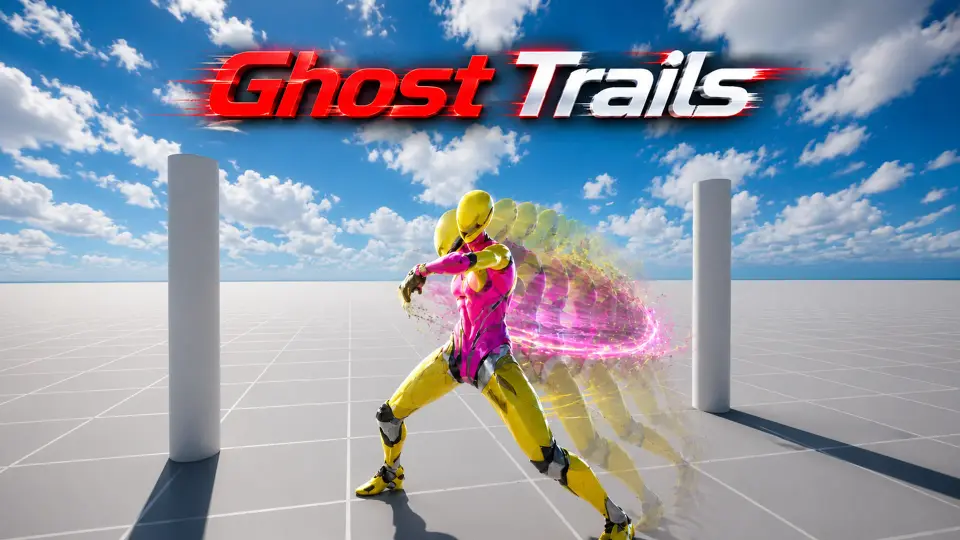
An afterimage works because the eye keeps a copy of the character for a fraction of a second longer than the character actually stays there. Ghost Trails exists to manufacture that copy on demand. It is a system for creating afterimages, and its tags — Trail, Effect, Ghost, VisualEffect — describe exactly the job: a visible echo of a mesh, left behind as something moves.
That makes it a fit for the moments where a character crosses ground faster than the animation alone can sell. A dash, a sidestep, a burst of speed on an enemy. Without the echo, the pose change happens and the audience simply accepts it. With the echo, the movement has a visible wake.
The effect is deliberately not scenery. It attaches to what is already animating, which is why the most useful way to think about Ghost Trails is as an extension of the animation rather than a separate visual effect layered on top of it.
AnimNotifyState is where the ghost trail's timing lives
The core workflow is the part worth understanding first: Ghost Trail is added to animations through AnimNotifyState, and that notify state controls the duration.
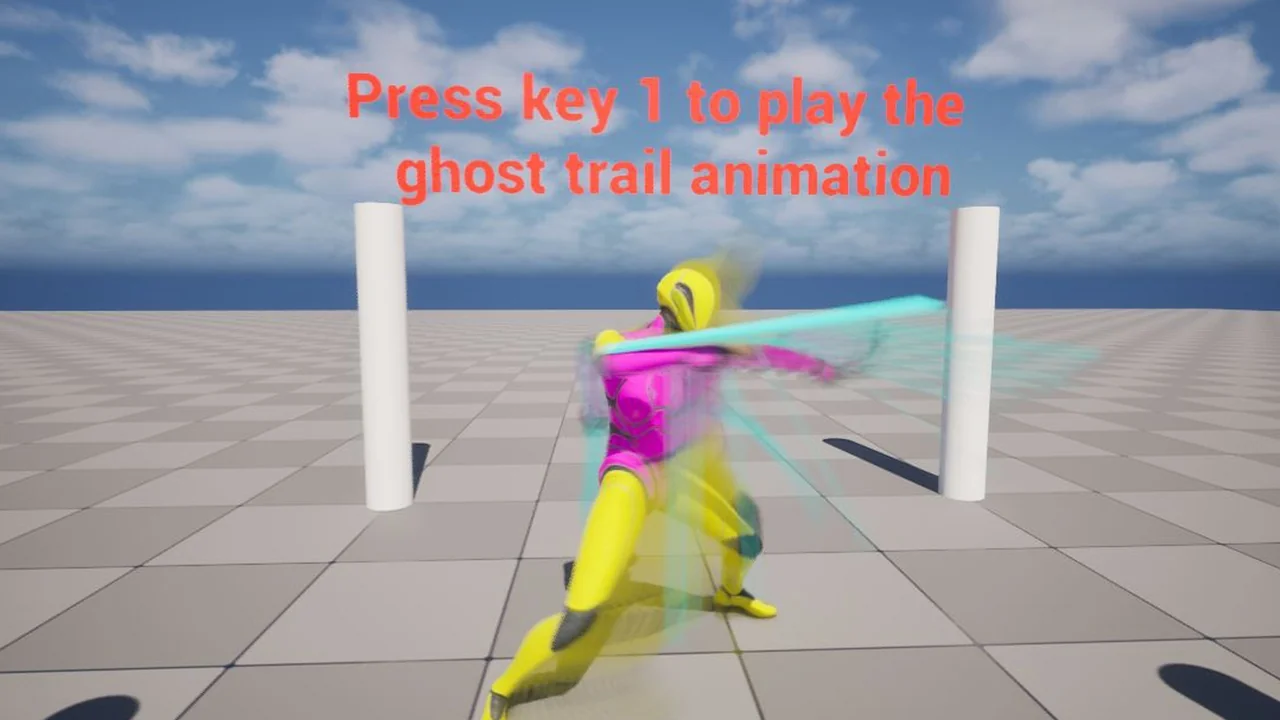
A notify state occupies a span inside an animation instead of one instant. Placing one on the timeline means the ghost trail starts and stops as part of the animation itself. There is no second cue to fire from elsewhere, no separate script waiting for the right frame — the animation carries its own afterimage window.
For animators, this changes where the work happens. Trimming a dash, retiming a recovery, or lengthening a lunge all move the trail along with the motion, because the trail is tied to the span that was marked. When a move is reworked, the effect follows instead of drifting out of sync.
It also means the trail can be authored per move. A short hop and a long charge can each carry their own span, so the ghosting lasts exactly as long as that particular action demands.
Ghost Trail V2.0: duration and opacity on their own terms
Version 2.0 adds two adjustments that do most of the visual heavy lifting: customizing the ghost trail's duration and its opacity.
Duration governs how far behind the character the echo stretches — how many copies exist at once and how long the oldest one survives. Opacity governs how much those copies impose on the frame. Together they decide whether the effect whispers or shouts.
A high-opacity, short-duration trail looks like a hard impact, each copy almost solid before it vanishes. A lower-opacity trail that lingers produces something softer and more spectral, closer to a blur with a shape. The same move can be pushed either direction depending on what the character is supposed to feel like.
Because both values are exposed rather than baked, they can be tuned against the actual scene. A trail that reads well against a dark corridor may disappear against a bright one, and the opacity setting is where that gets corrected.
Multiple mesh support when a character is more than one piece
Multiple mesh support is the other addition in Ghost Trail 2.0, and it addresses a practical problem: characters are frequently assembled from more than one mesh. Ghost Trails handles those setups, so the afterimage can follow a character built from several parts rather than being limited to a single mesh.
That widens the range of characters the trail can be attached to without the effect becoming a special case. The trail stays consistent across the character instead of picking up one piece and leaving the rest clean.
The blueprint, actor, component and material pieces
The tag set behind Ghost Trails — Actor, Component, Blueprint, Material, Gameplay — maps out how the pieces fit together.
An actor and a component carry the effect
The trail exists as an actor in the scene, with component logic driving it. That structure is what lets it be placed, referenced, and controlled like other gameplay objects.
Blueprint logic drives the setup
Blueprint sits at the centre of the workflow, which is consistent with an effect that has to respond to animation events and expose values like duration and opacity for adjustment.
Material handles the look
Material appears in the tag list too, which fits an effect whose appearance is shaped in a material rather than only in logic — the ghost's rendering is a separate concern from when it appears.
For anyone setting the system up for the first time, a manual walkthrough covers the manual path alongside the animation-driven one.
Who gets the most out of Ghost Trails
The people who will find this most immediately useful are animators and technical artists working on character action in Unreal, particularly those who want the afterimage to belong to the animation rather than to a separate effects layer. If a project already has dashes, dodges, or fast-moving enemies waiting for a visual wake, the AnimNotifyState route puts that wake directly on the timeline where the motion is authored.
Teams working with characters built from multiple meshes get the additional benefit of a trail that covers the whole setup. And because duration and opacity are open to adjustment in 2.0, the same system can serve a subtle motion echo and an aggressive speed burst without needing two different approaches.
 Gameplay Features
 Gameplay Features
 Gameplay Features
 Gameplay Features