"95fdaf16012263fa"{"id":"1002319","slug":"graffiti-maker-in-game","title":"Graffiti Maker (In-Game)","category":"Gameplay Features","engine":"4.24+,5.0+","assetVersion":"","engineVersion":"Engine Version: 4.24+,5.0+","tag":"Gameplay Features","accent":"blue","visual":"mech","summary":"Graffiti Maker (In-Game) gives players spray paint and text-based graffiti tools, editable text, rotation, scale, brush and color, plus exposed Blueprint logic.","platform":"Unreal Engine","indexPolicy":"index","publishedAt":"2026-11-06T06:20:42.223Z","updatedAt":"2026-11-06T06:20:42.223Z","sourceNotes":[],"fileContents":[],"compatibility":["Unreal Engine","Engine Version: 4.24+,5.0+"],"featuredImage":{"alt":"Graffiti Maker (In-Game)","src":"/wp-content/uploads/published/2026/11/5a373d1605d3-bb57d7e2-239e-4d6e-8bf0-af8edabb4bc6-2eeadae542.webp"},"hasDownloadLink":true,"downloads":0,"terms":[{"taxonomy":"category","slug":"gameplay-features","name":"Gameplay Features"}],"galleryImages":[{"src":"/wp-content/uploads/published/2026/11/b9cdb5479254-fe4ebaaf-b721-4cc4-af52-1bd2cd7e2a11-47aef6fddc.webp","alt":"Graffiti Maker (In-Game)"},{"src":"/wp-content/uploads/published/2026/11/f325c2d66a11-1c6b8e59-7b97-4780-9055-2c2db3fdca70-9f0fadb84c.webp","alt":"Graffiti Maker (In-Game)"},{"src":"/wp-content/uploads/published/2026/11/1fad0d24e484-848f4b43-cb5f-42bf-886e-1046521adb7f-4a0ec9065f.webp","alt":"Graffiti Maker (In-Game)"},{"src":"/wp-content/uploads/published/2026/11/bfb720b5747e-46be12a4-cbb7-4b75-8a7b-1bd9c1e3dea8-ac5b0a38e6.webp","alt":"Graffiti Maker (In-Game)"},{"src":"/wp-content/uploads/published/2026/11/7f5c8da5bc21-7d6c9096-f668-4756-ba81-d61cef0184ca-3918cb600e.webp","alt":"Graffiti Maker (In-Game)"},{"src":"/wp-content/uploads/published/2026/11/e1d0845d906a-6c20867c-d82d-464d-a6c8-7a889525b4c8-d20cc69ea0.webp","alt":"Graffiti Maker (In-Game)"},{"src":"/wp-content/uploads/published/2026/11/c74ee4d743e4-6208bc02-bb63-416b-a5f2-0a773fa9a89b-606790592b.webp","alt":"Graffiti Maker (In-Game)"},{"src":"/wp-content/uploads/published/2026/11/d1fb7d317ac4-343bff71-32b4-4782-9b48-7d67bc2ef774-639c2c5ebc.webp","alt":"Graffiti Maker (In-Game)"}],"accessPanel":{"kind":"resource","title":"Get this resource","eyebrow":"Free resource","message":"3DCGHUB is the service provider for this listing. Access is fulfilled through the official publisher channel.","fileName":"Graffiti Maker (In-Game).7z","safetyNote":"Resources are manually reviewed before listing to improve quality and reduce obvious risks.","actionLabel":"Get this resource","resourceType":"Resource archive","versions":[]},"contentHtml":"\u003ch2\u003eA Player-Facing Graffiti Tool for In-Game Marks\u003c/h2\u003e\n\u003cp\u003ePlayers do not always want to use the marks a designer placed ahead of time. Sometimes they want to leave their own tag, message, or painted mark in the world at the moment they choose. Graffiti Maker (In-Game) addresses that need directly: it lets players create in-game graffiti whenever and wherever they please.\u003c/p\u003e\n\u003cp\u003eThe tool is not a single fixed piece of graffiti. It contains a spray paint tool and a text generator, so a player can freely draw or produce a text graffiti based on a text input. The creation step happens inside the game session. A designer can provide the capability, then let players decide what appears in the world and when.\u003c/p\u003e \u003ch2\u003eSpray Paint and Text Input Share One Graffiti Maker\u003c/h2\u003e\n\u003cp\u003eThe spray paint side covers freehand drawing. A player can paint a mark directly instead of being limited to a text field. The text generator covers the typed route: the player enters text, and the system turns that input into in-game graffiti.\u003c/p\u003e\n\u003cp\u003eBoth paths produce graffiti through the same system. One handles drawn marks; the other handles words supplied by the player. A project can support both kinds of player expression without splitting them into separate features. The player chooses the method that matches the mark they want to leave.\u003c/p\u003e \u003ch2\u003eEditing Text, Rotation, Scale, Brush, and Color\u003c/h2\u003e\n\u003cp\u003eCreation is not the end of the interaction. Players can edit their graffiti or erase it at any time. The editable properties are text, rotation, scale, brush, and color. That gives the player a way to revise a mark after placing it rather than accepting the first result.\u003c/p\u003e\n\u003cp\u003eText editing covers the content of a text-based mark. Rotation changes how the graffiti is oriented, and scale changes its size. Brush and color affect the painted look. Erasing removes the mark when the player no longer wants it. The editing pass is part of the same graffiti interaction, not a separate authoring step. These controls make the graffiti something the player can keep adjusting, not a one-shot command that disappears from their control.\u003c/p\u003e \u003ch2\u003eBlueprint Logic Behind the Graffiti Maker\u003c/h2\u003e\n\u003cp\u003eThe system does not stop at the player-facing controls. A game designer has access to the Blueprint logic behind Graffiti Maker, so the system can be changed or extended. That access is the difference between a closed in-game tool and one a team can adapt to its own project.\u003c/p\u003e\n\u003cp\u003eNew colors and fonts are direct extension points. A designer can add options to the system, adjust how it behaves, or build new features on top of the existing Blueprint logic. The player still gets the creation and editing controls; the designer keeps a path into the implementation. That division gives a production room to tune the graffiti feature without replacing the player-facing loop. That keeps the system open to project-specific needs.\u003c/p\u003e \u003ch2\u003eWhere the System Fits in a Scene or Production\u003c/h2\u003e\n\u003cp\u003eGraffiti Maker fits scenes where player expression is part of the experience. A player who can draw with spray paint or generate text from an input can leave a personal mark in the game world. The system supports that kind of play because the graffiti is created in the session, not only supplied as part of the scene.\u003c/p\u003e\n\u003cp\u003eOn the production side, the Blueprint access gives designers a practical place to work. The player-facing tool handles drawing, text input, editing, and erasing. The designer-facing logic handles changes and additions such as new colors or fonts. A team can keep the player controls intact while adapting the system to its own set of options. The player does not have to leave the session to make those changes.\u003c/p\u003e \u003ch2\u003eWhat the Player Controls, What the Designer Controls\u003c/h2\u003e\n\u003cp\u003eThe split is clear in the feature set. Players choose between spray paint and text input. They can edit text, rotation, scale, brush, and color, and they can erase a mark at any time. Those controls cover the moment-to-moment use of graffiti in the game.\u003c/p\u003e\n\u003cp\u003eDesigners work on the Blueprint side. They can change the logic behind the system or add new features. New colors and fonts are two ways to extend it. The player does not need to handle that layer; the designer does. This makes Graffiti Maker useful both as an in-game activity and as a system a team can modify during production.\u003c/p\u003e \u003ch2\u003ePractical Fit for a Game That Needs Player-Made Marks\u003c/h2\u003e\n\u003cp\u003eIf a project needs in-game graffiti that players can create, revise, and remove on their own, Graffiti Maker covers that loop. It provides the spray paint tool, the text generator, the editing properties, and the Blueprint layer needed to adapt the system. The graffiti is not limited to a fixed set of marks chosen by the designer; it comes from the player's drawing or text input.\u003c/p\u003e\n\u003cp\u003eThat combination is the practical takeaway. The player gets a way to leave a mark in the world; the designer gets access to the logic behind it. In a production workflow, Graffiti Maker can sit as a player-facing feature with a designer-facing implementation layer, ready to be changed or extended as the project requires. It can serve as the complete player-facing loop and as an editable system underneath it.\u003c/p\u003e\n\n\u003ch2\u003eMore From The Same Workflow\u003c/h2\u003e\n\u003cul\u003e\n\u003cli\u003e\u003ca href=\"https://3dcghub.com/auto-instance/\" rel=\"noopener noreferrer\"\u003eAuto Instance\u003c/a\u003e\u003c/li\u003e\n\u003cli\u003e\u003ca href=\"https://3dcghub.com/ghost-trails/\" rel=\"noopener noreferrer\"\u003eGhost Trails\u003c/a\u003e\u003c/li\u003e\n\u003cli\u003e\u003ca href=\"https://3dcghub.com/cyberpunk-vehicle-hovermod-flymod/\" rel=\"noopener noreferrer\"\u003eCyberpunk Vehicle ( HoverMod + FlyMod )\u003c/a\u003e\u003c/li\u003e\n\u003cli\u003e\u003ca href=\"https://3dcghub.com/cargo-delivery-inventory-system/\" rel=\"noopener noreferrer\"\u003eCargo Delivery Inventory System\u003c/a\u003e\u003c/li\u003e\n\u003cli\u003e\u003ca href=\"https://3dcghub.com/battle-royale-air-drop/\" rel=\"noopener noreferrer\"\u003eBattle Royale - Air Drop\u003c/a\u003e\u003c/li\u003e\n\u003c/ul\u003e","contentTextLength":5248,"navigation":{"current":49,"total":4291,"previous":{"id":"1002320","slug":"height-maps-pack","title":"Height Maps Pack","category":"Desert","platform":"Unreal Engine","updatedAt":"2026-11-06T06:21:42.641Z"},"next":{"id":"1002318","slug":"ghost-trails","title":"Ghost Trails","category":"Gameplay Features","platform":"Unreal Engine","updatedAt":"2026-11-06T06:19:39.056Z"}},"relatedResources":[{"id":"1002294","slug":"auto-instance","title":"Auto Instance","category":"Gameplay Features","engine":"4.26+,5.0+","assetVersion":"","engineVersion":"Engine Version: 4.26+,5.0+","tag":"Gameplay Features","accent":"blue","visual":"mech","summary":"Auto Instance converts Static Mesh Actors in existing levels into Hierarchical or Instanced Static Mesh actors, with a threshold and one-click targeting.","platform":"Unreal Engine","indexPolicy":"index","publishedAt":"2026-11-04T05:22:04.042Z","updatedAt":"2026-11-04T05:22:04.042Z","sourceNotes":[],"fileContents":[],"compatibility":["Unreal Engine","Engine Version: 4.26+,5.0+"],"featuredImage":{"alt":"Auto Instance","src":"/wp-content/uploads/published/2026/11/b31daade89b7-1334a2ea-c735-4714-adcd-9c437d80b7aa-7a48a60d94.webp"},"hasDownloadLink":true,"downloads":1},{"id":"1002328","slug":"mobile-swipe-solution-for-android-and-ios","title":"Mobile Swipe Solution for Android and iOS","category":"Gameplay Features","engine":"4.23+,5.0+","assetVersion":"","engineVersion":"Engine Version: 4.23+,5.0+","tag":"Gameplay Features","accent":"blue","visual":"luts","summary":"A Blueprint swipe input solution for Unreal Engine mobile projects, covering 4-way, diagonal, and 8-way gestures plus the settings needed before Android and iOS","platform":"Unreal Engine","indexPolicy":"index","publishedAt":"2026-11-06T06:33:26.197Z","updatedAt":"2026-11-06T06:33:26.197Z","sourceNotes":[],"fileContents":[],"compatibility":["Unreal Engine","Engine Version: 4.23+,5.0+"],"featuredImage":{"alt":"Mobile Swipe Solution for Android and iOS","src":"/wp-content/uploads/published/2026/11/3204971faae6-e82cdf98-1b30-4ded-9007-97adc75b47b6-1af30d8522.webp"},"hasDownloadLink":true,"downloads":0},{"id":"1002318","slug":"ghost-trails","title":"Ghost Trails","category":"Gameplay Features","engine":"4.19+,5.0+","assetVersion":"","engineVersion":"Engine Version: 4.19+,5.0+","tag":"Gameplay Features","accent":"blue","visual":"mech","summary":"Ghost Trails builds afterimages into animations through AnimNotifyState, with duration and opacity control plus multiple mesh support for character effects.","platform":"Unreal Engine","indexPolicy":"index","publishedAt":"2026-11-06T06:19:39.056Z","updatedAt":"2026-11-06T06:19:39.056Z","sourceNotes":[],"fileContents":[],"compatibility":["Unreal Engine","Engine Version: 4.19+,5.0+"],"featuredImage":{"alt":"Ghost Trails","src":"/wp-content/uploads/published/2026/11/ee2633af425e-3c82c740-2c96-4c04-9d82-e66faa2d5b74-bb6a3e526e.webp"},"hasDownloadLink":true,"downloads":0}]}
Gameplay Features
Graffiti Maker (In-Game)
Graffiti Maker (In-Game) gives players spray paint and text-based graffiti tools, editable text, rotation, scale, brush and color, plus exposed Blueprint logic.
Players do not always want to use the marks a designer placed ahead of time. Sometimes they want to leave their own tag, message, or painted mark in the world at the moment they choose. Graffiti Maker (In-Game) addresses that need directly: it lets players create in-game graffiti whenever and wherever they please.
The tool is not a single fixed piece of graffiti. It contains a spray paint tool and a text generator, so a player can freely draw or produce a text graffiti based on a text input. The creation step happens inside the game session. A designer can provide the capability, then let players decide what appears in the world and when.
Spray Paint and Text Input Share One Graffiti Maker
The spray paint side covers freehand drawing. A player can paint a mark directly instead of being limited to a text field. The text generator covers the typed route: the player enters text, and the system turns that input into in-game graffiti.
Both paths produce graffiti through the same system. One handles drawn marks; the other handles words supplied by the player. A project can support both kinds of player expression without splitting them into separate features. The player chooses the method that matches the mark they want to leave.
Editing Text, Rotation, Scale, Brush, and Color
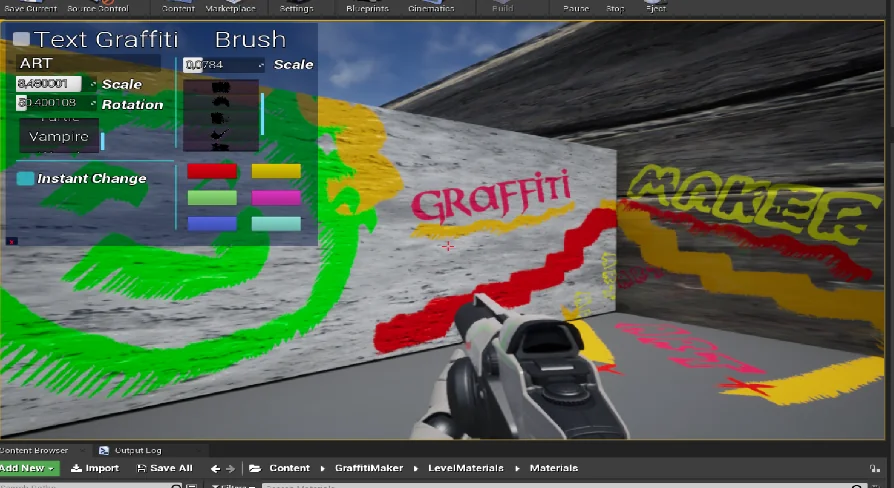
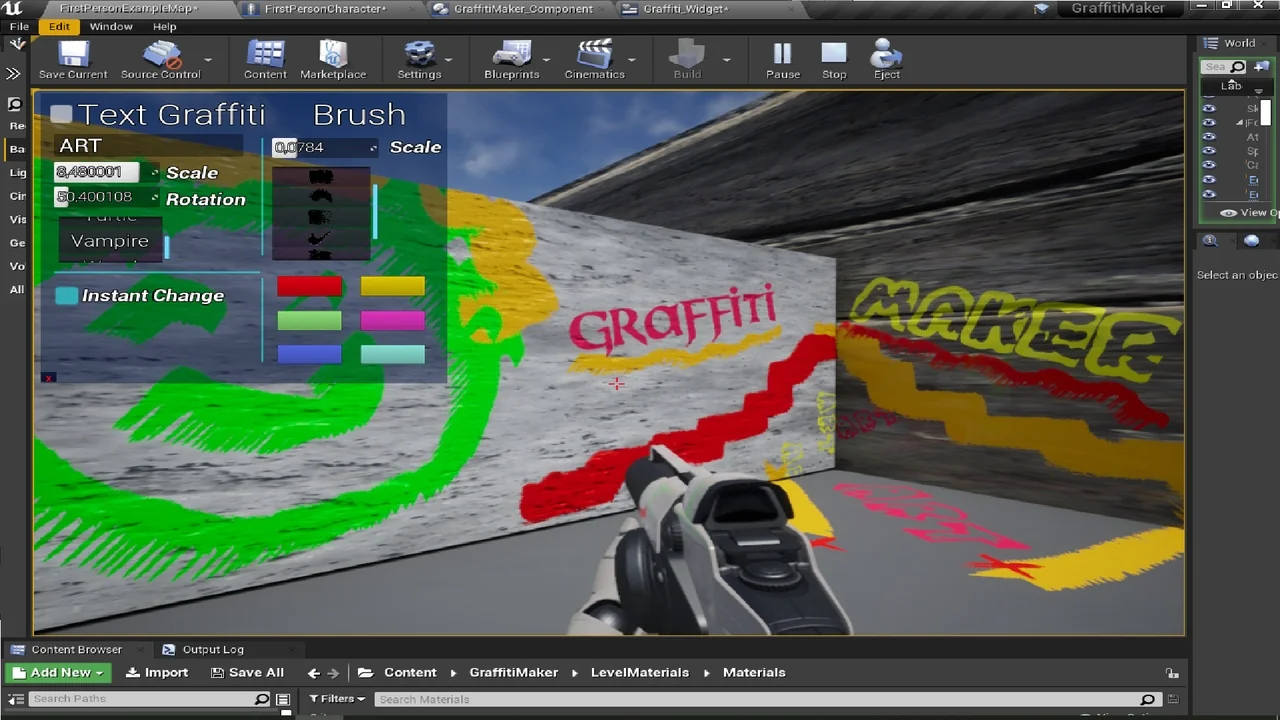
Creation is not the end of the interaction. Players can edit their graffiti or erase it at any time. The editable properties are text, rotation, scale, brush, and color. That gives the player a way to revise a mark after placing it rather than accepting the first result.
Text editing covers the content of a text-based mark. Rotation changes how the graffiti is oriented, and scale changes its size. Brush and color affect the painted look. Erasing removes the mark when the player no longer wants it. The editing pass is part of the same graffiti interaction, not a separate authoring step. These controls make the graffiti something the player can keep adjusting, not a one-shot command that disappears from their control.
Blueprint Logic Behind the Graffiti Maker
The system does not stop at the player-facing controls. A game designer has access to the Blueprint logic behind Graffiti Maker, so the system can be changed or extended. That access is the difference between a closed in-game tool and one a team can adapt to its own project.
New colors and fonts are direct extension points. A designer can add options to the system, adjust how it behaves, or build new features on top of the existing Blueprint logic. The player still gets the creation and editing controls; the designer keeps a path into the implementation. That division gives a production room to tune the graffiti feature without replacing the player-facing loop. That keeps the system open to project-specific needs.
Where the System Fits in a Scene or Production
Graffiti Maker fits scenes where player expression is part of the experience. A player who can draw with spray paint or generate text from an input can leave a personal mark in the game world. The system supports that kind of play because the graffiti is created in the session, not only supplied as part of the scene.
On the production side, the Blueprint access gives designers a practical place to work. The player-facing tool handles drawing, text input, editing, and erasing. The designer-facing logic handles changes and additions such as new colors or fonts. A team can keep the player controls intact while adapting the system to its own set of options. The player does not have to leave the session to make those changes.
What the Player Controls, What the Designer Controls
The split is clear in the feature set. Players choose between spray paint and text input. They can edit text, rotation, scale, brush, and color, and they can erase a mark at any time. Those controls cover the moment-to-moment use of graffiti in the game.
Designers work on the Blueprint side. They can change the logic behind the system or add new features. New colors and fonts are two ways to extend it. The player does not need to handle that layer; the designer does. This makes Graffiti Maker useful both as an in-game activity and as a system a team can modify during production.
Practical Fit for a Game That Needs Player-Made Marks
If a project needs in-game graffiti that players can create, revise, and remove on their own, Graffiti Maker covers that loop. It provides the spray paint tool, the text generator, the editing properties, and the Blueprint layer needed to adapt the system. The graffiti is not limited to a fixed set of marks chosen by the designer; it comes from the player's drawing or text input.
That combination is the practical takeaway. The player gets a way to leave a mark in the world; the designer gets access to the logic behind it. In a production workflow, Graffiti Maker can sit as a player-facing feature with a designer-facing implementation layer, ready to be changed or extended as the project requires. It can serve as the complete player-facing loop and as an editable system underneath it.
 Gameplay Features
 Gameplay Features
 Gameplay Features
 Gameplay Features