"95fdaf16012263fa"{"id":"1002315","slug":"cyberpunk-vehicle-hovermod-flymod","title":"Cyberpunk Vehicle ( HoverMod + FlyMod )","category":"Gameplay Features","engine":"4.24+,5.0+","assetVersion":"","engineVersion":"Engine Version: 4.24+,5.0+","tag":"Gameplay Features","accent":"blue","visual":"mech","summary":"A drivable cyberpunk hover vehicle for Unreal Engine 4.23 through 5.1, with HoverMod and FlyMod setups, Blueprint-driven movement, and a scifi city look.","platform":"Unreal Engine","indexPolicy":"index","publishedAt":"2026-11-06T06:17:19.865Z","updatedAt":"2026-11-06T06:17:19.865Z","sourceNotes":[],"fileContents":[],"compatibility":["Unreal Engine","Engine Version: 4.24+,5.0+"],"featuredImage":{"alt":"Cyberpunk Vehicle ( HoverMod + FlyMod )","src":"/wp-content/uploads/published/2026/11/d7cb9f7d3bf3-60a1b470-1ada-4c88-bd9b-cff8eef41781-b7d9864591.webp"},"hasDownloadLink":true,"downloads":0,"terms":[{"taxonomy":"category","slug":"gameplay-features","name":"Gameplay Features"}],"galleryImages":[{"src":"/wp-content/uploads/published/2026/11/76012e3a3233-f1048513-2dfc-4468-bb24-e47dfbad6e26-45f2302380.webp","alt":"Cyberpunk Vehicle ( HoverMod + FlyMod )"},{"src":"/wp-content/uploads/published/2026/11/4daecce66a0e-6abd86b2-82db-46b4-b268-77faf4c10e71-786abd1cd2.webp","alt":"Cyberpunk Vehicle ( HoverMod + FlyMod )"},{"src":"/wp-content/uploads/published/2026/11/b387c4003c40-45120be8-d2f9-48ef-8dad-474c78b86a62-7f27abac5a.webp","alt":"Cyberpunk Vehicle ( HoverMod + FlyMod )"},{"src":"/wp-content/uploads/published/2026/11/6bbb38317846-d8a1fd0e-3ac2-4511-9379-ad43608a99fc-23953e4467.webp","alt":"Cyberpunk Vehicle ( HoverMod + FlyMod )"},{"src":"/wp-content/uploads/published/2026/11/877ac8f64a90-df9b1a55-3222-40b0-b71c-9cb11a509a17-b028f04bd8.webp","alt":"Cyberpunk Vehicle ( HoverMod + FlyMod )"},{"src":"/wp-content/uploads/published/2026/11/7dd7ca98e998-645a613d-5dcc-46eb-8e7b-6bc8986d0242-c36f24d4ff.webp","alt":"Cyberpunk Vehicle ( HoverMod + FlyMod )"},{"src":"/wp-content/uploads/published/2026/11/9c1169bcdc3d-b313d25b-ea56-4f0c-9144-25bd1ff4f171-7aae5e5881.webp","alt":"Cyberpunk Vehicle ( HoverMod + FlyMod )"},{"src":"/wp-content/uploads/published/2026/11/1f57846bd0cb-c2319cbf-7859-40b5-bdc0-1b27f2433918-b5a91508d4.webp","alt":"Cyberpunk Vehicle ( HoverMod + FlyMod )"},{"src":"/wp-content/uploads/published/2026/11/93d9c147a7f4-c946aa69-1a87-4aa6-9dfc-ac27a06f90db-a628990091.webp","alt":"Cyberpunk Vehicle ( HoverMod + FlyMod )"},{"src":"/wp-content/uploads/published/2026/11/037fd5e719e4-69bcea2d-7bde-40b8-a1dd-8a2b5e2c5a8c-1ff6da4e4f.webp","alt":"Cyberpunk Vehicle ( HoverMod + FlyMod )"}],"accessPanel":{"kind":"resource","title":"Get this resource","eyebrow":"Free resource","message":"3DCGHUB is the service provider for this listing. Access is fulfilled through the official publisher channel.","fileName":"Cyberpunk Vehicle ( HoverMod FlyMod ).7z","safetyNote":"Resources are manually reviewed before listing to improve quality and reduce obvious risks.","actionLabel":"Get this resource","resourceType":"Resource archive","versions":[]},"contentHtml":"\u003cp\u003eStreets lined with towers, traffic that never quite touches the ground, chases that climb instead of turning corners — that is the kind of scene this vehicle was built to sit inside. Cyberpunk Vehicle is a drivable hover vehicle for Unreal Engine, and the two names in brackets tell you most of what you need before you open the project: a hover configuration and a fly configuration, both part of the same resource.\u003c/p\u003e \u003ch2\u003eWhere a hovercar changes a city scene\u003c/h2\u003e \u003cp\u003eGround vehicles in a dense futuristic city force a designer into a narrow set of choices. Roads have to exist, corners have to be wide enough, and every chase has to obey the same grid as the pedestrians. A hover vehicle loosens that. Movement can pass over the street rather than through it, which is why the futuristic, scifi and city tags sit alongside the vehicle and hovercar tags on this one.\u003c/p\u003e \u003cp\u003eThe cyberpunk label is doing real work here too. This is not a generic grey transport — the styling assumes a setting where neon, dense architecture and machine-heavy streets are the baseline. If your level already looks like that, the vehicle slots in without needing a re-skin to justify itself.\u003c/p\u003e \u003ch2\u003eHoverMod and FlyMod as two movement states\u003c/h2\u003e \u003cp\u003eThe bracket in the name is the clearest structural hint in the whole resource. HoverMod and FlyMod are named separately, which means the vehicle is not a single fixed behaviour — there is a hovering setup and a flying setup, and the naming suggests they are treated as distinct modes rather than one blended motion.\u003c/p\u003e \u003cp\u003ePractically, that split matters when you plan a scene. A low hover reads as street-level presence: patrol craft, delivery drones with weight, anything that should feel like it is fighting gravity but still occupying the avenue. A fly configuration opens up the vertical space above the buildings, where a camera can pull back and the city becomes a backdrop instead of a corridor. Having both in one resource lets you stage a sequence that starts close to the ground and lifts without swapping assets.\u003c/p\u003e \u003cp\u003eBecause the vehicle is drivable rather than a static prop, this is player-controlled movement, not a canned animation. The difference shows immediately when someone else sits behind the controls.\u003c/p\u003e \u003ch2\u003eBlueprint work rather than a locked black box\u003c/h2\u003e \u003cp\u003eBlueprint appears in the tag set, which places the driving logic in Unreal's visual scripting system. That is a meaningful detail for anyone who expects to adjust how the vehicle behaves. Blueprint assets can be opened, read and edited inside the editor, so the vehicle is something you can inspect and adapt instead of a compiled behaviour you have to work around.\u003c/p\u003e \u003cp\u003eFor a team already working in Blueprints, it removes a translation step. For a solo developer, it means the vehicle belongs to the same project graph as everything else — the same place where input, camera and game rules live. The resource also carries documentation alongside a trailer, so there is material to consult before digging into the graphs.\u003c/p\u003e \u003ch2\u003eUnreal Engine 4.23 through 5.1\u003c/h2\u003e \u003cp\u003eVersion coverage runs across both engine generations: 4.23, 4.24, 4.25, 4.26, 4.27, 5.0 and 5.1. That spread is worth noting because it spans the boundary between UE4 and UE5. Projects still sitting on a late UE4 build are covered, and so are projects that have already moved to the first two UE5 releases.\u003c/p\u003e \u003cp\u003eIf you are on something outside that list, nothing here promises it will open cleanly — the supported set is the seven versions named, and that is where the guarantee stops. Matching your engine to one of them is the straightforward path.\u003c/p\u003e \u003ch2\u003eReading the tag set as a shortlist of scenes\u003c/h2\u003e \u003cp\u003eThe tags — vehicle, futuristic, scifi, hovercar, blueprint, city, cyberpunk — read almost like a checklist of the projects this was made for. A near-future racing prototype. A vertical slice set in a rain-slicked downtown. A flight-and-chase demo where the point is the sense of altitude. A scifi short rendered in engine rather than an offline package.\u003c/p\u003e \u003cp\u003eWhat the tags do not suggest is a period piece, a grounded modern setting, or anything that needs a plain street car. The styling is committed, and it will look out of place anywhere that is not at least somewhat futuristic.\u003c/p\u003e \u003cp\u003eThere is also a support side to the resource: the creator keeps a help space open for fixing issues and collecting requests for future products, which is useful if the vehicle misbehaves on your particular engine version.\u003c/p\u003e \u003ch2\u003eWho gets the most out of it\u003c/h2\u003e \u003cp\u003eSmall teams and solo developers building a futuristic city scene are the natural fit. If your project already lives in the cyberpunk register and you need a vehicle the player can actually drive — with a low hover state and a flying state available in the same resource — this covers that gap without requiring you to assemble the movement logic from nothing.\u003c/p\u003e \u003cp\u003eTeams on a locked engine version should check their number against the list first. Anyone on 4.23 to 5.1 with a neon city and a need for something that moves above the road will find the pieces already in place.\u003c/p\u003e\n\n\u003ch2\u003eContinue Browsing Similar Packs\u003c/h2\u003e\n\u003cul\u003e\n\u003cli\u003e\u003ca href=\"https://3dcghub.com/checkpoint-course-creator/\" rel=\"noopener noreferrer\"\u003eCheckpoint Course Creator\u003c/a\u003e\u003c/li\u003e\n\u003cli\u003e\u003ca href=\"https://3dcghub.com/wall-fx-pack/\" rel=\"noopener noreferrer\"\u003eWall FX pack\u003c/a\u003e\u003c/li\u003e\n\u003cli\u003e\u003ca href=\"https://3dcghub.com/gui-with-multiplayer/\" rel=\"noopener noreferrer\"\u003eGUI with Multiplayer\u003c/a\u003e\u003c/li\u003e\n\u003cli\u003e\u003ca href=\"https://3dcghub.com/character-interaction/\" rel=\"noopener noreferrer\"\u003eCharacter Interaction\u003c/a\u003e\u003c/li\u003e\n\u003cli\u003e\u003ca href=\"https://3dcghub.com/traffic-ai-system/\" rel=\"noopener noreferrer\"\u003eTraffic AI System\u003c/a\u003e\u003c/li\u003e\n\u003c/ul\u003e","contentTextLength":5127,"navigation":{"current":53,"total":4291,"previous":{"id":"1002316","slug":"force-shields","title":"Force Shields","category":"Shaders","platform":"Unreal Engine","updatedAt":"2026-11-06T06:18:05.220Z"},"next":{"id":"1002314","slug":"cyberpunk-alley-storefronts-pack","title":"Cyberpunk Alley Storefronts Pack","category":"Cyberpunk","platform":"Unreal Engine","updatedAt":"2026-11-06T06:16:19.579Z"}},"relatedResources":[{"id":"1001978","slug":"checkpoint-course-creator","title":"Checkpoint Course Creator","category":"Gameplay Features","engine":"4.26+,5.0+","assetVersion":"","engineVersion":"Engine Version: 4.26+,5.0+","tag":"Gameplay Features","accent":"blue","visual":"mech","summary":"Checkpoint Course Creator sets up grounded and flying racing tracks with Chaos vehicle physics, lap tracking, trophy tiers, and dynamic blueprint markers.","platform":"Unreal Engine","indexPolicy":"index","publishedAt":"2026-10-24T14:18:21.930Z","updatedAt":"2026-10-24T14:18:21.930Z","sourceNotes":[],"fileContents":[],"compatibility":["Unreal Engine","Engine Version: 4.26+,5.0+"],"featuredImage":{"alt":"Checkpoint Course Creator","src":"/wp-content/uploads/published/2026/10/20410469e4a7-59be1b7d-d0c8-4084-81c8-9e78f6da32e5-c1405e9904.webp"},"hasDownloadLink":true,"downloads":0},{"id":"15973","slug":"wall-fx-pack","title":"Wall FX pack","category":"Shaders","engine":"4.26+,5.0+","assetVersion":"Engine version: 4.26+,5.0+","engineVersion":"4.24","tag":"Shaders","accent":"blue","visual":"audio","summary":"The Wall FX pack is a versatile collection of visual effects designed for futuristic and cyberpunk environments. It features stylized assets like holograms, electric shields, and glitch effects.","platform":"Unreal Engine","indexPolicy":"noindex","publishedAt":"2026-03-12T13:38:58.000Z","updatedAt":"2026-04-19T15:44:38.000Z","sourceNotes":[],"fileContents":[],"compatibility":["Unreal Engine","Engine version: 4.26+,5.0+"],"featuredImage":{"alt":"Wall FX pack","src":"https://3dcghub.com/wp-content/uploads/2026/03/ed2e601e-04c7-4770-8d41-c42abec5f623.webp"},"hasDownloadLink":true,"downloads":0},{"id":"1001686","slug":"gui-with-multiplayer","title":"GUI with Multiplayer","category":"Gameplay Features","engine":"5.0+","assetVersion":"","engineVersion":"Engine Version: 5.0+","tag":"Gameplay Features","accent":"blue","visual":"mech","summary":"Explore GUI with Multiplayer, a Blueprint menu, pause, and lobby interface designed without vehicle bloat and compatible with Complete RPG setups.","platform":"Unreal Engine","indexPolicy":"index","publishedAt":"2026-10-14T09:01:31.452Z","updatedAt":"2026-10-14T09:01:31.452Z","sourceNotes":[],"fileContents":[],"compatibility":["Unreal Engine","Engine Version: 5.0+"],"featuredImage":{"alt":"GUI with Multiplayer","src":"/wp-content/uploads/published/2026/10/adad783b7992-00a57126-ac3e-4e43-9e2f-f9b4e649e3b9-c27c2242f7.webp"},"hasDownloadLink":true,"downloads":0}]}
Gameplay Features
Cyberpunk Vehicle ( HoverMod + FlyMod )
A drivable cyberpunk hover vehicle for Unreal Engine 4.23 through 5.1, with HoverMod and FlyMod setups, Blueprint-driven movement, and a scifi city look.
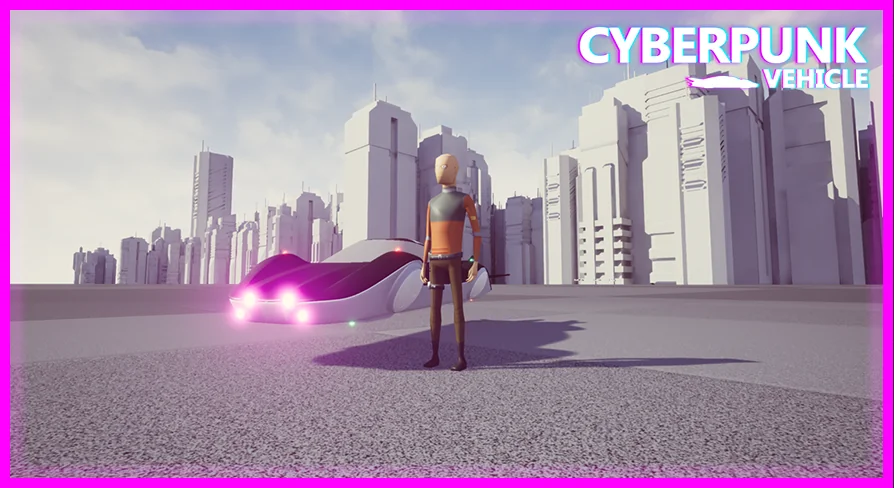
Streets lined with towers, traffic that never quite touches the ground, chases that climb instead of turning corners — that is the kind of scene this vehicle was built to sit inside. Cyberpunk Vehicle is a drivable hover vehicle for Unreal Engine, and the two names in brackets tell you most of what you need before you open the project: a hover configuration and a fly configuration, both part of the same resource.
Where a hovercar changes a city scene
Ground vehicles in a dense futuristic city force a designer into a narrow set of choices. Roads have to exist, corners have to be wide enough, and every chase has to obey the same grid as the pedestrians. A hover vehicle loosens that. Movement can pass over the street rather than through it, which is why the futuristic, scifi and city tags sit alongside the vehicle and hovercar tags on this one.
The cyberpunk label is doing real work here too. This is not a generic grey transport — the styling assumes a setting where neon, dense architecture and machine-heavy streets are the baseline. If your level already looks like that, the vehicle slots in without needing a re-skin to justify itself.
HoverMod and FlyMod as two movement states
The bracket in the name is the clearest structural hint in the whole resource. HoverMod and FlyMod are named separately, which means the vehicle is not a single fixed behaviour — there is a hovering setup and a flying setup, and the naming suggests they are treated as distinct modes rather than one blended motion.
Practically, that split matters when you plan a scene. A low hover reads as street-level presence: patrol craft, delivery drones with weight, anything that should feel like it is fighting gravity but still occupying the avenue. A fly configuration opens up the vertical space above the buildings, where a camera can pull back and the city becomes a backdrop instead of a corridor. Having both in one resource lets you stage a sequence that starts close to the ground and lifts without swapping assets.
Because the vehicle is drivable rather than a static prop, this is player-controlled movement, not a canned animation. The difference shows immediately when someone else sits behind the controls.
Blueprint work rather than a locked black box
Blueprint appears in the tag set, which places the driving logic in Unreal's visual scripting system. That is a meaningful detail for anyone who expects to adjust how the vehicle behaves. Blueprint assets can be opened, read and edited inside the editor, so the vehicle is something you can inspect and adapt instead of a compiled behaviour you have to work around.
For a team already working in Blueprints, it removes a translation step. For a solo developer, it means the vehicle belongs to the same project graph as everything else — the same place where input, camera and game rules live. The resource also carries documentation alongside a trailer, so there is material to consult before digging into the graphs.
Unreal Engine 4.23 through 5.1
Version coverage runs across both engine generations: 4.23, 4.24, 4.25, 4.26, 4.27, 5.0 and 5.1. That spread is worth noting because it spans the boundary between UE4 and UE5. Projects still sitting on a late UE4 build are covered, and so are projects that have already moved to the first two UE5 releases.
If you are on something outside that list, nothing here promises it will open cleanly — the supported set is the seven versions named, and that is where the guarantee stops. Matching your engine to one of them is the straightforward path.
Reading the tag set as a shortlist of scenes
The tags — vehicle, futuristic, scifi, hovercar, blueprint, city, cyberpunk — read almost like a checklist of the projects this was made for. A near-future racing prototype. A vertical slice set in a rain-slicked downtown. A flight-and-chase demo where the point is the sense of altitude. A scifi short rendered in engine rather than an offline package.
What the tags do not suggest is a period piece, a grounded modern setting, or anything that needs a plain street car. The styling is committed, and it will look out of place anywhere that is not at least somewhat futuristic.
There is also a support side to the resource: the creator keeps a help space open for fixing issues and collecting requests for future products, which is useful if the vehicle misbehaves on your particular engine version.
Who gets the most out of it
Small teams and solo developers building a futuristic city scene are the natural fit. If your project already lives in the cyberpunk register and you need a vehicle the player can actually drive — with a low hover state and a flying state available in the same resource — this covers that gap without requiring you to assemble the movement logic from nothing.
Teams on a locked engine version should check their number against the list first. Anyone on 4.23 to 5.1 with a neon city and a need for something that moves above the road will find the pieces already in place.
 Gameplay Features
 Gameplay Features
 Shaders
 Gameplay Features