"096ff702956f0eda"{"id":"1002165","slug":"ready-platforms","title":"Ready Platforms","category":"Gameplay Features","engine":"4.26+,5.0+","assetVersion":"","engineVersion":"Engine Version: 4.26+,5.0+","tag":"Gameplay Features","accent":"blue","visual":"mech","summary":"Configure interactive traversal mechanics with Ready Platforms, featuring custom spline loops, mesh overrides, and particle trail integration.","platform":"Unreal Engine","publishedAt":"2026-10-29T10:08:13.951Z","updatedAt":"2026-10-29T10:08:13.951Z","sourceNotes":[],"fileContents":[],"compatibility":["Unreal Engine","Engine Version: 4.26+,5.0+"],"featuredImage":{"alt":"Ready Platforms","src":"/wp-content/uploads/published/2026/10/4f158a6dcc94-9019b8fa-a812-4d1a-b6bf-27f61e2d014e-5811fa571e.webp"},"hasDownloadLink":true,"downloads":0,"terms":[{"taxonomy":"category","slug":"gameplay-features","name":"Gameplay Features"}],"galleryImages":[{"src":"/wp-content/uploads/published/2026/10/0bd8297ab8a8-1db6086b-45e9-44cf-8019-c6aca9464d35-dcdc8ab545.webp","alt":"Ready Platforms"},{"src":"/wp-content/uploads/published/2026/10/a54a94d2271a-a8465dbd-2221-4477-a522-5f95baac75b5-1e14c3b788.webp","alt":"Ready Platforms"},{"src":"/wp-content/uploads/published/2026/10/bf859f063f49-b14fc38a-aefe-49a9-bafd-ec137ac89041-79870d11ee.webp","alt":"Ready Platforms"},{"src":"/wp-content/uploads/published/2026/10/b364937d8299-1bda8c4d-7bb1-4a35-9dbf-a253fac0e9d5-f09caa82f3.webp","alt":"Ready Platforms"}],"accessPanel":{"kind":"resource","title":"Download this resource","eyebrow":"Free Download","message":"Log in or create a free account to start your download.","fileName":"Ready Platforms.7z","safetyNote":"Resources are manually reviewed before listing to improve quality and reduce obvious risks.","actionLabel":"Download Free","resourceType":"Resource archive"},"contentHtml":"\u003ch2\u003eConstructing Traversable Paths Without Custom Code\u003c/h2\u003e\u003cp\u003eDesigning interactive traversal often stalls when developers must write bespoke movement scripts for every moving ledge, floating elevator, or collapsing hazard. Ready Platforms resolves this workflow bottleneck by supplying a dedicated Blueprint framework alongside supporting static meshes and materials, allowing level builders to assemble complex platforming logic directly in the editor.\u003c/p\u003e\u003cp\u003eThe Blueprint package is structured to bypass scripting entirely. Designers can drop a platform into an environment and immediately define its core physics state by toggling whether the actor remains static or movable. Because the system includes its own static meshes and materials, testing whitebox traversal runs or placing finished geometry can happen in the same pass. Direct parameter fields allow immediate adjustments to the rotation and scale of the platform mesh, ensuring that footholds fit narrow corridors, wide open chasms, or irregular vertical climbs without requiring external modeling adjustments.\u003c/p\u003e\u003ch2\u003eSpline Trajectory, Loops, and Real-Time Destination Previews\u003c/h2\u003e\u003cp\u003eAligning platform movement across intricate geometry can easily lead to trial-and-error placement when paths are blind.\u003c/p\u003e\u003cp\u003eReady Platforms counters alignment issues by providing a real-time preview of the platform's final destination. Level designers can see the exact endpoint inside the viewport while manipulating trajectory data. Pathing operates along splines, granting fine control over how the platform navigates 3D space. You can set the platform's rotation to dynamically follow the rotation of the spline curve, keeping moving footholds oriented naturally around bends, drops, and climbs. For continuous circuits, the framework lets you activate loop travels and close the spline's loop at any arbitrary position along the track, while travel duration settings dictate the precise transit speed from start to finish.\u003c/p\u003e\u003ch2\u003eTrigger Conditions, Step Activation, and Timed Pauses\u003c/h2\u003e\u003cp\u003eRhythm is essential to platformer pacing, demanding distinct activation triggers for different gameplay scenarios.\u003c/p\u003e\u003cp\u003eThe system accommodates distinct interaction styles by allowing platforms to activate automatically or strictly upon player contact. When step activation is selected, the platform waits for an actor to step onto its surface before initiating travel. Pacing can be tuned further by dictating the waiting time when the platform reaches its destination, giving players a brief window to disembark before the platform returns or moves along the spline. You can also configure the platform to wait for another step before it activates again, or cap the number of uses allowed so that a platform only functions for a designated number of crossings before becoming inert.\u003c/p\u003e\u003ch2\u003eFalling Mechanics and Ready Platforms Mesh Customization\u003c/h2\u003e\u003cp\u003eCollapsing bridges and timed drop-offs form the backbone of high-stakes platforming challenges.\u003c/p\u003e\u003cp\u003eReady Platforms includes built-in controls for falling hazards, complete with a dedicated time parameter that counts down before the descent begins. Level creators can toggle the falling animation on or off depending on whether the platform should drop abruptly with physics or play out an animated sequence. Visual versatility extends across all platform types: creators can override the platform mesh to any static mesh asset desired, swapping out primitive shapes for stone slabs, metal grates, sci-fi elevators, or modular architecture while preserving the underlying Blueprint logic and interaction triggers.\u003c/p\u003e\u003ch2\u003eIntegrating Particle System Trails and Visual Effects\u003c/h2\u003e\u003cp\u003eVisual feedback gives players a clear read on moving hazards and traveling footholds.\u003c/p\u003e\u003cp\u003eThe framework features integrated particle system trails that emit along the platform's movement vector. Developers can toggle these trails to signal speed, direction, or active transit states. The particle system size can be scaled directly within the actor parameters to match small stepping stones or massive floating barges, and the default emitter can be overridden with custom particle systems to match the visual identity of the project. Furthermore, the asset maintains compatibility with VFX Attack Trails, allowing creators to integrate stylized movement visuals directly into their level geometry.\u003c/p\u003e\u003cp\u003eBy unifying travel duration, spline tracking, usage limits, mesh overrides, and particle effects into an accessible set of editor parameters, the asset functions as a practical framework for assembling dynamic platformer mechanics across any environment layout.\u003c/p\u003e\n\n\u003ch2\u003eContinue Browsing Similar Packs\u003c/h2\u003e\n\u003cul\u003e\n\u003cli\u003e\u003ca href=\"https://3dcghub.com/2048-puzzle-game-template/\" title=\"2048 Puzzle Game Template\"\u003e2048 Puzzle Game Template\u003c/a\u003e\u003c/li\u003e\n\u003cli\u003e\u003ca href=\"https://3dcghub.com/gameplay-ability-system-gas-fully-optimized-game-ready/\" title=\"Gameplay Ability System ( GAS ), Fully Optimized, Game-Ready\"\u003eGameplay Ability System ( GAS ), Fully Optimized, Game-Ready\u003c/a\u003e\u003c/li\u003e\n\u003cli\u003e\u003ca href=\"https://3dcghub.com/balloons/\" title=\"Balloons\"\u003eBalloons\u003c/a\u003e\u003c/li\u003e\n\u003cli\u003e\u003ca href=\"https://3dcghub.com/advanced-framework-vr-mobile-desktop/\" title=\"Advanced Framework - VR, Mobile \u0026amp; Desktop\"\u003eAdvanced Framework - VR, Mobile \u0026amp; Desktop\u003c/a\u003e\u003c/li\u003e\n\u003cli\u003e\u003ca href=\"https://3dcghub.com/hologram-vfx-with-niagara-2/\" title=\"HOLOGRAM VFX With Niagara 2\"\u003eHOLOGRAM VFX With Niagara 2\u003c/a\u003e\u003c/li\u003e\n\u003c/ul\u003e","contentTextLength":4758,"navigation":{"current":87,"total":4177,"previous":{"id":"1002166","slug":"realistic-grass-sv-02-master-grass","title":"Realistic Grass SV 02 Master Grass","category":"Nature \u0026 Plants","platform":"Unreal Engine","updatedAt":"2026-10-29T10:09:04.991Z"},"next":{"id":"1002164","slug":"rain-and-wind-loops","title":"Rain and Wind Loops","category":"Sound Effects","platform":"Unreal Engine","updatedAt":"2026-10-29T10:07:16.853Z"}},"relatedResources":[{"id":"10464","slug":"2048-puzzle-game-template","title":"2048 Puzzle Game Template","category":"Gameplay Features","engine":"5.3+","assetVersion":"Engine version: 5.3+","engineVersion":"4.23","tag":"Gameplay Features","accent":"blue","visual":"animation","summary":"Build your own tile-matching experience with the 2048 Puzzle Game Template. This fully commented Blueprint system is ready for deployment on Mobile, Android, and PC platforms.","platform":"Unreal Engine","publishedAt":"2026-03-03T15:27:48.000Z","updatedAt":"2026-04-19T15:50:01.000Z","sourceNotes":[],"fileContents":[],"compatibility":["Unreal Engine"],"featuredImage":{"alt":"2048 Puzzle Game Template","src":"https://3dcghub.com/wp-content/uploads/2026/03/018c8fd7-f45c-4d90-b831-7c8cda5a2b63.webp"},"hasDownloadLink":true,"downloads":0},{"id":"1002036","slug":"gameplay-ability-system-gas-fully-optimized-game-ready","title":"Gameplay Ability System ( GAS ), Fully Optimized, Game-Ready","category":"Gameplay Features","engine":"5.0+","assetVersion":"","engineVersion":"Engine Version: 5.0+","tag":"Gameplay Features","accent":"blue","visual":"mech","summary":"Explore an optimized, game-ready Gameplay Ability System Blueprint framework built with interfaces and event timers for smooth performance across genres.","platform":"Unreal Engine","publishedAt":"2026-10-26T13:58:26.755Z","updatedAt":"2026-10-26T13:58:26.755Z","sourceNotes":[],"fileContents":[],"compatibility":["Unreal Engine","Engine Version: 5.0+"],"featuredImage":{"alt":"Gameplay Ability System ( GAS ), Fully Optimized, Game-Ready","src":"/wp-content/uploads/published/2026/10/fb66f2b25878-f007a6d0-9fd0-4bbf-8cb6-249f97833b71-4bb764b479.webp"},"hasDownloadLink":true,"downloads":0},{"id":"28521","slug":"balloons","title":"Balloons","category":"Gameplay Features","engine":"5.2+","assetVersion":"Engine version: 5.2+","engineVersion":"","tag":"Gameplay Features","accent":"blue","visual":"character","summary":"Balloons focuses on scene-ready balloon behavior rather than a single static prop. It includes blueprints for precise placement, anchor-tied bunches, and large loose balloon spawns, with control over speed, helium, materials, meshes, strings, and spawn amount.","platform":"Unreal Engine","publishedAt":"2026-05-16T07:52:05.000Z","updatedAt":"2026-05-16T07:52:06.000Z","sourceNotes":[],"fileContents":[],"compatibility":["Unreal Engine","Engine version: 5.2+"],"featuredImage":{"alt":"Balloons","src":"https://3dcghub.com/wp-content/uploads/2026/05/89ab9d49611e_158efac7-d2f5-4a55-b264-f4c0f813133d.webp"},"hasDownloadLink":true,"downloads":0}]}
Gameplay Features
Ready Platforms
Configure interactive traversal mechanics with Ready Platforms, featuring custom spline loops, mesh overrides, and particle trail integration.
Constructing Traversable Paths Without Custom Code
Designing interactive traversal often stalls when developers must write bespoke movement scripts for every moving ledge, floating elevator, or collapsing hazard. Ready Platforms resolves this workflow bottleneck by supplying a dedicated Blueprint framework alongside supporting static meshes and materials, allowing level builders to assemble complex platforming logic directly in the editor.
The Blueprint package is structured to bypass scripting entirely. Designers can drop a platform into an environment and immediately define its core physics state by toggling whether the actor remains static or movable. Because the system includes its own static meshes and materials, testing whitebox traversal runs or placing finished geometry can happen in the same pass. Direct parameter fields allow immediate adjustments to the rotation and scale of the platform mesh, ensuring that footholds fit narrow corridors, wide open chasms, or irregular vertical climbs without requiring external modeling adjustments.
Spline Trajectory, Loops, and Real-Time Destination Previews
Aligning platform movement across intricate geometry can easily lead to trial-and-error placement when paths are blind.
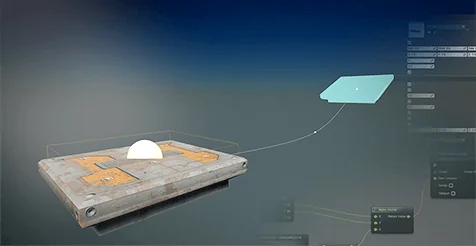
Ready Platforms counters alignment issues by providing a real-time preview of the platform's final destination. Level designers can see the exact endpoint inside the viewport while manipulating trajectory data. Pathing operates along splines, granting fine control over how the platform navigates 3D space. You can set the platform's rotation to dynamically follow the rotation of the spline curve, keeping moving footholds oriented naturally around bends, drops, and climbs. For continuous circuits, the framework lets you activate loop travels and close the spline's loop at any arbitrary position along the track, while travel duration settings dictate the precise transit speed from start to finish.
Trigger Conditions, Step Activation, and Timed Pauses
Rhythm is essential to platformer pacing, demanding distinct activation triggers for different gameplay scenarios.
The system accommodates distinct interaction styles by allowing platforms to activate automatically or strictly upon player contact. When step activation is selected, the platform waits for an actor to step onto its surface before initiating travel. Pacing can be tuned further by dictating the waiting time when the platform reaches its destination, giving players a brief window to disembark before the platform returns or moves along the spline. You can also configure the platform to wait for another step before it activates again, or cap the number of uses allowed so that a platform only functions for a designated number of crossings before becoming inert.
Falling Mechanics and Ready Platforms Mesh Customization
Collapsing bridges and timed drop-offs form the backbone of high-stakes platforming challenges.
Ready Platforms includes built-in controls for falling hazards, complete with a dedicated time parameter that counts down before the descent begins. Level creators can toggle the falling animation on or off depending on whether the platform should drop abruptly with physics or play out an animated sequence. Visual versatility extends across all platform types: creators can override the platform mesh to any static mesh asset desired, swapping out primitive shapes for stone slabs, metal grates, sci-fi elevators, or modular architecture while preserving the underlying Blueprint logic and interaction triggers.
Integrating Particle System Trails and Visual Effects
Visual feedback gives players a clear read on moving hazards and traveling footholds.
The framework features integrated particle system trails that emit along the platform's movement vector. Developers can toggle these trails to signal speed, direction, or active transit states. The particle system size can be scaled directly within the actor parameters to match small stepping stones or massive floating barges, and the default emitter can be overridden with custom particle systems to match the visual identity of the project. Furthermore, the asset maintains compatibility with VFX Attack Trails, allowing creators to integrate stylized movement visuals directly into their level geometry.
By unifying travel duration, spline tracking, usage limits, mesh overrides, and particle effects into an accessible set of editor parameters, the asset functions as a practical framework for assembling dynamic platformer mechanics across any environment layout.
 Gameplay Features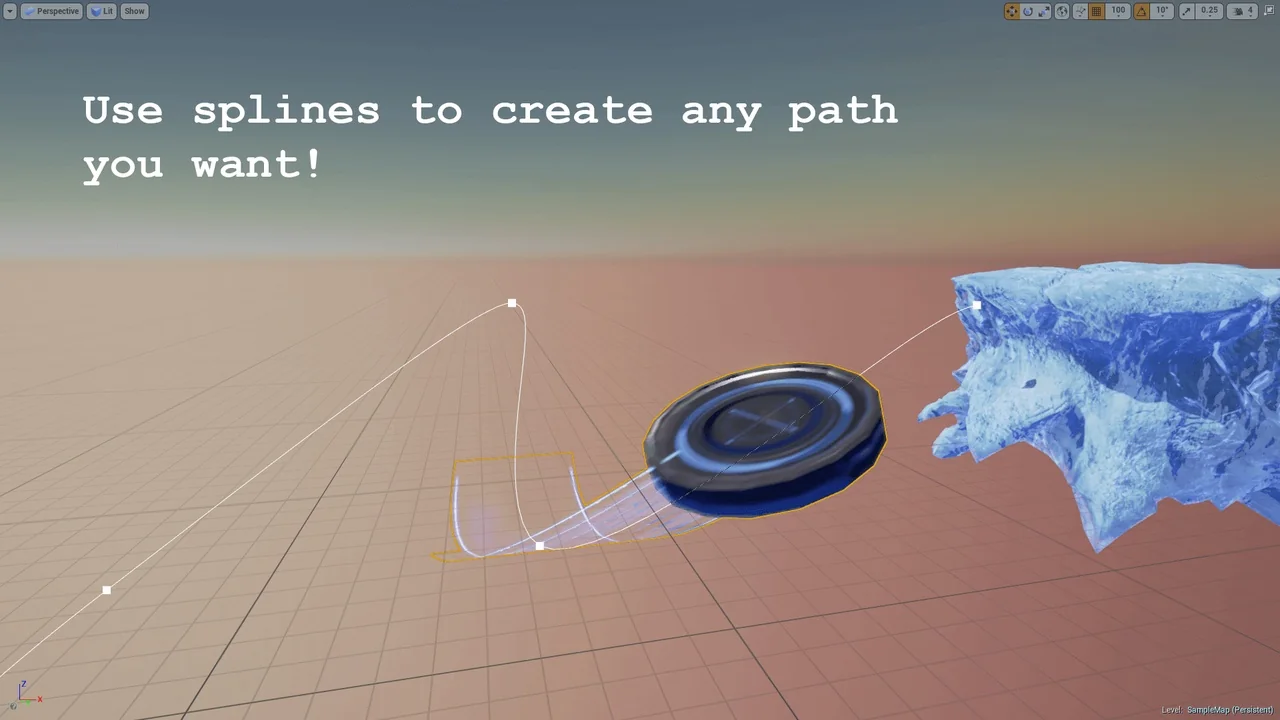
 Gameplay Features
 Gameplay Features
 Gameplay Features