"ae2217ad8e73450c"{"id":"1003012","slug":"character-selection-plus","title":"Character Selection Plus","category":"Characters \u0026 Creatures","engine":"4.26+,5.0+","assetVersion":"","engineVersion":"Engine Version: 4.26+,5.0+","tag":"Characters","accent":"blue","visual":"character","summary":"A fully replicated Blueprint character selection screen with plug-in characters, per-character animations, pre-wired clothing variables, and a swappable backdro","platform":"Unreal Engine","indexPolicy":"index","publishedAt":"2026-11-25T16:17:14.123Z","updatedAt":"2026-11-25T16:17:14.123Z","sourceNotes":[],"fileContents":[],"compatibility":["Unreal Engine","Engine Version: 4.26+,5.0+"],"featuredImage":{"alt":"Character Selection Plus","src":"/wp-content/uploads/published/2026/11/ce286071a041-01b07277-ec85-4d08-8245-5e0c823e150e-8e371e444d.webp"},"hasDownloadLink":true,"downloads":0,"terms":[{"taxonomy":"category","slug":"characters-and-creatures","name":"Characters \u0026 Creatures"}],"galleryImages":[{"src":"/wp-content/uploads/published/2026/11/6976f1e93bed-3cc53067-6bd7-426f-9eee-b69abb60c635-1e8b8e1fda.webp","alt":"Character Selection Plus"},{"src":"/wp-content/uploads/published/2026/11/926b7a69706b-6ad9698e-123a-48cf-b31a-93e85fa2d6e1-a04833494f.webp","alt":"Character Selection Plus"},{"src":"/wp-content/uploads/published/2026/11/135cf9117651-74c64223-b03d-49f3-8fbe-fefee3c6c9ef-6ccd118197.webp","alt":"Character Selection Plus"},{"src":"/wp-content/uploads/published/2026/11/bf932da81878-d68d229f-c724-4645-87c7-3ee466b18d8f-560b8172db.webp","alt":"Character Selection Plus"},{"src":"/wp-content/uploads/published/2026/11/47e3e4247375-25ec567c-505e-4974-8354-a58f6412db8d-5c260b7a9f.webp","alt":"Character Selection Plus"},{"src":"/wp-content/uploads/published/2026/11/8ab9b3059fae-6c4566cb-3231-4fcc-9c52-56f360685b17-df977bdd86.webp","alt":"Character Selection Plus"},{"src":"/wp-content/uploads/published/2026/11/54839dfd05c9-f0236162-6b8a-4fb3-bcde-fbff8e9dd6f8-a41da5267b.webp","alt":"Character Selection Plus"}],"accessPanel":{"kind":"resource","title":"Get this resource","safetyNote":"Resources are manually reviewed before listing to improve quality and reduce obvious risks.","fileName":"Character Selection Plus.7z","resourceType":"Resource archive","versions":[]},"contentHtml":"\u003cp\u003eA lobby where players claim a fighter before the match loads. A co-op hub where avatars get swapped between runs. A project whose gameplay already works but which has nothing standing in front of it to decide who the player spawns as. Character Selection Plus addresses that layer of a game: a fully replicated character selection screen that can either anchor a brand-new replicated project or move into one that already exists.\u003c/p\u003e \u003cp\u003eEverything sits in Blueprints. The pack carries tags for Blueprint, character selection, and animation blueprint, so the work of hooking up characters, clothing, and preview animations happens in the visual scripting graph rather than in a separate framework bolted onto the side of a project.\u003c/p\u003e \u003ch2\u003eThe Selection Screen Is Replicated First\u003c/h2\u003e \u003cp\u003eReplication defines this asset more than any single visual choice. The screen is built to run across a network, and that determines the kinds of scenes it can sit in: a pre-match staging room, a lobby where several players pick at once, a shared space where the choice has to stay consistent rather than live privately on one machine. It is a different proposition from a single-player picker that only changes what the local player sees.\u003c/p\u003e \u003cp\u003eThat is also why the asset can go two directions. A team starting a replicated project can use the screen as the beginning and build outward from it. A team with an existing replicated project can pull the screen in and keep what they already have. Integration is not limited to projects based on the pack, which is the practical reason it stays useful to teams at different stages.\u003c/p\u003e \u003cp\u003eThe replicated clothing code follows the same logic. Whatever a player is wearing is part of the same replicated setup as the character choice itself, so wardrobe state travels through the screen rather than being handled separately.\u003c/p\u003e \u003ch2\u003eCharacters You Already Own, Animations You Get to Choose\u003c/h2\u003e \u003cp\u003eThe characters on display are yours. There is no fixed roster to accept as-is. From there the animation setup splits into two deliberate options: give each character its own animations, or run one set across the entire roster. Neither is a fallback for the other, and which one you take is a decision made during setup. A roster of one-off characters can each carry a distinct idle or stance, while a larger, more uniform roster can share a single performance without extra work.\u003c/p\u003e \u003ch3\u003eWhat the preview animations do for the Selection screen\u003c/h3\u003e \u003cp\u003eThe number of animations on the selection screen is open. Dance animations and weapon stances are named as examples, and nothing caps how many play there. That turns the screen into more than a row of names. A character can be shown doing something that communicates its personality or its combat identity before the match begins — a weapon stance at the moment of choice carries information a neutral idle pose does not, and a dance loop makes the pick itself part of the experience in a lighter multiplayer title.\u003c/p\u003e \u003ch2\u003eClothing That Arrives Already Wired\u003c/h2\u003e \u003cp\u003eClothing runs through replicated code that is ready to use; the step left to the developer is adding the mesh. Three clothing variables are already set up, giving a starting structure for outfits, and further slots can be added in code without rebuilding anything. The pack is slated to gain more clothing slots in an update, but the same slots can be added independently in the meantime, so a project needing five or six outfit pieces is not held back waiting for anything.\u003c/p\u003e \u003cp\u003eThe planning advantage is straightforward. The replicated clothing plumbing and the slot variables exist, which leaves the art side — supplying meshes that fit the slots — as the remaining work. For a project where characters wear layered outfits, that division keeps engineering and asset production on separate tracks.\u003c/p\u003e \u003ch2\u003eBackdrops, Detail, and the Fade-In Option\u003c/h2\u003e \u003cp\u003eThe environment the screen sits in is not locked. The background map can be replaced with one of your own, or the existing map can be kept and dressed up with terrain and additional detail. That covers two common situations: a project with an established art direction that needs the screen to sit inside an existing environment, and a project content to start from the included map and push it further.\u003c/p\u003e \u003cp\u003eA fade-in option softens how characters arrive on screen. Rather than a character snapping into place on selection or on load, the fade lets that appearance be staged — a small presentation choice that matters on a screen whose whole purpose is showing off the roster.\u003c/p\u003e \u003ch2\u003eWhere Character Selection Plus Fits\u003c/h2\u003e \u003cp\u003eThe clearest fit is a replicated project that needs a selection front end without building one from zero, whether the project is new and this screen is the starting point or already running and simply needs the screen dropped in. A second fit is a project that wants a roster showcase: characters displayed with dance animations or weapon stances, an optional fade, and a backdrop that can be swapped or enriched with terrain and detail.\u003c/p\u003e \u003cp\u003eBring your own characters, your own clothing meshes, and whichever animation strategy suits the roster. The replicated screen, the prepared clothing variables, and the animation-ready presentation supply the frame around them, and the Blueprint foundation keeps that work inside the scripting environment the rest of the project already uses.\u003c/p\u003e\n\n\u003ch2\u003eRelated Resources Worth Checking\u003c/h2\u003e\n\u003cul\u003e\n\u003cli\u003e\u003ca href=\"https://3dcghub.com/swordswoman/\" rel=\"noopener noreferrer\"\u003eSwordswoman\u003c/a\u003e\u003c/li\u003e\n\u003cli\u003e\u003ca href=\"https://3dcghub.com/character-captain/\" rel=\"noopener noreferrer\"\u003eCharacter Captain\u003c/a\u003e\u003c/li\u003e\n\u003cli\u003e\u003ca href=\"https://3dcghub.com/cyberpunk-mercenary/\" rel=\"noopener noreferrer\"\u003eCyberpunk Mercenary\u003c/a\u003e\u003c/li\u003e\n\u003cli\u003e\u003ca href=\"https://3dcghub.com/underwater-life/\" rel=\"noopener noreferrer\"\u003eUnderwater Life\u003c/a\u003e\u003c/li\u003e\n\u003cli\u003e\u003ca href=\"https://3dcghub.com/underwater-odyssey/\" rel=\"noopener noreferrer\"\u003eUnderwater odyssey\u003c/a\u003e\u003c/li\u003e\n\u003c/ul\u003e","contentTextLength":5411,"navigation":{"current":32,"total":4964,"previous":{"id":"1003013","slug":"character-skills","title":"Character Skills","category":"Gameplay Features","platform":"Unreal Engine","updatedAt":"2026-11-25T16:17:59.912Z"},"next":{"id":"1003011","slug":"character-interaction-add-on-vol-01","title":"Character Interaction Add-On Vol.01","category":"Combat","platform":"Unreal Engine","updatedAt":"2026-11-25T16:16:13.765Z"}},"relatedResources":[{"id":"24789","slug":"swordswoman","title":"Swordswoman","category":"Characters \u0026 Creatures","engine":"4.26+,5.0+","assetVersion":"Engine version: 4.26+,5.0+","engineVersion":"","tag":"Characters","accent":"blue","visual":"character","summary":"Swordswoman is set up as a modular female character with a UE4 skeleton, facial expressions, and separated armor, hair, body, and clothing parts. It also includes a full body without seams plus multiple 4K texture sets for the main components.","platform":"Unreal Engine","indexPolicy":"index","publishedAt":"2026-04-17T08:47:00.000Z","updatedAt":"2026-11-14T10:16:22.497Z","sourceNotes":[],"fileContents":[],"compatibility":["Unreal Engine","Engine version: 4.26+,5.0+"],"featuredImage":{"alt":"Swordswoman","src":"https://3dcghub.com/wp-content/uploads/2026/04/ed75dd13c63a_b31ab841-8674-4ec4-a28d-0844fb43f8f2.webp"},"fileSizeBytes":394766010,"hasDownloadLink":true,"downloads":1},{"id":"1002310","slug":"character-captain","title":"Character Captain","category":"Characters \u0026 Creatures","engine":"4.18+,5.0+","assetVersion":"","engineVersion":"Engine Version: 4.18+,5.0+","tag":"Characters","accent":"blue","visual":"character","summary":"Character Captain is a lowpoly NPC captain for sea-themed games, with script and Animation Blueprint tags plus a compatibility note for 56 creature animations.","platform":"Unreal Engine","indexPolicy":"index","publishedAt":"2026-11-06T06:13:00.506Z","updatedAt":"2026-11-06T06:13:00.506Z","sourceNotes":[],"fileContents":[],"compatibility":["Unreal Engine","Engine Version: 4.18+,5.0+"],"featuredImage":{"alt":"Character Captain","src":"/wp-content/uploads/published/2026/11/66d000342486-6d157691-6795-48a1-9a2d-ec6f288e887a-66c06219fb.webp"},"fileSizeBytes":21777670,"hasDownloadLink":true,"downloads":0},{"id":"1002370","slug":"cyberpunk-mercenary","title":"Cyberpunk Mercenary","category":"Characters \u0026 Creatures","engine":"4.24+,5.0+","assetVersion":"","engineVersion":"Engine Version: 4.24+,5.0+","tag":"Characters","accent":"blue","visual":"character","summary":"Cyberpunk Mercenary pairs a futuristic helmet-and-jacket fighter with sword, weapon, script, and animation blueprint support plus real-time previews.","platform":"Unreal Engine","indexPolicy":"index","publishedAt":"2026-11-09T18:39:04.969Z","updatedAt":"2026-11-09T18:39:04.969Z","sourceNotes":[],"fileContents":[],"compatibility":["Unreal Engine","Engine Version: 4.24+,5.0+"],"featuredImage":{"alt":"Cyberpunk Mercenary","src":"/wp-content/uploads/published/2026/11/d1b03fec6b87-3ae32fba-a023-4a0b-bcf9-a6ae2d9f8bf9-3090ca29a7.webp"},"fileSizeBytes":71153087,"hasDownloadLink":true,"downloads":0}]}[{"id":4225,"sourceId":4225,"taxonomyId":4225,"taxonomy":"category","slug":"asset-library","name":"Asset Library","parentId":null,"count":4817,"hasChildren":true,"href":"/","seoTitle":"Free Game Assets Library | 3DCGHUB","seoDescription":"Browse free Unreal Engine, Unity, Blender assets and game development tutorials on 3DCGHUB with previews, compatibility notes, and secure downloads.","sitemapEnabled":true,"children":[{"id":4227,"sourceId":4227,"taxonomyId":4227,"taxonomy":"category","slug":"blender-add-ons-plugins","name":"Blender Add-ons \u0026 Plugins","parentId":4225,"count":10,"hasChildren":false,"href":"/category/blender-add-ons-plugins/","seoTitle":"Free Blender Add-ons \u0026 Plugins | 3DCGHUB","seoDescription":"Browse free Blender Add-ons \u0026 Plugins tools for Blender on 3DCGHUB: curated downloads with preview images, compatibility notes and secure download access.","sitemapEnabled":true},{"id":514,"sourceId":514,"taxonomyId":514,"taxonomy":"category","slug":"unity-2","name":"Unity","parentId":4225,"count":453,"hasChildren":true,"href":"/category/unity-2/","seoTitle":"Free Unity Assets | 3DCGHUB","seoDescription":"Browse free Unity resources on 3DCGHUB: curated downloads with preview images, compatibility notes and secure download access.","sitemapEnabled":true,"children":[{"id":523,"sourceId":523,"taxonomyId":523,"taxonomy":"category","slug":"2d","name":"2D","parentId":514,"count":1,"hasChildren":true,"href":"/category/2d/","seoTitle":"Free Unity 2D | 3DCGHUB","seoDescription":"Browse free 2D assets for Unity on 3DCGHUB: curated downloads with preview images, compatibility notes and secure download access.","sitemapEnabled":true},{"id":515,"sourceId":515,"taxonomyId":515,"taxonomy":"category","slug":"3d-unity-2","name":"3D","parentId":514,"count":162,"hasChildren":true,"href":"/category/3d-unity-2/","seoTitle":"Free Unity 3D Assets | 3DCGHUB","seoDescription":"Browse free 3D assets for Unity on 3DCGHUB: curated downloads with preview images, compatibility notes and secure download access.","sitemapEnabled":true},{"id":565,"sourceId":565,"taxonomyId":565,"taxonomy":"category","slug":"add-ons","name":"Add-Ons","parentId":514,"count":2,"hasChildren":false,"href":"/category/add-ons/","seoTitle":"Free Unity Add-Ons | 3DCGHUB","seoDescription":"Browse free Add-Ons assets for Unity on 3DCGHUB: curated downloads with preview images, compatibility notes and secure download access.","sitemapEnabled":true},{"id":529,"sourceId":529,"taxonomyId":529,"taxonomy":"category","slug":"audio-unity-2","name":"Audio","parentId":514,"count":1,"hasChildren":true,"href":"/category/audio-unity-2/","seoTitle":"Free Unity Audio | 3DCGHUB","seoDescription":"Browse free Audio for Unity on 3DCGHUB: curated downloads with preview images, compatibility notes and secure download access.","sitemapEnabled":true},{"id":557,"sourceId":557,"taxonomyId":557,"taxonomy":"category","slug":"templates","name":"Templates","parentId":514,"count":36,"hasChildren":true,"href":"/category/templates/","seoTitle":"Free Unity Templates | 3DCGHUB","seoDescription":"Browse free Unity project templates on 3DCGHUB. Starter kits with previews, compatibility notes, and secure download access.","sitemapEnabled":true},{"id":533,"sourceId":533,"taxonomyId":533,"taxonomy":"category","slug":"tools-unity-2","name":"Tools","parentId":514,"count":0,"hasChildren":true,"href":"/category/tools-unity-2/","sitemapEnabled":true},{"id":554,"sourceId":554,"taxonomyId":554,"taxonomy":"category","slug":"vfx-unity-2","name":"VFX","parentId":514,"count":4,"hasChildren":true,"href":"/category/vfx-unity-2/","seoTitle":"Free Unity VFX | 3DCGHUB","seoDescription":"Browse free VFX for Unity on 3DCGHUB: curated downloads with preview images, compatibility notes and secure download access.","sitemapEnabled":true}]},{"id":511,"sourceId":511,"taxonomyId":511,"taxonomy":"category","slug":"unreal-engine-2","name":"Unreal Engine","parentId":4225,"count":4355,"hasChildren":true,"href":"/category/unreal-engine-2/","seoTitle":"Free Unreal Engine Assets | 3DCGHUB","seoDescription":"Browse free Unreal Engine resources on 3DCGHUB: curated downloads with preview images, compatibility notes and secure download access.","sitemapEnabled":true,"children":[{"id":54,"sourceId":54,"taxonomyId":54,"taxonomy":"category","slug":"3d","name":"3D","parentId":511,"count":2441,"hasChildren":true,"href":"/category/3d/","seoTitle":"Free Unreal Engine 3D | 3DCGHUB","seoDescription":"Browse free 3D assets for Unreal Engine on 3DCGHUB: curated downloads with preview images, compatibility notes and secure download access.","sitemapEnabled":true},{"id":441,"sourceId":441,"taxonomyId":441,"taxonomy":"category","slug":"animations","name":"Animations","parentId":511,"count":269,"hasChildren":true,"href":"/category/animations/","seoTitle":"Free Unreal Engine Animations | 3DCGHUB","seoDescription":"Browse free Animations for Unreal Engine on 3DCGHUB: curated downloads with preview images, compatibility notes and secure download access.","sitemapEnabled":true},{"id":446,"sourceId":446,"taxonomyId":446,"taxonomy":"category","slug":"audio","name":"Audio","parentId":511,"count":63,"hasChildren":true,"href":"/category/audio/","seoTitle":"Free Unreal Engine Audio Resources | 3DCGHUB","seoDescription":"Browse free Unreal Engine audio resources including sound effects, voices, dialogue, and ambient sounds. Curated free downloads on 3DCGHUB.","sitemapEnabled":true},{"id":466,"sourceId":466,"taxonomyId":466,"taxonomy":"category","slug":"game-systems","name":"Game Systems","parentId":511,"count":381,"hasChildren":true,"href":"/category/game-systems/","seoTitle":"Free Unreal Engine Game Systems | 3DCGHUB","seoDescription":"Browse free Game Systems tools for Unreal Engine on 3DCGHUB: curated downloads with preview images, compatibility notes and secure download access.","sitemapEnabled":true},{"id":478,"sourceId":478,"taxonomyId":478,"taxonomy":"category","slug":"game-templates","name":"Game Templates","parentId":511,"count":155,"hasChildren":true,"href":"/category/game-templates/","seoTitle":"Free Unreal Engine Game Templates | 3DCGHUB","seoDescription":"Browse free Game Templates for Unreal Engine on 3DCGHUB: curated downloads with preview images, compatibility notes and secure download access.","sitemapEnabled":true},{"id":432,"sourceId":432,"taxonomyId":432,"taxonomy":"category","slug":"hdri","name":"HDRI","parentId":511,"count":6,"hasChildren":true,"href":"/category/hdri/","seoTitle":"Free Unreal Engine HDRI | 3DCGHUB","seoDescription":"Browse free Unreal Engine HDRI skies and lighting maps on 3DCGHUB. Environment lighting with previews and secure downloads.","sitemapEnabled":true},{"id":228,"sourceId":228,"taxonomyId":228,"taxonomy":"category","slug":"material-and-textures","name":"Material \u0026 Textures","parentId":511,"count":172,"hasChildren":true,"href":"/category/material-and-textures/","seoTitle":"Free Unreal Engine Material \u0026 Textures | 3DCGHUB","seoDescription":"Browse free Material \u0026 Textures for Unreal Engine on 3DCGHUB: curated downloads with preview images, compatibility notes and secure download access.","sitemapEnabled":true},{"id":298,"sourceId":298,"taxonomyId":298,"taxonomy":"category","slug":"sprites-and-flipbooks","name":"Sprites \u0026 Flipbooks","parentId":511,"count":18,"hasChildren":true,"href":"/category/sprites-and-flipbooks/","seoTitle":"Free Unreal Engine Sprites \u0026 Flipbooks | 3DCGHUB","seoDescription":"Browse free Sprites \u0026 Flipbooks assets for Unreal Engine on 3DCGHUB: curated downloads with preview images, compatibility notes and secure download access.","sitemapEnabled":true},{"id":489,"sourceId":489,"taxonomyId":489,"taxonomy":"category","slug":"tools-and-plugins","name":"Tools \u0026 Plugins","parentId":511,"count":390,"hasChildren":true,"href":"/category/tools-and-plugins/","seoTitle":"Free Unreal Engine Tools \u0026 Plugins | 3DCGHUB","seoDescription":"Browse free Tools \u0026 Plugins for Unreal Engine on 3DCGHUB: curated downloads with preview images, compatibility notes and secure download access.","sitemapEnabled":true},{"id":459,"sourceId":459,"taxonomyId":459,"taxonomy":"category","slug":"ui","name":"UI","parentId":511,"count":47,"hasChildren":true,"href":"/category/ui/","seoTitle":"Free Unreal Engine UI | 3DCGHUB","seoDescription":"Browse free UI for Unreal Engine on 3DCGHUB: curated downloads with preview images, compatibility notes and secure download access.","sitemapEnabled":true},{"id":450,"sourceId":450,"taxonomyId":450,"taxonomy":"category","slug":"vfx","name":"VFX","parentId":511,"count":413,"hasChildren":true,"href":"/category/vfx/","seoTitle":"Free Unreal Engine VFX | 3DCGHUB","seoDescription":"Browse free VFX for Unreal Engine on 3DCGHUB: curated downloads with preview images, compatibility notes and secure download access.","sitemapEnabled":true}]}]},{"id":4222,"sourceId":4222,"taxonomyId":4222,"taxonomy":"category","slug":"tutorial-library","name":"Tutorial Library","parentId":null,"count":117,"hasChildren":false,"href":"/tutorials/","seoTitle":"Free Game Development Tutorial Library | 3DCGHUB","seoDescription":"Browse free game development tutorials for Unreal Engine, Unity, Blender, and more on 3DCGHUB with practical workflows and secure downloads.","sitemapEnabled":true}]
Resource screenshots
1 / 7
Asset drops
Daily Asset Drops
Follow 3DCGHUB on Telegram for daily Unreal, Unity & Blender drops and curated CC0 releases.
Resources are manually reviewed before listing to improve quality and reduce obvious risks.
Reviewed archive
Characters
Character Selection Plus
A fully replicated Blueprint character selection screen with plug-in characters, per-character animations, pre-wired clothing variables, and a swappable backdro
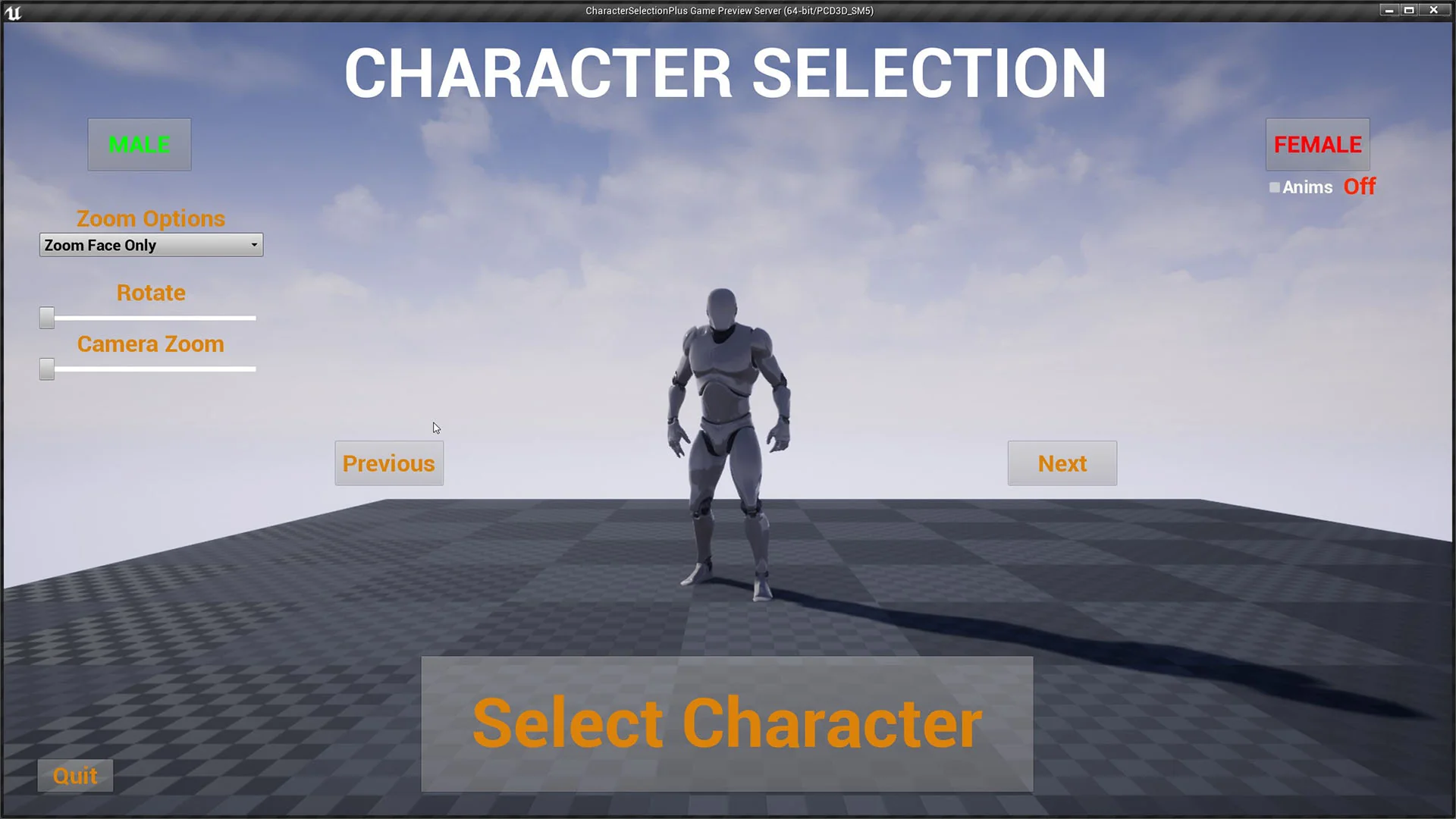
A lobby where players claim a fighter before the match loads. A co-op hub where avatars get swapped between runs. A project whose gameplay already works but which has nothing standing in front of it to decide who the player spawns as. Character Selection Plus addresses that layer of a game: a fully replicated character selection screen that can either anchor a brand-new replicated project or move into one that already exists.
Everything sits in Blueprints. The pack carries tags for Blueprint, character selection, and animation blueprint, so the work of hooking up characters, clothing, and preview animations happens in the visual scripting graph rather than in a separate framework bolted onto the side of a project.
The Selection Screen Is Replicated First
Replication defines this asset more than any single visual choice. The screen is built to run across a network, and that determines the kinds of scenes it can sit in: a pre-match staging room, a lobby where several players pick at once, a shared space where the choice has to stay consistent rather than live privately on one machine. It is a different proposition from a single-player picker that only changes what the local player sees.
That is also why the asset can go two directions. A team starting a replicated project can use the screen as the beginning and build outward from it. A team with an existing replicated project can pull the screen in and keep what they already have. Integration is not limited to projects based on the pack, which is the practical reason it stays useful to teams at different stages.
The replicated clothing code follows the same logic. Whatever a player is wearing is part of the same replicated setup as the character choice itself, so wardrobe state travels through the screen rather than being handled separately.
Characters You Already Own, Animations You Get to Choose
The characters on display are yours. There is no fixed roster to accept as-is. From there the animation setup splits into two deliberate options: give each character its own animations, or run one set across the entire roster. Neither is a fallback for the other, and which one you take is a decision made during setup. A roster of one-off characters can each carry a distinct idle or stance, while a larger, more uniform roster can share a single performance without extra work.
What the preview animations do for the Selection screen
The number of animations on the selection screen is open. Dance animations and weapon stances are named as examples, and nothing caps how many play there. That turns the screen into more than a row of names. A character can be shown doing something that communicates its personality or its combat identity before the match begins — a weapon stance at the moment of choice carries information a neutral idle pose does not, and a dance loop makes the pick itself part of the experience in a lighter multiplayer title.
Clothing That Arrives Already Wired
Clothing runs through replicated code that is ready to use; the step left to the developer is adding the mesh. Three clothing variables are already set up, giving a starting structure for outfits, and further slots can be added in code without rebuilding anything. The pack is slated to gain more clothing slots in an update, but the same slots can be added independently in the meantime, so a project needing five or six outfit pieces is not held back waiting for anything.
The planning advantage is straightforward. The replicated clothing plumbing and the slot variables exist, which leaves the art side — supplying meshes that fit the slots — as the remaining work. For a project where characters wear layered outfits, that division keeps engineering and asset production on separate tracks.
Backdrops, Detail, and the Fade-In Option
The environment the screen sits in is not locked. The background map can be replaced with one of your own, or the existing map can be kept and dressed up with terrain and additional detail. That covers two common situations: a project with an established art direction that needs the screen to sit inside an existing environment, and a project content to start from the included map and push it further.
A fade-in option softens how characters arrive on screen. Rather than a character snapping into place on selection or on load, the fade lets that appearance be staged — a small presentation choice that matters on a screen whose whole purpose is showing off the roster.
Where Character Selection Plus Fits
The clearest fit is a replicated project that needs a selection front end without building one from zero, whether the project is new and this screen is the starting point or already running and simply needs the screen dropped in. A second fit is a project that wants a roster showcase: characters displayed with dance animations or weapon stances, an optional fade, and a backdrop that can be swapped or enriched with terrain and detail.
Bring your own characters, your own clothing meshes, and whichever animation strategy suits the roster. The replicated screen, the prepared clothing variables, and the animation-ready presentation supply the frame around them, and the Blueprint foundation keeps that work inside the scripting environment the rest of the project already uses.
 Characters
 Characters
 Characters