"c68a05d5e51405b3"{"id":"1000499","slug":"castle-windows-pack","title":"Castle Windows Pack","category":"Buildings \u0026 Architecture","engine":"4.27,5.0+","assetVersion":"","engineVersion":"Engine Version: 4.27,5.0+","tag":"Buildings","accent":"blue","visual":"mech","summary":"Castle Windows Pack provides 318 mix-and-match PNGs of window designs, grids, and glass panes with PBR materials, emissive controls, and curved wall support.","platform":"Unreal Engine","publishedAt":"2026-07-13T09:27:51.037Z","updatedAt":"2026-07-13T09:27:51.037Z","sourceNotes":[],"fileContents":[],"compatibility":["Unreal Engine","Engine Version: 4.27,5.0+"],"featuredImage":{"alt":"Castle Windows Pack","src":"/wp-content/uploads/published/2026/07/04dd48555aeb-6040f920-1f7f-49ab-aa22-06741499e5cc-0f4dfaf830.webp"},"hasDownloadLink":true,"downloads":1,"terms":[{"taxonomy":"category","slug":"buildings-and-architecture","name":"Buildings \u0026 Architecture"}],"galleryImages":[{"src":"/wp-content/uploads/published/2026/07/1e64c6130eb2-a4e091d5-a815-4c2d-ab1c-2daea61d1739-a289e59bc2.webp","alt":"Castle Windows Pack"},{"src":"/wp-content/uploads/published/2026/07/c7b09d1ffcf8-45d164c1-0ad5-4ae5-80ae-a0bbab9edcc8-0e1a88a5c3.webp","alt":"Castle Windows Pack"},{"src":"/wp-content/uploads/published/2026/07/d84ec0498a48-6b4bbfbb-04af-4843-a3ff-6713e0ba429c-e0d2ecc5c2.webp","alt":"Castle Windows Pack"},{"src":"/wp-content/uploads/published/2026/07/08270d383a3f-8d5a964b-21f0-49e1-b511-0fad265f88a1-1ece4de9bf.webp","alt":"Castle Windows Pack"},{"src":"/wp-content/uploads/published/2026/07/9b4a5d15b48a-e0d4259c-783f-47ad-a675-4aaf47a27540-7a22d16833.webp","alt":"Castle Windows Pack"},{"src":"/wp-content/uploads/published/2026/07/7697db742e82-4622d949-c09c-41b0-82d8-089ebbb9d082-4fcd6505ac.webp","alt":"Castle Windows Pack"},{"src":"/wp-content/uploads/published/2026/07/2a3dd2702427-4fbe5f5a-f1c1-4fa3-a229-59091b3d47ef-1db5d1f614.webp","alt":"Castle Windows Pack"},{"src":"/wp-content/uploads/published/2026/07/113dc6baf834-104a7ebd-0068-4fdd-8b59-92824d0b92e7-a597ddb60b.webp","alt":"Castle Windows Pack"},{"src":"/wp-content/uploads/published/2026/07/3139fd0f3d69-b4b13446-f437-4c55-9f69-0d89e70c01cc-4dd3501a64.webp","alt":"Castle Windows Pack"},{"src":"/wp-content/uploads/published/2026/07/e13bbb459373-cb3ac851-0edc-4a00-b248-5a24e22f8264-444565b40b.webp","alt":"Castle Windows Pack"}],"accessPanel":{"kind":"resource","title":"Download this resource","eyebrow":"Free Download","message":"Log in or create a free account to start your download.","fileName":"Content.7z","safetyNote":"Resources are manually reviewed before listing to improve quality and reduce obvious risks.","actionLabel":"Download Free","resourceType":"Resource archive"},"contentHtml":"\u003cp\u003eArchitectural scenes often stall at the window stage. A castle facade, a city wall, or a corridor of arched openings all demand variation, but modeling every individual frame, mullion, and pane quickly eats into production time. Castle Windows Pack takes a different route, treating window creation as a texturing and material problem rather than a heavy geometry task.\u003c/p\u003e\u003ch2\u003e318 PNGs Built for Mix-and-Match Window Construction\u003c/h2\u003e\u003cp\u003eThe core of the package is a library of 318 complementary PNGs containing window designs, grids, and glass panes. The intent is mix-and-match: rather than serving a fixed set of pre-assembled windows, the textures let developers combine separate elements into original combinations. A grid from one texture can pair with a pane design from another, and the frame shape can shift to suit the architecture.\u003c/p\u003e\u003cp\u003eBecause the textures are flat images applied to plane meshes, the workflow favors quick iteration. A designer can swap a grid pattern, test a different pane tint, or adjust the frame treatment without rebuilding geometry. For productions that need dozens of unique windows across a castle or town environment, that modularity directly reduces revision cycles.\u003c/p\u003e\u003ch2\u003eApplying Designs to Plane Meshes on Flat and Curved Walls\u003c/h2\u003e\u003cp\u003eThe textures are meant for plane meshes. A developer applies a chosen texture combination to a flat plane, then positions that plane against the wall surface. This keeps window geometry lightweight and makes placement straightforward, particularly when an environment already has solid wall geometry that simply needs window detailing overlaid onto it.\u003c/p\u003e\u003cp\u003eA standout point for architectural work is the support for curved walls. Castle towers, ramparts, and rounded corridors frequently resist standard flat window assets. The pack addresses that directly: the meshes can be curved to accommodate curved walls so the windows conform to the surface rather than fighting it.\u003c/p\u003e\u003ch2\u003ePBR Material Instance With Color, Emissive, and Brightness Control\u003c/h2\u003e\u003cp\u003eThe textures feed into a standard PBR material that includes normal maps. That gives surfaces depth and tactile response under lighting, which matters when a camera passes close to a window frame or when raking light hits the mullions at a low angle.\u003c/p\u003e\u003cp\u003eSupporting that is a Material Instance with color customization, emissive, and brightness parameters. Color customization lets a single texture set serve multiple buildings or districts without obvious repetition. Emissive and brightness controls, meanwhile, are what make windows read as lit interiors rather than dark painted holes. A designer can tune how strong the interior glow appears, adjust its brightness to match the time of day or scene mood, and integrate the windows with the surrounding architecture so the lighting feels consistent.\u003c/p\u003e\u003ch2\u003eAligning Made-to-Fit Meshes for Composite Window Showpieces\u003c/h2\u003e\u003cp\u003eThe pack encourages combining its made-to-fit window meshes into larger composite arrangements. By aligning several meshes together, a developer can construct combo pieces, multi-pane assemblies, grouped windows, or ornamental window clusters that read as a single architectural feature. This is where the mix-and-match concept extends beyond the textures and into spatial composition.\u003c/p\u003e\u003cp\u003eFor castle architecture in particular, grouped windows and stacked arrangements are common. Great halls, throne rooms, and chapel facades often feature rows of tall windows or clusters of arched openings. The made-to-fit alignment workflow lets those compositions come together from the existing mesh set.\u003c/p\u003e\u003ch2\u003eBlurred Window-Lit Shadows for Atmospheric Depth\u003c/h2\u003e\u003cp\u003eLight passing through windows casts shadows, and the pack accounts for that with customizable blurred window-lit shadows. These shadows simulate the soft pools of light that fall through stained glass or murkier panes onto floors and adjacent walls. Developers can adjust the blur and customization parameters to push the effect toward crisp or diffuse depending on how direct the light source is and how dramatic the moment needs to be.\u003c/p\u003e\u003cp\u003eThat shadow behavior matters most in interior cinematics and walkthrough sequences, where the floor and wall lighting are visible to the camera. A static shadow map might look correct from one angle but wrong from another; a blurred, customizable shadow that responds to the scene lighting setup holds up better across shots.\u003c/p\u003e\u003ch2\u003eWhere the Pack Fits in a Production Pipeline\u003c/h2\u003e\u003cp\u003eCastle Windows Pack sits in the dressing and detailing phase of environment work. After walls, floors, and major structural geometry are blocked in, the package supplies the window layer without requiring bespoke modeling for each opening. The plane-mesh approach keeps draw calls and geometric complexity low, which is useful in scenes dense with architecture.\u003c/p\u003e\u003cp\u003eThe compatibility range spans two clusters: engine versions 4.20 through 4.23, and 4.25 through 4.27. Projects on those versions can integrate the Material Instance and texture library without conversion work, assuming the standard PBR pipeline is in place.\u003c/p\u003e\u003ch2\u003eWho Benefits From This Approach\u003c/h2\u003e\u003cp\u003eDevelopers working on castle, medieval, or broad architectural environments will find the most direct use here. The tag set, window, castle, and architecture, reflects the primary scope. Level designers who need to populate large facades quickly, lighting artists who want emissive windows they can tune to match a scene, and environment artists who need variation without ballooning mesh counts are the natural users.\u003c/p\u003e\u003cp\u003eThe practical takeaway is that Castle Windows Pack treats windows as a modular, material-driven dressing problem. With 318 mix-and-match PNGs, a PBR Material Instance with emissive and color controls, support for curved walls, and customizable lit shadows, the package covers the window workflow from flat facades to rounded towers without forcing a custom modeling step for every new opening.\u003c/p\u003e\n\n\u003ch2\u003eRelated Resources Worth Checking\u003c/h2\u003e\n\u003cul\u003e\n\u003cli\u003e\u003ca href=\"https://3dcghub.com/elven-modular-architecture/\" title=\"Elven Modular Architecture\"\u003eElven Modular Architecture\u003c/a\u003e\u003c/li\u003e\n\u003cli\u003e\u003ca href=\"https://3dcghub.com/japanese-street/\" title=\"Japanese Street\"\u003eJapanese Street\u003c/a\u003e\u003c/li\u003e\n\u003cli\u003e\u003ca href=\"https://3dcghub.com/oil-refinery-pack/\" title=\"Oil Refinery Pack\"\u003eOil Refinery Pack\u003c/a\u003e\u003c/li\u003e\n\u003cli\u003e\u003ca href=\"https://3dcghub.com/industrial-vol-4-electricity-hydro-and-water-treatment/\" title=\"Industrial VOL.4 - Electricity, Hydro, and Water Treatment\"\u003eIndustrial VOL.4 - Electricity, Hydro, and Water Treatment\u003c/a\u003e\u003c/li\u003e\n\u003cli\u003e\u003ca href=\"https://3dcghub.com/scl-restaurant-002/\" title=\"SCL Restaurant 002\"\u003eSCL Restaurant 002\u003c/a\u003e\u003c/li\u003e\n\u003c/ul\u003e","contentTextLength":6029,"navigation":{"current":1510,"total":3860,"previous":{"id":"1000500","slug":"climb-and-vaulting-component-v2","title":"Climb and Vaulting Component V2","category":"Gameplay Features","platform":"Unreal Engine","updatedAt":"2026-07-13T09:33:50.073Z"},"next":{"id":"1000498","slug":"billboards-pack-vol-01","title":"Billboards Pack Vol.01","category":"Components","platform":"Unreal Engine","updatedAt":"2026-07-13T07:05:03.435Z"}},"relatedResources":[{"id":"1000833","slug":"glass-mirrors-windows","title":"Glass Mirrors Windows","category":"Buildings \u0026 Architecture","engine":"4.26+,5.0+","assetVersion":"","engineVersion":"Engine Version: 4.26+,5.0+","tag":"Buildings","accent":"blue","visual":"mech","summary":"A collection of 17 glass, mirror, and window materials for high-end games and architectural visualization, covering frosted, cracked, stained, and reflective su","platform":"Unreal Engine","publishedAt":"2026-08-03T13:08:49.613Z","updatedAt":"2026-08-03T13:08:49.613Z","sourceNotes":[],"fileContents":[],"compatibility":["Unreal Engine","Engine Version: 4.26+,5.0+"],"featuredImage":{"alt":"Glass Mirrors Windows","src":"/wp-content/uploads/published/2026/08/6e72e6f37488-c676653f-47a0-48c1-a49d-6d606982f755-0ce49077ed.webp"},"hasDownloadLink":true,"downloads":0},{"id":"27618","slug":"elven-modular-architecture","title":"Elven Modular Architecture","category":"Buildings \u0026 Architecture","engine":"5.0+","assetVersion":"Engine version: 5.0+","engineVersion":"5.0","tag":"Buildings","accent":"blue","visual":"mech","summary":"Elven Modular Architecture brings together modular fantasy building pieces for towns, houses, mansions, castles, and city scenes. It combines Nanite-ready meshes, custom collision, and material controls for moss, dirt, and debris so the look can be adjusted...","platform":"Unreal Engine","publishedAt":"2026-04-26T13:27:49.000Z","updatedAt":"2026-04-26T13:27:50.000Z","sourceNotes":[],"fileContents":[],"compatibility":["Unreal Engine","Engine version: 5.0+"],"featuredImage":{"alt":"Elven Modular Architecture","src":"https://3dcghub.com/wp-content/uploads/2026/04/f362aaf7e1bd_188b6bc3-ef8d-4595-8ec8-e273f7835607.webp"},"hasDownloadLink":true,"downloads":0},{"id":"1001339","slug":"crazy-insane-door-pack","title":"Crazy Insane Door Pack","category":"Buildings \u0026 Architecture","engine":"4.7+,5.0+","assetVersion":"","engineVersion":"Engine Version: 4.7+,5.0+","tag":"Buildings","accent":"blue","visual":"mech","summary":"Explore the Crazy Insane Door Pack, featuring 2,342 modular door assets, 8 dimensional groups, 4K wood textures, and vertex painting workflows.","platform":"Unreal Engine","publishedAt":"2026-10-04T10:03:59.144Z","updatedAt":"2026-10-04T10:03:59.144Z","sourceNotes":[],"fileContents":[],"compatibility":["Unreal Engine","Engine Version: 4.7+,5.0+"],"featuredImage":{"alt":"Crazy Insane Door Pack","src":"/wp-content/uploads/published/2026/10/41bc567faf07-4356fbd9-f5ce-4c8d-a7fc-6119e35afcb2-a198cc7346.webp"},"hasDownloadLink":true,"downloads":2}]}
Buildings
Castle Windows Pack
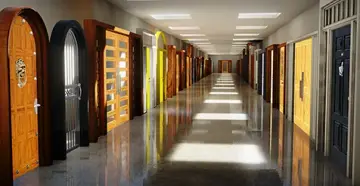
Castle Windows Pack provides 318 mix-and-match PNGs of window designs, grids, and glass panes with PBR materials, emissive controls, and curved wall support.
Architectural scenes often stall at the window stage. A castle facade, a city wall, or a corridor of arched openings all demand variation, but modeling every individual frame, mullion, and pane quickly eats into production time. Castle Windows Pack takes a different route, treating window creation as a texturing and material problem rather than a heavy geometry task.
318 PNGs Built for Mix-and-Match Window Construction
The core of the package is a library of 318 complementary PNGs containing window designs, grids, and glass panes. The intent is mix-and-match: rather than serving a fixed set of pre-assembled windows, the textures let developers combine separate elements into original combinations. A grid from one texture can pair with a pane design from another, and the frame shape can shift to suit the architecture.
Because the textures are flat images applied to plane meshes, the workflow favors quick iteration. A designer can swap a grid pattern, test a different pane tint, or adjust the frame treatment without rebuilding geometry. For productions that need dozens of unique windows across a castle or town environment, that modularity directly reduces revision cycles.
Applying Designs to Plane Meshes on Flat and Curved Walls
The textures are meant for plane meshes. A developer applies a chosen texture combination to a flat plane, then positions that plane against the wall surface. This keeps window geometry lightweight and makes placement straightforward, particularly when an environment already has solid wall geometry that simply needs window detailing overlaid onto it.
A standout point for architectural work is the support for curved walls. Castle towers, ramparts, and rounded corridors frequently resist standard flat window assets. The pack addresses that directly: the meshes can be curved to accommodate curved walls so the windows conform to the surface rather than fighting it.
PBR Material Instance With Color, Emissive, and Brightness Control
The textures feed into a standard PBR material that includes normal maps. That gives surfaces depth and tactile response under lighting, which matters when a camera passes close to a window frame or when raking light hits the mullions at a low angle.
Supporting that is a Material Instance with color customization, emissive, and brightness parameters. Color customization lets a single texture set serve multiple buildings or districts without obvious repetition. Emissive and brightness controls, meanwhile, are what make windows read as lit interiors rather than dark painted holes. A designer can tune how strong the interior glow appears, adjust its brightness to match the time of day or scene mood, and integrate the windows with the surrounding architecture so the lighting feels consistent.
Aligning Made-to-Fit Meshes for Composite Window Showpieces
The pack encourages combining its made-to-fit window meshes into larger composite arrangements. By aligning several meshes together, a developer can construct combo pieces, multi-pane assemblies, grouped windows, or ornamental window clusters that read as a single architectural feature. This is where the mix-and-match concept extends beyond the textures and into spatial composition.
For castle architecture in particular, grouped windows and stacked arrangements are common. Great halls, throne rooms, and chapel facades often feature rows of tall windows or clusters of arched openings. The made-to-fit alignment workflow lets those compositions come together from the existing mesh set.
Blurred Window-Lit Shadows for Atmospheric Depth
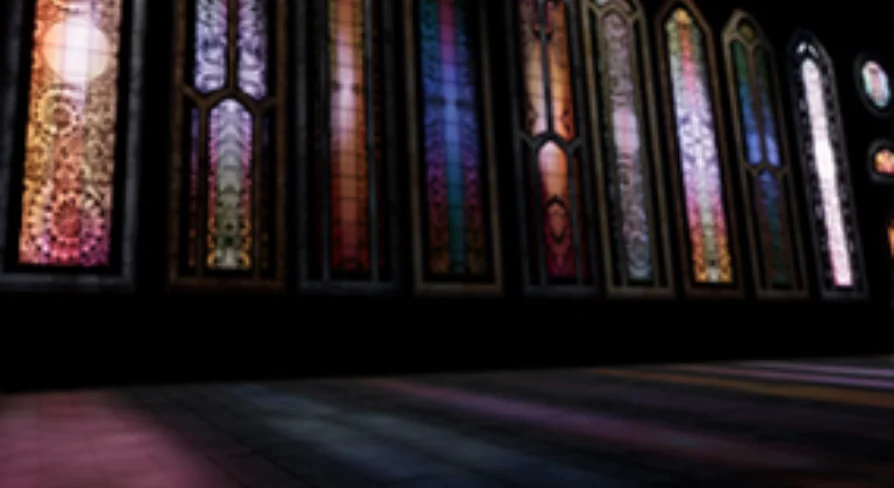
Light passing through windows casts shadows, and the pack accounts for that with customizable blurred window-lit shadows. These shadows simulate the soft pools of light that fall through stained glass or murkier panes onto floors and adjacent walls. Developers can adjust the blur and customization parameters to push the effect toward crisp or diffuse depending on how direct the light source is and how dramatic the moment needs to be.
That shadow behavior matters most in interior cinematics and walkthrough sequences, where the floor and wall lighting are visible to the camera. A static shadow map might look correct from one angle but wrong from another; a blurred, customizable shadow that responds to the scene lighting setup holds up better across shots.
Where the Pack Fits in a Production Pipeline
Castle Windows Pack sits in the dressing and detailing phase of environment work. After walls, floors, and major structural geometry are blocked in, the package supplies the window layer without requiring bespoke modeling for each opening. The plane-mesh approach keeps draw calls and geometric complexity low, which is useful in scenes dense with architecture.
The compatibility range spans two clusters: engine versions 4.20 through 4.23, and 4.25 through 4.27. Projects on those versions can integrate the Material Instance and texture library without conversion work, assuming the standard PBR pipeline is in place.
Who Benefits From This Approach
Developers working on castle, medieval, or broad architectural environments will find the most direct use here. The tag set, window, castle, and architecture, reflects the primary scope. Level designers who need to populate large facades quickly, lighting artists who want emissive windows they can tune to match a scene, and environment artists who need variation without ballooning mesh counts are the natural users.
The practical takeaway is that Castle Windows Pack treats windows as a modular, material-driven dressing problem. With 318 mix-and-match PNGs, a PBR Material Instance with emissive and color controls, support for curved walls, and customizable lit shadows, the package covers the window workflow from flat facades to rounded towers without forcing a custom modeling step for every new opening.
 Buildings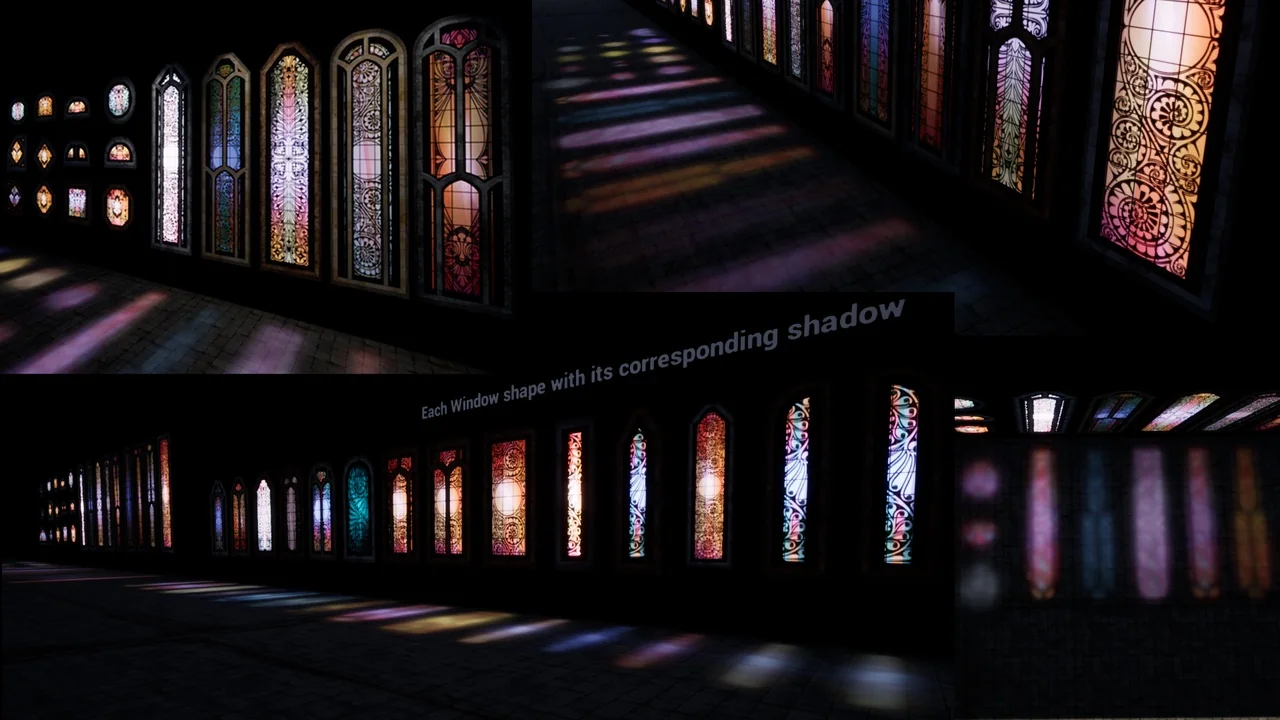
 Buildings
 Buildings
 Buildings