"c68a05d5e51405b3"{"id":"1000498","slug":"billboards-pack-vol-01","title":"Billboards Pack Vol.01","category":"Components","engine":"5.0+","assetVersion":"","engineVersion":"Engine Version: 5.0+","tag":"Components","accent":"blue","visual":"mech","summary":"Animated LED billboards and static ad counterparts sized for dense urban scenes, with material-driven animation toggles and four aspect ratios for interchangeab","platform":"Unreal Engine","publishedAt":"2026-07-13T07:05:03.435Z","updatedAt":"2026-07-13T07:05:03.435Z","sourceNotes":[],"fileContents":[],"compatibility":["Unreal Engine","Engine Version: 5.0+"],"featuredImage":{"alt":"Billboards Pack Vol.01","src":"/wp-content/uploads/published/2026/07/8e4c7438854a-1888e39e-86cc-4935-bc8e-3e530e06cfd2-a8de4e317b.webp"},"hasDownloadLink":true,"downloads":0,"terms":[{"taxonomy":"category","slug":"components","name":"Components"}],"galleryImages":[{"src":"/wp-content/uploads/published/2026/07/7f3e2078655d-d9791120-6c41-4b2d-89d3-3343305ec124-b40498f7f0.webp","alt":"Billboards Pack Vol.01"},{"src":"/wp-content/uploads/published/2026/07/f7f113652796-1ff8b110-908d-4315-8833-e7f6e9555338-480901cbde.webp","alt":"Billboards Pack Vol.01"},{"src":"/wp-content/uploads/published/2026/07/ebaa412ca5ee-71a530c6-c8ed-4330-882d-311db2c0e286-1b0d31a58d.webp","alt":"Billboards Pack Vol.01"},{"src":"/wp-content/uploads/published/2026/07/a91a66e326fe-147659e0-ad3b-4d70-b5a6-92451bbda8c6-0d106bbec2.webp","alt":"Billboards Pack Vol.01"},{"src":"/wp-content/uploads/published/2026/07/70e7342113ed-fb4cf67f-55ea-4a03-bd39-2cc64af91a03-ae05ea739a.webp","alt":"Billboards Pack Vol.01"}],"accessPanel":{"kind":"resource","title":"Download this resource","eyebrow":"Free Download","message":"Log in or create a free account to start your download.","fileName":"Content.7z","safetyNote":"Resources are manually reviewed before listing to improve quality and reduce obvious risks.","actionLabel":"Download Free","resourceType":"Resource archive"},"contentHtml":"\u003cp\u003eDrop these animated LED advertisements into a scene and the environment immediately starts reading as a dense, living cityscape. Massive screens cycle through bright, saturated content the way the billboards in Times Square do—glowing, shifting, and pulling visual focus toward building facades and elevated signage. The package pairs those moving ads with static counterparts, giving builders the choice between perpetual motion and a single frozen frame on any given surface.\u003c/p\u003e \u003cp\u003eThe pack also ships with structural billboard models at a range of sizes, aspect ratios, and styles. Rather than locking every ad to one fixed display, the geometry varies so that narrow vertical screens, wide horizontal bands, and square-ish panels can all appear side by side in the same block. Four aspect ratios—1×4, 1×2, 2×1, and 4×1—define the ad canvases and billboard frames. Those ratios matter when swapping content: an ad built for one screen can be repurposed across any compatible geometry, whether it came from this pack or was authored separately and dropped onto an existing mesh.\u003c/p\u003e \u003ch2\u003eAnimating LED Ads and Static Ad Variations inside Billboards Pack Vol.01\u003c/h2\u003e \u003cp\u003eEach animated LED advertisement runs on a timed visual loop powered by material functions. Those functions live inside a master material, and every ad is a material instance of that master. Individual instances can toggle animations on or off, which means a busy intersection might keep every screen in motion while a quiet background boulevard runs the same content static to reduce visual noise.\u003c/p\u003e \u003cp\u003eSeveral advertisements ship with multiple variations out of the box. The variations can differ in color or in animation behavior, so if the default look does not fit a particular lighting setup or mood, switching to an alternate variant is faster than opening the material editor and rebuilding from scratch. Both the animated and static ad versions are designed to slot onto the same billboard frames, so content and structure stay independent.\u003c/p\u003e \u003ch2\u003eAspect Ratios That Keep Advertising Interchangeable\u003c/h2\u003e \u003cp\u003eThe four supported aspect ratios—1×4, 1×2, 2×1, and 4×1—cover tall vertical pillars, medium portrait panels, landscape banners, and wide horizontal ribbons. The ratios apply to both the ad content itself and the billboard models, which keeps the system composable.\u003c/p\u003e \u003cul\u003e\n\u003cli\u003e1×4 — tall vertical pillar signage\u003c/li\u003e\n\u003cli\u003e1×2 — portrait-oriented panel\u003c/li\u003e\n\u003cli\u003e2×1 — landscape banner\u003c/li\u003e\n\u003cli\u003e4×1 — wide horizontal ribbon display\u003c/li\u003e\n\u003c/ul\u003e \u003cp\u003eThis is what makes external ad content viable inside the pack. A custom ad authored at one of those four ratios should drop onto the included billboards without rescaling surprises. The same interchange works in reverse: any ad from this collection can be mapped onto custom billboard geometry that respects one of those four proportions.\u003c/p\u003e \u003ch2\u003eMaterial Function Workflow for Editing and Creating Billboard Variations\u003c/h2\u003e\n\u003cp\u003eBecause animation state is exposed to material instances as a toggle, the workflow is non-destructive. A billboard that ships as animated can be set to static at the instance level without altering the master material. Likewise, tweaking or authoring new variations can happen by adjusting what the material functions feed into each instance, rather than duplicating entire material graphs.\u003c/p\u003e \u003cp\u003eThe master material is the control hub. It defines how the LED content moves, how the emissive intensity behaves, and how each ad's timing is structured. Inside that master, material functions handle the animation logic independently, then surface those controls to each material instance. When a scene needs a calmer street, animating ads can be quieted across an entire row of screens by flipping the toggle on the relevant instances. When a single screen needs a new behavior—different speed, different color cycling, different loop—the editing path goes through the material functions feeding that instance.\u003c/p\u003e \u003ch2\u003eVisual Style Suited to Cyberpunk and Urban Cityscapes\u003c/h2\u003e\n\u003cp\u003eThe aesthetic leans saturated, glowing, and neon-lit. Tags attached to the asset point directly at this visual identity: emissive, bloom, bright, colorful, futuristic, scifi, cyberpunk, photorealistic, and urban. That visual language makes the pack especially useful for night-time city building scenes, moody street environments, and futuristic skylines where signage does the heavy lifting for atmosphere. Emissive surfaces and dynamic video-loop style content bring facade dead space to life without requiring custom texture work per building.\u003c/p\u003e \u003ch2\u003eCompatibility and Pack-to-Pack Interaction\u003c/h2\u003e\n\u003cp\u003eBillboards Pack Vol.01 is compatible with Unreal Engine versions 5.0 through 5.7. It is slated to function with the forthcoming Billboard Pack Vol.02, meaning ads and billboard frames from both volumes can be mixed within the same scene. That cross-pack compatibility reinforces the aspect-ratio interchange model: content from one pack can populate structural frames from the other without file-level hacks.\u003c/p\u003e \u003cp\u003eThe showcase imagery references Epic Games' city scene, which is noted as downloadable, allowing creators to test the billboards inside a prebuilt dense urban environment rather than authoring test geometry from scratch.\u003c/p\u003e \u003ch2\u003eWho Gains the Most from the LED Billboard Kit\u003c/h2\u003e\n\u003cp\u003eTeams building dense urban scenes at night or in futuristic settings are the primary beneficiaries. The toggleable animation system means a single block can shift from calm to frenetic without swapping assets—just instance changes. The four fixed aspect ratios make custom ad integration realistic for projects that already have their own art pipeline. And the material-function backbone means new variations stay cheap to produce once the initial setup is understood. For any pipeline where city facades need to feel alive without per-screen custom engineering, this kit targets that exact gap.\u003c/p\u003e\n\n\u003ch2\u003eContinue Browsing Similar Packs\u003c/h2\u003e\n\u003cul\u003e\n\u003cli\u003eBillboards Pack Vol.01: Animated LED Ads for 3D Cities\u003c/li\u003e\n\u003cli\u003e\u003ca href=\"https://3dcghub.com/vhs-component-easy-plug-play/\" title=\"VHS Component - (Easy Plug \u0026amp; Play)\"\u003eVHS Component - (Easy Plug \u0026amp; Play)\u003c/a\u003e\u003c/li\u003e\n\u003cli\u003e\u003ca href=\"https://3dcghub.com/customizable-bodycam-component/\" title=\"Customizable Bodycam Component\"\u003eCustomizable Bodycam Component\u003c/a\u003e\u003c/li\u003e\n\u003cli\u003e\u003ca href=\"https://3dcghub.com/skinned-decal-component/\" title=\"Skinned Decal Component\"\u003eSkinned Decal Component\u003c/a\u003e\u003c/li\u003e\n\u003cli\u003e\u003ca href=\"https://3dcghub.com/rdlodtools-rd-tools-pro/\" title=\"rdLODtools (rd Tools Pro)\"\u003erdLODtools (rd Tools Pro)\u003c/a\u003e\u003c/li\u003e\n\u003c/ul\u003e","contentTextLength":5971,"navigation":{"current":1511,"total":3860,"previous":{"id":"1000499","slug":"castle-windows-pack","title":"Castle Windows Pack","category":"Buildings \u0026 Architecture","platform":"Unreal Engine","updatedAt":"2026-07-13T09:27:51.037Z"},"next":{"id":"1000497","slug":"amazonian-warrior-girl","title":"Amazonian warrior girl","category":"Characters \u0026 Creatures","platform":"Unreal Engine","updatedAt":"2026-07-13T04:00:54.006Z"}},"relatedResources":[{"id":"1001205","slug":"4k-materials-wood-flooring-vol-01","title":"4K Materials: Wood Flooring Vol.01","category":"Building \u0026 Human-made","engine":"5.0+","assetVersion":"","engineVersion":"Engine Version: 5.0+","tag":"Building","accent":"blue","visual":"luts","summary":"Examine the technical setup, 4K photo-sourced textures, and customizable PBR parameters in 4K Materials: Wood Flooring Vol.01 for Unreal Engine.","platform":"Unreal Engine","publishedAt":"2026-09-19T08:24:31.393Z","updatedAt":"2026-09-19T08:24:31.393Z","sourceNotes":[],"fileContents":[],"compatibility":["Unreal Engine","Engine Version: 5.0+"],"featuredImage":{"alt":"4K Materials: Wood Flooring Vol.01","src":"/wp-content/uploads/published/2026/09/ef794206e335-48108620-a344-4346-b6de-9960223c3356-e81fedea02.webp"},"hasDownloadLink":true,"downloads":0},{"id":"1001679","slug":"wooden-constructor","title":"Wooden Constructor","category":"Components","engine":"4.26+,5.0+","assetVersion":"","engineVersion":"Engine Version: 4.26+,5.0+","tag":"Components","accent":"blue","visual":"mech","summary":"A breakdown of the Wooden Constructor kit, featuring modular planks, pillars, bracing, and pre-built assemblies for low-poly medieval environments.","platform":"Unreal Engine","publishedAt":"2026-10-13T15:30:22.598Z","updatedAt":"2026-10-13T15:30:22.598Z","sourceNotes":[],"fileContents":[],"compatibility":["Unreal Engine","Engine Version: 4.26+,5.0+"],"featuredImage":{"alt":"Wooden Constructor","src":"/wp-content/uploads/published/2026/10/ab17a9ae112c-529800f3-fa6d-4b81-9e72-750a8921d81d-16e4fb534e.webp"},"hasDownloadLink":true,"downloads":1},{"id":"15960","slug":"vhs-component-easy-plug-play","title":"VHS Component - (Easy Plug \u0026 Play)","category":"Shaders","engine":"5.5+","assetVersion":"Engine version: 5.5+","engineVersion":"5.1","tag":"Shaders","accent":"blue","visual":"mech","summary":"Transform your project's atmosphere with the VHS Component - (Easy Plug \u0026 Play). This tool offers hyper-realistic analog visuals, including static and dynamic timestamps, with a setup that takes only minutes.","platform":"Unreal Engine","publishedAt":"2026-03-12T13:36:41.000Z","updatedAt":"2026-04-19T15:44:38.000Z","sourceNotes":[],"fileContents":[],"compatibility":["Unreal Engine","Engine version: 5.5+"],"featuredImage":{"alt":"VHS Component - (Easy Plug \u0026 Play)","src":"https://3dcghub.com/wp-content/uploads/2026/03/610591be-1290-461d-9ed5-05671fbe7c67.webp"},"hasDownloadLink":true,"downloads":2}]}
Components
Billboards Pack Vol.01
Animated LED billboards and static ad counterparts sized for dense urban scenes, with material-driven animation toggles and four aspect ratios for interchangeab
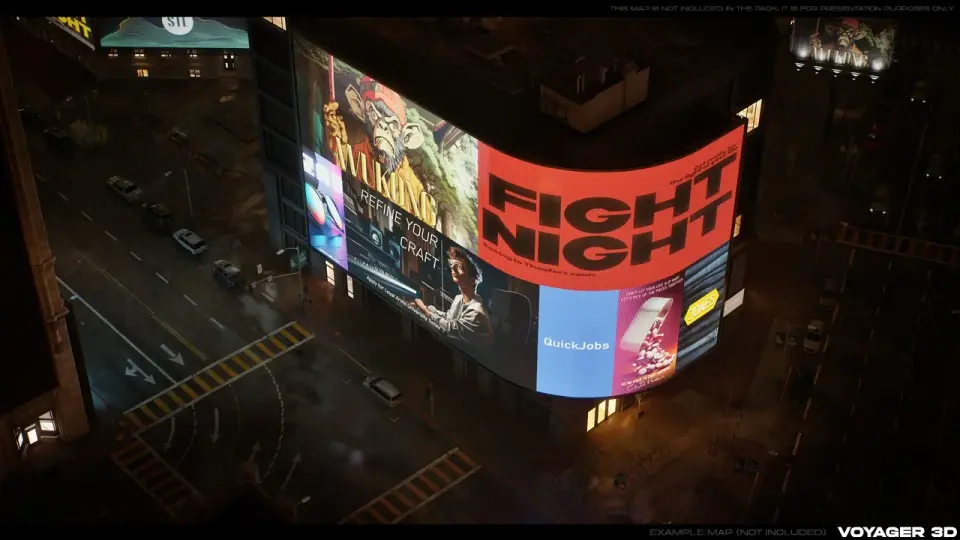
Drop these animated LED advertisements into a scene and the environment immediately starts reading as a dense, living cityscape. Massive screens cycle through bright, saturated content the way the billboards in Times Square do—glowing, shifting, and pulling visual focus toward building facades and elevated signage. The package pairs those moving ads with static counterparts, giving builders the choice between perpetual motion and a single frozen frame on any given surface.
The pack also ships with structural billboard models at a range of sizes, aspect ratios, and styles. Rather than locking every ad to one fixed display, the geometry varies so that narrow vertical screens, wide horizontal bands, and square-ish panels can all appear side by side in the same block. Four aspect ratios—1×4, 1×2, 2×1, and 4×1—define the ad canvases and billboard frames. Those ratios matter when swapping content: an ad built for one screen can be repurposed across any compatible geometry, whether it came from this pack or was authored separately and dropped onto an existing mesh.
Animating LED Ads and Static Ad Variations inside Billboards Pack Vol.01
Each animated LED advertisement runs on a timed visual loop powered by material functions. Those functions live inside a master material, and every ad is a material instance of that master. Individual instances can toggle animations on or off, which means a busy intersection might keep every screen in motion while a quiet background boulevard runs the same content static to reduce visual noise.
Several advertisements ship with multiple variations out of the box. The variations can differ in color or in animation behavior, so if the default look does not fit a particular lighting setup or mood, switching to an alternate variant is faster than opening the material editor and rebuilding from scratch. Both the animated and static ad versions are designed to slot onto the same billboard frames, so content and structure stay independent.
Aspect Ratios That Keep Advertising Interchangeable
The four supported aspect ratios—1×4, 1×2, 2×1, and 4×1—cover tall vertical pillars, medium portrait panels, landscape banners, and wide horizontal ribbons. The ratios apply to both the ad content itself and the billboard models, which keeps the system composable.
1×4 — tall vertical pillar signage
1×2 — portrait-oriented panel
2×1 — landscape banner
4×1 — wide horizontal ribbon display
This is what makes external ad content viable inside the pack. A custom ad authored at one of those four ratios should drop onto the included billboards without rescaling surprises. The same interchange works in reverse: any ad from this collection can be mapped onto custom billboard geometry that respects one of those four proportions.
Material Function Workflow for Editing and Creating Billboard Variations
Because animation state is exposed to material instances as a toggle, the workflow is non-destructive. A billboard that ships as animated can be set to static at the instance level without altering the master material. Likewise, tweaking or authoring new variations can happen by adjusting what the material functions feed into each instance, rather than duplicating entire material graphs.
The master material is the control hub. It defines how the LED content moves, how the emissive intensity behaves, and how each ad's timing is structured. Inside that master, material functions handle the animation logic independently, then surface those controls to each material instance. When a scene needs a calmer street, animating ads can be quieted across an entire row of screens by flipping the toggle on the relevant instances. When a single screen needs a new behavior—different speed, different color cycling, different loop—the editing path goes through the material functions feeding that instance.
Visual Style Suited to Cyberpunk and Urban Cityscapes
The aesthetic leans saturated, glowing, and neon-lit. Tags attached to the asset point directly at this visual identity: emissive, bloom, bright, colorful, futuristic, scifi, cyberpunk, photorealistic, and urban. That visual language makes the pack especially useful for night-time city building scenes, moody street environments, and futuristic skylines where signage does the heavy lifting for atmosphere. Emissive surfaces and dynamic video-loop style content bring facade dead space to life without requiring custom texture work per building.
Compatibility and Pack-to-Pack Interaction
Billboards Pack Vol.01 is compatible with Unreal Engine versions 5.0 through 5.7. It is slated to function with the forthcoming Billboard Pack Vol.02, meaning ads and billboard frames from both volumes can be mixed within the same scene. That cross-pack compatibility reinforces the aspect-ratio interchange model: content from one pack can populate structural frames from the other without file-level hacks.
The showcase imagery references Epic Games' city scene, which is noted as downloadable, allowing creators to test the billboards inside a prebuilt dense urban environment rather than authoring test geometry from scratch.
Who Gains the Most from the LED Billboard Kit
Teams building dense urban scenes at night or in futuristic settings are the primary beneficiaries. The toggleable animation system means a single block can shift from calm to frenetic without swapping assets—just instance changes. The four fixed aspect ratios make custom ad integration realistic for projects that already have their own art pipeline. And the material-function backbone means new variations stay cheap to produce once the initial setup is understood. For any pipeline where city facades need to feel alive without per-screen custom engineering, this kit targets that exact gap.
Continue Browsing Similar Packs
Billboards Pack Vol.01: Animated LED Ads for 3D Cities
 Components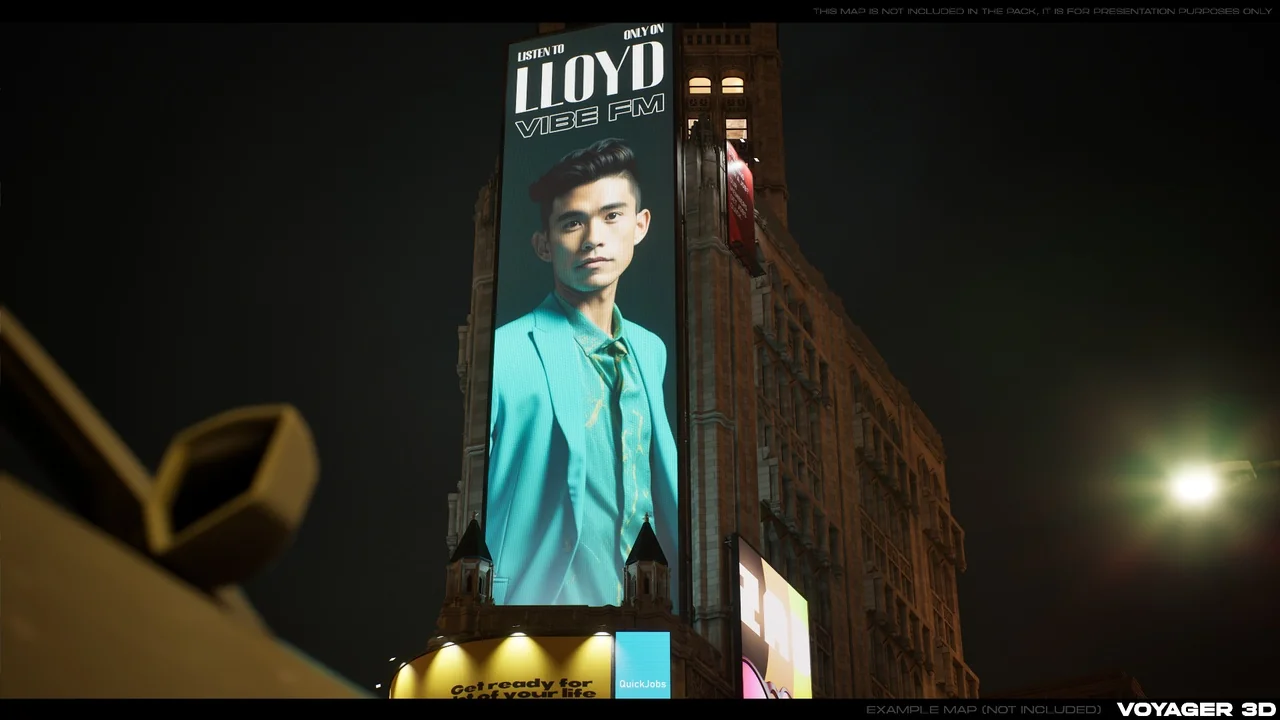
 Building
 Components
 Shaders