"ae2217ad8e73450c"{"id":"1003003","slug":"cableway-template","title":"Cableway Template","category":"Vehicles \u0026 Transportation","engine":"4.26+,5.0+","assetVersion":"","engineVersion":"Engine Version: 4.26+,5.0+","tag":"Vehicles","accent":"blue","visual":"mech","summary":"A two-gondola cableway system with an automatic or manual pillar-based track creator, instanced static meshes, editable float-curve speed and preconfigured soun","platform":"Unreal Engine","indexPolicy":"index","publishedAt":"2026-11-25T16:08:01.952Z","updatedAt":"2026-11-25T16:08:01.952Z","sourceNotes":[],"fileContents":[],"compatibility":["Unreal Engine","Engine Version: 4.26+,5.0+"],"featuredImage":{"alt":"Cableway Template","src":"/wp-content/uploads/published/2026/11/3035803d73e8-587056eb-c2db-4181-8a44-b050bcb4f421-8c46e9796f.webp"},"hasDownloadLink":true,"downloads":0,"terms":[{"taxonomy":"category","slug":"vehicles-and-transportation","name":"Vehicles \u0026 Transportation"}],"galleryImages":[{"src":"/wp-content/uploads/published/2026/11/f443ffb860b0-6bfa69c8-7585-4f7e-95e8-9b73fe5f7124-8875297221.webp","alt":"Cableway Template"},{"src":"/wp-content/uploads/published/2026/11/57a71c128f35-6417d282-c9ba-41c8-bfdf-b2ed38246930-f7a808a6b0.webp","alt":"Cableway Template"},{"src":"/wp-content/uploads/published/2026/11/cacd3946f329-d0d4a675-0af3-4f29-90fe-da7476c6f6cf-2a4b5ec901.webp","alt":"Cableway Template"},{"src":"/wp-content/uploads/published/2026/11/29d1e411c469-8d2e4c6f-2808-4a90-bea3-95adb0e47406-405dbdb404.webp","alt":"Cableway Template"},{"src":"/wp-content/uploads/published/2026/11/523f707bb0d3-b15e4b30-f933-4811-91ca-bd6cdff3ae96-0d63383845.webp","alt":"Cableway Template"},{"src":"/wp-content/uploads/published/2026/11/8885d2eff4eb-8d1a0a6e-bea6-402d-b5c6-a7df184b7afe-79a0ceba6e.webp","alt":"Cableway Template"},{"src":"/wp-content/uploads/published/2026/11/6fb951fba519-bf4fded7-2589-469f-8df2-0b9e8c12217c-c606c17a45.webp","alt":"Cableway Template"}],"accessPanel":{"kind":"resource","title":"Get this resource","safetyNote":"Resources are manually reviewed before listing to improve quality and reduce obvious risks.","fileName":"Cableway Template.7z","resourceType":"Resource archive","versions":[]},"contentHtml":"\u003cp\u003eThe entry point is deliberately short: create the track, then drag two gondola Blueprints into the level and assign the track actor to them. Between those two moves sits a track creator that handles pillar placement, station positioning and cable direction, so a working line exists before any tuning begins. Everything past that point — pillar coordinates, cableway heading, travel speed — stays exposed and adjustable.\u003c/p\u003e \u003ch2\u003eLaying Out a Cableway Track with Pillars\u003c/h2\u003e \u003cp\u003eThe track creator works two ways. Pillars can be specified by coordinate, giving exact control over where each support lands on the map, or generated automatically and then trimmed with a dedicated system for deleting the pillars that do not belong. That second option matters more than it first appears: automatic placement produces a rough line fast, and the delete pass turns that rough line into something deliberate without ever opening a coordinate field.\u003c/p\u003e \u003cp\u003eStation placement follows the same logic. The second station is simply dragged to the required location rather than typed in, which keeps the layout work inside the viewport. Adjusting pillar positions and the direction of the cableway is framed as a few steps rather than a setup session, and the emphasis on fitting any map suggests the creator was built to be re-run per level instead of locked to one layout.\u003c/p\u003e \u003cp\u003eThe track spans three wires per side and carries two gondolas. That structure holds across the whole length of the line, since pillars define the path and the wire geometry follows.\u003c/p\u003e \u003ch2\u003eHooking Gondolas to the Track Actor\u003c/h2\u003e \u003cp\u003eGondolas are separate Blueprints. Nothing is baked into the track: the track actor describes the route, and the two gondola Blueprints are dropped in and pointed at it. Assigning the track actor is the only connection required, and once that link exists the vehicles read their motion from the line they were given.\u003c/p\u003e \u003cp\u003eSounds are already configured on the gondolas, so a newly assembled line produces audio without extra wiring. For a scene that needs the cableway to read as industrial infrastructure rather than a silent prop, that saves a pass that would otherwise sit between placement and preview.\u003c/p\u003e \u003ch3\u003eSpeed Along a Float Curve\u003c/h3\u003e \u003cp\u003eTravel speed is driven by a float curve. Changing the pace of the ride, or varying it across the journey, means editing that curve rather than touching the movement logic. A gentle drift between stations and a faster haul both come from the same mechanism, which is why the curve is called out as easy to modify — it is the single dial for how the gondolas behave over time.\u003c/p\u003e \u003ch2\u003eInstanced Static Meshes and the Draw Call Budget\u003c/h2\u003e \u003cp\u003eThe track is assembled from instanced static meshes. Because repeated geometry is instanced, draw calls stay low enough that very long tracks can be built without the cost climbing alongside the length. A cableway that crosses an entire map is the case this design serves, and it is the difference between a line that reads as distance and a line that has to be capped at a short span.\u003c/p\u003e \u003cp\u003eBuilding on static meshes carries a second benefit beyond performance. Most of the parameters governing the track can be changed easily, and the geometry itself stays familiar — no proprietary track object to work around when the layout needs to shift.\u003c/p\u003e \u003cp\u003eAutomation covers the default path completely, and a simple HUD is sketched as an alternative way to drive the system. That HUD is not implemented, so the automatic behaviour is what a project actually gets out of the box. Manual control over the underlying values is present regardless; what is missing is the on-screen layer for it.\u003c/p\u003e \u003ch2\u003eCableway Materials, Textures and Migration\u003c/h2\u003e \u003cp\u003eEvery mesh uses an instance of a master material, and there are two masters: one for metallic surfaces and one for non-metallic. The metallic master covers the hardware side of the line, the non-metallic master the rest, and individual meshes inherit from those two parents rather than carrying their own material setups.\u003c/p\u003e \u003cp\u003eTexture resolution runs from 1024x1024 up to 4096x4096, giving a range from background supports that can sit at the lower end to hero surfaces that hold up closer to camera. Textures were authored in Substance Painter and the 3D models in Maya, and no Substance plugin is required to use the result — the material output is self-contained.\u003c/p\u003e \u003ch3\u003eMoving the Cableway Between Projects\u003c/h3\u003e \u003cp\u003eMigration is short because the template is compact. Only two actors need to travel: the track actor and the gondola setup around it. There is no sprawling dependency chain to trace, which keeps the move between levels or projects predictable and makes the template reasonable to evaluate inside a real scene rather than a dedicated test map.\u003c/p\u003e \u003cp\u003eFor scenes where the line has to survive ongoing edits — a station shifted, a pillar removed, a stretch lengthened — the combination of an automatic creator, a pillar-deletion pass, a draggable second station and a static-mesh foundation means rework stays at the layout level. The float curve absorbs changes to pacing, and the master materials absorb changes to look. What remains fixed is the route the track actor describes, and that is the part most likely to be redrawn anyway. Documentation and a video demo accompany the project for anyone who wants the setup walkthrough before committing a level to it.\u003c/p\u003e \u003cp\u003eThe result suits industrial and realistic environments that need a working transport line as a simulation element rather than a static prop: a haul route across a quarry, a passenger lift between two points on a hillside, a background cable system in a large map. Anyone building those scenes will find the setup cost close to the two drags it starts with, and the tuning cost limited to a curve and a handful of exposed track parameters.\u003c/p\u003e\n\n\u003ch2\u003eContinue Browsing Similar Packs\u003c/h2\u003e\n\u003cul\u003e\n\u003cli\u003e\u003ca href=\"https://3dcghub.com/drivable-vehicle-snowmobile/\" rel=\"noopener noreferrer\"\u003eDrivable Vehicle : Snowmobile\u003c/a\u003e\u003c/li\u003e\n\u003cli\u003e\u003ca href=\"https://3dcghub.com/measurement-spline/\" rel=\"noopener noreferrer\"\u003eMeasurement Spline\u003c/a\u003e\u003c/li\u003e\n\u003cli\u003e\u003ca href=\"https://3dcghub.com/maz537-battle-truck-6-versions/\" rel=\"noopener noreferrer\"\u003eMAZ537 / Battle Truck / 6 Versions\u003c/a\u003e\u003c/li\u003e\n\u003cli\u003e\u003ca href=\"https://3dcghub.com/top-down-post-apocalyptic-props/\" rel=\"noopener noreferrer\"\u003eTop-Down Post-Apocalyptic Props\u003c/a\u003e\u003c/li\u003e\n\u003cli\u003e\u003ca href=\"https://3dcghub.com/security-car/\" rel=\"noopener noreferrer\"\u003eSecurity Car\u003c/a\u003e\u003c/li\u003e\n\u003c/ul\u003e","contentTextLength":5875,"navigation":{"current":41,"total":4964,"previous":{"id":"1003004","slug":"capoeira-anim-set","title":"Capoeira Anim Set","category":"Combat","platform":"Unreal Engine","updatedAt":"2026-11-25T16:09:21.640Z"},"next":{"id":"1003002","slug":"bulk-icon-generator-fast-customizable-icon-export-from-your-meshes","title":"Bulk Icon Generator — Fast, Customizable Icon Export from Your Meshes","category":"Automations","platform":"Unreal Engine","updatedAt":"2026-11-25T16:06:25.515Z"}},"relatedResources":[{"id":"1002002","slug":"drivable-vehicle-snowmobile","title":"Drivable Vehicle : Snowmobile","category":"Vehicles \u0026 Transportation","engine":"4.26+,5.0+","assetVersion":"","engineVersion":"Engine Version: 4.26+,5.0+","tag":"Vehicles","accent":"blue","visual":"mech","summary":"Explore the fully functional snowmobile asset featuring working suspension, multi-part destruction blueprints, realistic audio, and four skin variations.","platform":"Unreal Engine","indexPolicy":"index","publishedAt":"2026-10-26T12:20:55.590Z","updatedAt":"2026-10-26T12:20:55.590Z","sourceNotes":[],"fileContents":[],"compatibility":["Unreal Engine","Engine Version: 4.26+,5.0+"],"featuredImage":{"alt":"Drivable Vehicle : Snowmobile","src":"/wp-content/uploads/published/2026/10/c845dd5822c1-e43f4344-c4b1-4b18-9b13-291c789f50af-ad16bae709.webp"},"fileSizeBytes":330957110,"hasDownloadLink":true,"downloads":1},{"id":"1002324","slug":"measurement-spline","title":"Measurement Spline","category":"Vehicles \u0026 Transportation","engine":"4.22+,5.0+","assetVersion":"","engineVersion":"Engine Version: 4.22+,5.0+","tag":"Vehicles","accent":"blue","visual":"mech","summary":"A Blueprint spline parent that changes only the editor’s visual measurement display, with a child Spline Mesh system and text scaled to long spline lengths.","platform":"Unreal Engine","indexPolicy":"index","publishedAt":"2026-11-06T06:29:03.999Z","updatedAt":"2026-11-06T06:29:03.999Z","sourceNotes":[],"fileContents":[],"compatibility":["Unreal Engine","Engine Version: 4.22+,5.0+"],"featuredImage":{"alt":"Measurement Spline","src":"/wp-content/uploads/published/2026/11/5bae5bb347e2-fbd5702a-754e-4620-985a-6787b60ba6dd-190dcbb400.webp"},"fileSizeBytes":36348339,"hasDownloadLink":true,"downloads":0},{"id":"1002323","slug":"maz537-battle-truck-6-versions","title":"MAZ537 / Battle Truck / 6 Versions","category":"Vehicles \u0026 Transportation","engine":"4.24+,5.0+","assetVersion":"","engineVersion":"Engine Version: 4.24+,5.0+","tag":"Vehicles","accent":"blue","visual":"mech","summary":"A Russian MAZ537 combat truck package with six blueprint variations, twelve textures, and five camo and paint schemes spanning green forest, beige urban, white,","platform":"Unreal Engine","indexPolicy":"index","publishedAt":"2026-11-06T06:24:58.002Z","updatedAt":"2026-11-06T06:24:58.002Z","sourceNotes":[],"fileContents":[],"compatibility":["Unreal Engine","Engine Version: 4.24+,5.0+"],"featuredImage":{"alt":"MAZ537 / Battle Truck / 6 Versions","src":"/wp-content/uploads/published/2026/11/e43f77c846bf-f97ea65b-02f4-4ad8-a428-0e55a116e75f-3fe3271b04.webp"},"fileSizeBytes":223263343,"hasDownloadLink":true,"downloads":0}]}[{"id":4225,"sourceId":4225,"taxonomyId":4225,"taxonomy":"category","slug":"asset-library","name":"Asset Library","parentId":null,"count":4817,"hasChildren":true,"href":"/","seoTitle":"Free Game Assets Library | 3DCGHUB","seoDescription":"Browse free Unreal Engine, Unity, Blender assets and game development tutorials on 3DCGHUB with previews, compatibility notes, and secure downloads.","sitemapEnabled":true,"children":[{"id":4227,"sourceId":4227,"taxonomyId":4227,"taxonomy":"category","slug":"blender-add-ons-plugins","name":"Blender Add-ons \u0026 Plugins","parentId":4225,"count":10,"hasChildren":false,"href":"/category/blender-add-ons-plugins/","seoTitle":"Free Blender Add-ons \u0026 Plugins | 3DCGHUB","seoDescription":"Browse free Blender Add-ons \u0026 Plugins tools for Blender on 3DCGHUB: curated downloads with preview images, compatibility notes and secure download access.","sitemapEnabled":true},{"id":514,"sourceId":514,"taxonomyId":514,"taxonomy":"category","slug":"unity-2","name":"Unity","parentId":4225,"count":453,"hasChildren":true,"href":"/category/unity-2/","seoTitle":"Free Unity Assets | 3DCGHUB","seoDescription":"Browse free Unity resources on 3DCGHUB: curated downloads with preview images, compatibility notes and secure download access.","sitemapEnabled":true,"children":[{"id":523,"sourceId":523,"taxonomyId":523,"taxonomy":"category","slug":"2d","name":"2D","parentId":514,"count":1,"hasChildren":true,"href":"/category/2d/","seoTitle":"Free Unity 2D | 3DCGHUB","seoDescription":"Browse free 2D assets for Unity on 3DCGHUB: curated downloads with preview images, compatibility notes and secure download access.","sitemapEnabled":true},{"id":515,"sourceId":515,"taxonomyId":515,"taxonomy":"category","slug":"3d-unity-2","name":"3D","parentId":514,"count":162,"hasChildren":true,"href":"/category/3d-unity-2/","seoTitle":"Free Unity 3D Assets | 3DCGHUB","seoDescription":"Browse free 3D assets for Unity on 3DCGHUB: curated downloads with preview images, compatibility notes and secure download access.","sitemapEnabled":true},{"id":565,"sourceId":565,"taxonomyId":565,"taxonomy":"category","slug":"add-ons","name":"Add-Ons","parentId":514,"count":2,"hasChildren":false,"href":"/category/add-ons/","seoTitle":"Free Unity Add-Ons | 3DCGHUB","seoDescription":"Browse free Add-Ons assets for Unity on 3DCGHUB: curated downloads with preview images, compatibility notes and secure download access.","sitemapEnabled":true},{"id":529,"sourceId":529,"taxonomyId":529,"taxonomy":"category","slug":"audio-unity-2","name":"Audio","parentId":514,"count":1,"hasChildren":true,"href":"/category/audio-unity-2/","seoTitle":"Free Unity Audio | 3DCGHUB","seoDescription":"Browse free Audio for Unity on 3DCGHUB: curated downloads with preview images, compatibility notes and secure download access.","sitemapEnabled":true},{"id":557,"sourceId":557,"taxonomyId":557,"taxonomy":"category","slug":"templates","name":"Templates","parentId":514,"count":36,"hasChildren":true,"href":"/category/templates/","seoTitle":"Free Unity Templates | 3DCGHUB","seoDescription":"Browse free Unity project templates on 3DCGHUB. Starter kits with previews, compatibility notes, and secure download access.","sitemapEnabled":true},{"id":533,"sourceId":533,"taxonomyId":533,"taxonomy":"category","slug":"tools-unity-2","name":"Tools","parentId":514,"count":0,"hasChildren":true,"href":"/category/tools-unity-2/","sitemapEnabled":true},{"id":554,"sourceId":554,"taxonomyId":554,"taxonomy":"category","slug":"vfx-unity-2","name":"VFX","parentId":514,"count":4,"hasChildren":true,"href":"/category/vfx-unity-2/","seoTitle":"Free Unity VFX | 3DCGHUB","seoDescription":"Browse free VFX for Unity on 3DCGHUB: curated downloads with preview images, compatibility notes and secure download access.","sitemapEnabled":true}]},{"id":511,"sourceId":511,"taxonomyId":511,"taxonomy":"category","slug":"unreal-engine-2","name":"Unreal Engine","parentId":4225,"count":4355,"hasChildren":true,"href":"/category/unreal-engine-2/","seoTitle":"Free Unreal Engine Assets | 3DCGHUB","seoDescription":"Browse free Unreal Engine resources on 3DCGHUB: curated downloads with preview images, compatibility notes and secure download access.","sitemapEnabled":true,"children":[{"id":54,"sourceId":54,"taxonomyId":54,"taxonomy":"category","slug":"3d","name":"3D","parentId":511,"count":2441,"hasChildren":true,"href":"/category/3d/","seoTitle":"Free Unreal Engine 3D | 3DCGHUB","seoDescription":"Browse free 3D assets for Unreal Engine on 3DCGHUB: curated downloads with preview images, compatibility notes and secure download access.","sitemapEnabled":true},{"id":441,"sourceId":441,"taxonomyId":441,"taxonomy":"category","slug":"animations","name":"Animations","parentId":511,"count":269,"hasChildren":true,"href":"/category/animations/","seoTitle":"Free Unreal Engine Animations | 3DCGHUB","seoDescription":"Browse free Animations for Unreal Engine on 3DCGHUB: curated downloads with preview images, compatibility notes and secure download access.","sitemapEnabled":true},{"id":446,"sourceId":446,"taxonomyId":446,"taxonomy":"category","slug":"audio","name":"Audio","parentId":511,"count":63,"hasChildren":true,"href":"/category/audio/","seoTitle":"Free Unreal Engine Audio Resources | 3DCGHUB","seoDescription":"Browse free Unreal Engine audio resources including sound effects, voices, dialogue, and ambient sounds. Curated free downloads on 3DCGHUB.","sitemapEnabled":true},{"id":466,"sourceId":466,"taxonomyId":466,"taxonomy":"category","slug":"game-systems","name":"Game Systems","parentId":511,"count":381,"hasChildren":true,"href":"/category/game-systems/","seoTitle":"Free Unreal Engine Game Systems | 3DCGHUB","seoDescription":"Browse free Game Systems tools for Unreal Engine on 3DCGHUB: curated downloads with preview images, compatibility notes and secure download access.","sitemapEnabled":true},{"id":478,"sourceId":478,"taxonomyId":478,"taxonomy":"category","slug":"game-templates","name":"Game Templates","parentId":511,"count":155,"hasChildren":true,"href":"/category/game-templates/","seoTitle":"Free Unreal Engine Game Templates | 3DCGHUB","seoDescription":"Browse free Game Templates for Unreal Engine on 3DCGHUB: curated downloads with preview images, compatibility notes and secure download access.","sitemapEnabled":true},{"id":432,"sourceId":432,"taxonomyId":432,"taxonomy":"category","slug":"hdri","name":"HDRI","parentId":511,"count":6,"hasChildren":true,"href":"/category/hdri/","seoTitle":"Free Unreal Engine HDRI | 3DCGHUB","seoDescription":"Browse free Unreal Engine HDRI skies and lighting maps on 3DCGHUB. Environment lighting with previews and secure downloads.","sitemapEnabled":true},{"id":228,"sourceId":228,"taxonomyId":228,"taxonomy":"category","slug":"material-and-textures","name":"Material \u0026 Textures","parentId":511,"count":172,"hasChildren":true,"href":"/category/material-and-textures/","seoTitle":"Free Unreal Engine Material \u0026 Textures | 3DCGHUB","seoDescription":"Browse free Material \u0026 Textures for Unreal Engine on 3DCGHUB: curated downloads with preview images, compatibility notes and secure download access.","sitemapEnabled":true},{"id":298,"sourceId":298,"taxonomyId":298,"taxonomy":"category","slug":"sprites-and-flipbooks","name":"Sprites \u0026 Flipbooks","parentId":511,"count":18,"hasChildren":true,"href":"/category/sprites-and-flipbooks/","seoTitle":"Free Unreal Engine Sprites \u0026 Flipbooks | 3DCGHUB","seoDescription":"Browse free Sprites \u0026 Flipbooks assets for Unreal Engine on 3DCGHUB: curated downloads with preview images, compatibility notes and secure download access.","sitemapEnabled":true},{"id":489,"sourceId":489,"taxonomyId":489,"taxonomy":"category","slug":"tools-and-plugins","name":"Tools \u0026 Plugins","parentId":511,"count":390,"hasChildren":true,"href":"/category/tools-and-plugins/","seoTitle":"Free Unreal Engine Tools \u0026 Plugins | 3DCGHUB","seoDescription":"Browse free Tools \u0026 Plugins for Unreal Engine on 3DCGHUB: curated downloads with preview images, compatibility notes and secure download access.","sitemapEnabled":true},{"id":459,"sourceId":459,"taxonomyId":459,"taxonomy":"category","slug":"ui","name":"UI","parentId":511,"count":47,"hasChildren":true,"href":"/category/ui/","seoTitle":"Free Unreal Engine UI | 3DCGHUB","seoDescription":"Browse free UI for Unreal Engine on 3DCGHUB: curated downloads with preview images, compatibility notes and secure download access.","sitemapEnabled":true},{"id":450,"sourceId":450,"taxonomyId":450,"taxonomy":"category","slug":"vfx","name":"VFX","parentId":511,"count":413,"hasChildren":true,"href":"/category/vfx/","seoTitle":"Free Unreal Engine VFX | 3DCGHUB","seoDescription":"Browse free VFX for Unreal Engine on 3DCGHUB: curated downloads with preview images, compatibility notes and secure download access.","sitemapEnabled":true}]}]},{"id":4222,"sourceId":4222,"taxonomyId":4222,"taxonomy":"category","slug":"tutorial-library","name":"Tutorial Library","parentId":null,"count":117,"hasChildren":false,"href":"/tutorials/","seoTitle":"Free Game Development Tutorial Library | 3DCGHUB","seoDescription":"Browse free game development tutorials for Unreal Engine, Unity, Blender, and more on 3DCGHUB with practical workflows and secure downloads.","sitemapEnabled":true}]
Resource screenshots
1 / 7
Asset drops
Daily Asset Drops
Follow 3DCGHUB on Telegram for daily Unreal, Unity & Blender drops and curated CC0 releases.
Resources are manually reviewed before listing to improve quality and reduce obvious risks.
Reviewed archive
Vehicles
Cableway Template
A two-gondola cableway system with an automatic or manual pillar-based track creator, instanced static meshes, editable float-curve speed and preconfigured soun
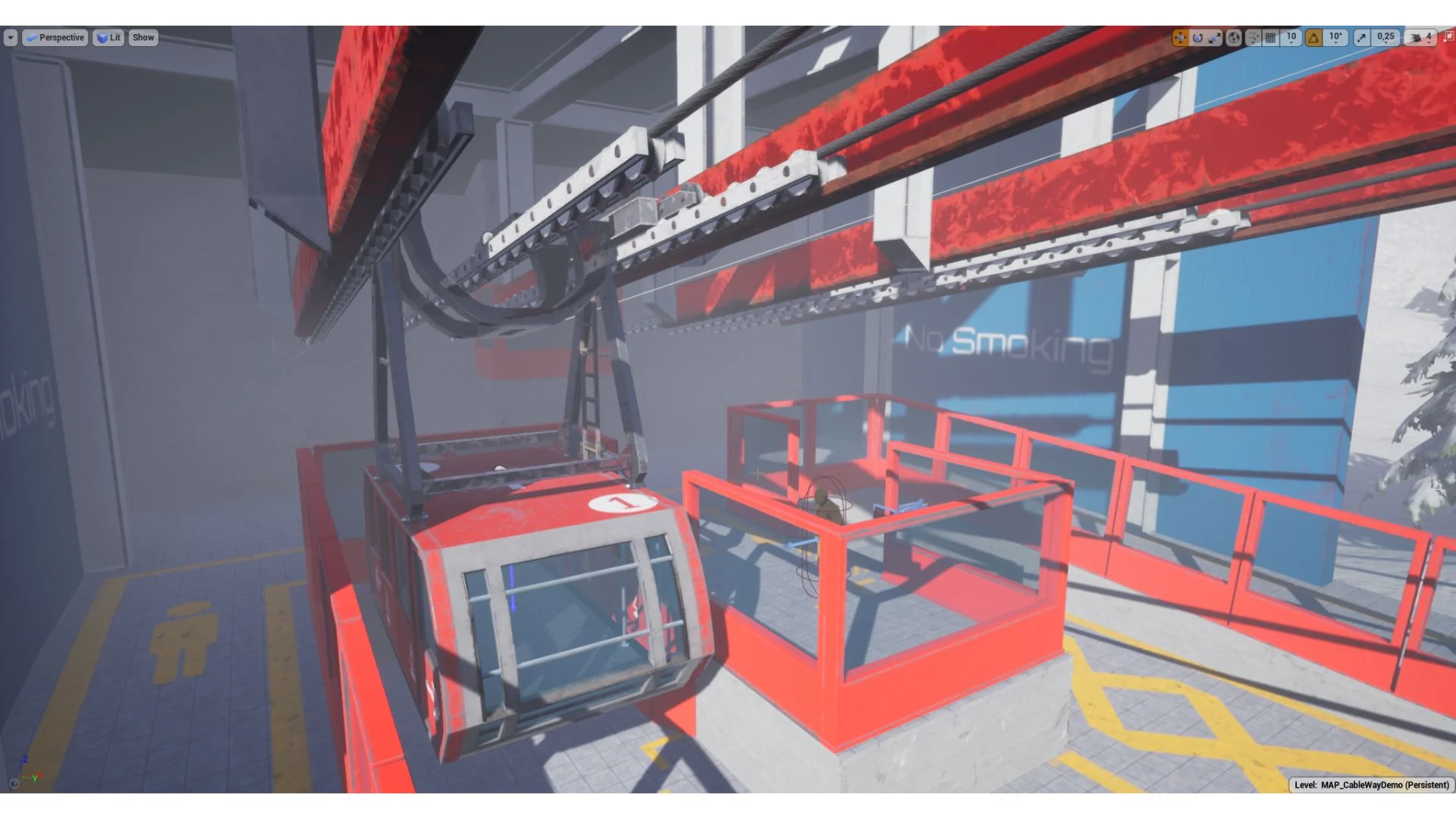
The entry point is deliberately short: create the track, then drag two gondola Blueprints into the level and assign the track actor to them. Between those two moves sits a track creator that handles pillar placement, station positioning and cable direction, so a working line exists before any tuning begins. Everything past that point — pillar coordinates, cableway heading, travel speed — stays exposed and adjustable.
Laying Out a Cableway Track with Pillars
The track creator works two ways. Pillars can be specified by coordinate, giving exact control over where each support lands on the map, or generated automatically and then trimmed with a dedicated system for deleting the pillars that do not belong. That second option matters more than it first appears: automatic placement produces a rough line fast, and the delete pass turns that rough line into something deliberate without ever opening a coordinate field.
Station placement follows the same logic. The second station is simply dragged to the required location rather than typed in, which keeps the layout work inside the viewport. Adjusting pillar positions and the direction of the cableway is framed as a few steps rather than a setup session, and the emphasis on fitting any map suggests the creator was built to be re-run per level instead of locked to one layout.
The track spans three wires per side and carries two gondolas. That structure holds across the whole length of the line, since pillars define the path and the wire geometry follows.
Hooking Gondolas to the Track Actor
Gondolas are separate Blueprints. Nothing is baked into the track: the track actor describes the route, and the two gondola Blueprints are dropped in and pointed at it. Assigning the track actor is the only connection required, and once that link exists the vehicles read their motion from the line they were given.
Sounds are already configured on the gondolas, so a newly assembled line produces audio without extra wiring. For a scene that needs the cableway to read as industrial infrastructure rather than a silent prop, that saves a pass that would otherwise sit between placement and preview.
Speed Along a Float Curve
Travel speed is driven by a float curve. Changing the pace of the ride, or varying it across the journey, means editing that curve rather than touching the movement logic. A gentle drift between stations and a faster haul both come from the same mechanism, which is why the curve is called out as easy to modify — it is the single dial for how the gondolas behave over time.
Instanced Static Meshes and the Draw Call Budget
The track is assembled from instanced static meshes. Because repeated geometry is instanced, draw calls stay low enough that very long tracks can be built without the cost climbing alongside the length. A cableway that crosses an entire map is the case this design serves, and it is the difference between a line that reads as distance and a line that has to be capped at a short span.
Building on static meshes carries a second benefit beyond performance. Most of the parameters governing the track can be changed easily, and the geometry itself stays familiar — no proprietary track object to work around when the layout needs to shift.
Automation covers the default path completely, and a simple HUD is sketched as an alternative way to drive the system. That HUD is not implemented, so the automatic behaviour is what a project actually gets out of the box. Manual control over the underlying values is present regardless; what is missing is the on-screen layer for it.
Cableway Materials, Textures and Migration
Every mesh uses an instance of a master material, and there are two masters: one for metallic surfaces and one for non-metallic. The metallic master covers the hardware side of the line, the non-metallic master the rest, and individual meshes inherit from those two parents rather than carrying their own material setups.
Texture resolution runs from 1024x1024 up to 4096x4096, giving a range from background supports that can sit at the lower end to hero surfaces that hold up closer to camera. Textures were authored in Substance Painter and the 3D models in Maya, and no Substance plugin is required to use the result — the material output is self-contained.
Moving the Cableway Between Projects
Migration is short because the template is compact. Only two actors need to travel: the track actor and the gondola setup around it. There is no sprawling dependency chain to trace, which keeps the move between levels or projects predictable and makes the template reasonable to evaluate inside a real scene rather than a dedicated test map.
For scenes where the line has to survive ongoing edits — a station shifted, a pillar removed, a stretch lengthened — the combination of an automatic creator, a pillar-deletion pass, a draggable second station and a static-mesh foundation means rework stays at the layout level. The float curve absorbs changes to pacing, and the master materials absorb changes to look. What remains fixed is the route the track actor describes, and that is the part most likely to be redrawn anyway. Documentation and a video demo accompany the project for anyone who wants the setup walkthrough before committing a level to it.
The result suits industrial and realistic environments that need a working transport line as a simulation element rather than a static prop: a haul route across a quarry, a passenger lift between two points on a hillside, a background cable system in a large map. Anyone building those scenes will find the setup cost close to the two drags it starts with, and the tuning cost limited to a curve and a handful of exposed track parameters.
 Vehicles
 Vehicles
 Vehicles