"95fdaf16012263fa"{"id":"1002324","slug":"measurement-spline","title":"Measurement Spline","category":"Vehicles \u0026 Transportation","engine":"4.22+,5.0+","assetVersion":"","engineVersion":"Engine Version: 4.22+,5.0+","tag":"Vehicles","accent":"blue","visual":"mech","summary":"A Blueprint spline parent that changes only the editor’s visual measurement display, with a child Spline Mesh system and text scaled to long spline lengths.","platform":"Unreal Engine","indexPolicy":"index","publishedAt":"2026-11-06T06:29:03.999Z","updatedAt":"2026-11-06T06:29:03.999Z","sourceNotes":[],"fileContents":[],"compatibility":["Unreal Engine","Engine Version: 4.22+,5.0+"],"featuredImage":{"alt":"Measurement Spline","src":"/wp-content/uploads/published/2026/11/5bae5bb347e2-fbd5702a-754e-4620-985a-6787b60ba6dd-190dcbb400.webp"},"hasDownloadLink":true,"downloads":0,"terms":[{"taxonomy":"category","slug":"vehicles-and-transportation","name":"Vehicles \u0026 Transportation"}],"galleryImages":[{"src":"/wp-content/uploads/published/2026/11/4c0b124a4a86-19a343f7-8ca2-4ce4-8e1a-23bc90c291fa-2a98372aa3.webp","alt":"Measurement Spline"},{"src":"/wp-content/uploads/published/2026/11/ac10b36aefce-0bf309c1-33d7-4037-88cf-b87fa5757d6c-6aefba1474.webp","alt":"Measurement Spline"},{"src":"/wp-content/uploads/published/2026/11/679a86cf1678-0b5a7161-5527-4e83-9ee7-ed3b02497a69-6d86e5560d.webp","alt":"Measurement Spline"},{"src":"/wp-content/uploads/published/2026/11/f74adfa7e3cc-70440aec-78a7-48d1-81dd-13b15ea37f86-0e81f6c537.webp","alt":"Measurement Spline"},{"src":"/wp-content/uploads/published/2026/11/93bb73ebd162-8a63ebf9-3d2b-4871-a2f8-b755be2dcf85-6b863e03da.webp","alt":"Measurement Spline"},{"src":"/wp-content/uploads/published/2026/11/e0d3d62470a0-1b7ddc02-439d-47f0-b58c-2e0bc976e8e1-f7e19b8f00.webp","alt":"Measurement Spline"}],"accessPanel":{"kind":"resource","title":"Get this resource","eyebrow":"Free resource","message":"3DCGHUB is the service provider for this listing. Access is fulfilled through the official publisher channel.","fileName":"Content.7z","safetyNote":"Resources are manually reviewed before listing to improve quality and reduce obvious risks.","actionLabel":"Get this resource","resourceType":"Resource archive","versions":[]},"contentHtml":"\u003cp\u003eLong spline layouts become difficult to read when measurement values grow and the route stretches across a large editor view. Measurement Spline approaches that problem through a Blueprint parent that can replace the base Spline parent class. Its focus is the visual editorial representation of spline systems, not gameplay or in-game performance. In practice, that keeps the measurement display separate from how the spline behaves at runtime.\u003c/p\u003e\n\u003cp\u003eThe tool began with a railway system in mind, which explains one of its defining behaviors: text values scale based on spline length. That makes the measurement display easier to read when working with long spline meshes and large measurements. The package also includes a child Spline Mesh system and three legacy Blueprints for cases where older versions are needed.\u003c/p\u003e\n\u003ch2\u003eA Blueprint Parent That Replaces the Base Spline Class\u003c/h2\u003e\n\u003cp\u003eMeasurement Spline is a simple tool and parent spline class. It can be used as a replacement for the base Spline parent class, so the change happens at the Blueprint class level. The blueprint alters the visual editorial representation of spline systems without affecting gameplay or in-game performance.\u003c/p\u003e\n\u003cp\u003eThese are Blueprints rather than standalone components. To use one, make a copy of the Measurement Spline blueprint you want, or create a child that inherits the functionality and gives you a base to build on. That distinction shapes the setup: you are choosing and extending a Blueprint class, not adding a component as an isolated piece.\u003c/p\u003e\n\u003ch2\u003eSpline Mesh Components in the Measurement Spline Child\u003c/h2\u003e\n\u003cp\u003eThe Spline Mesh system is a child of the Measurement Spline parent. Its spline mesh components are generated seamlessly, keeping the mesh side connected to the parent measurement Blueprint. Mesh-related controls sit under 'Mesh Spline Settings', while measurement controls sit under 'Measurement Spline Settings'.\u003c/p\u003e\n\u003cp\u003eThree legacy blueprints are included as well, available if they are needed. The Spline Mesh child and the legacy Blueprints sit alongside the main parent setup rather than replacing the measurement-focused role of the parent. The generated components handle the mesh side; the parent handles the editor-facing measurement display.\u003c/p\u003e\n\u003ch2\u003eText That Scales for Railway-Sized Splines\u003c/h2\u003e\n\u003cp\u003eRailway layouts can run long, and measurements attached to them can become large enough that fixed-size labels are hard to read. Text values in Measurement Spline scale based on spline length. This was part of the original railway-oriented design, and it gives the tool a consistent reading rule: as the spline grows, the text scales with it.\u003c/p\u003e\n\u003cp\u003eThat behavior is aimed at long spline meshes and large measurements. Because the Blueprint changes only the editorial representation, the scaling is about reading the spline in the editor. It does not change gameplay or in-game performance.\u003c/p\u003e\n\u003ch2\u003eTyping Values in Measurement Spline Settings\u003c/h2\u003e\n\u003cp\u003eAlmost everything in the blueprints is customizable. Many variables should be altered by typing into text fields rather than sliding values with the mouse. The reason is the complexity that appears with long or complicated spline systems; interactive sliding can become difficult in those cases. Customization can be intensive at times, and improvements are in progress.\u003c/p\u003e\n\u003cp\u003eThe relevant controls are grouped under 'Measurement Spline Settings' and 'Mesh Spline Settings'. On a short spline, adjustment is straightforward. On a long, complex system, plan to enter exact values instead of dragging. The two settings groups keep measurement behavior and mesh behavior in named places, which makes the customization path easier to follow.\u003c/p\u003e\n\u003ch2\u003eChoosing Between the Spline Mesh System and Legacy Blueprints\u003c/h2\u003e\n\u003cp\u003eThe current package includes the Spline Mesh system as part of the selection, plus three legacy blueprints for anyone who needs them. A project already tied to an older version can use the legacy Blueprints as a fallback. Starting fresh, the decision is mainly which Measurement Spline blueprint to copy or extend.\u003c/p\u003e\n\u003cp\u003eA copy gives you a separate Blueprint to work from. A child class inherits the functionality and provides a place to build on top. That is the intended extension route because the tool is delivered as Blueprints, not components. The parent class remains the source of the measurement behavior, and the child can carry additional work without losing that inherited functionality.\u003c/p\u003e\n\u003ch2\u003eWhere Measurement Spline Fits in a Railway or Long-Spline Workflow\u003c/h2\u003e\n\u003cp\u003eUse it when spline systems need a readable measurement layer in the editor, especially on long routes where labels must remain legible. The railway origin is not just a theme; it explains the text scaling and the emphasis on long spline meshes and large measurements. A team working with spline-driven layouts can keep the measurement display independent from gameplay and in-game performance.\u003c/p\u003e\n\u003cp\u003eThe Spline Mesh child adds generated mesh components where the workflow calls for them. The two settings groups keep customization in named locations, and the option to copy or subclass the Blueprint supports both quick reuse and further development. For a production that already relies on spline parents, the practical step is to pick the blueprint version, copy or subclass it, then edit values under the relevant settings group.\u003c/p\u003e\n\n\u003ch2\u003eMore From The Same Workflow\u003c/h2\u003e\n\u003cul\u003e\n\u003cli\u003e\u003ca href=\"https://3dcghub.com/hover-car-system/\" rel=\"noopener noreferrer\"\u003eHover Car System\u003c/a\u003e\u003c/li\u003e\n\u003cli\u003e\u003ca href=\"https://3dcghub.com/vehicle-traffic-system/\" rel=\"noopener noreferrer\"\u003eVehicle Traffic System\u003c/a\u003e\u003c/li\u003e\n\u003cli\u003e\u003ca href=\"https://3dcghub.com/drivable-vehicle-snowmobile/\" rel=\"noopener noreferrer\"\u003eDrivable Vehicle : Snowmobile\u003c/a\u003e\u003c/li\u003e\n\u003cli\u003e\u003ca href=\"https://3dcghub.com/maz537-battle-truck-6-versions/\" rel=\"noopener noreferrer\"\u003eMAZ537 / Battle Truck / 6 Versions\u003c/a\u003e\u003c/li\u003e\n\u003cli\u003e\u003ca href=\"https://3dcghub.com/top-down-post-apocalyptic-props/\" rel=\"noopener noreferrer\"\u003eTop-Down Post-Apocalyptic Props\u003c/a\u003e\u003c/li\u003e\n\u003c/ul\u003e","contentTextLength":5432,"navigation":{"current":44,"total":4291,"previous":{"id":"1002325","slug":"medieval-fantasy-buildings","title":"Medieval Fantasy Buildings","category":"Towns \u0026 Villages","platform":"Unreal Engine","updatedAt":"2026-11-06T06:30:44.639Z"},"next":{"id":"1002323","slug":"maz537-battle-truck-6-versions","title":"MAZ537 / Battle Truck / 6 Versions","category":"Vehicles \u0026 Transportation","platform":"Unreal Engine","updatedAt":"2026-11-06T06:24:58.002Z"}},"relatedResources":[{"id":"1002055","slug":"hover-car-system","title":"Hover Car System","category":"Vehicles \u0026 Transportation","engine":"4.26+,5.0+","assetVersion":"","engineVersion":"Engine Version: 4.26+,5.0+","tag":"Vehicles","accent":"blue","visual":"mech","summary":"Explore the Hover Car System for Unreal Engine, featuring physically based hover mechanics, custom mesh integration, spline navigation, and AI control.","platform":"Unreal Engine","indexPolicy":"index","publishedAt":"2026-10-26T15:12:29.161Z","updatedAt":"2026-10-26T15:12:29.161Z","sourceNotes":[],"fileContents":[],"compatibility":["Unreal Engine","Engine Version: 4.26+,5.0+"],"featuredImage":{"alt":"Hover Car System","src":"/wp-content/uploads/published/2026/10/c480e8076fba-a61929d4-3dbc-46da-8590-475583a1f0c8-1ccfca2074.webp"},"hasDownloadLink":true,"downloads":0},{"id":"1000903","slug":"vehicle-traffic-system","title":"Vehicle Traffic System","category":"Vehicles \u0026 Transportation","engine":"5.4+","assetVersion":"","engineVersion":"Engine Version: 5.4+","tag":"Vehicles","accent":"blue","visual":"mech","summary":"A Blueprint-driven vehicle traffic system for UE4 and UE5 with spline routing, traffic lights, priority lanes, passing lanes, highways, parking, and destination","platform":"Unreal Engine","indexPolicy":"index","publishedAt":"2026-08-06T05:10:23.369Z","updatedAt":"2026-08-06T05:10:23.369Z","sourceNotes":[],"fileContents":[],"compatibility":["Unreal Engine","Engine Version: 5.4+"],"featuredImage":{"alt":"Vehicle Traffic System","src":"/wp-content/uploads/published/2026/08/9618a01fc56f-cffbc0ee-1a2f-46ad-bd7b-b3dbc55a57c1-d20a51d985.webp"},"hasDownloadLink":true,"downloads":0},{"id":"1002002","slug":"drivable-vehicle-snowmobile","title":"Drivable Vehicle : Snowmobile","category":"Vehicles \u0026 Transportation","engine":"4.26+,5.0+","assetVersion":"","engineVersion":"Engine Version: 4.26+,5.0+","tag":"Vehicles","accent":"blue","visual":"mech","summary":"Explore the fully functional snowmobile asset featuring working suspension, multi-part destruction blueprints, realistic audio, and four skin variations.","platform":"Unreal Engine","indexPolicy":"index","publishedAt":"2026-10-26T12:20:55.590Z","updatedAt":"2026-10-26T12:20:55.590Z","sourceNotes":[],"fileContents":[],"compatibility":["Unreal Engine","Engine Version: 4.26+,5.0+"],"featuredImage":{"alt":"Drivable Vehicle : Snowmobile","src":"/wp-content/uploads/published/2026/10/c845dd5822c1-e43f4344-c4b1-4b18-9b13-291c789f50af-ad16bae709.webp"},"hasDownloadLink":true,"downloads":1}]}
Vehicles
Measurement Spline
A Blueprint spline parent that changes only the editor’s visual measurement display, with a child Spline Mesh system and text scaled to long spline lengths.
Long spline layouts become difficult to read when measurement values grow and the route stretches across a large editor view. Measurement Spline approaches that problem through a Blueprint parent that can replace the base Spline parent class. Its focus is the visual editorial representation of spline systems, not gameplay or in-game performance. In practice, that keeps the measurement display separate from how the spline behaves at runtime.
The tool began with a railway system in mind, which explains one of its defining behaviors: text values scale based on spline length. That makes the measurement display easier to read when working with long spline meshes and large measurements. The package also includes a child Spline Mesh system and three legacy Blueprints for cases where older versions are needed.
A Blueprint Parent That Replaces the Base Spline Class
Measurement Spline is a simple tool and parent spline class. It can be used as a replacement for the base Spline parent class, so the change happens at the Blueprint class level. The blueprint alters the visual editorial representation of spline systems without affecting gameplay or in-game performance.
These are Blueprints rather than standalone components. To use one, make a copy of the Measurement Spline blueprint you want, or create a child that inherits the functionality and gives you a base to build on. That distinction shapes the setup: you are choosing and extending a Blueprint class, not adding a component as an isolated piece.
Spline Mesh Components in the Measurement Spline Child
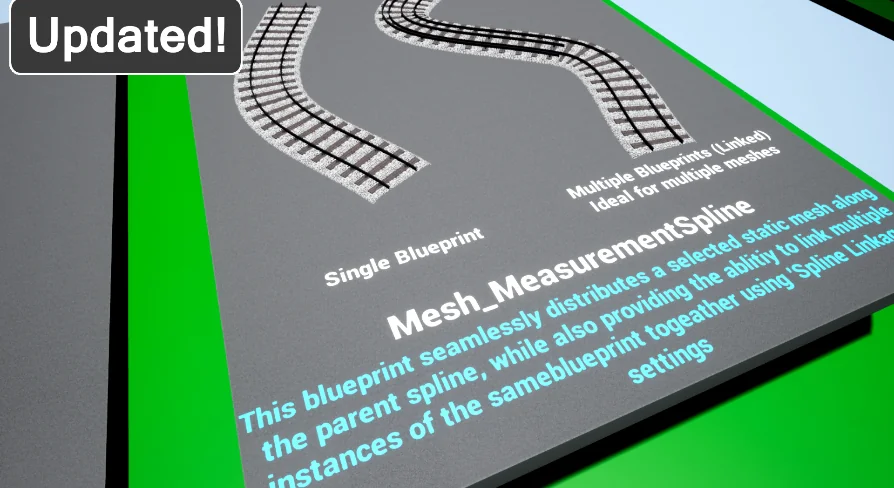
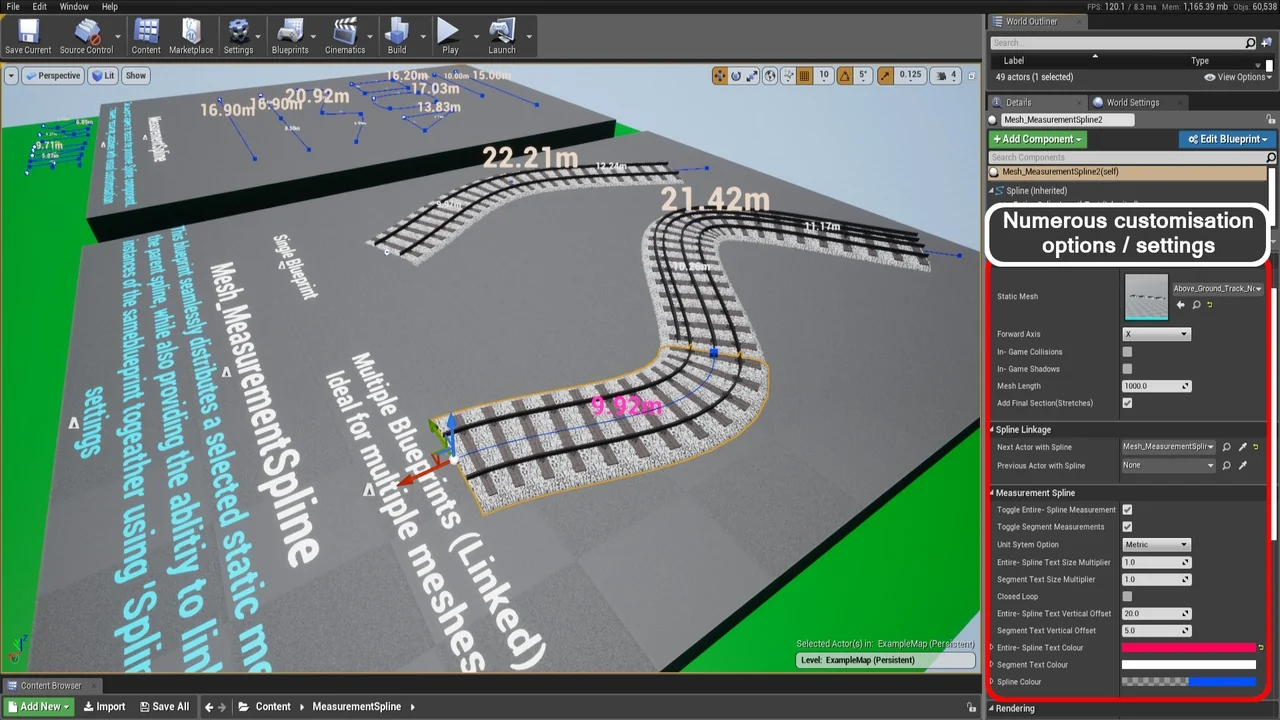
The Spline Mesh system is a child of the Measurement Spline parent. Its spline mesh components are generated seamlessly, keeping the mesh side connected to the parent measurement Blueprint. Mesh-related controls sit under 'Mesh Spline Settings', while measurement controls sit under 'Measurement Spline Settings'.
Three legacy blueprints are included as well, available if they are needed. The Spline Mesh child and the legacy Blueprints sit alongside the main parent setup rather than replacing the measurement-focused role of the parent. The generated components handle the mesh side; the parent handles the editor-facing measurement display.
Text That Scales for Railway-Sized Splines
Railway layouts can run long, and measurements attached to them can become large enough that fixed-size labels are hard to read. Text values in Measurement Spline scale based on spline length. This was part of the original railway-oriented design, and it gives the tool a consistent reading rule: as the spline grows, the text scales with it.
That behavior is aimed at long spline meshes and large measurements. Because the Blueprint changes only the editorial representation, the scaling is about reading the spline in the editor. It does not change gameplay or in-game performance.
Typing Values in Measurement Spline Settings
Almost everything in the blueprints is customizable. Many variables should be altered by typing into text fields rather than sliding values with the mouse. The reason is the complexity that appears with long or complicated spline systems; interactive sliding can become difficult in those cases. Customization can be intensive at times, and improvements are in progress.
The relevant controls are grouped under 'Measurement Spline Settings' and 'Mesh Spline Settings'. On a short spline, adjustment is straightforward. On a long, complex system, plan to enter exact values instead of dragging. The two settings groups keep measurement behavior and mesh behavior in named places, which makes the customization path easier to follow.
Choosing Between the Spline Mesh System and Legacy Blueprints
The current package includes the Spline Mesh system as part of the selection, plus three legacy blueprints for anyone who needs them. A project already tied to an older version can use the legacy Blueprints as a fallback. Starting fresh, the decision is mainly which Measurement Spline blueprint to copy or extend.
A copy gives you a separate Blueprint to work from. A child class inherits the functionality and provides a place to build on top. That is the intended extension route because the tool is delivered as Blueprints, not components. The parent class remains the source of the measurement behavior, and the child can carry additional work without losing that inherited functionality.
Where Measurement Spline Fits in a Railway or Long-Spline Workflow
Use it when spline systems need a readable measurement layer in the editor, especially on long routes where labels must remain legible. The railway origin is not just a theme; it explains the text scaling and the emphasis on long spline meshes and large measurements. A team working with spline-driven layouts can keep the measurement display independent from gameplay and in-game performance.
The Spline Mesh child adds generated mesh components where the workflow calls for them. The two settings groups keep customization in named locations, and the option to copy or subclass the Blueprint supports both quick reuse and further development. For a production that already relies on spline parents, the practical step is to pick the blueprint version, copy or subclass it, then edit values under the relevant settings group.
 Vehicles
 Vehicles
 Vehicles
 Vehicles