"ae2217ad8e73450c"{"id":"1002993","slug":"automatic-coral-generator","title":"Automatic Coral Generator","category":"Procedural Systems","engine":"4.15+,5.0+","assetVersion":"","engineVersion":"Engine Version: 4.15+,5.0+","tag":"Procedural Systems","accent":"blue","visual":"mech","summary":"A drag-and-drop reef tool with 13 coral meshes, per-mesh frequency and scale controls, runtime randomization, seeded streams, cull distances, and test maps.","platform":"Unreal Engine","indexPolicy":"index","publishedAt":"2026-11-25T15:55:50.854Z","updatedAt":"2026-11-25T15:55:50.854Z","sourceNotes":[],"fileContents":[],"compatibility":["Unreal Engine","Engine Version: 4.15+,5.0+"],"featuredImage":{"alt":"Automatic Coral Generator","src":"/wp-content/uploads/published/2026/11/b2269eec6806-b87eb665-14fe-411f-80c5-e1f3adbcf88a-5f664e5d87.webp"},"hasDownloadLink":true,"downloads":0,"terms":[{"taxonomy":"category","slug":"procedural-systems","name":"Procedural Systems"}],"galleryImages":[{"src":"/wp-content/uploads/published/2026/11/49fbda21c28f-63139295-d257-4db2-ba03-e8d8536e0182-540cff55f2.webp","alt":"Automatic Coral Generator"},{"src":"/wp-content/uploads/published/2026/11/c743893c7eca-be73e2b9-8c3d-40c9-b314-401cc716d9e7-9d7e812fa8.webp","alt":"Automatic Coral Generator"},{"src":"/wp-content/uploads/published/2026/11/ccf303c1b1b4-b43d7de1-f919-4df7-8749-a81038c9be79-3793a900a1.webp","alt":"Automatic Coral Generator"},{"src":"/wp-content/uploads/published/2026/11/d5d0ebae3666-06ca81fe-3022-4009-b796-cb253f504205-ef413bec9f.webp","alt":"Automatic Coral Generator"},{"src":"/wp-content/uploads/published/2026/11/2d8636b5b668-2901839a-866d-432e-87b6-0a7a20b5212a-9f1e3ffb3a.webp","alt":"Automatic Coral Generator"},{"src":"/wp-content/uploads/published/2026/11/7c6302031944-56184b5c-3ea2-4995-a020-0098ddefa0e4-46e7d73747.webp","alt":"Automatic Coral Generator"}],"accessPanel":{"kind":"resource","title":"Get this resource","safetyNote":"Resources are manually reviewed before listing to improve quality and reduce obvious risks.","fileName":"Content.7z","resourceType":"Resource archive","versions":[]},"contentHtml":"\u003cp\u003ePlacement starts with a drag-and-drop action. Automatic Coral Generator is a scale-and-drop reef builder: the generator goes into the scene, the reef is scaled to fit, and coral members are added or removed until the composition reads correctly. The first step does not require hand-placing every piece of coral; the generator handles distribution while the artist decides which members belong in the reef.\u003c/p\u003e \u003ch2\u003eDropping Coral Into a Scene\u003c/h2\u003e\n\u003cp\u003eThe important controls sit at the member level. The generator lets you add and remove coral members, so a reef can move from sparse to dense without rebuilding the whole setup. Each mesh has its own values for frequency, scale, scale variety, maximum depth, normal alignment, Z offset, and collision. That spread of controls makes the generator useful for more than a single look: frequency and scale variety change the rhythm of the reef, maximum depth caps where members appear vertically, normal alignment and Z offset adjust how pieces meet a surface, and collision can be modified per mesh when the coral needs to behave differently in the scene.\u003c/p\u003e\n\u003cp\u003eThat per-mesh structure is the practical difference between a reef that feels assembled and one that feels scattered. A member can be frequent but small, another sparse but wide, and another limited by depth or shifted on the Z axis. Because those values belong to each mesh, the reef is not a single uniform carpet. The drag-and-drop step establishes the base; the member settings decide how that base develops across a landscape, a pond, or a more controlled test scene.\u003c/p\u003e\n\u003cp\u003eRemoving a member matters as much as adding one. It gives the reef a way to become sparse in one area without changing the global scale or rebuilding the generator. The scale control sets the reef's footprint after the drop, while scale and scale variety refine the size of individual members inside that footprint. That separation keeps layout decisions and mesh-level decisions from collapsing into the same control.\u003c/p\u003e \u003ch2\u003eCoral Variable Preview, Runtime Randomize, and Seeded Streams\u003c/h2\u003e\n\u003cp\u003eA coral variable preview is part of the workflow, which matters when several controls are feeding the same result. You can inspect the effect of the generator's variables before committing to a finished arrangement. The included video showcase moves through drag and drop, runtime randomize, coral variable preview, seeded stream, cull distances, coral meshes, the updated water shader, and speed creation, and those stages map closely to the way the tool is used: place, adjust, preview, then decide how much variation should remain live.\u003c/p\u003e\n\u003cp\u003eRuntime Randomize extends that beyond a one-time setup. The reef can be re-randomized at runtime rather than frozen at the moment it was placed. Seeded Stream is the counterweight: randomization can run from a seed, so the same stream can be used instead of an uncontrolled shuffle. In production terms, that gives two modes of working. One is exploratory, where the reef changes until the arrangement is right. The other is repeatable, where a seeded stream keeps the result stable while the rest of the scene is structured through it.\u003c/p\u003e\n\u003cp\u003eSpeed Creation is also named in the walkthrough, and it fits the same intent. The generator is not asking for a long manual pass over every coral mesh; it is asking for a fast first pass followed by targeted adjustments to the members and variables that matter.\u003c/p\u003e \u003ch2\u003eCull Distances and Coral Mesh Performance\u003c/h2\u003e\n\u003cp\u003eCull distances are exposed as a setting rather than left as an afterthought. For coral, that is a sensible place to manage how far the detailed reef extends before distant members drop out of the view. A landscape test map and a pond test map exercise very different sight lines, and cull distances let the same generator settle into both without treating every coral mesh as equally important at every distance.\u003c/p\u003e\n\u003cp\u003eThis is also where the per-mesh approach pays off. Because coral members can be configured individually, cull distances can be considered alongside frequency, scale, depth, and collision instead of being a single global switch applied after the fact. The package then offers a reef that can be dense where the camera is close and less expensive where the view opens up. The tool does not hide that decision inside a baked mesh; it leaves it in the generator setup.\u003c/p\u003e \u003ch2\u003eThirteen Coral Meshes and the Updated Water Shader\u003c/h2\u003e\n\u003cp\u003eThe package includes 13 unique coral meshes to experiment with, and most of them have multiple color varieties. That gives the generator a broader vocabulary than a single mesh repeated at different scales. Color variety helps break up repetition, while the per-mesh controls handle frequency, size, depth, alignment, offset, and collision. The two layers work together: the mesh set provides the shapes, and the generator decides how often and where each shape appears.\u003c/p\u003e\n\u003cp\u003eThe same shape returning in a different color can separate one cluster from another without introducing another mesh. That is useful when a reef has to read as varied at close range while still coming from a compact set of coral assets. The 13 meshes are the raw variety; the color varieties and member settings extend how far that variety can stretch.\u003c/p\u003e\n\u003cp\u003eThe water side is not separate from the coral setup. A customized water Blueprint, an underwater post process, and coral settings to adjust are included, along with an updated water shader. For underwater scenes, that is useful because the reef is seen through water rather than against a neutral background. The coral generator establishes the reef; the water and post-process pieces establish the conditions in which that reef is viewed.\u003c/p\u003e \u003ch2\u003eBlueprints, Presets, and Test Maps\u003c/h2\u003e\n\u003cp\u003eThe Blueprint side includes the Coral Blueprint, the Customized Water Blueprint, an underwater post process, coral settings to adjust, and Coral Blueprint presets. The presets are useful as starting points rather than blank setups, particularly when the generator has several variables feeding the same reef. They let a scene begin from an established configuration and then move toward the specific look required by the shot or level.\u003c/p\u003e\n\u003cp\u003eThree maps are included: a landscape test map, a pond test map, and a features map. The landscape map gives the generator a broad terrain context; the pond map narrows the water setting; the features map is there to inspect the generator's feature set. Having those three contexts in the package shortens the distance between learning the controls and applying them to a scene. A feature can be tested in isolation, then checked in a landscape or pond setting where depth, alignment, and cull distances behave differently.\u003c/p\u003e\n\u003cp\u003eThe features map is especially useful for walking through settings in sequence: change a member's frequency, check its depth limit, adjust normal alignment or Z offset, then look at collision. That kind of pass is hard to judge in a bare scene with no water context, which is why the landscape and pond maps sit alongside it.\u003c/p\u003e \u003ch2\u003eWhere the Generator Fits in a Level Build\u003c/h2\u003e\n\u003cp\u003eAutomatic Coral Generator fits the part of a level build where a reef needs to exist quickly, then be tuned. It is a scene-assembly tool: drop it in, scale the reef, choose the members, and adjust the per-mesh values until the distribution reads correctly. From there, runtime randomize and seeded streams decide whether the reef stays fixed or changes during play, and cull distances keep the mesh load aligned with the view.\u003c/p\u003e\n\u003cp\u003eThat makes it useful for underwater set dressing, pond scenes, and landscape tests where coral is part of the environment rather than a hero asset. The included water Blueprint, underwater post process, and updated water shader mean the reef does not have to be separated from its viewing conditions. The test maps and presets support a practical loop: start from a known setup, inspect the features, then push the coral members toward the density, depth, and scale the scene needs. The tool's value in production is not that it removes artist control; it is that it puts the control at the member and generator level, where a reef can be changed without rebuilding it mesh by mesh.\u003c/p\u003e\n\n\u003ch2\u003eExplore Similar Assets\u003c/h2\u003e\n\u003cul\u003e\n\u003cli\u003e\u003ca href=\"https://3dcghub.com/smart-spline-generator/\" rel=\"noopener noreferrer\"\u003eSmart Spline Generator\u003c/a\u003e\u003c/li\u003e\n\u003cli\u003e\u003ca href=\"https://3dcghub.com/suspension-bridge/\" rel=\"noopener noreferrer\"\u003eSuspension Bridge\u003c/a\u003e\u003c/li\u003e\n\u003cli\u003e\u003ca href=\"https://3dcghub.com/easy-level-generator/\" rel=\"noopener noreferrer\"\u003eEasy Level Generator\u003c/a\u003e\u003c/li\u003e\n\u003cli\u003e\u003ca href=\"https://3dcghub.com/ultimate-river-tool/\" rel=\"noopener noreferrer\"\u003eUltimate River Tool\u003c/a\u003e\u003c/li\u003e\n\u003cli\u003e\u003ca href=\"https://3dcghub.com/interactive-procedural-city-generator/\" rel=\"noopener noreferrer\"\u003eInteractive Procedural City Generator\u003c/a\u003e\u003c/li\u003e\n\u003c/ul\u003e","contentTextLength":8229,"navigation":{"current":51,"total":4964,"previous":{"id":"1002994","slug":"automatic-sliding-doors","title":"Automatic Sliding Doors","category":"Buildings \u0026 Architecture","platform":"Unreal Engine","updatedAt":"2026-11-25T15:56:40.011Z"},"next":{"id":"1002992","slug":"autolandscapematalpine","title":"AutoLandscapeMatAlpine","category":"Procedural Systems","platform":"Unreal Engine","updatedAt":"2026-11-25T15:54:59.064Z"}},"relatedResources":[{"id":"1001029","slug":"smart-spline-generator","title":"Smart Spline Generator","category":"Procedural Systems","engine":"4.26+,5.0+","assetVersion":"","engineVersion":"Engine Version: 4.26+,5.0+","tag":"Procedural Systems","accent":"blue","visual":"mech","summary":"Generate ivy, vines, ropes, and fences that align to any surface in UE. 100% Blueprint spline tool with bridge mechanics, mesh optimization, and Merge Actor sup","platform":"Unreal Engine","indexPolicy":"index","publishedAt":"2026-08-23T12:07:57.773Z","updatedAt":"2026-08-23T12:07:57.773Z","sourceNotes":[],"fileContents":[],"compatibility":["Unreal Engine","Engine Version: 4.26+,5.0+"],"featuredImage":{"alt":"Smart Spline Generator","src":"/wp-content/uploads/published/2026/08/f90a16a3c76e-b9721aca-557f-4b86-ba96-1d0847842373-d8e9d64b13.webp"},"fileSizeBytes":50405705,"hasDownloadLink":true,"downloads":3},{"id":"1002226","slug":"suspension-bridge","title":"Suspension Bridge","category":"Procedural Systems","engine":"4.22+,5.0+","assetVersion":"","engineVersion":"Engine Version: 4.22+,5.0+","tag":"Procedural Systems","accent":"blue","visual":"mech","summary":"Build adaptable suspension bridges with configurable blueprint settings, automatic height compensation, straightening logic, and UV Light compatibility.","platform":"Unreal Engine","indexPolicy":"index","publishedAt":"2026-10-29T15:25:23.582Z","updatedAt":"2026-10-29T15:25:23.582Z","sourceNotes":[],"fileContents":[],"compatibility":["Unreal Engine","Engine Version: 4.22+,5.0+"],"featuredImage":{"alt":"Suspension Bridge","src":"/wp-content/uploads/published/2026/10/94f656729825-80d13e9c-5093-4893-985e-09b23d18b9cf-9a2e9e760c.webp"},"fileSizeBytes":1770689,"hasDownloadLink":true,"downloads":0},{"id":"11359","slug":"easy-level-generator","title":"Easy Level Generator","category":"Procedural Systems","engine":"4.26+,5.0+","assetVersion":"Engine version: 4.26+,5.0+","engineVersion":"4.26","tag":"Procedural Systems","accent":"blue","visual":"animation","summary":"EzLG is a 100% Blueprint-based tool designed for multistory level generation using Wave Function Collapse logic. It offers advanced features like backtracking support and density scaling for early-stage prototyping.","platform":"Unreal Engine","indexPolicy":"noindex","publishedAt":"2026-03-05T17:04:11.000Z","updatedAt":"2026-04-19T15:48:13.000Z","sourceNotes":[],"fileContents":[],"compatibility":["Unreal Engine","Engine version: 4.26+,5.0+"],"featuredImage":{"alt":"Easy Level Generator","src":"https://3dcghub.com/wp-content/uploads/2026/03/49996153-43f6-4c92-8285-bdd6d0e06b66-1.webp"},"fileSizeBytes":53786361,"hasDownloadLink":true,"downloads":2}]}[{"id":4225,"sourceId":4225,"taxonomyId":4225,"taxonomy":"category","slug":"asset-library","name":"Asset Library","parentId":null,"count":4817,"hasChildren":true,"href":"/","seoTitle":"Free Game Assets Library | 3DCGHUB","seoDescription":"Browse free Unreal Engine, Unity, Blender assets and game development tutorials on 3DCGHUB with previews, compatibility notes, and secure downloads.","sitemapEnabled":true,"children":[{"id":4227,"sourceId":4227,"taxonomyId":4227,"taxonomy":"category","slug":"blender-add-ons-plugins","name":"Blender Add-ons \u0026 Plugins","parentId":4225,"count":10,"hasChildren":false,"href":"/category/blender-add-ons-plugins/","seoTitle":"Free Blender Add-ons \u0026 Plugins | 3DCGHUB","seoDescription":"Browse free Blender Add-ons \u0026 Plugins tools for Blender on 3DCGHUB: curated downloads with preview images, compatibility notes and secure download access.","sitemapEnabled":true},{"id":514,"sourceId":514,"taxonomyId":514,"taxonomy":"category","slug":"unity-2","name":"Unity","parentId":4225,"count":453,"hasChildren":true,"href":"/category/unity-2/","seoTitle":"Free Unity Assets | 3DCGHUB","seoDescription":"Browse free Unity resources on 3DCGHUB: curated downloads with preview images, compatibility notes and secure download access.","sitemapEnabled":true,"children":[{"id":523,"sourceId":523,"taxonomyId":523,"taxonomy":"category","slug":"2d","name":"2D","parentId":514,"count":1,"hasChildren":true,"href":"/category/2d/","seoTitle":"Free Unity 2D | 3DCGHUB","seoDescription":"Browse free 2D assets for Unity on 3DCGHUB: curated downloads with preview images, compatibility notes and secure download access.","sitemapEnabled":true},{"id":515,"sourceId":515,"taxonomyId":515,"taxonomy":"category","slug":"3d-unity-2","name":"3D","parentId":514,"count":162,"hasChildren":true,"href":"/category/3d-unity-2/","seoTitle":"Free Unity 3D Assets | 3DCGHUB","seoDescription":"Browse free 3D assets for Unity on 3DCGHUB: curated downloads with preview images, compatibility notes and secure download access.","sitemapEnabled":true},{"id":565,"sourceId":565,"taxonomyId":565,"taxonomy":"category","slug":"add-ons","name":"Add-Ons","parentId":514,"count":2,"hasChildren":false,"href":"/category/add-ons/","seoTitle":"Free Unity Add-Ons | 3DCGHUB","seoDescription":"Browse free Add-Ons assets for Unity on 3DCGHUB: curated downloads with preview images, compatibility notes and secure download access.","sitemapEnabled":true},{"id":529,"sourceId":529,"taxonomyId":529,"taxonomy":"category","slug":"audio-unity-2","name":"Audio","parentId":514,"count":1,"hasChildren":true,"href":"/category/audio-unity-2/","seoTitle":"Free Unity Audio | 3DCGHUB","seoDescription":"Browse free Audio for Unity on 3DCGHUB: curated downloads with preview images, compatibility notes and secure download access.","sitemapEnabled":true},{"id":557,"sourceId":557,"taxonomyId":557,"taxonomy":"category","slug":"templates","name":"Templates","parentId":514,"count":36,"hasChildren":true,"href":"/category/templates/","seoTitle":"Free Unity Templates | 3DCGHUB","seoDescription":"Browse free Unity project templates on 3DCGHUB. Starter kits with previews, compatibility notes, and secure download access.","sitemapEnabled":true},{"id":533,"sourceId":533,"taxonomyId":533,"taxonomy":"category","slug":"tools-unity-2","name":"Tools","parentId":514,"count":0,"hasChildren":true,"href":"/category/tools-unity-2/","sitemapEnabled":true},{"id":554,"sourceId":554,"taxonomyId":554,"taxonomy":"category","slug":"vfx-unity-2","name":"VFX","parentId":514,"count":4,"hasChildren":true,"href":"/category/vfx-unity-2/","seoTitle":"Free Unity VFX | 3DCGHUB","seoDescription":"Browse free VFX for Unity on 3DCGHUB: curated downloads with preview images, compatibility notes and secure download access.","sitemapEnabled":true}]},{"id":511,"sourceId":511,"taxonomyId":511,"taxonomy":"category","slug":"unreal-engine-2","name":"Unreal Engine","parentId":4225,"count":4355,"hasChildren":true,"href":"/category/unreal-engine-2/","seoTitle":"Free Unreal Engine Assets | 3DCGHUB","seoDescription":"Browse free Unreal Engine resources on 3DCGHUB: curated downloads with preview images, compatibility notes and secure download access.","sitemapEnabled":true,"children":[{"id":54,"sourceId":54,"taxonomyId":54,"taxonomy":"category","slug":"3d","name":"3D","parentId":511,"count":2441,"hasChildren":true,"href":"/category/3d/","seoTitle":"Free Unreal Engine 3D | 3DCGHUB","seoDescription":"Browse free 3D assets for Unreal Engine on 3DCGHUB: curated downloads with preview images, compatibility notes and secure download access.","sitemapEnabled":true},{"id":441,"sourceId":441,"taxonomyId":441,"taxonomy":"category","slug":"animations","name":"Animations","parentId":511,"count":269,"hasChildren":true,"href":"/category/animations/","seoTitle":"Free Unreal Engine Animations | 3DCGHUB","seoDescription":"Browse free Animations for Unreal Engine on 3DCGHUB: curated downloads with preview images, compatibility notes and secure download access.","sitemapEnabled":true},{"id":446,"sourceId":446,"taxonomyId":446,"taxonomy":"category","slug":"audio","name":"Audio","parentId":511,"count":63,"hasChildren":true,"href":"/category/audio/","seoTitle":"Free Unreal Engine Audio Resources | 3DCGHUB","seoDescription":"Browse free Unreal Engine audio resources including sound effects, voices, dialogue, and ambient sounds. Curated free downloads on 3DCGHUB.","sitemapEnabled":true},{"id":466,"sourceId":466,"taxonomyId":466,"taxonomy":"category","slug":"game-systems","name":"Game Systems","parentId":511,"count":381,"hasChildren":true,"href":"/category/game-systems/","seoTitle":"Free Unreal Engine Game Systems | 3DCGHUB","seoDescription":"Browse free Game Systems tools for Unreal Engine on 3DCGHUB: curated downloads with preview images, compatibility notes and secure download access.","sitemapEnabled":true},{"id":478,"sourceId":478,"taxonomyId":478,"taxonomy":"category","slug":"game-templates","name":"Game Templates","parentId":511,"count":155,"hasChildren":true,"href":"/category/game-templates/","seoTitle":"Free Unreal Engine Game Templates | 3DCGHUB","seoDescription":"Browse free Game Templates for Unreal Engine on 3DCGHUB: curated downloads with preview images, compatibility notes and secure download access.","sitemapEnabled":true},{"id":432,"sourceId":432,"taxonomyId":432,"taxonomy":"category","slug":"hdri","name":"HDRI","parentId":511,"count":6,"hasChildren":true,"href":"/category/hdri/","seoTitle":"Free Unreal Engine HDRI | 3DCGHUB","seoDescription":"Browse free Unreal Engine HDRI skies and lighting maps on 3DCGHUB. Environment lighting with previews and secure downloads.","sitemapEnabled":true},{"id":228,"sourceId":228,"taxonomyId":228,"taxonomy":"category","slug":"material-and-textures","name":"Material \u0026 Textures","parentId":511,"count":172,"hasChildren":true,"href":"/category/material-and-textures/","seoTitle":"Free Unreal Engine Material \u0026 Textures | 3DCGHUB","seoDescription":"Browse free Material \u0026 Textures for Unreal Engine on 3DCGHUB: curated downloads with preview images, compatibility notes and secure download access.","sitemapEnabled":true},{"id":298,"sourceId":298,"taxonomyId":298,"taxonomy":"category","slug":"sprites-and-flipbooks","name":"Sprites \u0026 Flipbooks","parentId":511,"count":18,"hasChildren":true,"href":"/category/sprites-and-flipbooks/","seoTitle":"Free Unreal Engine Sprites \u0026 Flipbooks | 3DCGHUB","seoDescription":"Browse free Sprites \u0026 Flipbooks assets for Unreal Engine on 3DCGHUB: curated downloads with preview images, compatibility notes and secure download access.","sitemapEnabled":true},{"id":489,"sourceId":489,"taxonomyId":489,"taxonomy":"category","slug":"tools-and-plugins","name":"Tools \u0026 Plugins","parentId":511,"count":390,"hasChildren":true,"href":"/category/tools-and-plugins/","seoTitle":"Free Unreal Engine Tools \u0026 Plugins | 3DCGHUB","seoDescription":"Browse free Tools \u0026 Plugins for Unreal Engine on 3DCGHUB: curated downloads with preview images, compatibility notes and secure download access.","sitemapEnabled":true},{"id":459,"sourceId":459,"taxonomyId":459,"taxonomy":"category","slug":"ui","name":"UI","parentId":511,"count":47,"hasChildren":true,"href":"/category/ui/","seoTitle":"Free Unreal Engine UI | 3DCGHUB","seoDescription":"Browse free UI for Unreal Engine on 3DCGHUB: curated downloads with preview images, compatibility notes and secure download access.","sitemapEnabled":true},{"id":450,"sourceId":450,"taxonomyId":450,"taxonomy":"category","slug":"vfx","name":"VFX","parentId":511,"count":413,"hasChildren":true,"href":"/category/vfx/","seoTitle":"Free Unreal Engine VFX | 3DCGHUB","seoDescription":"Browse free VFX for Unreal Engine on 3DCGHUB: curated downloads with preview images, compatibility notes and secure download access.","sitemapEnabled":true}]}]},{"id":4222,"sourceId":4222,"taxonomyId":4222,"taxonomy":"category","slug":"tutorial-library","name":"Tutorial Library","parentId":null,"count":117,"hasChildren":false,"href":"/tutorials/","seoTitle":"Free Game Development Tutorial Library | 3DCGHUB","seoDescription":"Browse free game development tutorials for Unreal Engine, Unity, Blender, and more on 3DCGHUB with practical workflows and secure downloads.","sitemapEnabled":true}]
Resource screenshots
1 / 6
Asset drops
Daily Asset Drops
Follow 3DCGHUB on Telegram for daily Unreal, Unity & Blender drops and curated CC0 releases.
Resources are manually reviewed before listing to improve quality and reduce obvious risks.
Reviewed archive
Procedural Systems
Automatic Coral Generator
A drag-and-drop reef tool with 13 coral meshes, per-mesh frequency and scale controls, runtime randomization, seeded streams, cull distances, and test maps.
Placement starts with a drag-and-drop action. Automatic Coral Generator is a scale-and-drop reef builder: the generator goes into the scene, the reef is scaled to fit, and coral members are added or removed until the composition reads correctly. The first step does not require hand-placing every piece of coral; the generator handles distribution while the artist decides which members belong in the reef.
Dropping Coral Into a Scene
The important controls sit at the member level. The generator lets you add and remove coral members, so a reef can move from sparse to dense without rebuilding the whole setup. Each mesh has its own values for frequency, scale, scale variety, maximum depth, normal alignment, Z offset, and collision. That spread of controls makes the generator useful for more than a single look: frequency and scale variety change the rhythm of the reef, maximum depth caps where members appear vertically, normal alignment and Z offset adjust how pieces meet a surface, and collision can be modified per mesh when the coral needs to behave differently in the scene.
That per-mesh structure is the practical difference between a reef that feels assembled and one that feels scattered. A member can be frequent but small, another sparse but wide, and another limited by depth or shifted on the Z axis. Because those values belong to each mesh, the reef is not a single uniform carpet. The drag-and-drop step establishes the base; the member settings decide how that base develops across a landscape, a pond, or a more controlled test scene.
Removing a member matters as much as adding one. It gives the reef a way to become sparse in one area without changing the global scale or rebuilding the generator. The scale control sets the reef's footprint after the drop, while scale and scale variety refine the size of individual members inside that footprint. That separation keeps layout decisions and mesh-level decisions from collapsing into the same control.
Coral Variable Preview, Runtime Randomize, and Seeded Streams
A coral variable preview is part of the workflow, which matters when several controls are feeding the same result. You can inspect the effect of the generator's variables before committing to a finished arrangement. The included video showcase moves through drag and drop, runtime randomize, coral variable preview, seeded stream, cull distances, coral meshes, the updated water shader, and speed creation, and those stages map closely to the way the tool is used: place, adjust, preview, then decide how much variation should remain live.
Runtime Randomize extends that beyond a one-time setup. The reef can be re-randomized at runtime rather than frozen at the moment it was placed. Seeded Stream is the counterweight: randomization can run from a seed, so the same stream can be used instead of an uncontrolled shuffle. In production terms, that gives two modes of working. One is exploratory, where the reef changes until the arrangement is right. The other is repeatable, where a seeded stream keeps the result stable while the rest of the scene is structured through it.
Speed Creation is also named in the walkthrough, and it fits the same intent. The generator is not asking for a long manual pass over every coral mesh; it is asking for a fast first pass followed by targeted adjustments to the members and variables that matter.
Cull Distances and Coral Mesh Performance
Cull distances are exposed as a setting rather than left as an afterthought. For coral, that is a sensible place to manage how far the detailed reef extends before distant members drop out of the view. A landscape test map and a pond test map exercise very different sight lines, and cull distances let the same generator settle into both without treating every coral mesh as equally important at every distance.
This is also where the per-mesh approach pays off. Because coral members can be configured individually, cull distances can be considered alongside frequency, scale, depth, and collision instead of being a single global switch applied after the fact. The package then offers a reef that can be dense where the camera is close and less expensive where the view opens up. The tool does not hide that decision inside a baked mesh; it leaves it in the generator setup.
Thirteen Coral Meshes and the Updated Water Shader
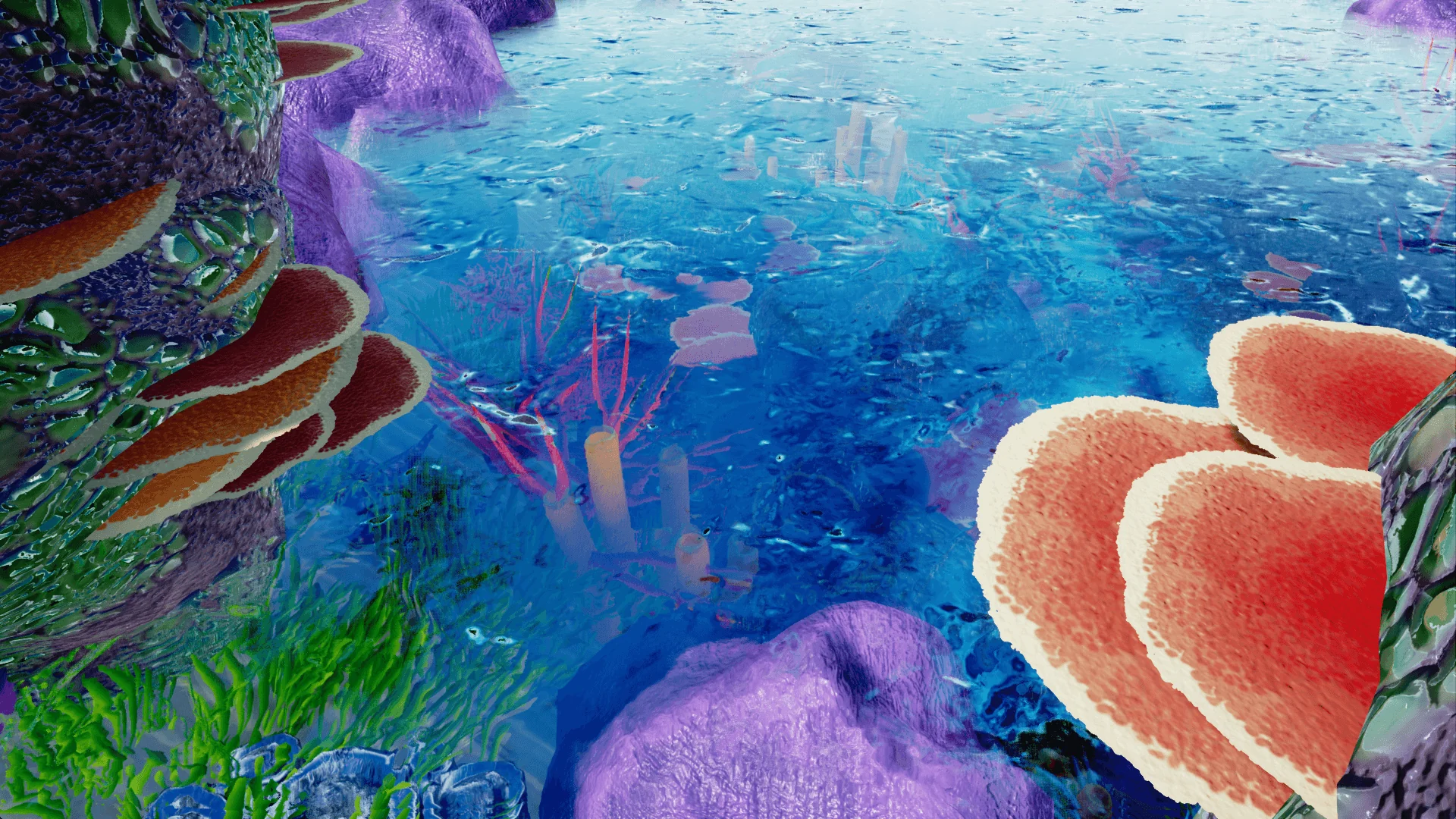
The package includes 13 unique coral meshes to experiment with, and most of them have multiple color varieties. That gives the generator a broader vocabulary than a single mesh repeated at different scales. Color variety helps break up repetition, while the per-mesh controls handle frequency, size, depth, alignment, offset, and collision. The two layers work together: the mesh set provides the shapes, and the generator decides how often and where each shape appears.
The same shape returning in a different color can separate one cluster from another without introducing another mesh. That is useful when a reef has to read as varied at close range while still coming from a compact set of coral assets. The 13 meshes are the raw variety; the color varieties and member settings extend how far that variety can stretch.
The water side is not separate from the coral setup. A customized water Blueprint, an underwater post process, and coral settings to adjust are included, along with an updated water shader. For underwater scenes, that is useful because the reef is seen through water rather than against a neutral background. The coral generator establishes the reef; the water and post-process pieces establish the conditions in which that reef is viewed.
Blueprints, Presets, and Test Maps
The Blueprint side includes the Coral Blueprint, the Customized Water Blueprint, an underwater post process, coral settings to adjust, and Coral Blueprint presets. The presets are useful as starting points rather than blank setups, particularly when the generator has several variables feeding the same reef. They let a scene begin from an established configuration and then move toward the specific look required by the shot or level.
Three maps are included: a landscape test map, a pond test map, and a features map. The landscape map gives the generator a broad terrain context; the pond map narrows the water setting; the features map is there to inspect the generator's feature set. Having those three contexts in the package shortens the distance between learning the controls and applying them to a scene. A feature can be tested in isolation, then checked in a landscape or pond setting where depth, alignment, and cull distances behave differently.
The features map is especially useful for walking through settings in sequence: change a member's frequency, check its depth limit, adjust normal alignment or Z offset, then look at collision. That kind of pass is hard to judge in a bare scene with no water context, which is why the landscape and pond maps sit alongside it.
Where the Generator Fits in a Level Build
Automatic Coral Generator fits the part of a level build where a reef needs to exist quickly, then be tuned. It is a scene-assembly tool: drop it in, scale the reef, choose the members, and adjust the per-mesh values until the distribution reads correctly. From there, runtime randomize and seeded streams decide whether the reef stays fixed or changes during play, and cull distances keep the mesh load aligned with the view.
That makes it useful for underwater set dressing, pond scenes, and landscape tests where coral is part of the environment rather than a hero asset. The included water Blueprint, underwater post process, and updated water shader mean the reef does not have to be separated from its viewing conditions. The test maps and presets support a practical loop: start from a known setup, inspect the features, then push the coral members toward the density, depth, and scale the scene needs. The tool's value in production is not that it removes artist control; it is that it puts the control at the member and generator level, where a reef can be changed without rebuilding it mesh by mesh.
 Procedural Systems
 Procedural Systems
 Procedural Systems