"ae2217ad8e73450c"{"id":"1002992","slug":"autolandscapematalpine","title":"AutoLandscapeMatAlpine","category":"Procedural Systems","engine":"4.26+,5.0+","assetVersion":"","engineVersion":"Engine Version: 4.26+,5.0+","tag":"Procedural Systems","accent":"blue","visual":"city","summary":"A procedural Alpine landscape material that textures edited terrain without layer painting, with seasonal instances, 66 height maps at 4096 and seven at 8192.","platform":"Unreal Engine","indexPolicy":"index","publishedAt":"2026-11-25T15:54:59.064Z","updatedAt":"2026-11-25T15:54:59.064Z","sourceNotes":[],"fileContents":[],"compatibility":["Unreal Engine","Engine Version: 4.26+,5.0+"],"featuredImage":{"alt":"AutoLandscapeMatAlpine","src":"/wp-content/uploads/published/2026/11/634f1895ab2a-daae024f-65cc-4dcd-994c-47f2ce02d379-ea880a5941.webp"},"hasDownloadLink":true,"downloads":0,"terms":[{"taxonomy":"category","slug":"procedural-systems","name":"Procedural Systems"}],"galleryImages":[{"src":"/wp-content/uploads/published/2026/11/e48a74e1b45c-216265af-e9bf-4d49-9a29-fc54142f7c5c-87178af185.webp","alt":"AutoLandscapeMatAlpine"},{"src":"/wp-content/uploads/published/2026/11/7e888103c77e-19df6770-e420-4075-b90e-2dcaf70fe276-f00d48ee01.webp","alt":"AutoLandscapeMatAlpine"},{"src":"/wp-content/uploads/published/2026/11/e63f1b0873dd-7ed6ea63-2a45-491f-a5f7-b1cb649958c9-3d1d07feb4.webp","alt":"AutoLandscapeMatAlpine"},{"src":"/wp-content/uploads/published/2026/11/7b4288c22365-6da7abd4-d050-4589-843b-b97138008353-75b5728493.webp","alt":"AutoLandscapeMatAlpine"},{"src":"/wp-content/uploads/published/2026/11/1d7f603ae795-44fec1bc-68b4-4065-91ac-53b2d0af139e-abdb80d5a2.webp","alt":"AutoLandscapeMatAlpine"},{"src":"/wp-content/uploads/published/2026/11/4340d027381d-1cd4c543-868b-4389-960c-65c64ff6cb95-82ef2cfe9e.webp","alt":"AutoLandscapeMatAlpine"},{"src":"/wp-content/uploads/published/2026/11/99f488cd2c04-acf7caff-c3af-4eba-b32b-9df80fd1e77e-e32d8acd56.webp","alt":"AutoLandscapeMatAlpine"}],"accessPanel":{"kind":"resource","title":"Get this resource","safetyNote":"Resources are manually reviewed before listing to improve quality and reduce obvious risks.","fileName":"Content.7z","resourceType":"Resource archive","versions":[]},"contentHtml":"\u003cp\u003eTerrain texturing often turns into a second job after the sculpt. The ridges and basins are in place, the silhouettes read correctly, and then every slope needs a manual pass to make the surface believable. AutoLandscapeMatAlpine is built to remove that pass. It is a procedural, automatic landscape material set in its Alpine edition, and it textures the ground while the landscape is being edited. The only required action is editing the landscape in the editor; the material handles the work of making everything just edited look properly textured. That is the core promise, and it changes the order of terrain work rather than just adding another texture set.\u003c/p\u003e\n\u003ch2\u003eWhat AutoLandscapeMatAlpine Changes About Terrain Work\u003c/h2\u003e\n\u003cp\u003eThe workflow is deliberately thin. There is no painting of material layers, no mask to keep synchronized with the heightfield, and no repaint after a sculpting session moves half the mountain. A designer edits the landscape, and the material reads the result. Because the texture is driven by the real structure and features of the landscape, the shading responds to the terrain that was actually built. A new ridge gives the material something new to react to; a flattened plateau is answered as well. That is why the result can look believable rather than stamped on: the surface treatment follows the terrain structure visible in the sculpt.\u003c/p\u003e\n\u003cp\u003eThe practical gain is speed, but the more useful consequence is iteration. Terrain can keep moving late in a blockout without triggering a separate texturing pass. A level can be judged on silhouette and composition instead of on a half-painted stand-in, and a mountain pass can be re-cut after playtesting without an artist rebuilding surface coverage by hand. The package includes Blueprint and script alongside the material, which fits the automatic behaviour: this is a procedural landscape tool rather than a static texture collection with a few tiling variations.\u003c/p\u003e\n\u003ch2\u003eAlpine Instances Inside AutoLandscapeMatAlpine\u003c/h2\u003e\n\u003cp\u003eThe Alpine edition includes a master material and a set of instances for different uses and times of year. The master carries the behaviour; the instances carry the look. Each instance can be tuned without disturbing the others, which is the difference between a fixed material and a working system. Coloring, shading and the distribution of the landscape across the surface are fully adjustable at the material instance level. A single terrain can be dressed for a green summer pass, then pushed toward a colder seasonal reading by working through an instance rather than rebuilding the landscape or starting over.\u003c/p\u003e\n\u003cp\u003eVariants for different uses sit alongside the seasonal ones. The same terrain can serve more than one context in a project without duplicate landscapes, and the artist can keep the change local to an instance. For a small team, one master material can remain the shared reference while individual artists adjust their own variants. That structure keeps a level's look stable while someone else experiments on a copy, and it avoids a situation where every seasonal or use-case adjustment forces a new master material.\u003c/p\u003e\n\u003ch2\u003eHeight Maps Included With AutoLandscapeMatAlpine\u003c/h2\u003e\n\u003cp\u003eTerrain needs something to sculpt before a material can do anything with it. The package includes 66 height maps at 4096x4096 plus seven at 8192x8192, intended to get you started on building your levels and maps. The two tiers serve different scales of ambition. The 4096 set is a broad working library of terrain forms to pull from, while the seven 8192 maps carry enough resolution for the larger, more demanding shapes. For an Alpine-focused project, that is a starting point rather than a blank plane.\u003c/p\u003e\n\u003cp\u003eThose figures should be kept separate from the material's own textures. All bitmaps used in the material itself are 2048x2048. The height data arrives at 4096 and 8192, and the surface bitmaps at 2048. Two different resolutions do two different jobs: the height maps provide terrain structure to sculpt from, while the material bitmaps handle the surface treatment. Planning terrain budgets around the wrong figure would misread what the set provides.\u003c/p\u003e\n\u003ch2\u003eDetail at FPS Height and Satellite Distance\u003c/h2\u003e\n\u003cp\u003eGround-level and map-level are usually where landscape materials fall apart. A surface tuned to look convincing under a player's feet can turn to mush when the camera pulls back, and a material tuned for an orbital overview can look flat and repetitive at eye height. The final material here is detailed from an FPS perspective and still works when viewed as a satellite image. That range matters for projects that move between the two. A strategy map, a tactical overview, a level-select screen or a cinematic pull-out all ask the terrain to hold up at distance, while the same terrain has to survive a first-person camera walking through it minutes later. One material covering both ends of that distance removes the need to swap surfaces as the camera changes.\u003c/p\u003e\n\u003ch2\u003eWhere the Alpine Edition Fits\u003c/h2\u003e\n\u003cp\u003eEnvironment artists working on mountainous or cold-climate terrain get the most direct benefit. The Alpine framing and the seasonal instances are pitched at exactly that kind of landscape, and the height maps give a starting point rather than a blank plane. Level designers who iterate heavily on terrain shape benefit just as much, since the texturing keeps pace with the sculpt instead of waiting for a separate art pass. The no-painting workflow compresses what is normally a specialist task into ordinary landscape editing.\u003c/p\u003e\n\u003cp\u003eSmaller teams and solo developers are the other natural fit. The instance structure means one setup can cover several looks and times of year, and the material instance controls keep adjustments contained. For projects where terrain is the setting rather than a backdrop — a climb, a traversal route, a patrol across open ground — the combination of structure-driven texturing and a library of height maps is a reasonable place to start building. The set does not ask for layer painting first; it asks for landscape editing, and the material does the rest.\u003c/p\u003e\n\n\u003ch2\u003eExplore Similar Assets\u003c/h2\u003e\n\u003cul\u003e\n\u003cli\u003e\u003ca href=\"https://3dcghub.com/lightning-fast/\" rel=\"noopener noreferrer\"\u003eLightning Fast\u003c/a\u003e\u003c/li\u003e\n\u003cli\u003e\u003ca href=\"https://3dcghub.com/archvis-toolkit/\" rel=\"noopener noreferrer\"\u003eArchVis Toolkit\u003c/a\u003e\u003c/li\u003e\n\u003cli\u003e\u003ca href=\"https://3dcghub.com/ultimate-greyboxing-kit/\" rel=\"noopener noreferrer\"\u003eUltimate Greyboxing Kit\u003c/a\u003e\u003c/li\u003e\n\u003cli\u003e\u003ca href=\"https://3dcghub.com/dynamic-radial-menu-x/\" rel=\"noopener noreferrer\"\u003eDYNAMIC RADIAL MENU X\u003c/a\u003e\u003c/li\u003e\n\u003cli\u003e\u003ca href=\"https://3dcghub.com/black-hole-creator/\" rel=\"noopener noreferrer\"\u003eBlack Hole Creator\u003c/a\u003e\u003c/li\u003e\n\u003c/ul\u003e","contentTextLength":6162,"navigation":{"current":52,"total":4964,"previous":{"id":"1002993","slug":"automatic-coral-generator","title":"Automatic Coral Generator","category":"Procedural Systems","platform":"Unreal Engine","updatedAt":"2026-11-25T15:55:50.854Z"},"next":{"id":"1002991","slug":"archvis-toolkit","title":"ArchVis Toolkit","category":"Procedural Systems","platform":"Unreal Engine","updatedAt":"2026-11-25T15:54:05.439Z"}},"relatedResources":[{"id":"1002799","slug":"lightning-fast","title":"Lightning Fast","category":"Procedural Systems","engine":"4.18+,5.0+","assetVersion":"","engineVersion":"Engine Version: 4.18+,5.0+","tag":"Procedural Systems","accent":"blue","visual":"mech","summary":"Lightning Fast combines procedural materials and blueprints to generate realistic and stylized electricity, bolts, beams, and replicated character skills.","platform":"Unreal Engine","indexPolicy":"index","publishedAt":"2026-11-20T07:23:46.559Z","updatedAt":"2026-11-20T07:23:46.559Z","sourceNotes":[],"fileContents":[],"compatibility":["Unreal Engine","Engine Version: 4.18+,5.0+"],"featuredImage":{"alt":"Lightning Fast","src":"/wp-content/uploads/published/2026/11/06c02825a750-edbe767e-5ee2-4dab-9bbb-e463794963fc-93027b6b2a.webp"},"fileSizeBytes":25671059,"hasDownloadLink":true,"downloads":0},{"id":"1002991","slug":"archvis-toolkit","title":"ArchVis Toolkit","category":"Procedural Systems","engine":"4.19+,5.0+","assetVersion":"","engineVersion":"Engine Version: 4.19+,5.0+","tag":"Procedural Systems","accent":"blue","visual":"mech","summary":"ArchVis Toolkit adds interactive doors, mesh and material swaps, linked light switches and dimmers, a floor-aware minimap, and exterior cameras.","platform":"Unreal Engine","indexPolicy":"index","publishedAt":"2026-11-25T15:54:05.439Z","updatedAt":"2026-11-25T15:54:05.439Z","sourceNotes":[],"fileContents":[],"compatibility":["Unreal Engine","Engine Version: 4.19+,5.0+"],"featuredImage":{"alt":"ArchVis Toolkit","src":"/wp-content/uploads/published/2026/11/214290569fb4-49660475-ca4a-4c48-becd-933562e366c0-a1f93d7fc9.webp"},"hasDownloadLink":true,"downloads":0},{"id":"1002247","slug":"ultimate-greyboxing-kit","title":"Ultimate Greyboxing Kit","category":"Procedural Systems","engine":"4.26+,5.0+","assetVersion":"","engineVersion":"Engine Version: 4.26+,5.0+","tag":"Procedural Systems","accent":"blue","visual":"mech","summary":"A rapid level design kit featuring 73 modular shapes, world-aligned materials, and 18 interactive blueprints to block out gameplay before creating final art.","platform":"Unreal Engine","indexPolicy":"index","publishedAt":"2026-10-29T16:05:37.804Z","updatedAt":"2026-10-29T16:05:37.804Z","sourceNotes":[],"fileContents":[],"compatibility":["Unreal Engine","Engine Version: 4.26+,5.0+"],"featuredImage":{"alt":"Ultimate Greyboxing Kit","src":"/wp-content/uploads/published/2026/10/c5f8bddc80d5-27f71971-a0bf-4fa3-80be-dfe992256b08-8b95e2cbe5.webp"},"fileSizeBytes":30510967,"hasDownloadLink":true,"downloads":0}]}[{"id":4225,"sourceId":4225,"taxonomyId":4225,"taxonomy":"category","slug":"asset-library","name":"Asset Library","parentId":null,"count":4817,"hasChildren":true,"href":"/","seoTitle":"Free Game Assets Library | 3DCGHUB","seoDescription":"Browse free Unreal Engine, Unity, Blender assets and game development tutorials on 3DCGHUB with previews, compatibility notes, and secure downloads.","sitemapEnabled":true,"children":[{"id":4227,"sourceId":4227,"taxonomyId":4227,"taxonomy":"category","slug":"blender-add-ons-plugins","name":"Blender Add-ons \u0026 Plugins","parentId":4225,"count":10,"hasChildren":false,"href":"/category/blender-add-ons-plugins/","seoTitle":"Free Blender Add-ons \u0026 Plugins | 3DCGHUB","seoDescription":"Browse free Blender Add-ons \u0026 Plugins tools for Blender on 3DCGHUB: curated downloads with preview images, compatibility notes and secure download access.","sitemapEnabled":true},{"id":514,"sourceId":514,"taxonomyId":514,"taxonomy":"category","slug":"unity-2","name":"Unity","parentId":4225,"count":453,"hasChildren":true,"href":"/category/unity-2/","seoTitle":"Free Unity Assets | 3DCGHUB","seoDescription":"Browse free Unity resources on 3DCGHUB: curated downloads with preview images, compatibility notes and secure download access.","sitemapEnabled":true,"children":[{"id":523,"sourceId":523,"taxonomyId":523,"taxonomy":"category","slug":"2d","name":"2D","parentId":514,"count":1,"hasChildren":true,"href":"/category/2d/","seoTitle":"Free Unity 2D | 3DCGHUB","seoDescription":"Browse free 2D assets for Unity on 3DCGHUB: curated downloads with preview images, compatibility notes and secure download access.","sitemapEnabled":true},{"id":515,"sourceId":515,"taxonomyId":515,"taxonomy":"category","slug":"3d-unity-2","name":"3D","parentId":514,"count":162,"hasChildren":true,"href":"/category/3d-unity-2/","seoTitle":"Free Unity 3D Assets | 3DCGHUB","seoDescription":"Browse free 3D assets for Unity on 3DCGHUB: curated downloads with preview images, compatibility notes and secure download access.","sitemapEnabled":true},{"id":565,"sourceId":565,"taxonomyId":565,"taxonomy":"category","slug":"add-ons","name":"Add-Ons","parentId":514,"count":2,"hasChildren":false,"href":"/category/add-ons/","seoTitle":"Free Unity Add-Ons | 3DCGHUB","seoDescription":"Browse free Add-Ons assets for Unity on 3DCGHUB: curated downloads with preview images, compatibility notes and secure download access.","sitemapEnabled":true},{"id":529,"sourceId":529,"taxonomyId":529,"taxonomy":"category","slug":"audio-unity-2","name":"Audio","parentId":514,"count":1,"hasChildren":true,"href":"/category/audio-unity-2/","seoTitle":"Free Unity Audio | 3DCGHUB","seoDescription":"Browse free Audio for Unity on 3DCGHUB: curated downloads with preview images, compatibility notes and secure download access.","sitemapEnabled":true},{"id":557,"sourceId":557,"taxonomyId":557,"taxonomy":"category","slug":"templates","name":"Templates","parentId":514,"count":36,"hasChildren":true,"href":"/category/templates/","seoTitle":"Free Unity Templates | 3DCGHUB","seoDescription":"Browse free Unity project templates on 3DCGHUB. Starter kits with previews, compatibility notes, and secure download access.","sitemapEnabled":true},{"id":533,"sourceId":533,"taxonomyId":533,"taxonomy":"category","slug":"tools-unity-2","name":"Tools","parentId":514,"count":0,"hasChildren":true,"href":"/category/tools-unity-2/","sitemapEnabled":true},{"id":554,"sourceId":554,"taxonomyId":554,"taxonomy":"category","slug":"vfx-unity-2","name":"VFX","parentId":514,"count":4,"hasChildren":true,"href":"/category/vfx-unity-2/","seoTitle":"Free Unity VFX | 3DCGHUB","seoDescription":"Browse free VFX for Unity on 3DCGHUB: curated downloads with preview images, compatibility notes and secure download access.","sitemapEnabled":true}]},{"id":511,"sourceId":511,"taxonomyId":511,"taxonomy":"category","slug":"unreal-engine-2","name":"Unreal Engine","parentId":4225,"count":4355,"hasChildren":true,"href":"/category/unreal-engine-2/","seoTitle":"Free Unreal Engine Assets | 3DCGHUB","seoDescription":"Browse free Unreal Engine resources on 3DCGHUB: curated downloads with preview images, compatibility notes and secure download access.","sitemapEnabled":true,"children":[{"id":54,"sourceId":54,"taxonomyId":54,"taxonomy":"category","slug":"3d","name":"3D","parentId":511,"count":2441,"hasChildren":true,"href":"/category/3d/","seoTitle":"Free Unreal Engine 3D | 3DCGHUB","seoDescription":"Browse free 3D assets for Unreal Engine on 3DCGHUB: curated downloads with preview images, compatibility notes and secure download access.","sitemapEnabled":true},{"id":441,"sourceId":441,"taxonomyId":441,"taxonomy":"category","slug":"animations","name":"Animations","parentId":511,"count":269,"hasChildren":true,"href":"/category/animations/","seoTitle":"Free Unreal Engine Animations | 3DCGHUB","seoDescription":"Browse free Animations for Unreal Engine on 3DCGHUB: curated downloads with preview images, compatibility notes and secure download access.","sitemapEnabled":true},{"id":446,"sourceId":446,"taxonomyId":446,"taxonomy":"category","slug":"audio","name":"Audio","parentId":511,"count":63,"hasChildren":true,"href":"/category/audio/","seoTitle":"Free Unreal Engine Audio Resources | 3DCGHUB","seoDescription":"Browse free Unreal Engine audio resources including sound effects, voices, dialogue, and ambient sounds. Curated free downloads on 3DCGHUB.","sitemapEnabled":true},{"id":466,"sourceId":466,"taxonomyId":466,"taxonomy":"category","slug":"game-systems","name":"Game Systems","parentId":511,"count":381,"hasChildren":true,"href":"/category/game-systems/","seoTitle":"Free Unreal Engine Game Systems | 3DCGHUB","seoDescription":"Browse free Game Systems tools for Unreal Engine on 3DCGHUB: curated downloads with preview images, compatibility notes and secure download access.","sitemapEnabled":true},{"id":478,"sourceId":478,"taxonomyId":478,"taxonomy":"category","slug":"game-templates","name":"Game Templates","parentId":511,"count":155,"hasChildren":true,"href":"/category/game-templates/","seoTitle":"Free Unreal Engine Game Templates | 3DCGHUB","seoDescription":"Browse free Game Templates for Unreal Engine on 3DCGHUB: curated downloads with preview images, compatibility notes and secure download access.","sitemapEnabled":true},{"id":432,"sourceId":432,"taxonomyId":432,"taxonomy":"category","slug":"hdri","name":"HDRI","parentId":511,"count":6,"hasChildren":true,"href":"/category/hdri/","seoTitle":"Free Unreal Engine HDRI | 3DCGHUB","seoDescription":"Browse free Unreal Engine HDRI skies and lighting maps on 3DCGHUB. Environment lighting with previews and secure downloads.","sitemapEnabled":true},{"id":228,"sourceId":228,"taxonomyId":228,"taxonomy":"category","slug":"material-and-textures","name":"Material \u0026 Textures","parentId":511,"count":172,"hasChildren":true,"href":"/category/material-and-textures/","seoTitle":"Free Unreal Engine Material \u0026 Textures | 3DCGHUB","seoDescription":"Browse free Material \u0026 Textures for Unreal Engine on 3DCGHUB: curated downloads with preview images, compatibility notes and secure download access.","sitemapEnabled":true},{"id":298,"sourceId":298,"taxonomyId":298,"taxonomy":"category","slug":"sprites-and-flipbooks","name":"Sprites \u0026 Flipbooks","parentId":511,"count":18,"hasChildren":true,"href":"/category/sprites-and-flipbooks/","seoTitle":"Free Unreal Engine Sprites \u0026 Flipbooks | 3DCGHUB","seoDescription":"Browse free Sprites \u0026 Flipbooks assets for Unreal Engine on 3DCGHUB: curated downloads with preview images, compatibility notes and secure download access.","sitemapEnabled":true},{"id":489,"sourceId":489,"taxonomyId":489,"taxonomy":"category","slug":"tools-and-plugins","name":"Tools \u0026 Plugins","parentId":511,"count":390,"hasChildren":true,"href":"/category/tools-and-plugins/","seoTitle":"Free Unreal Engine Tools \u0026 Plugins | 3DCGHUB","seoDescription":"Browse free Tools \u0026 Plugins for Unreal Engine on 3DCGHUB: curated downloads with preview images, compatibility notes and secure download access.","sitemapEnabled":true},{"id":459,"sourceId":459,"taxonomyId":459,"taxonomy":"category","slug":"ui","name":"UI","parentId":511,"count":47,"hasChildren":true,"href":"/category/ui/","seoTitle":"Free Unreal Engine UI | 3DCGHUB","seoDescription":"Browse free UI for Unreal Engine on 3DCGHUB: curated downloads with preview images, compatibility notes and secure download access.","sitemapEnabled":true},{"id":450,"sourceId":450,"taxonomyId":450,"taxonomy":"category","slug":"vfx","name":"VFX","parentId":511,"count":413,"hasChildren":true,"href":"/category/vfx/","seoTitle":"Free Unreal Engine VFX | 3DCGHUB","seoDescription":"Browse free VFX for Unreal Engine on 3DCGHUB: curated downloads with preview images, compatibility notes and secure download access.","sitemapEnabled":true}]}]},{"id":4222,"sourceId":4222,"taxonomyId":4222,"taxonomy":"category","slug":"tutorial-library","name":"Tutorial Library","parentId":null,"count":117,"hasChildren":false,"href":"/tutorials/","seoTitle":"Free Game Development Tutorial Library | 3DCGHUB","seoDescription":"Browse free game development tutorials for Unreal Engine, Unity, Blender, and more on 3DCGHUB with practical workflows and secure downloads.","sitemapEnabled":true}]
Resource screenshots
1 / 7
Asset drops
Daily Asset Drops
Follow 3DCGHUB on Telegram for daily Unreal, Unity & Blender drops and curated CC0 releases.
Resources are manually reviewed before listing to improve quality and reduce obvious risks.
Reviewed archive
Procedural Systems
AutoLandscapeMatAlpine
A procedural Alpine landscape material that textures edited terrain without layer painting, with seasonal instances, 66 height maps at 4096 and seven at 8192.
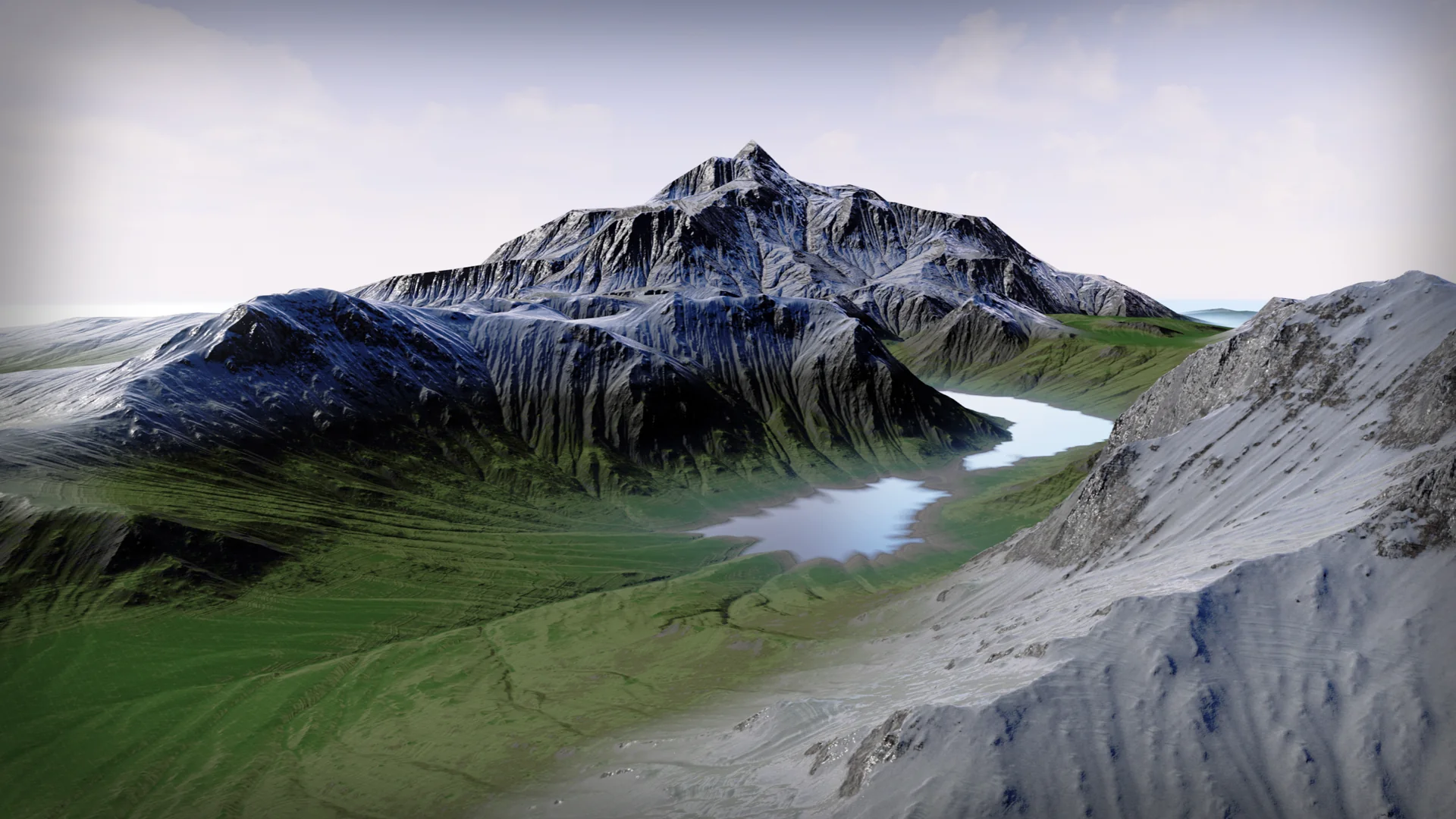
Terrain texturing often turns into a second job after the sculpt. The ridges and basins are in place, the silhouettes read correctly, and then every slope needs a manual pass to make the surface believable. AutoLandscapeMatAlpine is built to remove that pass. It is a procedural, automatic landscape material set in its Alpine edition, and it textures the ground while the landscape is being edited. The only required action is editing the landscape in the editor; the material handles the work of making everything just edited look properly textured. That is the core promise, and it changes the order of terrain work rather than just adding another texture set.
What AutoLandscapeMatAlpine Changes About Terrain Work
The workflow is deliberately thin. There is no painting of material layers, no mask to keep synchronized with the heightfield, and no repaint after a sculpting session moves half the mountain. A designer edits the landscape, and the material reads the result. Because the texture is driven by the real structure and features of the landscape, the shading responds to the terrain that was actually built. A new ridge gives the material something new to react to; a flattened plateau is answered as well. That is why the result can look believable rather than stamped on: the surface treatment follows the terrain structure visible in the sculpt.
The practical gain is speed, but the more useful consequence is iteration. Terrain can keep moving late in a blockout without triggering a separate texturing pass. A level can be judged on silhouette and composition instead of on a half-painted stand-in, and a mountain pass can be re-cut after playtesting without an artist rebuilding surface coverage by hand. The package includes Blueprint and script alongside the material, which fits the automatic behaviour: this is a procedural landscape tool rather than a static texture collection with a few tiling variations.
Alpine Instances Inside AutoLandscapeMatAlpine
The Alpine edition includes a master material and a set of instances for different uses and times of year. The master carries the behaviour; the instances carry the look. Each instance can be tuned without disturbing the others, which is the difference between a fixed material and a working system. Coloring, shading and the distribution of the landscape across the surface are fully adjustable at the material instance level. A single terrain can be dressed for a green summer pass, then pushed toward a colder seasonal reading by working through an instance rather than rebuilding the landscape or starting over.
Variants for different uses sit alongside the seasonal ones. The same terrain can serve more than one context in a project without duplicate landscapes, and the artist can keep the change local to an instance. For a small team, one master material can remain the shared reference while individual artists adjust their own variants. That structure keeps a level's look stable while someone else experiments on a copy, and it avoids a situation where every seasonal or use-case adjustment forces a new master material.
Height Maps Included With AutoLandscapeMatAlpine
Terrain needs something to sculpt before a material can do anything with it. The package includes 66 height maps at 4096x4096 plus seven at 8192x8192, intended to get you started on building your levels and maps. The two tiers serve different scales of ambition. The 4096 set is a broad working library of terrain forms to pull from, while the seven 8192 maps carry enough resolution for the larger, more demanding shapes. For an Alpine-focused project, that is a starting point rather than a blank plane.
Those figures should be kept separate from the material's own textures. All bitmaps used in the material itself are 2048x2048. The height data arrives at 4096 and 8192, and the surface bitmaps at 2048. Two different resolutions do two different jobs: the height maps provide terrain structure to sculpt from, while the material bitmaps handle the surface treatment. Planning terrain budgets around the wrong figure would misread what the set provides.
Detail at FPS Height and Satellite Distance
Ground-level and map-level are usually where landscape materials fall apart. A surface tuned to look convincing under a player's feet can turn to mush when the camera pulls back, and a material tuned for an orbital overview can look flat and repetitive at eye height. The final material here is detailed from an FPS perspective and still works when viewed as a satellite image. That range matters for projects that move between the two. A strategy map, a tactical overview, a level-select screen or a cinematic pull-out all ask the terrain to hold up at distance, while the same terrain has to survive a first-person camera walking through it minutes later. One material covering both ends of that distance removes the need to swap surfaces as the camera changes.
Where the Alpine Edition Fits
Environment artists working on mountainous or cold-climate terrain get the most direct benefit. The Alpine framing and the seasonal instances are pitched at exactly that kind of landscape, and the height maps give a starting point rather than a blank plane. Level designers who iterate heavily on terrain shape benefit just as much, since the texturing keeps pace with the sculpt instead of waiting for a separate art pass. The no-painting workflow compresses what is normally a specialist task into ordinary landscape editing.
Smaller teams and solo developers are the other natural fit. The instance structure means one setup can cover several looks and times of year, and the material instance controls keep adjustments contained. For projects where terrain is the setting rather than a backdrop — a climb, a traversal route, a patrol across open ground — the combination of structure-driven texturing and a library of height maps is a reasonable place to start building. The set does not ask for layer painting first; it asks for landscape editing, and the material does the rest.
 Procedural Systems
 Procedural Systems
 Procedural Systems