"8652e693bd7bbc55"{"id":"1002987","slug":"angled-lower-thirds","title":"Angled Lower Thirds","category":"Widgets \u0026 Controls","engine":"4.24+,5.0+","assetVersion":"","engineVersion":"Engine Version: 4.24+,5.0+","tag":"Widgets \u0026 Controls","accent":"blue","visual":"mech","summary":"A practical look at Angled Lower Thirds, a set of 12 animated UMG widgets for Unreal Engine 4.24 and above, with global and separate color controls.","platform":"Unreal Engine","indexPolicy":"index","publishedAt":"2026-11-25T09:50:32.950Z","updatedAt":"2026-11-25T09:50:32.950Z","sourceNotes":[],"fileContents":[],"compatibility":["Unreal Engine","Engine Version: 4.24+,5.0+"],"featuredImage":{"alt":"Angled Lower Thirds","src":"/wp-content/uploads/published/2026/11/b7674f15384e-efc59bf6-4c1f-46c7-b01f-287d76e4d042-fc82ed06ad.webp"},"hasDownloadLink":true,"downloads":0,"terms":[{"taxonomy":"category","slug":"widgets-and-controls","name":"Widgets \u0026 Controls"}],"galleryImages":[{"src":"/wp-content/uploads/published/2026/11/e2b0d4d437f2-fb07f50c-b7d2-47aa-8bd7-550354aa704d-eb412b5acf.webp","alt":"Angled Lower Thirds"},{"src":"/wp-content/uploads/published/2026/11/d32d29dadf5f-4695ffce-12c3-41fd-b0bc-2bb4486784d1-bfa6837fe9.webp","alt":"Angled Lower Thirds"},{"src":"/wp-content/uploads/published/2026/11/b191a5277a6f-44253861-d45e-450e-b1e2-2e8213c2a517-640e60681e.webp","alt":"Angled Lower Thirds"}],"accessPanel":{"kind":"resource","title":"Get this resource","safetyNote":"Resources are manually reviewed before listing to improve quality and reduce obvious risks.","fileName":"Content.7z","resourceType":"Resource archive","versions":[]},"contentHtml":"\u003ch2\u003eAngled Lower Thirds for Television-Style Name and Role Graphics\u003c/h2\u003e\n\u003cp\u003eWhen a project needs on-screen identification graphics anchored low in the frame, the work often splits between motion design and engine implementation. Angled Lower Thirds takes the engine side: it is a collection of 12 lower third UMG widgets for Unreal Engine 4.24 and above. The package is tagged Widget, Television, and Blueprint, which places it in the part of an Unreal project where interface elements are authored and animated for television-style presentation.\u003c/p\u003e\n\u003cp\u003eThe positioning is specific. These are lower thirds, the graphics used to identify a speaker or subject while the main image continues. In a television workflow, that usually means repeated use, quick variation, and a consistent visual language across many names or segments. A set of twelve animated widgets gives a production a range of lower-third options to draw from rather than forcing one layout to cover every situation.\u003c/p\u003e \u003ch2\u003eWhat the Twelve Animated Widgets Give You\u003c/h2\u003e\n\u003cp\u003eThe core count is twelve. Each is an animated widget, so motion is part of the asset rather than something added only after placement. All twelve are UMG widgets for Unreal Engine 4.24 and above, which means they are authored in Unreal's UI system and used within that version range. A project already on 4.24 or newer can treat them as UI building blocks rather than separate motion files.\u003c/p\u003e\n\u003cp\u003eTwelve options also create a practical middle ground. A single lower third can become repetitive across a long program; a very large library can be harder to keep consistent. Here, the variation comes from a defined family of animated widgets. The set supports choosing a different treatment for different segments while staying inside the same UMG environment and the same authoring approach.\u003c/p\u003e \u003ch2\u003eAngled Lower Thirds and the Global Control Set\u003c/h2\u003e\n\u003cp\u003eColor and visibility adjustments are handled at two levels. Global hue, brightness, and opacity settings affect the widgets as a group, giving a fast way to shift the overall look without opening each widget individually. That is a compact control surface for a series with a defined palette, or for any situation where the graphics need to sit differently against the footage behind them.\u003c/p\u003e\n\u003cp\u003eThe colors are also separately customizable, and gradient direction has its own control. Those two details matter for lower thirds because a name plate often needs to distinguish itself from the background while still matching a larger graphic package. Hue can move the whole set; separate color adjustments let individual color decisions move independently; gradient direction changes the way color travels across the graphic. The combination gives an editor or UI artist useful variation before touching the underlying widget.\u003c/p\u003e \u003ch2\u003eLower Thirds Built from Reusable Elements and Native UMG Animation\u003c/h2\u003e\n\u003cp\u003eAll widgets were created by \u003cem\u003eElements\u003c/em\u003e, a reusable set of mini widgets. That is more than a naming detail. The twelve lower thirds are not twelve isolated constructions; they are built from a shared kit of small widgets. In production, that shared origin supports consistency across the family and gives a UI artist a clearer structure to inspect when a lower third needs to be adapted.\u003c/p\u003e\n\u003cp\u003eThe construction uses native UMG tools and shader parameters. Native UMG means the widgets and their animation belong to Unreal's own UI workflow. Shader parameters add another layer of control inside that same environment. For a team already working in Unreal, this keeps lower-third authoring close to the rest of the interface work instead of sending every change out to a separate motion-graphics application. The set is tagged Blueprint as well, so it sits within the Unreal-side workflow where widgets and Blueprint logic commonly meet.\u003c/p\u003e\n\u003cp\u003eThe animations are not fixed. All animations can be customized with basic UMG knowledge, which lowers the barrier for adjusting motion without rebuilding a widget from scratch. A team can take one of the twelve animated lower thirds and rework its animation to suit a different pace or presentation style.\u003c/p\u003e\n\u003cp\u003eBecause the widgets are animated by native UMG tools, the animation work stays in the same authoring environment as the widget itself. The practical effect shows up when a lower third has to be revised late in a project. The person making the change does not need a separate animation package; they need familiarity with basic UMG. The combination of reusable elements, native animation, and shader parameters gives the set a layered editing model: small shared pieces at the base, full lower-third widgets at the top, and animation that can be adjusted in between.\u003c/p\u003e \u003ch2\u003eWhere Angled Lower Thirds Fits in a Production Workflow\u003c/h2\u003e\n\u003cp\u003eTelevision-oriented projects are the clearest fit. The Television tag points to programming where lower thirds identify people, roles, or segments on screen, and the twelve-widget set provides enough variety for recurring use. A production can choose a lower third for a host, another for a guest, and another for a recurring segment, all while keeping the same UMG foundation and the same global controls. The global hue, brightness, and opacity settings make it possible to tune the family to a program's look without treating each widget as a separate art project.\u003c/p\u003e\n\u003cp\u003eUnreal Engine projects that need in-engine lower thirds are the other natural context. Since these are UMG widgets for 4.24 and above, they belong inside the engine's UI layer. That is useful when the lower third has to appear as part of a real-time scene or a television-style presentation built in Unreal. The editable animation and shader parameters keep the graphics responsive to changes rather than locking them to a single recorded output.\u003c/p\u003e \u003ch2\u003eWho Gets the Most from the Angled Lower Thirds Set\u003c/h2\u003e\n\u003cp\u003eThe strongest fit is a team already inside Unreal Engine 4.24 or newer that needs a family of animated lower thirds without building each one from zero. That includes television-style projects that repeat identification graphics, and Unreal-based presentations that need lower thirds to live in the same UI system as the rest of the interface. A solo creator with basic UMG knowledge can use the twelve widgets as starting points and adjust the animation; a small team can lean on the shared elements and the global controls to keep a consistent look across multiple lower thirds.\u003c/p\u003e\n\u003cp\u003eAngled Lower Thirds is therefore best understood as an editable widget set, not a one-off graphic. The twelve animated widgets supply the range, the global hue, brightness, and opacity controls supply quick tuning, the separate color and gradient direction controls supply variation, and the elements kit plus native UMG animation supply a structure that can be maintained. For work where lower thirds are a recurring part of the interface, that combination is the practical value: a defined set to start from, with enough control to make it belong to the production.\u003c/p\u003e\n\n\u003ch2\u003eRelated Resources Worth Checking\u003c/h2\u003e\n\u003cul\u003e\n\u003cli\u003e\u003ca href=\"https://3dcghub.com/advanced-menu-system/\" rel=\"noopener noreferrer\"\u003eAdvanced Menu System\u003c/a\u003e\u003c/li\u003e\n\u003cli\u003e\u003ca href=\"https://3dcghub.com/circle-damage-indicator-component/\" rel=\"noopener noreferrer\"\u003eCircle Damage Indicator Component\u003c/a\u003e\u003c/li\u003e\n\u003cli\u003e\u003ca href=\"https://3dcghub.com/music-player-advanced/\" rel=\"noopener noreferrer\"\u003eMusic Player Advanced\u003c/a\u003e\u003c/li\u003e\n\u003cli\u003e\u003ca href=\"https://3dcghub.com/in-game-achievement-system/\" rel=\"noopener noreferrer\"\u003eIn-Game Achievement System\u003c/a\u003e\u003c/li\u003e\n\u003cli\u003e\u003ca href=\"https://3dcghub.com/damage-text/\" rel=\"noopener noreferrer\"\u003eDamage Text\u003c/a\u003e\u003c/li\u003e\n\u003c/ul\u003e","contentTextLength":7044,"navigation":{"current":4,"total":4911,"previous":{"id":"1002988","slug":"animated-modern-civilian-hands-pack","title":"Animated Modern Civilian Hands Pack","category":"Humans","platform":"Unreal Engine","updatedAt":"2026-11-25T09:51:16.864Z"},"next":{"id":"1002986","slug":"amt-asymmetrical-multiplayer-template-4-vs-1","title":"AMT (Asymmetrical Multiplayer Template, 4 vs 1)","category":"Action-Adventure","platform":"Unreal Engine","updatedAt":"2026-11-25T09:49:46.615Z"}},"relatedResources":[{"id":"1002978","slug":"advanced-menu-system","title":"Advanced Menu System","category":"Widgets \u0026 Controls","engine":"4.21+,5.0+","assetVersion":"","engineVersion":"Engine Version: 4.21+,5.0+","tag":"Widgets \u0026 Controls","accent":"blue","visual":"mech","summary":"Unreal widget package with a settings menu, pause menu, and preference-saving system, plus CommonUI widgets, localization files, and input-aware icons.","platform":"Unreal Engine","indexPolicy":"index","publishedAt":"2026-11-25T09:21:19.766Z","updatedAt":"2026-11-25T09:21:19.766Z","sourceNotes":[],"fileContents":[],"compatibility":["Unreal Engine","Engine Version: 4.21+,5.0+"],"featuredImage":{"alt":"Advanced Menu System","src":"/wp-content/uploads/published/2026/11/0cb0597060fa-77664e4a-b4cf-4ded-847a-33ef4ffef99a-aedd71f024.webp"},"hasDownloadLink":true,"downloads":0},{"id":"1002311","slug":"circle-damage-indicator-component","title":"Circle Damage Indicator Component","category":"Widgets \u0026 Controls","engine":"4.16+,5.0+","assetVersion":"","engineVersion":"Engine Version: 4.16+,5.0+","tag":"Widgets \u0026 Controls","accent":"blue","visual":"mech","summary":"A circular HUD damage indicator with dynamic and static modes, adjustable fade speed, color, custom textures, near-damage distance, scale, and screen position.","platform":"Unreal Engine","indexPolicy":"index","publishedAt":"2026-11-06T06:13:47.602Z","updatedAt":"2026-11-06T06:13:47.602Z","sourceNotes":[],"fileContents":[],"compatibility":["Unreal Engine","Engine Version: 4.16+,5.0+"],"featuredImage":{"alt":"Circle Damage Indicator Component","src":"/wp-content/uploads/published/2026/11/e59f95423c2d-cee698d1-8ed3-4367-8388-90f534069ae7-234cdda7ed.webp"},"fileSizeBytes":24786952,"hasDownloadLink":true,"downloads":0},{"id":"1002127","slug":"music-player-advanced","title":"Music Player Advanced","category":"Widgets \u0026 Controls","engine":"4.27+,5.0+","assetVersion":"","engineVersion":"Engine Version: 4.27+,5.0+","tag":"Widgets \u0026 Controls","accent":"blue","visual":"audio","summary":"Explore Music Player Advanced, a modular Blueprint audio player widget offering convenient controls, customizable skins, and overlay interface functionality.","platform":"Unreal Engine","indexPolicy":"index","publishedAt":"2026-10-29T09:07:27.487Z","updatedAt":"2026-10-29T09:07:27.487Z","sourceNotes":[],"fileContents":[],"compatibility":["Unreal Engine","Engine Version: 4.27+,5.0+"],"featuredImage":{"alt":"Music Player Advanced","src":"/wp-content/uploads/published/2026/10/6183beb92368-785984b0-3db3-4e30-b44f-769541ea9bb7-3ccbdbf993.webp"},"fileSizeBytes":48716854,"hasDownloadLink":true,"downloads":0}]}[{"id":4225,"sourceId":4225,"taxonomyId":4225,"taxonomy":"category","slug":"asset-library","name":"Asset Library","parentId":null,"count":4765,"hasChildren":true,"href":"/","seoTitle":"Free Game Assets Library | 3DCGHUB","seoDescription":"Browse free Unreal Engine, Unity, Blender assets and game development tutorials on 3DCGHUB with previews, compatibility notes, and secure downloads.","sitemapEnabled":true,"children":[{"id":4227,"sourceId":4227,"taxonomyId":4227,"taxonomy":"category","slug":"blender-add-ons-plugins","name":"Blender Add-ons \u0026 Plugins","parentId":4225,"count":10,"hasChildren":false,"href":"/category/blender-add-ons-plugins/","seoTitle":"Free Blender Add-ons \u0026 Plugins | 3DCGHUB","seoDescription":"Browse free Blender Add-ons \u0026 Plugins tools for Blender on 3DCGHUB: curated downloads with preview images, compatibility notes and secure download access.","sitemapEnabled":true},{"id":514,"sourceId":514,"taxonomyId":514,"taxonomy":"category","slug":"unity-2","name":"Unity","parentId":4225,"count":453,"hasChildren":true,"href":"/category/unity-2/","seoTitle":"Free Unity Assets | 3DCGHUB","seoDescription":"Browse free Unity resources on 3DCGHUB: curated downloads with preview images, compatibility notes and secure download access.","sitemapEnabled":true,"children":[{"id":523,"sourceId":523,"taxonomyId":523,"taxonomy":"category","slug":"2d","name":"2D","parentId":514,"count":1,"hasChildren":true,"href":"/category/2d/","seoTitle":"Free Unity 2D | 3DCGHUB","seoDescription":"Browse free 2D assets for Unity on 3DCGHUB: curated downloads with preview images, compatibility notes and secure download access.","sitemapEnabled":true},{"id":515,"sourceId":515,"taxonomyId":515,"taxonomy":"category","slug":"3d-unity-2","name":"3D","parentId":514,"count":162,"hasChildren":true,"href":"/category/3d-unity-2/","seoTitle":"Free Unity 3D Assets | 3DCGHUB","seoDescription":"Browse free 3D assets for Unity on 3DCGHUB: curated downloads with preview images, compatibility notes and secure download access.","sitemapEnabled":true},{"id":565,"sourceId":565,"taxonomyId":565,"taxonomy":"category","slug":"add-ons","name":"Add-Ons","parentId":514,"count":2,"hasChildren":false,"href":"/category/add-ons/","seoTitle":"Free Unity Add-Ons | 3DCGHUB","seoDescription":"Browse free Add-Ons assets for Unity on 3DCGHUB: curated downloads with preview images, compatibility notes and secure download access.","sitemapEnabled":true},{"id":529,"sourceId":529,"taxonomyId":529,"taxonomy":"category","slug":"audio-unity-2","name":"Audio","parentId":514,"count":1,"hasChildren":true,"href":"/category/audio-unity-2/","seoTitle":"Free Unity Audio | 3DCGHUB","seoDescription":"Browse free Audio for Unity on 3DCGHUB: curated downloads with preview images, compatibility notes and secure download access.","sitemapEnabled":true},{"id":557,"sourceId":557,"taxonomyId":557,"taxonomy":"category","slug":"templates","name":"Templates","parentId":514,"count":36,"hasChildren":true,"href":"/category/templates/","seoTitle":"Free Unity Templates | 3DCGHUB","seoDescription":"Browse free Unity project templates on 3DCGHUB. Starter kits with previews, compatibility notes, and secure download access.","sitemapEnabled":true},{"id":533,"sourceId":533,"taxonomyId":533,"taxonomy":"category","slug":"tools-unity-2","name":"Tools","parentId":514,"count":0,"hasChildren":true,"href":"/category/tools-unity-2/","sitemapEnabled":true},{"id":554,"sourceId":554,"taxonomyId":554,"taxonomy":"category","slug":"vfx-unity-2","name":"VFX","parentId":514,"count":4,"hasChildren":true,"href":"/category/vfx-unity-2/","seoTitle":"Free Unity VFX | 3DCGHUB","seoDescription":"Browse free VFX for Unity on 3DCGHUB: curated downloads with preview images, compatibility notes and secure download access.","sitemapEnabled":true}]},{"id":511,"sourceId":511,"taxonomyId":511,"taxonomy":"category","slug":"unreal-engine-2","name":"Unreal Engine","parentId":4225,"count":4303,"hasChildren":true,"href":"/category/unreal-engine-2/","seoTitle":"Free Unreal Engine Assets | 3DCGHUB","seoDescription":"Browse free Unreal Engine resources on 3DCGHUB: curated downloads with preview images, compatibility notes and secure download access.","sitemapEnabled":true,"children":[{"id":54,"sourceId":54,"taxonomyId":54,"taxonomy":"category","slug":"3d","name":"3D","parentId":511,"count":2434,"hasChildren":true,"href":"/category/3d/","seoTitle":"Free Unreal Engine 3D | 3DCGHUB","seoDescription":"Browse free 3D assets for Unreal Engine on 3DCGHUB: curated downloads with preview images, compatibility notes and secure download access.","sitemapEnabled":true},{"id":441,"sourceId":441,"taxonomyId":441,"taxonomy":"category","slug":"animations","name":"Animations","parentId":511,"count":245,"hasChildren":true,"href":"/category/animations/","seoTitle":"Free Unreal Engine Animations | 3DCGHUB","seoDescription":"Browse free Animations for Unreal Engine on 3DCGHUB: curated downloads with preview images, compatibility notes and secure download access.","sitemapEnabled":true},{"id":446,"sourceId":446,"taxonomyId":446,"taxonomy":"category","slug":"audio","name":"Audio","parentId":511,"count":63,"hasChildren":true,"href":"/category/audio/","seoTitle":"Free Unreal Engine Audio Resources | 3DCGHUB","seoDescription":"Browse free Unreal Engine audio resources including sound effects, voices, dialogue, and ambient sounds. Curated free downloads on 3DCGHUB.","sitemapEnabled":true},{"id":466,"sourceId":466,"taxonomyId":466,"taxonomy":"category","slug":"game-systems","name":"Game Systems","parentId":511,"count":366,"hasChildren":true,"href":"/category/game-systems/","seoTitle":"Free Unreal Engine Game Systems | 3DCGHUB","seoDescription":"Browse free Game Systems tools for Unreal Engine on 3DCGHUB: curated downloads with preview images, compatibility notes and secure download access.","sitemapEnabled":true},{"id":478,"sourceId":478,"taxonomyId":478,"taxonomy":"category","slug":"game-templates","name":"Game Templates","parentId":511,"count":151,"hasChildren":true,"href":"/category/game-templates/","seoTitle":"Free Unreal Engine Game Templates | 3DCGHUB","seoDescription":"Browse free Game Templates for Unreal Engine on 3DCGHUB: curated downloads with preview images, compatibility notes and secure download access.","sitemapEnabled":true},{"id":432,"sourceId":432,"taxonomyId":432,"taxonomy":"category","slug":"hdri","name":"HDRI","parentId":511,"count":6,"hasChildren":true,"href":"/category/hdri/","seoTitle":"Free Unreal Engine HDRI | 3DCGHUB","seoDescription":"Browse free Unreal Engine HDRI skies and lighting maps on 3DCGHUB. Environment lighting with previews and secure downloads.","sitemapEnabled":true},{"id":228,"sourceId":228,"taxonomyId":228,"taxonomy":"category","slug":"material-and-textures","name":"Material \u0026 Textures","parentId":511,"count":172,"hasChildren":true,"href":"/category/material-and-textures/","seoTitle":"Free Unreal Engine Material \u0026 Textures | 3DCGHUB","seoDescription":"Browse free Material \u0026 Textures for Unreal Engine on 3DCGHUB: curated downloads with preview images, compatibility notes and secure download access.","sitemapEnabled":true},{"id":298,"sourceId":298,"taxonomyId":298,"taxonomy":"category","slug":"sprites-and-flipbooks","name":"Sprites \u0026 Flipbooks","parentId":511,"count":18,"hasChildren":true,"href":"/category/sprites-and-flipbooks/","seoTitle":"Free Unreal Engine Sprites \u0026 Flipbooks | 3DCGHUB","seoDescription":"Browse free Sprites \u0026 Flipbooks assets for Unreal Engine on 3DCGHUB: curated downloads with preview images, compatibility notes and secure download access.","sitemapEnabled":true},{"id":489,"sourceId":489,"taxonomyId":489,"taxonomy":"category","slug":"tools-and-plugins","name":"Tools \u0026 Plugins","parentId":511,"count":390,"hasChildren":true,"href":"/category/tools-and-plugins/","seoTitle":"Free Unreal Engine Tools \u0026 Plugins | 3DCGHUB","seoDescription":"Browse free Tools \u0026 Plugins for Unreal Engine on 3DCGHUB: curated downloads with preview images, compatibility notes and secure download access.","sitemapEnabled":true},{"id":459,"sourceId":459,"taxonomyId":459,"taxonomy":"category","slug":"ui","name":"UI","parentId":511,"count":45,"hasChildren":true,"href":"/category/ui/","seoTitle":"Free Unreal Engine UI | 3DCGHUB","seoDescription":"Browse free UI for Unreal Engine on 3DCGHUB: curated downloads with preview images, compatibility notes and secure download access.","sitemapEnabled":true},{"id":450,"sourceId":450,"taxonomyId":450,"taxonomy":"category","slug":"vfx","name":"VFX","parentId":511,"count":413,"hasChildren":true,"href":"/category/vfx/","seoTitle":"Free Unreal Engine VFX | 3DCGHUB","seoDescription":"Browse free VFX for Unreal Engine on 3DCGHUB: curated downloads with preview images, compatibility notes and secure download access.","sitemapEnabled":true}]}]},{"id":4222,"sourceId":4222,"taxonomyId":4222,"taxonomy":"category","slug":"tutorial-library","name":"Tutorial Library","parentId":null,"count":117,"hasChildren":false,"href":"/tutorials/","seoTitle":"Free Game Development Tutorial Library | 3DCGHUB","seoDescription":"Browse free game development tutorials for Unreal Engine, Unity, Blender, and more on 3DCGHUB with practical workflows and secure downloads.","sitemapEnabled":true}]
Resource screenshots
1 / 3
Asset drops
Daily Asset Drops
Follow 3DCGHUB on Telegram for daily Unreal, Unity & Blender drops and curated CC0 releases.
Angled Lower Thirds for Television-Style Name and Role Graphics
When a project needs on-screen identification graphics anchored low in the frame, the work often splits between motion design and engine implementation. Angled Lower Thirds takes the engine side: it is a collection of 12 lower third UMG widgets for Unreal Engine 4.24 and above. The package is tagged Widget, Television, and Blueprint, which places it in the part of an Unreal project where interface elements are authored and animated for television-style presentation.
The positioning is specific. These are lower thirds, the graphics used to identify a speaker or subject while the main image continues. In a television workflow, that usually means repeated use, quick variation, and a consistent visual language across many names or segments. A set of twelve animated widgets gives a production a range of lower-third options to draw from rather than forcing one layout to cover every situation.
What the Twelve Animated Widgets Give You
The core count is twelve. Each is an animated widget, so motion is part of the asset rather than something added only after placement. All twelve are UMG widgets for Unreal Engine 4.24 and above, which means they are authored in Unreal's UI system and used within that version range. A project already on 4.24 or newer can treat them as UI building blocks rather than separate motion files.
Twelve options also create a practical middle ground. A single lower third can become repetitive across a long program; a very large library can be harder to keep consistent. Here, the variation comes from a defined family of animated widgets. The set supports choosing a different treatment for different segments while staying inside the same UMG environment and the same authoring approach.
Angled Lower Thirds and the Global Control Set
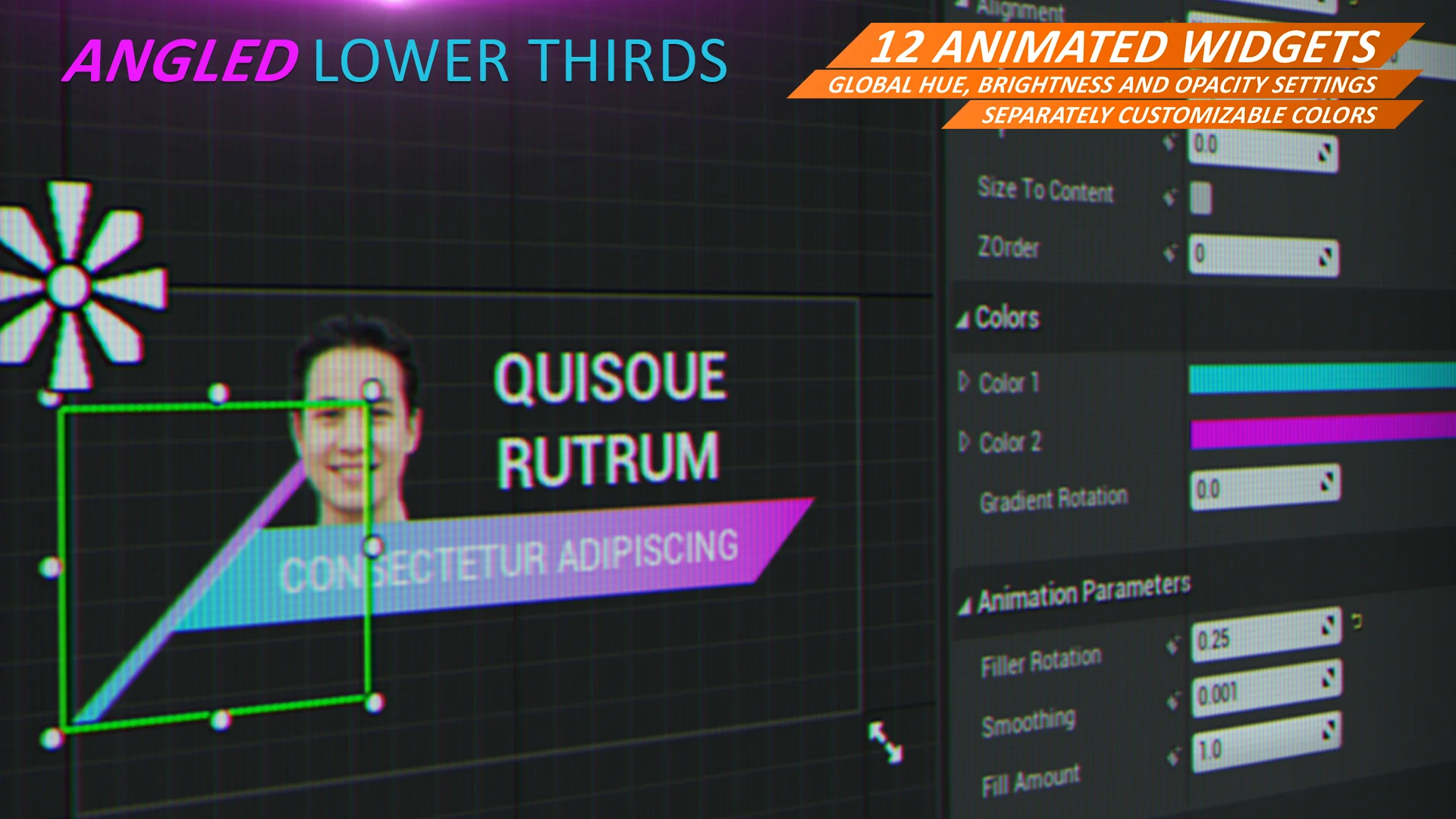
Color and visibility adjustments are handled at two levels. Global hue, brightness, and opacity settings affect the widgets as a group, giving a fast way to shift the overall look without opening each widget individually. That is a compact control surface for a series with a defined palette, or for any situation where the graphics need to sit differently against the footage behind them.
The colors are also separately customizable, and gradient direction has its own control. Those two details matter for lower thirds because a name plate often needs to distinguish itself from the background while still matching a larger graphic package. Hue can move the whole set; separate color adjustments let individual color decisions move independently; gradient direction changes the way color travels across the graphic. The combination gives an editor or UI artist useful variation before touching the underlying widget.
Lower Thirds Built from Reusable Elements and Native UMG Animation
All widgets were created by Elements, a reusable set of mini widgets. That is more than a naming detail. The twelve lower thirds are not twelve isolated constructions; they are built from a shared kit of small widgets. In production, that shared origin supports consistency across the family and gives a UI artist a clearer structure to inspect when a lower third needs to be adapted.
The construction uses native UMG tools and shader parameters. Native UMG means the widgets and their animation belong to Unreal's own UI workflow. Shader parameters add another layer of control inside that same environment. For a team already working in Unreal, this keeps lower-third authoring close to the rest of the interface work instead of sending every change out to a separate motion-graphics application. The set is tagged Blueprint as well, so it sits within the Unreal-side workflow where widgets and Blueprint logic commonly meet.
The animations are not fixed. All animations can be customized with basic UMG knowledge, which lowers the barrier for adjusting motion without rebuilding a widget from scratch. A team can take one of the twelve animated lower thirds and rework its animation to suit a different pace or presentation style.
Because the widgets are animated by native UMG tools, the animation work stays in the same authoring environment as the widget itself. The practical effect shows up when a lower third has to be revised late in a project. The person making the change does not need a separate animation package; they need familiarity with basic UMG. The combination of reusable elements, native animation, and shader parameters gives the set a layered editing model: small shared pieces at the base, full lower-third widgets at the top, and animation that can be adjusted in between.
Where Angled Lower Thirds Fits in a Production Workflow
Television-oriented projects are the clearest fit. The Television tag points to programming where lower thirds identify people, roles, or segments on screen, and the twelve-widget set provides enough variety for recurring use. A production can choose a lower third for a host, another for a guest, and another for a recurring segment, all while keeping the same UMG foundation and the same global controls. The global hue, brightness, and opacity settings make it possible to tune the family to a program's look without treating each widget as a separate art project.
Unreal Engine projects that need in-engine lower thirds are the other natural context. Since these are UMG widgets for 4.24 and above, they belong inside the engine's UI layer. That is useful when the lower third has to appear as part of a real-time scene or a television-style presentation built in Unreal. The editable animation and shader parameters keep the graphics responsive to changes rather than locking them to a single recorded output.
Who Gets the Most from the Angled Lower Thirds Set
The strongest fit is a team already inside Unreal Engine 4.24 or newer that needs a family of animated lower thirds without building each one from zero. That includes television-style projects that repeat identification graphics, and Unreal-based presentations that need lower thirds to live in the same UI system as the rest of the interface. A solo creator with basic UMG knowledge can use the twelve widgets as starting points and adjust the animation; a small team can lean on the shared elements and the global controls to keep a consistent look across multiple lower thirds.
Angled Lower Thirds is therefore best understood as an editable widget set, not a one-off graphic. The twelve animated widgets supply the range, the global hue, brightness, and opacity controls supply quick tuning, the separate color and gradient direction controls supply variation, and the elements kit plus native UMG animation supply a structure that can be maintained. For work where lower thirds are a recurring part of the interface, that combination is the practical value: a defined set to start from, with enough control to make it belong to the production.
 Widgets & Controls
 Widgets & Controls
 Widgets & Controls