"a19e0535960bd083"{"id":"1001996","slug":"damage-text","title":"Damage Text","category":"Widgets \u0026 Controls","engine":"4.26+,5.0+","assetVersion":"","engineVersion":"Engine Version: 4.26+,5.0+","tag":"Widgets \u0026 Controls","accent":"blue","visual":"mech","summary":"Add floating damage numbers and combat text directly via blueprint calls without actor setup, featuring presets, visibility checks, and multiplayer support.","platform":"Unreal Engine","publishedAt":"2026-10-26T12:14:37.980Z","updatedAt":"2026-10-26T12:14:37.980Z","sourceNotes":[],"fileContents":[],"compatibility":["Unreal Engine","Engine Version: 4.26+,5.0+"],"featuredImage":{"alt":"Damage Text","src":"/wp-content/uploads/published/2026/10/b5f9bc69fa4a-12d7495f-5890-4c48-a3d5-0d3e79d72e6c-341b7c3a05.webp"},"hasDownloadLink":true,"downloads":0,"terms":[{"taxonomy":"category","slug":"widgets-and-controls","name":"Widgets \u0026 Controls"}],"galleryImages":[{"src":"/wp-content/uploads/published/2026/10/d89ab2eac2f3-b0072d09-484a-4f2f-9a0c-49d89ec52d9f-0f94558530.webp","alt":"Damage Text"},{"src":"/wp-content/uploads/published/2026/10/4f712f20ec55-760fbcf8-63b0-42b3-826a-f179914fe52b-7d22e20011.webp","alt":"Damage Text"},{"src":"/wp-content/uploads/published/2026/10/d8913834e7c1-96eeb226-3a52-4e60-a4ae-70fe05722195-ac46a9af54.webp","alt":"Damage Text"},{"src":"/wp-content/uploads/published/2026/10/165b24d0f87b-55c1e05d-1c02-43d2-9973-4d4df224e487-df5c6e6e23.webp","alt":"Damage Text"},{"src":"/wp-content/uploads/published/2026/10/3d76c398d145-8efa6ecc-b40e-4e56-88ef-dc46b0c0c597-ca42028b8e.webp","alt":"Damage Text"}],"accessPanel":{"kind":"resource","title":"Download this resource","eyebrow":"Free Download","message":"Log in or create a free account to start your download.","fileName":"Content.7z","safetyNote":"Resources are manually reviewed before listing to improve quality and reduce obvious risks.","actionLabel":"Download Free","resourceType":"Resource archive"},"contentHtml":"\u003ch2\u003eDirect Blueprint Execution Without Component Clutter\u003c/h2\u003e\n\u003cp\u003eIntegrating floating combat numbers into an existing project often introduces unwanted complexity when systems demand that developers attach bespoke components to every damageable character or spawn complex actor hierarchies in world space. Damage Text simplifies this implementation flow by eliminating the need to create actors or add dedicated components to pawns. Instead, the display pipeline triggers directly through a function call that can be executed from anywhere within your blueprint architecture.\u003c/p\u003e\n\u003cp\u003eWhether processing hit calculations inside a weapon fire trace, handling tick-based burn damage from an area-of-effect zone, or registering direct melee impact events, invoking the display requires only passing the relevant hit data to the existing function. This decoupling keeps character and vehicle hierarchies lightweight, preventing the need to re-architect base pawn classes just to display numeric feedback.\u003c/p\u003e \u003ch2\u003eStyling Through Presets, Icons, Fonts, and Shadows\u003c/h2\u003e\n\u003cp\u003eThe asset ships with seven distinct presets ready for immediate use. These presets define the visual hierarchy of damage output, giving projects immediate visual variation out of the box. Beyond the defaults, a wide range of settings allows developers to create bespoke presets tailored to the art direction and informational needs of a specific game.\u003c/p\u003e\n\u003cp\u003eCustomization extends through several core visual parameters:\u003c/p\u003e\n\u003cul\u003e \u003cli\u003e\u003cstrong\u003eTypography and Fonts:\u003c/strong\u003e Adjust typeface selections and scaling to match clean sci-fi layouts, stylized arcade games, or classic fantasy combat menus.\u003c/li\u003e \u003cli\u003e\u003cstrong\u003eColor and Shadow Settings:\u003c/strong\u003e Modify text and drop-shadow parameters to maintain strong contrast across diverse level lighting, bright outdoor zones, and dark interior environments.\u003c/li\u003e \u003cli\u003e\u003cstrong\u003eIcon Integration:\u003c/strong\u003e Embed custom icons directly alongside numeric values, allowing developers to communicate element types, critical strikes, headshots, or status effects alongside raw damage amounts.\u003c/li\u003e\n\u003c/ul\u003e\n\u003cp\u003eBecause the configuration relies on preset parameters, updating the look of a specific damage category across an entire project can be handled centrally rather than editing individual combat actors or UI widgets.\u003c/p\u003e \u003ch2\u003eConfiguring Damage Text Animations and Motion Profiles\u003c/h2\u003e\n\u003cp\u003eFloating numbers rely heavily on kinetic movement to feel impactful and stay readable during rapid fire or multi-target encounters. Damage Text includes five pre-configured animations for displaying damage output. These built-in motions cover different trajectory styles, allowing numbers to bounce, float, fade, or scatter to avoid overlapping text during rapid hit delivery.\u003c/p\u003e\n\u003cp\u003eProjects that require specific animation curves or specialized movement behaviors can build custom motion paths. The asset includes a dedicated guide explaining how to add custom animations directly into the system. This modular structure lets creators design project-specific trajectories, such as high-velocity pop-outs for critical hits or lingering drift effects for passive status degradation, without rewriting the underlying coordinate calculation logic.\u003c/p\u003e \u003ch2\u003ePerspective Support and Occlusion-Based Visibility Checking\u003c/h2\u003e\n\u003cp\u003eCombat perspectives vary widely across game genres, and on-screen feedback must adapt accordingly. Damage Text supports all standard camera modes, operating reliably whether deployed in tight first-person shooters, over-the-shoulder third-person adventures, or isometric perspectives. The math driving the projection handles camera orientation smoothly without manual screen-to-world mapping adjustments from the developer.\u003c/p\u003e\n\u003cp\u003eA critical consideration in spatial UI is handling line of sight. Damage Text includes a built-in visibility checking option that verifies whether the damage point is actually visible to the player camera before rendering the effect. If a combatant takes damage behind a solid wall, inside a closed structure, or around environmental geometry that blocks direct line of sight, the system suppresses the spawn. This prevents visual clutter from penetrating level geometry and prevents unintended wall-hack indicators that reveal hidden enemy positions through solid surfaces.\u003c/p\u003e \u003ch2\u003eMultiplayer Replication and Network Handling\u003c/h2\u003e\n\u003cp\u003eHandling floating combat text in networked multiplayer environments often requires custom client-server replication logic to ensure numbers display accurately without overloading the network. Damage Text provides full multiplayer support right out of the box. Everything required for synchronized damage presentation is already configured within the system, requiring no additional network configuration passes or secondary RPC implementations during setup.\u003c/p\u003e\n\u003cp\u003eThe network structure ensures that numeric values and associated visual cues replicate efficiently to the proper clients. When a server registers damage, the feedback call is distributed cleanly, letting players view their own damage output and combat events reliably under active multiplayer conditions.\u003c/p\u003e \u003ch2\u003eDemo Scene Architecture and Blueprint Maintenance\u003c/h2\u003e\n\u003cp\u003eTo assist with immediate integration and troubleshooting, the asset includes a complete demo scene showcasing practical implementations of the function calls, preset variations, and animation options. This testing environment serves as a reference point for inspecting how function inputs correlate with on-screen visual results under realistic conditions.\u003c/p\u003e\n\u003cp\u003eEvery blueprint in the package is fully commented. Logic chains, parameter lookups, coordinate projections, and visibility trace checks are clearly documented within the node graphs. This transparent organization makes long-term maintenance straightforward, whether developers want to expand preset catalogs, implement custom icon logic, or combine Damage Text alongside complementary combat interface tools such as the Circle Damage Indicator Component.\u003c/p\u003e\n\n\u003ch2\u003eContinue Browsing Similar Packs\u003c/h2\u003e\n\u003cul\u003e\n\u003cli\u003e\u003ca href=\"https://3dcghub.com/blood/\" title=\"Blood\"\u003eBlood\u003c/a\u003e\u003c/li\u003e\n\u003cli\u003e\u003ca href=\"https://3dcghub.com/ultimate-menu-system/\" title=\"Ultimate Menu System\"\u003eUltimate Menu System\u003c/a\u003e\u003c/li\u003e\n\u003cli\u003e\u003ca href=\"https://3dcghub.com/delayed-healthbar-system/\" title=\"Delayed Healthbar System\"\u003eDelayed Healthbar System\u003c/a\u003e\u003c/li\u003e\n\u003cli\u003e\u003ca href=\"https://3dcghub.com/pro-icon-pack/\" title=\"Pro Icon Pack\"\u003ePro Icon Pack\u003c/a\u003e\u003c/li\u003e\n\u003cli\u003e\u003ca href=\"https://3dcghub.com/simple-screen-damage-indicator/\" title=\"Simple Screen Damage Indicator\"\u003eSimple Screen Damage Indicator\u003c/a\u003e\u003c/li\u003e\n\u003c/ul\u003e","contentTextLength":5935,"navigation":{"current":95,"total":4026,"previous":{"id":"1001997","slug":"dark-knight","title":"Dark Knight","category":"Characters \u0026 Creatures","platform":"Unreal Engine","updatedAt":"2026-10-26T12:15:31.161Z"},"next":{"id":"1001995","slug":"daforma-vertex-shader-based-3d-deformation-effectors","title":"daforma - Vertex Shader based 3D Deformation Effectors","category":"Gameplay Features","platform":"Unreal Engine","updatedAt":"2026-10-26T12:14:03.022Z"}},"relatedResources":[{"id":"1001722","slug":"blood","title":"Blood","category":"Damage \u0026 Grunge","engine":"4.26+,5.0+","assetVersion":"","engineVersion":"Engine Version: 4.26+,5.0+","tag":"Damage \u0026 Grunge","accent":"blue","visual":"mech","summary":"Over 120 horror decals deliver 4K and 2K blood smears, demonic symbols, and text with a performance-first single-texture setup and Decal Blueprint control.","platform":"Unreal Engine","publishedAt":"2026-10-19T16:20:31.409Z","updatedAt":"2026-10-19T16:20:31.409Z","sourceNotes":[],"fileContents":[],"compatibility":["Unreal Engine","Engine Version: 4.26+,5.0+"],"featuredImage":{"alt":"Blood","src":"/wp-content/uploads/published/2026/10/c8e02bd2344b-ac47f0d8-8e82-4163-b6b7-d83fe1867fbb-065bd8a46c.webp"},"hasDownloadLink":true,"downloads":1},{"id":"15521","slug":"ultimate-menu-system","title":"Ultimate Menu System","category":"Widgets \u0026 Controls","engine":"4.27,5.0+","assetVersion":"Engine version: 4.27,5.0+","engineVersion":"4.26","tag":"Widgets \u0026 Controls","accent":"blue","visual":"animation","summary":"Ultimate Menu System provides a modular and dynamic framework for creating professional game interfaces. It supports multiple input methods and includes pre-built systems for settings and multiplayer hosting.","platform":"Unreal Engine","publishedAt":"2026-03-12T09:12:56.000Z","updatedAt":"2026-04-19T15:44:45.000Z","sourceNotes":[],"fileContents":[],"compatibility":["Unreal Engine","Engine version: 4.27,5.0+"],"featuredImage":{"alt":"Ultimate Menu System","src":"https://3dcghub.com/wp-content/uploads/2026/03/f49ca1b4-975f-44a0-a17f-9f3cca8ab40c.webp"},"hasDownloadLink":true,"downloads":1},{"id":"15459","slug":"delayed-healthbar-system","title":"Delayed Healthbar System","category":"Widgets \u0026 Controls","engine":"5.0+","assetVersion":"Engine version: 5.0+","engineVersion":"5.0","tag":"Widgets \u0026 Controls","accent":"blue","visual":"audio","summary":"Enhance your game's user interface with the Delayed Healthbar System. This asset provides a ready-to-use solution for animated health bars, damage blips, and screen-space indicators.","platform":"Unreal Engine","publishedAt":"2026-03-12T09:07:20.000Z","updatedAt":"2026-04-19T15:44:46.000Z","sourceNotes":[],"fileContents":[],"compatibility":["Unreal Engine","Engine version: 5.0+"],"featuredImage":{"alt":"Delayed Healthbar System","src":"https://3dcghub.com/wp-content/uploads/2026/03/072782e5-1fcd-4671-915e-3f517fc8aea5.webp"},"hasDownloadLink":true,"downloads":0}]}
Widgets & Controls
Damage Text
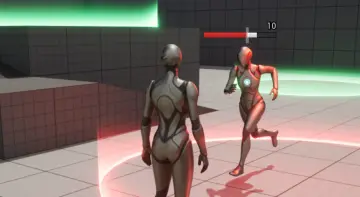
Add floating damage numbers and combat text directly via blueprint calls without actor setup, featuring presets, visibility checks, and multiplayer support.
Direct Blueprint Execution Without Component Clutter
Integrating floating combat numbers into an existing project often introduces unwanted complexity when systems demand that developers attach bespoke components to every damageable character or spawn complex actor hierarchies in world space. Damage Text simplifies this implementation flow by eliminating the need to create actors or add dedicated components to pawns. Instead, the display pipeline triggers directly through a function call that can be executed from anywhere within your blueprint architecture.
Whether processing hit calculations inside a weapon fire trace, handling tick-based burn damage from an area-of-effect zone, or registering direct melee impact events, invoking the display requires only passing the relevant hit data to the existing function. This decoupling keeps character and vehicle hierarchies lightweight, preventing the need to re-architect base pawn classes just to display numeric feedback.
Styling Through Presets, Icons, Fonts, and Shadows
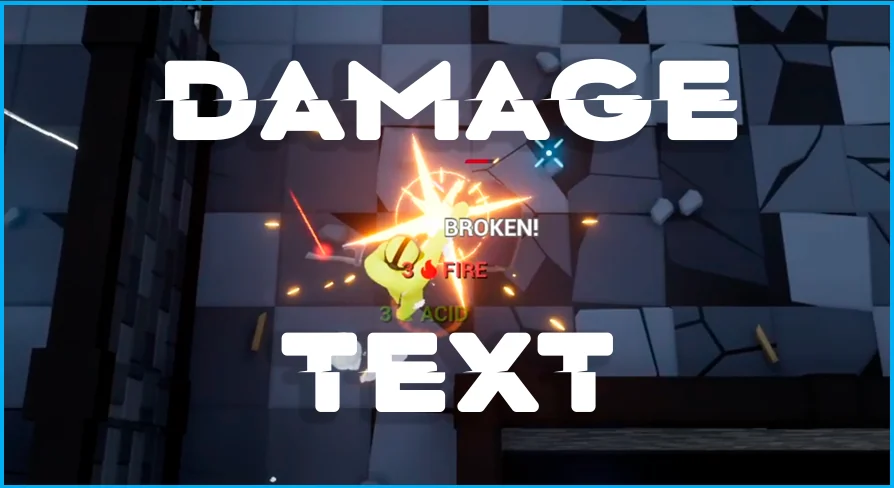
The asset ships with seven distinct presets ready for immediate use. These presets define the visual hierarchy of damage output, giving projects immediate visual variation out of the box. Beyond the defaults, a wide range of settings allows developers to create bespoke presets tailored to the art direction and informational needs of a specific game.
Customization extends through several core visual parameters:
Typography and Fonts: Adjust typeface selections and scaling to match clean sci-fi layouts, stylized arcade games, or classic fantasy combat menus.
Color and Shadow Settings: Modify text and drop-shadow parameters to maintain strong contrast across diverse level lighting, bright outdoor zones, and dark interior environments.
Icon Integration: Embed custom icons directly alongside numeric values, allowing developers to communicate element types, critical strikes, headshots, or status effects alongside raw damage amounts.
Because the configuration relies on preset parameters, updating the look of a specific damage category across an entire project can be handled centrally rather than editing individual combat actors or UI widgets.
Configuring Damage Text Animations and Motion Profiles
Floating numbers rely heavily on kinetic movement to feel impactful and stay readable during rapid fire or multi-target encounters. Damage Text includes five pre-configured animations for displaying damage output. These built-in motions cover different trajectory styles, allowing numbers to bounce, float, fade, or scatter to avoid overlapping text during rapid hit delivery.
Projects that require specific animation curves or specialized movement behaviors can build custom motion paths. The asset includes a dedicated guide explaining how to add custom animations directly into the system. This modular structure lets creators design project-specific trajectories, such as high-velocity pop-outs for critical hits or lingering drift effects for passive status degradation, without rewriting the underlying coordinate calculation logic.
Perspective Support and Occlusion-Based Visibility Checking
Combat perspectives vary widely across game genres, and on-screen feedback must adapt accordingly. Damage Text supports all standard camera modes, operating reliably whether deployed in tight first-person shooters, over-the-shoulder third-person adventures, or isometric perspectives. The math driving the projection handles camera orientation smoothly without manual screen-to-world mapping adjustments from the developer.
A critical consideration in spatial UI is handling line of sight. Damage Text includes a built-in visibility checking option that verifies whether the damage point is actually visible to the player camera before rendering the effect. If a combatant takes damage behind a solid wall, inside a closed structure, or around environmental geometry that blocks direct line of sight, the system suppresses the spawn. This prevents visual clutter from penetrating level geometry and prevents unintended wall-hack indicators that reveal hidden enemy positions through solid surfaces.
Multiplayer Replication and Network Handling
Handling floating combat text in networked multiplayer environments often requires custom client-server replication logic to ensure numbers display accurately without overloading the network. Damage Text provides full multiplayer support right out of the box. Everything required for synchronized damage presentation is already configured within the system, requiring no additional network configuration passes or secondary RPC implementations during setup.
The network structure ensures that numeric values and associated visual cues replicate efficiently to the proper clients. When a server registers damage, the feedback call is distributed cleanly, letting players view their own damage output and combat events reliably under active multiplayer conditions.
Demo Scene Architecture and Blueprint Maintenance
To assist with immediate integration and troubleshooting, the asset includes a complete demo scene showcasing practical implementations of the function calls, preset variations, and animation options. This testing environment serves as a reference point for inspecting how function inputs correlate with on-screen visual results under realistic conditions.
Every blueprint in the package is fully commented. Logic chains, parameter lookups, coordinate projections, and visibility trace checks are clearly documented within the node graphs. This transparent organization makes long-term maintenance straightforward, whether developers want to expand preset catalogs, implement custom icon logic, or combine Damage Text alongside complementary combat interface tools such as the Circle Damage Indicator Component.
 Widgets & Controls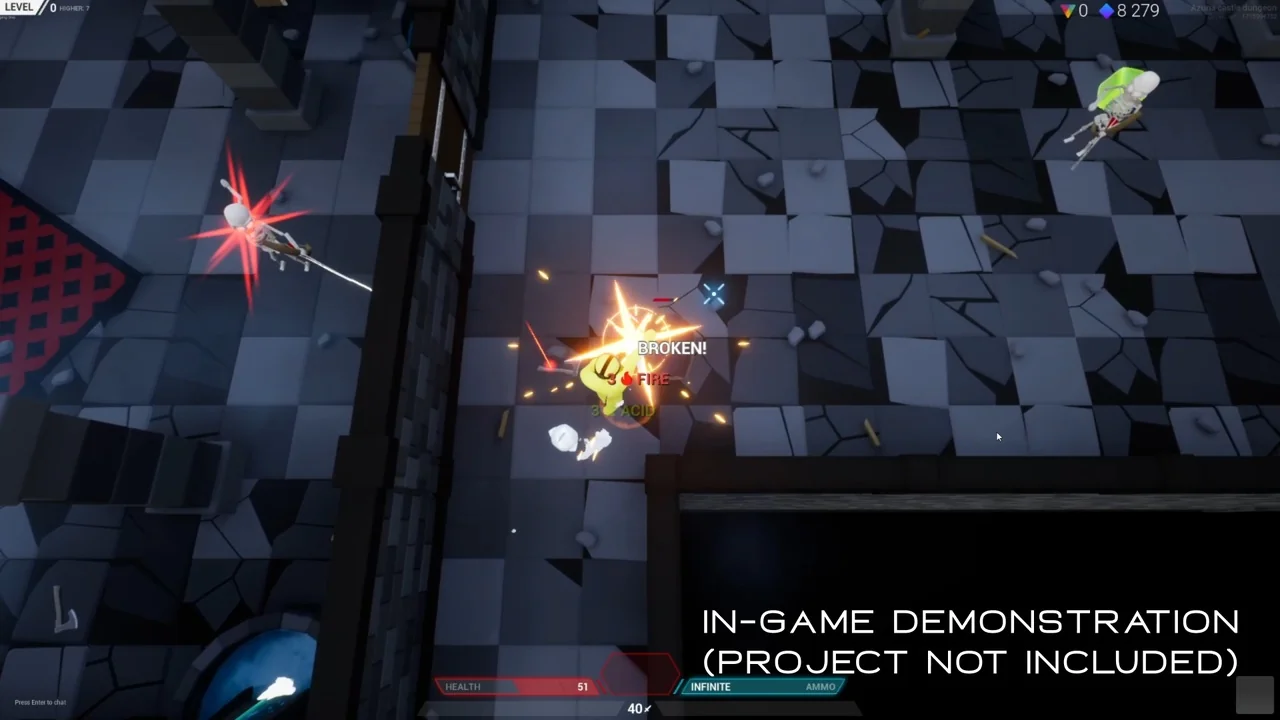
 Damage & Grunge
 Widgets & Controls
 Widgets & Controls