"efaa631e936fd3ee"{"id":"1002127","slug":"music-player-advanced","title":"Music Player Advanced","category":"Widgets \u0026 Controls","engine":"4.27+,5.0+","assetVersion":"","engineVersion":"Engine Version: 4.27+,5.0+","tag":"Widgets \u0026 Controls","accent":"blue","visual":"audio","summary":"Explore Music Player Advanced, a modular Blueprint audio player widget offering convenient controls, customizable skins, and overlay interface functionality.","platform":"Unreal Engine","publishedAt":"2026-10-29T09:07:27.487Z","updatedAt":"2026-10-29T09:07:27.487Z","sourceNotes":[],"fileContents":[],"compatibility":["Unreal Engine","Engine Version: 4.27+,5.0+"],"featuredImage":{"alt":"Music Player Advanced","src":"/wp-content/uploads/published/2026/10/6183beb92368-785984b0-3db3-4e30-b44f-769541ea9bb7-3ccbdbf993.webp"},"hasDownloadLink":true,"downloads":0,"terms":[{"taxonomy":"category","slug":"widgets-and-controls","name":"Widgets \u0026 Controls"}],"galleryImages":[{"src":"/wp-content/uploads/published/2026/10/3b2e6c67b26a-28a22cea-701e-4b44-a9a3-9a3e29ef5359-2f27be3fa1.webp","alt":"Music Player Advanced"}],"accessPanel":{"kind":"resource","title":"Download this resource","eyebrow":"Free Download","message":"Log in or create a free account to start your download.","fileName":"Content.7z","safetyNote":"Resources are manually reviewed before listing to improve quality and reduce obvious risks.","actionLabel":"Download Free","resourceType":"Resource archive"},"contentHtml":"\u003cp\u003eIntegrating interactive audio systems directly into user-facing menus requires balancing functional depth with immediate, friction-free operation. Music Player Advanced approaches in-game sound management through a structured audio player structured through accessible layouts and straightforward interaction. Designed to sit cleanly within an active project, it bridges user interface needs with background listening, granting players direct control over their audio environment without forcing them through convoluted configuration screens.\u003c/p\u003e \u003ch2\u003eConvenient Controls and Accessible User Layouts\u003c/h2\u003e\n\u003cp\u003eThe core philosophy of Music Player Advanced emphasizes intuitive manipulation. Its controls and interface layouts are organized to remain straightforward and pleasant to operate, reducing mechanical friction to the point where even a child can interact with the player without confusion. In interactive media, complex interfaces often pull attention away from active play. When an audio module presents too many nested options or ambiguous icons, players either ignore the system entirely or suffer breaks in immersion.\u003c/p\u003e \u003cp\u003eBy streamlining control schemes into clean, understandable configurations, the interface guarantees that essential player functions remain within immediate reach. Starting playback, adjusting volume, or cycling through tracks functions without hesitation. This direct operational style serves games that welcome younger audiences or casual players, where accessible interface cues are mandatory. It equally benefits complex genres by keeping utility widgets uncluttered, allowing audio adjustments to happen rapidly during active gameplay sessions.\u003c/p\u003e \u003ch2\u003eCustomizing the Music Player Advanced Appearance with Skins\u003c/h2\u003e\n\u003cp\u003eVisual cohesion across games is rarely uniform. A user interface suited for a lighthearted adventure looks misplaced in a stylized retro arcade title or a sleek simulation dashboard. Music Player Advanced resolves this visual challenge by allowing developers and players to customize its appearance using various skins. Applying different skin options transforms the aesthetic footprint of the player, adapting the presentation to match individual tastes and distinct visual directions.\u003c/p\u003e \u003cp\u003eThis capability prevents the audio tool from feeling like a static, third-party element pinned onto a screen. Instead, skins enable the interface to blend naturally with surrounding UI elements or stand out as a stylized in-game gadget. Offering aesthetic variability allows players to personalize their interactive space, cultivating a sense of ownership over their media tools. Whether a project calls for bright, colorful frames or subdued, minimalist layouts, changing the skin updates the visual character while keeping underlying controls familiar and stable.\u003c/p\u003e \u003ch2\u003eModular Blueprint Widget and Overlay Architecture\u003c/h2\u003e\n\u003cp\u003eConstructed as a modular Blueprint widget, Music Player Advanced functions as an adaptable user interface overlay. Because it operates within a modular framework, the player can be deployed across multiple layers of a project without disrupting underlying gameplay logic. It can exist as an on-screen overlay during high-action scenes, embed itself within primary pause menus, or activate strictly within dedicated media terminals in a game world.\u003c/p\u003e \u003cp\u003eThe separation of interface components within the Blueprint structure simplifies layout adjustments. User interface designers can anchor the player widget to specific screen edges, position it as a floating panel, or pair it with other HUD modules. The modular architecture ensures that adding, moving, or toggling the overlay does not necessitate tearing down existing menu hierarchies, maintaining clean separation between user input handling and active game runtime systems.\u003c/p\u003e \u003ch2\u003eEnhancing Gameplay Through Interactive Audio Features\u003c/h2\u003e\n\u003cp\u003eSoundtrack pacing can define the emotional tone of a session, but granting players agency over that soundtrack shifts passive listening into an active component of play. Music Player Advanced carries a full range of features aimed at elevating how players experience audio during their sessions. Bringing interactive playback to the forefront introduces a distinct layer of fun, turning simple exploration or extended creative sessions into personalized experiences.\u003c/p\u003e \u003cp\u003eAllowing users to curate, switch, and command audio while steering characters or managing scenes enriches long-form gameplay loops. In sandbox environments, driving titles, or open simulation spaces, spending hours inside a single level can become repetitive if audio cues remain static. An advanced audio player overlay allows players to establish their own rhythm, matching track intensity to the onscreen situation. This interactive agency transforms the player from a simple UI widget into an engaging companion element that elevates the entire gaming experience.\u003c/p\u003e \u003ch2\u003eProject Alignment and Practical Implementation\u003c/h2\u003e\n\u003cp\u003eMusic Player Advanced finds its most natural placement in productions that emphasize self-directed pacing, extensive session lengths, and user customization. Titles centered around world-building, life simulation, open driving, or casual arcade action profit considerably from player-managed audio. The tool provides the necessary utility right out of the box, avoiding the need to engineer a proprietary media control framework from scratch.\u003c/p\u003e \u003cp\u003eBecause the layout accommodates broad demographics, it serves family-friendly games just as effectively as creative toolkits where users spend substantial time organizing assets or testing scenes. The combination of child-friendly control clarity, diverse visual skinning, and an overlay-ready Blueprint structure gives developers a flexible, drop-in solution to introduce comprehensive sound controls into any screen space.\u003c/p\u003e\n\n\u003ch2\u003eExplore Similar Assets\u003c/h2\u003e\n\u003cul\u003e\n\u003cli\u003e\u003ca href=\"https://3dcghub.com/pro-icon-pack/\" title=\"Pro Icon Pack\"\u003ePro Icon Pack\u003c/a\u003e\u003c/li\u003e\n\u003cli\u003e\u003ca href=\"https://3dcghub.com/hqui-progress-bars/\" title=\"HQUI: Progress Bars\"\u003eHQUI: Progress Bars\u003c/a\u003e\u003c/li\u003e\n\u003cli\u003e\u003ca href=\"https://3dcghub.com/archviz-user-interface-3/\" title=\"ArchViz User Interface 3\"\u003eArchViz User Interface 3\u003c/a\u003e\u003c/li\u003e\n\u003cli\u003e\u003ca href=\"https://3dcghub.com/extended-progress-bar/\" title=\"Extended Progress Bar\"\u003eExtended Progress Bar\u003c/a\u003e\u003c/li\u003e\n\u003cli\u003e\u003ca href=\"https://3dcghub.com/ultimate-menu-system/\" title=\"Ultimate Menu System\"\u003eUltimate Menu System\u003c/a\u003e\u003c/li\u003e\n\u003c/ul\u003e","contentTextLength":5878,"navigation":{"current":157,"total":4209,"previous":{"id":"1002128","slug":"muzzle-flashes","title":"Muzzle Flashes","category":"Variety","platform":"Unreal Engine","updatedAt":"2026-10-29T09:07:58.148Z"},"next":{"id":"1002126","slug":"multiplayer-topdown-kit","title":"Multiplayer TopDown Kit","category":"Action-Adventure","platform":"Unreal Engine","updatedAt":"2026-10-29T09:06:01.569Z"}},"relatedResources":[{"id":"1001924","slug":"pro-icon-pack","title":"Pro Icon Pack","category":"Widgets \u0026 Controls","engine":"4.26+,5.0+","assetVersion":"","engineVersion":"Engine Version: 4.26+,5.0+","tag":"Widgets \u0026 Controls","accent":"blue","visual":"mech","summary":"Explore the implementation and structural utility of Pro Icon Pack across HUD, inventory, and main menu systems in Unreal Engine interface design.","platform":"Unreal Engine","publishedAt":"2026-10-22T12:00:19.598Z","updatedAt":"2026-10-22T12:00:19.598Z","sourceNotes":[],"fileContents":[],"compatibility":["Unreal Engine","Engine Version: 4.26+,5.0+"],"featuredImage":{"alt":"Pro Icon Pack","src":"/wp-content/uploads/published/2026/10/eaeb4b76f65b-75923046-733b-4bd8-ba53-e45ddc9e2a36-ea737c91b8.webp"},"hasDownloadLink":true,"downloads":0},{"id":"15480","slug":"hqui-progress-bars","title":"HQUI: Progress Bars","category":"Widgets \u0026 Controls","engine":"4.26+,5.0+","assetVersion":"Engine version: 4.26+,5.0+","engineVersion":"4.19","tag":"Widgets \u0026 Controls","accent":"blue","visual":"animation","summary":"HQUI: Progress Bars offers a robust set of highly customizable UMG components for developers. This pack features advanced settings, gradients, and automated interpolation to elevate your game's user interface.","platform":"Unreal Engine","publishedAt":"2026-03-12T09:09:48.000Z","updatedAt":"2026-04-19T15:44:46.000Z","sourceNotes":[],"fileContents":[],"compatibility":["Unreal Engine","Engine version: 4.26+,5.0+"],"featuredImage":{"alt":"HQUI: Progress Bars","src":"https://3dcghub.com/wp-content/uploads/2026/03/327a22db-0f44-410f-93b6-73bd636562cb.webp"},"hasDownloadLink":true,"downloads":2},{"id":"27392","slug":"archviz-user-interface-3","title":"ArchViz User Interface 3","category":"Widgets \u0026 Controls","engine":"4.26+,5.0+","assetVersion":"Engine version: 4.26+,5.0+","engineVersion":"","tag":"Widgets \u0026 Controls","accent":"blue","visual":"animation","summary":"ArchViz User Interface 3 combines an interactive floorplan, object editing tools, and spreadsheet-style design mode in a modular blueprint setup. It supports keyboard, gamepad, touch, and limited PC VR use, with extra handling for multi-unit projects and da...","platform":"Unreal Engine","publishedAt":"2026-04-25T05:38:29.000Z","updatedAt":"2026-04-25T05:38:30.000Z","sourceNotes":[],"fileContents":[],"compatibility":["Unreal Engine","Engine version: 4.26+,5.0+"],"featuredImage":{"alt":"ArchViz User Interface 3","src":"https://3dcghub.com/wp-content/uploads/2026/04/c34306b75653_48502c74-f468-40ca-90e2-14036a1e26bf.webp"},"hasDownloadLink":true,"downloads":1}]}
Widgets & Controls
Music Player Advanced
Explore Music Player Advanced, a modular Blueprint audio player widget offering convenient controls, customizable skins, and overlay interface functionality.
Integrating interactive audio systems directly into user-facing menus requires balancing functional depth with immediate, friction-free operation. Music Player Advanced approaches in-game sound management through a structured audio player structured through accessible layouts and straightforward interaction. Designed to sit cleanly within an active project, it bridges user interface needs with background listening, granting players direct control over their audio environment without forcing them through convoluted configuration screens.
Convenient Controls and Accessible User Layouts
The core philosophy of Music Player Advanced emphasizes intuitive manipulation. Its controls and interface layouts are organized to remain straightforward and pleasant to operate, reducing mechanical friction to the point where even a child can interact with the player without confusion. In interactive media, complex interfaces often pull attention away from active play. When an audio module presents too many nested options or ambiguous icons, players either ignore the system entirely or suffer breaks in immersion.
By streamlining control schemes into clean, understandable configurations, the interface guarantees that essential player functions remain within immediate reach. Starting playback, adjusting volume, or cycling through tracks functions without hesitation. This direct operational style serves games that welcome younger audiences or casual players, where accessible interface cues are mandatory. It equally benefits complex genres by keeping utility widgets uncluttered, allowing audio adjustments to happen rapidly during active gameplay sessions.
Customizing the Music Player Advanced Appearance with Skins
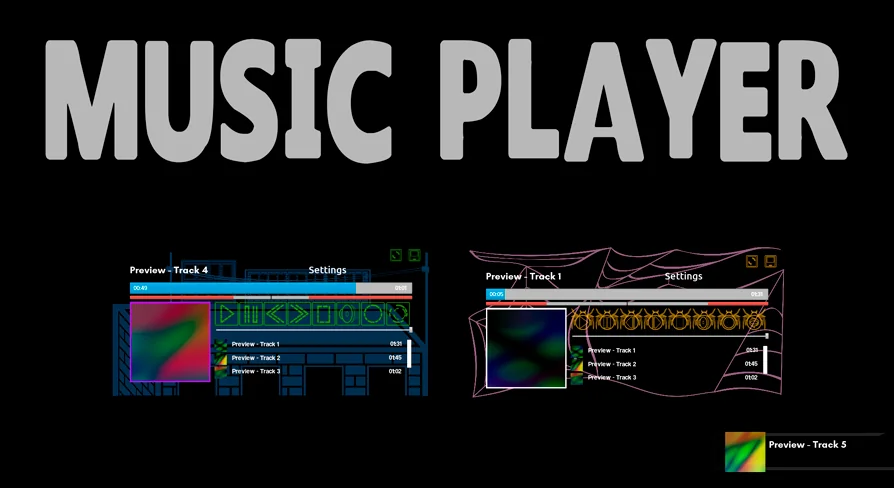
Visual cohesion across games is rarely uniform. A user interface suited for a lighthearted adventure looks misplaced in a stylized retro arcade title or a sleek simulation dashboard. Music Player Advanced resolves this visual challenge by allowing developers and players to customize its appearance using various skins. Applying different skin options transforms the aesthetic footprint of the player, adapting the presentation to match individual tastes and distinct visual directions.
This capability prevents the audio tool from feeling like a static, third-party element pinned onto a screen. Instead, skins enable the interface to blend naturally with surrounding UI elements or stand out as a stylized in-game gadget. Offering aesthetic variability allows players to personalize their interactive space, cultivating a sense of ownership over their media tools. Whether a project calls for bright, colorful frames or subdued, minimalist layouts, changing the skin updates the visual character while keeping underlying controls familiar and stable.
Modular Blueprint Widget and Overlay Architecture
Constructed as a modular Blueprint widget, Music Player Advanced functions as an adaptable user interface overlay. Because it operates within a modular framework, the player can be deployed across multiple layers of a project without disrupting underlying gameplay logic. It can exist as an on-screen overlay during high-action scenes, embed itself within primary pause menus, or activate strictly within dedicated media terminals in a game world.
The separation of interface components within the Blueprint structure simplifies layout adjustments. User interface designers can anchor the player widget to specific screen edges, position it as a floating panel, or pair it with other HUD modules. The modular architecture ensures that adding, moving, or toggling the overlay does not necessitate tearing down existing menu hierarchies, maintaining clean separation between user input handling and active game runtime systems.
Enhancing Gameplay Through Interactive Audio Features
Soundtrack pacing can define the emotional tone of a session, but granting players agency over that soundtrack shifts passive listening into an active component of play. Music Player Advanced carries a full range of features aimed at elevating how players experience audio during their sessions. Bringing interactive playback to the forefront introduces a distinct layer of fun, turning simple exploration or extended creative sessions into personalized experiences.
Allowing users to curate, switch, and command audio while steering characters or managing scenes enriches long-form gameplay loops. In sandbox environments, driving titles, or open simulation spaces, spending hours inside a single level can become repetitive if audio cues remain static. An advanced audio player overlay allows players to establish their own rhythm, matching track intensity to the onscreen situation. This interactive agency transforms the player from a simple UI widget into an engaging companion element that elevates the entire gaming experience.
Project Alignment and Practical Implementation
Music Player Advanced finds its most natural placement in productions that emphasize self-directed pacing, extensive session lengths, and user customization. Titles centered around world-building, life simulation, open driving, or casual arcade action profit considerably from player-managed audio. The tool provides the necessary utility right out of the box, avoiding the need to engineer a proprietary media control framework from scratch.
Because the layout accommodates broad demographics, it serves family-friendly games just as effectively as creative toolkits where users spend substantial time organizing assets or testing scenes. The combination of child-friendly control clarity, diverse visual skinning, and an overlay-ready Blueprint structure gives developers a flexible, drop-in solution to introduce comprehensive sound controls into any screen space.
 Widgets & Controls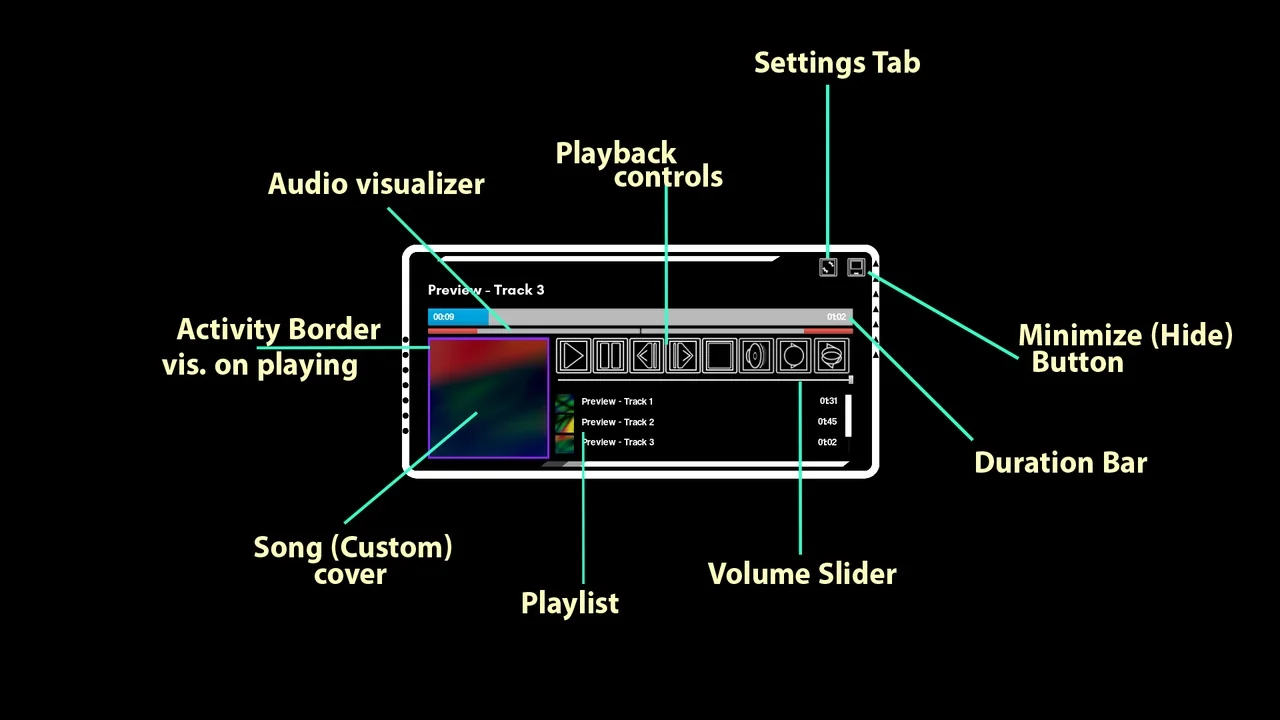
 Widgets & Controls
 Widgets & Controls
 Widgets & Controls