"0341a2901a4ae9aa"{"id":"27392","slug":"archviz-user-interface-3","title":"ArchViz User Interface 3","category":"Widgets \u0026 Controls","engine":"4.26+,5.0+","assetVersion":"Engine version: 4.26+,5.0+","engineVersion":"","tag":"Widgets \u0026 Controls","accent":"blue","visual":"animation","summary":"ArchViz User Interface 3 combines an interactive floorplan, object editing tools, and spreadsheet-style design mode in a modular blueprint setup. It supports keyboard, gamepad, touch, and limited PC VR use, with extra handling for multi-unit projects and da...","platform":"Unreal Engine","publishedAt":"2026-04-25T05:38:29.000Z","updatedAt":"2026-04-25T05:38:30.000Z","sourceNotes":[],"fileContents":[],"compatibility":["Unreal Engine","Engine version: 4.26+,5.0+"],"featuredImage":{"alt":"ArchViz User Interface 3","src":"https://3dcghub.com/wp-content/uploads/2026/04/c34306b75653_48502c74-f468-40ca-90e2-14036a1e26bf.webp"},"hasDownloadLink":true,"downloads":1,"terms":[{"taxonomy":"category","slug":"widgets-and-controls","name":"Widgets \u0026 Controls"},{"taxonomy":"post_tag","slug":"game-systems","name":"Game Systems"},{"taxonomy":"post_tag","slug":"ui","name":"UI"},{"taxonomy":"post_tag","slug":"unreal-engine-5","name":"Unreal Engine 5"}],"galleryImages":[{"src":"https://3dcghub.com/wp-content/uploads/2026/04/6b1478ac8748_5f9edebb-a8c2-4afa-9846-ceaf378d4587.webp","alt":"ArchViz User Interface 3"},{"src":"https://3dcghub.com/wp-content/uploads/2026/04/f33bf79469cc_cdb5090a-9a3a-4060-9d1d-409e98fe683d.webp","alt":"ArchViz User Interface 3"},{"src":"https://3dcghub.com/wp-content/uploads/2026/04/577b947f8e73_e19242f8-650f-477e-a6ad-38e07d055b38.webp","alt":"ArchViz User Interface 3"},{"src":"https://3dcghub.com/wp-content/uploads/2026/04/07fc490c1bc8_955970b6-6d20-4996-9a44-11b9d1342ec5.webp","alt":"ArchViz User Interface 3"},{"src":"https://3dcghub.com/wp-content/uploads/2026/04/2dd7d5e7ce02_5a03f5f9-bdf3-4940-b90e-acb5abe24735.webp","alt":"ArchViz User Interface 3"},{"src":"https://3dcghub.com/wp-content/uploads/2026/04/a69e71fe912e_35888cd7-8228-4d9a-8ad6-af2630b93e92.webp","alt":"ArchViz User Interface 3"},{"src":"https://3dcghub.com/wp-content/uploads/2026/04/99cf565c3b42_8739043a-f54d-43b7-a11d-9030b66b68e8.webp","alt":"ArchViz User Interface 3"},{"src":"https://3dcghub.com/wp-content/uploads/2026/04/d7a10540ab51_1fccf066-28ab-4a74-a9b0-4ebcb79e4408.webp","alt":"ArchViz User Interface 3"},{"src":"https://3dcghub.com/wp-content/uploads/2026/04/55a088dfe4cd_99db4d62-cc75-46bc-93f8-3f67754ad8f4.webp","alt":"ArchViz User Interface 3"},{"src":"https://3dcghub.com/wp-content/uploads/2026/04/ffa441987b07_026e4bcd-c3ab-4508-9938-2e7c22d1e7f7.webp","alt":"ArchViz User Interface 3"}],"accessPanel":{"kind":"resource","title":"Access this resource","eyebrow":"Free Download","message":"Log in or create a free account to start your download.","fileName":"ArchVizUserInterface3.7z","safetyNote":"All resources are 100% manually reviewed to eliminate all risks.","actionLabel":"Download Free","resourceType":"Resource archive"},"contentHtml":"\u003ch2\u003eInteractive floorplans, edit mode, and design mode\u003c/h2\u003e\u003cp\u003eArchViz User Interface 3 is a modern, modular interface for architectural or other projects. The core setup centers on an interactive floorplan, scene interaction tools, and ways to modify assets without leaving the interface. It is a blueprint-only project, so it stays within Unreal’s visual scripting workflow, and no programming knowledge is required. Basic knowledge of Blueprints can still help when adjusting or extending the system.\u003c/p\u003e\u003cp\u003eThe structure is meant to stay flexible. Smaller projects can use the same framework as larger ones, because the interface is built from modules rather than a single rigid layout. That makes it suitable for production work where the UI needs to shift between direct scene editing, presentation tasks, and project management without changing the underlying approach.\u003c/p\u003e\u003cp\u003eThe edit and design workflows are split in a practical way. Edit Mode handles material or mesh changes on individual objects in the scene. Design Mode moves those changes into a spreadsheet-like table, which makes it easier to work through broader sets of objects. Design Schemes and Object Groups can batch design changes across many objects at once, so repeated edits do not have to be handled one item at a time.\u003c/p\u003e\u003ch2\u003eScene controls, object data, and layout handling\u003c/h2\u003e\u003cp\u003eSeveral modules focus on information and scene management rather than simple navigation. The Interactive Floorplan supports multiple floor levels, while the Object Info Widget can show optional information for selected objects. The Unit Info Blueprint and Widget display unit-specific details in multi-unit projects, which makes the interface useful when the scene represents more than one apartment, room set, or project part.\u003c/p\u003e\u003cp\u003eOther tools cover different stages of presentation and coordination. Lighting or Layout Scenarios can swap one sub level for another, and the Cinematic Camera supports screenshots with simple tilt correction. The Sequence Animation Player can play pre-made animations from the UI, which gives the interface a cutscene-style role when a project needs guided presentation. Scene Travel connects multiple units or project parts from the UI, so movement through a larger setup can be handled from the same system.\u003c/p\u003e\u003cp\u003eThe package also includes project management features that fit real production work. Cost tracking keeps track of and updates the cost for all selections in the scene. User Management and Save Slots provide five save slots per user plus a default slot. Data management can be local or stored in Google Cloud with a plug-in. Multiple reports can be exported as HTML, CSV, or JSON text files when the file export plug-in is available.\u003c/p\u003e\u003ch2\u003eInput presets and presentation options\u003c/h2\u003e\u003cp\u003eThe interface includes presets for keyboard and mouse, gamepad, touch, and VR use. There is a virtual tablet in 3D space for VR projects, and Pixel Streaming is supported with touch controls through a web browser. Limited PC VR support is available through the virtual 3D tablet. The project is also fully translatable into a different language, which matters when the same interface needs to serve more than one market or team.\u003c/p\u003e\u003cp\u003eA stand-alone packaged application for Windows is one of the intended uses. The demo project is made for Windows, and some materials do not compile on mobile platforms. The project may work on other platforms, including Apple, PlayStation, Xbox, and Android, but the setup is centered on the Windows path. An example project is also available with single and multi-unit examples, plus versions for gamepad, touch, and PC OpenXR input.\u003c/p\u003e\u003cul\u003e\u003cli\u003eKeyboard, mouse, gamepad, touch, and PC-VR modes\u003c/li\u003e\u003cli\u003eVirtual tablet support for VR projects\u003c/li\u003e\u003cli\u003ePixel Streaming touch control in a browser\u003c/li\u003e\u003cli\u003eFully translatable interface text\u003c/li\u003e\u003c/ul\u003e\u003ch2\u003eProject data, navigation actors, and version update notes\u003c/h2\u003e\u003cp\u003eThe project includes a set of blueprints that organize data and navigation. Info Map contains all data for the project and displays floorplan drawings. Variation Actor connects scene objects to the user interface, Object Info Actor displays information about selected objects, Location Actor provides quick access to locations, and Stairs Marker is used for Target Move. The interface also supports four game modes: Keyboard, Touch, Gamepad, and PC-VR.\u003c/p\u003e\u003cp\u003eAccurate Sun Positioning, day and time settings, and a sun cycle are part of the environment controls. Drone or Walk mode adjusts player movement, camera controls, and game quality. There is also a media screen with a video player, plus About Project, Office, and Help widgets. These pieces make the interface feel less like a single menu and more like a working control layer for a scene.\u003c/p\u003e\u003cp\u003eThe January 2026 update focuses on more intuitive useability and less repetitive data input through data tables. It is not fully compatible with previous versions, so some settings and data have to be re-entered when an older project is updated. Documentation and Version History are included, and the FAQ and Known Bugs section is available for troubleshooting. If compile errors or movement issues appear, the required plugins are Sun Positioning, OpenXR, and Enhanced Input.\u003c/p\u003e\u003cp\u003eIn practice, the package is set up for archviz work that needs scene interaction, object editing, floorplan navigation, and multi-input presentation in one blueprint-based system.\u003c/p\u003e\n\n\u003ch2\u003eMore From The Same Workflow\u003c/h2\u003e\n\u003cul\u003e\n\u003cli\u003e\u003ca href=\"https://3dcghub.com/shootlikeme-unreal-engine-third-person-shooter-template/\" title=\"ShootLikeMe – Unreal Engine Third Person Shooter Template\"\u003eShootLikeMe – Unreal Engine Third Person Shooter Template\u003c/a\u003e\u003c/li\u003e\n\u003cli\u003e\u003ca href=\"https://3dcghub.com/advanced-unreal-engine-5-multiplayer-gameplay-programming/\" title=\"Advanced Unreal Engine 5 Multiplayer Gameplay Programming\"\u003eAdvanced Unreal Engine 5 Multiplayer Gameplay Programming\u003c/a\u003e\u003c/li\u003e\n\u003cli\u003e\u003ca href=\"https://3dcghub.com/niagara-beginners-to-advanced-in-unreal-engine-5/\" title=\"Niagara Beginners to advanced in Unreal Engine 5\"\u003eNiagara Beginners to advanced in Unreal Engine 5\u003c/a\u003e\u003c/li\u003e\n\u003cli\u003e\u003ca href=\"https://3dcghub.com/create-zelda-like-skills-with-c-in-unreal-engine-5-2/\" title=\"Create Zelda-like skills with C++ in unreal engine 5\"\u003eCreate Zelda-like skills with C++ in unreal engine 5\u003c/a\u003e\u003c/li\u003e\n\u003cli\u003e\u003ca href=\"https://3dcghub.com/main-menus-beginner-class-unreal-engine-5/\" title=\"Main Menus Beginner Class – Unreal Engine 5\"\u003eMain Menus Beginner Class – Unreal Engine 5\u003c/a\u003e\u003c/li\u003e\n\u003c/ul\u003e\n\n\u003ch2\u003eAsset Gallery\u003c/h2\u003e","contentTextLength":5643,"navigation":{"current":2264,"total":4017,"previous":{"id":"27405","slug":"arghanions-cosmic-forge-space-nebula-skyboxes-volume-11","title":"Arghanion's Cosmic Forge - Space Nebula Skyboxes - Volume 11","category":"Sky","platform":"Unreal Engine","updatedAt":"2026-04-25T06:33:01.000Z"},"next":{"id":"27377","slug":"archviz-template-lite","title":"| ArchViz Template Lite |","category":"Simulation","platform":"Unreal Engine","updatedAt":"2026-04-24T08:28:55.000Z"}},"relatedResources":[{"id":"15459","slug":"delayed-healthbar-system","title":"Delayed Healthbar System","category":"Widgets \u0026 Controls","engine":"5.0+","assetVersion":"Engine version: 5.0+","engineVersion":"5.0","tag":"Widgets \u0026 Controls","accent":"blue","visual":"audio","summary":"Enhance your game's user interface with the Delayed Healthbar System. This asset provides a ready-to-use solution for animated health bars, damage blips, and screen-space indicators.","platform":"Unreal Engine","publishedAt":"2026-03-12T09:07:20.000Z","updatedAt":"2026-04-19T15:44:46.000Z","sourceNotes":[],"fileContents":[],"compatibility":["Unreal Engine","Engine version: 5.0+"],"featuredImage":{"alt":"Delayed Healthbar System","src":"https://3dcghub.com/wp-content/uploads/2026/03/072782e5-1fcd-4671-915e-3f517fc8aea5.webp"},"hasDownloadLink":true,"downloads":0},{"id":"15480","slug":"hqui-progress-bars","title":"HQUI: Progress Bars","category":"Widgets \u0026 Controls","engine":"4.26+,5.0+","assetVersion":"Engine version: 4.26+,5.0+","engineVersion":"4.19","tag":"Widgets \u0026 Controls","accent":"blue","visual":"animation","summary":"HQUI: Progress Bars offers a robust set of highly customizable UMG components for developers. This pack features advanced settings, gradients, and automated interpolation to elevate your game's user interface.","platform":"Unreal Engine","publishedAt":"2026-03-12T09:09:48.000Z","updatedAt":"2026-04-19T15:44:46.000Z","sourceNotes":[],"fileContents":[],"compatibility":["Unreal Engine","Engine version: 4.26+,5.0+"],"featuredImage":{"alt":"HQUI: Progress Bars","src":"https://3dcghub.com/wp-content/uploads/2026/03/327a22db-0f44-410f-93b6-73bd636562cb.webp"},"hasDownloadLink":true,"downloads":2},{"id":"15467","slug":"extended-progress-bar","title":"Extended Progress Bar","category":"Widgets \u0026 Controls","engine":"4.26+,5.0+","assetVersion":"Engine version: 4.26+,5.0+","engineVersion":"4.24","tag":"Widgets \u0026 Controls","accent":"blue","visual":"character","summary":"Enhance your game's user interface with the Extended Progress Bar. This plugin simplifies the process of creating animated bars for health, mana, and stamina with deep customization options.","platform":"Unreal Engine","publishedAt":"2026-03-12T09:07:55.000Z","updatedAt":"2026-04-19T15:44:46.000Z","sourceNotes":[],"fileContents":[],"compatibility":["Unreal Engine","Engine version: 4.26+,5.0+"],"featuredImage":{"alt":"Extended Progress Bar","src":"https://3dcghub.com/wp-content/uploads/2026/03/2ae124bc-cc48-4d29-ba9a-8d3040b25849.webp"},"hasDownloadLink":true,"downloads":1}]}
Widgets & Controls
ArchViz User Interface 3
ArchViz User Interface 3 combines an interactive floorplan, object editing tools, and spreadsheet-style design mode in a modular blueprint setup. It supports keyboard, gamepad, touch, and limited PC VR use, with extra handling for multi-unit projects and da...
Interactive floorplans, edit mode, and design mode
ArchViz User Interface 3 is a modern, modular interface for architectural or other projects. The core setup centers on an interactive floorplan, scene interaction tools, and ways to modify assets without leaving the interface. It is a blueprint-only project, so it stays within Unreal’s visual scripting workflow, and no programming knowledge is required. Basic knowledge of Blueprints can still help when adjusting or extending the system.
The structure is meant to stay flexible. Smaller projects can use the same framework as larger ones, because the interface is built from modules rather than a single rigid layout. That makes it suitable for production work where the UI needs to shift between direct scene editing, presentation tasks, and project management without changing the underlying approach.
The edit and design workflows are split in a practical way. Edit Mode handles material or mesh changes on individual objects in the scene. Design Mode moves those changes into a spreadsheet-like table, which makes it easier to work through broader sets of objects. Design Schemes and Object Groups can batch design changes across many objects at once, so repeated edits do not have to be handled one item at a time.
Scene controls, object data, and layout handling
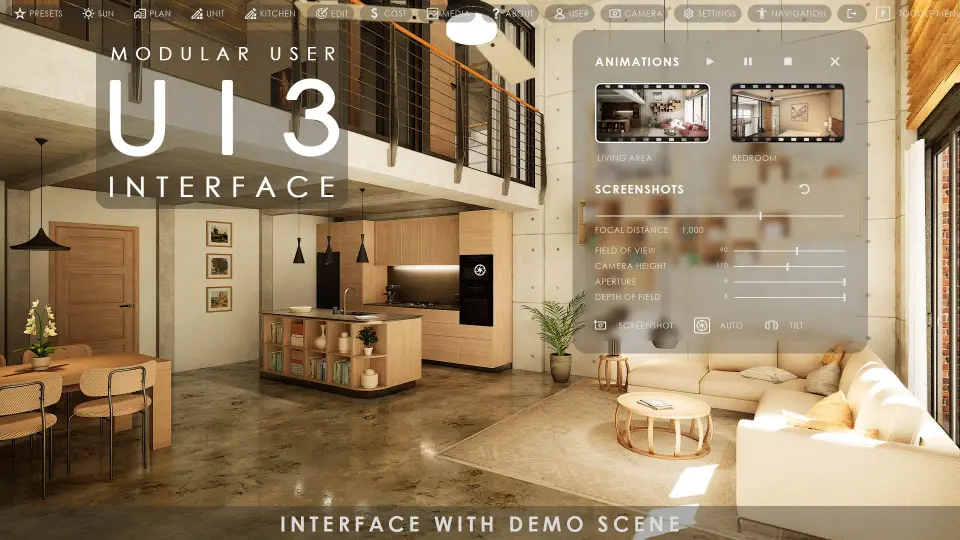
Several modules focus on information and scene management rather than simple navigation. The Interactive Floorplan supports multiple floor levels, while the Object Info Widget can show optional information for selected objects. The Unit Info Blueprint and Widget display unit-specific details in multi-unit projects, which makes the interface useful when the scene represents more than one apartment, room set, or project part.
Other tools cover different stages of presentation and coordination. Lighting or Layout Scenarios can swap one sub level for another, and the Cinematic Camera supports screenshots with simple tilt correction. The Sequence Animation Player can play pre-made animations from the UI, which gives the interface a cutscene-style role when a project needs guided presentation. Scene Travel connects multiple units or project parts from the UI, so movement through a larger setup can be handled from the same system.
The package also includes project management features that fit real production work. Cost tracking keeps track of and updates the cost for all selections in the scene. User Management and Save Slots provide five save slots per user plus a default slot. Data management can be local or stored in Google Cloud with a plug-in. Multiple reports can be exported as HTML, CSV, or JSON text files when the file export plug-in is available.
Input presets and presentation options
The interface includes presets for keyboard and mouse, gamepad, touch, and VR use. There is a virtual tablet in 3D space for VR projects, and Pixel Streaming is supported with touch controls through a web browser. Limited PC VR support is available through the virtual 3D tablet. The project is also fully translatable into a different language, which matters when the same interface needs to serve more than one market or team.
A stand-alone packaged application for Windows is one of the intended uses. The demo project is made for Windows, and some materials do not compile on mobile platforms. The project may work on other platforms, including Apple, PlayStation, Xbox, and Android, but the setup is centered on the Windows path. An example project is also available with single and multi-unit examples, plus versions for gamepad, touch, and PC OpenXR input.
Keyboard, mouse, gamepad, touch, and PC-VR modes
Virtual tablet support for VR projects
Pixel Streaming touch control in a browser
Fully translatable interface text
Project data, navigation actors, and version update notes
The project includes a set of blueprints that organize data and navigation. Info Map contains all data for the project and displays floorplan drawings. Variation Actor connects scene objects to the user interface, Object Info Actor displays information about selected objects, Location Actor provides quick access to locations, and Stairs Marker is used for Target Move. The interface also supports four game modes: Keyboard, Touch, Gamepad, and PC-VR.
Accurate Sun Positioning, day and time settings, and a sun cycle are part of the environment controls. Drone or Walk mode adjusts player movement, camera controls, and game quality. There is also a media screen with a video player, plus About Project, Office, and Help widgets. These pieces make the interface feel less like a single menu and more like a working control layer for a scene.
The January 2026 update focuses on more intuitive useability and less repetitive data input through data tables. It is not fully compatible with previous versions, so some settings and data have to be re-entered when an older project is updated. Documentation and Version History are included, and the FAQ and Known Bugs section is available for troubleshooting. If compile errors or movement issues appear, the required plugins are Sun Positioning, OpenXR, and Enhanced Input.
In practice, the package is set up for archviz work that needs scene interaction, object editing, floorplan navigation, and multi-input presentation in one blueprint-based system.
 Widgets & Controls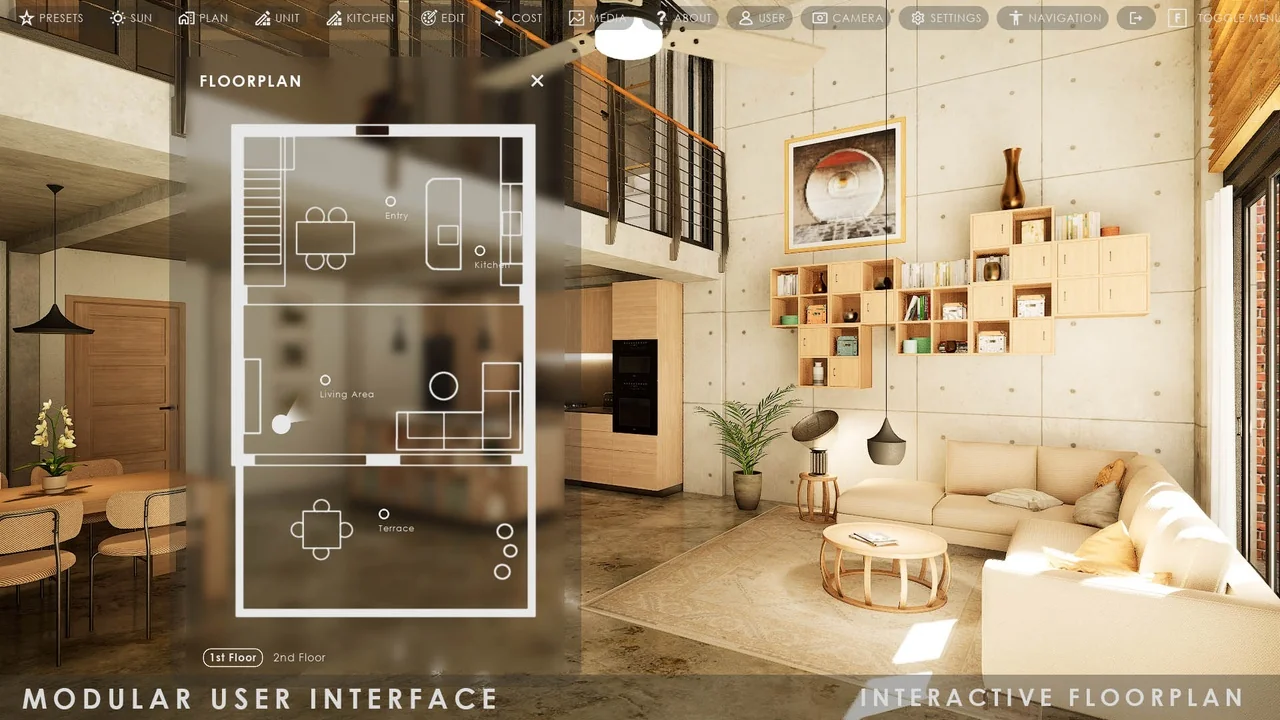
 Widgets & Controls
 Widgets & Controls
 Widgets & Controls