"0341a2901a4ae9aa"{"id":"27405","slug":"arghanions-cosmic-forge-space-nebula-skyboxes-volume-11","title":"Arghanion's Cosmic Forge - Space Nebula Skyboxes - Volume 11","category":"Sky","engine":"5.2+","assetVersion":"Engine version: 5.2+","engineVersion":"","tag":"Sky","accent":"blue","visual":"luts","summary":"Arghanion's Cosmic Forge - Space Nebula Skyboxes - Volume 11 combines 8 HDR skybox textures, alpha maps, and starfields with an Unreal Engine Blueprint material setup. It can load two HDRIs at once, rotate a second skybox independently, and add flowmap dist...","platform":"Unreal Engine","publishedAt":"2026-04-25T06:33:00.000Z","updatedAt":"2026-04-25T06:33:01.000Z","sourceNotes":[],"fileContents":[],"compatibility":["Unreal Engine","Engine version: 5.2+"],"featuredImage":{"alt":"Arghanion's Cosmic Forge - Space Nebula Skyboxes - Volume 11","src":"https://3dcghub.com/wp-content/uploads/2026/04/9b31bc18d5b4_ca5da42c-68cb-40d6-bc47-f6686d432130.webp"},"hasDownloadLink":true,"downloads":1,"terms":[{"taxonomy":"category","slug":"sky","name":"Sky"},{"taxonomy":"post_tag","slug":"environment","name":"Environment"},{"taxonomy":"post_tag","slug":"materials","name":"Materials"},{"taxonomy":"post_tag","slug":"unreal-engine-5","name":"Unreal Engine 5"}],"galleryImages":[{"src":"https://3dcghub.com/wp-content/uploads/2026/04/19662ab3074c_11a2842b-9734-4fcb-b961-9955861095f5.webp","alt":"Arghanion's Cosmic Forge - Space Nebula Skyboxes - Volume 11"},{"src":"https://3dcghub.com/wp-content/uploads/2026/04/8b0fdf8f6cb6_6aba2632-ebbf-4495-8d26-f619559b6cf5.webp","alt":"Arghanion's Cosmic Forge - Space Nebula Skyboxes - Volume 11"},{"src":"https://3dcghub.com/wp-content/uploads/2026/04/0352e5c23cf7_098b06e2-e0a9-4b6b-b7aa-225f6a5cd0d9.webp","alt":"Arghanion's Cosmic Forge - Space Nebula Skyboxes - Volume 11"},{"src":"https://3dcghub.com/wp-content/uploads/2026/04/452f402979ae_6f42c78d-65b3-4e6d-96c9-62d9ac0db3cc.webp","alt":"Arghanion's Cosmic Forge - Space Nebula Skyboxes - Volume 11"},{"src":"https://3dcghub.com/wp-content/uploads/2026/04/b621cb44168c_6424b334-fdc1-47ab-a4b2-64cb9cd2bbfa.webp","alt":"Arghanion's Cosmic Forge - Space Nebula Skyboxes - Volume 11"},{"src":"https://3dcghub.com/wp-content/uploads/2026/04/69b48b38c82e_ef3d4bf2-9195-4954-950e-7321559d08b8.webp","alt":"Arghanion's Cosmic Forge - Space Nebula Skyboxes - Volume 11"},{"src":"https://3dcghub.com/wp-content/uploads/2026/04/bb53afe4e9b8_0065f402-1229-4ecf-87ba-ebad806e352f.webp","alt":"Arghanion's Cosmic Forge - Space Nebula Skyboxes - Volume 11"},{"src":"https://3dcghub.com/wp-content/uploads/2026/04/1b0b45d81f99_b704f3e4-ed23-4789-8056-5eca269c9dfc.webp","alt":"Arghanion's Cosmic Forge - Space Nebula Skyboxes - Volume 11"},{"src":"https://3dcghub.com/wp-content/uploads/2026/04/0dc4d35461a2_d60c8169-8fa5-41c3-b850-ed93ff3af5cc.webp","alt":"Arghanion's Cosmic Forge - Space Nebula Skyboxes - Volume 11"},{"src":"https://3dcghub.com/wp-content/uploads/2026/04/9d9642cc05ff_40a0ff53-e78b-43d2-b6fc-8b67b53c3815.webp","alt":"Arghanion's Cosmic Forge - Space Nebula Skyboxes - Volume 11"}],"accessPanel":{"kind":"resource","title":"Access this resource","eyebrow":"Free Download","message":"Log in or create a free account to start your download.","fileName":"Content.7z","safetyNote":"All resources are 100% manually reviewed to eliminate all risks.","actionLabel":"Download Free","resourceType":"Resource archive"},"contentHtml":"\u003ch2\u003eHDR skyboxes, alpha maps, and starfield layers\u003c/h2\u003e\u003cp\u003eArghanion's Cosmic Forge - Space Nebula Skyboxes - Volume 11 combines 8 HDR skybox textures with alpha maps and starfields, then places them in an Unreal Engine project with a complete Blueprint material setup. The main visual idea is straightforward: the HDR skybox textures provide the nebula backdrop, the alpha maps create depth and intricate designs, and the starfields add another layer of depth on top of that.\u003c/p\u003e\u003cp\u003eThe package also includes an animated nebula cubemap HDRI, a star skybox, and a nebula star skybox in cubemap format. An extra cubemap with rotation capability is part of the package as well, giving the scene more than one way to present space imagery. Instead of relying on a single static sky, the collection is arranged to work with layered space visuals that can be tuned and combined inside the project.\u003c/p\u003e\u003cp\u003eThat layering matters for the kind of sky this set is trying to handle. The available details points to a nebula look that is not just a flat panorama, but a sky made from several elements working together: skybox textures, alpha-driven detail, and star passes that add distance behind the main nebula shapes. The result is a setup that keeps the sky visually active even before any extra motion is applied.\u003c/p\u003e\u003ch2\u003eBlueprint material setup in Unreal Engine\u003c/h2\u003e\u003cp\u003eThe Unreal Engine project comes with a complete Blueprint material setup that can load up to 2 different HDRIs at the same time. Those two skyboxes can live in the same skysphere, and the second skybox can be rotated independently. That gives the scene a practical way to combine different sky layers without forcing them to sit in exactly the same orientation.\u003c/p\u003e\u003cp\u003eTwo starfields can also be used together, and a Flow Map is included for the main cubemap texture. The setup is not just about placing a sky into the scene; it is about controlling how that sky behaves once it is there. With two sky layers, two starfields, and a flowmap tied to the main cubemap, the project has enough room to present a space backdrop with more variation than a single sky texture would allow.\u003c/p\u003e\u003cp\u003eThe rotation option is especially useful in the context of the collection's own structure. Because the second skybox can move independently, the material setup can keep one layer stable while another layer shifts. That gives the sky a more adjustable composition, which fits the package's emphasis on depth and layered nebula detail.\u003c/p\u003e\u003ch2\u003eBrightness, masking, and animated distortion\u003c/h2\u003e\u003cp\u003eThe customization options are concrete and focused on the sky itself. Brightness, saturation, and intensity controls are included, so the look can be adjusted without changing the underlying assets. A Sun Disk Mask is also available to hide the sun based on alpha textures, which gives the nebula setup a cleaner way to manage the bright disk inside the sky image.\u003c/p\u003e\u003cp\u003eThe Flow Map setup is used to distort and animate the skybox. That means the sky is not limited to a still image treatment; it can be pushed toward motion and variation through the material system. Because the flowmap is tied to the main cubemap texture, the distortion and animation affect the sky structure directly rather than sitting on top as a separate effect.\u003c/p\u003e\u003cp\u003eThis makes the collection fit scenes that need the sky to feel active while still staying within a controlled Unreal Engine material workflow. The combination of adjustable color controls, sun masking, and animated distortion gives the nebula setup a few different ways to change how it reads on screen. Each of those controls is tied to a specific part of the sky rather than to a vague general effect.\u003c/p\u003e\u003ch2\u003eBlackhole Blueprint and package pieces\u003c/h2\u003e\u003cp\u003eThe Unreal Engine project also contains a fully customizable Blackhole Blueprint, which extends the collection beyond skyboxes alone. Alongside the sky elements, the package includes a large world scene, so the project is not limited to isolated sky assets. The scene and blueprint pieces sit next to the sky content as part of the same package structure.\u003c/p\u003e\u003cul\u003e\u003cli\u003eAnimated Nebula Cubemap - HDRI\u003c/li\u003e\u003cli\u003eBlackhole Blueprint\u003c/li\u003e\u003cli\u003eLarge World Scene\u003c/li\u003e\u003cli\u003eStar Skybox\u003c/li\u003e\u003cli\u003eNebula Star Skybox in Cubemap format\u003c/li\u003e\u003cli\u003eStarfields included\u003c/li\u003e\u003cli\u003eExtra cubemap with rotation capability\u003c/li\u003e\u003c/ul\u003e\u003cp\u003eThose included parts point to a project that is ready to handle layered space imagery in a single Unreal Engine setup. The black hole blueprint adds a separate celestial element, while the large world scene gives the collection a broader setting inside the project. The sky assets, starfields, and rotation-capable cubemap then give the space backdrop enough variation to be assembled in different ways without stepping outside the package's own material system.\u003c/p\u003e\u003cp\u003eFor anyone working through a nebula sky setup in Unreal Engine, the package is organized to handle layered HDRI skies, starfield depth, independent skybox rotation, and flowmap-based animation. It ends up serving a clear practical role: one project that can manage space sky layers, brightness tuning, sun masking, and a customizable black hole blueprint in the same workflow.\u003c/p\u003e\n\n\u003ch2\u003eMore From The Same Workflow\u003c/h2\u003e\n\u003cul\u003e\n\u003cli\u003e\u003ca href=\"https://3dcghub.com/shootlikeme-unreal-engine-third-person-shooter-template/\" title=\"ShootLikeMe – Unreal Engine Third Person Shooter Template\"\u003eShootLikeMe – Unreal Engine Third Person Shooter Template\u003c/a\u003e\u003c/li\u003e\n\u003cli\u003e\u003ca href=\"https://3dcghub.com/advanced-unreal-engine-5-multiplayer-gameplay-programming/\" title=\"Advanced Unreal Engine 5 Multiplayer Gameplay Programming\"\u003eAdvanced Unreal Engine 5 Multiplayer Gameplay Programming\u003c/a\u003e\u003c/li\u003e\n\u003cli\u003e\u003ca href=\"https://3dcghub.com/niagara-beginners-to-advanced-in-unreal-engine-5/\" title=\"Niagara Beginners to advanced in Unreal Engine 5\"\u003eNiagara Beginners to advanced in Unreal Engine 5\u003c/a\u003e\u003c/li\u003e\n\u003cli\u003e\u003ca href=\"https://3dcghub.com/create-zelda-like-skills-with-c-in-unreal-engine-5-2/\" title=\"Create Zelda-like skills with C++ in unreal engine 5\"\u003eCreate Zelda-like skills with C++ in unreal engine 5\u003c/a\u003e\u003c/li\u003e\n\u003cli\u003e\u003ca href=\"https://3dcghub.com/main-menus-beginner-class-unreal-engine-5/\" title=\"Main Menus Beginner Class – Unreal Engine 5\"\u003eMain Menus Beginner Class – Unreal Engine 5\u003c/a\u003e\u003c/li\u003e\n\u003c/ul\u003e\n\n\u003ch2\u003eAsset Gallery\u003c/h2\u003e","contentTextLength":5347,"navigation":{"current":2263,"total":4017,"previous":{"id":"27418","slug":"artists-attic-studio-environment","title":"Artist’s Attic Studio Environment","category":"Interior","platform":"Unreal Engine","updatedAt":"2026-04-25T08:27:47.000Z"},"next":{"id":"27392","slug":"archviz-user-interface-3","title":"ArchViz User Interface 3","category":"Widgets \u0026 Controls","platform":"Unreal Engine","updatedAt":"2026-04-25T05:38:30.000Z"}},"relatedResources":[{"id":"12943","slug":"space-skybox-collection-3","title":"Space Skybox Collection 3","category":"Sky","engine":"5.1+","assetVersion":"Engine version: 5.1+","engineVersion":"4.24","tag":"Sky","accent":"blue","visual":"luts","summary":"Enhance your cosmic environments with Space Skybox Collection 3, a set of four layered materials featuring nebulae and distant galaxies. These assets offer both cubemap and square image formats for maximum flexibility.","platform":"Unreal Engine","publishedAt":"2026-03-09T18:02:11.000Z","updatedAt":"2026-04-19T15:46:34.000Z","sourceNotes":[],"fileContents":[],"compatibility":["Unreal Engine"],"featuredImage":{"alt":"Space Skybox Collection 3","src":"https://3dcghub.com/wp-content/uploads/2026/03/4eba7177-fbc5-478e-9086-85b2add9f21a.webp"},"hasDownloadLink":true,"downloads":1},{"id":"12914","slug":"cartoon-sky-shader","title":"Cartoon Sky Shader","category":"Sky","engine":"5.0+","assetVersion":"Engine version: 5.0+","engineVersion":"4.26","tag":"Sky","accent":"blue","visual":"luts","summary":"Enhance your project with the Cartoon Sky Shader, a versatile tool for creating atmospheric or stylized skies. This pack features dynamic sun, moon, and cloud systems compatible with Unreal Engine.","platform":"Unreal Engine","publishedAt":"2026-03-09T18:01:40.000Z","updatedAt":"2026-04-19T15:46:35.000Z","sourceNotes":[],"fileContents":[],"compatibility":["Unreal Engine","Engine version: 5.0+"],"featuredImage":{"alt":"Cartoon Sky Shader","src":"https://3dcghub.com/wp-content/uploads/2026/03/ac7979be-3ccd-4718-ae28-4187ff61eacf.webp"},"hasDownloadLink":true,"downloads":0},{"id":"9747","slug":"moon-landscape","title":"Moon Landscape","category":"Sky \u0026 Space","engine":"4.26+,5.0+","assetVersion":"Engine version: 4.26+,5.0+","engineVersion":"5.0","tag":"Sky \u0026 Space","accent":"blue","visual":"city","summary":"Enhance your cosmic scenes with this detailed Moon Landscape. It features a massive 8129x8129 surface, unique material layers, and realistic background assets like planet Earth and a starry sky.","platform":"Unreal Engine","publishedAt":"2026-03-01T17:43:23.000Z","updatedAt":"2026-04-19T15:51:01.000Z","sourceNotes":[],"fileContents":[],"compatibility":["Unreal Engine","Engine version: 4.26+,5.0+"],"featuredImage":{"alt":"Moon Landscape","src":"https://3dcghub.com/wp-content/uploads/2026/03/0c3bb51b-8fd3-4b08-93a2-b69c5d7ee79a.webp"},"hasDownloadLink":true,"downloads":1}]}
Sky
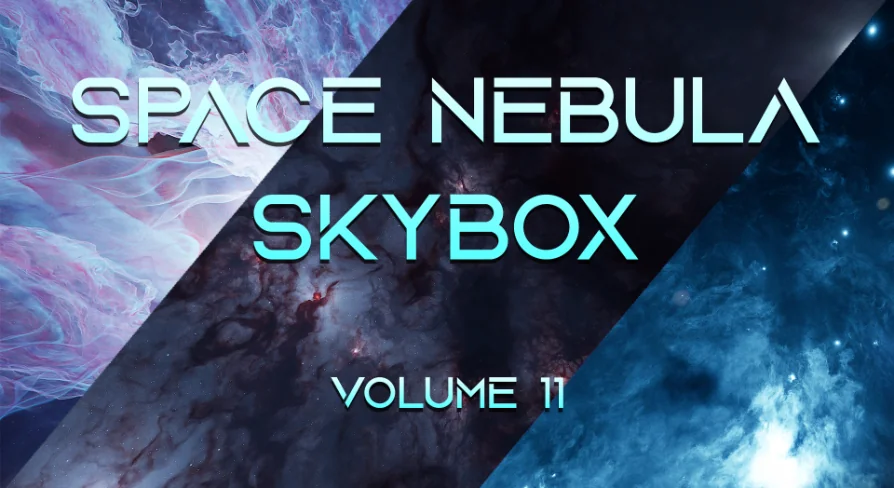
Arghanion's Cosmic Forge - Space Nebula Skyboxes - Volume 11
Arghanion's Cosmic Forge - Space Nebula Skyboxes - Volume 11 combines 8 HDR skybox textures, alpha maps, and starfields with an Unreal Engine Blueprint material setup. It can load two HDRIs at once, rotate a second skybox independently, and add flowmap dist...
Arghanion's Cosmic Forge - Space Nebula Skyboxes - Volume 11 combines 8 HDR skybox textures with alpha maps and starfields, then places them in an Unreal Engine project with a complete Blueprint material setup. The main visual idea is straightforward: the HDR skybox textures provide the nebula backdrop, the alpha maps create depth and intricate designs, and the starfields add another layer of depth on top of that.
The package also includes an animated nebula cubemap HDRI, a star skybox, and a nebula star skybox in cubemap format. An extra cubemap with rotation capability is part of the package as well, giving the scene more than one way to present space imagery. Instead of relying on a single static sky, the collection is arranged to work with layered space visuals that can be tuned and combined inside the project.
That layering matters for the kind of sky this set is trying to handle. The available details points to a nebula look that is not just a flat panorama, but a sky made from several elements working together: skybox textures, alpha-driven detail, and star passes that add distance behind the main nebula shapes. The result is a setup that keeps the sky visually active even before any extra motion is applied.
Blueprint material setup in Unreal Engine
The Unreal Engine project comes with a complete Blueprint material setup that can load up to 2 different HDRIs at the same time. Those two skyboxes can live in the same skysphere, and the second skybox can be rotated independently. That gives the scene a practical way to combine different sky layers without forcing them to sit in exactly the same orientation.
Two starfields can also be used together, and a Flow Map is included for the main cubemap texture. The setup is not just about placing a sky into the scene; it is about controlling how that sky behaves once it is there. With two sky layers, two starfields, and a flowmap tied to the main cubemap, the project has enough room to present a space backdrop with more variation than a single sky texture would allow.
The rotation option is especially useful in the context of the collection's own structure. Because the second skybox can move independently, the material setup can keep one layer stable while another layer shifts. That gives the sky a more adjustable composition, which fits the package's emphasis on depth and layered nebula detail.
Brightness, masking, and animated distortion
The customization options are concrete and focused on the sky itself. Brightness, saturation, and intensity controls are included, so the look can be adjusted without changing the underlying assets. A Sun Disk Mask is also available to hide the sun based on alpha textures, which gives the nebula setup a cleaner way to manage the bright disk inside the sky image.
The Flow Map setup is used to distort and animate the skybox. That means the sky is not limited to a still image treatment; it can be pushed toward motion and variation through the material system. Because the flowmap is tied to the main cubemap texture, the distortion and animation affect the sky structure directly rather than sitting on top as a separate effect.
This makes the collection fit scenes that need the sky to feel active while still staying within a controlled Unreal Engine material workflow. The combination of adjustable color controls, sun masking, and animated distortion gives the nebula setup a few different ways to change how it reads on screen. Each of those controls is tied to a specific part of the sky rather than to a vague general effect.
Blackhole Blueprint and package pieces
The Unreal Engine project also contains a fully customizable Blackhole Blueprint, which extends the collection beyond skyboxes alone. Alongside the sky elements, the package includes a large world scene, so the project is not limited to isolated sky assets. The scene and blueprint pieces sit next to the sky content as part of the same package structure.
Animated Nebula Cubemap - HDRI
Blackhole Blueprint
Large World Scene
Star Skybox
Nebula Star Skybox in Cubemap format
Starfields included
Extra cubemap with rotation capability
Those included parts point to a project that is ready to handle layered space imagery in a single Unreal Engine setup. The black hole blueprint adds a separate celestial element, while the large world scene gives the collection a broader setting inside the project. The sky assets, starfields, and rotation-capable cubemap then give the space backdrop enough variation to be assembled in different ways without stepping outside the package's own material system.
For anyone working through a nebula sky setup in Unreal Engine, the package is organized to handle layered HDRI skies, starfield depth, independent skybox rotation, and flowmap-based animation. It ends up serving a clear practical role: one project that can manage space sky layers, brightness tuning, sun masking, and a customizable black hole blueprint in the same workflow.
 Sky
Sky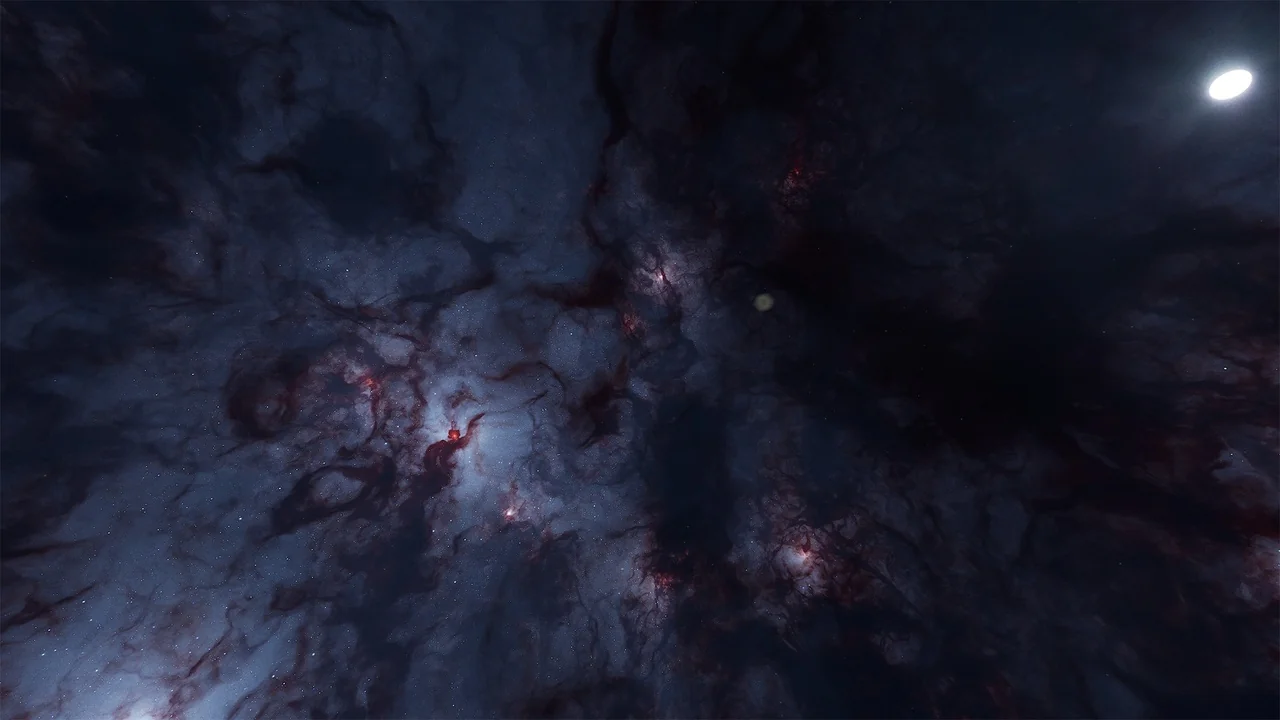
 Sky
Sky Sky
Sky Sky & Space