"b00678cacce53329"{"id":"1002859","slug":"weapon-impact-fx","title":"Weapon Impact FX","category":"Variety","engine":"4.20+,5.0+","assetVersion":"","engineVersion":"Engine Version: 4.20+,5.0+","tag":"Variety","accent":"blue","visual":"mech","summary":"Technical breakdown of Weapon Impact FX, featuring 58 particle variations across 10 surface categories with X-axis alignment and omnidirectional setups.","platform":"Unreal Engine","indexPolicy":"index","publishedAt":"2026-11-20T12:39:48.939Z","updatedAt":"2026-11-20T12:39:48.939Z","sourceNotes":[],"fileContents":[],"compatibility":["Unreal Engine","Engine Version: 4.20+,5.0+"],"featuredImage":{"alt":"Weapon Impact FX","src":"/wp-content/uploads/published/2026/11/1390cba7a756-7842c32e-0221-4276-a750-0c78af87e955-ab38025abb.webp"},"fileSizeBytes":294366774,"hasDownloadLink":true,"downloads":0,"terms":[{"taxonomy":"category","slug":"variety-vfx","name":"Variety"}],"galleryImages":[{"src":"/wp-content/uploads/published/2026/11/8a58d1a8b936-2347dcb2-5907-4d4a-a371-99ddef9ca068-4bf0dbf529.webp","alt":"Weapon Impact FX"},{"src":"/wp-content/uploads/published/2026/11/fed74375c868-6a5d8638-bb16-4fb0-baca-2294be00138c-13dabdcdfd.webp","alt":"Weapon Impact FX"},{"src":"/wp-content/uploads/published/2026/11/692a0eba14b7-cedc7ba7-de28-4428-88fc-c12232c0f793-2b70ad1977.webp","alt":"Weapon Impact FX"},{"src":"/wp-content/uploads/published/2026/11/2b42da206789-e58a62e2-b916-4e58-9aee-7ab96a81d55f-cb2bc09513.webp","alt":"Weapon Impact FX"},{"src":"/wp-content/uploads/published/2026/11/ccef39b04983-b4558d59-8fa8-4c08-9231-4b15035c7a47-40ebbe9381.webp","alt":"Weapon Impact FX"},{"src":"/wp-content/uploads/published/2026/11/c2f47aafc383-d9948b6e-4e62-4c2d-967b-0e9f45171da7-5a67520f85.webp","alt":"Weapon Impact FX"},{"src":"/wp-content/uploads/published/2026/11/d7e73760a091-1c897367-3ed1-4566-8a00-7dd01adfc81a-cbbb33d490.webp","alt":"Weapon Impact FX"},{"src":"/wp-content/uploads/published/2026/11/927261a80de7-a9dc1f3f-c1f3-457e-bca1-3e6fc56c256a-1591274a63.webp","alt":"Weapon Impact FX"},{"src":"/wp-content/uploads/published/2026/11/6e79b61da212-8f32f478-6b5f-450e-a866-e3a9d992f7eb-80ccaae9aa.webp","alt":"Weapon Impact FX"}],"accessPanel":{"kind":"resource","title":"Get this resource","safetyNote":"Resources are manually reviewed before listing to improve quality and reduce obvious risks.","fileName":"Content.7z","resourceType":"Resource archive","versions":[]},"contentHtml":"\u003ch2\u003eConfiguring Weapon Impact FX Along Collision Vectors\u003c/h2\u003e\u003cp\u003eIntegrating hit responses into a combat system begins with surface detection and coordinate transformation. When a projectile or hitscan trace intersects geometry, the physics engine returns a contact point and surface normal. Weapon Impact FX structures its directional particles with the forward emission vector explicitly aiming down the X axis. This fixed orientation eliminates guesswork when assembling dynamic spawn functions. Rather than writing custom rotation offsets for different materials, developers can pipe the surface normal or inverted reflection angle straight into the particle transform's forward vector, aligning every impact spray immediately on spawn.\u003c/p\u003e\u003cp\u003eStandardizing particle forward vectors along the X axis accelerates the assembly of gameplay trace events. Whether an impact stems from a high-velocity rifle round, an arrow, or an energetic fantasy blast, line-trace hit data typically provides a contact normal vector. By aligning the X axis directly with that contact normal, directional debris, dust plumes, and fragmented matter immediately propagate away from the struck geometry in a physically coherent trajectory.\u003c/p\u003e\u003ch2\u003eDirectional and Omni Particle Behaviors in Impact FX\u003c/h2\u003e\u003cp\u003eCombat environments produce varied impact dynamics depending on velocity, angle of incidence, and weapon class. Weapon Impact FX resolves this by supplying both directional and omni directional particle systems across each of its included types. The total library comprises 58 distinct weapon impact particle setups, ensuring that strikes can be visually articulated according to the specific physics of an encounter.\u003c/p\u003e\u003cp\u003eDirectional effects address glancing strikes, direct-angle ballistic penetrations, and focused discharges where kinetic energy pushes material outward along a clear cone. Because these systems project their primary velocity along the X axis, they effectively convey kinetic transfer across surfaces like walls, shields, and vehicle armor. Material chips, secondary spatter, and focused dust plumes travel outward from the point of entry.\u003c/p\u003e\u003cp\u003eOmnidirectional variants serve situations where energy distributes equally in all directions. When a projectile detonates on contact, strikes a surface perpendicularly with overwhelming force, or triggers a localized bursting reaction, omni particles release debris, smoke, and fragmentation radially. Maintaining dedicated omni and directional versions for each category ensures that hit-event logic can simply switch between an omnidirectional emitter and an X-axis directional emitter based on incoming velocity angles or weapon payload types.\u003c/p\u003e\u003ch2\u003eSurface Classification Across Weapon Impact Categories\u003c/h2\u003e\u003cp\u003eMaterial diversity dictates the believable breakdown of an environment during combat encounters. Weapon Impact FX categorizes its 58 particle types into 10 distinct surface groups, establishing clear material coverage for complex levels:\u003c/p\u003e\u003cul\u003e\u003cli\u003e\u003cstrong\u003eBlood:\u003c/strong\u003e Organic collision responses, spanning directional fluid sprays along exit or entry vectors alongside omnidirectional bursts for blunt-force trauma and localized wound impacts.\u003c/li\u003e\u003cli\u003e\u003cstrong\u003eConcrete:\u003c/strong\u003e Hard-surface masonry strikes, kicking up brittle stone fragments, powdered aggregate, and directional pulverized dust.\u003c/li\u003e\u003cli\u003e\u003cstrong\u003eDirt:\u003c/strong\u003e Granular ground disturbance featuring dense soil displacement, particulate clouds, and loose earth dispersal.\u003c/li\u003e\u003cli\u003e\u003cstrong\u003eExplosive:\u003c/strong\u003e High-energy blast events combining high-velocity debris projection with radial pressure releases suitable for heavy munitions or magical detonations.\u003c/li\u003e\u003cli\u003e\u003cstrong\u003eGlass:\u003c/strong\u003e Brittle-surface disruption defined by high-frequency crystalline shards, micro-fragmentation, and clean break patterns.\u003c/li\u003e\u003cli\u003e\u003cstrong\u003eGrass:\u003c/strong\u003e Organic ground cover strikes that release sheared blades, topsoil dust, and low-density turf fragments.\u003c/li\u003e\u003cli\u003e\u003cstrong\u003eMetal:\u003c/strong\u003e Non-penetrable or semi-penetrable hard surface reactions, yielding directional sparks, incandescent contact flares, and friction matter.\u003c/li\u003e\u003cli\u003e\u003cstrong\u003eSmoke:\u003c/strong\u003e Pure volumetric obscuration and lingering atmospheric residue, useful for suppressed discharges, post-impact smoldering, and tactical hit feedback.\u003c/li\u003e\u003cli\u003e\u003cstrong\u003eWater:\u003c/strong\u003e Fluid displacement spanning vertical and directional splash jets, airborne droplets, and expanding omnidirectional disturbance sheets.\u003c/li\u003e\u003cli\u003e\u003cstrong\u003eWood:\u003c/strong\u003e Splintering timber reactions with fibrous debris ejection, sawed-grain dust, and directional core fracture particles.\u003c/li\u003e\u003c/ul\u003e\u003cp\u003eStructuring the library around these 10 core surface types simplifies the integration of physical materials. A game’s physics layer can classify incoming geometry into one of these ten definitions, dynamically calling the matching directional or omnidirectional effect from the 58 available particle types without requiring distinct sub-logic for varied architectural props.\u003c/p\u003e\u003ch2\u003eProduction Deployment Across Realistic and Fantasy Weapon Systems\u003c/h2\u003e\u003cp\u003eBalancing impact visual design requires assets to serve distinct aesthetic parameters without destabilizing game performance. Weapon Impact FX spans both realistic and fantasy stylistic applications, as well as general weapon categories. In a realistic modern shooter, the metal, concrete, dirt, and glass presets supply immediate mechanical feedback for physical ballistic rounds, ensuring that bullets striking varied level components yield appropriate debris sizes and dust lingering profiles.\u003c/p\u003e\u003cp\u003eIn fantasy or stylized projects, the same categorical breakdown accommodates supernatural projectiles, elemental magic, and enchanted melee attacks. The explosive, smoke, and blood categories translate naturally to spell impacts, explosive ward triggers, and creature melee clashes. Because the asset package supplies 58 distinct variations across its material palette, projects can introduce visual hierarchy: standard impacts can deploy lighter directional puffs, while critical strikes, charged projectiles, or heavy artillery can call heavier multi-stage systems from the explosive and omnidirectional rosters.\u003c/p\u003e\u003ch2\u003eStandardized Maintenance and Pipeline Reliability\u003c/h2\u003e\u003cp\u003eManaging weapon impact logic across large scale game projects often suffers when visual effects utilize inconsistent internal coordinates or unpredictable transform conventions. By locking directional particles down the X axis across all 10 categories, Weapon Impact FX establishes an unambiguous standard for gameplay engineers and technical artists. Combat traces can rely on a single, unified orientation function for all 58 particle variants, significantly lowering the overhead required to maintain hit-spawning logic across expanding weapon arsenals and diverse combat terrain.\u003c/p\u003e\n\n\u003ch2\u003eExplore Similar Assets\u003c/h2\u003e\n\u003cul\u003e\n\u003cli\u003e\u003ca href=\"https://3dcghub.com/cartoony-impact-fx-second-edition/\" rel=\"noopener noreferrer\"\u003eCartoony Impact FX - Second Edition\u003c/a\u003e\u003c/li\u003e\n\u003cli\u003e\u003ca href=\"https://3dcghub.com/simple-cartoon-fx-pack/\" rel=\"noopener noreferrer\"\u003eSimple Cartoon FX Pack\u003c/a\u003e\u003c/li\u003e\n\u003cli\u003e\u003ca href=\"https://3dcghub.com/stylized-fx-3/\" rel=\"noopener noreferrer\"\u003eStylized FX 3\u003c/a\u003e\u003c/li\u003e\n\u003cli\u003e\u003ca href=\"https://3dcghub.com/stylized-fx-2/\" rel=\"noopener noreferrer\"\u003eStylized FX 2\u003c/a\u003e\u003c/li\u003e\n\u003cli\u003e\u003ca href=\"https://3dcghub.com/simple-cartoon-fx-2/\" rel=\"noopener noreferrer\"\u003eSimple Cartoon FX 2\u003c/a\u003e\u003c/li\u003e\n\u003c/ul\u003e","contentTextLength":6658,"navigation":{"current":21,"total":4797,"previous":{"id":"1002860","slug":"fantasy-vfx-collection","title":"FANTASY VFX COLLECTION","category":"Variety","platform":"Unreal Engine","updatedAt":"2026-11-20T12:40:56.633Z"},"next":{"id":"1002858","slug":"vfx-weather-pack","title":"VFX Weather Pack","category":"Variety","platform":"Unreal Engine","updatedAt":"2026-11-20T12:38:46.484Z"}},"relatedResources":[{"id":"1001724","slug":"cartoony-impact-fx-second-edition","title":"Cartoony Impact FX - Second Edition","category":"Variety","engine":"4.16+,5.0+","assetVersion":"","engineVersion":"Engine Version: 4.16+,5.0+","tag":"Variety","accent":"blue","visual":"mech","summary":"A breakdown of Cartoony Impact FX - Second Edition, focusing on its multi-layer modular explosion architecture, specialized stylized shaders, and Blueprint work","platform":"Unreal Engine","indexPolicy":"index","publishedAt":"2026-10-20T02:31:01.294Z","updatedAt":"2026-10-20T02:31:01.294Z","sourceNotes":[],"fileContents":[],"compatibility":["Unreal Engine","Engine Version: 4.16+,5.0+"],"featuredImage":{"alt":"Cartoony Impact FX - Second Edition","src":"/wp-content/uploads/published/2026/10/162fa84c565f-430f11b7-58a2-46fe-94f8-0db994923997-9610786aa4.webp"},"fileSizeBytes":57915212,"hasDownloadLink":true,"downloads":1},{"id":"1001666","slug":"simple-cartoon-fx-pack","title":"Simple Cartoon FX Pack","category":"Variety","engine":"4.10+,5.0+","assetVersion":"","engineVersion":"Engine Version: 4.10+,5.0+","tag":"Variety","accent":"blue","visual":"mech","summary":"Explore the Simple Cartoon FX Pack, featuring 10 stylized game particles with cartoon shading and editable material instances for casual game workflows.","platform":"Unreal Engine","indexPolicy":"index","publishedAt":"2026-10-13T15:07:26.502Z","updatedAt":"2026-10-13T15:07:26.502Z","sourceNotes":[],"fileContents":[],"compatibility":["Unreal Engine","Engine Version: 4.10+,5.0+"],"featuredImage":{"alt":"Simple Cartoon FX Pack","src":"/wp-content/uploads/published/2026/10/43e6ff1aa10a-e7eed192-5502-4a94-a4a9-c2409c0d8613-2453e9c1e9.webp"},"fileSizeBytes":75912447,"hasDownloadLink":true,"downloads":3},{"id":"1002868","slug":"fireworks-niagara-fx","title":"Fireworks Niagara FX","category":"Variety","engine":"4.25+,5.0+","assetVersion":"","engineVersion":"Engine Version: 4.25+,5.0+","tag":"Variety","accent":"blue","visual":"mech","summary":"Explore Fireworks Niagara FX, featuring nine shell types, direct and rocket spawn modes, customizable shape effects, and volumetric smoke illumination.","platform":"Unreal Engine","indexPolicy":"index","publishedAt":"2026-11-20T16:31:03.944Z","updatedAt":"2026-11-20T16:31:03.944Z","sourceNotes":[],"fileContents":[],"compatibility":["Unreal Engine","Engine Version: 4.25+,5.0+"],"featuredImage":{"alt":"Fireworks Niagara FX","src":"/wp-content/uploads/published/2026/11/45478d2360d8-3ed009ea-0797-411e-bf5d-e3d5ff0227aa-8c344bc6c5.webp"},"fileSizeBytes":36424846,"hasDownloadLink":true,"downloads":0}]}
Resource screenshots
1 / 9
Join our channel
Follow 3DCGHUB on Telegram for new resource drops, migration updates, and community notices.
Resources are manually reviewed before listing to improve quality and reduce obvious risks.
No account required
Variety
Weapon Impact FX
Technical breakdown of Weapon Impact FX, featuring 58 particle variations across 10 surface categories with X-axis alignment and omnidirectional setups.
Configuring Weapon Impact FX Along Collision Vectors
Integrating hit responses into a combat system begins with surface detection and coordinate transformation. When a projectile or hitscan trace intersects geometry, the physics engine returns a contact point and surface normal. Weapon Impact FX structures its directional particles with the forward emission vector explicitly aiming down the X axis. This fixed orientation eliminates guesswork when assembling dynamic spawn functions. Rather than writing custom rotation offsets for different materials, developers can pipe the surface normal or inverted reflection angle straight into the particle transform's forward vector, aligning every impact spray immediately on spawn.
Standardizing particle forward vectors along the X axis accelerates the assembly of gameplay trace events. Whether an impact stems from a high-velocity rifle round, an arrow, or an energetic fantasy blast, line-trace hit data typically provides a contact normal vector. By aligning the X axis directly with that contact normal, directional debris, dust plumes, and fragmented matter immediately propagate away from the struck geometry in a physically coherent trajectory.
Directional and Omni Particle Behaviors in Impact FX
Combat environments produce varied impact dynamics depending on velocity, angle of incidence, and weapon class. Weapon Impact FX resolves this by supplying both directional and omni directional particle systems across each of its included types. The total library comprises 58 distinct weapon impact particle setups, ensuring that strikes can be visually articulated according to the specific physics of an encounter.
Directional effects address glancing strikes, direct-angle ballistic penetrations, and focused discharges where kinetic energy pushes material outward along a clear cone. Because these systems project their primary velocity along the X axis, they effectively convey kinetic transfer across surfaces like walls, shields, and vehicle armor. Material chips, secondary spatter, and focused dust plumes travel outward from the point of entry.
Omnidirectional variants serve situations where energy distributes equally in all directions. When a projectile detonates on contact, strikes a surface perpendicularly with overwhelming force, or triggers a localized bursting reaction, omni particles release debris, smoke, and fragmentation radially. Maintaining dedicated omni and directional versions for each category ensures that hit-event logic can simply switch between an omnidirectional emitter and an X-axis directional emitter based on incoming velocity angles or weapon payload types.
Surface Classification Across Weapon Impact Categories
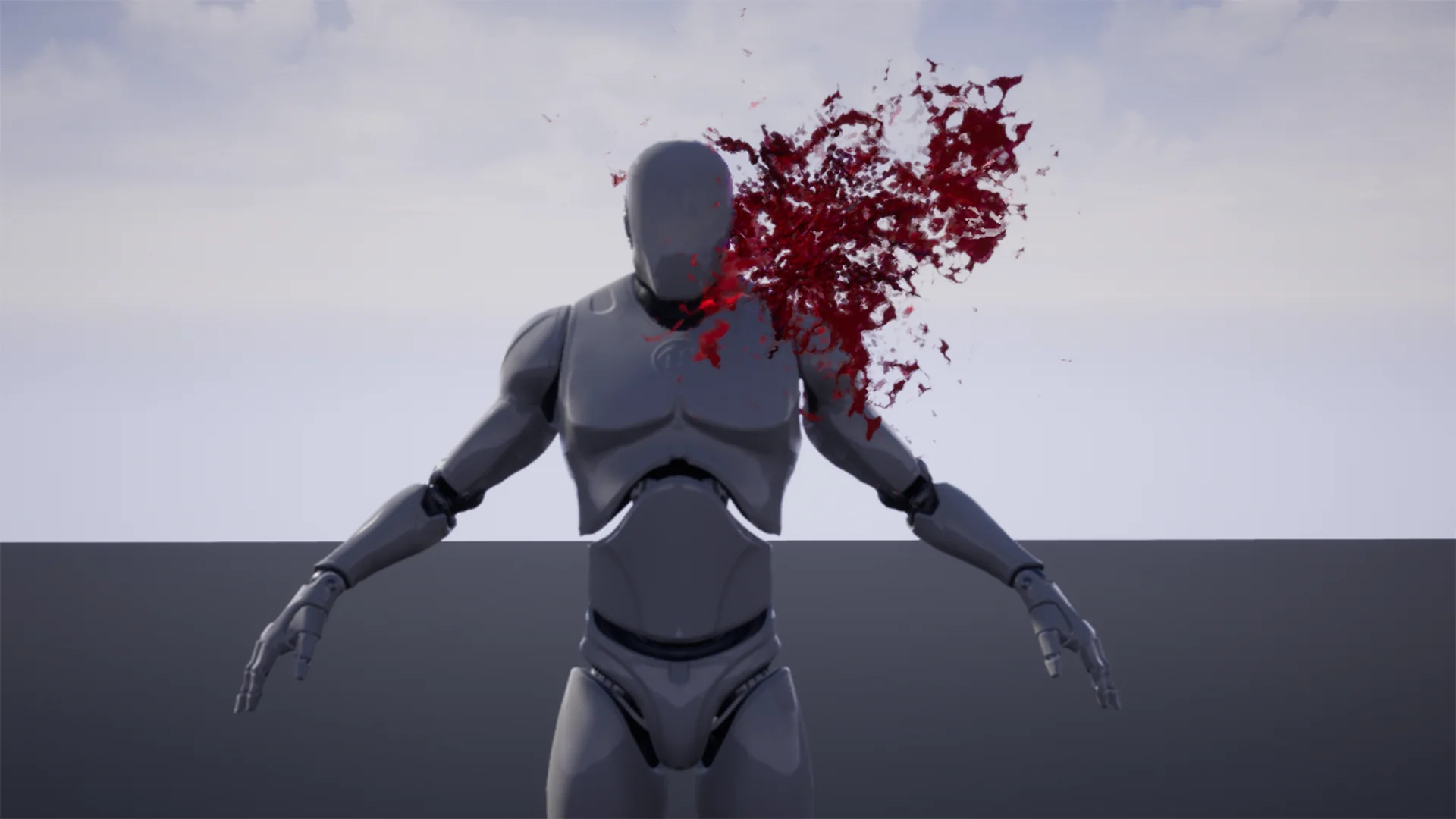
Material diversity dictates the believable breakdown of an environment during combat encounters. Weapon Impact FX categorizes its 58 particle types into 10 distinct surface groups, establishing clear material coverage for complex levels:
Blood: Organic collision responses, spanning directional fluid sprays along exit or entry vectors alongside omnidirectional bursts for blunt-force trauma and localized wound impacts.
Concrete: Hard-surface masonry strikes, kicking up brittle stone fragments, powdered aggregate, and directional pulverized dust.
Explosive: High-energy blast events combining high-velocity debris projection with radial pressure releases suitable for heavy munitions or magical detonations.
Glass: Brittle-surface disruption defined by high-frequency crystalline shards, micro-fragmentation, and clean break patterns.
Grass: Organic ground cover strikes that release sheared blades, topsoil dust, and low-density turf fragments.
Metal: Non-penetrable or semi-penetrable hard surface reactions, yielding directional sparks, incandescent contact flares, and friction matter.
Smoke: Pure volumetric obscuration and lingering atmospheric residue, useful for suppressed discharges, post-impact smoldering, and tactical hit feedback.
Water: Fluid displacement spanning vertical and directional splash jets, airborne droplets, and expanding omnidirectional disturbance sheets.
Wood: Splintering timber reactions with fibrous debris ejection, sawed-grain dust, and directional core fracture particles.
Structuring the library around these 10 core surface types simplifies the integration of physical materials. A game’s physics layer can classify incoming geometry into one of these ten definitions, dynamically calling the matching directional or omnidirectional effect from the 58 available particle types without requiring distinct sub-logic for varied architectural props.
Production Deployment Across Realistic and Fantasy Weapon Systems
Balancing impact visual design requires assets to serve distinct aesthetic parameters without destabilizing game performance. Weapon Impact FX spans both realistic and fantasy stylistic applications, as well as general weapon categories. In a realistic modern shooter, the metal, concrete, dirt, and glass presets supply immediate mechanical feedback for physical ballistic rounds, ensuring that bullets striking varied level components yield appropriate debris sizes and dust lingering profiles.
In fantasy or stylized projects, the same categorical breakdown accommodates supernatural projectiles, elemental magic, and enchanted melee attacks. The explosive, smoke, and blood categories translate naturally to spell impacts, explosive ward triggers, and creature melee clashes. Because the asset package supplies 58 distinct variations across its material palette, projects can introduce visual hierarchy: standard impacts can deploy lighter directional puffs, while critical strikes, charged projectiles, or heavy artillery can call heavier multi-stage systems from the explosive and omnidirectional rosters.
Standardized Maintenance and Pipeline Reliability
Managing weapon impact logic across large scale game projects often suffers when visual effects utilize inconsistent internal coordinates or unpredictable transform conventions. By locking directional particles down the X axis across all 10 categories, Weapon Impact FX establishes an unambiguous standard for gameplay engineers and technical artists. Combat traces can rely on a single, unified orientation function for all 58 particle variants, significantly lowering the overhead required to maintain hit-spawning logic across expanding weapon arsenals and diverse combat terrain.
 Variety
 Variety
 Variety