"b00678cacce53329"{"id":"1002841","slug":"stylized-fx-3","title":"Stylized FX 3","category":"Variety","engine":"4.21+,5.0+","assetVersion":"","engineVersion":"Engine Version: 4.21+,5.0+","tag":"Variety","accent":"blue","visual":"mech","summary":"Explore Stylized FX 3, featuring modular environment particles, material instance color controls, optimized textures, and engine-ready tornado scaling.","platform":"Unreal Engine","indexPolicy":"index","publishedAt":"2026-11-20T12:22:48.593Z","updatedAt":"2026-11-20T12:22:48.593Z","sourceNotes":[],"fileContents":[],"compatibility":["Unreal Engine","Engine Version: 4.21+,5.0+"],"featuredImage":{"alt":"Stylized FX 3","src":"/wp-content/uploads/published/2026/11/4fd599b8d970-de0b2388-342c-4f1f-9f53-60f73af60c08-a96cf0225a.webp"},"fileSizeBytes":52914256,"hasDownloadLink":true,"downloads":0,"terms":[{"taxonomy":"category","slug":"variety-vfx","name":"Variety"}],"galleryImages":[{"src":"/wp-content/uploads/published/2026/11/affee420defb-49fa8752-f1e5-4e84-81c9-2f48e3e5356e-b37ef71ebd.webp","alt":"Stylized FX 3"},{"src":"/wp-content/uploads/published/2026/11/f9bd01d2ef0b-0793194c-479b-4251-8635-925b9cbfef0e-1abe3f7747.webp","alt":"Stylized FX 3"},{"src":"/wp-content/uploads/published/2026/11/421f2e7ae7af-833448a8-9df7-4eae-a5e0-f3a08b446f1e-fe5c88048e.webp","alt":"Stylized FX 3"},{"src":"/wp-content/uploads/published/2026/11/f4bc9c4c4767-ffbede59-773a-4eb8-9e51-2bb3c95af7e5-159decf825.webp","alt":"Stylized FX 3"},{"src":"/wp-content/uploads/published/2026/11/08f132184d01-efe253d9-0540-4210-993f-bcf6a5b7c63c-4923ca861d.webp","alt":"Stylized FX 3"}],"accessPanel":{"kind":"resource","title":"Get this resource","safetyNote":"Resources are manually reviewed before listing to improve quality and reduce obvious risks.","fileName":"Content.7z","resourceType":"Resource archive","versions":[]},"contentHtml":"\u003cp\u003eModular particle systems and material instances form the core structure of Stylized FX 3. Rather than locking visual elements into static, unchangeable simulations, the package provides individual modular components that developers can adapt across different scenes. This architecture allows each visual effect to be broken down, adjusted, and reassembled to match the visual parameters of stylized and cartoon worlds.\u003c/p\u003e \u003ch2\u003eModular Particle Setup in Stylized FX 3\u003c/h2\u003e\n\u003cp\u003eModularity in particle design changes how visual effects are deployed throughout a game environment. Instead of relying on rigid, pre-baked simulations that only fit a single context, Stylized FX 3 builds its systems out of distinct modular units. Emitters, shapes, and behaviors operate as decoupled components, giving technical artists the freedom to isolate specific particle movements or combine multiple elements into complex atmospheric events.\u003c/p\u003e\n\u003cp\u003eIn stylized game production, modularity is essential for maintaining visual consistency. Hand-crafted aesthetics rely heavily on clear silhouettes, purposeful exaggeration, and clean forms. When particle systems are modular, a developer can strip away secondary visual clutter to keep an effect readable during intense gameplay, or conversely, layer multiple modular emitters together when an environmental vista demands a more pronounced focal point. The structural independence of each particle element ensures that adjustments made to timing, density, or velocity do not disrupt the broader pipeline.\u003c/p\u003e\n\u003cp\u003eThis decoupled approach also simplifies asset management across large levels. When an environment requires repeated visual motifs—such as localized air currents, dynamic ambient phenomena, or active environmental hazards—using modular components allows those effects to share underlying logic while presenting variations in scale and density. The workflow minimizes redundant scene setup while keeping the visual identity unified.\u003c/p\u003e \u003ch2\u003eAdjusting Textures and Colors via Material Instances\u003c/h2\u003e\n\u003cp\u003eMaterial instances serve as the primary interface for modifying the visual appearance of Stylized FX 3. Rather than recompiling base shaders or generating separate texture sheets for minor aesthetic variations, artists work directly with exposed instance parameters to alter surface properties and color palettes on the fly.\u003c/p\u003e\n\u003cp\u003eThis workflow enables rapid adjustments to color values to match distinct lighting conditions and level palettes. An effect originally configured for daylight can be shifted toward deep blues, purples, or vibrant hues for nighttime or alien landscapes simply by modifying instance values. Because the material instance logic handles color shifts directly, there is no need to duplicate underlying assets, which keeps project structures clean and memory overhead predictable.\u003c/p\u003e\n\u003cp\u003eBeyond simple tint adjustments, the material instance framework allows texture manipulation within the effects. Artists can refine the appearance of particle surfaces, shifting the texture dynamics to change how sharp or soft a cartoon shape appears in the world. Adjusting texture parameters within the instance modifies emission balance, edge contrast, and visual density. This flexibility ensures that the effects remain cohesive whether placed next to flat-shaded cartoon geometry or more richly painted stylized props.\u003c/p\u003e \u003ch2\u003eEnvironment FX Integration for Cartoon Scenes\u003c/h2\u003e\n\u003cp\u003eStylized FX 3 is explicitly structured for environment FX, fulfilling a role distinct from transient gameplay triggers or character combat abilities. Environmental visual effects must exist persistently within a scene without overwhelming gameplay clarity or consuming disproportionate processing budgets.\u003c/p\u003e\n\u003cp\u003eEnvironmental effects in cartoon-style titles require precise balance. Realistic visual effects often depend on complex noise patterns and heavy transparency blending, which can easily clash with the clean lines and solid colors of stylized art direction. Stylized FX 3 approaches environmental visuals with graphic, readable shapes that integrate cleanly alongside non-photorealistic geometry. That leaves an environment that feels active and expressive without creating visual visual fatigue for the player.\u003c/p\u003e\n\u003cp\u003ePlacing effects throughout a level requires attention to spatial composition. Whether decorating natural terrain, mechanical landmarks, or dynamic weather zones, environmental visual effects anchor the player's perception of atmosphere. Because the package emphasizes stylized environmental applications, the emitters can be placed to highlight key points of interest, guide player pathing through directional movement, or establish persistent visual moods across varied level biomes.\u003c/p\u003e \u003ch2\u003eEngine Revisions, Optimization, and Tornado Resizing in Stylized FX 3\u003c/h2\u003e\n\u003cp\u003eIterative updates to the package have targeted performance efficiency and mechanical reliability directly within the engine. Version 3.1 brought specific enhancements to optimization and texture quality. Balancing texture fidelity against memory usage is a critical consideration for particle assets, where rapid overdraw and uncompressed textures can strain hardware performance. The refinements in version 3.1 improved texture clarity while tuning runtime behavior to maintain smoother performance across active scenes.\u003c/p\u003e\n\u003cp\u003eSubsequent refinement in version 3.2 resolved a crucial engine-level issue involving tornado resizing. In complex visual effects involving rotational forces and funnel geometry, scaling an effect inside an engine viewport often breaks velocity profiles, emitter bounds, or axis constraints. If a tornado effect cannot scale uniformly, level designers are locked into using a single fixed size, severely limiting its utility across different scene layouts.\u003c/p\u003e\n\u003cp\u003eThe fix introduced in version 3.2 allows the tornado effect to be scaled cleanly on the engine without distorting its internal simulation mechanics. Level designers can scale the effect down to create small, localized whirlwinds for narrow pathways, or scale it up into a massive environmental landmark commanding the horizon. Ensuring that transform scales translate accurately through the particle system preserves the intended cartoon motion and silhouette at any proportion.\u003c/p\u003e \u003ch2\u003eDeployment Across Stylized Game Pipelines\u003c/h2\u003e\n\u003cp\u003eImplementing Stylized FX 3 into a game project involves coordinating modular emitters, material instances, and scene placement into a unified technical setup. Because the package is built to fit stylized games directly, technical artists do not need to spend time stripping photorealistic artifacts or re-authoring basic shaders to match non-photorealistic visual targets.\u003c/p\u003e\n\u003cp\u003eThe combination of easily manipulated material instances and modular particle structures allows the package to support rapid environmental dressing. Developers can place base emitters into a level, link tailored material instances to sync colors with regional lighting, and scale features like tornadoes to fit local terrain constraints. Stylized FX 3 provides the core atmospheric building blocks required to populate stylized environments with consistent, performant, and easily tuned visual effects.\u003c/p\u003e\n\n\u003ch2\u003eRelated Resources Worth Checking\u003c/h2\u003e\n\u003cul\u003e\n\u003cli\u003e\u003ca href=\"https://3dcghub.com/simple-cartoon-fx-pack/\" rel=\"noopener noreferrer\"\u003eSimple Cartoon FX Pack\u003c/a\u003e\u003c/li\u003e\n\u003cli\u003e\u003ca href=\"https://3dcghub.com/stylized-fx-2/\" rel=\"noopener noreferrer\"\u003eStylized FX 2\u003c/a\u003e\u003c/li\u003e\n\u003cli\u003e\u003ca href=\"https://3dcghub.com/simple-cartoon-fx-2/\" rel=\"noopener noreferrer\"\u003eSimple Cartoon FX 2\u003c/a\u003e\u003c/li\u003e\n\u003cli\u003e\u003ca href=\"https://3dcghub.com/cartoony-impact-fx-second-edition/\" rel=\"noopener noreferrer\"\u003eCartoony Impact FX - Second Edition\u003c/a\u003e\u003c/li\u003e\n\u003cli\u003e\u003ca href=\"https://3dcghub.com/comic-sound-effect-fx/\" rel=\"noopener noreferrer\"\u003eComic Sound Effect FX\u003c/a\u003e\u003c/li\u003e\n\u003c/ul\u003e","contentTextLength":7261,"navigation":{"current":39,"total":4797,"previous":{"id":"1002842","slug":"stylized-shooting-vfx-niagara-muzzle-bullet-trail-impact","title":"Stylized Shooting VFX Niagara (Muzzle - Bullet Trail - Impact)","category":"Fire \u0026 Explosions","platform":"Unreal Engine","updatedAt":"2026-11-20T12:23:46.116Z"},"next":{"id":"1002840","slug":"stylized-fx-2","title":"Stylized FX 2","category":"Variety","platform":"Unreal Engine","updatedAt":"2026-11-20T12:22:12.018Z"}},"relatedResources":[{"id":"1001666","slug":"simple-cartoon-fx-pack","title":"Simple Cartoon FX Pack","category":"Variety","engine":"4.10+,5.0+","assetVersion":"","engineVersion":"Engine Version: 4.10+,5.0+","tag":"Variety","accent":"blue","visual":"mech","summary":"Explore the Simple Cartoon FX Pack, featuring 10 stylized game particles with cartoon shading and editable material instances for casual game workflows.","platform":"Unreal Engine","indexPolicy":"index","publishedAt":"2026-10-13T15:07:26.502Z","updatedAt":"2026-10-13T15:07:26.502Z","sourceNotes":[],"fileContents":[],"compatibility":["Unreal Engine","Engine Version: 4.10+,5.0+"],"featuredImage":{"alt":"Simple Cartoon FX Pack","src":"/wp-content/uploads/published/2026/10/43e6ff1aa10a-e7eed192-5502-4a94-a4a9-c2409c0d8613-2453e9c1e9.webp"},"fileSizeBytes":75912447,"hasDownloadLink":true,"downloads":3},{"id":"1002867","slug":"action-fx-pack","title":"Action FX Pack","category":"Variety","engine":"4.19+,5.0+","assetVersion":"","engineVersion":"Engine Version: 4.19+,5.0+","tag":"Variety","accent":"blue","visual":"mech","summary":"Explore the design and implementation of the Action FX Pack, tailored for high-tempo combat feedback and stylish, stylized visual aesthetics in game development","platform":"Unreal Engine","indexPolicy":"index","publishedAt":"2026-11-20T15:16:23.239Z","updatedAt":"2026-11-20T15:16:23.239Z","sourceNotes":[],"fileContents":[],"compatibility":["Unreal Engine","Engine Version: 4.19+,5.0+"],"featuredImage":{"alt":"Action FX Pack","src":"/wp-content/uploads/published/2026/11/2b9004428987-48031500-ee25-424a-9597-ada262c965b1-c3d10c813d.webp"},"fileSizeBytes":60377861,"hasDownloadLink":true,"downloads":0},{"id":"1002866","slug":"stylized-fx-6","title":"Stylized FX 6","category":"Variety","engine":"4.16+,5.0+","assetVersion":"","engineVersion":"Engine Version: 4.16+,5.0+","tag":"Variety","accent":"blue","visual":"mech","summary":"Stylized FX 6 delivers focused real-time visual effects for non-photorealistic game projects, emphasizing silhouette clarity, timing, and bold artistic style.","platform":"Unreal Engine","indexPolicy":"index","publishedAt":"2026-11-20T12:53:23.890Z","updatedAt":"2026-11-20T12:53:23.890Z","sourceNotes":[],"fileContents":[],"compatibility":["Unreal Engine","Engine Version: 4.16+,5.0+"],"featuredImage":{"alt":"Stylized FX 6","src":"/wp-content/uploads/published/2026/11/0a2e8bbe656b-1ef4dc10-f2ff-47d4-bdc0-f8fa091c8df2-228260cee1.webp"},"fileSizeBytes":73365834,"hasDownloadLink":true,"downloads":0}]}
Resource screenshots
1 / 5
Join our channel
Follow 3DCGHUB on Telegram for new resource drops, migration updates, and community notices.
Resources are manually reviewed before listing to improve quality and reduce obvious risks.
No account required
Variety
Stylized FX 3
Explore Stylized FX 3, featuring modular environment particles, material instance color controls, optimized textures, and engine-ready tornado scaling.
Modular particle systems and material instances form the core structure of Stylized FX 3. Rather than locking visual elements into static, unchangeable simulations, the package provides individual modular components that developers can adapt across different scenes. This architecture allows each visual effect to be broken down, adjusted, and reassembled to match the visual parameters of stylized and cartoon worlds.
Modular Particle Setup in Stylized FX 3
Modularity in particle design changes how visual effects are deployed throughout a game environment. Instead of relying on rigid, pre-baked simulations that only fit a single context, Stylized FX 3 builds its systems out of distinct modular units. Emitters, shapes, and behaviors operate as decoupled components, giving technical artists the freedom to isolate specific particle movements or combine multiple elements into complex atmospheric events.
In stylized game production, modularity is essential for maintaining visual consistency. Hand-crafted aesthetics rely heavily on clear silhouettes, purposeful exaggeration, and clean forms. When particle systems are modular, a developer can strip away secondary visual clutter to keep an effect readable during intense gameplay, or conversely, layer multiple modular emitters together when an environmental vista demands a more pronounced focal point. The structural independence of each particle element ensures that adjustments made to timing, density, or velocity do not disrupt the broader pipeline.
This decoupled approach also simplifies asset management across large levels. When an environment requires repeated visual motifs—such as localized air currents, dynamic ambient phenomena, or active environmental hazards—using modular components allows those effects to share underlying logic while presenting variations in scale and density. The workflow minimizes redundant scene setup while keeping the visual identity unified.
Adjusting Textures and Colors via Material Instances
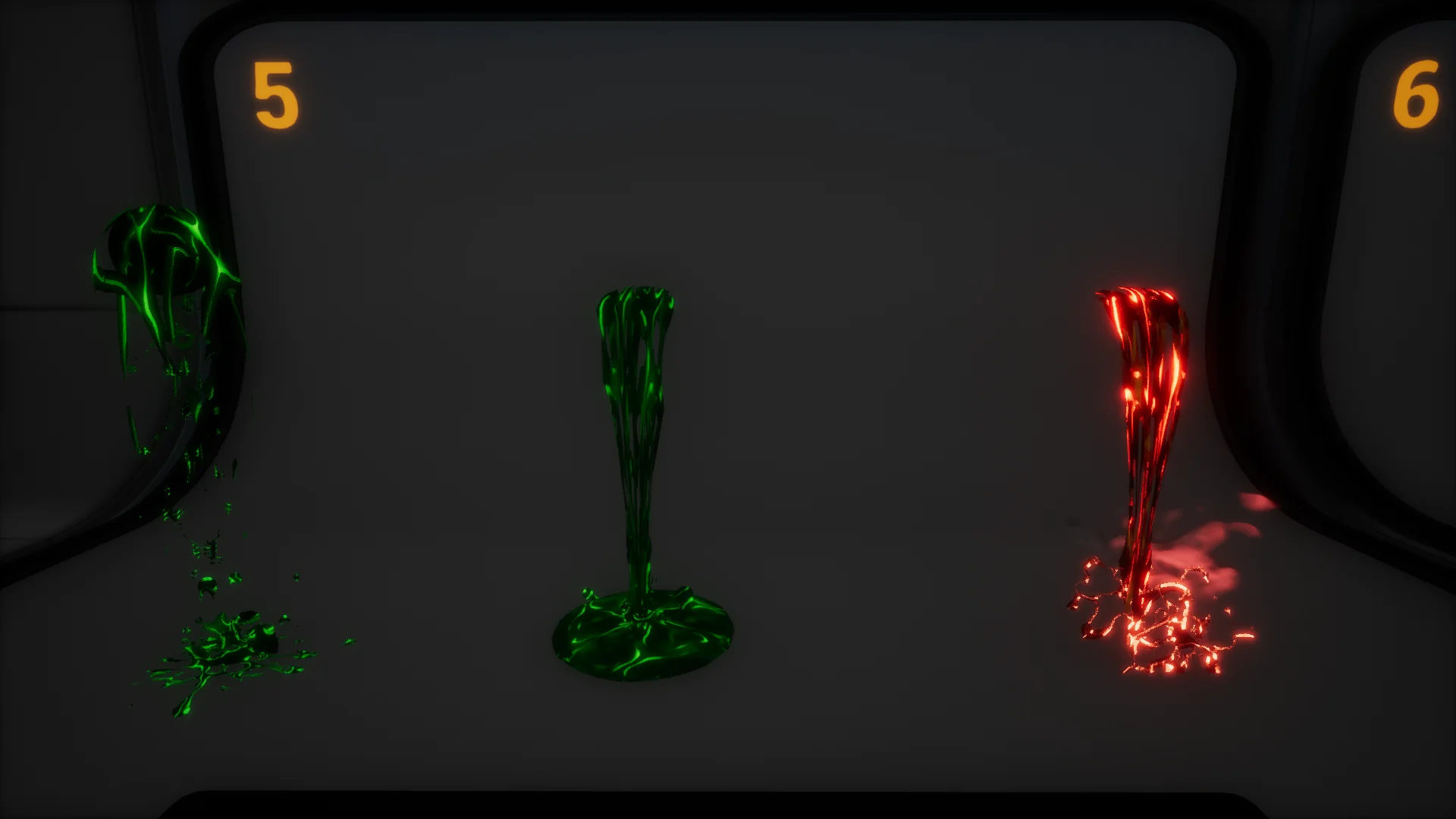
Material instances serve as the primary interface for modifying the visual appearance of Stylized FX 3. Rather than recompiling base shaders or generating separate texture sheets for minor aesthetic variations, artists work directly with exposed instance parameters to alter surface properties and color palettes on the fly.
This workflow enables rapid adjustments to color values to match distinct lighting conditions and level palettes. An effect originally configured for daylight can be shifted toward deep blues, purples, or vibrant hues for nighttime or alien landscapes simply by modifying instance values. Because the material instance logic handles color shifts directly, there is no need to duplicate underlying assets, which keeps project structures clean and memory overhead predictable.
Beyond simple tint adjustments, the material instance framework allows texture manipulation within the effects. Artists can refine the appearance of particle surfaces, shifting the texture dynamics to change how sharp or soft a cartoon shape appears in the world. Adjusting texture parameters within the instance modifies emission balance, edge contrast, and visual density. This flexibility ensures that the effects remain cohesive whether placed next to flat-shaded cartoon geometry or more richly painted stylized props.
Environment FX Integration for Cartoon Scenes
Stylized FX 3 is explicitly structured for environment FX, fulfilling a role distinct from transient gameplay triggers or character combat abilities. Environmental visual effects must exist persistently within a scene without overwhelming gameplay clarity or consuming disproportionate processing budgets.
Environmental effects in cartoon-style titles require precise balance. Realistic visual effects often depend on complex noise patterns and heavy transparency blending, which can easily clash with the clean lines and solid colors of stylized art direction. Stylized FX 3 approaches environmental visuals with graphic, readable shapes that integrate cleanly alongside non-photorealistic geometry. That leaves an environment that feels active and expressive without creating visual visual fatigue for the player.
Placing effects throughout a level requires attention to spatial composition. Whether decorating natural terrain, mechanical landmarks, or dynamic weather zones, environmental visual effects anchor the player's perception of atmosphere. Because the package emphasizes stylized environmental applications, the emitters can be placed to highlight key points of interest, guide player pathing through directional movement, or establish persistent visual moods across varied level biomes.
Engine Revisions, Optimization, and Tornado Resizing in Stylized FX 3
Iterative updates to the package have targeted performance efficiency and mechanical reliability directly within the engine. Version 3.1 brought specific enhancements to optimization and texture quality. Balancing texture fidelity against memory usage is a critical consideration for particle assets, where rapid overdraw and uncompressed textures can strain hardware performance. The refinements in version 3.1 improved texture clarity while tuning runtime behavior to maintain smoother performance across active scenes.
Subsequent refinement in version 3.2 resolved a crucial engine-level issue involving tornado resizing. In complex visual effects involving rotational forces and funnel geometry, scaling an effect inside an engine viewport often breaks velocity profiles, emitter bounds, or axis constraints. If a tornado effect cannot scale uniformly, level designers are locked into using a single fixed size, severely limiting its utility across different scene layouts.
The fix introduced in version 3.2 allows the tornado effect to be scaled cleanly on the engine without distorting its internal simulation mechanics. Level designers can scale the effect down to create small, localized whirlwinds for narrow pathways, or scale it up into a massive environmental landmark commanding the horizon. Ensuring that transform scales translate accurately through the particle system preserves the intended cartoon motion and silhouette at any proportion.
Deployment Across Stylized Game Pipelines
Implementing Stylized FX 3 into a game project involves coordinating modular emitters, material instances, and scene placement into a unified technical setup. Because the package is built to fit stylized games directly, technical artists do not need to spend time stripping photorealistic artifacts or re-authoring basic shaders to match non-photorealistic visual targets.
The combination of easily manipulated material instances and modular particle structures allows the package to support rapid environmental dressing. Developers can place base emitters into a level, link tailored material instances to sync colors with regional lighting, and scale features like tornadoes to fit local terrain constraints. Stylized FX 3 provides the core atmospheric building blocks required to populate stylized environments with consistent, performant, and easily tuned visual effects.
 Variety
 Variety
 Variety