"6f9bd6df1f44a86f"{"id":"1000821","slug":"unreal-engine-5-rts-game-real-time-strategy","title":"Unreal Engine 5: RTS game (Real Time Strategy)","category":"Unreal Engine","engine":"File Content: video + English subtitles","assetVersion":"Video Language: English","engineVersion":"File Content: video + English subtitles","tag":"Unreal Engine","accent":"blue","visual":"mech","summary":"Build a mini RTS resource game in Unreal Engine 5 with AI workers, building placement, dynamic UI, data tables, and Blueprint-based modular logic.","platform":"Unreal Engine","indexPolicy":"index","publishedAt":"2026-07-31T11:47:18.818Z","updatedAt":"2026-07-31T11:47:18.818Z","sourceNotes":[],"fileContents":[],"compatibility":["Unreal Engine","Video Language: English","File Content: video + English subtitles"],"featuredImage":{"alt":"Unreal Engine 5: RTS game (Real Time Strategy)","src":"/wp-content/uploads/published/2026/07/d1c092bc176f-6329257-fc2a-4-02eb1c7c32.webp"},"hasDownloadLink":true,"downloads":1,"terms":[{"taxonomy":"category","slug":"tutoriallibrary-unrealengine","name":"Unreal Engine"}],"galleryImages":[],"accessPanel":{"kind":"video-resource","title":"Download this video resource","eyebrow":"Free Download","message":"Log in or create a free account to start your download.","fileName":"Unreal Engine 5 RTS game (Real Time Strategy).7z","safetyNote":"Resources are manually reviewed before listing to improve quality and reduce obvious risks.","actionLabel":"Download Free","resourceType":"Video download"},"contentHtml":"\u003cp\u003eReal-time strategy projects live or die by the clarity of their underlying systems. A resource-gathering loop needs responsive unit control, a building pipeline that the player can read at a glance, and a data layer that keeps every collected unit of wood or stone accounted for. \u003cem\u003eUnreal Engine 5: RTS game (Real Time Strategy)\u003c/em\u003e is built for developers who want to assemble exactly that kind of loop without piecing together fragments from unrelated tutorials. The course routes its training through a single mini resource game, with the functional pillars broken out across 6 curriculum blocks so that each piece, from UI setup to manual control, feeds back into the whole.\u003c/p\u003e\n\n\u003ch2\u003eBuilding a Working RTS Foundation in UE5\u003c/h2\u003e\n\u003cp\u003eWhere a typical asset drop focuses on visuals, here the functional premise is the draw. The course begins with project setup and moves through the primary systems an RTS demands: buildings, resources, workers, and manual control. Each step is treated as part of a live game, not a sandbox. Building placement becomes a problem of collision and spatial logic, while resource handling becomes a data-management task tied to Game State. Those two concerns end up threading through nearly every other module in the curriculum.\u003c/p\u003e\n\n\u003cp\u003eThe stated scope is explicit: a mini resource game in RTS style with AI workers, building placement, resource collection, advanced data management, and collisions. Those 5 elements define the shape of the project. Collisions govern where structures can be placed and how units path around them. Data management tracks what has been gathered, what has been spent, and what is available for new construction. The worker AI then executes the visible behavior: pathing, gathering, and delivering resources to the right node.\u003c/p\u003e\n\n\u003ch2\u003eBlueprint Logic and Reusable Game Systems\u003c/h2\u003e\n\u003cp\u003eA central goal of the course is mastery of Unreal Engine 5's Blueprint system for creating reusable, modular game logic. That focus matters in an RTS context. A worker Blueprint suited to one resource node should be adaptable to another without duplication. A building Blueprint created for a storage structure should share its core behavior with production or defensive structures so that extending the roster does not require rewriting control scripts from scratch.\u003c/p\u003e\n\n\u003cp\u003eBy framing Blueprints as modular components logically separated from one another, the course pushes developers toward using the same worker and building classes across multiple scenarios. The curriculum explicitly covers integrating meshes and animations into Blueprint logic via Data Tables for efficient asset management. Data Tables become the backbone for linking statistics, visual references, and production cost information together rather than hardcoding values into individual Blueprint instances. That shift converts a sprawling RTS prototype into a structured project where new unit or building types can be added by populating rows in a table.\u003c/p\u003e\n\n\u003ch2\u003eDynamic UI Driven by Game State\u003c/h2\u003e\n\u003cp\u003eRTS interfaces are demanding because they must reflect real-time changes instantly. The course addresses this directly by teaching the design of dynamic UIs using Widgets and event-driven updates. The resource counters displayed on screen need to change the moment a worker drops off materials. The building placement UI must update based on whether a location is valid. Production progress bars need to advance smoothly without stalling the Main Game Thread.\u003c/p\u003e\n\n\u003cp\u003eEvent-driven updates serve this need well. Instead of constantly polling Game State on every Tick, which is inefficient, the UI system responds to events broadcast by the underlying game logic. When a resource amount changes, a corresponding event fires, and only the affected UI elements refresh. The curriculum integrates UI setup early through a dedicated module, meaning the interface evolves alongside the playable systems rather than being bolted on at the end.\u003c/p\u003e\n\n\u003ch2\u003eWorker AI Behavior and Character Control\u003c/h2\u003e\n\u003cp\u003eThe course dedicates specific attention to AI systems and character control in Unreal Engine 5. An RTS worker operates with a degree of autonomy. It needs to identify a resource node, move to it, execute a gather action, return to a designated drop-off point, and repeat the loop. The curriculum covers designing exactly this loop, establishing the fundamentals of how AI characters evaluate their environment, make decisions, and execute navigation.\u003c/p\u003e\n\n\u003cp\u003eManual control is also included as a curriculum module, suggesting the course addresses both the autonomous AI behavior and traditional direct player commands. That dual approach covers the complete RTS worker experience. Players can assign tasks and let the AI execute them, or step in to manually direct specific units when tactical decisions require immediate override. The interaction between these two control modes, how a manually issued command interrupts existing AI behavior, represents a specific challenge in RTS design that the course addresses through its structured progression.\u003c/p\u003e\n\n\u003ch2\u003eAnimating and Managing Game Assets\u003c/h2\u003e\n\u003cp\u003eStatic Meshes and animations are covered as interconnected parts of asset management. Workers need movement animations, idle states, and gather actions that trigger at the correct moments during their behavioral loop. Buildings need visual feedback for construction progress or placement validity.\u003c/p\u003e\n\n\u003cp\u003eThe inclusion of Data Tables in this context is significant. Rather than managing individual assets in isolation, Data Tables provide a centralized structure for organizing asset references and associated statistics. A single worker type might have multiple animation sets corresponding to different resource types. A Data Table can map those relationships cleanly, ensuring that the Blueprint logic pulls the correct visual data based on the current task or resource.\u003c/p\u003e\n\n\u003ch2\u003eCollisions and Building Placement Logic\u003c/h2\u003e\n\u003cp\u003eThe curriculum specifically isolates buildings and resources as separate modules. Building placement in an RTS requires strict collision handling. A structure cannot overlap with terrain obstacles, existing buildings, or resource nodes. The placement system must communicate valid and invalid positions to the player and enforce those rules once a building is committed.\u003c/p\u003e\n\n\u003cp\u003eResource nodes function differently. They serve as interaction points for worker AI and have their own collision and footprint requirements. The collision system determines navigation, interaction distance, and placement validity throughout the game environment. Advanced data management ties these physical systems to player resources, ensuring that constructed buildings cost the correct amount and that generated structures register correctly within the broader Game State.\u003c/p\u003e\n\n\u003ch2\u003eWho Benefits from This Course Structure\u003c/h2\u003e\n\u003cp\u003eWith a total workload of 9 hours 53 minutes and a beginner-level designation published as of January 4, 2026, the course is positioned for beginner to intermediate developers who want to learn Unreal Engine 5 through practical game system construction. It does not assume prior mastery of the engine. The curriculum is explicitly ideal for those interested in focusing on Blueprints, AI, UI design, and modular game logic during their learning process.\u003c/p\u003e\n\n\u003cp\u003eDevelopers who learn most effectively by building a complete, functional project rather than studying isolated features will find the format beneficial. The mini resource game provides a contained scope where every system, from the initial UI setup to the final manual control implementation, contributes to a playable result. By the end of the curriculum, learners will have constructed a working RTS prototype that demonstrates modular Blueprint architecture, event-driven UI, functional AI workers, and data-driven asset management working in concert.\u003c/p\u003e\n\n\u003ch2\u003eExplore Similar Assets\u003c/h2\u003e\n\u003cul\u003e\n\u003cli\u003e\u003ca href=\"https://3dcghub.com/unreal-engine-5-mini-maps-compass-and-marker-systems/\" rel=\"noopener noreferrer\"\u003eUnreal Engine 5: Mini Maps Compass and Marker Systems\u003c/a\u003e\u003c/li\u003e\n\u003cli\u003e\u003ca href=\"https://3dcghub.com/real-time-automotive-rendering-1001/\" rel=\"noopener noreferrer\"\u003eReal-Time Automotive Rendering 1001\u003c/a\u003e\u003c/li\u003e\n\u003cli\u003e\u003ca href=\"https://3dcghub.com/unreal-engine-5-motion-design/\" rel=\"noopener noreferrer\"\u003eUnreal Engine 5 : Motion Design\u003c/a\u003e\u003c/li\u003e\n\u003cli\u003e\u003ca href=\"https://3dcghub.com/environment-design-in-unreal-engine-5-5-from-basics-to-pro/\" rel=\"noopener noreferrer\"\u003eEnvironment Design in Unreal Engine 5.5 – From Basics to Pro\u003c/a\u003e\u003c/li\u003e\n\u003cli\u003e\u003ca href=\"https://3dcghub.com/unreal-cinematic-mastery-from-beginner-to-cinematic-creator/\" rel=\"noopener noreferrer\"\u003eUnreal Cinematic Mastery –From Beginner to Cinematic Creator\u003c/a\u003e\u003c/li\u003e\n\u003c/ul\u003e","contentTextLength":7973,"navigation":{"current":1543,"total":4218,"previous":{"id":"1000822","slug":"farming-and-mining-pack","title":"Farming And Mining Pack","category":"Variety","platform":"Unreal Engine","updatedAt":"2026-08-01T13:09:02.081Z"},"next":{"id":"1000819","slug":"ethereal-tentacle-fx","title":"Ethereal Tentacle FX","category":"Spells \u0026 Combat","platform":"Unreal Engine","updatedAt":"2026-07-31T11:39:17.799Z"}},"relatedResources":[{"id":"1000751","slug":"unreal-engine-5-motion-design","title":"Unreal Engine 5 : Motion Design","category":"Unreal Engine","engine":"File Content: video + English subtitles","assetVersion":"Video Language: English","engineVersion":"File Content: video + English subtitles","tag":"Unreal Engine","accent":"blue","visual":"mech","summary":"A 5.5-hour course covering real-time motion graphics in Unreal Engine 5.4, including cloner tools, splines, typography, and logo animation for beginners.","platform":"Unreal Engine","indexPolicy":"index","publishedAt":"2026-07-27T14:03:08.078Z","updatedAt":"2026-07-27T14:03:08.078Z","sourceNotes":[],"fileContents":[],"compatibility":["Unreal Engine","Video Language: English","File Content: video + English subtitles"],"featuredImage":{"alt":"Unreal Engine 5 : Motion Design","src":"/wp-content/uploads/published/2026/07/8686c1689baf-5885848-9034-4-aa0051a79b.webp"},"hasDownloadLink":true,"downloads":2},{"id":"1000741","slug":"real-time-automotive-rendering-1001","title":"Real-Time Automotive Rendering 1001","category":"Unreal Engine","engine":"File Content: video + English subtitles","assetVersion":"Video Language: English","engineVersion":"File Content: video + English subtitles","tag":"Unreal Engine","accent":"blue","visual":"mech","summary":"A beginner-friendly Unreal Engine course covering automotive cinematic creation: asset prep in Maya, shader setup, exterior and studio lighting, and camera rend","platform":"Unreal Engine","indexPolicy":"index","publishedAt":"2026-07-27T11:52:00.768Z","updatedAt":"2026-07-27T11:52:00.768Z","sourceNotes":[],"fileContents":[],"compatibility":["Unreal Engine","Video Language: English","File Content: video + English subtitles"],"featuredImage":{"alt":"Real-Time Automotive Rendering 1001","src":"/wp-content/uploads/published/2026/07/e10d685964d4-rtat1001-0002-porsche-shot-chateu-1-0005-2048x811-da382017e6.webp"},"hasDownloadLink":true,"downloads":1},{"id":"1000761","slug":"unreal-engine-5-mini-maps-compass-and-marker-systems","title":"Unreal Engine 5: Mini Maps Compass and Marker Systems","category":"Unreal Engine","engine":"File Content: video + English subtitles","assetVersion":"Video Language: English","engineVersion":"File Content: video + English subtitles","tag":"Unreal Engine","accent":"blue","visual":"mech","summary":"A comprehensive Unreal Engine 5 course teaching developers to build dynamic mini maps, real-time compasses, big maps, and marker systems.","platform":"Unreal Engine","indexPolicy":"index","publishedAt":"2026-07-28T04:52:54.556Z","updatedAt":"2026-07-28T04:52:54.556Z","sourceNotes":[],"fileContents":[],"compatibility":["Unreal Engine","Video Language: English","File Content: video + English subtitles"],"featuredImage":{"alt":"Unreal Engine 5: Mini Maps Compass and Marker Systems","src":"/wp-content/uploads/published/2026/07/42e7f8e953d5-6127979-0c78-2-e1d0c593ef.webp"},"hasDownloadLink":true,"downloads":0}]}
Unreal Engine
Unreal Engine 5: RTS game (Real Time Strategy)
Build a mini RTS resource game in Unreal Engine 5 with AI workers, building placement, dynamic UI, data tables, and Blueprint-based modular logic.
Category:Unreal EnginePlatform: Unreal EngineVideo Language: EnglishFile Content: video + English subtitlesPublished: Jul 31, 2026
Unreal Engine
Resource overview
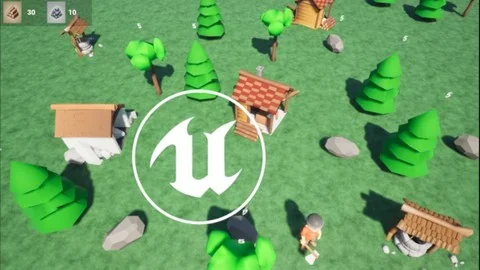
Real-time strategy projects live or die by the clarity of their underlying systems. A resource-gathering loop needs responsive unit control, a building pipeline that the player can read at a glance, and a data layer that keeps every collected unit of wood or stone accounted for. Unreal Engine 5: RTS game (Real Time Strategy) is built for developers who want to assemble exactly that kind of loop without piecing together fragments from unrelated tutorials. The course routes its training through a single mini resource game, with the functional pillars broken out across 6 curriculum blocks so that each piece, from UI setup to manual control, feeds back into the whole.
Building a Working RTS Foundation in UE5
Where a typical asset drop focuses on visuals, here the functional premise is the draw. The course begins with project setup and moves through the primary systems an RTS demands: buildings, resources, workers, and manual control. Each step is treated as part of a live game, not a sandbox. Building placement becomes a problem of collision and spatial logic, while resource handling becomes a data-management task tied to Game State. Those two concerns end up threading through nearly every other module in the curriculum.
The stated scope is explicit: a mini resource game in RTS style with AI workers, building placement, resource collection, advanced data management, and collisions. Those 5 elements define the shape of the project. Collisions govern where structures can be placed and how units path around them. Data management tracks what has been gathered, what has been spent, and what is available for new construction. The worker AI then executes the visible behavior: pathing, gathering, and delivering resources to the right node.
Blueprint Logic and Reusable Game Systems
A central goal of the course is mastery of Unreal Engine 5's Blueprint system for creating reusable, modular game logic. That focus matters in an RTS context. A worker Blueprint suited to one resource node should be adaptable to another without duplication. A building Blueprint created for a storage structure should share its core behavior with production or defensive structures so that extending the roster does not require rewriting control scripts from scratch.
By framing Blueprints as modular components logically separated from one another, the course pushes developers toward using the same worker and building classes across multiple scenarios. The curriculum explicitly covers integrating meshes and animations into Blueprint logic via Data Tables for efficient asset management. Data Tables become the backbone for linking statistics, visual references, and production cost information together rather than hardcoding values into individual Blueprint instances. That shift converts a sprawling RTS prototype into a structured project where new unit or building types can be added by populating rows in a table.
Dynamic UI Driven by Game State
RTS interfaces are demanding because they must reflect real-time changes instantly. The course addresses this directly by teaching the design of dynamic UIs using Widgets and event-driven updates. The resource counters displayed on screen need to change the moment a worker drops off materials. The building placement UI must update based on whether a location is valid. Production progress bars need to advance smoothly without stalling the Main Game Thread.
Event-driven updates serve this need well. Instead of constantly polling Game State on every Tick, which is inefficient, the UI system responds to events broadcast by the underlying game logic. When a resource amount changes, a corresponding event fires, and only the affected UI elements refresh. The curriculum integrates UI setup early through a dedicated module, meaning the interface evolves alongside the playable systems rather than being bolted on at the end.
Worker AI Behavior and Character Control
The course dedicates specific attention to AI systems and character control in Unreal Engine 5. An RTS worker operates with a degree of autonomy. It needs to identify a resource node, move to it, execute a gather action, return to a designated drop-off point, and repeat the loop. The curriculum covers designing exactly this loop, establishing the fundamentals of how AI characters evaluate their environment, make decisions, and execute navigation.
Manual control is also included as a curriculum module, suggesting the course addresses both the autonomous AI behavior and traditional direct player commands. That dual approach covers the complete RTS worker experience. Players can assign tasks and let the AI execute them, or step in to manually direct specific units when tactical decisions require immediate override. The interaction between these two control modes, how a manually issued command interrupts existing AI behavior, represents a specific challenge in RTS design that the course addresses through its structured progression.
Animating and Managing Game Assets
Static Meshes and animations are covered as interconnected parts of asset management. Workers need movement animations, idle states, and gather actions that trigger at the correct moments during their behavioral loop. Buildings need visual feedback for construction progress or placement validity.
The inclusion of Data Tables in this context is significant. Rather than managing individual assets in isolation, Data Tables provide a centralized structure for organizing asset references and associated statistics. A single worker type might have multiple animation sets corresponding to different resource types. A Data Table can map those relationships cleanly, ensuring that the Blueprint logic pulls the correct visual data based on the current task or resource.
Collisions and Building Placement Logic
The curriculum specifically isolates buildings and resources as separate modules. Building placement in an RTS requires strict collision handling. A structure cannot overlap with terrain obstacles, existing buildings, or resource nodes. The placement system must communicate valid and invalid positions to the player and enforce those rules once a building is committed.
Resource nodes function differently. They serve as interaction points for worker AI and have their own collision and footprint requirements. The collision system determines navigation, interaction distance, and placement validity throughout the game environment. Advanced data management ties these physical systems to player resources, ensuring that constructed buildings cost the correct amount and that generated structures register correctly within the broader Game State.
Who Benefits from This Course Structure
With a total workload of 9 hours 53 minutes and a beginner-level designation published as of January 4, 2026, the course is positioned for beginner to intermediate developers who want to learn Unreal Engine 5 through practical game system construction. It does not assume prior mastery of the engine. The curriculum is explicitly ideal for those interested in focusing on Blueprints, AI, UI design, and modular game logic during their learning process.
Developers who learn most effectively by building a complete, functional project rather than studying isolated features will find the format beneficial. The mini resource game provides a contained scope where every system, from the initial UI setup to the final manual control implementation, contributes to a playable result. By the end of the curriculum, learners will have constructed a working RTS prototype that demonstrates modular Blueprint architecture, event-driven UI, functional AI workers, and data-driven asset management working in concert.
 Unreal Engine
 Unreal Engine
 Unreal Engine
 Unreal Engine