"6f9bd6df1f44a86f"{"id":"1000822","slug":"farming-and-mining-pack","title":"Farming And Mining Pack","category":"Variety","engine":"4.27,5.0+","assetVersion":"","engineVersion":"Engine Version: 4.27,5.0+","tag":"Variety","accent":"blue","visual":"mech","summary":"Animation and tool asset pack for UE4/UE5 covering farming and mining workflows. Eight tools, four animation groups, bone-based tool handling, and retargeting c","platform":"Unreal Engine","indexPolicy":"index","publishedAt":"2026-08-01T13:09:02.081Z","updatedAt":"2026-08-01T13:09:02.081Z","sourceNotes":[],"fileContents":[],"compatibility":["Unreal Engine","Engine Version: 4.27,5.0+"],"featuredImage":{"alt":"Farming And Mining Pack","src":"/wp-content/uploads/published/2026/08/3467ae2678f6-f83b35f5-8fb0-4635-aaa2-080b35d30154-5a06f566ca.webp"},"hasDownloadLink":true,"downloads":11,"terms":[{"taxonomy":"category","slug":"variety-animations","name":"Variety"}],"galleryImages":[{"src":"/wp-content/uploads/published/2026/08/55c283444c7f-2811a3b4-de3c-4728-9d98-c1b1a91b44e6-0fdf5a599b.webp","alt":"Farming And Mining Pack"},{"src":"/wp-content/uploads/published/2026/08/c5bca7d37305-8fcaed76-a864-43c9-8e2f-e4b2d7e6d356-3dd5c5e66c.webp","alt":"Farming And Mining Pack"},{"src":"/wp-content/uploads/published/2026/08/7b3327f4a7b3-5edded88-f211-45d3-b7d3-617d8a1fe346-01e43dbb5c.webp","alt":"Farming And Mining Pack"},{"src":"/wp-content/uploads/published/2026/08/01a8ea165e75-ad182758-08f1-4ff2-9b06-ad3fb2135aff-a3c9a1f81a.webp","alt":"Farming And Mining Pack"},{"src":"/wp-content/uploads/published/2026/08/b956e2d02e03-5a6d4630-9612-4196-9bec-b42f2a0f4457-75cdf4faa2.webp","alt":"Farming And Mining Pack"},{"src":"/wp-content/uploads/published/2026/08/8eeffba889d6-8bc5f71e-b53c-4fe6-98fa-6fbc4773378f-2f305ea260.webp","alt":"Farming And Mining Pack"},{"src":"/wp-content/uploads/published/2026/08/cf1a11a95427-5b943b9f-a43f-4716-91ef-26655b3cac8f-ee9bcab2af.webp","alt":"Farming And Mining Pack"},{"src":"/wp-content/uploads/published/2026/08/914cc7aab900-42d6433c-1f92-459e-ba14-9c4b186b31e4-12c73a33a4.webp","alt":"Farming And Mining Pack"},{"src":"/wp-content/uploads/published/2026/08/428c7e6cb757-693e9867-d59e-432c-bed7-fa450758a5fb-ca4f462ef0.webp","alt":"Farming And Mining Pack"},{"src":"/wp-content/uploads/published/2026/08/95c55142eb81-d9c4546a-bb09-41b2-be2c-2c67627b99c3-e4534603c7.webp","alt":"Farming And Mining Pack"}],"accessPanel":{"kind":"resource","title":"Download this resource","eyebrow":"Free Download","message":"Log in or create a free account to start your download.","fileName":"Content.7z","safetyNote":"Resources are manually reviewed before listing to improve quality and reduce obvious risks.","actionLabel":"Download Free","resourceType":"Resource archive"},"contentHtml":"\u003cp\u003eThe \u003cem\u003eFarming and Mining Pack\u003c/em\u003e addresses a specific production challenge: getting characters to hold, swing, and slide farming and mining tools in a way that looks natural rather than rigidly locked to the hand. The approach centers on custom tool bones and a structured animation pipeline shaped by the UE4 Male Mannequin proportions. Getting it into a project means understanding the bone requirements, the animation grouping, and the engine version constraints before committing to integration.\u003c/p\u003e\n\n\u003ch2\u003eCustom Tool Bones and Why They Exist\u003c/h2\u003e\n\u003cp\u003eThe pack depends on 2 specific bones attached to the right hand: \u003ccode\u003eTool_R_Hand\u003c/code\u003e and \u003ccode\u003eTool_R_Hand_Effect\u003c/code\u003e. These are not cosmetic additions. When a character swings a pickaxe or performs similar movements, the tool is not meant to stay fixed in the grip. It slides forward, backward, or rotates for better handling and angling. The \u003ccode\u003eTool_R_Hand\u003c/code\u003e and \u003ccode\u003eTool_R_Hand_Effect\u003c/code\u003e bones exist to drive that sliding and spinning behavior.\u003c/p\u003e\n\n\u003cp\u003eThis creates an immediate setup requirement. If your character mesh does not include these bones in its skinning data at import time, Unreal Engine will ignore them even if they exist on the Skeleton in-engine. The bones must be present in the mesh's Skin Modifier. They do not need to be weighted to any vertices, but they must be part of the skinned bone list so the engine recognizes them and allows the tool-specific animation data to function.\u003c/p\u003e\n\n\u003ch3\u003eAdding Tool Bones Through a 3D Software Reference\u003c/h3\u003e\n\u003cp\u003eThe pack includes a Mannequin mesh in the project's main meshes folder that serves as a bone position reference. You export this mesh to your 3D software of choice, load your character alongside it in the default T-Pose, and add the \u003ccode\u003eTool_R_Hand\u003c/code\u003e and \u003ccode\u003eTool_R_Hand_Effect\u003c/code\u003e bones to your mesh's Skin Modifier at the corresponding positions. Even with zero vertex weights assigned to these bones, Unreal Engine will still register them and play the tool bone animations correctly.\u003c/p\u003e\n\n\u003cp\u003eThe alternative is messier. You can hide the included Mannequin and use it purely as an in-engine reference pose, avoiding any external mesh modification. This workaround functions but is not the cleaner path. The developer recommends modifying the bones externally whenever possible.\u003c/p\u003e\n\n\u003ch2\u003eAnimation Structure Across Tool Groups\u003c/h2\u003e\n\u003cp\u003eAnimations fall into 4 groups, each tied to tool categories rather than individual items:\u003c/p\u003e\n\u003cul\u003e\n \u003cli\u003e\u003cstrong\u003eHoes and rakes:\u003c/strong\u003e Covers the \u003cem\u003etriangle hoe\u003c/em\u003e, \u003cem\u003esquare hoe\u003c/em\u003e, \u003cem\u003ehoola hoe\u003c/em\u003e, and \u003cem\u003erake\u003c/em\u003e mesh. All 4 share the same animation set.\u003c/li\u003e\n \u003cli\u003e\u003cstrong\u003eShovel:\u003c/strong\u003e Dedicated animation group for shovel use.\u003c/li\u003e\n \u003cli\u003e\u003cstrong\u003ePickaxe or backhoe:\u003c/strong\u003e These 2 tools share animations for the most part.\u003c/li\u003e\n \u003cli\u003e\u003cstrong\u003eAxe:\u003c/strong\u003e Dedicated animation group for axe use.\u003c/li\u003e\n\u003c/ul\u003e\n\n\u003cp\u003eWithin each group, most animations follow a general structure: idle poses, transition animations that move the character into an action-ready pose, action animations for the digging/raking/swinging motion itself, and relax animations that return the character to idle. Not every animation fits this pattern, but the majority do.\u003c/p\u003e\n\n\u003ch2\u003eThe 8 Tools and Material Setup\u003c/h2\u003e\n\u003cp\u003eThe pack ships with 8 tool meshes: \u003cem\u003etriangle hoe\u003c/em\u003e, \u003cem\u003esquare hoe\u003c/em\u003e, \u003cem\u003ehoola hoe\u003c/em\u003e, \u003cem\u003erake\u003c/em\u003e, \u003cem\u003eshovel\u003c/em\u003e, \u003cem\u003epickaxe\u003c/em\u003e, \u003cem\u003ebackhoe\u003c/em\u003e, and \u003cem\u003eaxe\u003c/em\u003e. Each tool has 3 texture sets. The axe has 1 additional texture set beyond the standard 3.\u003c/p\u003e\n\n\u003cp\u003eMaterials are configured with basic customization options. The intent is to give developers room to adjust the tool appearances beyond the provided texture sets without requiring a full Material overhaul. The customization is described as basic rather than deep, so expectations should be calibrated accordingly.\u003c/p\u003e\n\n\u003ch2\u003eProportion Precision and the UE4 Mannequin Requirement\u003c/h2\u003e\n\u003cp\u003eThese are precise animations. The developer emphasizes that characters must have proportions matching the base UE4 Male Mannequin. If a character deviates from those proportions, the hands may drift away from the intended contact points on the tool, or the character may look contorted as the animation forces the hands into positions the skeleton was not shaped for.\u003c/p\u003e\n\n\u003cp\u003eThis proportion dependency is the core reason the pack is shaped by the UE4 Male skeleton rather than a generic rig. The animation data places hands at specific locations relative to the tool mesh, and any skeletal mismatch compounds as the animation plays.\u003c/p\u003e\n\n\u003ch2\u003eUE5 Retargeting Limitations and a Known Import Bug\u003c/h2\u003e\n\u003cp\u003eUnreal Engine 5 (UE5) support comes with caveats that affect both workflow and reliability. UE5 Mannequins have slightly different proportions than their UE4 counterparts, so retargeted results generally do not look as clean. Beyond visual quality, there is a functional requirement: the \u003ccode\u003eHand_R_Tool\u003c/code\u003e bone must be added onto the UE5 Skeleton and included in the Retarget Rig so it copies over with the rest of the animation data during retargeting. Without this step, the tool bone animations will not carry across.\u003c/p\u003e\n\n\u003cp\u003eFor developers not comfortable editing the animation Retarget Rig, the developer states plainly that the pack should be assumed unusable for UE5 Mannequin skeleton characters. The retargeting process is not optional for UE5; it is a prerequisite.\u003c/p\u003e\n\n\u003ch3\u003eThe UE5 / UE5.1 Import Crash\u003c/h3\u003e\n\u003cp\u003eThere is a known Unreal Engine bug in UE5 and UE5.1 that can cause the editor to crash when importing a character mesh that has a new bone added to it, such as adding \u003ccode\u003eTool_R_Hand\u003c/code\u003e onto the Manny or Quinn skeleton. This is an engine-level bug, not something the developer can patch or support. The developer advises testing the import step on your specific Unreal Engine build before committing to this pack if UE5 integration is the plan. A step-by-step tutorial for the UE5 process is included in the Q\u0026A section at the end of the documentation to walk through adding bones to the UE5 Skeleton and setting up the Retarget Rig.\u003c/p\u003e\n\n\u003ch2\u003eWhat to Check Before Integrating\u003c/h2\u003e\n\u003cp\u003eThe practical path to using this pack runs through a few checkpoints. First, confirm your target character mesh either already includes the \u003ccode\u003eTool_R_Hand\u003c/code\u003e and \u003ccode\u003eTool_R_Hand_Effect\u003c/code\u003e bones or can be modified in 3D software to include them in the Skin Modifier. Second, verify your character proportions against the UE4 Male Mannequin if you want the animations to land cleanly without drift or contortion. Third, if you are targeting UE5, test whether your engine build allows importing a mesh with newly added bones without crashing, and determine whether you are comfortable editing the Retarget Rig to include the \u003ccode\u003eHand_R_Tool\u003c/code\u003e bone.\u003c/p\u003e\n\n\u003cp\u003eThe documentation covers these steps in detail, and additional tutorials are available for the Blender bone-adding process and the \u003ccode\u003eSet Master Pose\u003c/code\u003e workaround. The pack includes demo videos for the products, the axe update, and the pick update, along with a \u003ccode\u003eSet Master Pose\u003c/code\u003e workaround tutorial for an alternative integration approach.\u003c/p\u003e\n\n\u003cp\u003eCompatibility is noted with \u003cem\u003eFlight Suit 2\u003c/em\u003e.\u003c/p\u003e\n\n\u003ch2\u003eMore From The Same Workflow\u003c/h2\u003e\n\u003cul\u003e\n\u003cli\u003e\u003ca href=\"https://3dcghub.com/space-station-asteroid-mining-facility/\" rel=\"noopener noreferrer\"\u003eSpace Station - Asteroid Mining Facility\u003c/a\u003e\u003c/li\u003e\n\u003cli\u003e\u003ca href=\"https://3dcghub.com/car-interact-animations-vol-1/\" rel=\"noopener noreferrer\"\u003eCar Interact Animations VOL. 1\u003c/a\u003e\u003c/li\u003e\n\u003cli\u003e\u003ca href=\"https://3dcghub.com/dance-party-mocap-pack/\" rel=\"noopener noreferrer\"\u003eDance Party - MoCap Pack\u003c/a\u003e\u003c/li\u003e\n\u003cli\u003e\u003ca href=\"https://3dcghub.com/city-sim-animation-pack/\" rel=\"noopener noreferrer\"\u003eCiTY SIM ANIMATION PACK\u003c/a\u003e\u003c/li\u003e\n\u003cli\u003e\u003ca href=\"https://3dcghub.com/female-interaction-animation-pack/\" rel=\"noopener noreferrer\"\u003eFemale Interaction Animation Pack\u003c/a\u003e\u003c/li\u003e\n\u003c/ul\u003e","contentTextLength":6874,"navigation":{"current":1542,"total":4218,"previous":{"id":"1000823","slug":"female-movement-pistol","title":"Female Movement Pistol","category":"Locomotion / Gaits","platform":"Unreal Engine","updatedAt":"2026-08-01T13:14:36.733Z"},"next":{"id":"1000821","slug":"unreal-engine-5-rts-game-real-time-strategy","title":"Unreal Engine 5: RTS game (Real Time Strategy)","category":"Unreal Engine","platform":"Unreal Engine","updatedAt":"2026-07-31T11:47:18.818Z"}},"relatedResources":[{"id":"1000851","slug":"mining-animation","title":"Mining Animation","category":"Variety","engine":"4.26+,5.0+","assetVersion":"","engineVersion":"Engine Version: 4.26+,5.0+","tag":"Variety","accent":"blue","visual":"animation","summary":"33 hand-crafted animations covering directional walks, rolls, idle, hit reactions, pickaxe mining, and a root-motion death animation for fantasy RPG characters.","platform":"Unreal Engine","indexPolicy":"index","publishedAt":"2026-08-04T16:39:26.490Z","updatedAt":"2026-08-04T16:39:26.490Z","sourceNotes":[],"fileContents":[],"compatibility":["Unreal Engine","Engine Version: 4.26+,5.0+"],"featuredImage":{"alt":"Mining Animation","src":"/wp-content/uploads/published/2026/08/3901279a8f71-e69eb007-2b3b-4d50-b85a-ddda3075490f-d96a56ed3b.webp"},"hasDownloadLink":true,"downloads":8},{"id":"1002071","slug":"knife-mocapanimpack-1-3","title":"Knife MocapAnimPack 1.3","category":"Variety","engine":"4.27+,5.0+","assetVersion":"","engineVersion":"Engine Version: 4.27+,5.0+","tag":"Variety","accent":"blue","visual":"mech","summary":"A close look at Knife MocapAnimPack 1.3, covering stand and crouch movement styles, combat melee attacks, hit reactions, and UE4 to UE5 retargeting.","platform":"Unreal Engine","indexPolicy":"index","publishedAt":"2026-10-26T15:32:58.910Z","updatedAt":"2026-10-26T15:32:58.910Z","sourceNotes":[],"fileContents":[],"compatibility":["Unreal Engine","Engine Version: 4.27+,5.0+"],"featuredImage":{"alt":"Knife MocapAnimPack 1.3","src":"/wp-content/uploads/published/2026/10/fcf5631e8a19-ba143fce-ffab-4c7c-b0fc-47a9ed5ead04-7123ed4f43.webp"},"hasDownloadLink":true,"downloads":3},{"id":"1000874","slug":"rifle-mega-mocapanimpack-1-3","title":"Rifle Mega MocapAnimPack 1,3","category":"Variety","engine":"4.27,5.0+","assetVersion":"","engineVersion":"Engine Version: 4.27,5.0+","tag":"Variety","accent":"blue","visual":"mech","summary":"Rifle Mega MocapAnimPack 1,3 includes 300+ FBX rifle animations across 12 sets, covering locomotion, shooting, reloading, melee, and aim offsets for four weapon","platform":"Unreal Engine","indexPolicy":"index","publishedAt":"2026-08-05T15:05:01.035Z","updatedAt":"2026-08-05T15:05:01.035Z","sourceNotes":[],"fileContents":[],"compatibility":["Unreal Engine","Engine Version: 4.27,5.0+"],"featuredImage":{"alt":"Rifle Mega MocapAnimPack 1,3","src":"/wp-content/uploads/published/2026/08/537038fd458b-82a5bf17-be5c-4d6a-a89a-70c596017430-5112e793d3.webp"},"hasDownloadLink":true,"downloads":9}]}
Variety
Farming And Mining Pack
Animation and tool asset pack for UE4/UE5 covering farming and mining workflows. Eight tools, four animation groups, bone-based tool handling, and retargeting c
Category:Unreal Engine,VarietyPlatform: Unreal EngineEngine Version: 4.27,5.0+Published: Aug 1, 2026
Variety
Resource overview
The Farming and Mining Pack addresses a specific production challenge: getting characters to hold, swing, and slide farming and mining tools in a way that looks natural rather than rigidly locked to the hand. The approach centers on custom tool bones and a structured animation pipeline shaped by the UE4 Male Mannequin proportions. Getting it into a project means understanding the bone requirements, the animation grouping, and the engine version constraints before committing to integration.
Custom Tool Bones and Why They Exist
The pack depends on 2 specific bones attached to the right hand: Tool_R_Hand and Tool_R_Hand_Effect. These are not cosmetic additions. When a character swings a pickaxe or performs similar movements, the tool is not meant to stay fixed in the grip. It slides forward, backward, or rotates for better handling and angling. The Tool_R_Hand and Tool_R_Hand_Effect bones exist to drive that sliding and spinning behavior.
This creates an immediate setup requirement. If your character mesh does not include these bones in its skinning data at import time, Unreal Engine will ignore them even if they exist on the Skeleton in-engine. The bones must be present in the mesh's Skin Modifier. They do not need to be weighted to any vertices, but they must be part of the skinned bone list so the engine recognizes them and allows the tool-specific animation data to function.
Adding Tool Bones Through a 3D Software Reference
The pack includes a Mannequin mesh in the project's main meshes folder that serves as a bone position reference. You export this mesh to your 3D software of choice, load your character alongside it in the default T-Pose, and add the Tool_R_Hand and Tool_R_Hand_Effect bones to your mesh's Skin Modifier at the corresponding positions. Even with zero vertex weights assigned to these bones, Unreal Engine will still register them and play the tool bone animations correctly.
The alternative is messier. You can hide the included Mannequin and use it purely as an in-engine reference pose, avoiding any external mesh modification. This workaround functions but is not the cleaner path. The developer recommends modifying the bones externally whenever possible.
Animation Structure Across Tool Groups
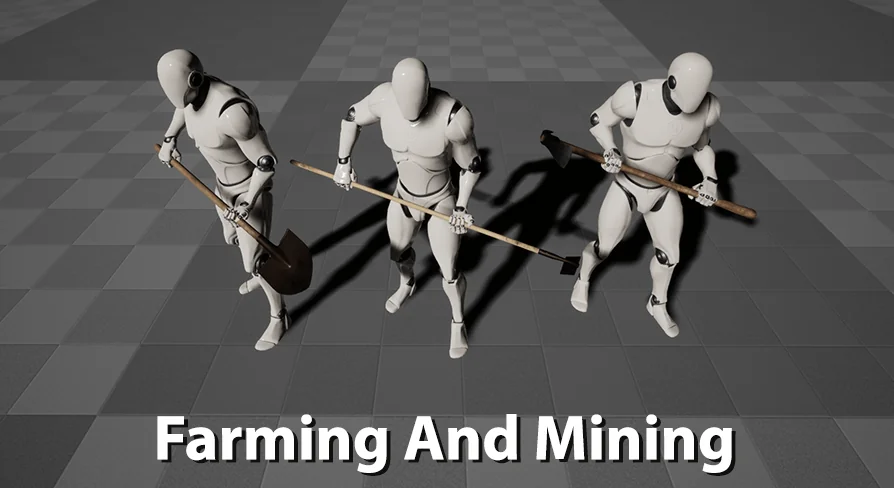
Animations fall into 4 groups, each tied to tool categories rather than individual items:
Hoes and rakes: Covers the triangle hoe, square hoe, hoola hoe, and rake mesh. All 4 share the same animation set.
Shovel: Dedicated animation group for shovel use.
Pickaxe or backhoe: These 2 tools share animations for the most part.
Axe: Dedicated animation group for axe use.
Within each group, most animations follow a general structure: idle poses, transition animations that move the character into an action-ready pose, action animations for the digging/raking/swinging motion itself, and relax animations that return the character to idle. Not every animation fits this pattern, but the majority do.
The 8 Tools and Material Setup
The pack ships with 8 tool meshes: triangle hoe, square hoe, hoola hoe, rake, shovel, pickaxe, backhoe, and axe. Each tool has 3 texture sets. The axe has 1 additional texture set beyond the standard 3.
Materials are configured with basic customization options. The intent is to give developers room to adjust the tool appearances beyond the provided texture sets without requiring a full Material overhaul. The customization is described as basic rather than deep, so expectations should be calibrated accordingly.
Proportion Precision and the UE4 Mannequin Requirement
These are precise animations. The developer emphasizes that characters must have proportions matching the base UE4 Male Mannequin. If a character deviates from those proportions, the hands may drift away from the intended contact points on the tool, or the character may look contorted as the animation forces the hands into positions the skeleton was not shaped for.
This proportion dependency is the core reason the pack is shaped by the UE4 Male skeleton rather than a generic rig. The animation data places hands at specific locations relative to the tool mesh, and any skeletal mismatch compounds as the animation plays.
UE5 Retargeting Limitations and a Known Import Bug
Unreal Engine 5 (UE5) support comes with caveats that affect both workflow and reliability. UE5 Mannequins have slightly different proportions than their UE4 counterparts, so retargeted results generally do not look as clean. Beyond visual quality, there is a functional requirement: the Hand_R_Tool bone must be added onto the UE5 Skeleton and included in the Retarget Rig so it copies over with the rest of the animation data during retargeting. Without this step, the tool bone animations will not carry across.
For developers not comfortable editing the animation Retarget Rig, the developer states plainly that the pack should be assumed unusable for UE5 Mannequin skeleton characters. The retargeting process is not optional for UE5; it is a prerequisite.
The UE5 / UE5.1 Import Crash
There is a known Unreal Engine bug in UE5 and UE5.1 that can cause the editor to crash when importing a character mesh that has a new bone added to it, such as adding Tool_R_Hand onto the Manny or Quinn skeleton. This is an engine-level bug, not something the developer can patch or support. The developer advises testing the import step on your specific Unreal Engine build before committing to this pack if UE5 integration is the plan. A step-by-step tutorial for the UE5 process is included in the Q&A section at the end of the documentation to walk through adding bones to the UE5 Skeleton and setting up the Retarget Rig.
What to Check Before Integrating
The practical path to using this pack runs through a few checkpoints. First, confirm your target character mesh either already includes the Tool_R_Hand and Tool_R_Hand_Effect bones or can be modified in 3D software to include them in the Skin Modifier. Second, verify your character proportions against the UE4 Male Mannequin if you want the animations to land cleanly without drift or contortion. Third, if you are targeting UE5, test whether your engine build allows importing a mesh with newly added bones without crashing, and determine whether you are comfortable editing the Retarget Rig to include the Hand_R_Tool bone.
The documentation covers these steps in detail, and additional tutorials are available for the Blender bone-adding process and the Set Master Pose workaround. The pack includes demo videos for the products, the axe update, and the pick update, along with a Set Master Pose workaround tutorial for an alternative integration approach.
 Variety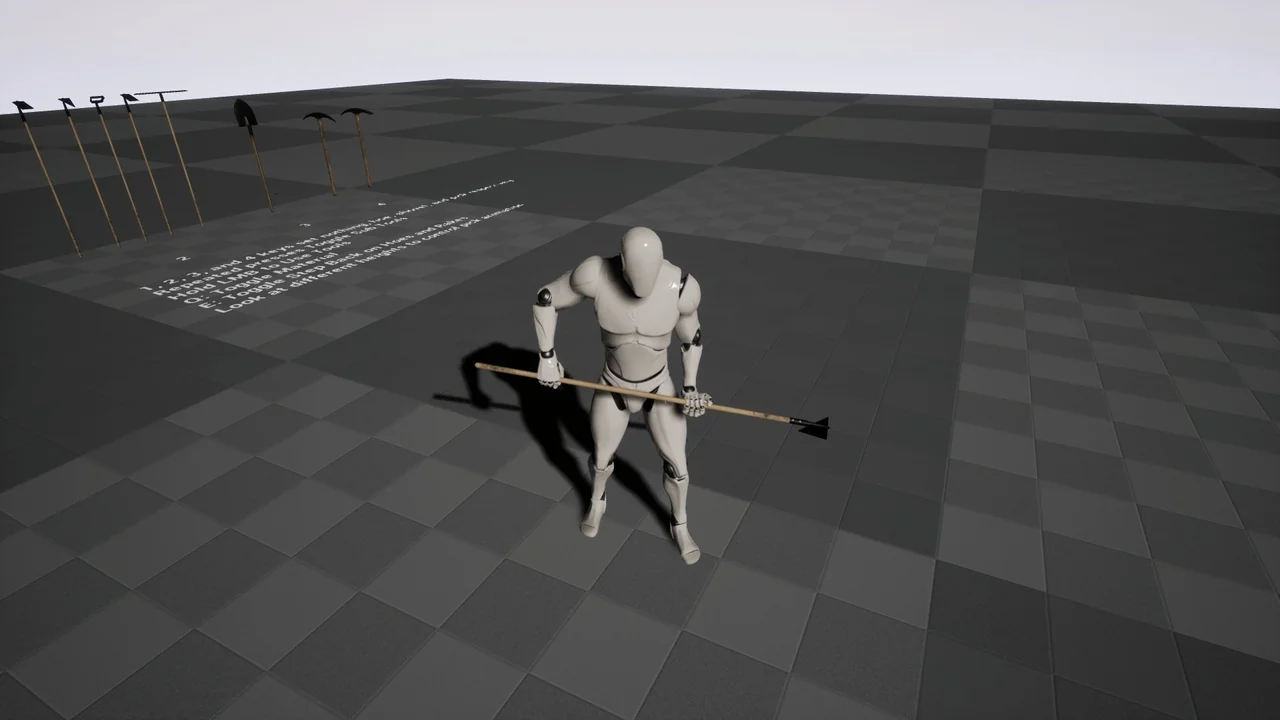
 Variety
 Variety
 Variety