"6f9bd6df1f44a86f"{"id":"1000823","slug":"female-movement-pistol","title":"Female Movement Pistol","category":"Locomotion / Gaits","engine":"5.0+","assetVersion":"","engineVersion":"Engine Version: 5.0+","tag":"Locomotion / Gaits","accent":"blue","visual":"animation","summary":"115 motion-capture animation clips for a female pistol-wielding character. Mecanim-compatible humanoid animations covering standing, crouching, kneeling, prone,","platform":"Unreal Engine","indexPolicy":"index","publishedAt":"2026-08-01T13:14:36.733Z","updatedAt":"2026-08-01T13:14:36.733Z","sourceNotes":[],"fileContents":[],"compatibility":["Unreal Engine","Engine Version: 5.0+"],"featuredImage":{"alt":"Female Movement Pistol","src":"/wp-content/uploads/published/2026/08/9324d20eb863-367d473b-946f-4133-8867-7ec89b35d423-ab63f50b65.webp"},"hasDownloadLink":true,"downloads":0,"terms":[{"taxonomy":"category","slug":"locomotion-gaits","name":"Locomotion / Gaits"}],"galleryImages":[{"src":"/wp-content/uploads/published/2026/08/d40774933c0d-799b6dae-ac84-4a97-9d20-6c80da74b238-7fb20c7f7d.webp","alt":"Female Movement Pistol"},{"src":"/wp-content/uploads/published/2026/08/f582bdebe38c-9dbce5d0-88b1-4247-9212-25cd111ef41f-c883f18e0a.webp","alt":"Female Movement Pistol"},{"src":"/wp-content/uploads/published/2026/08/844876fc1ae4-1cf68f56-7644-48b1-ac4b-371e48920128-86ab4f899a.webp","alt":"Female Movement Pistol"},{"src":"/wp-content/uploads/published/2026/08/7f9d278d8551-54653351-f638-4f79-ab43-407a360d208f-2ea4799b5f.webp","alt":"Female Movement Pistol"},{"src":"/wp-content/uploads/published/2026/08/b0d38ec47786-ce69e55b-90fe-4b94-9a29-467c956cbc4e-11a73f7aaf.webp","alt":"Female Movement Pistol"},{"src":"/wp-content/uploads/published/2026/08/dd0e02222367-e90631ec-d12d-4673-9c44-7d8a63dac07e-8565459e67.webp","alt":"Female Movement Pistol"},{"src":"/wp-content/uploads/published/2026/08/0565cd8c8210-3cad2369-7c50-46c3-8aee-8eb2af178105-e4d69eeeec.webp","alt":"Female Movement Pistol"},{"src":"/wp-content/uploads/published/2026/08/e381530848da-0f8686b2-0a0f-4046-9a72-773d00b72a8b-decbb804bb.webp","alt":"Female Movement Pistol"},{"src":"/wp-content/uploads/published/2026/08/2cffea974d95-2b8251c2-ddf8-4af7-b5d8-38607151eca9-d06104ca10.webp","alt":"Female Movement Pistol"},{"src":"/wp-content/uploads/published/2026/08/1a09016c7232-a935ced1-b2dd-42e9-ad81-fc91e872bbad-ca735e374e.webp","alt":"Female Movement Pistol"}],"accessPanel":{"kind":"resource","title":"Download this resource","eyebrow":"Free Download","message":"Log in or create a free account to start your download.","fileName":"Content.7z","safetyNote":"Resources are manually reviewed before listing to improve quality and reduce obvious risks.","actionLabel":"Download Free","resourceType":"Resource archive"},"contentHtml":"\u003cp\u003eBuilding a believable third-person or first-person character controller requires far more than a single idle and a walk cycle. You need transitions between stances, directional starts and stops, and state-specific actions that all feel connected through a single rigged skeleton. \u003cem\u003eFemale Movement Pistol\u003c/em\u003e addresses that pipeline gap with 115 motion-capture animation clips shaped by a female character handling a pistol, giving developers a connected web of locomotion, posture changes, and position-specific shoot and death states.\u003c/p\u003e\n\n\u003ch2\u003eHumanoid Rig Setup and Mecanim Compatibility\u003c/h2\u003e\n\u003cp\u003eEvery clip in the set is humanoid-based and tagged as Mecanim-compatible. That means the animations are retargeted to Unity's standard Humanoid Skeleton, so they can be applied to any character rig configured through the Mecanim importer rather than tied to one custom skeleton.\u003c/p\u003e\n\n\u003cp\u003eFor implementation, this simplifies the controller rig. You bring in your own female Humanoid character, configure it as Humanoid in Unity's Rig tab, and the clips drop into an Animator Controller as states or Blend Tree motions. Because the entire set is humanoid, you can also mix these clips with other Humanoid animation libraries if your project already uses a different locomotion set for unarmed or rifle-based characters.\u003c/p\u003e\n\n\u003ch2\u003eBarehand to Pistol State Transitions\u003c/h2\u003e\n\u003cp\u003eThe set opens with a barehand idle loop and 2 transition clips that bridge the unarmed and armed states. \u003ccode\u003eAA_Female_Movement_Barehand_to_Hold_Pistol\u003c/code\u003e and its reverse \u003ccode\u003eAA_Female_Movement_Hold_Pistol_to_Barehand\u003c/code\u003e let a character draw or holster a pistol within the animation flow itself, rather than snapping from one pose to another.\u003c/p\u003e\n\n\u003cp\u003eIn a controller setup, these 2 clips can sit between an unarmed locomotion State Machine and the pistol locomotion State Machine, triggered by an equip or unequip input. The pistol idle loop \u003ccode\u003eAA_Female_Movement_Pistol_idle_loop\u003c/code\u003e then becomes the resting state for the armed branch. Notably, the pistol model itself is not included, so the character's hand and arm poses are the only animation-side representation of the weapon.\u003c/p\u003e\n\n\u003ch2\u003eStanding, Crouch, and Kneel Locomotion Network\u003c/h2\u003e\n\u003ch3\u003e8-Directional Walk and Run with Starts and Stops\u003c/h3\u003e\n\u003cp\u003eThe core locomotion covers walk and run in 8 directional variants: forward, backward, right-45, right-90, right-135, left-45, left-90, and left-135. Each direction has a 3-clip set: an idle-to-movement start, a looping movement clip, and a movement-to-idle stop. For example, \u003ccode\u003eAA_Female_Movement_Pistol_idle_to_walkR90\u003c/code\u003e, \u003ccode\u003eAA_Female_Movement_Pistol_walkR90_loop\u003c/code\u003e, and \u003ccode\u003eAA_Female_Movement_Pistol_walkR90_to_idle\u003c/code\u003e form a complete start-move-stop chain for walking right at 90°.\u003c/p\u003e\n\n\u003cp\u003eThis structure maps directly to a 2D Directional Blend Tree. The start clips handle the acceleration phase where the character shifts from idle into a directional gait, the loop clips fill the sustained movement portion, and the stop clips handle deceleration and foot planting back to idle. Having both walk and run variants for all 8 directions means you can build separate walk and run Blend Trees and cross-fade between them based on input magnitude or a sprint button.\u003c/p\u003e\n\n\u003ch3\u003eCrouch Walk Network\u003c/h3\u003e\n\u003cp\u003eA full crouch-walk network mirrors the standing locomotion set. CrouchWalk variants exist for forward, backward, right-45, right-90, right-135, left-45, left-90, and left-135, each with idle-to-crouchwalk, loop, and crouchwalk-to-idle clips.\u003c/p\u003e\n\n\u003cp\u003eTransitions between standing and crouch are covered by step-based clips: \u003ccode\u003eStand_to_Crouch_StepForward\u003c/code\u003e, \u003ccode\u003eStand_to_Crouch_StepBack\u003c/code\u003e, and the reverse \u003ccode\u003eCrouch_to_Stand_StepForward\u003c/code\u003e and \u003ccode\u003eCrouch_to_Stand_StepBack\u003c/code\u003e. A separate \u003ccode\u003eCrouch_to_Kneel\u003c/code\u003e and \u003ccode\u003eKneel_to_Crouch\u003c/code\u003e pair bridges the crouch and kneel stances, giving the controller a connected chain from standing all the way down to kneeling without pose pops.\u003c/p\u003e\n\n\u003ch2\u003eStanding, Kneeling, and Prone Position Blocks\u003c/h2\u003e\n\u003cp\u003eBeyond locomotion, the set includes 3 positional blocks: Standing Position, Kneeling Position, and Prone Position. Each block follows the same internal pattern, which makes them predictable to wire into an Animator Controller.\u003c/p\u003e\n\n\u003cp\u003eThe Standing Position block contains an idle-to-position entry, a holding loop, a position-to-idle exit, a shoot clip, 4 turn clips at 90° and 180° for both right and left, a death clip, and a 4-part jump sequence with start, air loop, end, and a full jump clip. The Kneeling Position block mirrors this exactly with its own entry, loop, exit, shoot, 4 turns, and death. The Prone Position block is smaller, containing entry, loop, exit, shoot, and death.\u003c/p\u003e\n\n\u003cp\u003eEach positional block can be treated as a self-contained Sub-State Machine. The character enters from pistol idle, holds the position, can shoot from it, turn in place, and die. The turn clips at 90° and 180° in the standing and kneeling blocks let the character reorient without leaving the stance, which is useful for cover-based or tactical shooters where a character needs to track targets while planted in one spot.\u003c/p\u003e\n\n\u003ch2\u003eIdle Jump Sequence and Air Loop\u003c/h2\u003e\n\u003cp\u003eA standalone jump sequence exists off the pistol idle state: \u003ccode\u003ePistol_idle_Jump\u003c/code\u003e, \u003ccode\u003ePistol_idle_Jump_Start\u003c/code\u003e, \u003ccode\u003ePistol_idle_Jump_Air_Loop\u003c/code\u003e, and \u003ccode\u003ePistol_idle_Jump_End\u003c/code\u003e. The start, air loop, and end structure lets a controller trigger the jump on takeoff, hold the air loop while airborne for variable-height jumps, and play the landing end clip when grounded. This is separate from the Standing Position jump sequence, which follows the same internal pattern but originates from the standing combat position rather than standard idle.\u003c/p\u003e\n\n\u003ch2\u003eWhat the Set Does Not Cover\u003c/h2\u003e\n\u003cp\u003eOne constraint worth noting: none of the clips include finger animation. The hand posing for gripping or firing the pistol is driven by wrist and arm motion only. In practice, if your character needs articulate finger knuckle bending around the pistol grip or trigger pulls, that layer has to come from hand-pose correction or an additional finger animation layer on top of these clips.\u003c/p\u003e\n\n\u003cp\u003eThe pistol prop is also not part of the package. The character's right hand and arm are posed as if holding a weapon, but the actual pistol mesh must be supplied separately and parented or socket-attached to the hand bone at runtime.\u003c/p\u003e\n\n\u003cp\u003eWhere this set fits in a production is as a complete armed-locomotion and stance layer for a female Humanoid character. The clip naming is consistent across all 115 entries, the looping variations are marked, and the start-move-stop chains mean an Animator Controller can be assembled with predictable state transitions rather than improvising between mismatched clips from different sources.\u003c/p\u003e\n\n\u003ch2\u003eExplore Similar Assets\u003c/h2\u003e\n\u003cul\u003e\n\u003cli\u003e\u003ca href=\"https://3dcghub.com/robot-police/\" rel=\"noopener noreferrer\"\u003eRobot Police\u003c/a\u003e\u003c/li\u003e\n\u003cli\u003e\u003ca href=\"https://3dcghub.com/procedural-animation-framework/\" rel=\"noopener noreferrer\"\u003eProcedural Animation Framework\u003c/a\u003e\u003c/li\u003e\n\u003cli\u003e\u003ca href=\"https://3dcghub.com/roll-and-dash-animation/\" rel=\"noopener noreferrer\"\u003eRoll and Dash Animation\u003c/a\u003e\u003c/li\u003e\n\u003cli\u003e\u003ca href=\"https://3dcghub.com/ghost-creature-anims/\" rel=\"noopener noreferrer\"\u003eGhost Creature Anims\u003c/a\u003e\u003c/li\u003e\n\u003cli\u003e\u003ca href=\"https://3dcghub.com/ledge-animation-set/\" rel=\"noopener noreferrer\"\u003eLedge Animation Set\u003c/a\u003e\u003c/li\u003e\n\u003c/ul\u003e","contentTextLength":6658,"navigation":{"current":1541,"total":4218,"previous":{"id":"1000824","slug":"fences-and-gates-vol-2","title":"Fences and Gates - VOL.2","category":"Walls","platform":"Unreal Engine","updatedAt":"2026-08-01T13:22:40.513Z"},"next":{"id":"1000822","slug":"farming-and-mining-pack","title":"Farming And Mining Pack","category":"Variety","platform":"Unreal Engine","updatedAt":"2026-08-01T13:09:02.081Z"}},"relatedResources":[{"id":"1001175","slug":"zombie-movement-and-modular-interaction-animations","title":"Zombie Movement and Modular Interaction Animations","category":"Locomotion / Gaits","engine":"5.0+","assetVersion":"","engineVersion":"Engine Version: 5.0+","tag":"Locomotion / Gaits","accent":"blue","visual":"animation","summary":"Explore Zombie Movement and Modular Interaction Animations, featuring 34 motion clips with wounded locomotion, paired grab sequences, and crawl attacks.","platform":"Unreal Engine","indexPolicy":"index","publishedAt":"2026-09-17T03:47:54.048Z","updatedAt":"2026-09-17T03:47:54.048Z","sourceNotes":[],"fileContents":[],"compatibility":["Unreal Engine","Engine Version: 5.0+"],"featuredImage":{"alt":"Zombie Movement and Modular Interaction Animations","src":"/wp-content/uploads/published/2026/09/13eb6b01a562-5c1e2ffa-4ec9-4fab-ae0a-72c010372724-88412b8dd5.webp"},"hasDownloadLink":true,"downloads":3},{"id":"6155","slug":"robot-police","title":"Robot Police","category":"Locomotion / Gaits","engine":"4.26+,5.0+","assetVersion":"Engine version: 4.26+,5.0+","engineVersion":"4.24","tag":"Locomotion / Gaits","accent":"blue","visual":"animation","summary":"Level up your sci-fi game with over 200 professional robot police animations. Includes rifle, pistol, and unarmed sets for mechs and military androids.","platform":"Unreal Engine","indexPolicy":"index","publishedAt":"2026-02-18T17:04:01.000Z","updatedAt":"2026-04-19T15:56:30.000Z","sourceNotes":[],"fileContents":[],"compatibility":["Unreal Engine","Engine version: 4.26+,5.0+"],"featuredImage":{"alt":"Robot Police","src":"https://3dcghub.com/wp-content/uploads/2026/02/3c9845a6-520b-4325-9078-901e4f34c29a.webp"},"hasDownloadLink":true,"downloads":0},{"id":"1000661","slug":"procedural-animation-framework","title":"Procedural Animation Framework","category":"Locomotion / Gaits","engine":"5.4+","assetVersion":"","engineVersion":"Engine Version: 5.4+","tag":"Locomotion / Gaits","accent":"blue","visual":"animation","summary":"A modular Procedural Animation Framework for generating dynamic character movements. This blueprint-based tool offers a GUI to adjust speed, intensity, and styl","platform":"Unreal Engine","indexPolicy":"index","publishedAt":"2026-07-21T20:41:27.608Z","updatedAt":"2026-07-21T20:41:27.608Z","sourceNotes":[],"fileContents":[],"compatibility":["Unreal Engine","Engine Version: 5.4+"],"featuredImage":{"alt":"Procedural Animation Framework","src":"/wp-content/uploads/published/2026/07/b4f435dfaf31-35648f2c-79b6-4caf-a383-bb746751dd1b-2bb23f5fcb.webp"},"hasDownloadLink":true,"downloads":5}]}
Locomotion / Gaits
Female Movement Pistol
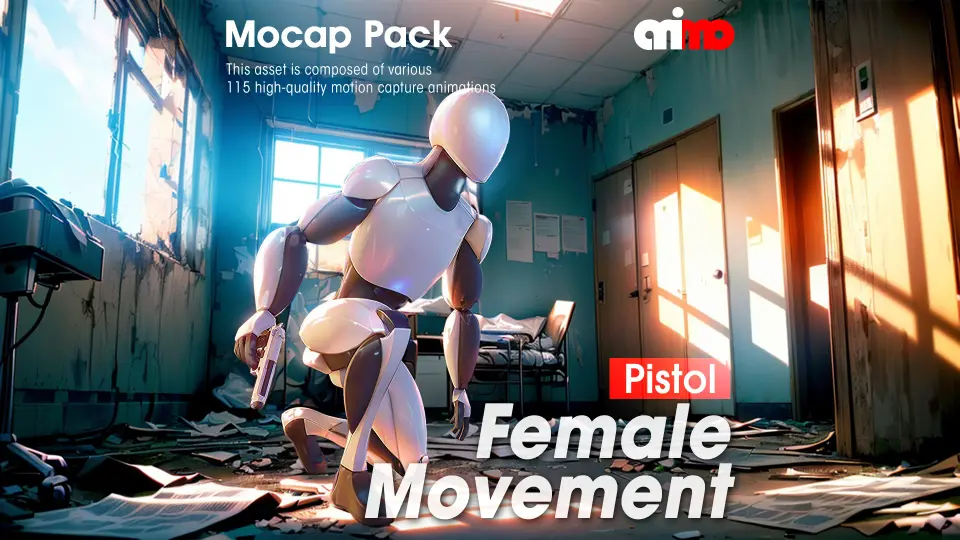
115 motion-capture animation clips for a female pistol-wielding character. Mecanim-compatible humanoid animations covering standing, crouching, kneeling, prone,
Building a believable third-person or first-person character controller requires far more than a single idle and a walk cycle. You need transitions between stances, directional starts and stops, and state-specific actions that all feel connected through a single rigged skeleton. Female Movement Pistol addresses that pipeline gap with 115 motion-capture animation clips shaped by a female character handling a pistol, giving developers a connected web of locomotion, posture changes, and position-specific shoot and death states.
Humanoid Rig Setup and Mecanim Compatibility
Every clip in the set is humanoid-based and tagged as Mecanim-compatible. That means the animations are retargeted to Unity's standard Humanoid Skeleton, so they can be applied to any character rig configured through the Mecanim importer rather than tied to one custom skeleton.
For implementation, this simplifies the controller rig. You bring in your own female Humanoid character, configure it as Humanoid in Unity's Rig tab, and the clips drop into an Animator Controller as states or Blend Tree motions. Because the entire set is humanoid, you can also mix these clips with other Humanoid animation libraries if your project already uses a different locomotion set for unarmed or rifle-based characters.
Barehand to Pistol State Transitions
The set opens with a barehand idle loop and 2 transition clips that bridge the unarmed and armed states. AA_Female_Movement_Barehand_to_Hold_Pistol and its reverse AA_Female_Movement_Hold_Pistol_to_Barehand let a character draw or holster a pistol within the animation flow itself, rather than snapping from one pose to another.
In a controller setup, these 2 clips can sit between an unarmed locomotion State Machine and the pistol locomotion State Machine, triggered by an equip or unequip input. The pistol idle loop AA_Female_Movement_Pistol_idle_loop then becomes the resting state for the armed branch. Notably, the pistol model itself is not included, so the character's hand and arm poses are the only animation-side representation of the weapon.
Standing, Crouch, and Kneel Locomotion Network
8-Directional Walk and Run with Starts and Stops
The core locomotion covers walk and run in 8 directional variants: forward, backward, right-45, right-90, right-135, left-45, left-90, and left-135. Each direction has a 3-clip set: an idle-to-movement start, a looping movement clip, and a movement-to-idle stop. For example, AA_Female_Movement_Pistol_idle_to_walkR90, AA_Female_Movement_Pistol_walkR90_loop, and AA_Female_Movement_Pistol_walkR90_to_idle form a complete start-move-stop chain for walking right at 90°.
This structure maps directly to a 2D Directional Blend Tree. The start clips handle the acceleration phase where the character shifts from idle into a directional gait, the loop clips fill the sustained movement portion, and the stop clips handle deceleration and foot planting back to idle. Having both walk and run variants for all 8 directions means you can build separate walk and run Blend Trees and cross-fade between them based on input magnitude or a sprint button.
Crouch Walk Network
A full crouch-walk network mirrors the standing locomotion set. CrouchWalk variants exist for forward, backward, right-45, right-90, right-135, left-45, left-90, and left-135, each with idle-to-crouchwalk, loop, and crouchwalk-to-idle clips.
Transitions between standing and crouch are covered by step-based clips: Stand_to_Crouch_StepForward, Stand_to_Crouch_StepBack, and the reverse Crouch_to_Stand_StepForward and Crouch_to_Stand_StepBack. A separate Crouch_to_Kneel and Kneel_to_Crouch pair bridges the crouch and kneel stances, giving the controller a connected chain from standing all the way down to kneeling without pose pops.
Standing, Kneeling, and Prone Position Blocks
Beyond locomotion, the set includes 3 positional blocks: Standing Position, Kneeling Position, and Prone Position. Each block follows the same internal pattern, which makes them predictable to wire into an Animator Controller.
The Standing Position block contains an idle-to-position entry, a holding loop, a position-to-idle exit, a shoot clip, 4 turn clips at 90° and 180° for both right and left, a death clip, and a 4-part jump sequence with start, air loop, end, and a full jump clip. The Kneeling Position block mirrors this exactly with its own entry, loop, exit, shoot, 4 turns, and death. The Prone Position block is smaller, containing entry, loop, exit, shoot, and death.
Each positional block can be treated as a self-contained Sub-State Machine. The character enters from pistol idle, holds the position, can shoot from it, turn in place, and die. The turn clips at 90° and 180° in the standing and kneeling blocks let the character reorient without leaving the stance, which is useful for cover-based or tactical shooters where a character needs to track targets while planted in one spot.
Idle Jump Sequence and Air Loop
A standalone jump sequence exists off the pistol idle state: Pistol_idle_Jump, Pistol_idle_Jump_Start, Pistol_idle_Jump_Air_Loop, and Pistol_idle_Jump_End. The start, air loop, and end structure lets a controller trigger the jump on takeoff, hold the air loop while airborne for variable-height jumps, and play the landing end clip when grounded. This is separate from the Standing Position jump sequence, which follows the same internal pattern but originates from the standing combat position rather than standard idle.
What the Set Does Not Cover
One constraint worth noting: none of the clips include finger animation. The hand posing for gripping or firing the pistol is driven by wrist and arm motion only. In practice, if your character needs articulate finger knuckle bending around the pistol grip or trigger pulls, that layer has to come from hand-pose correction or an additional finger animation layer on top of these clips.
The pistol prop is also not part of the package. The character's right hand and arm are posed as if holding a weapon, but the actual pistol mesh must be supplied separately and parented or socket-attached to the hand bone at runtime.
Where this set fits in a production is as a complete armed-locomotion and stance layer for a female Humanoid character. The clip naming is consistent across all 115 entries, the looping variations are marked, and the start-move-stop chains mean an Animator Controller can be assembled with predictable state transitions rather than improvising between mismatched clips from different sources.
 Locomotion / Gaits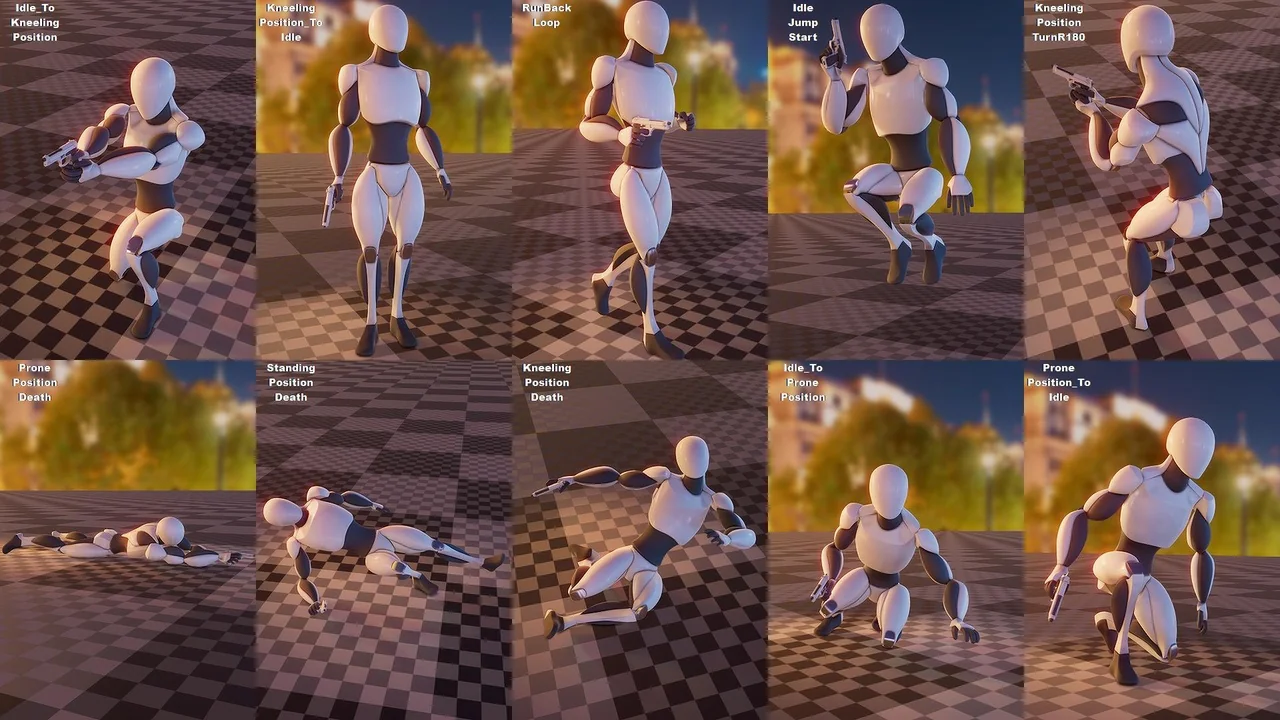
 Locomotion / Gaits
 Locomotion / Gaits
 Locomotion / Gaits