"7066dd76da796369"{"id":"1000761","slug":"unreal-engine-5-mini-maps-compass-and-marker-systems","title":"Unreal Engine 5: Mini Maps Compass and Marker Systems","category":"Unreal Engine","engine":"File Content: video + English subtitles","assetVersion":"Video Language: English","engineVersion":"File Content: video + English subtitles","tag":"Unreal Engine","accent":"blue","visual":"mech","summary":"A comprehensive Unreal Engine 5 course teaching developers to build dynamic mini maps, real-time compasses, big maps, and marker systems.","platform":"Unreal Engine","publishedAt":"2026-07-28T04:52:54.556Z","updatedAt":"2026-07-28T04:52:54.556Z","sourceNotes":[],"fileContents":[],"compatibility":["Unreal Engine","Video Language: English","File Content: video + English subtitles"],"featuredImage":{"alt":"Unreal Engine 5: Mini Maps Compass and Marker Systems","src":"/wp-content/uploads/published/2026/07/42e7f8e953d5-6127979-0c78-2-e1d0c593ef.webp"},"hasDownloadLink":true,"downloads":0,"terms":[{"taxonomy":"category","slug":"tutoriallibrary-unrealengine","name":"Unreal Engine"}],"galleryImages":[],"accessPanel":{"kind":"video-resource","title":"Download this video resource","eyebrow":"Free Download","message":"Log in or create a free account to start your download.","fileName":"Unreal Engine 5 Mini Maps Compass and Marker Systems.7z","safetyNote":"Resources are manually reviewed before listing to improve quality and reduce obvious risks.","actionLabel":"Download Free","resourceType":"Video download"},"contentHtml":"\u003cp\u003eBuilding an immersive game world requires giving players the tools to understand their surroundings. Open-world environments, role-playing games, and exploration-driven experiences rely heavily on navigation interfaces to keep players oriented and engaged. The \u003cem\u003eUnreal Engine 5: Mini Maps Compass and Marker Systems\u003c/em\u003e course serves as a practical pathway for developers wanting to build these functional interfaces from scratch.\u003c/p\u003e\n\n\u003ch2\u003eEstablishing Player Orientation with Mini-Maps and Compasses\u003c/h2\u003e\n\u003cp\u003eAt the core of spatial awareness in game design are mini-maps and compasses. The course breaks down the construction of a functional mini-map system specifically tailored to enhance player navigation. By implementing this system, developers can provide a live, scaled-down view of the immediate game world, allowing players to move confidently through complex terrains.\u003c/p\u003e\n\n\u003cp\u003eAlongside the mini-map, the curriculum covers the creation of a real-time compass. A compass operates differently from a top-down map by constantly updating directional information relative to the player's camera orientation. The developer learns to calibrate this system so that players stay on track during their adventures without having to pause the game to check a full-screen menu.\u003c/p\u003e\n\n\u003ch3\u003eBuilding a Comprehensive Big Map System\u003c/h3\u003e\n\u003cp\u003eExploration games often need to transition from a localized view to a broad overview of the world. The course dedicates time to developing a comprehensive Big Map system. This interface allows players to step back and view the entire game world at a glance. Players use this broad view to plan their journeys, chart routes to distant objectives, and get a sense of the game world's scale.\u003c/p\u003e\n\n\u003cp\u003eTo make the Big Map system interactive, the course includes a dedicated Big Map zoom system. This functionality lets players magnify specific regions of the world map. Developers learn to script the zoom mechanics so that players can seamlessly scale their view from a hemispherical perspective down to a tighter regional look without losing their bearings.\u003c/p\u003e\n\n\u003ch2\u003eHighlighting Objectives Through Markers and Advanced POIs\u003c/h2\u003e\n\u003cp\u003eA map is only as useful as the information layered on top of it. The curriculum addresses the creation of a marker system designed to highlight important locations, objectives, and Points of Interest (POIs). Developers master the art of pinning these informational icons to both the mini-map and the Big Map.\u003c/p\u003e\n\n\u003cp\u003eTaking this a step further, the course provides instruction on an advanced Point of Interest system. This allows for more intricate environmental interactions. A localized marker can evolve into a complex Point of Interest that triggers events or displays layered contextual data.\u003c/p\u003e\n\n\u003cp\u003eThe curriculum also integrates a new \"Icons with Quest\" system. This section teaches developers how to tie map icons directly to game logic and active quests. A marker can change state, update its icon, or appear on the compass only when a specific quest condition is met. Developers can also utilize the Mark Location system, an interface feature that lets players drop their own custom markers on the world map to track unmapped points of interest they wish to return to later.\u003c/p\u003e\n\n\u003ch2\u003eImplementing Fast Travel and Dynamic Map Mechanics\u003c/h2\u003e\n\u003cp\u003eFor larger game worlds, walking from one end of the map to the other can become tedious. The course introduces Fast Travel systems tied directly to the map interfaces. By interacting with the Big Map or specific discovered points of interest, players can instantly transport their character to previously unlocked locations. Developers learn to link the map UI directly to character movement and Level Streaming logic.\u003c/p\u003e\n\n\u003cp\u003eThe instruction also covers making a dynamic map system. A static map is often insufficient for games where the environment changes or where the player charters undiscovered territory. A dynamic system updates the map display based on the player's physical location in the world, revealing new terrain data as they explore.\u003c/p\u003e\n\n\u003ch3\u003eMap Optimization and Project Migration\u003c/h3\u003e\n\u003cp\u003ePerformance remains a critical consideration when designing live UI elements that update every frame. The course includes a segment on how to optimize map systems, ensuring that rendering the mini-map, updating compass headings, and animating markers do not degrade the game's frame rate.\u003c/p\u003e\n\n\u003cp\u003eEngine workflows also require modular development practices. The curriculum teaches developers how to migrate a map system to a new project. This ensures that the complex UI Blueprints, Widgets, and logic built during the course can be packaged and transferred into entirely different game builds without requiring a complete rebuild.\u003c/p\u003e\n\n\u003ch2\u003eWho Benefits from the Navigation Systems Course\u003c/h2\u003e\n\u003cp\u003eDelivered by \u003cem\u003eKalponic Studio\u003c/em\u003e, this curriculum spans 5 hours and 43 minutes of instructional workload. Published in August 2024, the material is structured to accommodate all skill levels. The target audience includes anyone interested in game development, making it accessible to beginners while providing enough depth in system architecture to benefit intermediate creators.\u003c/p\u003e\n\n\u003cp\u003eDevelopers who want to create exploration games, open-world RPGs, or survival titles will find the systems taught here directly applicable to their projects. By the end of the workload, creators possess the knowledge to build, optimize, and transfer complete navigation suites, arming their players with the directional tools needed to fully experience a complex game world.\u003c/p\u003e\n\n\u003ch2\u003eRelated Resources Worth Checking\u003c/h2\u003e\n\u003cul\u003e\n\u003cli\u003e\u003ca href=\"https://3dcghub.com/compassy-mini-big-maps-compass-navigation-system/\" title=\"Compassy (Mini \u0026amp; Big Maps + Compass Navigation System)\"\u003eCompassy (Mini \u0026amp; Big Maps + Compass Navigation System)\u003c/a\u003e\u003c/li\u003e\n\u003cli\u003e\u003ca href=\"https://3dcghub.com/narrative-navigator-maps-compasses-waypoints/\" title=\"Narrative Navigator - Maps, Compasses, Waypoints\"\u003eNarrative Navigator - Maps, Compasses, Waypoints\u003c/a\u003e\u003c/li\u003e\n\u003cli\u003e\u003ca href=\"https://3dcghub.com/unreal-5-niagara-advanced-niagara/\" title=\"Unreal 5 Niagara - Advanced Niagara\"\u003eUnreal 5 Niagara - Advanced Niagara\u003c/a\u003e\u003c/li\u003e\n\u003cli\u003e\u003ca href=\"https://3dcghub.com/unreal-engine-5-blueprint-scripting-101/\" title=\"Unreal Engine 5 - Blueprint Scripting 101\"\u003eUnreal Engine 5 - Blueprint Scripting 101\u003c/a\u003e\u003c/li\u003e\n\u003cli\u003e\u003ca href=\"https://3dcghub.com/multiplayer-in-unreal-with-gas-and-aws-dedicated-servers/\" title=\"Multiplayer in Unreal with GAS and AWS Dedicated Servers\"\u003eMultiplayer in Unreal with GAS and AWS Dedicated Servers\u003c/a\u003e\u003c/li\u003e\n\u003c/ul\u003e","contentTextLength":5692,"navigation":{"current":1402,"total":4016,"previous":{"id":"1000762","slug":"arabic-dock","title":"Arabic Dock","category":"Towns \u0026 Villages","platform":"Unreal Engine","updatedAt":"2026-07-28T09:22:02.675Z"},"next":{"id":"1000760","slug":"unreal-engine-5-automation-using-editor-utility-widgets","title":"Unreal Engine 5 - Automation using Editor Utility Widgets","category":"Unreal Engine","platform":"Unreal Engine","updatedAt":"2026-07-28T04:33:25.769Z"}},"relatedResources":[{"id":"1000821","slug":"unreal-engine-5-rts-game-real-time-strategy","title":"Unreal Engine 5: RTS game (Real Time Strategy)","category":"Unreal Engine","engine":"File Content: video + English subtitles","assetVersion":"Video Language: English","engineVersion":"File Content: video + English subtitles","tag":"Unreal Engine","accent":"blue","visual":"mech","summary":"Build a mini RTS resource game in Unreal Engine 5 with AI workers, building placement, dynamic UI, data tables, and Blueprint-based modular logic.","platform":"Unreal Engine","publishedAt":"2026-07-31T11:47:18.818Z","updatedAt":"2026-07-31T11:47:18.818Z","sourceNotes":[],"fileContents":[],"compatibility":["Unreal Engine","Video Language: English","File Content: video + English subtitles"],"featuredImage":{"alt":"Unreal Engine 5: RTS game (Real Time Strategy)","src":"/wp-content/uploads/published/2026/07/d1c092bc176f-6329257-fc2a-4-02eb1c7c32.webp"},"hasDownloadLink":true,"downloads":1},{"id":"14858","slug":"compassy-mini-big-maps-compass-navigation-system","title":"Compassy (Mini \u0026 Big Maps + Compass Navigation System)","category":"Game Mechanics","engine":"5.3","assetVersion":"Engine version: 5.3","engineVersion":"5.1","tag":"Game Mechanics","accent":"blue","visual":"city","summary":"Compassy is a comprehensive navigation suite designed to upgrade game maps. It features mini maps, big maps, and a dynamic compass system with mission markers.","platform":"Unreal Engine","publishedAt":"2026-03-11T19:40:18.000Z","updatedAt":"2026-04-19T15:45:39.000Z","sourceNotes":[],"fileContents":[],"compatibility":["Unreal Engine","Engine version: 5.3"],"featuredImage":{"alt":"Compassy (Mini \u0026 Big Maps + Compass Navigation System)","src":"https://3dcghub.com/wp-content/uploads/2026/03/94d133fb-ac1b-45f9-a3c7-d8cc5f2a2e22.webp"},"hasDownloadLink":true,"downloads":1},{"id":"1000185","slug":"unreal-engine-5-c-advanced-frontend-ui-programming","title":"Unreal Engine 5 C++: Advanced Frontend UI Programming","category":"Unreal Engine","engine":"File Content: video + English subtitles","assetVersion":"Video Language: English","engineVersion":"File Content: video + English subtitles","tag":"Unreal Engine","accent":"blue","visual":"mech","summary":"Build a modular AAA frontend interface in Unreal Engine 5 using C++ and Common UI, featuring widget stacks, input remapping, and dynamic settings panels.","platform":"Unreal Engine","publishedAt":"2026-06-22T04:36:47.167Z","updatedAt":"2026-10-03T14:08:44.356Z","sourceNotes":[],"fileContents":[],"compatibility":["Unreal Engine","Video Language: English","File Content: video + English subtitles"],"featuredImage":{"alt":"Unreal Engine 5 C++: Advanced Frontend UI Programming","src":"/wp-content/uploads/published/2026/06/12faf3fde540-6261861-cd99-2-1eb445cf78.webp"},"hasDownloadLink":true,"downloads":0}]}
Unreal Engine
Unreal Engine 5: Mini Maps Compass and Marker Systems
A comprehensive Unreal Engine 5 course teaching developers to build dynamic mini maps, real-time compasses, big maps, and marker systems.
Category:Unreal EnginePlatform: Unreal EngineVideo Language: EnglishFile Content: video + English subtitlesPublished: Jul 28, 2026
Unreal Engine
Resource overview
Building an immersive game world requires giving players the tools to understand their surroundings. Open-world environments, role-playing games, and exploration-driven experiences rely heavily on navigation interfaces to keep players oriented and engaged. The Unreal Engine 5: Mini Maps Compass and Marker Systems course serves as a practical pathway for developers wanting to build these functional interfaces from scratch.
Establishing Player Orientation with Mini-Maps and Compasses
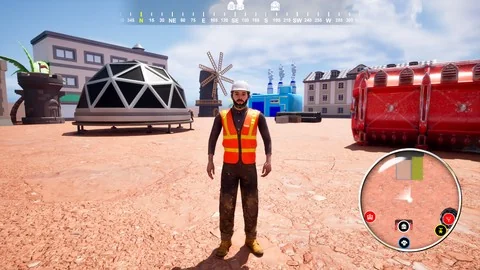
At the core of spatial awareness in game design are mini-maps and compasses. The course breaks down the construction of a functional mini-map system specifically tailored to enhance player navigation. By implementing this system, developers can provide a live, scaled-down view of the immediate game world, allowing players to move confidently through complex terrains.
Alongside the mini-map, the curriculum covers the creation of a real-time compass. A compass operates differently from a top-down map by constantly updating directional information relative to the player's camera orientation. The developer learns to calibrate this system so that players stay on track during their adventures without having to pause the game to check a full-screen menu.
Building a Comprehensive Big Map System
Exploration games often need to transition from a localized view to a broad overview of the world. The course dedicates time to developing a comprehensive Big Map system. This interface allows players to step back and view the entire game world at a glance. Players use this broad view to plan their journeys, chart routes to distant objectives, and get a sense of the game world's scale.
To make the Big Map system interactive, the course includes a dedicated Big Map zoom system. This functionality lets players magnify specific regions of the world map. Developers learn to script the zoom mechanics so that players can seamlessly scale their view from a hemispherical perspective down to a tighter regional look without losing their bearings.
Highlighting Objectives Through Markers and Advanced POIs
A map is only as useful as the information layered on top of it. The curriculum addresses the creation of a marker system designed to highlight important locations, objectives, and Points of Interest (POIs). Developers master the art of pinning these informational icons to both the mini-map and the Big Map.
Taking this a step further, the course provides instruction on an advanced Point of Interest system. This allows for more intricate environmental interactions. A localized marker can evolve into a complex Point of Interest that triggers events or displays layered contextual data.
The curriculum also integrates a new "Icons with Quest" system. This section teaches developers how to tie map icons directly to game logic and active quests. A marker can change state, update its icon, or appear on the compass only when a specific quest condition is met. Developers can also utilize the Mark Location system, an interface feature that lets players drop their own custom markers on the world map to track unmapped points of interest they wish to return to later.
Implementing Fast Travel and Dynamic Map Mechanics
For larger game worlds, walking from one end of the map to the other can become tedious. The course introduces Fast Travel systems tied directly to the map interfaces. By interacting with the Big Map or specific discovered points of interest, players can instantly transport their character to previously unlocked locations. Developers learn to link the map UI directly to character movement and Level Streaming logic.
The instruction also covers making a dynamic map system. A static map is often insufficient for games where the environment changes or where the player charters undiscovered territory. A dynamic system updates the map display based on the player's physical location in the world, revealing new terrain data as they explore.
Map Optimization and Project Migration
Performance remains a critical consideration when designing live UI elements that update every frame. The course includes a segment on how to optimize map systems, ensuring that rendering the mini-map, updating compass headings, and animating markers do not degrade the game's frame rate.
Engine workflows also require modular development practices. The curriculum teaches developers how to migrate a map system to a new project. This ensures that the complex UI Blueprints, Widgets, and logic built during the course can be packaged and transferred into entirely different game builds without requiring a complete rebuild.
Who Benefits from the Navigation Systems Course
Delivered by Kalponic Studio, this curriculum spans 5 hours and 43 minutes of instructional workload. Published in August 2024, the material is structured to accommodate all skill levels. The target audience includes anyone interested in game development, making it accessible to beginners while providing enough depth in system architecture to benefit intermediate creators.
Developers who want to create exploration games, open-world RPGs, or survival titles will find the systems taught here directly applicable to their projects. By the end of the workload, creators possess the knowledge to build, optimize, and transfer complete navigation suites, arming their players with the directional tools needed to fully experience a complex game world.
 Unreal Engine
 Unreal Engine
 Game Mechanics
 Unreal Engine