"c7a6d690c5327ebe"{"id":"1003066","slug":"umg-input-manager","title":"UMG Input Manager","category":"Gameplay Features","engine":"4.19+,5.0+","assetVersion":"","engineVersion":"4.19+,5.0+","tag":"Gameplay Features","accent":"blue","visual":"mech","summary":"An object-oriented UMG input framework for Unreal Engine featuring dynamic device-context visibility, focus listening, and custom gamepad navigation.","platform":"Unreal Engine","indexPolicy":"index","publishedAt":"2026-11-28T08:05:06.155Z","updatedAt":"2026-11-28T08:05:06.155Z","sourceNotes":[],"fileContents":[],"compatibility":["Unreal Engine","Engine Version: 4.19+,5.0+"],"featuredImage":{"alt":"UMG Input Manager","src":"/wp-content/uploads/published/2026/11/asset-0-d7a7d0c7fc.webp"},"fileSizeBytes":48179446,"hasDownloadLink":true,"downloads":0,"terms":[{"taxonomy":"category","slug":"gameplay-features","name":"Gameplay Features"}],"galleryImages":[{"src":"/wp-content/uploads/published/2026/11/asset-1-07cf4697b4.webp","alt":"UMG Input Manager"},{"src":"/wp-content/uploads/published/2026/11/asset-2-a23f25f5c8.webp","alt":"UMG Input Manager"},{"src":"/wp-content/uploads/published/2026/11/asset-3-cb108dbd07.webp","alt":"UMG Input Manager"},{"src":"/wp-content/uploads/published/2026/11/asset-4-5c071771f4.webp","alt":"UMG Input Manager"},{"src":"/wp-content/uploads/published/2026/11/asset-5-fa6f894129.webp","alt":"UMG Input Manager"}],"accessPanel":{"kind":"resource","title":"Get this resource","safetyNote":"Resources are manually reviewed before listing to improve quality and reduce obvious risks.","fileFormat":".7z","resourceType":"Resource archive","versions":[]},"contentHtml":"\u003ch2\u003eOverview\u003c/h2\u003e\u003cp\u003e\u003cstrong\u003eUMG Input Manager\u003c/strong\u003e by Vincenzo Arnone provides an object-oriented input management architecture designed specifically for Unreal Engine's Unreal Motion Graphics (UMG) UI system. It allows developers to map granular functions—such as contextual actions on an inventory slot—directly to discrete keys or analog axes across keyboards, mice, and gamepads. Built to resolve common focus and multi-device UI management issues, the system includes specialized element handlers, adaptive focus listening, and context-aware visibility rules.\u003c/p\u003e\u003ch2\u003eTechnical Package Breakdown\u003c/h2\u003e\u003cp\u003eThe package establishes a modular UI framework with the following core architectural components:\u003c/p\u003e\u003cul\u003e\u003cli\u003e\u003cstrong\u003eObject-Oriented Input Mapping:\u003c/strong\u003e Bind custom functions directly to specific input actions and axes on individual UI components (e.g., assigning separate gamepad face buttons to contextual actions like Open or Delete).\u003c/li\u003e\u003cli\u003e\u003cstrong\u003eAdapted UI Elements:\u003c/strong\u003e Built-in input handling extensions for standard widgets, including buttons, checkboxes, spinboxes, and text spinboxes.\u003c/li\u003e\u003cli\u003e\u003cstrong\u003eLayout \u0026 Element Managers:\u003c/strong\u003e Coordinated input routing designed for multi-widget structures like dynamic lists and grid panels.\u003c/li\u003e\u003cli\u003e\u003cstrong\u003eListening System:\u003c/strong\u003e An automated focus management mechanic that routes input exclusively to the currently active UI element to prevent input bleeding.\u003c/li\u003e\u003cli\u003e\u003cstrong\u003eDevice Context Visibility:\u003c/strong\u003e Dynamic runtime visibility toggling that displays or hides UI prompts and widgets based on the currently detected input device (keyboard, mouse, or gamepad).\u003c/li\u003e\u003cli\u003e\u003cstrong\u003eWidget-Based Mouse Cursor:\u003c/strong\u003e A fully customizable cursor treated as an engine widget, automatically displaying or hiding based on the active hardware controller.\u003c/li\u003e\u003cli\u003e\u003cstrong\u003eDemonstration Content:\u003c/strong\u003e Packaged showcase assets located within the plugin directory to demonstrate runtime implementation.\u003c/li\u003e\u003c/ul\u003e\u003ch2\u003eEngine Compatibility \u0026 Integration Notes\u003c/h2\u003e\u003cp\u003eThe system is compatible with Unreal Engine versions 4.19+ as well as Unreal Engine 5.0+. Delivered as a lightweight asset package (45.9 MB), its widget-based input paradigms integrate into standard UMG workflows without requiring manual polling loops. UI elements can be deployed individually or organized under dedicated manager containers like grid inventories and cascading menus.\u003c/p\u003e\u003ch2\u003eUse Cases\u003c/h2\u003e\u003cul\u003e\u003cli\u003e\u003cstrong\u003eCross-Platform Menus:\u003c/strong\u003e Seamlessly switch between mouse pointers and gamepad navigation with dynamic on-screen prompt swapping.\u003c/li\u003e\u003cli\u003e\u003cstrong\u003eComplex Inventory Grids:\u003c/strong\u003e Manage multi-action item slots that require contextual gamepad actions and strict focus trapping.\u003c/li\u003e\u003cli\u003e\u003cstrong\u003eDynamic Settings Interfaces:\u003c/strong\u003e Control sliders, checkboxes, and spinboxes across unified input schemes without breaking UI focus hierarchy.\u003c/li\u003e\u003c/ul\u003e\n\n\u003ch2\u003eRelated Resources Worth Checking\u003c/h2\u003e\n\u003cul\u003e\n\u003cli\u003e\u003ca href=\"https://3dcghub.com/widget-interaction-system-with-terminals-and-keypads/\" rel=\"noopener noreferrer\"\u003eWidget Interaction System with Terminals \u0026amp; Keypads\u003c/a\u003e\u003c/li\u003e\n\u003cli\u003e\u003ca href=\"https://3dcghub.com/custom-lens-flare-tool/\" rel=\"noopener noreferrer\"\u003eCustom Lens Flare Tool\u003c/a\u003e\u003c/li\u003e\n\u003cli\u003e\u003ca href=\"https://3dcghub.com/mobile-swipe-solution-for-android-and-ios/\" rel=\"noopener noreferrer\"\u003eMobile Swipe Solution for Android and iOS\u003c/a\u003e\u003c/li\u003e\n\u003cli\u003e\u003ca href=\"https://3dcghub.com/virtual-reality-character-flying/\" rel=\"noopener noreferrer\"\u003eVirtual Reality Character Flying\u003c/a\u003e\u003c/li\u003e\n\u003cli\u003e\u003ca href=\"https://3dcghub.com/useful-rts-camera/\" rel=\"noopener noreferrer\"\u003eUseful RTS Camera\u003c/a\u003e\u003c/li\u003e\n\u003c/ul\u003e","contentTextLength":2791,"navigation":{"current":182,"total":5165,"previous":{"id":"1003067","slug":"tornado-blueprint","title":"Tornado Blueprint","category":"Weather","platform":"Unreal Engine","updatedAt":"2026-11-28T08:05:38.043Z"},"next":{"id":"1003065","slug":"vr-swords-and-slicing-system","title":"VR Swords and Slicing System","category":"Weapons \u0026 Combat","platform":"Unreal Engine","updatedAt":"2026-11-28T08:04:25.053Z"}},"relatedResources":[{"id":"1003060","slug":"widget-interaction-system-with-terminals-and-keypads","title":"Widget Interaction System with Terminals \u0026 Keypads","category":"Gameplay Features","engine":"4.23+,5.0+","assetVersion":"","engineVersion":"4.23+,5.0+","tag":"Gameplay Features","accent":"blue","visual":"mech","summary":"A universal 3D widget interaction framework for Unreal Engine featuring smooth camera focus, direct mouse input transitions, terminals, and keypads.","platform":"Unreal Engine","indexPolicy":"index","publishedAt":"2026-11-28T06:45:05.104Z","updatedAt":"2026-11-28T07:09:29.085Z","sourceNotes":[],"fileContents":[],"compatibility":["Unreal Engine","Engine Version: 4.23+,5.0+"],"featuredImage":{"alt":"Widget Interaction System with Terminals \u0026 Keypads","src":"/wp-content/uploads/published/2026/11/asset-0-20776f50dc.webp"},"fileSizeBytes":33117058,"hasDownloadLink":true,"downloads":0},{"id":"1003026","slug":"custom-lens-flare-tool","title":"Custom Lens Flare Tool","category":"Gameplay Features","engine":"4.13+,5.0+","assetVersion":"","engineVersion":"4.13+,5.0+","tag":"Gameplay Features","accent":"blue","visual":"mech","summary":"A blueprint-driven lens flare actor for creating and controlling sprite flare elements through screen space UMG widgets, with 26 textures, 4 materials, and prem","platform":"Unreal Engine","indexPolicy":"index","publishedAt":"2026-11-25T16:30:15.471Z","updatedAt":"2026-11-25T16:30:15.471Z","sourceNotes":[],"fileContents":[],"compatibility":["Unreal Engine","Engine Version: 4.13+,5.0+"],"featuredImage":{"alt":"Custom Lens Flare Tool","src":"/wp-content/uploads/published/2026/11/d35dea2d7229-21d0fc5c-e4ea-4ebb-9fc6-5308b717b1dd-328c3b1867.webp"},"fileSizeBytes":15442736,"hasDownloadLink":true,"downloads":0},{"id":"1002328","slug":"mobile-swipe-solution-for-android-and-ios","title":"Mobile Swipe Solution for Android and iOS","category":"Gameplay Features","engine":"4.23+,5.0+","assetVersion":"","engineVersion":"4.23+,5.0+","tag":"Gameplay Features","accent":"blue","visual":"luts","summary":"A Blueprint swipe input solution for Unreal Engine mobile projects, covering 4-way, diagonal, and 8-way gestures plus the settings needed before Android and iOS","platform":"Unreal Engine","indexPolicy":"index","publishedAt":"2026-11-06T06:33:26.197Z","updatedAt":"2026-11-06T06:33:26.197Z","sourceNotes":[],"fileContents":[],"compatibility":["Unreal Engine","Engine Version: 4.23+,5.0+"],"featuredImage":{"alt":"Mobile Swipe Solution for Android and iOS","src":"/wp-content/uploads/published/2026/11/3204971faae6-e82cdf98-1b30-4ded-9007-97adc75b47b6-1af30d8522.webp"},"fileSizeBytes":50891,"hasDownloadLink":true,"downloads":0}]}[{"id":4225,"sourceId":4225,"taxonomyId":4225,"taxonomy":"category","slug":"asset-library","name":"Asset Library","parentId":null,"count":0,"hasChildren":true,"href":"/","seoTitle":"Free Game Assets Library | 3DCGHUB","seoDescription":"Browse free Unreal Engine, Unity, Blender assets and game development tutorials on 3DCGHUB with previews, compatibility notes, and secure downloads.","sitemapEnabled":true,"children":[{"id":4227,"sourceId":4227,"taxonomyId":4227,"taxonomy":"category","slug":"blender-add-ons-plugins","name":"Blender Add-ons \u0026 Plugins","parentId":4225,"count":0,"hasChildren":false,"href":"/category/blender-add-ons-plugins/","seoTitle":"Free Blender Add-ons \u0026 Plugins | 3DCGHUB","seoDescription":"Browse free Blender Add-ons \u0026 Plugins tools for Blender on 3DCGHUB: curated downloads with preview images, compatibility notes and secure download access.","sitemapEnabled":true},{"id":514,"sourceId":514,"taxonomyId":514,"taxonomy":"category","slug":"unity-2","name":"Unity","parentId":4225,"count":0,"hasChildren":true,"href":"/category/unity-2/","seoTitle":"Free Unity Assets | 3DCGHUB","seoDescription":"Browse free Unity resources on 3DCGHUB: curated downloads with preview images, compatibility notes and secure download access.","sitemapEnabled":true,"children":[{"id":523,"sourceId":523,"taxonomyId":523,"taxonomy":"category","slug":"2d","name":"2D","parentId":514,"count":0,"hasChildren":true,"href":"/category/2d/","seoTitle":"Free Unity 2D | 3DCGHUB","seoDescription":"Browse free 2D assets for Unity on 3DCGHUB: curated downloads with preview images, compatibility notes and secure download access.","sitemapEnabled":true},{"id":515,"sourceId":515,"taxonomyId":515,"taxonomy":"category","slug":"3d-unity-2","name":"3D","parentId":514,"count":0,"hasChildren":true,"href":"/category/3d-unity-2/","seoTitle":"Free Unity 3D Assets | 3DCGHUB","seoDescription":"Browse free 3D assets for Unity on 3DCGHUB: curated downloads with preview images, compatibility notes and secure download access.","sitemapEnabled":true},{"id":565,"sourceId":565,"taxonomyId":565,"taxonomy":"category","slug":"add-ons","name":"Add-Ons","parentId":514,"count":0,"hasChildren":false,"href":"/category/add-ons/","seoTitle":"Free Unity Add-Ons | 3DCGHUB","seoDescription":"Browse free Add-Ons assets for Unity on 3DCGHUB: curated downloads with preview images, compatibility notes and secure download access.","sitemapEnabled":true},{"id":529,"sourceId":529,"taxonomyId":529,"taxonomy":"category","slug":"audio-unity-2","name":"Audio","parentId":514,"count":0,"hasChildren":true,"href":"/category/audio-unity-2/","seoTitle":"Free Unity Audio | 3DCGHUB","seoDescription":"Browse free Audio for Unity on 3DCGHUB: curated downloads with preview images, compatibility notes and secure download access.","sitemapEnabled":true},{"id":557,"sourceId":557,"taxonomyId":557,"taxonomy":"category","slug":"templates","name":"Templates","parentId":514,"count":0,"hasChildren":true,"href":"/category/templates/","seoTitle":"Free Unity Templates | 3DCGHUB","seoDescription":"Browse free Unity project templates on 3DCGHUB. Starter kits with previews, compatibility notes, and secure download access.","sitemapEnabled":true},{"id":533,"sourceId":533,"taxonomyId":533,"taxonomy":"category","slug":"tools-unity-2","name":"Tools","parentId":514,"count":0,"hasChildren":true,"href":"/category/tools-unity-2/","sitemapEnabled":true},{"id":554,"sourceId":554,"taxonomyId":554,"taxonomy":"category","slug":"vfx-unity-2","name":"VFX","parentId":514,"count":0,"hasChildren":true,"href":"/category/vfx-unity-2/","seoTitle":"Free Unity VFX | 3DCGHUB","seoDescription":"Browse free VFX for Unity on 3DCGHUB: curated downloads with preview images, compatibility notes and secure download access.","sitemapEnabled":true}]},{"id":511,"sourceId":511,"taxonomyId":511,"taxonomy":"category","slug":"unreal-engine-2","name":"Unreal Engine","parentId":4225,"count":0,"hasChildren":true,"href":"/category/unreal-engine-2/","seoTitle":"Free Unreal Engine Assets | 3DCGHUB","seoDescription":"Browse free Unreal Engine resources on 3DCGHUB: curated downloads with preview images, compatibility notes and secure download access.","sitemapEnabled":true,"children":[{"id":54,"sourceId":54,"taxonomyId":54,"taxonomy":"category","slug":"3d","name":"3D","parentId":511,"count":0,"hasChildren":true,"href":"/category/3d/","seoTitle":"Free Unreal Engine 3D | 3DCGHUB","seoDescription":"Browse free 3D assets for Unreal Engine on 3DCGHUB: curated downloads with preview images, compatibility notes and secure download access.","sitemapEnabled":true},{"id":441,"sourceId":441,"taxonomyId":441,"taxonomy":"category","slug":"animations","name":"Animations","parentId":511,"count":0,"hasChildren":true,"href":"/category/animations/","seoTitle":"Free Unreal Engine Animations | 3DCGHUB","seoDescription":"Browse free Animations for Unreal Engine on 3DCGHUB: curated downloads with preview images, compatibility notes and secure download access.","sitemapEnabled":true},{"id":446,"sourceId":446,"taxonomyId":446,"taxonomy":"category","slug":"audio","name":"Audio","parentId":511,"count":0,"hasChildren":true,"href":"/category/audio/","seoTitle":"Free Unreal Engine Audio Resources | 3DCGHUB","seoDescription":"Browse free Unreal Engine audio resources including sound effects, voices, dialogue, and ambient sounds. Curated free downloads on 3DCGHUB.","sitemapEnabled":true},{"id":466,"sourceId":466,"taxonomyId":466,"taxonomy":"category","slug":"game-systems","name":"Game Systems","parentId":511,"count":0,"hasChildren":true,"href":"/category/game-systems/","seoTitle":"Free Unreal Engine Game Systems | 3DCGHUB","seoDescription":"Browse free Game Systems tools for Unreal Engine on 3DCGHUB: curated downloads with preview images, compatibility notes and secure download access.","sitemapEnabled":true},{"id":478,"sourceId":478,"taxonomyId":478,"taxonomy":"category","slug":"game-templates","name":"Game Templates","parentId":511,"count":0,"hasChildren":true,"href":"/category/game-templates/","seoTitle":"Free Unreal Engine Game Templates | 3DCGHUB","seoDescription":"Browse free Game Templates for Unreal Engine on 3DCGHUB: curated downloads with preview images, compatibility notes and secure download access.","sitemapEnabled":true},{"id":432,"sourceId":432,"taxonomyId":432,"taxonomy":"category","slug":"hdri","name":"HDRI","parentId":511,"count":0,"hasChildren":true,"href":"/category/hdri/","seoTitle":"Free Unreal Engine HDRI | 3DCGHUB","seoDescription":"Browse free Unreal Engine HDRI skies and lighting maps on 3DCGHUB. Environment lighting with previews and secure downloads.","sitemapEnabled":true},{"id":228,"sourceId":228,"taxonomyId":228,"taxonomy":"category","slug":"material-and-textures","name":"Material \u0026 Textures","parentId":511,"count":0,"hasChildren":true,"href":"/category/material-and-textures/","seoTitle":"Free Unreal Engine Material \u0026 Textures | 3DCGHUB","seoDescription":"Browse free Material \u0026 Textures for Unreal Engine on 3DCGHUB: curated downloads with preview images, compatibility notes and secure download access.","sitemapEnabled":true},{"id":298,"sourceId":298,"taxonomyId":298,"taxonomy":"category","slug":"sprites-and-flipbooks","name":"Sprites \u0026 Flipbooks","parentId":511,"count":0,"hasChildren":true,"href":"/category/sprites-and-flipbooks/","seoTitle":"Free Unreal Engine Sprites \u0026 Flipbooks | 3DCGHUB","seoDescription":"Browse free Sprites \u0026 Flipbooks assets for Unreal Engine on 3DCGHUB: curated downloads with preview images, compatibility notes and secure download access.","sitemapEnabled":true},{"id":489,"sourceId":489,"taxonomyId":489,"taxonomy":"category","slug":"tools-and-plugins","name":"Tools \u0026 Plugins","parentId":511,"count":0,"hasChildren":true,"href":"/category/tools-and-plugins/","seoTitle":"Free Unreal Engine Tools \u0026 Plugins | 3DCGHUB","seoDescription":"Browse free Tools \u0026 Plugins for Unreal Engine on 3DCGHUB: curated downloads with preview images, compatibility notes and secure download access.","sitemapEnabled":true},{"id":459,"sourceId":459,"taxonomyId":459,"taxonomy":"category","slug":"ui","name":"UI","parentId":511,"count":0,"hasChildren":true,"href":"/category/ui/","seoTitle":"Free Unreal Engine UI | 3DCGHUB","seoDescription":"Browse free UI for Unreal Engine on 3DCGHUB: curated downloads with preview images, compatibility notes and secure download access.","sitemapEnabled":true},{"id":450,"sourceId":450,"taxonomyId":450,"taxonomy":"category","slug":"vfx","name":"VFX","parentId":511,"count":0,"hasChildren":true,"href":"/category/vfx/","seoTitle":"Free Unreal Engine VFX | 3DCGHUB","seoDescription":"Browse free VFX for Unreal Engine on 3DCGHUB: curated downloads with preview images, compatibility notes and secure download access.","sitemapEnabled":true}]}]},{"id":4222,"sourceId":4222,"taxonomyId":4222,"taxonomy":"category","slug":"tutorial-library","name":"Tutorial Library","parentId":null,"count":0,"hasChildren":false,"href":"/tutorials/","seoTitle":"Free Game Development Tutorial Library | 3DCGHUB","seoDescription":"Browse free game development tutorials for Unreal Engine, Unity, Blender, and more on 3DCGHUB with practical workflows and secure downloads.","sitemapEnabled":true}]
Resource screenshots
1 / 5
Asset drops
Daily Asset Drops
Follow 3DCGHUB on Telegram for daily Unreal, Unity & Blender drops and curated CC0 releases.
UMG Input Manager by Vincenzo Arnone provides an object-oriented input management architecture designed specifically for Unreal Engine's Unreal Motion Graphics (UMG) UI system. It allows developers to map granular functions—such as contextual actions on an inventory slot—directly to discrete keys or analog axes across keyboards, mice, and gamepads. Built to resolve common focus and multi-device UI management issues, the system includes specialized element handlers, adaptive focus listening, and context-aware visibility rules.
Technical Package Breakdown
The package establishes a modular UI framework with the following core architectural components:
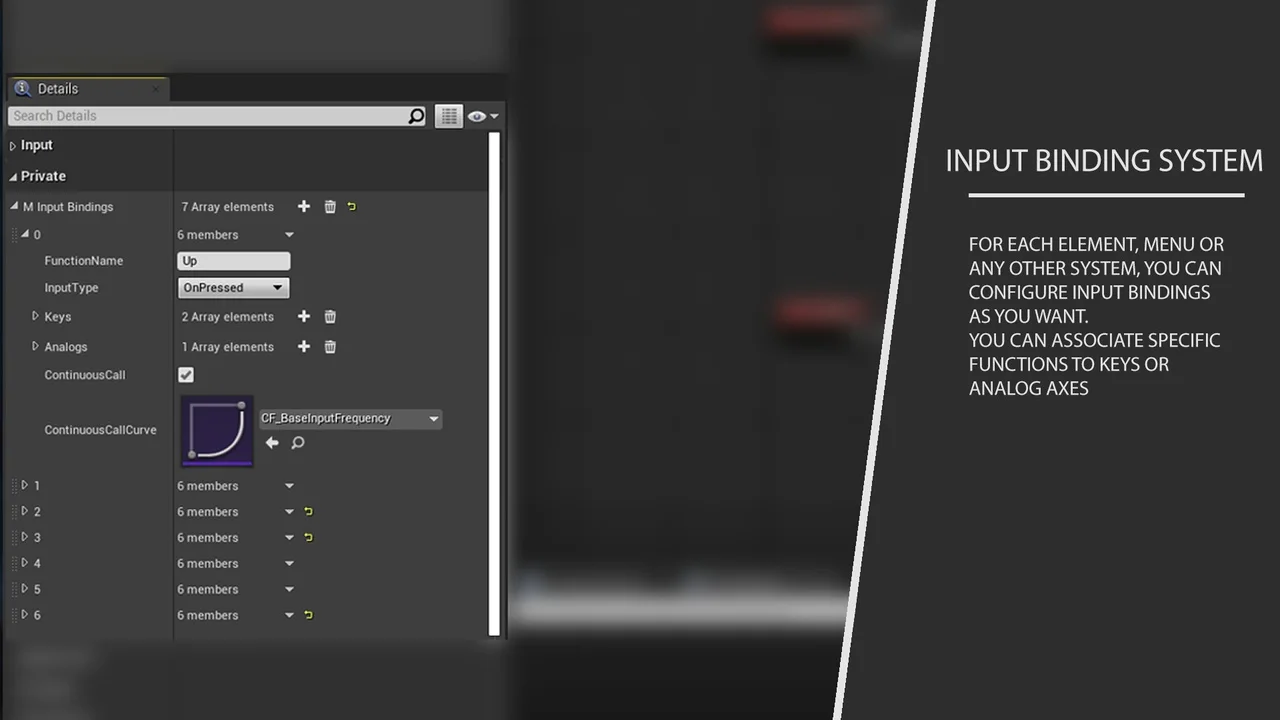
Object-Oriented Input Mapping: Bind custom functions directly to specific input actions and axes on individual UI components (e.g., assigning separate gamepad face buttons to contextual actions like Open or Delete).
Adapted UI Elements: Built-in input handling extensions for standard widgets, including buttons, checkboxes, spinboxes, and text spinboxes.
Layout & Element Managers: Coordinated input routing designed for multi-widget structures like dynamic lists and grid panels.
Listening System: An automated focus management mechanic that routes input exclusively to the currently active UI element to prevent input bleeding.
Device Context Visibility: Dynamic runtime visibility toggling that displays or hides UI prompts and widgets based on the currently detected input device (keyboard, mouse, or gamepad).
Widget-Based Mouse Cursor: A fully customizable cursor treated as an engine widget, automatically displaying or hiding based on the active hardware controller.
Demonstration Content: Packaged showcase assets located within the plugin directory to demonstrate runtime implementation.
Engine Compatibility & Integration Notes
The system is compatible with Unreal Engine versions 4.19+ as well as Unreal Engine 5.0+. Delivered as a lightweight asset package (45.9 MB), its widget-based input paradigms integrate into standard UMG workflows without requiring manual polling loops. UI elements can be deployed individually or organized under dedicated manager containers like grid inventories and cascading menus.
Use Cases
Cross-Platform Menus: Seamlessly switch between mouse pointers and gamepad navigation with dynamic on-screen prompt swapping.
Complex Inventory Grids: Manage multi-action item slots that require contextual gamepad actions and strict focus trapping.
Dynamic Settings Interfaces: Control sliders, checkboxes, and spinboxes across unified input schemes without breaking UI focus hierarchy.
 Gameplay Features
 Gameplay Features
 Gameplay Features