"efaa631e936fd3ee"{"id":"1002252","slug":"useful-rts-camera","title":"Useful RTS Camera","category":"Gameplay Features","engine":"5.0+","assetVersion":"","engineVersion":"Engine Version: 5.0+","tag":"Gameplay Features","accent":"blue","visual":"mech","summary":"Implement top-down navigation with Useful RTS Camera, featuring 5-step zoom, rect select framing, edge scroll widgets, and UE 5.1+ Enhanced Input replication.","platform":"Unreal Engine","publishedAt":"2026-10-29T16:12:08.826Z","updatedAt":"2026-10-29T16:12:08.826Z","sourceNotes":[],"fileContents":[],"compatibility":["Unreal Engine","Engine Version: 5.0+"],"featuredImage":{"alt":"Useful RTS Camera","src":"/wp-content/uploads/published/2026/10/f65a0a101e30-df5f12e9-09f8-4970-84b7-7696cf611d2d-cbca3916d1.webp"},"hasDownloadLink":true,"downloads":0,"terms":[{"taxonomy":"category","slug":"gameplay-features","name":"Gameplay Features"}],"galleryImages":[{"src":"/wp-content/uploads/published/2026/10/aec3d0666cc9-fd9c71c1-665b-4559-a97a-5dca53b17c25-b82006e8d6.webp","alt":"Useful RTS Camera"},{"src":"/wp-content/uploads/published/2026/10/9b9d0a650f76-72efc910-442e-4229-9180-32a97697e7e0-e905e7623a.webp","alt":"Useful RTS Camera"},{"src":"/wp-content/uploads/published/2026/10/cf0a982a24da-13ffe1f6-4fcb-4226-baa6-19c5cc98bf08-e5e75d7dd2.webp","alt":"Useful RTS Camera"},{"src":"/wp-content/uploads/published/2026/10/088aae4a5ab5-2477247f-c81d-4f0f-9ee3-117c00dad172-f4ef41e5e4.webp","alt":"Useful RTS Camera"},{"src":"/wp-content/uploads/published/2026/10/7c5e3a66040b-6e1e71fe-97b5-44e9-b930-a090bd345c60-9f84b0213a.webp","alt":"Useful RTS Camera"},{"src":"/wp-content/uploads/published/2026/10/8b1f755e59df-822ad20c-cdaa-41d8-a2ef-b41964485f9c-3dd0cb9080.webp","alt":"Useful RTS Camera"}],"accessPanel":{"kind":"resource","title":"Download this resource","eyebrow":"Free Download","message":"Log in or create a free account to start your download.","fileName":"Useful RTS Camera.7z","safetyNote":"Resources are manually reviewed before listing to improve quality and reduce obvious risks.","actionLabel":"Download Free","resourceType":"Resource archive"},"contentHtml":"\u003ch2\u003eEstablishing Tactical Control in Top-Down Environments\u003c/h2\u003e\u003cp\u003eTop-down strategy projects frequently stall during early prototyping because smooth viewport navigation requires synchronizing movement, zoom levels, boundary detections, and unit interactions under a unified controller.\u003c/p\u003e\u003cp\u003eUseful RTS Camera resolves this core navigation challenge by providing an integrated Blueprint system that handles spatial observation out of the box. Instead of assembling separate camera rigs, mouse capture logic, and interface indicators from scratch, the system establishes a reliable perspective framework ready for tactical command. Developers can maneuver across game environments immediately, leveraging native Unreal Engine camera dynamics configured specifically for real-time strategy requirements.\u003c/p\u003e\u003ch2\u003eControlling Viewport Perspective with Five-Step Zoom, Rotation, and Movement\u003c/h2\u003e\u003cp\u003eCamera travel relies on synchronized directional panning and smooth rotational sweeps across the game terrain.\u003c/p\u003e\u003cp\u003eElevation and scene inspection are managed through an original zoom system structured across five distinct steps. Rather than continuous, unconstrained scrolling that can throw scene framing off balance, the five-step approach provides controlled vantage tiers. Players can snap reliably between close-range inspection of individual assets and wide macroscopic views of the battlefield. Combined with horizontal movement and fluid orbital rotation, these zoom steps allow players to track moving targets, survey defensive lines, and inspect environmental elevations while preserving visual clarity across every angle.\u003c/p\u003e\u003ch2\u003eNavigating Boundaries with Edge Scrolls Widgets and Dynamic Cursor States\u003c/h2\u003e\u003cp\u003eScreen-edge interaction is critical for fluid real-time steering when mouse navigation takes precedence over direct keyboard input.\u003c/p\u003e\u003cp\u003eUseful RTS Camera embeds specialized cursor and scrolls widgets directly along the display boundaries to communicate directional tracking. When the pointer touches the perimeter of the screen, the scroll widgets register the screen-space boundary, giving visual feedback while shifting the camera across the landscape. Updated textures for both the cursor and the edge scrolls widgets provide distinct interface markers, ensuring players can instantly read movement directions. Because the setup is fully customizable, interface elements and scrolling sensitivity can be tuned to match different UI themes and pacing needs without breaking boundary detection.\u003c/p\u003e\u003ch2\u003eUnit Targeting Through the Rect Select Frame and Simple AI Movement\u003c/h2\u003e\u003cp\u003eBeyond passive spatial observation, strategy cameras must give players an active interface to command elements on the ground.\u003c/p\u003e\u003cp\u003eThe system incorporates a built-in rect select frame that allows users to drag a bounding marquee across the game world to lasso selectable entities. Working alongside this drag-selection frame is integrated simple AI movement logic operating directly within the framework. When entities are gathered within the selection rectangle, issuing destination commands engages the basic AI movement routines, directing targets across the map. This pairing connects camera-level user input straight to ground-level pathing, validating troop command interactions without demanding third-party selection plugins.\u003c/p\u003e\u003ch2\u003eModern Configuration via Enhanced Input and Network Replication\u003c/h2\u003e\u003cp\u003eModern gameplay systems require responsive input architectures that scale across changing hardware and multiplayer sessions.\u003c/p\u003e\u003cp\u003eUseful RTS Camera integrates the Enhanced Input Action System for projects running Unreal Engine 5.1 and above. This modern input pipeline allows teams to remap, alter, and extend camera actions using modular input contexts and triggers rather than legacy input mappings. The underlying architecture is network replicated, ensuring camera coordinates, orientations, and command interactions stay synchronized across multi-client sessions. The system also maintains operational compatibility with Advanced Universal Spawner, making it straightforward to populate worlds with spawned agents that the camera system can immediately target, frame, and direct.\u003c/p\u003e\u003ch2\u003eProduction Placement Across Strategy Frameworks\u003c/h2\u003e\u003cp\u003eSetting up top-down interactions typically pulls engineering time away from core gameplay logic and asset creation.\u003c/p\u003e\u003cp\u003eUseful RTS Camera functions effectively as a turnkey template for real-time strategy titles, tactical battle simulators, and base-building projects. By uniting five-step zoom tracking, edge interface widgets, rectangular selection, basic AI locomotion, and network replication under Unreal Engine 5.1+ standards, it offers a reliable perspective foundation that drops directly into prototyping or final production environments.\u003c/p\u003e\n\n\u003ch2\u003eRelated Resources Worth Checking\u003c/h2\u003e\n\u003cul\u003e\n\u003cli\u003e\u003ca href=\"https://3dcghub.com/ultimate-rts-camera/\" title=\"Ultimate RTS Camera\"\u003eUltimate RTS Camera\u003c/a\u003e\u003c/li\u003e\n\u003cli\u003e\u003ca href=\"https://3dcghub.com/customizable-bodycam-component/\" title=\"Customizable Bodycam Component\"\u003eCustomizable Bodycam Component\u003c/a\u003e\u003c/li\u003e\n\u003cli\u003e\u003ca href=\"https://3dcghub.com/orbit-camera/\" title=\"Orbit Camera\"\u003eOrbit Camera\u003c/a\u003e\u003c/li\u003e\n\u003cli\u003e\u003ca href=\"https://3dcghub.com/advanced-bodycam-vhs-body-camera-component-with-video-effects/\" title=\"Advanced BodyCam / VHS - Body Camera Component with Video Effects\"\u003eAdvanced BodyCam / VHS - Body Camera Component with Video Effects\u003c/a\u003e\u003c/li\u003e\n\u003cli\u003e\u003ca href=\"https://3dcghub.com/cine-cam/\" title=\"Cine Cam\"\u003eCine Cam\u003c/a\u003e\u003c/li\u003e\n\u003c/ul\u003e","contentTextLength":4862,"navigation":{"current":33,"total":4209,"previous":{"id":"1002253","slug":"uv-light","title":"UV Light","category":"Gameplay Features","platform":"Unreal Engine","updatedAt":"2026-10-29T16:12:47.692Z"},"next":{"id":"1002251","slug":"unified-procedural-animation","title":"Unified Procedural Animation","category":"Gameplay Features","platform":"Unreal Engine","updatedAt":"2026-10-29T16:11:23.823Z"}},"relatedResources":[{"id":"1002249","slug":"ultimate-rts-camera","title":"Ultimate RTS Camera","category":"Gameplay Features","engine":"5.0+","assetVersion":"","engineVersion":"Engine Version: 5.0+","tag":"Gameplay Features","accent":"blue","visual":"mech","summary":"A full-featured, replicated Unreal Engine camera system for RTS games, offering multi-input detection, touch gestures, and smooth interpolation.","platform":"Unreal Engine","publishedAt":"2026-10-29T16:09:33.483Z","updatedAt":"2026-10-29T16:09:33.483Z","sourceNotes":[],"fileContents":[],"compatibility":["Unreal Engine","Engine Version: 5.0+"],"featuredImage":{"alt":"Ultimate RTS Camera","src":"/wp-content/uploads/published/2026/10/e6d34a5d4257-5f52a74f-0679-4069-bf8f-61bec6fabc19-ab7177cb89.webp"},"hasDownloadLink":true,"downloads":0},{"id":"1000048","slug":"customizable-bodycam-component","title":"Customizable Bodycam Component","category":"Gameplay Features","engine":"5.1+","assetVersion":"","engineVersion":"Engine Version: 5.1+","tag":"Gameplay Features","accent":"blue","visual":"mech","summary":"A Blueprint-driven camera component designed to deliver photorealistic, character-mirrored motion, exposed material parameters, and customizable VHS effects.","platform":"Unreal Engine","publishedAt":"2026-05-22T11:03:34.875Z","updatedAt":"2026-10-24T07:39:32.861Z","sourceNotes":[],"fileContents":[],"compatibility":["Unreal Engine","Engine Version: 5.1+"],"featuredImage":{"alt":"Customizable Bodycam Component","src":"/wp-content/uploads/published/2026/05/a8f60f9cccc0-8a5f4ac1-11c7-49f2-9fb6-a21c09403ba4-65699f7637.webp"},"hasDownloadLink":true,"downloads":5},{"id":"1002135","slug":"orbit-camera","title":"Orbit Camera","category":"Gameplay Features","engine":"5.1+","assetVersion":"","engineVersion":"Engine Version: 5.1+","tag":"Gameplay Features","accent":"blue","visual":"mech","summary":"Explore the Orbit Camera pawn blueprint, featuring custom pivot targeting, dolly zooms, camera switching transitions, and a clean screenshot album.","platform":"Unreal Engine","publishedAt":"2026-10-29T09:23:20.322Z","updatedAt":"2026-10-29T09:23:20.322Z","sourceNotes":[],"fileContents":[],"compatibility":["Unreal Engine","Engine Version: 5.1+"],"featuredImage":{"alt":"Orbit Camera","src":"/wp-content/uploads/published/2026/10/e324a714a1c3-3b75bef2-164f-4162-916b-96dc9e94da5f-912c0b74b8.webp"},"hasDownloadLink":true,"downloads":0}]}
Gameplay Features
Useful RTS Camera
Implement top-down navigation with Useful RTS Camera, featuring 5-step zoom, rect select framing, edge scroll widgets, and UE 5.1+ Enhanced Input replication.
Establishing Tactical Control in Top-Down Environments
Top-down strategy projects frequently stall during early prototyping because smooth viewport navigation requires synchronizing movement, zoom levels, boundary detections, and unit interactions under a unified controller.
Useful RTS Camera resolves this core navigation challenge by providing an integrated Blueprint system that handles spatial observation out of the box. Instead of assembling separate camera rigs, mouse capture logic, and interface indicators from scratch, the system establishes a reliable perspective framework ready for tactical command. Developers can maneuver across game environments immediately, leveraging native Unreal Engine camera dynamics configured specifically for real-time strategy requirements.
Controlling Viewport Perspective with Five-Step Zoom, Rotation, and Movement
Camera travel relies on synchronized directional panning and smooth rotational sweeps across the game terrain.
Elevation and scene inspection are managed through an original zoom system structured across five distinct steps. Rather than continuous, unconstrained scrolling that can throw scene framing off balance, the five-step approach provides controlled vantage tiers. Players can snap reliably between close-range inspection of individual assets and wide macroscopic views of the battlefield. Combined with horizontal movement and fluid orbital rotation, these zoom steps allow players to track moving targets, survey defensive lines, and inspect environmental elevations while preserving visual clarity across every angle.
Navigating Boundaries with Edge Scrolls Widgets and Dynamic Cursor States
Screen-edge interaction is critical for fluid real-time steering when mouse navigation takes precedence over direct keyboard input.
Useful RTS Camera embeds specialized cursor and scrolls widgets directly along the display boundaries to communicate directional tracking. When the pointer touches the perimeter of the screen, the scroll widgets register the screen-space boundary, giving visual feedback while shifting the camera across the landscape. Updated textures for both the cursor and the edge scrolls widgets provide distinct interface markers, ensuring players can instantly read movement directions. Because the setup is fully customizable, interface elements and scrolling sensitivity can be tuned to match different UI themes and pacing needs without breaking boundary detection.
Unit Targeting Through the Rect Select Frame and Simple AI Movement
Beyond passive spatial observation, strategy cameras must give players an active interface to command elements on the ground.
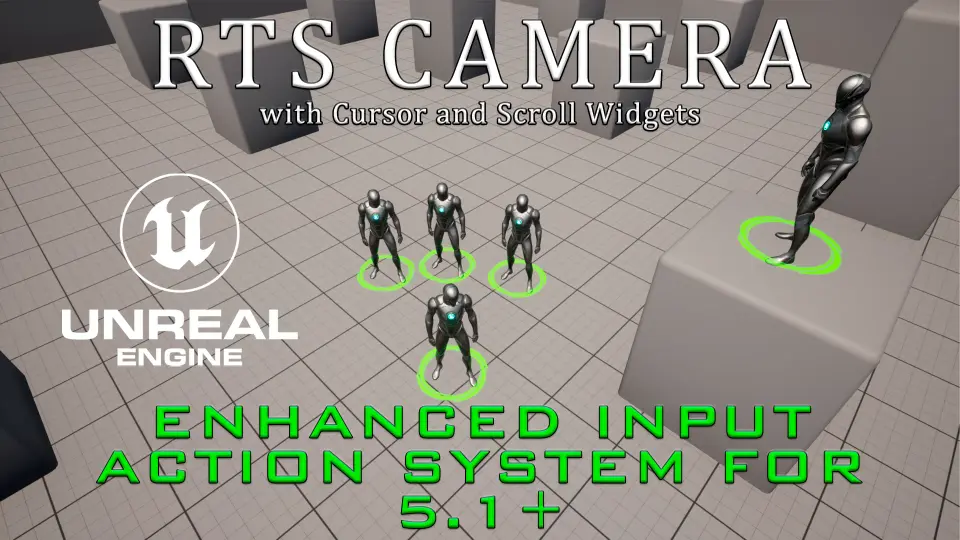
The system incorporates a built-in rect select frame that allows users to drag a bounding marquee across the game world to lasso selectable entities. Working alongside this drag-selection frame is integrated simple AI movement logic operating directly within the framework. When entities are gathered within the selection rectangle, issuing destination commands engages the basic AI movement routines, directing targets across the map. This pairing connects camera-level user input straight to ground-level pathing, validating troop command interactions without demanding third-party selection plugins.
Modern Configuration via Enhanced Input and Network Replication
Modern gameplay systems require responsive input architectures that scale across changing hardware and multiplayer sessions.
Useful RTS Camera integrates the Enhanced Input Action System for projects running Unreal Engine 5.1 and above. This modern input pipeline allows teams to remap, alter, and extend camera actions using modular input contexts and triggers rather than legacy input mappings. The underlying architecture is network replicated, ensuring camera coordinates, orientations, and command interactions stay synchronized across multi-client sessions. The system also maintains operational compatibility with Advanced Universal Spawner, making it straightforward to populate worlds with spawned agents that the camera system can immediately target, frame, and direct.
Production Placement Across Strategy Frameworks
Setting up top-down interactions typically pulls engineering time away from core gameplay logic and asset creation.
Useful RTS Camera functions effectively as a turnkey template for real-time strategy titles, tactical battle simulators, and base-building projects. By uniting five-step zoom tracking, edge interface widgets, rectangular selection, basic AI locomotion, and network replication under Unreal Engine 5.1+ standards, it offers a reliable perspective foundation that drops directly into prototyping or final production environments.
 Gameplay Features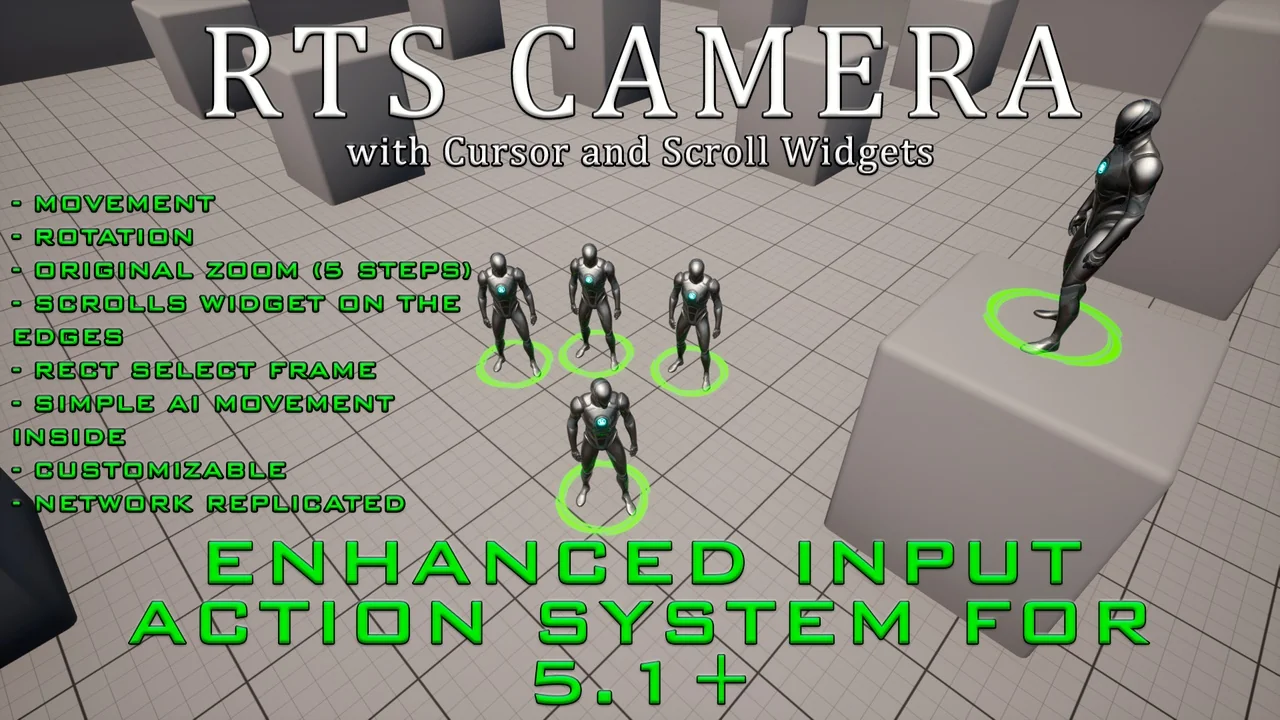
 Gameplay Features
 Gameplay Features
 Gameplay Features