"1062d43bc714d570"{"id":"1001018","slug":"storm-volumetric-clouds-and-sky","title":"Storm Volumetric Clouds and Sky","category":"Weather","engine":"5.2+","assetVersion":"","engineVersion":"Engine Version: 5.2+","tag":"Weather","accent":"blue","visual":"mech","summary":"A flexible volumetric storm system with custom blueprint, material parameters, 8 demo levels, real-world heightmaps, and Lumen support for UE 5.1+.","platform":"Unreal Engine","publishedAt":"2026-08-22T16:19:29.034Z","updatedAt":"2026-08-22T16:19:29.034Z","sourceNotes":[],"fileContents":[],"compatibility":["Unreal Engine","Engine Version: 5.2+"],"featuredImage":{"alt":"Storm Volumetric Clouds and Sky","src":"/wp-content/uploads/published/2026/08/a2ac7753a005-4410b895-7e92-4c66-9417-0f813fcbc722-40f9d9ae0d.webp"},"hasDownloadLink":true,"downloads":0,"terms":[{"taxonomy":"category","slug":"weather-vfx","name":"Weather"}],"galleryImages":[{"src":"/wp-content/uploads/published/2026/08/611fb2704b4b-0de5eb46-bb54-482e-826d-d443412eeac9-b80facbe88.webp","alt":"Storm Volumetric Clouds and Sky"},{"src":"/wp-content/uploads/published/2026/08/1874fc93d15e-4cb4071c-bdff-45c7-8edf-6589648f896e-15b2f70bad.webp","alt":"Storm Volumetric Clouds and Sky"},{"src":"/wp-content/uploads/published/2026/08/1202c16e80ca-c036002b-3302-4267-acb9-fddc8c000053-8dc89ef3a4.webp","alt":"Storm Volumetric Clouds and Sky"},{"src":"/wp-content/uploads/published/2026/08/04ed35d45aa0-2a04a8d4-0972-42e3-9f7e-4e307ce091c8-3de1aeb0f8.webp","alt":"Storm Volumetric Clouds and Sky"},{"src":"/wp-content/uploads/published/2026/08/2dc95c945517-6ce8736c-eb5b-4cbf-a478-2fb1572d29cb-433fd08c0b.webp","alt":"Storm Volumetric Clouds and Sky"},{"src":"/wp-content/uploads/published/2026/08/4592d6325b5a-194374f2-9392-48d2-b97b-9cd8d9cd3de1-eb4c81a983.webp","alt":"Storm Volumetric Clouds and Sky"},{"src":"/wp-content/uploads/published/2026/08/27d70a7ffded-2c2d0f96-978b-4b4d-a89a-702536d2283a-36b40b059c.webp","alt":"Storm Volumetric Clouds and Sky"},{"src":"/wp-content/uploads/published/2026/08/987abb30d76d-b177a3cb-12aa-41c6-8641-9c71757c2189-f290070238.webp","alt":"Storm Volumetric Clouds and Sky"},{"src":"/wp-content/uploads/published/2026/08/ddaf3dfb6948-0ae88980-7833-4c90-b7ea-1b7303053ca5-c9faaa0680.webp","alt":"Storm Volumetric Clouds and Sky"},{"src":"/wp-content/uploads/published/2026/08/d84611412ef7-d72374c2-6d59-47ed-8f23-dfd52272a363-ae0ddb68eb.webp","alt":"Storm Volumetric Clouds and Sky"}],"accessPanel":{"kind":"resource","title":"Download this resource","eyebrow":"Free Download","message":"Log in or create a free account to start your download.","fileName":"Storm Volumetric Clouds and Sky.7z","safetyNote":"Resources are manually reviewed before listing to improve quality and reduce obvious risks.","actionLabel":"Download Free","resourceType":"Resource archive"},"contentHtml":"\u003cp\u003eDrop the blueprint into an empty project and the sky begins to churn. That is the core promise of Storm Volumetric Clouds and Sky: a volumetric cloud package designed to turn a blank scene into a towering storm front in a few clicks. It is flexible enough to produce realistic weather, yet its material parameters can push the same system into alien skies that have never seen rain.\u003c/p\u003e \u003ch2\u003eA Volumetric Storm in a Single Drag-and-Drop\u003c/h2\u003e\n\u003cp\u003eThe asset is shaped by a blueprint that gathers every essential actor for a storm volumetric sky into one ready-to-place setup. Instead of manually wiring together a directional light, sky light, sky atmosphere, exponential height fog, and cloud volumes, the blueprint already contains them. It also includes a custom volumetric cloud material for the storm itself, a skydome with its own sky material, and a separate material for the middle of the storm.\u003c/p\u003e\n\u003cp\u003eThis means the barrier to entry is deliberately low. Open a blank empty project, drag the blueprint into the scene, and the storm system is immediately active. There is no need to assemble components from scratch or understand how each piece interacts. After the initial placement, artists can start adjusting parameters, flowmaps, and lighting to shape the storm into something unique.\u003c/p\u003e \u003ch2\u003eMaterial Parameters That Shape the Whole Sky\u003c/h2\u003e\n\u003cp\u003eThe cloud material instances are where the real customization happens. They expose a large set of parameters that control nearly every visual aspect of the storm. Color, shape, position, and intensity can all be changed quickly. Flowmaps give another layer of control, letting the artist steer how the cloud formations move and evolve.\u003c/p\u003e\n\u003cp\u003eBecause these parameters are so broad, the system works for more than realistic storms. Shifting the colors and altering the flowmaps can turn the same volumetric setup into an alien sky with strange, swirling formations. The included videos demonstrate this range, covering storm center customization, flowmap changes, shape manipulation, and how the storm reacts to light. That light sensitivity is baked into the material setup, so the clouds respond naturally to dynamic lighting changes instead of feeling like static geometry.\u003c/p\u003e \u003ch2\u003eEight Demo Levels and Real Terrain as a Starting Point\u003c/h2\u003e\n\u003cp\u003eThe pack ships with eight demo levels, and each one uses a different lighting and storm setup. This variety gives an immediate sense of how far the system can be pushed. One level may feature a dark, brooding storm while another shows a more dramatic, backlit cloudscape. For creators who want a landscape to test against, the demo levels include large real-world heightmaps generated from DEM (Digital Elevation Models). These are not generic procedurally generated hills; they are faithful reproductions of actual terrain, preserving the real-world scale and the physical characteristics of the location.\u003c/p\u003e\n\u003cp\u003eHaving accurate terrain already in the scene is a practical advantage. It gives a grounded reference point for how the storm shadows, fog, and lighting behave across valleys, ridges, and open flats. Artists can use these heightmaps as a foundation for their own project, or simply as a testing ground while they explore the cloud parameters.\u003c/p\u003e \u003ch2\u003eBuilt for Open-World Performance and Lumen\u003c/h2\u003e\n\u003cp\u003eEverything in the pack is optimized for open-world games, with speed and performance as explicit goals. The system supports dynamic lighting, including full dynamic global illumination. This is not a pre-baked skybox; it is a living volumetric system where the clouds react to light changes in real time. For Unreal Engine 5 projects, the asset supports Lumen from UE 5.1 onward, which means the storm can participate in the scene’s global illumination and reflections without a cumbersome separate workflow.\u003c/p\u003e\n\u003cp\u003eThe pack also relies on World Partition to keep everything optimized. When a demo map is first opened, the landscape regions are not loaded automatically, so the terrain and some actors may not appear in the editor. The intended workflow is to open the World Partition tab, select all regions, right-click, and choose “Load Regions from Selection.” This is a one-time step per project, and it’s standard Unreal Engine behavior for World Partition-based maps. The benefit is a smaller memory footprint and a scene that only loads what it needs, which matters for large open worlds.\u003c/p\u003e \u003ch2\u003eTwo Workflows, One Storm System\u003c/h2\u003e\n\u003cp\u003eNot every team wants to rely on a pre-assembled blueprint. Some prefer a hand-built setup where every actor is placed deliberately. The asset supports both approaches. The first three demo levels show the volumetric storm created without the blueprint, providing a reference for those who want a custom composition. The blueprint itself exists for users with very little Unreal Engine experience, allowing them to generate the storm in a single click without needing to know the internals of UE5. Whether the team is prototyping quickly or building a bespoke storm solution, the choice is open.\u003c/p\u003e\n\u003cp\u003eThis dual nature is one of the strongest parts of the package. A solo developer can be up and running with a dramatic sky in minutes, while a more experienced technical artist can tear the system apart, rebuild the materials, and set up their own light rigging. The underlying material instances and flowmaps carry over regardless of the workflow, so the visual control stays consistent.\u003c/p\u003e \u003ch2\u003eFinal Takeaway for Teams\u003c/h2\u003e\n\u003cp\u003eStorm Volumetric Clouds and Sky is not just a static skybox. It is a complete, reactive storm system that adapts to lighting, terrain, and artistic intent. The blueprint makes the first result nearly instant, while the material parameters provide a deep well of customization for later refinement. For Unreal Engine 5 projects that need convincing storm clouds, alien atmospheres, or any weather-heavy sky with strong performance characteristics, this asset offers a direct path from empty scene to epic sky.\u003c/p\u003e\n\n\u003ch2\u003eExplore Similar Assets\u003c/h2\u003e\n\u003cul\u003e\n\u003cli\u003e\u003ca href=\"https://3dcghub.com/desert-and-snow-vdb-collection/\" title=\"Desert \u0026amp; Snow VDB Collection\"\u003eDesert \u0026amp; Snow VDB Collection\u003c/a\u003e\u003c/li\u003e\n\u003cli\u003e\u003ca href=\"https://3dcghub.com/vdb-cloud-and-fog-pack-1/\" title=\"VDB Cloud \u0026amp; Fog Pack 1\"\u003eVDB Cloud \u0026amp; Fog Pack 1\u003c/a\u003e\u003c/li\u003e\n\u003cli\u003e\u003ca href=\"https://3dcghub.com/clouds-generator-niagara-fluids/\" title=\"Clouds Generator - Niagara Fluids\"\u003eClouds Generator - Niagara Fluids\u003c/a\u003e\u003c/li\u003e\n\u003cli\u003e\u003ca href=\"https://3dcghub.com/stylized-volumetric-clouds-shader/\" title=\"Stylized Volumetric Clouds Shader\"\u003eStylized Volumetric Clouds Shader\u003c/a\u003e\u003c/li\u003e\n\u003cli\u003e\u003ca href=\"https://3dcghub.com/fire-tornado-fx-vdb/\" title=\"Fire Tornado FX VDB\"\u003eFire Tornado FX VDB\u003c/a\u003e\u003c/li\u003e\n\u003c/ul\u003e","contentTextLength":6041,"navigation":{"current":479,"total":3379,"previous":{"id":"1001019","slug":"studio-7","title":"Studio 7","category":"Interior","platform":"Unreal Engine","updatedAt":"2026-08-23T04:38:07.320Z"},"next":{"id":"1001017","slug":"star-vfx-pack","title":"Star VFX Pack","category":"Shaders","platform":"Unreal Engine","updatedAt":"2026-08-22T16:14:20.964Z"}},"relatedResources":[{"id":"1000050","slug":"desert-and-snow-vdb-collection","title":"Desert \u0026 Snow VDB Collection","category":"Weather","engine":"5.3+","assetVersion":"","engineVersion":"5.3+","tag":"Weather","accent":"blue","visual":"mech","summary":"Desert \u0026 Snow VDB Collection brings 45 customizable volumetric effects to Unreal Engine for storms, blizzards, tornados, and sand or snow movement.","platform":"Unreal Engine","publishedAt":"2026-05-22T12:42:59.843Z","updatedAt":"2026-05-22T12:42:59.843Z","sourceNotes":[],"fileContents":[],"compatibility":["Unreal Engine","Engine version: 5.3+"],"featuredImage":{"alt":"Desert \u0026 Snow VDB Collection","src":"/wp-content/uploads/published/2026/05/6c38fbd27e23-c1188312-885c-4c2f-8f70-0c3a957a4a26-23f8ba47ad.webp"},"hasDownloadLink":true,"downloads":2},{"id":"1000032","slug":"vdb-cloud-and-fog-pack-1","title":"VDB Cloud \u0026 Fog Pack 1","category":"Weather","engine":"5.3+","assetVersion":"","engineVersion":"5.3+","tag":"Weather","accent":"blue","visual":"mech","summary":"A practical look at VDB Cloud \u0026 Fog Pack 1 for Unreal Engine, covering setup notes, rendering commands, and where simulated cloud and fog caches fit best.","platform":"Unreal Engine","publishedAt":"2026-05-21T08:56:43.608Z","updatedAt":"2026-05-21T08:56:43.608Z","sourceNotes":[],"fileContents":[],"compatibility":["Unreal Engine","Engine version: 5.3+"],"featuredImage":{"alt":"VDB Cloud \u0026 Fog Pack 1","src":"/wp-content/uploads/published/2026/05/b3d307c1fa74-e5c0ac20-065a-46cc-aad4-b1167829ec9a-0133e863dc.webp"},"hasDownloadLink":true,"downloads":2},{"id":"17543","slug":"clouds-generator-niagara-fluids","title":"Clouds Generator - Niagara Fluids","category":"Weather","engine":"5.3+","assetVersion":"Engine version: 5.3+","engineVersion":"5.3","tag":"Weather","accent":"blue","visual":"city","summary":"Enhance your digital environments with Clouds Generator - Niagara Fluids. This package offers 11 advanced systems for creating dynamic, realistic cloud effects from meshes and splines.","platform":"Unreal Engine","publishedAt":"2026-03-13T14:51:34.000Z","updatedAt":"2026-04-19T15:43:30.000Z","sourceNotes":[],"fileContents":[],"compatibility":["Unreal Engine","Engine version: 5.3+"],"featuredImage":{"alt":"Clouds Generator - Niagara Fluids","src":"https://3dcghub.com/wp-content/uploads/2026/03/7331d1dc-1b2f-4f31-a50d-5301426f101f.webp"},"hasDownloadLink":true,"downloads":1}]}
Weather
Storm Volumetric Clouds and Sky
A flexible volumetric storm system with custom blueprint, material parameters, 8 demo levels, real-world heightmaps, and Lumen support for UE 5.1+.
Category:Unreal Engine,WeatherPlatform: Unreal EngineEngine Version: 5.2+Published: Aug 22, 2026
Weather
Resource overview
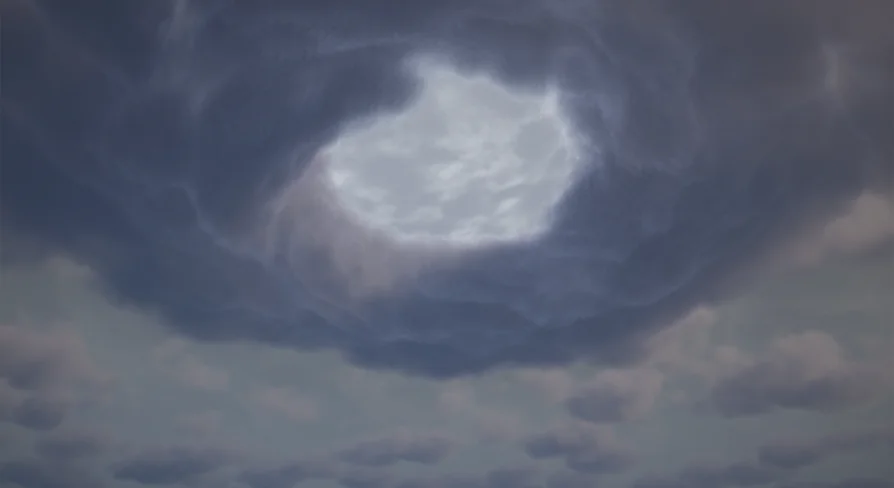
Drop the blueprint into an empty project and the sky begins to churn. That is the core promise of Storm Volumetric Clouds and Sky: a volumetric cloud package designed to turn a blank scene into a towering storm front in a few clicks. It is flexible enough to produce realistic weather, yet its material parameters can push the same system into alien skies that have never seen rain.
A Volumetric Storm in a Single Drag-and-Drop
The asset is shaped by a blueprint that gathers every essential actor for a storm volumetric sky into one ready-to-place setup. Instead of manually wiring together a directional light, sky light, sky atmosphere, exponential height fog, and cloud volumes, the blueprint already contains them. It also includes a custom volumetric cloud material for the storm itself, a skydome with its own sky material, and a separate material for the middle of the storm.
This means the barrier to entry is deliberately low. Open a blank empty project, drag the blueprint into the scene, and the storm system is immediately active. There is no need to assemble components from scratch or understand how each piece interacts. After the initial placement, artists can start adjusting parameters, flowmaps, and lighting to shape the storm into something unique.
Material Parameters That Shape the Whole Sky
The cloud material instances are where the real customization happens. They expose a large set of parameters that control nearly every visual aspect of the storm. Color, shape, position, and intensity can all be changed quickly. Flowmaps give another layer of control, letting the artist steer how the cloud formations move and evolve.
Because these parameters are so broad, the system works for more than realistic storms. Shifting the colors and altering the flowmaps can turn the same volumetric setup into an alien sky with strange, swirling formations. The included videos demonstrate this range, covering storm center customization, flowmap changes, shape manipulation, and how the storm reacts to light. That light sensitivity is baked into the material setup, so the clouds respond naturally to dynamic lighting changes instead of feeling like static geometry.
Eight Demo Levels and Real Terrain as a Starting Point
The pack ships with eight demo levels, and each one uses a different lighting and storm setup. This variety gives an immediate sense of how far the system can be pushed. One level may feature a dark, brooding storm while another shows a more dramatic, backlit cloudscape. For creators who want a landscape to test against, the demo levels include large real-world heightmaps generated from DEM (Digital Elevation Models). These are not generic procedurally generated hills; they are faithful reproductions of actual terrain, preserving the real-world scale and the physical characteristics of the location.
Having accurate terrain already in the scene is a practical advantage. It gives a grounded reference point for how the storm shadows, fog, and lighting behave across valleys, ridges, and open flats. Artists can use these heightmaps as a foundation for their own project, or simply as a testing ground while they explore the cloud parameters.
Built for Open-World Performance and Lumen
Everything in the pack is optimized for open-world games, with speed and performance as explicit goals. The system supports dynamic lighting, including full dynamic global illumination. This is not a pre-baked skybox; it is a living volumetric system where the clouds react to light changes in real time. For Unreal Engine 5 projects, the asset supports Lumen from UE 5.1 onward, which means the storm can participate in the scene’s global illumination and reflections without a cumbersome separate workflow.
The pack also relies on World Partition to keep everything optimized. When a demo map is first opened, the landscape regions are not loaded automatically, so the terrain and some actors may not appear in the editor. The intended workflow is to open the World Partition tab, select all regions, right-click, and choose “Load Regions from Selection.” This is a one-time step per project, and it’s standard Unreal Engine behavior for World Partition-based maps. The benefit is a smaller memory footprint and a scene that only loads what it needs, which matters for large open worlds.
Two Workflows, One Storm System
Not every team wants to rely on a pre-assembled blueprint. Some prefer a hand-built setup where every actor is placed deliberately. The asset supports both approaches. The first three demo levels show the volumetric storm created without the blueprint, providing a reference for those who want a custom composition. The blueprint itself exists for users with very little Unreal Engine experience, allowing them to generate the storm in a single click without needing to know the internals of UE5. Whether the team is prototyping quickly or building a bespoke storm solution, the choice is open.
This dual nature is one of the strongest parts of the package. A solo developer can be up and running with a dramatic sky in minutes, while a more experienced technical artist can tear the system apart, rebuild the materials, and set up their own light rigging. The underlying material instances and flowmaps carry over regardless of the workflow, so the visual control stays consistent.
Final Takeaway for Teams
Storm Volumetric Clouds and Sky is not just a static skybox. It is a complete, reactive storm system that adapts to lighting, terrain, and artistic intent. The blueprint makes the first result nearly instant, while the material parameters provide a deep well of customization for later refinement. For Unreal Engine 5 projects that need convincing storm clouds, alien atmospheres, or any weather-heavy sky with strong performance characteristics, this asset offers a direct path from empty scene to epic sky.
 Weather
 Weather
 Weather
 Weather