"7b46a695175d8694"{"id":"1000032","slug":"vdb-cloud-and-fog-pack-1","title":"VDB Cloud \u0026 Fog Pack 1","category":"Weather","engine":"5.3+","assetVersion":"","engineVersion":"5.3+","tag":"Weather","accent":"blue","visual":"mech","summary":"A practical look at VDB Cloud \u0026 Fog Pack 1 for Unreal Engine, covering setup notes, rendering commands, and where simulated cloud and fog caches fit best.","platform":"Unreal Engine","publishedAt":"2026-05-21T08:56:43.608Z","updatedAt":"2026-05-21T08:56:43.608Z","sourceNotes":[],"fileContents":[],"compatibility":["Unreal Engine","Engine version: 5.3+"],"featuredImage":{"alt":"VDB Cloud \u0026 Fog Pack 1","src":"/wp-content/uploads/published/2026/05/b3d307c1fa74-e5c0ac20-065a-46cc-aad4-b1167829ec9a-0133e863dc.webp"},"hasDownloadLink":true,"downloads":2,"terms":[{"taxonomy":"category","slug":"weather-vfx","name":"Weather"}],"galleryImages":[{"src":"/wp-content/uploads/published/2026/05/e40d264f93e4-7202b98e-1d86-48fb-8cee-d5828cdd10eb-374b53dbd8.webp","alt":"VDB Cloud \u0026 Fog Pack 1"},{"src":"/wp-content/uploads/published/2026/05/37806197a8d1-5896a830-dca6-4cbc-948a-99dbb63c93c5-f75ab09890.webp","alt":"VDB Cloud \u0026 Fog Pack 1"},{"src":"/wp-content/uploads/published/2026/05/72fe097c6168-ace85803-67cf-418b-a3bb-b32afcd42246-72df8617c1.webp","alt":"VDB Cloud \u0026 Fog Pack 1"},{"src":"/wp-content/uploads/published/2026/05/113fb5f5d6ac-727fb498-2457-4ea0-9563-b3db208b6b8c-0f644a9e06.webp","alt":"VDB Cloud \u0026 Fog Pack 1"},{"src":"/wp-content/uploads/published/2026/05/0283cc09c526-7b76ae2b-aee2-4fff-b502-18e0be1c4b27-58c6bdc6c2.webp","alt":"VDB Cloud \u0026 Fog Pack 1"},{"src":"/wp-content/uploads/published/2026/05/ed18bf26a9d5-eb8425ce-3859-4092-8f1f-d4e1591d6770-52d43e942e.webp","alt":"VDB Cloud \u0026 Fog Pack 1"},{"src":"/wp-content/uploads/published/2026/05/d8d0ced14f91-8123ac42-815e-479c-9a7f-ec21feca3dde-efc3f444ed.webp","alt":"VDB Cloud \u0026 Fog Pack 1"},{"src":"/wp-content/uploads/published/2026/05/fd6579c5580f-a7daf40b-d586-47b7-9c6e-b9b7fb05f1b4-1ec909abdf.webp","alt":"VDB Cloud \u0026 Fog Pack 1"},{"src":"/wp-content/uploads/published/2026/05/e699c2386d89-b9c0a281-407d-4f30-b309-e38ccfab0c18-262906d324.webp","alt":"VDB Cloud \u0026 Fog Pack 1"},{"src":"/wp-content/uploads/published/2026/05/27e3c8d24b75-9ed542ea-2b88-421b-a635-5afd317beacd-f853b60519.webp","alt":"VDB Cloud \u0026 Fog Pack 1"}],"accessPanel":{"kind":"resource","title":"Access this resource","eyebrow":"Free Download","message":"Log in or create a free account to start your download.","fileName":"VDB_Cloud.7z","safetyNote":"Resources are manually reviewed before listing to improve quality and reduce obvious risks.","actionLabel":"Download Free","resourceType":"Resource archive"},"contentHtml":"\u003cp\u003eLarge sky shots, weather-heavy environments, and cinematic scenes often need atmosphere that feels substantial rather than flat. \u003cstrong\u003eVDB Cloud \u0026amp; Fog Pack 1\u003c/strong\u003e Targets exactly that kind of work with extremely realistic and highly detailed simulated VDB cloud and fog effects aimed at AAA quality games and movies.\u003c/p\u003e\n\u003cp\u003eThe pack sits in a specific workflow. These effects are VDB caches of simulations imported into Unreal Engine, which immediately sets expectations for how they are meant to be used. They bring in pre-simulated volumetric results rather than behaving like live particle systems, making them suitable for scenes where the visual shape and density of cloud or fog matter more than real-time environmental response.\u003c/p\u003e \u003ch2\u003eWhere VDB Cloud \u0026amp; Fog Pack 1 fits best\u003c/h2\u003e\n\u003cp\u003eThe strongest use case here is any scene that needs convincing volumetric atmosphere with a polished, film-style look. Cloud banks, layered mist, hanging fog, and broad environmental vapor all fit within that lane. The emphasis on extremely realistic and highly detailed simulation points toward work where the atmosphere is visible enough to carry part of the frame, not just fill empty space.\u003c/p\u003e\n\u003cp\u003eThat matters for two kinds of projects explicitly named here: AAA quality games and movies. In both cases, the clouds and fog are not treated as minor background decoration. They can function as scene-shaping elements, helping define depth, silhouette, mood, and weather presence. The pack’s identity is less about quick particle dressing and more about bringing in volumetric effects that already have simulation detail baked into them.\u003c/p\u003e\n\u003cp\u003eThe attached tags reinforce that atmospheric range. Gas, mist, vapor, sky, weather, rain, cloud, steam, fog, smoke, and dust all point to projects where layered air and suspended matter are central visual ingredients. Even when a scene is not focused on storm systems or dense overcast conditions, that same family of effects can support softer environmental haze or more dramatic rolling formations in the distance.\u003c/p\u003e \u003ch2\u003eUnreal Engine setup starts with the VDB cache workflow\u003c/h2\u003e\n\u003cp\u003eThis pack is not presented as a Niagara package, and that distinction is important before any implementation begins. The effects are VDB caches of simulations imported into Unreal Engine. They are not Niagara or other particle effects. Anyone approaching the pack should think in terms of bringing simulated volumetric data into the engine, not building or tweaking a real-time emitter behavior graph.\u003c/p\u003e\n\u003cp\u003eThat changes how the asset should be evaluated in production. If the goal is to drop atmospheric elements into a scene with the look of pre-simulated cloud and fog volumes, this workflow makes sense. If the goal is to have particles actively respond in real time like a dynamic effect system, this pack is clearly not operating in that space.\u003c/p\u003e\n\u003cp\u003eThe available details also states the practical consequence directly: these effects will not interact with the environment like real-time simulations. That single note defines the implementation boundary better than any marketing language could. A cloud mass or fog volume from this pack can provide a detailed volumetric look, but it should not be mistaken for an effect that reacts like a live simulation when surrounding conditions change.\u003c/p\u003e\n\u003cp\u003eIn production terms, that means planning scenes around controlled visual placement. The pack suits artists and teams who know they want the aesthetic of simulated cloud and fog caches inside Unreal Engine and who are comfortable working with effects that are imported rather than dynamically generated in the moment.\u003c/p\u003e \u003ch2\u003eNot Niagara, not real-time simulation\u003c/h2\u003e\n\u003cp\u003eThe clearest way to understand \u003cstrong\u003eVDB Cloud \u0026amp; Fog Pack 1\u003c/strong\u003e Is to avoid treating it like something it is not. It does not belong in the same category as Niagara-driven particle effects, and it should not be expected to behave like an interactive environmental system. That is not a weakness so much as a workflow decision, and the pack states that decision plainly.\u003c/p\u003e\n\u003cp\u003eFor creative use, this helps narrow the best applications. A shot that needs a stable, richly formed cloud body in the sky can benefit from a VDB cache approach. A fog layer that needs to carry visible volume through a cinematic composition can also benefit. A gameplay or sequence moment that depends on effects reacting to the environment like a real-time simulation is a different requirement.\u003c/p\u003e\n\u003cp\u003eThe tags include both \u003cem\u003eNiagara\u003c/em\u003e And \u003cem\u003eParticle\u003c/em\u003e, but the implementation notes clarify the actual role of the pack: it exists alongside those Unreal workflows rather than replacing them. It is useful for teams who want volumetric atmosphere in Unreal Engine while understanding that the behavior comes from imported simulation caches.\u003c/p\u003e\n\u003cp\u003eThat distinction also affects expectation management during scene assembly. The pack contributes look and presence. It is not framed here as a system for physical interaction. When those boundaries are clear from the beginning, the pack becomes easier to place in the right part of a project pipeline.\u003c/p\u003e \u003ch2\u003eRendering and visibility commands for VDB Cloud \u0026amp; Fog Pack 1\u003c/h2\u003e\n\u003cp\u003eThe most practical implementation notes are tied to rendering behavior in some engine versions. If VDBs disappear after changing scalability settings, the fix provided is the console command \u003ccode\u003eR.HeterogeneousVolumes 1\u003c/code\u003e. That is a direct troubleshooting step, and it is one of the most important details to keep nearby when testing scenes under different quality settings.\u003c/p\u003e\n\u003cp\u003eVisibility distance is handled with a second command: \u003ccode\u003eR.HeterogeneousVolumes.MaxTraceDistance 200000\u003c/code\u003e. The note adds that this value can be adjusted as needed. In other words, the command is not presented as a fixed rule but as a working baseline for increasing how far the VDBs remain visible.\u003c/p\u003e\n\u003cp\u003eThese two instructions say a lot about practical use inside Unreal Engine. First, volumetric results can be affected by scalability changes in some engine versions, so verification after settings adjustments is part of the workflow. Second, visible distance is something that may need tuning depending on the scene. Broad skies, large establishing views, or long sightlines can demand different trace distance settings than close or enclosed setups.\u003c/p\u003e\n\u003cp\u003eThat does not add complexity for its own sake. It simply means this pack benefits from implementation testing in context. Once placed into a scene, artists can evaluate whether the default behavior supports the intended composition and then use the provided commands when they need to restore rendering or push visibility farther into the distance.\u003c/p\u003e \u003ch2\u003eCloud, fog, mist, vapor, and weather-driven scene work\u003c/h2\u003e\n\u003cp\u003eThe tag set gives a useful picture of the visual territory covered by the pack. Cloud and fog are the core, but the surrounding terms help define the broader atmosphere it can support: mist, vapor, steam, smoke, gas, dust, sky, weather, and rain. The pack’s role in scene building is therefore not limited to one narrow look. It can serve projects that need soft airborne layers as well as heavier, more dramatic volumetric presence.\u003c/p\u003e\n\u003cp\u003eFor environment art and cinematic framing, that range matters. A sky scene may call for clouds that give scale to the horizon. A weather shot may need suspended fog to tie the ground and distance together. A mood-driven sequence may benefit from vapor or mist-like forms that soften edges and deepen the sense of air between the camera and the world.\u003c/p\u003e\n\u003cp\u003eThe inclusion of snow, flame, and smoke among the tags does not change the pack’s stated identity as cloud and fog work, but it does place it inside a larger atmospheric and effects vocabulary. It belongs to a category of visual tools used to shape conditions in the air rather than just decorate surfaces on the ground. That leaves a resource that is most at home in scenes where the atmosphere itself is part of the composition.\u003c/p\u003e \u003ch2\u003eA broader VDB effects family inside Unreal Engine\u003c/h2\u003e\n\u003cp\u003e\u003cstrong\u003eVDB Cloud \u0026amp; Fog Pack 1\u003c/strong\u003e Is also positioned as one part of a wider set of VDB effect packs. Another cloud-focused volume, \u003cem\u003eVDB Cloud \u0026amp; Fog Pack 2\u003c/em\u003e, sits alongside it. There is also a separate fire series with \u003cem\u003eVDB Fire Effects Pack 1\u003c/em\u003e, \u003cem\u003eVDB Fire Effects Pack 2\u003c/em\u003e, \u003cem\u003eVDB Fire Effects Pack 3\u003c/em\u003e, and \u003cem\u003eVDB Fire Effects Pack 4\u003c/em\u003e.\u003c/p\u003e\n\u003cp\u003eBeyond that, related VDB categories include large explosions, smoke effects, dust effects, and large scale water effects. Taken together, those names show that the cloud and fog pack belongs to a broader Unreal Engine volumetric workflow rather than existing as an isolated one-off effect. Teams already using VDB-based visuals for one atmospheric or cinematic purpose may recognize how naturally cloud and fog fit into that larger family.\u003c/p\u003e\n\u003cp\u003eFor anyone specifically evaluating this pack, the practical takeaway is straightforward. It is most useful for artists and teams who want extremely realistic and highly detailed simulated cloud and fog effects in Unreal Engine, who are comfortable working with imported VDB caches, and who need to manage visibility and rendering behavior with the provided heterogeneous volume commands when required.\u003c/p\u003e\n\n\u003ch2\u003eRelated Resources Worth Checking\u003c/h2\u003e\n\u003cul\u003e\n\u003cli\u003e\u003ca href=\"https://3dcghub.com/fire-tornado-fx-vdb/\" title=\"Fire Tornado FX VDB\"\u003eFire Tornado FX VDB\u003c/a\u003e\u003c/li\u003e\n\u003cli\u003e\u003ca href=\"https://3dcghub.com/clouds-generator-niagara-fluids/\" title=\"Clouds Generator - Niagara Fluids\"\u003eClouds Generator - Niagara Fluids\u003c/a\u003e\u003c/li\u003e\n\u003cli\u003e\u003ca href=\"https://3dcghub.com/desert-snow-vdb-collection-vol-2/\" title=\"Desert \u0026amp; Snow VDB Collection Vol.2\"\u003eDesert \u0026amp; Snow VDB Collection Vol.2\u003c/a\u003e\u003c/li\u003e\n\u003cli\u003e\u003ca href=\"https://3dcghub.com/clouds-lighting-system/\" title=\"Clouds Lighting System\"\u003eClouds Lighting System\u003c/a\u003e\u003c/li\u003e\n\u003cli\u003e\u003ca href=\"https://3dcghub.com/ultra-volumetrics/\" title=\"Ultra Volumetrics\"\u003eUltra Volumetrics\u003c/a\u003e\u003c/li\u003e\n\u003c/ul\u003e","contentTextLength":9186,"navigation":{"current":1592,"total":3481,"previous":{"id":"1000033","slug":"working-night-vision-goggles","title":"Working Night Vision Goggles","category":"Gameplay Features","platform":"Unreal Engine","updatedAt":"2026-05-21T09:41:07.954Z"},"next":{"id":"1000031","slug":"ultimate-fishing-megapack","title":"Ultimate Fishing Megapack","category":"Vehicles \u0026 Transportation","platform":"Unreal Engine","updatedAt":"2026-05-21T08:50:01.340Z"}},"relatedResources":[{"id":"1001018","slug":"storm-volumetric-clouds-and-sky","title":"Storm Volumetric Clouds and Sky","category":"Weather","engine":"5.2+","assetVersion":"","engineVersion":"Engine Version: 5.2+","tag":"Weather","accent":"blue","visual":"mech","summary":"A flexible volumetric storm system with custom blueprint, material parameters, 8 demo levels, real-world heightmaps, and Lumen support for UE 5.1+.","platform":"Unreal Engine","publishedAt":"2026-08-22T16:19:29.034Z","updatedAt":"2026-08-22T16:19:29.034Z","sourceNotes":[],"fileContents":[],"compatibility":["Unreal Engine","Engine Version: 5.2+"],"featuredImage":{"alt":"Storm Volumetric Clouds and Sky","src":"/wp-content/uploads/published/2026/08/a2ac7753a005-4410b895-7e92-4c66-9417-0f813fcbc722-40f9d9ae0d.webp"},"hasDownloadLink":true,"downloads":0},{"id":"1000504","slug":"easy-fog","title":"Easy Fog","category":"Weather","engine":"5.1+","assetVersion":"","engineVersion":"Engine Version: 5.1+","tag":"Weather","accent":"blue","visual":"mech","summary":"Easy Fog brings wind-animated fog cards to Unreal Engine 5, offering art-directable density, emissive control, and Lumen/Pathtracing compatibility.","platform":"Unreal Engine","publishedAt":"2026-07-13T12:12:11.722Z","updatedAt":"2026-07-13T12:12:11.722Z","sourceNotes":[],"fileContents":[],"compatibility":["Unreal Engine","Engine Version: 5.1+"],"featuredImage":{"alt":"Easy Fog","src":"/wp-content/uploads/published/2026/07/e5732a9c2208-1f276f36-7edb-4751-95b6-23f5f289ebb6-a3f5fd3fa5.webp"},"hasDownloadLink":true,"downloads":1},{"id":"1000050","slug":"desert-and-snow-vdb-collection","title":"Desert \u0026 Snow VDB Collection","category":"Weather","engine":"5.3+","assetVersion":"","engineVersion":"5.3+","tag":"Weather","accent":"blue","visual":"mech","summary":"Desert \u0026 Snow VDB Collection brings 45 customizable volumetric effects to Unreal Engine for storms, blizzards, tornados, and sand or snow movement.","platform":"Unreal Engine","publishedAt":"2026-05-22T12:42:59.843Z","updatedAt":"2026-05-22T12:42:59.843Z","sourceNotes":[],"fileContents":[],"compatibility":["Unreal Engine","Engine version: 5.3+"],"featuredImage":{"alt":"Desert \u0026 Snow VDB Collection","src":"/wp-content/uploads/published/2026/05/6c38fbd27e23-c1188312-885c-4c2f-8f70-0c3a957a4a26-23f8ba47ad.webp"},"hasDownloadLink":true,"downloads":2}]}
Weather
VDB Cloud & Fog Pack 1
A practical look at VDB Cloud & Fog Pack 1 for Unreal Engine, covering setup notes, rendering commands, and where simulated cloud and fog caches fit best.
Category:Unreal Engine,WeatherPlatform: Unreal EngineEngine version: 5.3+Published: May 21, 2026
Weather
Resource overview
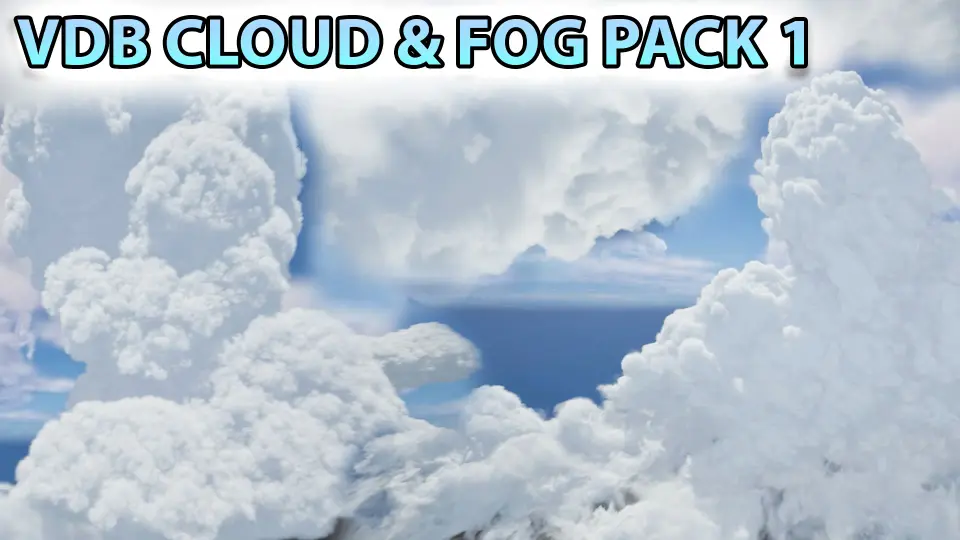
Large sky shots, weather-heavy environments, and cinematic scenes often need atmosphere that feels substantial rather than flat. VDB Cloud & Fog Pack 1 Targets exactly that kind of work with extremely realistic and highly detailed simulated VDB cloud and fog effects aimed at AAA quality games and movies.
The pack sits in a specific workflow. These effects are VDB caches of simulations imported into Unreal Engine, which immediately sets expectations for how they are meant to be used. They bring in pre-simulated volumetric results rather than behaving like live particle systems, making them suitable for scenes where the visual shape and density of cloud or fog matter more than real-time environmental response.
Where VDB Cloud & Fog Pack 1 fits best
The strongest use case here is any scene that needs convincing volumetric atmosphere with a polished, film-style look. Cloud banks, layered mist, hanging fog, and broad environmental vapor all fit within that lane. The emphasis on extremely realistic and highly detailed simulation points toward work where the atmosphere is visible enough to carry part of the frame, not just fill empty space.
That matters for two kinds of projects explicitly named here: AAA quality games and movies. In both cases, the clouds and fog are not treated as minor background decoration. They can function as scene-shaping elements, helping define depth, silhouette, mood, and weather presence. The pack’s identity is less about quick particle dressing and more about bringing in volumetric effects that already have simulation detail baked into them.
The attached tags reinforce that atmospheric range. Gas, mist, vapor, sky, weather, rain, cloud, steam, fog, smoke, and dust all point to projects where layered air and suspended matter are central visual ingredients. Even when a scene is not focused on storm systems or dense overcast conditions, that same family of effects can support softer environmental haze or more dramatic rolling formations in the distance.
Unreal Engine setup starts with the VDB cache workflow
This pack is not presented as a Niagara package, and that distinction is important before any implementation begins. The effects are VDB caches of simulations imported into Unreal Engine. They are not Niagara or other particle effects. Anyone approaching the pack should think in terms of bringing simulated volumetric data into the engine, not building or tweaking a real-time emitter behavior graph.
That changes how the asset should be evaluated in production. If the goal is to drop atmospheric elements into a scene with the look of pre-simulated cloud and fog volumes, this workflow makes sense. If the goal is to have particles actively respond in real time like a dynamic effect system, this pack is clearly not operating in that space.
The available details also states the practical consequence directly: these effects will not interact with the environment like real-time simulations. That single note defines the implementation boundary better than any marketing language could. A cloud mass or fog volume from this pack can provide a detailed volumetric look, but it should not be mistaken for an effect that reacts like a live simulation when surrounding conditions change.
In production terms, that means planning scenes around controlled visual placement. The pack suits artists and teams who know they want the aesthetic of simulated cloud and fog caches inside Unreal Engine and who are comfortable working with effects that are imported rather than dynamically generated in the moment.
Not Niagara, not real-time simulation
The clearest way to understand VDB Cloud & Fog Pack 1 Is to avoid treating it like something it is not. It does not belong in the same category as Niagara-driven particle effects, and it should not be expected to behave like an interactive environmental system. That is not a weakness so much as a workflow decision, and the pack states that decision plainly.
For creative use, this helps narrow the best applications. A shot that needs a stable, richly formed cloud body in the sky can benefit from a VDB cache approach. A fog layer that needs to carry visible volume through a cinematic composition can also benefit. A gameplay or sequence moment that depends on effects reacting to the environment like a real-time simulation is a different requirement.
The tags include both Niagara And Particle, but the implementation notes clarify the actual role of the pack: it exists alongside those Unreal workflows rather than replacing them. It is useful for teams who want volumetric atmosphere in Unreal Engine while understanding that the behavior comes from imported simulation caches.
That distinction also affects expectation management during scene assembly. The pack contributes look and presence. It is not framed here as a system for physical interaction. When those boundaries are clear from the beginning, the pack becomes easier to place in the right part of a project pipeline.
Rendering and visibility commands for VDB Cloud & Fog Pack 1
The most practical implementation notes are tied to rendering behavior in some engine versions. If VDBs disappear after changing scalability settings, the fix provided is the console command R.HeterogeneousVolumes 1. That is a direct troubleshooting step, and it is one of the most important details to keep nearby when testing scenes under different quality settings.
Visibility distance is handled with a second command: R.HeterogeneousVolumes.MaxTraceDistance 200000. The note adds that this value can be adjusted as needed. In other words, the command is not presented as a fixed rule but as a working baseline for increasing how far the VDBs remain visible.
These two instructions say a lot about practical use inside Unreal Engine. First, volumetric results can be affected by scalability changes in some engine versions, so verification after settings adjustments is part of the workflow. Second, visible distance is something that may need tuning depending on the scene. Broad skies, large establishing views, or long sightlines can demand different trace distance settings than close or enclosed setups.
That does not add complexity for its own sake. It simply means this pack benefits from implementation testing in context. Once placed into a scene, artists can evaluate whether the default behavior supports the intended composition and then use the provided commands when they need to restore rendering or push visibility farther into the distance.
Cloud, fog, mist, vapor, and weather-driven scene work
The tag set gives a useful picture of the visual territory covered by the pack. Cloud and fog are the core, but the surrounding terms help define the broader atmosphere it can support: mist, vapor, steam, smoke, gas, dust, sky, weather, and rain. The pack’s role in scene building is therefore not limited to one narrow look. It can serve projects that need soft airborne layers as well as heavier, more dramatic volumetric presence.
For environment art and cinematic framing, that range matters. A sky scene may call for clouds that give scale to the horizon. A weather shot may need suspended fog to tie the ground and distance together. A mood-driven sequence may benefit from vapor or mist-like forms that soften edges and deepen the sense of air between the camera and the world.
The inclusion of snow, flame, and smoke among the tags does not change the pack’s stated identity as cloud and fog work, but it does place it inside a larger atmospheric and effects vocabulary. It belongs to a category of visual tools used to shape conditions in the air rather than just decorate surfaces on the ground. That leaves a resource that is most at home in scenes where the atmosphere itself is part of the composition.
A broader VDB effects family inside Unreal Engine
VDB Cloud & Fog Pack 1 Is also positioned as one part of a wider set of VDB effect packs. Another cloud-focused volume, VDB Cloud & Fog Pack 2, sits alongside it. There is also a separate fire series with VDB Fire Effects Pack 1, VDB Fire Effects Pack 2, VDB Fire Effects Pack 3, and VDB Fire Effects Pack 4.
Beyond that, related VDB categories include large explosions, smoke effects, dust effects, and large scale water effects. Taken together, those names show that the cloud and fog pack belongs to a broader Unreal Engine volumetric workflow rather than existing as an isolated one-off effect. Teams already using VDB-based visuals for one atmospheric or cinematic purpose may recognize how naturally cloud and fog fit into that larger family.
For anyone specifically evaluating this pack, the practical takeaway is straightforward. It is most useful for artists and teams who want extremely realistic and highly detailed simulated cloud and fog effects in Unreal Engine, who are comfortable working with imported VDB caches, and who need to manage visibility and rendering behavior with the provided heterogeneous volume commands when required.
 Weather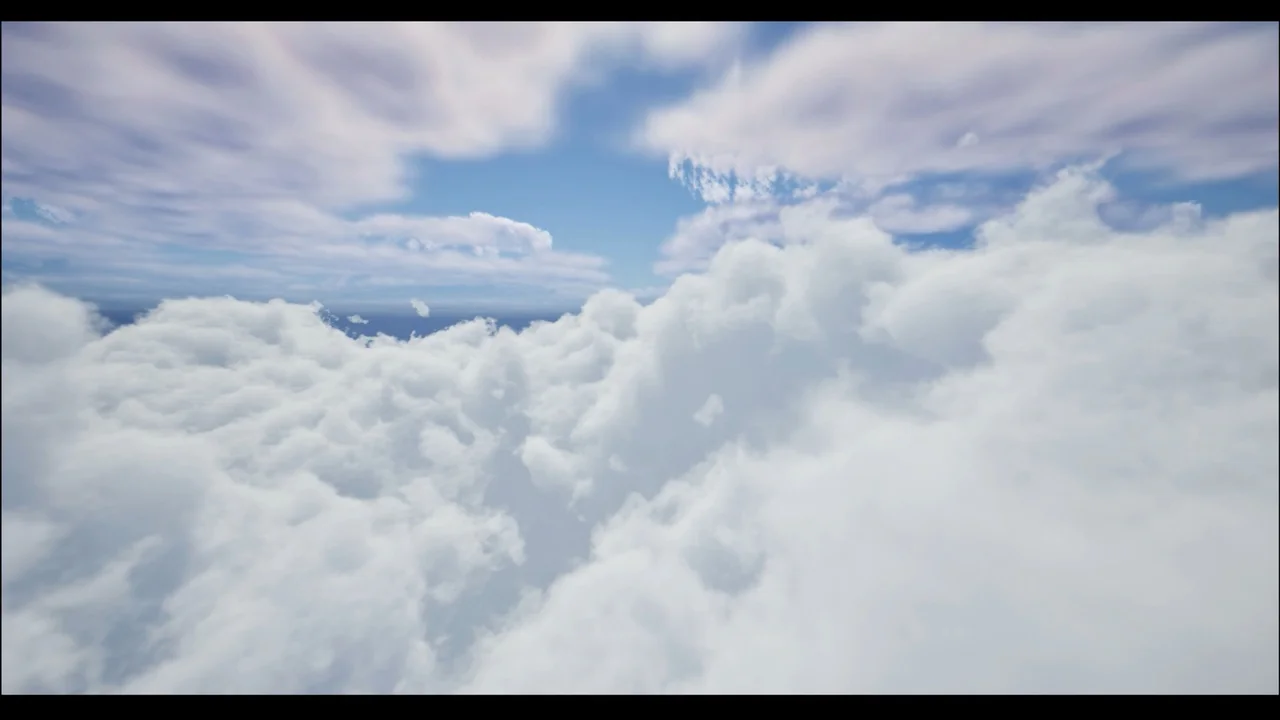
 Weather
 Weather
 Weather