"1062d43bc714d570"{"id":"1001017","slug":"star-vfx-pack","title":"Star VFX Pack","category":"Shaders","engine":"5.0+","assetVersion":"","engineVersion":"Engine Version: 5.0+","tag":"Shaders","accent":"blue","visual":"mech","summary":"Customizable star VFX pack with 28+ Niagara systems, 45+ dynamic materials, 22+ textures, and 17+ models. Includes a Win64bit demo and Discord support.","platform":"Unreal Engine","publishedAt":"2026-08-22T16:14:20.964Z","updatedAt":"2026-08-22T16:14:20.964Z","sourceNotes":[],"fileContents":[],"compatibility":["Unreal Engine","Engine Version: 5.0+"],"featuredImage":{"alt":"Star VFX Pack","src":"/wp-content/uploads/published/2026/08/6c8b512b96a6-338ff890-24aa-4c23-9f1e-be692219540d-2d18fd0080.webp"},"hasDownloadLink":true,"downloads":0,"terms":[{"taxonomy":"category","slug":"shaders","name":"Shaders"}],"galleryImages":[{"src":"/wp-content/uploads/published/2026/08/4544e3f3830f-f82c60b5-4abd-401e-b5fc-4264030ddd36-db00756fd9.webp","alt":"Star VFX Pack"},{"src":"/wp-content/uploads/published/2026/08/4ec827d903a3-2539e6c4-41df-4430-9f59-22ecf44dd5da-2f89c7141e.webp","alt":"Star VFX Pack"},{"src":"/wp-content/uploads/published/2026/08/ecde08a72178-be8e3332-31b3-4ce5-af50-bdcd04a4b735-b064e5e123.webp","alt":"Star VFX Pack"},{"src":"/wp-content/uploads/published/2026/08/4ab7a714cf93-f5dfdf79-c478-48b6-9d2b-8ce4ed07231c-9478fe5faa.webp","alt":"Star VFX Pack"},{"src":"/wp-content/uploads/published/2026/08/ca1d7d9a955c-455d7323-9716-48ed-996e-65b2c28db4eb-6ff3c9509f.webp","alt":"Star VFX Pack"},{"src":"/wp-content/uploads/published/2026/08/53a1b0f5cb02-1bd02fa8-e91f-4d18-8885-3ebafa753737-f269da303e.webp","alt":"Star VFX Pack"},{"src":"/wp-content/uploads/published/2026/08/3a3dae98c368-8ad864d2-e43a-4195-ae2a-28c34e8e40b5-52938f7fa3.webp","alt":"Star VFX Pack"},{"src":"/wp-content/uploads/published/2026/08/6e136f3419d7-33bf5ca9-e703-491b-a8bc-1bc90d905fa5-97fc709d12.webp","alt":"Star VFX Pack"},{"src":"/wp-content/uploads/published/2026/08/324135eff38d-d369f53f-b492-4f40-bb08-bf6495569bfc-be211386c4.webp","alt":"Star VFX Pack"},{"src":"/wp-content/uploads/published/2026/08/d1cfcae85098-82748952-5927-488e-b46f-47d8ee42bc27-80d689db95.webp","alt":"Star VFX Pack"}],"accessPanel":{"kind":"resource","title":"Download this resource","eyebrow":"Free Download","message":"Log in or create a free account to start your download.","fileName":"Content.7z","safetyNote":"Resources are manually reviewed before listing to improve quality and reduce obvious risks.","actionLabel":"Download Free","resourceType":"Resource archive"},"contentHtml":"\u003cp\u003eDropping a star effect into a scene usually means opening a Niagara system and immediately hunting for the right parameters. This pack shortens that step: each star visual effect set is shaped by Niagara Effects and Dynamic Materials, and the included counts give a clear picture of what you are working with. The latest release contains 28+ customizable star visual effect sets, backed by 28+ Niagara systems and 3+ Niagara emitters. With 45+ effect materials, 22+ effect textures, 17+ star effect models, and 1+ pedestal set, the asset gives you the building blocks to assemble anything from a subtle sparkle to a dramatic universe-level shimmer.\u003c/p\u003e\u003ch2\u003eWhy Start With the Niagara Set Counts\u003c/h2\u003e\u003cp\u003eThe distinction between sets, systems, and emitters matters when you plan how to reuse the pack. There are 28+ star visual effect sets, each with its own Niagara system. The 3+ emitters are shared across those systems, which means a handful of emitter behaviors drive a wide variety of visual outcomes. If you have modified a star effect's particle behavior in one system, you can apply the same thinking to another system without building emitters from scratch. The structure keeps the pack consistent: the systems handle arrangement and scale, while the emitters supply the core particle behavior that reads as a star.\u003c/p\u003e\u003cp\u003eBecause every set is a distinct system, you can place multiple sets side by side without collisions. A starry sky, for example, might use one system for large twinkling stars and another for small drifting sparkles. The shared emitter pool means the base particle motion stays predictable across all sets, while the system-level settings change the spread, count, and scale to fit the moment.\u003c/p\u003e\u003ch2\u003eWhere Customization Actually Happens\u003c/h2\u003e\u003cp\u003eAll star visual effects in the pack are customizable across Texture, Color, Emissive, Particle, Scale, Material, and Static Mesh. In a typical setup, you would start with a texture that defines the star's shape, then adjust color and emissive to set the glow intensity and tint. Particle parameters control how the sparkles drift, rotate, or fade, while Scale lets you match the effect to the camera distance or the size of the target object. Materials can be swapped or modified, and the Static Mesh parameter gives you the option to replace a simple point sprite with actual geometry.\u003c/p\u003e\u003cp\u003eBecause the materials are dynamic, these values can respond to changes at runtime. A star that turns red when a player enters a danger zone, or a pickup that pulses by driving emissive intensity, does not require a separate system or material instance. The same effect set can be reused across contexts by animating a few parameters instead of duplicating a system.\u003c/p\u003e\u003ch2\u003eThe Material and Texture Foundation\u003c/h2\u003e\u003cp\u003eThe pack ships with 45+ effect materials and 22+ effect textures. That volume matters because the star look depends heavily on the interplay between a texture's core shape, its soft edge, and the emissive response of the material. A diamond-shaped texture with a high emissive value will read as a hard sparkle, while a round texture with a lower emissive value can look like a soft glow. Having 22+ textures lets you choose between different star shapes, halos, and noise patterns without creating your own image assets.\u003c/p\u003e\u003cp\u003eThe 45+ materials then cover variations of those textures, so you can pick a material that already behaves the way you want rather than starting from a default particle material. Since they are dynamic, you can adjust emissive warmth, color tint, and transparency inside the material graph or through exposed parameters. For a universe scene, a cool blue-white emissive works on a dark skybox; for a magical or precious mood, a warmer gold or pink tint gives the same texture a different personality.\u003c/p\u003e\u003ch2\u003eGeometry in the Mix: Models and Pedestal\u003c/h2\u003e\u003cp\u003eParticles are not the whole story. The pack includes 17+ star effect models, so you have physical geometry that can sit in the scene as props, pickups, or focal points. These models can also be assigned through the Static Mesh customization parameter, giving you a way to blend mesh-based and particle-based looks. A mesh star with a particle burst around it is a common pattern, and the pack supports that by letting you replace the default particle render with your chosen mesh.\u003c/p\u003e\u003cp\u003eThe 1+ pedestal set is a smaller but useful addition: it gives you a display base to place a star model or effect on, which is handy for menus, showcases, or level puzzles where the star needs a clear presentation point. The pedestal also operates as a separate piece, so it can be dropped into a level without the star attached and reused as a generic podium for other objects.\u003c/p\u003e\u003ch2\u003eDemo, Discord, and the Workflow Before the Scene\u003c/h2\u003e\u003cp\u003eBefore you commit to a look, the pack includes a Win64bit playable demo. That lets you open the set, see the effects in motion, and check how they perform in a real viewport rather than guessing from still images. For questions that come up during integration, Discord is the listed support channel. If a material reads strangely in your lighting setup or a system behaves differently in your project's Niagara version, the developer can be reached there directly.\u003c/p\u003e\u003cp\u003eThe pack is also compatible with Dynamic Spline FX 2, which extends the workflow if you already use spline-driven effects. That compatibility means the star systems can sit alongside spline-based trails or motion paths without fighting over the same Niagara resources. It is a practical detail to know before you map out a complex effect sequence.\u003c/p\u003e\u003cp\u003eThe overall package is structured for iteration. Between 28+ Niagara systems, the 45+ dynamic materials, and the 22+ textures, you have enough variables to turn a single star effect into a family of related looks. The star is a simple shape, but the pack's range from Universe to Magical to Glitter and Sparkle gives it a broader reach. Whether you are building a night sky, a jewel-like reward, or a magical shimmer, the control surface stays the same: pick a system, adjust the parameters, and the effect falls into line with the rest of the scene.\u003c/p\u003e\n\n\u003ch2\u003eExplore Similar Assets\u003c/h2\u003e\n\u003cul\u003e\n\u003cli\u003e\u003ca href=\"https://3dcghub.com/liquid-materials-vfx-pack/\" title=\"LIQUID MATERIALS : VFX Pack\"\u003eLIQUID MATERIALS : VFX Pack\u003c/a\u003e\u003c/li\u003e\n\u003cli\u003e\u003ca href=\"https://3dcghub.com/fluid-portal-vfx-pack/\" title=\"Fluid Portal VFX Pack\"\u003eFluid Portal VFX Pack\u003c/a\u003e\u003c/li\u003e\n\u003cli\u003e\u003ca href=\"https://3dcghub.com/crystal-vfx-pack/\" title=\"Crystal VFX Pack\"\u003eCrystal VFX Pack\u003c/a\u003e\u003c/li\u003e\n\u003cli\u003e\u003ca href=\"https://3dcghub.com/cube-vfx/\" title=\"Cube VFX\"\u003eCube VFX\u003c/a\u003e\u003c/li\u003e\n\u003cli\u003e\u003ca href=\"https://3dcghub.com/post-process-pro-pack/\" title=\"Post Process Pro Pack\"\u003ePost Process Pro Pack\u003c/a\u003e\u003c/li\u003e\n\u003c/ul\u003e","contentTextLength":6184,"navigation":{"current":480,"total":3379,"previous":{"id":"1001018","slug":"storm-volumetric-clouds-and-sky","title":"Storm Volumetric Clouds and Sky","category":"Weather","platform":"Unreal Engine","updatedAt":"2026-08-22T16:19:29.034Z"},"next":{"id":"1001016","slug":"skies-3-matte-painting","title":"Skies 3 - Matte painting","category":"Sky","platform":"Unreal Engine","updatedAt":"2026-08-22T14:01:06.534Z"}},"relatedResources":[{"id":"1000844","slug":"liquid-materials-vfx-pack","title":"LIQUID MATERIALS : VFX Pack","category":"Shaders","engine":"5.1+","assetVersion":"","engineVersion":"Engine Version: 5.1+","tag":"Shaders","accent":"blue","visual":"luts","summary":"LIQUID MATERIALS: VFX Pack provides 23 meshes, 13 glass materials, and 13 liquid materials with automatic Niagara-based real-time fluid animation for Unreal Eng","platform":"Unreal Engine","publishedAt":"2026-08-04T07:08:15.893Z","updatedAt":"2026-08-04T07:08:15.893Z","sourceNotes":[],"fileContents":[],"compatibility":["Unreal Engine","Engine Version: 5.1+"],"featuredImage":{"alt":"LIQUID MATERIALS : VFX Pack","src":"/wp-content/uploads/published/2026/08/031b6a53ab5b-856b12c0-66b3-4f90-9a63-103fd8b06400-4230560477.webp"},"hasDownloadLink":true,"downloads":2},{"id":"1000603","slug":"fluid-portal-vfx-pack","title":"Fluid Portal VFX Pack","category":"Shaders","engine":"5.3+","assetVersion":"","engineVersion":"Engine Version: 5.3+","tag":"Shaders","accent":"blue","visual":"mech","summary":"Interactive Fluid Portal VFX Pack with 14+ Niagara Fluids effects, customizable portal sets, materials, 4K textures, and a playable Win64 demo.","platform":"Unreal Engine","publishedAt":"2026-07-20T16:20:21.021Z","updatedAt":"2026-07-20T16:20:21.021Z","sourceNotes":[],"fileContents":[],"compatibility":["Unreal Engine","Engine Version: 5.3+"],"featuredImage":{"alt":"Fluid Portal VFX Pack","src":"/wp-content/uploads/published/2026/07/b656f5664f46-54ebd946-c6e0-452f-8bf1-e4b5f0c89b7b-2145f679bc.webp"},"hasDownloadLink":true,"downloads":1},{"id":"1000582","slug":"cube-vfx","title":"Cube VFX","category":"Shaders","engine":"5.6+","assetVersion":"","engineVersion":"Engine Version: 5.6+","tag":"Shaders","accent":"blue","visual":"mech","summary":"Cube VFX is a fully functional Absorption VFX pack for Unreal Engine 5.0–5.7, featuring 28+ effects, 16+ Niagara systems, 34+ materials, 44+ textures, and 5+ st","platform":"Unreal Engine","publishedAt":"2026-07-16T23:42:44.054Z","updatedAt":"2026-07-16T23:42:44.054Z","sourceNotes":[],"fileContents":[],"compatibility":["Unreal Engine","Engine Version: 5.6+"],"featuredImage":{"alt":"Cube VFX","src":"/wp-content/uploads/published/2026/07/9f431cd6f816-ba288672-09b8-4513-ba25-302d9d5516a3-00e5f2ecc8.webp"},"hasDownloadLink":true,"downloads":0}]}
Shaders
Star VFX Pack
Customizable star VFX pack with 28+ Niagara systems, 45+ dynamic materials, 22+ textures, and 17+ models. Includes a Win64bit demo and Discord support.
Category:Unreal Engine,ShadersPlatform: Unreal EngineEngine Version: 5.0+Published: Aug 22, 2026
Shaders
Resource overview
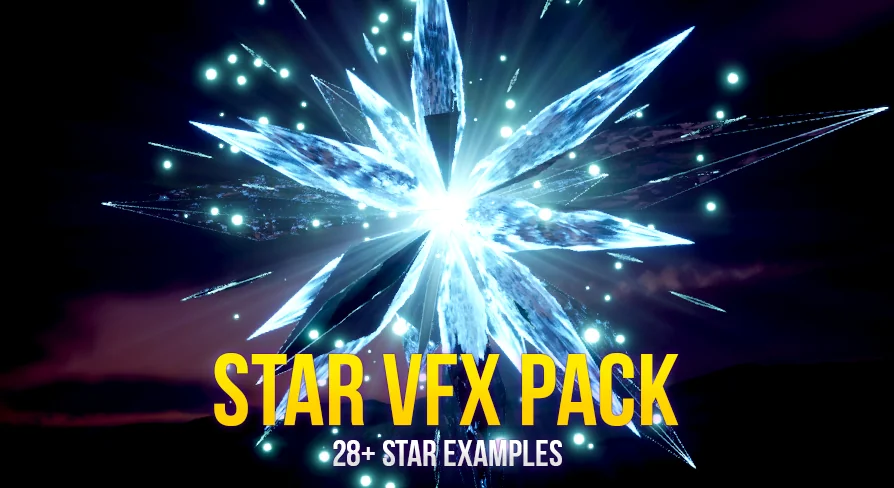
Dropping a star effect into a scene usually means opening a Niagara system and immediately hunting for the right parameters. This pack shortens that step: each star visual effect set is shaped by Niagara Effects and Dynamic Materials, and the included counts give a clear picture of what you are working with. The latest release contains 28+ customizable star visual effect sets, backed by 28+ Niagara systems and 3+ Niagara emitters. With 45+ effect materials, 22+ effect textures, 17+ star effect models, and 1+ pedestal set, the asset gives you the building blocks to assemble anything from a subtle sparkle to a dramatic universe-level shimmer.
Why Start With the Niagara Set Counts
The distinction between sets, systems, and emitters matters when you plan how to reuse the pack. There are 28+ star visual effect sets, each with its own Niagara system. The 3+ emitters are shared across those systems, which means a handful of emitter behaviors drive a wide variety of visual outcomes. If you have modified a star effect's particle behavior in one system, you can apply the same thinking to another system without building emitters from scratch. The structure keeps the pack consistent: the systems handle arrangement and scale, while the emitters supply the core particle behavior that reads as a star.
Because every set is a distinct system, you can place multiple sets side by side without collisions. A starry sky, for example, might use one system for large twinkling stars and another for small drifting sparkles. The shared emitter pool means the base particle motion stays predictable across all sets, while the system-level settings change the spread, count, and scale to fit the moment.
Where Customization Actually Happens
All star visual effects in the pack are customizable across Texture, Color, Emissive, Particle, Scale, Material, and Static Mesh. In a typical setup, you would start with a texture that defines the star's shape, then adjust color and emissive to set the glow intensity and tint. Particle parameters control how the sparkles drift, rotate, or fade, while Scale lets you match the effect to the camera distance or the size of the target object. Materials can be swapped or modified, and the Static Mesh parameter gives you the option to replace a simple point sprite with actual geometry.
Because the materials are dynamic, these values can respond to changes at runtime. A star that turns red when a player enters a danger zone, or a pickup that pulses by driving emissive intensity, does not require a separate system or material instance. The same effect set can be reused across contexts by animating a few parameters instead of duplicating a system.
The Material and Texture Foundation
The pack ships with 45+ effect materials and 22+ effect textures. That volume matters because the star look depends heavily on the interplay between a texture's core shape, its soft edge, and the emissive response of the material. A diamond-shaped texture with a high emissive value will read as a hard sparkle, while a round texture with a lower emissive value can look like a soft glow. Having 22+ textures lets you choose between different star shapes, halos, and noise patterns without creating your own image assets.
The 45+ materials then cover variations of those textures, so you can pick a material that already behaves the way you want rather than starting from a default particle material. Since they are dynamic, you can adjust emissive warmth, color tint, and transparency inside the material graph or through exposed parameters. For a universe scene, a cool blue-white emissive works on a dark skybox; for a magical or precious mood, a warmer gold or pink tint gives the same texture a different personality.
Geometry in the Mix: Models and Pedestal
Particles are not the whole story. The pack includes 17+ star effect models, so you have physical geometry that can sit in the scene as props, pickups, or focal points. These models can also be assigned through the Static Mesh customization parameter, giving you a way to blend mesh-based and particle-based looks. A mesh star with a particle burst around it is a common pattern, and the pack supports that by letting you replace the default particle render with your chosen mesh.
The 1+ pedestal set is a smaller but useful addition: it gives you a display base to place a star model or effect on, which is handy for menus, showcases, or level puzzles where the star needs a clear presentation point. The pedestal also operates as a separate piece, so it can be dropped into a level without the star attached and reused as a generic podium for other objects.
Demo, Discord, and the Workflow Before the Scene
Before you commit to a look, the pack includes a Win64bit playable demo. That lets you open the set, see the effects in motion, and check how they perform in a real viewport rather than guessing from still images. For questions that come up during integration, Discord is the listed support channel. If a material reads strangely in your lighting setup or a system behaves differently in your project's Niagara version, the developer can be reached there directly.
The pack is also compatible with Dynamic Spline FX 2, which extends the workflow if you already use spline-driven effects. That compatibility means the star systems can sit alongside spline-based trails or motion paths without fighting over the same Niagara resources. It is a practical detail to know before you map out a complex effect sequence.
The overall package is structured for iteration. Between 28+ Niagara systems, the 45+ dynamic materials, and the 22+ textures, you have enough variables to turn a single star effect into a family of related looks. The star is a simple shape, but the pack's range from Universe to Magical to Glitter and Sparkle gives it a broader reach. Whether you are building a night sky, a jewel-like reward, or a magical shimmer, the control surface stays the same: pick a system, adjust the parameters, and the effect falls into line with the rest of the scene.
 Shaders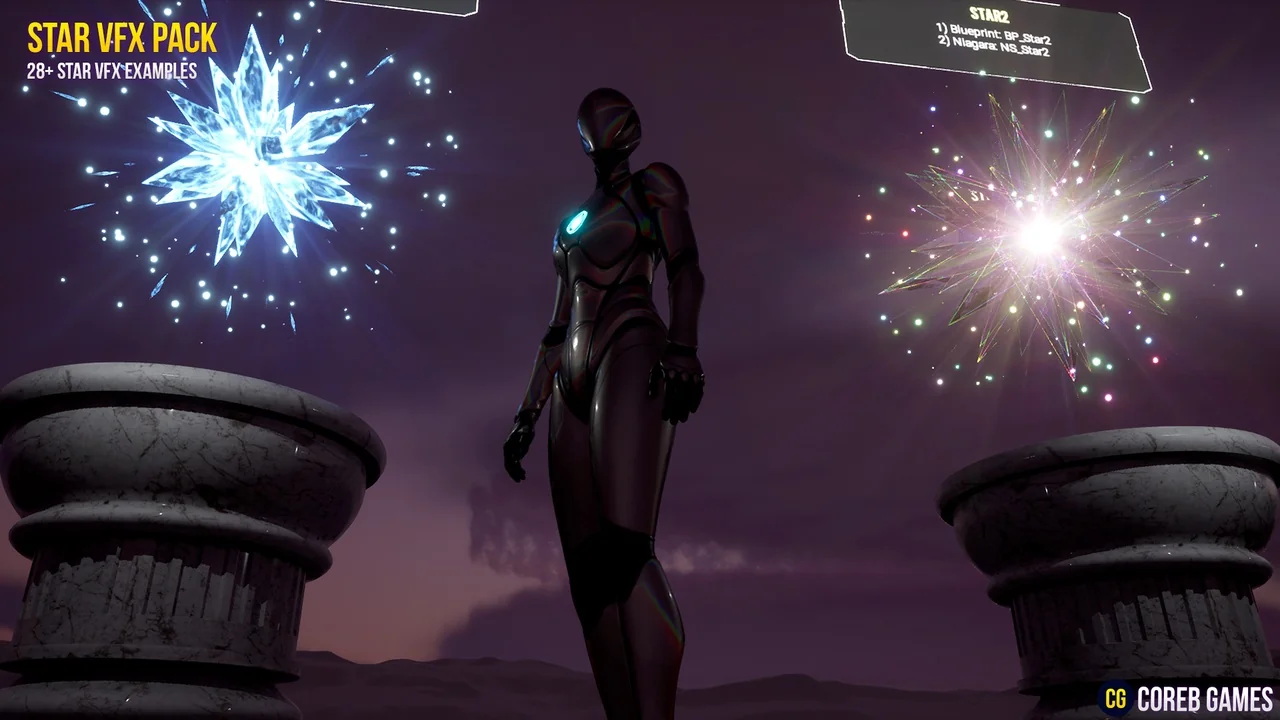
 Shaders
 Shaders
 Shaders