"26aaab8a5d5ed4fc"{"id":"1001019","slug":"studio-7","title":"Studio 7","category":"Interior","engine":"5.0+","assetVersion":"","engineVersion":"Engine Version: 5.0+","tag":"Interior","accent":"blue","visual":"mech","summary":"Modular TV studio pack with 52 props, constructive blocks, and an example level. Customizable logo and poster materials for building news sets.","platform":"Unreal Engine","publishedAt":"2026-08-23T04:38:07.320Z","updatedAt":"2026-08-23T04:38:07.320Z","sourceNotes":[],"fileContents":[],"compatibility":["Unreal Engine","Engine Version: 5.0+"],"featuredImage":{"alt":"Studio 7","src":"/wp-content/uploads/published/2026/08/c7fc6bc1a957-462ca492-71e9-4997-ae47-0e721fa33173-76cc2aaf1e.webp"},"hasDownloadLink":true,"downloads":2,"terms":[{"taxonomy":"category","slug":"interior","name":"Interior"}],"galleryImages":[{"src":"/wp-content/uploads/published/2026/08/2f08552bc269-a7494ec7-03f3-4ad2-9dba-98c12ca1b7a6-e0f24e2d8f.webp","alt":"Studio 7"},{"src":"/wp-content/uploads/published/2026/08/82843414de13-96da59a1-20a3-4948-af13-1d56b84348c1-8d2860bd8f.webp","alt":"Studio 7"},{"src":"/wp-content/uploads/published/2026/08/e6b13db022cb-72941950-3eb3-4936-9ab9-2501e95e9dfc-3c7ec34238.webp","alt":"Studio 7"},{"src":"/wp-content/uploads/published/2026/08/36fd89c1ca83-ce9ddf19-2939-40c0-9d74-ad7608cd5a5c-fb3f173867.webp","alt":"Studio 7"},{"src":"/wp-content/uploads/published/2026/08/63caabe3e9e9-ea3a1246-51fb-47bd-af8e-e84263567a0b-a1248abc50.webp","alt":"Studio 7"},{"src":"/wp-content/uploads/published/2026/08/dbfb2afd277e-13d5f8dc-d192-4800-9cd9-11241dfef698-45b5bd20e9.webp","alt":"Studio 7"},{"src":"/wp-content/uploads/published/2026/08/92e4bd6f5c91-6bd575c9-4a71-42a2-9677-073601c0fe77-486fe577b3.webp","alt":"Studio 7"},{"src":"/wp-content/uploads/published/2026/08/d3e8875f9ca3-bf666d44-83ae-44fb-bba6-5862032b2284-7d5e2ee90e.webp","alt":"Studio 7"},{"src":"/wp-content/uploads/published/2026/08/767ab7648494-5d019c1d-9943-488c-9816-b0e193f1f900-8295c1878d.webp","alt":"Studio 7"},{"src":"/wp-content/uploads/published/2026/08/86dfe4ef9926-5f8000bc-37de-4a68-a9be-a85c24af0db3-7db5c76655.webp","alt":"Studio 7"}],"accessPanel":{"kind":"resource","title":"Download this resource","eyebrow":"Free Download","message":"Log in or create a free account to start your download.","fileName":"Content.7z","safetyNote":"Resources are manually reviewed before listing to improve quality and reduce obvious risks.","actionLabel":"Download Free","resourceType":"Resource archive"},"contentHtml":"\u003cp\u003eStudio 7 is a modular TV studio environment that comes with 52 unique props and a fully laid out example level. The pack uses a modular workflow, meaning the walls, floors, glass panels, columns, and other constructive elements are designed to be combined in different ways. That makes it possible to build a news studio, talk show set, or any other broadcast interior from the same kit.\u003c/p\u003e \u003ch2\u003eA 52-Prop Collection for the Studio Floor\u003c/h2\u003e\n\u003cp\u003eInside the pack are 52 unique studio props. The list covers the essentials of a broadcast set: tables, chairs, microphones, cameras, spot lamps, panels, glass fences, light tracks, screens, and other set pieces. Having this many props in one asset means you can populate a full studio without assembling pieces from multiple packs. The overview scene shows the entire prop set in a single view, so you can quickly evaluate what is available before you start arranging things.\u003c/p\u003e \u003ch2\u003eConstructive Blocks for Rearranging the Room\u003c/h2\u003e\n\u003cp\u003eAlongside the props, Studio 7 provides a set of constructive elements: wall blocks, floor blocks, glass blocks, cylinders, panels, columns, and glass fences. These are the building blocks that shape the physical space of the studio. With them, you can extend the existing example level or design a completely new layout. The modular workflow is what makes this practical. Instead of moving a single large room mesh, you work with individual blocks that fit together to form a custom set.\u003c/p\u003e \u003ch2\u003eThe Example Level and the Updated 5.5 Build\u003c/h2\u003e\n\u003cp\u003eThe pack includes an example level, which is a complete TV studio scene built from the included props and constructive elements. The asset has been updated to version 5.5, and a YouTube preview shows the level in its current state. The example level serves as a starting point: you can use it as-is for a broadcast scene, or modify it by swapping out blocks and props to fit a different staging idea.\u003c/p\u003e \u003ch2\u003eMaterial Customization for Logos and Poster Labels\u003c/h2\u003e\n\u003cp\u003eStudio 7 uses original designs for its logo and posters. These are stored in the material settings, so you can import your own logo or label textures to replace the default branding. This is useful when the studio needs to reflect a specific channel or corporate identity. Some of the materials in the pack use textures from free PBR sources and free image sources, specifically ambientcg.com, unsplash.com, and freepik.com. This blend of original and third-party textures keeps the material library flexible and easy to modify.\u003c/p\u003e \u003ch2\u003eWhere Studio 7 Fits in a Broadcast Workflow\u003c/h2\u003e\n\u003cp\u003eThe tags attached to Studio 7 point to its intended roles: television, news, interior, scene, camera, set, and virtual. In a typical production workflow, you need a room that can be framed from multiple camera angles and lit appropriately. Studio 7 gives you furniture for anchors and guests, microphones and cameras to place around the set, spot lamps and light tracks to build a lighting rig, and panels and screens for backgrounds. The constructive blocks let you shape the room itself, which is important when you need to adapt the space for different segments or shows. For virtual productions, the modular layout makes it easier to adjust the environment without rebuilding the entire scene.\u003c/p\u003e \u003cp\u003eStudio 7 is set up to handle the basics of a TV studio in one package. The 52 props cover the key items, the constructive elements allow for custom layouts, the example level provides a ready-to-use template, and the material settings let you swap in your own branding. If you are building a news room, a talk show stage, or any broadcast interior, this modular kit gives you the pieces to start with.\u003c/p\u003e\n\n\u003ch2\u003eContinue Browsing Similar Packs\u003c/h2\u003e\n\u003cul\u003e\n\u003cli\u003e\u003ca href=\"https://3dcghub.com/artists-attic-studio-environment/\" title=\"Artist’s Attic Studio Environment\"\u003eArtist’s Attic Studio Environment\u003c/a\u003e\u003c/li\u003e\n\u003cli\u003e\u003ca href=\"https://3dcghub.com/virtual-studios-vol-1-scene-1/\" title=\"Virtual Studios Vol 1 Scene 1\"\u003eVirtual Studios Vol 1 Scene 1\u003c/a\u003e\u003c/li\u003e\n\u003cli\u003e\u003ca href=\"https://3dcghub.com/cgma-studio-offices/\" title=\"CGMA Studio Offices\"\u003eCGMA Studio Offices\u003c/a\u003e\u003c/li\u003e\n\u003cli\u003e\u003ca href=\"https://3dcghub.com/news-studio-environment-for-vr-news-reports-or-backdrops/\" title=\"News Studio - Environment for VR, News Reports or Backdrops\"\u003eNews Studio - Environment for VR, News Reports or Backdrops\u003c/a\u003e\u003c/li\u003e\n\u003cli\u003e\u003ca href=\"https://3dcghub.com/studio-news/\" title=\"Studio News\"\u003eStudio News\u003c/a\u003e\u003c/li\u003e\n\u003c/ul\u003e","contentTextLength":3795,"navigation":{"current":499,"total":3400,"previous":{"id":"1001020","slug":"stylized-log-cabin","title":"Stylized Log Cabin","category":"Fantasy","platform":"Unreal Engine","updatedAt":"2026-08-23T04:43:55.449Z"},"next":{"id":"1001018","slug":"storm-volumetric-clouds-and-sky","title":"Storm Volumetric Clouds and Sky","category":"Weather","platform":"Unreal Engine","updatedAt":"2026-08-22T16:19:29.034Z"}},"relatedResources":[{"id":"1000266","slug":"virtual-studios-vol-1-scene-1","title":"Virtual Studios Vol 1 Scene 1","category":"Interior","engine":"5.2+","assetVersion":"","engineVersion":"Engine Version: 5.2+","tag":"Interior","accent":"blue","visual":"mech","summary":"A high-quality 3D virtual studio scene optimized for Unreal Engine, featuring Lumen support, Nanite geometry, and PBR materials for real-time virtual production","platform":"Unreal Engine","publishedAt":"2026-07-01T00:47:40.997Z","updatedAt":"2026-07-01T00:47:40.997Z","sourceNotes":[],"fileContents":[],"compatibility":["Unreal Engine","Engine Version: 5.2+"],"featuredImage":{"alt":"Virtual Studios Vol 1 Scene 1","src":"/wp-content/uploads/published/2026/07/f03854c39cd9-88b247e2-1f9b-414f-899a-bb5c9309b8cf-d6def42b70.webp"},"hasDownloadLink":true,"downloads":0},{"id":"27418","slug":"artists-attic-studio-environment","title":"Artist’s Attic Studio Environment","category":"Interior","engine":"5.5+","assetVersion":"Engine version: 5.5+","engineVersion":"","tag":"Interior","accent":"blue","visual":"city","summary":"Artist’s Attic Studio Environment is a fully dressed attic interior with a warm, lived-in feel, modular structural pieces, and studio props. It fits scenes that need a cozy, story-rich space for cinematic framing or gameplay.","platform":"Unreal Engine","publishedAt":"2026-04-25T08:27:44.000Z","updatedAt":"2026-04-25T08:27:47.000Z","sourceNotes":[],"fileContents":[],"compatibility":["Unreal Engine","Engine version: 5.5+"],"featuredImage":{"alt":"Artist’s Attic Studio Environment","src":"https://3dcghub.com/wp-content/uploads/2026/04/1fce6996a87b_29a2b5f1-a05c-4f5a-bfc8-78a1ef2046a2.webp"},"hasDownloadLink":true,"downloads":0},{"id":"8811","slug":"cgma-studio-offices","title":"CGMA Studio Offices","category":"Interior","engine":"4.27,5.0+","assetVersion":"Engine version: 4.27,5.0+","engineVersion":"4.23","tag":"Interior","accent":"blue","visual":"city","summary":"Enhance your game project with CGMA Studio Offices, a professional-grade environment pack featuring 249 modular meshes. This collection provides everything needed for realistic corporate interiors with high-fidelity textures.","platform":"Unreal Engine","publishedAt":"2026-02-25T17:55:31.000Z","updatedAt":"2026-04-19T15:51:22.000Z","sourceNotes":[],"fileContents":[],"compatibility":["Unreal Engine","Engine version: 4.27,5.0+"],"featuredImage":{"alt":"CGMA Studio Offices","src":"https://3dcghub.com/wp-content/uploads/2026/02/4790748e-43df-46f4-9f47-9e450d83393d.webp"},"hasDownloadLink":true,"downloads":1}]}
Interior
Studio 7
Modular TV studio pack with 52 props, constructive blocks, and an example level. Customizable logo and poster materials for building news sets.
Category:Unreal Engine,InteriorPlatform: Unreal EngineEngine Version: 5.0+Published: Aug 23, 2026
Interior
Resource overview
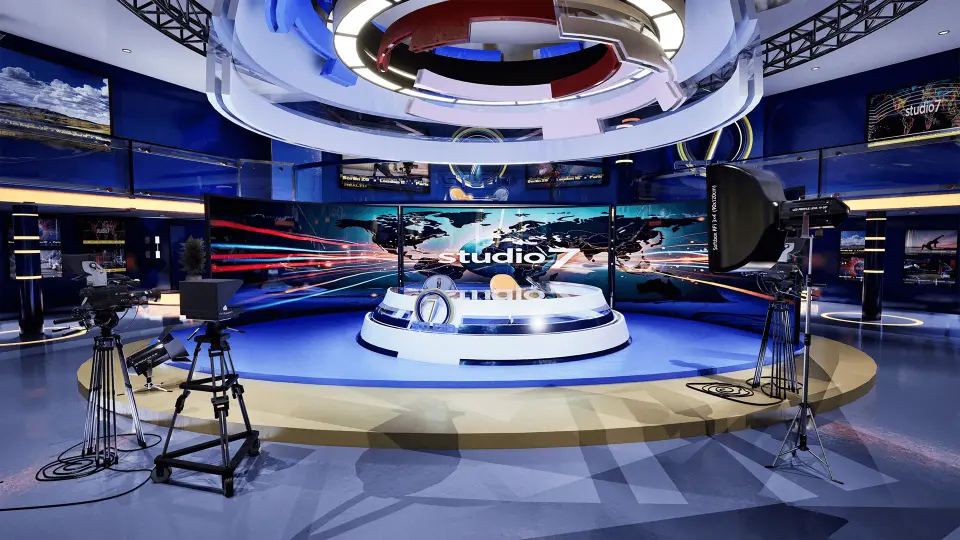
Studio 7 is a modular TV studio environment that comes with 52 unique props and a fully laid out example level. The pack uses a modular workflow, meaning the walls, floors, glass panels, columns, and other constructive elements are designed to be combined in different ways. That makes it possible to build a news studio, talk show set, or any other broadcast interior from the same kit.
A 52-Prop Collection for the Studio Floor
Inside the pack are 52 unique studio props. The list covers the essentials of a broadcast set: tables, chairs, microphones, cameras, spot lamps, panels, glass fences, light tracks, screens, and other set pieces. Having this many props in one asset means you can populate a full studio without assembling pieces from multiple packs. The overview scene shows the entire prop set in a single view, so you can quickly evaluate what is available before you start arranging things.
Constructive Blocks for Rearranging the Room
Alongside the props, Studio 7 provides a set of constructive elements: wall blocks, floor blocks, glass blocks, cylinders, panels, columns, and glass fences. These are the building blocks that shape the physical space of the studio. With them, you can extend the existing example level or design a completely new layout. The modular workflow is what makes this practical. Instead of moving a single large room mesh, you work with individual blocks that fit together to form a custom set.
The Example Level and the Updated 5.5 Build
The pack includes an example level, which is a complete TV studio scene built from the included props and constructive elements. The asset has been updated to version 5.5, and a YouTube preview shows the level in its current state. The example level serves as a starting point: you can use it as-is for a broadcast scene, or modify it by swapping out blocks and props to fit a different staging idea.
Material Customization for Logos and Poster Labels
Studio 7 uses original designs for its logo and posters. These are stored in the material settings, so you can import your own logo or label textures to replace the default branding. This is useful when the studio needs to reflect a specific channel or corporate identity. Some of the materials in the pack use textures from free PBR sources and free image sources, specifically ambientcg.com, unsplash.com, and freepik.com. This blend of original and third-party textures keeps the material library flexible and easy to modify.
Where Studio 7 Fits in a Broadcast Workflow
The tags attached to Studio 7 point to its intended roles: television, news, interior, scene, camera, set, and virtual. In a typical production workflow, you need a room that can be framed from multiple camera angles and lit appropriately. Studio 7 gives you furniture for anchors and guests, microphones and cameras to place around the set, spot lamps and light tracks to build a lighting rig, and panels and screens for backgrounds. The constructive blocks let you shape the room itself, which is important when you need to adapt the space for different segments or shows. For virtual productions, the modular layout makes it easier to adjust the environment without rebuilding the entire scene.
Studio 7 is set up to handle the basics of a TV studio in one package. The 52 props cover the key items, the constructive elements allow for custom layouts, the example level provides a ready-to-use template, and the material settings let you swap in your own branding. If you are building a news room, a talk show stage, or any broadcast interior, this modular kit gives you the pieces to start with.
 Interior
 Interior
 Interior
 Interior