"ddd0e3fb95b0aec2"{"id":"1001551","slug":"sci-fi-barrier-toolkit","title":"Sci-Fi Barrier Toolkit","category":"Building \u0026 Human-made","engine":"4.25+,5.0+","assetVersion":"","engineVersion":"Engine Version: 4.25+,5.0+","tag":"Building","accent":"blue","visual":"mech","summary":"Examine the Sci-Fi Barrier Toolkit, featuring three master materials, thirty barrier presets, hit event ripples, and deployment masking.","platform":"Unreal Engine","publishedAt":"2026-10-10T03:37:17.822Z","updatedAt":"2026-10-10T03:37:17.822Z","sourceNotes":[],"fileContents":[],"compatibility":["Unreal Engine","Engine Version: 4.25+,5.0+"],"featuredImage":{"alt":"Sci-Fi Barrier Toolkit","src":"/wp-content/uploads/published/2026/10/eeea6cba24a7-ec91586a-a959-4665-92a4-a1f4a0950293-383ddbfb0e.webp"},"hasDownloadLink":true,"downloads":0,"terms":[{"taxonomy":"category","slug":"building-and-human-made","name":"Building \u0026 Human-made"}],"galleryImages":[{"src":"/wp-content/uploads/published/2026/10/77152e875090-91e52094-9f30-4e56-839c-716023980896-abec253003.webp","alt":"Sci-Fi Barrier Toolkit"},{"src":"/wp-content/uploads/published/2026/10/1546ca123d73-7796cd50-ea4c-42f8-b8f6-dd1d62110f6f-7a1a515783.webp","alt":"Sci-Fi Barrier Toolkit"},{"src":"/wp-content/uploads/published/2026/10/7344057da625-d9bed26a-024b-41cd-8eb5-6fb3d465b132-8546f7df24.webp","alt":"Sci-Fi Barrier Toolkit"},{"src":"/wp-content/uploads/published/2026/10/c1b897d33abc-2bd0ae99-3107-48a6-ad0a-4048bf046fff-3f1394ae56.webp","alt":"Sci-Fi Barrier Toolkit"},{"src":"/wp-content/uploads/published/2026/10/44b69c89139b-b63dfeff-a1f9-46c9-8aa6-91303f715047-d1ec3c3794.webp","alt":"Sci-Fi Barrier Toolkit"},{"src":"/wp-content/uploads/published/2026/10/c72e74976766-e814c635-8e61-4c7b-bdc5-2ae425a5e531-d765f72503.webp","alt":"Sci-Fi Barrier Toolkit"},{"src":"/wp-content/uploads/published/2026/10/a98aab600074-871591f9-03f9-4e7d-8d78-124810747084-3819f533e1.webp","alt":"Sci-Fi Barrier Toolkit"},{"src":"/wp-content/uploads/published/2026/10/2a4dbcfefd4f-625bbdc2-b3e5-4dfa-8e54-bc985d5a4967-1405304afe.webp","alt":"Sci-Fi Barrier Toolkit"},{"src":"/wp-content/uploads/published/2026/10/ab7628f0f3d6-d2bd7e5d-7e91-413a-93f3-e077c97228b0-c6568aa7fe.webp","alt":"Sci-Fi Barrier Toolkit"},{"src":"/wp-content/uploads/published/2026/10/1050c358bcc5-00381580-9b8b-408a-8aef-5644704ecd16-7242ccf7d4.webp","alt":"Sci-Fi Barrier Toolkit"}],"accessPanel":{"kind":"resource","title":"Download this resource","eyebrow":"Free Download","message":"Log in or create a free account to start your download.","fileName":"Content.7z","safetyNote":"Resources are manually reviewed before listing to improve quality and reduce obvious risks.","actionLabel":"Download Free","resourceType":"Resource archive"},"contentHtml":"\u003cp\u003eThirty ready-to-use example barriers and three distinct master materials form the functional core of the Sci-Fi Barrier Toolkit. Built specifically for real-time environments requiring futuristic energy shields and force fields, the toolkit relies on material instances that expose more than fifty individual parameters each. Developers can adapt the provided thirty barrier variations directly into a scene or construct entirely custom surface networks by instancing one of the three master materials.\u003c/p\u003e \u003ch2\u003eThree Master Materials and Thirty Barrier Examples\u003c/h2\u003e\n\u003cp\u003eThe architecture of the toolkit separates shield behavior into three distinct technical approaches: Dual Pulse, Impact, and Deploy. Rather than forcing a single, overly complex shader to handle every scenario, each master material targets a specific type of gameplay response or visual dynamic.\u003c/p\u003e\n\u003cp\u003eThe thirty example barriers demonstrate how these base shaders can be pushed in different directions. By adjusting the exposed controls on these presets, developers can study how specific combinations of color, motion, distortion, and masking yield distinct variations of shields, field gates, and personal force barriers. Whether an encounter demands a stationary perimeter or an active combat shield, these instances offer immediate starting points that require no manual graph rewiring.\u003c/p\u003e \u003ch2\u003eImpact Mechanics: Vertex Offset and Hit Event Ripple Effects\u003c/h2\u003e\n\u003cp\u003eShields in interactive environments frequently need to telegraph weapon impacts, physical collisions, and incoming projectiles. The Impact master material addresses this gameplay requirement directly. It is pre-configured to interface with hit events, taking location and force data to drive visual distortion at the exact point of contact.\u003c/p\u003e\n\u003cp\u003eTwo distinct visual techniques define this response:\u003c/p\u003e\n\u003cul\u003e \u003cli\u003e\u003cstrong\u003eVertex Offset:\u003c/strong\u003e Incoming collisions can physically displace the barrier geometry, popping or bulging the surface outward or inward to signal physical resistance.\u003c/li\u003e \u003cli\u003e\u003cstrong\u003eCustom Ripple Effects:\u003c/strong\u003e Concentric waves spread across the shield surface from the hit location, simulating energy dispersion across the field.\u003c/li\u003e\n\u003c/ul\u003e\n\u003cp\u003eBecause these reactions are embedded within the material logic, setting up reactive shields does not require complex particle-based collision workarounds. The shader accepts the impact data directly, activating localized ripple propagation and surface deformation to convey physical contact instantly during gameplay.\u003c/p\u003e \u003ch2\u003eDeploy Logic and Texture Mask Unfolding\u003c/h2\u003e\n\u003cp\u003eActivating an energy shield often requires a visual sequence that establishes its boundary over time. The Deploy master material manages this transition mathematically through a texture mask setup linked to a central Deployment Percent value.\u003c/p\u003e\n\u003cp\u003eAs the Deployment Percent increases, the material calculates cutoff thresholds against the assigned mask texture, causing the barrier to progressively unfold across the mesh. This approach allows developers to animate barrier deployment via simple timeline curves, blueprint scalar updates, or sequencer tracks. By swapping the underlying texture mask, the field can reveal itself along geometric hex seams, digital grid sweeps, or organic energy arcs without changing the underlying unfolding math.\u003c/p\u003e \u003ch2\u003eDual Pulse Blending with Distance-Based Modulation\u003c/h2\u003e\n\u003cp\u003eFor ambient shields, power gates, or containment chambers, constant static patterns can feel stiff. The Dual Pulse master material resolves this by blending between two user-defined seamless patterns based on camera or world distance.\u003c/p\u003e\n\u003cp\u003eAs viewing distances shift, the material transitions smoothly between the primary and secondary seamless textures, preventing repetitive tiling artifacts at a distance while preserving fine detail up close. In tandem with this distance-based blending, the material introduces controllable flickering parameters. This allows the energy field to pulse erratically, breathe gently, or destabilize based on the specific aesthetic requirements of the sci-fi environment.\u003c/p\u003e \u003ch2\u003eSurface Shading Layers: Bands, Fresnel, Depth Fade, and Joint Emissive\u003c/h2\u003e\n\u003cp\u003eAcross all barrier setups, the toolkit supplies an extensive collection of rendering features designed to ground the holographic or energy appearance of the surfaces. These features interact with both the geometry of the barrier and the surrounding environment:\u003c/p\u003e\n\u003cul\u003e \u003cli\u003e\u003cstrong\u003eFresnel:\u003c/strong\u003e Accentuates glancing angles, producing a bright energy rim that outlines the boundary of the mesh against the background.\u003c/li\u003e \u003cli\u003e\u003cstrong\u003eDepth Fade:\u003c/strong\u003e Eliminates hard clipping lines where the barrier mesh intersects with floors, walls, or props, creating smooth, soft energy transitions at intersection seams.\u003c/li\u003e \u003cli\u003e\u003cstrong\u003eRefraction:\u003c/strong\u003e Distorts background geometry viewed through the shield, simulating heat, electromagnetic fields, or light-bending force fields.\u003c/li\u003e \u003cli\u003e\u003cstrong\u003eNormal Maps and Texture Panning:\u003c/strong\u003e Continual UV motion across normal maps produces active energy currents across the field surface.\u003c/li\u003e \u003cli\u003e\u003cstrong\u003eGenerated Bands:\u003c/strong\u003e Algorithmic lines and stripes traverse the geometry without requiring hardcoded texture data.\u003c/li\u003e \u003cli\u003e\u003cstrong\u003eJoint Emissive:\u003c/strong\u003e Directs emissive glow along the channels defined by the texture mask, simulating glowing structural ribs, conductive seams, or energy conduits that power the shield.\u003c/li\u003e\n\u003c/ul\u003e \u003ch2\u003eFine-Tuning Parameters and VR Locomotion Template Compatibility\u003c/h2\u003e\n\u003cp\u003eWith more than fifty parameters exposed per material instance, dialing in precise barrier characteristics requires zero modifications to the underlying node network. Designers can adjust panning speeds, emissive colors, normal map intensities, refraction strength, ripple frequencies, and depth fade softness independently across separate instances.\u003c/p\u003e\n\u003cp\u003eFor immersive interactive projects, the toolkit provides compatibility with the VR Locomotion Template. This ensures the shield mechanics, impact responses, and visual transparency layers function properly within head-mounted display workflows, allowing force barriers to exist naturally in virtual reality spaces alongside standard flatscreen gameplay configurations.\u003c/p\u003e\n\n\u003ch2\u003eRelated Resources Worth Checking\u003c/h2\u003e\n\u003cul\u003e\n\u003cli\u003e\u003ca href=\"https://3dcghub.com/modular-sci-fi-station/\" title=\"Modular Sci-Fi Station\"\u003eModular Sci-Fi Station\u003c/a\u003e\u003c/li\u003e\n\u003cli\u003e\u003ca href=\"https://3dcghub.com/city-skyline-restaurant-and-piano-bar/\" title=\"City Skyline Restaurant \u0026amp; Piano Bar\"\u003eCity Skyline Restaurant \u0026amp; Piano Bar\u003c/a\u003e\u003c/li\u003e\n\u003cli\u003e\u003ca href=\"https://3dcghub.com/the-rally-point-environment-rally-point-scifi-scifi-sci-fi-sci-fi-rally/\" title=\"The Rally Point Environment ( Rally Point Scifi Scifi Sci-Fi Sci-Fi Rally )\"\u003eThe Rally Point Environment ( Rally Point Scifi Scifi Sci-Fi Sci-Fi Rally )\u003c/a\u003e\u003c/li\u003e\n\u003cli\u003e\u003ca href=\"https://3dcghub.com/sci-fi-observation-station-kit/\" title=\"Sci Fi Observation Station Kit\"\u003eSci Fi Observation Station Kit\u003c/a\u003e\u003c/li\u003e\n\u003cli\u003e\u003ca href=\"https://3dcghub.com/sci-fi-heavy-bot/\" title=\"Sci Fi Heavy Bot\"\u003eSci Fi Heavy Bot\u003c/a\u003e\u003c/li\u003e\n\u003c/ul\u003e","contentTextLength":6151,"navigation":{"current":23,"total":3511,"previous":{"id":"1001552","slug":"sci-fi-creatures-cryo-capsules-room-2","title":"Sci-Fi Creatures Cryo Capsules Room 2","category":"Sci-Fi","platform":"Unreal Engine","updatedAt":"2026-10-10T03:40:19.964Z"},"next":{"id":"1001550","slug":"school-gym","title":"School gym","category":"Buildings \u0026 Architecture","platform":"Unreal Engine","updatedAt":"2026-10-10T03:16:01.943Z"}},"relatedResources":[{"id":"1001555","slug":"scifi-industrial-level-kit-2-0","title":"SciFi/Industrial Level Kit 2.0","category":"Sci-Fi","engine":"4.19+,5.0+","assetVersion":"","engineVersion":"Engine Version: 4.19+,5.0+","tag":"Sci-Fi","accent":"blue","visual":"mech","summary":"SciFi/Industrial Level Kit 2.0 delivers over 1500 modular meshes and Blueprints with PBR/IBL lighting and multi-resolution textures for sci-fi environments.","platform":"Unreal Engine","publishedAt":"2026-10-10T03:45:25.139Z","updatedAt":"2026-10-10T03:45:25.139Z","sourceNotes":[],"fileContents":[],"compatibility":["Unreal Engine","Engine Version: 4.19+,5.0+"],"featuredImage":{"alt":"SciFi/Industrial Level Kit 2.0","src":"/wp-content/uploads/published/2026/10/21759bf57f6e-da6da6ce-23c5-402b-8cc5-45bd1e8ecea9-a2e57d98d6.webp"},"hasDownloadLink":true,"downloads":0},{"id":"1001552","slug":"sci-fi-creatures-cryo-capsules-room-2","title":"Sci-Fi Creatures Cryo Capsules Room 2","category":"Sci-Fi","engine":"4.26+,5.0+","assetVersion":"","engineVersion":"Engine Version: 4.26+,5.0+","tag":"Sci-Fi","accent":"blue","visual":"character","summary":"Explore Sci-Fi Creatures Cryo Capsules Room 2, featuring modular stasis chambers, mid-poly alien specimens, liquid glass shaders, and dual room skins.","platform":"Unreal Engine","publishedAt":"2026-10-10T03:40:19.964Z","updatedAt":"2026-10-10T03:40:19.964Z","sourceNotes":[],"fileContents":[],"compatibility":["Unreal Engine","Engine Version: 4.26+,5.0+"],"featuredImage":{"alt":"Sci-Fi Creatures Cryo Capsules Room 2","src":"/wp-content/uploads/published/2026/10/4604bfbaa3ed-bfe35e5c-04a5-4fb3-a46d-3ac5269f2001-51dfb23017.webp"},"hasDownloadLink":true,"downloads":0},{"id":"1001142","slug":"modular-sci-fi-station","title":"Modular Sci-Fi Station","category":"Sci-Fi","engine":"4.16+,5.0+","assetVersion":"","engineVersion":"Engine Version: 4.16+,5.0+","tag":"Sci-Fi","accent":"blue","visual":"mech","summary":"Construct diverse sci-fi rooms, hallways, and spaceship interiors with the low-poly Modular Sci-Fi Station kit featuring high-resolution PBR textures.","platform":"Unreal Engine","publishedAt":"2026-09-09T05:35:44.412Z","updatedAt":"2026-10-09T15:37:29.142Z","sourceNotes":[],"fileContents":[],"compatibility":["Unreal Engine","Engine Version: 4.16+,5.0+"],"featuredImage":{"alt":"Modular Sci-Fi Station","src":"/wp-content/uploads/published/2026/09/a4c5f3ab3f03-8001c386-d63a-49cc-b8df-63595e3c4c42-c1137ad880.webp"},"hasDownloadLink":true,"downloads":0}]}
Building
Sci-Fi Barrier Toolkit
Examine the Sci-Fi Barrier Toolkit, featuring three master materials, thirty barrier presets, hit event ripples, and deployment masking.
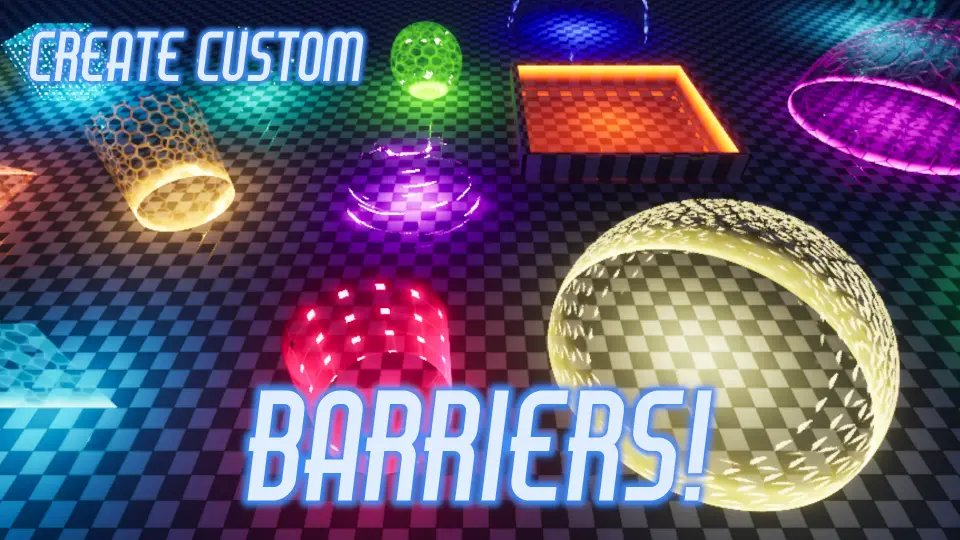
Thirty ready-to-use example barriers and three distinct master materials form the functional core of the Sci-Fi Barrier Toolkit. Built specifically for real-time environments requiring futuristic energy shields and force fields, the toolkit relies on material instances that expose more than fifty individual parameters each. Developers can adapt the provided thirty barrier variations directly into a scene or construct entirely custom surface networks by instancing one of the three master materials.
Three Master Materials and Thirty Barrier Examples
The architecture of the toolkit separates shield behavior into three distinct technical approaches: Dual Pulse, Impact, and Deploy. Rather than forcing a single, overly complex shader to handle every scenario, each master material targets a specific type of gameplay response or visual dynamic.
The thirty example barriers demonstrate how these base shaders can be pushed in different directions. By adjusting the exposed controls on these presets, developers can study how specific combinations of color, motion, distortion, and masking yield distinct variations of shields, field gates, and personal force barriers. Whether an encounter demands a stationary perimeter or an active combat shield, these instances offer immediate starting points that require no manual graph rewiring.
Impact Mechanics: Vertex Offset and Hit Event Ripple Effects
Shields in interactive environments frequently need to telegraph weapon impacts, physical collisions, and incoming projectiles. The Impact master material addresses this gameplay requirement directly. It is pre-configured to interface with hit events, taking location and force data to drive visual distortion at the exact point of contact.
Two distinct visual techniques define this response:
Vertex Offset: Incoming collisions can physically displace the barrier geometry, popping or bulging the surface outward or inward to signal physical resistance.
Custom Ripple Effects: Concentric waves spread across the shield surface from the hit location, simulating energy dispersion across the field.
Because these reactions are embedded within the material logic, setting up reactive shields does not require complex particle-based collision workarounds. The shader accepts the impact data directly, activating localized ripple propagation and surface deformation to convey physical contact instantly during gameplay.
Deploy Logic and Texture Mask Unfolding
Activating an energy shield often requires a visual sequence that establishes its boundary over time. The Deploy master material manages this transition mathematically through a texture mask setup linked to a central Deployment Percent value.
As the Deployment Percent increases, the material calculates cutoff thresholds against the assigned mask texture, causing the barrier to progressively unfold across the mesh. This approach allows developers to animate barrier deployment via simple timeline curves, blueprint scalar updates, or sequencer tracks. By swapping the underlying texture mask, the field can reveal itself along geometric hex seams, digital grid sweeps, or organic energy arcs without changing the underlying unfolding math.
Dual Pulse Blending with Distance-Based Modulation
For ambient shields, power gates, or containment chambers, constant static patterns can feel stiff. The Dual Pulse master material resolves this by blending between two user-defined seamless patterns based on camera or world distance.
As viewing distances shift, the material transitions smoothly between the primary and secondary seamless textures, preventing repetitive tiling artifacts at a distance while preserving fine detail up close. In tandem with this distance-based blending, the material introduces controllable flickering parameters. This allows the energy field to pulse erratically, breathe gently, or destabilize based on the specific aesthetic requirements of the sci-fi environment.
Surface Shading Layers: Bands, Fresnel, Depth Fade, and Joint Emissive
Across all barrier setups, the toolkit supplies an extensive collection of rendering features designed to ground the holographic or energy appearance of the surfaces. These features interact with both the geometry of the barrier and the surrounding environment:
Fresnel: Accentuates glancing angles, producing a bright energy rim that outlines the boundary of the mesh against the background.
Depth Fade: Eliminates hard clipping lines where the barrier mesh intersects with floors, walls, or props, creating smooth, soft energy transitions at intersection seams.
Refraction: Distorts background geometry viewed through the shield, simulating heat, electromagnetic fields, or light-bending force fields.
Normal Maps and Texture Panning: Continual UV motion across normal maps produces active energy currents across the field surface.
Generated Bands: Algorithmic lines and stripes traverse the geometry without requiring hardcoded texture data.
Joint Emissive: Directs emissive glow along the channels defined by the texture mask, simulating glowing structural ribs, conductive seams, or energy conduits that power the shield.
Fine-Tuning Parameters and VR Locomotion Template Compatibility
With more than fifty parameters exposed per material instance, dialing in precise barrier characteristics requires zero modifications to the underlying node network. Designers can adjust panning speeds, emissive colors, normal map intensities, refraction strength, ripple frequencies, and depth fade softness independently across separate instances.
For immersive interactive projects, the toolkit provides compatibility with the VR Locomotion Template. This ensures the shield mechanics, impact responses, and visual transparency layers function properly within head-mounted display workflows, allowing force barriers to exist naturally in virtual reality spaces alongside standard flatscreen gameplay configurations.
 Building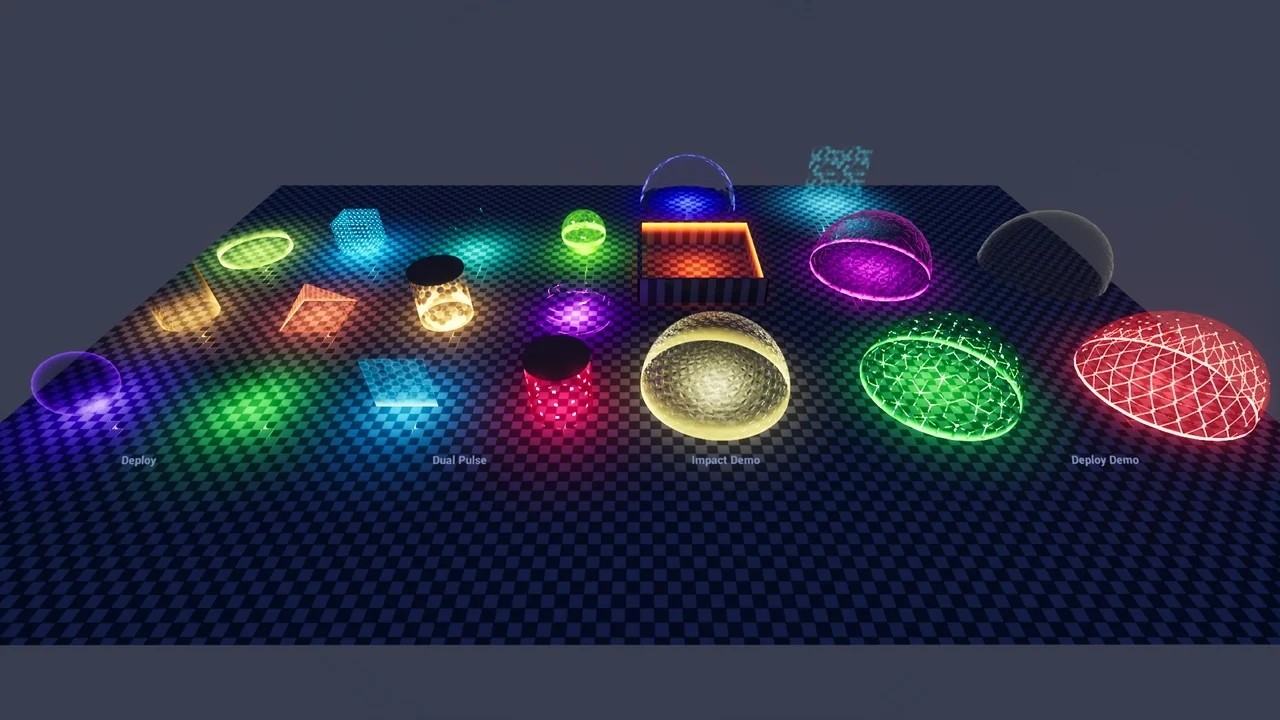
 Sci-Fi
 Sci-Fi
 Sci-Fi