"7b46a695175d8694"{"id":"1001507","slug":"city-skyline-restaurant-and-piano-bar","title":"City Skyline Restaurant \u0026 Piano Bar","category":"Sci-Fi","engine":"4.26+,5.0+","assetVersion":"","engineVersion":"Engine Version: 4.26+,5.0+","tag":"Sci-Fi","accent":"blue","visual":"city","summary":"Technical breakdown of the City Skyline Restaurant \u0026 Piano Bar environment, featuring 131 modular meshes, channel-packed materials, and multiplatform support.","platform":"Unreal Engine","publishedAt":"2026-10-09T13:08:04.836Z","updatedAt":"2026-10-09T13:08:04.836Z","sourceNotes":[],"fileContents":[],"compatibility":["Unreal Engine","Engine Version: 4.26+,5.0+"],"featuredImage":{"alt":"City Skyline Restaurant \u0026 Piano Bar","src":"/wp-content/uploads/published/2026/10/94101f86d0bc-7d549485-2c18-4321-bac6-08097ac83c9f-8b4ed3f54d.webp"},"hasDownloadLink":true,"downloads":0,"terms":[{"taxonomy":"category","slug":"sci-fi","name":"Sci-Fi"}],"galleryImages":[{"src":"/wp-content/uploads/published/2026/10/d5d40360f233-c1b60d02-9a51-4486-a03e-547cb7a74827-4fcab8828e.webp","alt":"City Skyline Restaurant \u0026 Piano Bar"},{"src":"/wp-content/uploads/published/2026/10/b43a53ba5669-5a8aaaf5-c684-4043-b882-9fa179acdb9b-da4fe97de7.webp","alt":"City Skyline Restaurant \u0026 Piano Bar"},{"src":"/wp-content/uploads/published/2026/10/08c716f2c082-7d081360-b649-4c8a-972d-c9b8bffd0e35-bb65e3edc5.webp","alt":"City Skyline Restaurant \u0026 Piano Bar"},{"src":"/wp-content/uploads/published/2026/10/d9f3d2f24ea6-f9f82a15-b22d-405f-b93c-e8a09fa29a4c-240d202288.webp","alt":"City Skyline Restaurant \u0026 Piano Bar"},{"src":"/wp-content/uploads/published/2026/10/3f00fd1daea5-7a39015b-d41f-4e07-b016-4dea650d7737-1694a0166e.webp","alt":"City Skyline Restaurant \u0026 Piano Bar"},{"src":"/wp-content/uploads/published/2026/10/0060013e3b14-d7be50de-f949-4d7c-976f-e79498d272cd-2feb2897ae.webp","alt":"City Skyline Restaurant \u0026 Piano Bar"},{"src":"/wp-content/uploads/published/2026/10/9238fafa693b-22087059-a426-4a99-9b15-78335a1382cd-fcb141aeb9.webp","alt":"City Skyline Restaurant \u0026 Piano Bar"},{"src":"/wp-content/uploads/published/2026/10/905dd586bce1-29fb9261-4272-44b9-8322-df7e55301278-d1068aecec.webp","alt":"City Skyline Restaurant \u0026 Piano Bar"},{"src":"/wp-content/uploads/published/2026/10/5ae1d8bef749-bd791c2c-e9a4-44b7-be02-a74df5a3393f-5fa0a4e79b.webp","alt":"City Skyline Restaurant \u0026 Piano Bar"},{"src":"/wp-content/uploads/published/2026/10/79be3560e0be-2a3f5bad-79b3-4604-b340-6656075f46d3-034abe35c3.webp","alt":"City Skyline Restaurant \u0026 Piano Bar"}],"accessPanel":{"kind":"resource","title":"Download this resource","eyebrow":"Free Download","message":"Log in or create a free account to start your download.","fileName":"Content.7z","safetyNote":"Resources are manually reviewed before listing to improve quality and reduce obvious risks.","actionLabel":"Download Free","resourceType":"Resource archive"},"contentHtml":"\u003ch2\u003eModular Assembly and Layout Construction in the Piano Bar\u003c/h2\u003e\u003cp\u003eLaying out the environment begins with its core modular structural pieces. The pack provides a modular workflow designed to let developers piece together custom floor plans or alter the default arrangement of the dining room and stage. Rather than relying on monolithic room meshes, the structural components split cleanly into modular wall, floor, and ceiling elements, allowing the venue to expand into multiple dining sections, private rooms, or an extended lounge area.\u003c/p\u003e\u003cp\u003eA total of 131 meshes form the complete scene. These pieces represent every element visible in the setting, spanning the central piano bar performance space, guest dining tables, interior architectural dividers, ambient light fixtures, and backdrop framing. While promotional demonstrations include human figures for scale reference, those placeholder characters are excluded from the project files. All props and structural elements are scaled directly to the Epic skeleton, ensuring imported characters align properly with chair heights, counter surfaces, door frames, and bar stools right out of the box.\u003c/p\u003e\u003cp\u003eCollision setup is handled cleanly across the mesh library. Simple collision hulls are applied to nearly all props, preventing player pawns or physics-driven objects from clipping through counter edges, seating, tables, or structural pillars. This basic collision footprint reduces unnecessary runtime physics calculations while keeping navigation mesh generation straightforward during level layout.\u003c/p\u003e\u003ch2\u003eMaster Shaders, Channel Packing, and Prop Customization Controls\u003c/h2\u003e\u003cp\u003eThe material pipeline is structured through a structured hierarchy of 91 total material assets. This network consists of 17 master materials, 58 material instances, and 16 modular material functions. Instead of hardcoding surface responses into standalone shaders, the material instances expose specific parameters for color adjustments and surface roughness across the majority of the props. This setup gives level designers the ability to tweak fabric hues, change wood finishes, or alter the sheen of polished surfaces directly in the viewport without needing external texture edits.\u003c/p\u003e\u003cp\u003eArchitectural assets in the scene make deliberate use of layered materials. This approach allows large-scale structural surfaces like walls, ceilings, and bulkheads to blend distinct material layers cleanly across modular seams. Material distribution relies heavily on channel-packed textures, grouping metalness, roughness, and ambient occlusion into individual color channels of a single image file. Packing these parameters together keeps texture memory down and decreases sample calls inside the shader instructions, maintaining high frame rates across dense indoor setups.\u003c/p\u003e\u003cp\u003eThe asset collection also integrates smoothly with other Grimmsorg Studio releases, such as the American Style Diner environment. Because the shading systems follow the same material function conventions and packing logic, props and architectural accents can be swapped or combined between packs without mismatched material logic.\u003c/p\u003e\u003ch2\u003eTexture Distribution and Lightmap Setup across the Interior\u003c/h2\u003e\u003cp\u003eHigh-resolution texturing across the 131 texture files balances visual fidelity and texture memory through targeted resolution budgeting. Assets receive texture dimensions matching their visual dominance in the scene:\u003c/p\u003e\u003cul\u003e\u003cli\u003e4096 \u0026times; 4096: 6 textures assigned to focal surfaces\u003c/li\u003e\u003cli\u003e2048 \u0026times; 2048: 78 textures covering primary furniture, counters, and architectural materials\u003c/li\u003e\u003cli\u003e1024 \u0026times; 1024: 25 textures applied to secondary props and tabletop items\u003c/li\u003e\u003cli\u003e512 \u0026times; 512: 19 textures for smaller prop accents and trim sheets\u003c/li\u003e\u003cli\u003e256 \u0026times; 256: 3 textures for micro-details and minor elements\u003c/li\u003e\u003c/ul\u003e\u003cp\u003eIllumination plays a primary role in framing the interior against the nighttime cityscape. Every mesh asset includes clean, consistent lightmap UV coordinates to ensure artifact-free static lighting bakes. The lightmap unwraps prevent bleeding across geometry edges on modular seams, allowing smooth light gradients from interior sconces, bar lights, and soft ceiling spots. The package is pre-configured with cinematic post-processing profiles that balance the deep shadows of an intimate bar setting against the bright skyline view outside the windows.\u003c/p\u003e\u003ch2\u003eFictional Branding, LOD Generation, and Multiplatform Deployment\u003c/h2\u003e\u003cp\u003eCommercial deployment often runs into complications with trademarked logos on decorative items like drink bottles, packaging, or decorative signage. Every brand element, label, and graphic design in this project was created from scratch as a fictional design. This custom labeling eliminates copyright risks when building scenes for published games, cinematic animations, or commercial visualizations.\u003c/p\u003e\u003cp\u003eLevel of detail meshes are not pre-baked into the static mesh files. Because Unreal Engine includes an integrated LOD generator tool, developers can generate tailored LOD chains with custom polygon reduction ratios directly inside the engine editor. This gives technical artists complete control over transition distances and triangle targets based on the specific rendering requirements of the target platform.\u003c/p\u003e\u003cp\u003eThe environment is authored on Windows for development and runs across a broad spread of target build platforms. Production builds support Windows desktop, Mac, PlayStation 4, and Xbox systems. The combination of channel-packed textures, lightweight collision meshes, and uniform lightmap channels ensures the visual quality holds up under the performance budgets required for eighth-generation consoles and modern desktop environments alike.\u003c/p\u003e\n\n\u003ch2\u003eRelated Resources Worth Checking\u003c/h2\u003e\n\u003cul\u003e\n\u003cli\u003e\u003ca href=\"https://3dcghub.com/ring-world-city-station/\" title=\"Ring World City Station\"\u003eRing World City Station\u003c/a\u003e\u003c/li\u003e\n\u003cli\u003e\u003ca href=\"https://3dcghub.com/nova-space-burgers-cyberpunk-abandoned-restaurant-space-bar-cyberpunk-art/\" title=\"Nova Space Burgers / Cyberpunk Abandoned Restaurant / Space Bar Cyberpunk Art\"\u003eNova Space Burgers / Cyberpunk Abandoned Restaurant / Space Bar Cyberpunk Art\u003c/a\u003e\u003c/li\u003e\n\u003cli\u003e\u003ca href=\"https://3dcghub.com/desert-science-fiction-city-modular-pack/\" title=\"Desert Science Fiction City Modular Pack\"\u003eDesert Science Fiction City Modular Pack\u003c/a\u003e\u003c/li\u003e\n\u003cli\u003e\u003ca href=\"https://3dcghub.com/future-container-slums/\" title=\"Future Container slums\"\u003eFuture Container slums\u003c/a\u003e\u003c/li\u003e\n\u003cli\u003e\u003ca href=\"https://3dcghub.com/cyberpunk-street-assets/\" title=\"Cyberpunk street assets\"\u003eCyberpunk street assets\u003c/a\u003e\u003c/li\u003e\n\u003c/ul\u003e","contentTextLength":5845,"navigation":{"current":38,"total":3481,"previous":{"id":"1001508","slug":"cyber-underground","title":"Cyber Underground","category":"Industrial","platform":"Unreal Engine","updatedAt":"2026-10-09T13:09:06.276Z"},"next":{"id":"1001506","slug":"buggy-vehicles-pack","title":"Buggy Vehicles Pack","category":"Vehicles \u0026 Transportation","platform":"Unreal Engine","updatedAt":"2026-10-09T07:33:01.176Z"}},"relatedResources":[{"id":"1001451","slug":"ring-world-city-station","title":"Ring World City Station","category":"Sci-Fi","engine":"4.26+,5.0+","assetVersion":"","engineVersion":"Engine Version: 4.26+,5.0+","tag":"Sci-Fi","accent":"blue","visual":"city","summary":"Build detailed sci-fi environments with Ring World City Station, featuring modular streets, bar interiors, spline blueprints, and Unreal Engine 5 Lumen support.","platform":"Unreal Engine","publishedAt":"2026-10-08T00:54:45.110Z","updatedAt":"2026-10-08T00:54:45.110Z","sourceNotes":[],"fileContents":[],"compatibility":["Unreal Engine","Engine Version: 4.26+,5.0+"],"featuredImage":{"alt":"Ring World City Station","src":"/wp-content/uploads/published/2026/10/b6b13533b57b-0cafe81c-c894-4f8d-9f15-09c6951558b9-9dafca5de0.webp"},"hasDownloadLink":true,"downloads":0},{"id":"1001144","slug":"nova-space-burgers-cyberpunk-abandoned-restaurant-space-bar-cyberpunk-art","title":"Nova Space Burgers / Cyberpunk Abandoned Restaurant / Space Bar Cyberpunk Art","category":"Cyberpunk","engine":"4.26+,5.0+","assetVersion":"","engineVersion":"Engine Version: 4.26+,5.0+","tag":"Cyberpunk","accent":"blue","visual":"mech","summary":"Explore Nova Space Burgers, a game-ready cyberpunk abandoned restaurant and space bar environment pack built for Unreal Engine with modular ULAT tools.","platform":"Unreal Engine","publishedAt":"2026-09-09T05:51:55.337Z","updatedAt":"2026-09-09T05:51:55.337Z","sourceNotes":[],"fileContents":[],"compatibility":["Unreal Engine","Engine Version: 4.26+,5.0+"],"featuredImage":{"alt":"Nova Space Burgers / Cyberpunk Abandoned Restaurant / Space Bar Cyberpunk Art","src":"/wp-content/uploads/published/2026/09/801739e8908c-51e559a4-7a58-43f5-b7f7-7d47bf6b9779-9c9bbaf04e.webp"},"hasDownloadLink":true,"downloads":2},{"id":"9494","slug":"desert-science-fiction-city-modular-pack","title":"Desert Science Fiction City Modular Pack","category":"Sci-Fi","engine":"4.26+,5.0+","assetVersion":"Engine version: 4.26+,5.0+","engineVersion":"4.26","tag":"Sci-Fi","accent":"blue","visual":"city","summary":"Build a vast futuristic civilization with the Desert Science Fiction City Modular Pack. This collection features enterable buildings, a functional train system, and full optimization for UE5 Nanite and Lumen.","platform":"Unreal Engine","publishedAt":"2026-03-01T17:03:09.000Z","updatedAt":"2026-04-19T15:51:08.000Z","sourceNotes":[],"fileContents":[],"compatibility":["Unreal Engine","Engine version: 4.26+,5.0+"],"featuredImage":{"alt":"Desert Science Fiction City Modular Pack","src":"https://3dcghub.com/wp-content/uploads/2026/03/af3cd1fe-c6e5-41fd-8169-94f020cb4765.webp"},"hasDownloadLink":true,"downloads":0}]}
Sci-Fi
City Skyline Restaurant & Piano Bar
Technical breakdown of the City Skyline Restaurant & Piano Bar environment, featuring 131 modular meshes, channel-packed materials, and multiplatform support.
Category:Unreal Engine,Sci-FiPlatform: Unreal EngineEngine Version: 4.26+,5.0+Published: Oct 9, 2026
Sci-Fi
Resource overview
Modular Assembly and Layout Construction in the Piano Bar
Laying out the environment begins with its core modular structural pieces. The pack provides a modular workflow designed to let developers piece together custom floor plans or alter the default arrangement of the dining room and stage. Rather than relying on monolithic room meshes, the structural components split cleanly into modular wall, floor, and ceiling elements, allowing the venue to expand into multiple dining sections, private rooms, or an extended lounge area.
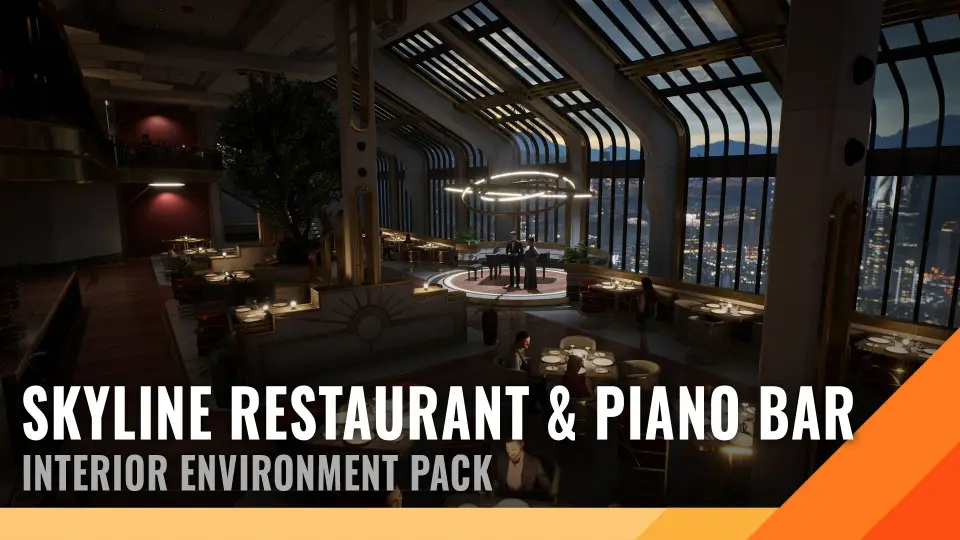
A total of 131 meshes form the complete scene. These pieces represent every element visible in the setting, spanning the central piano bar performance space, guest dining tables, interior architectural dividers, ambient light fixtures, and backdrop framing. While promotional demonstrations include human figures for scale reference, those placeholder characters are excluded from the project files. All props and structural elements are scaled directly to the Epic skeleton, ensuring imported characters align properly with chair heights, counter surfaces, door frames, and bar stools right out of the box.
Collision setup is handled cleanly across the mesh library. Simple collision hulls are applied to nearly all props, preventing player pawns or physics-driven objects from clipping through counter edges, seating, tables, or structural pillars. This basic collision footprint reduces unnecessary runtime physics calculations while keeping navigation mesh generation straightforward during level layout.
Master Shaders, Channel Packing, and Prop Customization Controls
The material pipeline is structured through a structured hierarchy of 91 total material assets. This network consists of 17 master materials, 58 material instances, and 16 modular material functions. Instead of hardcoding surface responses into standalone shaders, the material instances expose specific parameters for color adjustments and surface roughness across the majority of the props. This setup gives level designers the ability to tweak fabric hues, change wood finishes, or alter the sheen of polished surfaces directly in the viewport without needing external texture edits.
Architectural assets in the scene make deliberate use of layered materials. This approach allows large-scale structural surfaces like walls, ceilings, and bulkheads to blend distinct material layers cleanly across modular seams. Material distribution relies heavily on channel-packed textures, grouping metalness, roughness, and ambient occlusion into individual color channels of a single image file. Packing these parameters together keeps texture memory down and decreases sample calls inside the shader instructions, maintaining high frame rates across dense indoor setups.
The asset collection also integrates smoothly with other Grimmsorg Studio releases, such as the American Style Diner environment. Because the shading systems follow the same material function conventions and packing logic, props and architectural accents can be swapped or combined between packs without mismatched material logic.
Texture Distribution and Lightmap Setup across the Interior
High-resolution texturing across the 131 texture files balances visual fidelity and texture memory through targeted resolution budgeting. Assets receive texture dimensions matching their visual dominance in the scene:
4096 × 4096: 6 textures assigned to focal surfaces
1024 × 1024: 25 textures applied to secondary props and tabletop items
512 × 512: 19 textures for smaller prop accents and trim sheets
256 × 256: 3 textures for micro-details and minor elements
Illumination plays a primary role in framing the interior against the nighttime cityscape. Every mesh asset includes clean, consistent lightmap UV coordinates to ensure artifact-free static lighting bakes. The lightmap unwraps prevent bleeding across geometry edges on modular seams, allowing smooth light gradients from interior sconces, bar lights, and soft ceiling spots. The package is pre-configured with cinematic post-processing profiles that balance the deep shadows of an intimate bar setting against the bright skyline view outside the windows.
Fictional Branding, LOD Generation, and Multiplatform Deployment
Commercial deployment often runs into complications with trademarked logos on decorative items like drink bottles, packaging, or decorative signage. Every brand element, label, and graphic design in this project was created from scratch as a fictional design. This custom labeling eliminates copyright risks when building scenes for published games, cinematic animations, or commercial visualizations.
Level of detail meshes are not pre-baked into the static mesh files. Because Unreal Engine includes an integrated LOD generator tool, developers can generate tailored LOD chains with custom polygon reduction ratios directly inside the engine editor. This gives technical artists complete control over transition distances and triangle targets based on the specific rendering requirements of the target platform.
The environment is authored on Windows for development and runs across a broad spread of target build platforms. Production builds support Windows desktop, Mac, PlayStation 4, and Xbox systems. The combination of channel-packed textures, lightweight collision meshes, and uniform lightmap channels ensures the visual quality holds up under the performance budgets required for eighth-generation consoles and modern desktop environments alike.
 Sci-Fi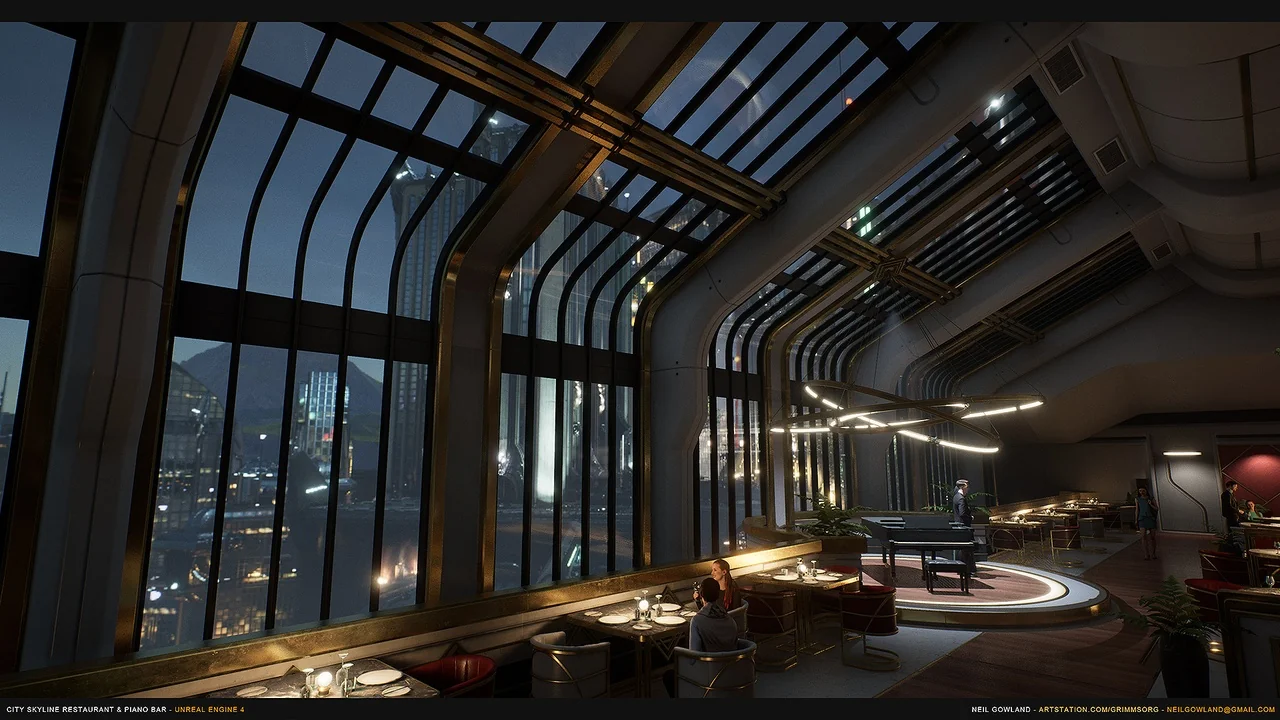
 Sci-Fi
 Cyberpunk
 Sci-Fi