Optimize Your Workflow with Quick Merge Skeletal Mesh
Quick Merge Skeletal Mesh is a specialized utility designed to streamline asset management within Unreal Engine 5. This tool allows developers to combine multiple skeletal meshes into a single, unified asset directly within the editor. By simplifying the merging process, the tool helps maintain a cleaner project structure and more efficient asset handling.
The developer has ensured that this tool remains compatible across all versions of Unreal Engine 5. Consequently, creators working on various iterations of the engine can integrate this functionality into their production pipelines. The primary goal of the tool is to provide a fast and reliable way to consolidate character or object components into one mesh.
Key Features and Recent Upgrades
The latest version 1.2 upgrade introduced significant improvements to the core functionality of Quick Merge Skeletal Mesh. One of the most important updates involves the handling of Level of Detail (LOD) settings. The developer has fixed LOD issues, ensuring that the merged assets maintain their visual integrity across different distances.
Additionally, the update addresses a critical stability fix regarding asset accessibility. Previously, some users encountered issues where assets could not be opened after restarting the editor. This has been resolved, providing a more stable environment for long-term project development. Therefore, users can merge their assets with confidence, knowing the files will remain accessible throughout the development cycle.
Simple Integration and Usage
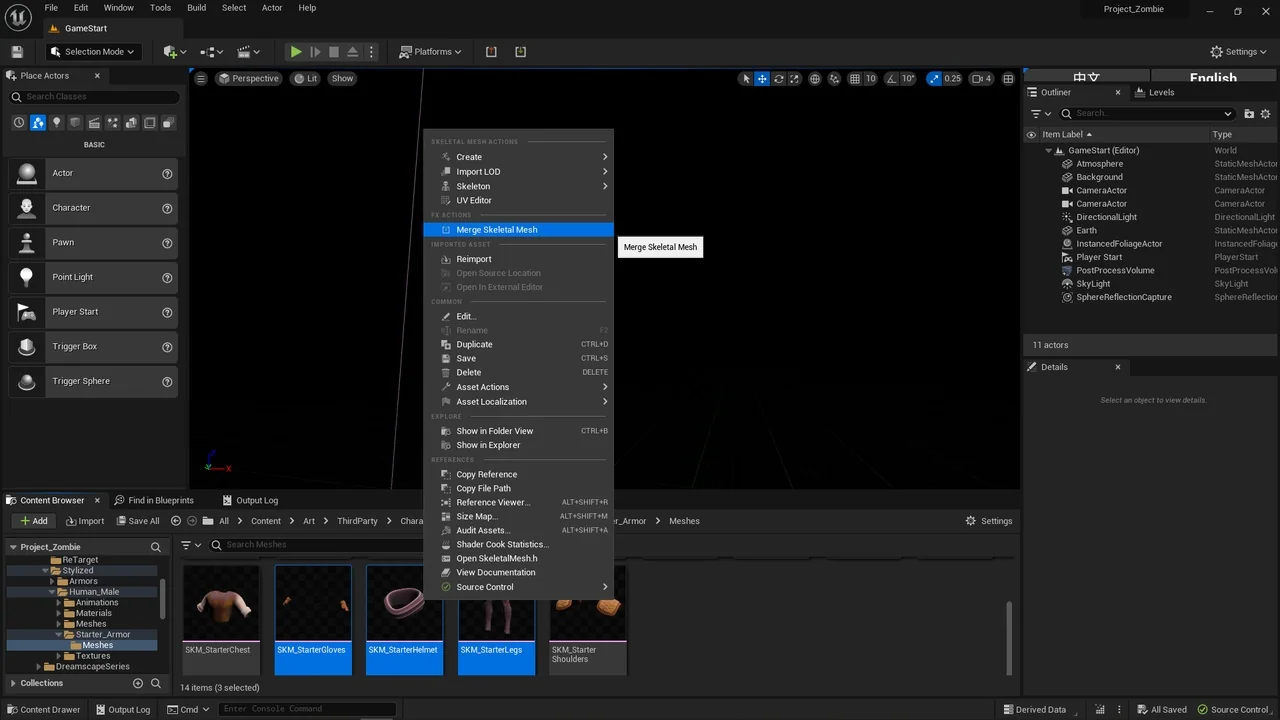
Using the Quick Merge Skeletal Mesh tool is straightforward and requires no complex configuration. To begin, users simply navigate to their skeletal meshes within the content browser. After selecting the desired meshes, a right-click opens the context menu where the merge option is located.
- Select multiple skeletal meshes in the content browser.
- Right-click the selected assets.
- Choose the merge option to create a single mesh.
However, it is vital to note that the tool relies on skeleton consistency. The merging process is based entirely on the first skeletal mesh selected by the user. Because the tool requires a shared structure, different skeletons will not be merged. Consequently, users must ensure that all selected meshes share the same skeleton for the operation to succeed.
Conclusion
Quick Merge Skeletal Mesh provides a practical solution for Unreal Engine 5 developers looking to consolidate their skeletal assets. By offering a simple right-click workflow and addressing previous technical bugs, it serves as a reliable utility for project optimization. As long as the meshes share a common skeleton, this tool offers a rapid way to transform multiple components into a single, functional asset.
Screenshots & Gallery