"c68a05d5e51405b3"{"id":"1001103","slug":"metro-maintenance-station-pack","title":"Metro Maintenance Station Pack","category":"Industrial Buildings","engine":"4.26+,5.0+","assetVersion":"","engineVersion":"Engine Version: 4.26+,5.0+","tag":"Industrial Buildin","accent":"blue","visual":"mech","summary":"Environment pieces and props for an old metro station, with shared textures, an included demo scene, and mobile-friendly poly counts for real-time variation.","platform":"Unreal Engine","publishedAt":"2026-09-07T05:30:49.725Z","updatedAt":"2026-09-07T05:38:04.497Z","sourceNotes":[],"fileContents":[],"compatibility":["Unreal Engine","Engine Version: 4.26+,5.0+"],"featuredImage":{"alt":"Metro Maintenance Station Pack","src":"/wp-content/uploads/published/2026/09/b2d4ae6f9a52-32b64c02-1b5b-4d14-ae82-cce1c5888626-fdb34b095b.webp"},"hasDownloadLink":true,"downloads":0,"terms":[{"taxonomy":"category","slug":"industrial-buildings","name":"Industrial Buildings"}],"galleryImages":[{"src":"/wp-content/uploads/published/2026/09/a40b65f21304-439da36a-9a7e-465d-8ad8-d1d25f51d613-e5eda09b58.webp","alt":"Metro Maintenance Station Pack"},{"src":"/wp-content/uploads/published/2026/09/8f85ca0ec7b8-7aff5ef0-8d7c-4555-bf1b-2fcc3dcd1570-fb095b1132.webp","alt":"Metro Maintenance Station Pack"},{"src":"/wp-content/uploads/published/2026/09/f5f2ae10bedd-f39cfdb6-d446-4acd-8d10-8a9f42df3e51-4603b4d7d1.webp","alt":"Metro Maintenance Station Pack"},{"src":"/wp-content/uploads/published/2026/09/fc715a3b0210-e9f91bb0-d009-4a2c-8086-ab4075285a6a-d9d662d01c.webp","alt":"Metro Maintenance Station Pack"},{"src":"/wp-content/uploads/published/2026/09/2153d6b4dbc2-244a9906-3550-4bcd-86ac-d0d2e8c25c5e-edd3355d5d.webp","alt":"Metro Maintenance Station Pack"},{"src":"/wp-content/uploads/published/2026/09/f06db22a4253-7a0a5776-6eea-491b-9c01-8e5dee865926-378cd9ba22.webp","alt":"Metro Maintenance Station Pack"},{"src":"/wp-content/uploads/published/2026/09/15ee0eb62619-561615a3-64c1-4429-9d5f-200347570fe9-035b573987.webp","alt":"Metro Maintenance Station Pack"},{"src":"/wp-content/uploads/published/2026/09/9332503bc07a-f62b4140-5f2c-492c-9f69-4dfcaf183c0c-53a22701fa.webp","alt":"Metro Maintenance Station Pack"},{"src":"/wp-content/uploads/published/2026/09/01c24265facd-e360793e-c0ea-4d82-b10a-99ef59152d1e-7ae730601a.webp","alt":"Metro Maintenance Station Pack"},{"src":"/wp-content/uploads/published/2026/09/b8e0b1ff953a-edbac702-47fe-4140-a525-23dab637091a-7a164fe7dd.webp","alt":"Metro Maintenance Station Pack"}],"accessPanel":{"kind":"resource","title":"Download this resource","eyebrow":"Free Download","message":"Log in or create a free account to start your download.","fileName":"Content.7z","safetyNote":"Resources are manually reviewed before listing to improve quality and reduce obvious risks.","actionLabel":"Download Free","resourceType":"Resource archive"},"contentHtml":"\u003cp\u003eWhat remains in an old metro station is often a design question before it becomes a narrative one. The area could hold monsters, survivors, or just the quiet corner where one maintenance worker keeps the place from falling apart. The Metro Maintenance Station Pack approaches that uncertainty as a buildable scene. It supplies environment pieces and props that can dress a disused underground space, and it does so without demanding a massive texture library or heavy geometry.\u003c/p\u003e\u003ch2\u003eIncluded Demo Scene: Not Just a Screenshot\u003c/h2\u003e\u003cp\u003eThe demo scene shown in screenshots is not a separate art piece that must be assembled by hand. It is included in the pack. That matters when you open the project for the first time. Instead of starting from an empty grid, you get a complete station layout that already demonstrates how the environment pieces line up and how props add the maintenance-worker story. You can inspect how the set is placed, then move or replace elements to match your own take on the space.\u003c/p\u003e\u003cp\u003eThe included scene also gives you a reference for scale. An underground corridor reads differently when the columns, rails, and room dividers are already arranged at the correct height. Using that scene as the starting layout is the fastest route to a believable station, because the hardest part of level dressing is usually the first composition. Once the base layout exists, adding or removing props becomes a small edit.\u003c/p\u003e\u003ch2\u003eEnvironment Pieces and Props Dressed in One Texture\u003c/h2\u003e\u003cp\u003eThe contents range from environment pieces to props, which means the pack carries both the architecture of the station and the smaller objects that fill it. The broad range of assets supports more than one scene layout. The same wall section that blocks a monster lair can also frame a survivor's cooking area or a maintenance bench.\u003c/p\u003e\u003cp\u003eThe texturing setup makes this flexibility easy to work with. Most assets do not include unique textures. Instead, they use the same texture to provide the surface for the majority of the pack. That is unusual enough to affect your workflow. Because the assets share a single surface, you can create a new look for the entire station by swapping that shared texture. Textures you have already added to your library become variation tools. Open the included demo scene, replace the shared surface with an older, more stained sheet, and the station changes character instantly. The same props and architecture remain, but the dirt and wear read differently.\u003c/p\u003e\u003ch2\u003ePoly Counts Between 28 and 23,380 Keep the Scene Real-Time\u003c/h2\u003e\u003cp\u003ePerformance is addressed directly in the polygon distribution. The counts vary from 28 to 23,380, with most assets falling between 1,000 and 2,000. That spread covers small details on the low end and larger set pieces on the high end, yet keeps the bulk of the pack inside a conservative range.\u003c/p\u003e\u003cp\u003eAccording to the asset notes, these are well optimized for real-time applications and can run even on mobile. For a station scene, that is useful because you rarely place a single object in front of the camera. Corridors contain many props at once, and the repeated environment pieces need to stay cheap. With most items sitting near 1,000 to 2,000 polygons, you can fill a level without exhausting a mobile draw budget. The rare object that reaches 23,380 becomes a focal point rather than a repeated element.\u003c/p\u003e\u003ch2\u003eTextures at 2048px and 4096px for the Grunge Look\u003c/h2\u003e\u003cp\u003eTexture resolution varies between 2048px and 4096px. That range gives the pack enough detail to sell the dirty, abandoned surface treatment on large structures and small props alike. In a low-light metro environment, the difference between a clean tile and a stained one relies on texture legibility, and the 2048px lower bound still provides a crisp read for most objects.\u003c/p\u003e\u003cp\u003eThe pack's intended mood is clear from the tags attached to it: abandoned, metro, modular, lowpoly, dirty, old, grunge, and underground. Those words describe more than the surface treatment. They point to a modular building style as well. The lowpoly look means the geometry stays readable and easy to compile, while the grunge detail comes through the paint and grime laid across the shared texture. Most assets do not need to carry heavy wear as modeled damage; the surface provides that story in 2048px to 4096px throughout the scene.\u003c/p\u003e\u003ch2\u003eFrom One Demo Station to Multiple Stories\u003c/h2\u003e\u003cp\u003eOnce the demo scene is open and the shared-texture workflow is clear, the pack becomes a base for editing rather than a fixed diorama. The same station layout can shift between three interpretations without any geometry changes. If monsters have taken over, replace the clean equipment with debris and leave the grunge texture intact. If survivors moved in, rearrange the maintenance props to form barricades or living spaces. If you want a quiet workplace, keep the pieces sparse and let the maintenance worker's corner stand on its own.\u003c/p\u003e\u003cp\u003eEvery scene variation follows the same practical path. Start with the included demo scene, swap the shared texture from your own collection, and move the props until the layout answers the question of what is still down in that old metro station. The pack gives you the environment pieces and props for all of those answers, and the real-time poly budget leaves room for the layers of storytelling you add on top.\u003c/p\u003e\n\n\u003ch2\u003eContinue Browsing Similar Packs\u003c/h2\u003e\n\u003cul\u003e\n\u003cli\u003e\u003ca href=\"https://3dcghub.com/assassin-girl-modular/\" rel=\"noopener noreferrer\"\u003eAssassin Girl Modular\u003c/a\u003e\u003c/li\u003e\n\u003cli\u003e\u003ca href=\"https://3dcghub.com/modular-soldier-pack-vol-1/\" rel=\"noopener noreferrer\"\u003eMODULAR SOLDIER PACK Vol. 1\u003c/a\u003e\u003c/li\u003e\n\u003cli\u003e\u003ca href=\"https://3dcghub.com/kitsune-yuna/\" rel=\"noopener noreferrer\"\u003eKitsune Yuna\u003c/a\u003e\u003c/li\u003e\n\u003cli\u003e\u003ca href=\"https://3dcghub.com/hero-for-rpg-modular-pbr/\" rel=\"noopener noreferrer\"\u003eHero for RPG : Modular PBR\u003c/a\u003e\u003c/li\u003e\n\u003cli\u003e\u003ca href=\"https://3dcghub.com/xiao-jue-asian-girl/\" rel=\"noopener noreferrer\"\u003eXiao Jue - Asian Girl\u003c/a\u003e\u003c/li\u003e\n\u003c/ul\u003e","contentTextLength":5425,"navigation":{"current":871,"total":3860,"previous":{"id":"1001105","slug":"modular-limb-damage-system","title":"Modular Limb Damage System","category":"Gameplay Features","platform":"Unreal Engine","updatedAt":"2026-09-07T05:41:59.387Z"},"next":{"id":"1001104","slug":"melee-ai-fp-tp-two-hands","title":"Melee+ (AI+FP/TP+Two Hands)","category":"Humans","platform":"Unreal Engine","updatedAt":"2026-09-07T05:37:02.505Z"}},"relatedResources":[{"id":"1169","slug":"industrial-vol-2-security-fences-and-barriers","title":"Industrial VOL.2 - Security Fences and Barriers","category":"Industrial Buildings","engine":"4.26+,5.0+","assetVersion":"Engine version:4.26+,5.0+","engineVersion":"4.26","tag":"Industrial Buildin","accent":"blue","visual":"audio","summary":"Create realistic industrial zones with AAA-quality security fences and modular barriers. Optimized for Unreal Engine with 2K textures and master materials.","platform":"Unreal Engine","publishedAt":"2026-02-06T16:50:22.000Z","updatedAt":"2026-04-19T15:58:13.000Z","sourceNotes":[],"fileContents":[],"compatibility":["Unreal Engine","Engine version: 4.26+,5.0+"],"featuredImage":{"alt":"Industrial VOL.2 - Security Fences and Barriers","src":"https://3dcghub.com/wp-content/uploads/2026/02/c57ed23a-ffed-4dcb-88b5-e25f83ed91f9.jpg"},"hasDownloadLink":true,"downloads":0},{"id":"1000241","slug":"victorian-train-station-and-railroad-modular-set","title":"Victorian Train Station and Railroad Modular Set","category":"Industrial","engine":"4.26+,5.0+","assetVersion":"","engineVersion":"Engine Version: 4.26+,5.0+","tag":"Industrial","accent":"blue","visual":"mech","summary":"Construct realistic 19th-century railway environments with this modular asset pack, featuring PBR materials, era-specific props, and pre-built station layouts.","platform":"Unreal Engine","publishedAt":"2026-06-30T19:27:29.377Z","updatedAt":"2026-06-30T19:27:29.377Z","sourceNotes":[],"fileContents":[],"compatibility":["Unreal Engine","Engine Version: 4.26+,5.0+"],"featuredImage":{"alt":"Victorian Train Station and Railroad Modular Set","src":"/wp-content/uploads/published/2026/06/431053457220-4e736639-b2d7-4ff8-85f5-af538bb481a2-bcd4089d02.webp"},"hasDownloadLink":true,"downloads":3},{"id":"1001142","slug":"modular-sci-fi-station","title":"Modular Sci-Fi Station","category":"Sci-Fi","engine":"4.16+,5.0+","assetVersion":"","engineVersion":"Engine Version: 4.16+,5.0+","tag":"Sci-Fi","accent":"blue","visual":"mech","summary":"Construct diverse sci-fi rooms, hallways, and spaceship interiors with the low-poly Modular Sci-Fi Station kit featuring high-resolution PBR textures.","platform":"Unreal Engine","publishedAt":"2026-09-09T05:35:44.412Z","updatedAt":"2026-10-09T15:37:29.142Z","sourceNotes":[],"fileContents":[],"compatibility":["Unreal Engine","Engine Version: 4.16+,5.0+"],"featuredImage":{"alt":"Modular Sci-Fi Station","src":"/wp-content/uploads/published/2026/09/a4c5f3ab3f03-8001c386-d63a-49cc-b8df-63595e3c4c42-c1137ad880.webp"},"hasDownloadLink":true,"downloads":0}]}
Industrial Buildin
Metro Maintenance Station Pack
Environment pieces and props for an old metro station, with shared textures, an included demo scene, and mobile-friendly poly counts for real-time variation.
What remains in an old metro station is often a design question before it becomes a narrative one. The area could hold monsters, survivors, or just the quiet corner where one maintenance worker keeps the place from falling apart. The Metro Maintenance Station Pack approaches that uncertainty as a buildable scene. It supplies environment pieces and props that can dress a disused underground space, and it does so without demanding a massive texture library or heavy geometry.
Included Demo Scene: Not Just a Screenshot
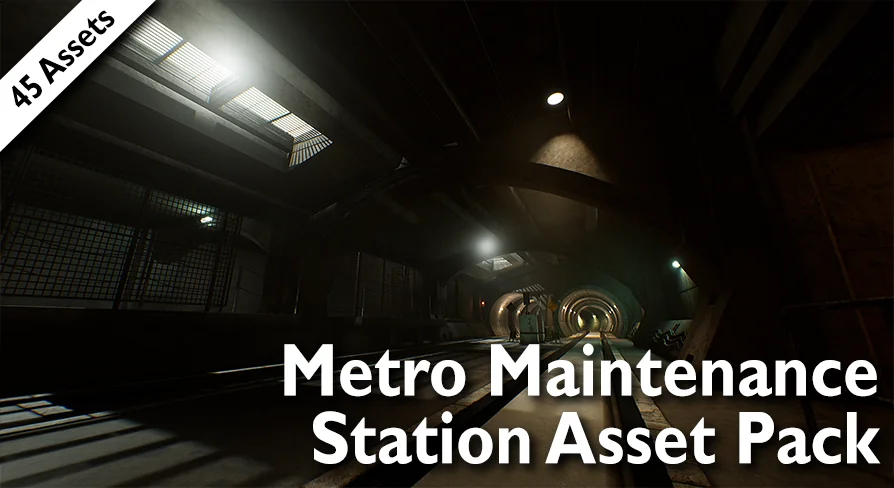
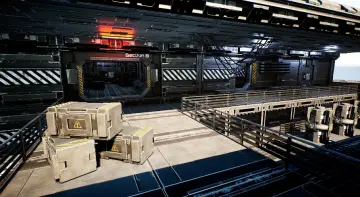
The demo scene shown in screenshots is not a separate art piece that must be assembled by hand. It is included in the pack. That matters when you open the project for the first time. Instead of starting from an empty grid, you get a complete station layout that already demonstrates how the environment pieces line up and how props add the maintenance-worker story. You can inspect how the set is placed, then move or replace elements to match your own take on the space.
The included scene also gives you a reference for scale. An underground corridor reads differently when the columns, rails, and room dividers are already arranged at the correct height. Using that scene as the starting layout is the fastest route to a believable station, because the hardest part of level dressing is usually the first composition. Once the base layout exists, adding or removing props becomes a small edit.
Environment Pieces and Props Dressed in One Texture
The contents range from environment pieces to props, which means the pack carries both the architecture of the station and the smaller objects that fill it. The broad range of assets supports more than one scene layout. The same wall section that blocks a monster lair can also frame a survivor's cooking area or a maintenance bench.
The texturing setup makes this flexibility easy to work with. Most assets do not include unique textures. Instead, they use the same texture to provide the surface for the majority of the pack. That is unusual enough to affect your workflow. Because the assets share a single surface, you can create a new look for the entire station by swapping that shared texture. Textures you have already added to your library become variation tools. Open the included demo scene, replace the shared surface with an older, more stained sheet, and the station changes character instantly. The same props and architecture remain, but the dirt and wear read differently.
Poly Counts Between 28 and 23,380 Keep the Scene Real-Time
Performance is addressed directly in the polygon distribution. The counts vary from 28 to 23,380, with most assets falling between 1,000 and 2,000. That spread covers small details on the low end and larger set pieces on the high end, yet keeps the bulk of the pack inside a conservative range.
According to the asset notes, these are well optimized for real-time applications and can run even on mobile. For a station scene, that is useful because you rarely place a single object in front of the camera. Corridors contain many props at once, and the repeated environment pieces need to stay cheap. With most items sitting near 1,000 to 2,000 polygons, you can fill a level without exhausting a mobile draw budget. The rare object that reaches 23,380 becomes a focal point rather than a repeated element.
Textures at 2048px and 4096px for the Grunge Look
Texture resolution varies between 2048px and 4096px. That range gives the pack enough detail to sell the dirty, abandoned surface treatment on large structures and small props alike. In a low-light metro environment, the difference between a clean tile and a stained one relies on texture legibility, and the 2048px lower bound still provides a crisp read for most objects.
The pack's intended mood is clear from the tags attached to it: abandoned, metro, modular, lowpoly, dirty, old, grunge, and underground. Those words describe more than the surface treatment. They point to a modular building style as well. The lowpoly look means the geometry stays readable and easy to compile, while the grunge detail comes through the paint and grime laid across the shared texture. Most assets do not need to carry heavy wear as modeled damage; the surface provides that story in 2048px to 4096px throughout the scene.
From One Demo Station to Multiple Stories
Once the demo scene is open and the shared-texture workflow is clear, the pack becomes a base for editing rather than a fixed diorama. The same station layout can shift between three interpretations without any geometry changes. If monsters have taken over, replace the clean equipment with debris and leave the grunge texture intact. If survivors moved in, rearrange the maintenance props to form barricades or living spaces. If you want a quiet workplace, keep the pieces sparse and let the maintenance worker's corner stand on its own.
Every scene variation follows the same practical path. Start with the included demo scene, swap the shared texture from your own collection, and move the props until the layout answers the question of what is still down in that old metro station. The pack gives you the environment pieces and props for all of those answers, and the real-time poly budget leaves room for the layers of storytelling you add on top.
 Industrial Buildin
 Industrial Buildin
 Industrial
 Sci-Fi