"c68a05d5e51405b3"{"id":"1001104","slug":"melee-ai-fp-tp-two-hands","title":"Melee+ (AI+FP/TP+Two Hands)","category":"Humans","engine":"4.27,5.0+","assetVersion":"","engineVersion":"Engine Version: 4.27,5.0+","tag":"Humans","accent":"blue","visual":"mech","summary":"Blueprint melee framework with any weapon in any hand, first/third-person mode, physical hit tracing, and AI combatants in one component.","platform":"Unreal Engine","publishedAt":"2026-09-07T05:37:02.505Z","updatedAt":"2026-09-07T05:37:02.505Z","sourceNotes":[],"fileContents":[],"compatibility":["Unreal Engine","Engine Version: 4.27,5.0+"],"featuredImage":{"alt":"Melee+ (AI+FP/TP+Two Hands)","src":"/wp-content/uploads/published/2026/09/95aab0609514-0da9baa9-edf9-478f-9dc5-f7fd3543196c-18d8ad0965.webp"},"hasDownloadLink":true,"downloads":0,"terms":[{"taxonomy":"category","slug":"humans","name":"Humans"}],"galleryImages":[{"src":"/wp-content/uploads/published/2026/09/7510cde5ccd1-87c8783a-f8b6-4842-aa8a-ce6fe2bde9ff-f145d8a5e7.webp","alt":"Melee+ (AI+FP/TP+Two Hands)"},{"src":"/wp-content/uploads/published/2026/09/ab9a9f081a82-77f27d09-fd2a-42de-92a1-90dece6bacd9-61704045f4.webp","alt":"Melee+ (AI+FP/TP+Two Hands)"},{"src":"/wp-content/uploads/published/2026/09/378ee5f716c3-48b8a5a9-adfe-40e1-a82e-f016d504671c-b9c947f5a5.webp","alt":"Melee+ (AI+FP/TP+Two Hands)"},{"src":"/wp-content/uploads/published/2026/09/55cbcf719067-52fb6a20-7260-4bf2-be7c-ec5b3171d1ac-2aaed0bb6b.webp","alt":"Melee+ (AI+FP/TP+Two Hands)"},{"src":"/wp-content/uploads/published/2026/09/e31361350915-82e7892e-e715-4bef-b175-151bd522b1b0-992658fdcf.webp","alt":"Melee+ (AI+FP/TP+Two Hands)"},{"src":"/wp-content/uploads/published/2026/09/aaadde74fdc1-8b0f44e1-d2f5-4590-89ba-cb8a4649af05-dacc0178f9.webp","alt":"Melee+ (AI+FP/TP+Two Hands)"},{"src":"/wp-content/uploads/published/2026/09/e1840b01db47-2d119486-3a98-4af6-aff8-a83a718f1fa5-97611918d0.webp","alt":"Melee+ (AI+FP/TP+Two Hands)"},{"src":"/wp-content/uploads/published/2026/09/d70d4d3d27a3-43483fef-d6c1-40fd-b2e0-4fb265cd4ad4-5a782384ac.webp","alt":"Melee+ (AI+FP/TP+Two Hands)"},{"src":"/wp-content/uploads/published/2026/09/e6c8b77b6803-16bf0105-10a6-4405-ba5a-3bb44b49ea00-5e708ee069.webp","alt":"Melee+ (AI+FP/TP+Two Hands)"}],"accessPanel":{"kind":"resource","title":"Download this resource","eyebrow":"Free Download","message":"Log in or create a free account to start your download.","fileName":"Content.7z","safetyNote":"Resources are manually reviewed before listing to improve quality and reduce obvious risks.","actionLabel":"Download Free","resourceType":"Resource archive"},"contentHtml":"\u003cp\u003eMelee+ is based on a flexible foundation: any weapon can be equipped on any hand. That rule anchors a blueprint framework that handles melee combat across two view modes, and it means editing a combat project starts with how you want characters to carry weapons rather than what the animation cycle permits. It has grown through updates that refocused the codebase around a single melee actor component, so it can be brought into a character blueprint without copy-pasting dozens of functions around the asset.\u003c/p\u003e\u003ch2\u003eAny item on any hand, with a melee rule that stays consistent\u003c/h2\u003e\u003cp\u003eThe asset calls this Two Handed Combat. Rather than setting one weapon slot to a rigid left- or right-hand grip, Melee+ lets characters freely equip any item in any hand. That makes it easy to put a player's primary weapon where it feels right, or to change an enemy loadout by swapping the item that the melee actor is holding on a given side. The included animations are fully compatible and scaled to Epic's skeleton, so the movement set does not fight the standard UE character proportions.\u003c/p\u003e\u003cp\u003eCombat states also have room to breathe outside of combat. The first update added sheathe and unsheathe animations. When characters enter or leave an interaction area, they can put the weapon away and return to a neutral stance. The same update improved dodge rolling animation and introduced input buffering, so players can chain commands even if the exact frame timing was early or late on the preceding action.\u003c/p\u003e\u003ch2\u003eSwitching between first-person and third-person without a camera on the neck\u003c/h2\u003e\u003cp\u003eMelee+ supports both first-person and third-person view modes. Switching between them is part of the core control scheme, not an added feature layered on top. One important detail about the first-person camera: it is not attached to the third-person mesh. In a typical melee system, switching to first-person means the camera sits inside or directly follows the same skeleton that handles dodges, impacts, and locomotion. In Melee+, the first-person camera is separate, so it doesn't inherit every head or bone rotation from the third-person character. This is a deliberate choice, as the asset states it exists to avoid motion sickness.\u003c/p\u003e\u003cp\u003eThat difference matters in a fight full of dodges, strafes, and directional hit reactions. A detached first-person camera remains stable while the third-person body shifts, avoiding the disorienting roll or drift that many third-to-first person swaps introduce.\u003c/p\u003e\u003ch2\u003eDamage is a physical contact test, not an animation timer\u003c/h2\u003e\u003cp\u003eThe combat feature list uses the phrase True Damage Hit Tracing with the warning: no smoke and mirrors. A weapon deals damage by physically hitting a surface in the game world. The system does not fake a hit when an animation reaches a particular frame, nor does it grant damage from a simple line-of-sight check. It checks the weapon's own trace and requires that trace to cross a surface. This has direct battlefield consequences: swings that pass wide, hit a wall, or land on another object will not damage a target standing behind that geometry.\u003c/p\u003e\u003cp\u003eOnce contact happens, the reactions are not static either. The asset supports dynamic hit and death reactions. Characters can react authentically to the location and direction of the hit, and death forces include realistic bone impulses so bodies fall as physics pushes them. That makes the actual moment of impact feel like a consequence of the contact trace rather than a triggered animation.\u003c/p\u003e\u003ch2\u003eAI combatants share the same melee rules\u003c/h2\u003e\u003cp\u003eMelee combat systems often split into a fully designed player experience and a simpler simulation for enemies. Melee+ treats AI pawns as part of the same combat space. AI combatants are included, with team detection and four example classes for a head start. Team detection allows characters to be set on different sides, so allied and hostile guards can respond differently to surrounding actors. The four example classes provide skeleton AI setups that can be reskinned, rebuilt, or used to test player loadouts, rather than starting an AI controller from empty.\u003c/p\u003e\u003cp\u003eThis is not a separate cutscene AI mode. The AI fighters use the same melee component architecture, and because the blueprint nodes are well structured and commented, it is possible to read through the flow and adjust behavior without migrating systems.\u003c/p\u003e\u003ch2\u003eUpdate 2: integration moves into a single component\u003c/h2\u003e\u003cp\u003eThe update history marks a major shift in how Melee+ is meant to be installed. Update 2 is a complete code rewrite. The melee functionality is now neatly housed inside a melee actor component. Instead of connecting attack traces and hit events to several different blueprint interfaces or copy-pasting logic into each character, developers can add the component to an actor and wire the weapon into it. That plug-and-play setup is listed as the asset's easy integration path.\u003c/p\u003e\u003cp\u003eFor a typical production workflow, this means the setup can be understood by reading a single component. A pick-up prompt system is tagged as removable, and feature examples are provided in commented blueprint nodes for teams that want to extend rather than inspect. The asset also includes a video tutorial for basic integration and a playable demo, which show how the component is meant to be applied before you open the graph.\u003c/p\u003e\u003ch2\u003eA low-poly arena and a performance-first structure make testing direct\u003c/h2\u003e\u003cp\u003ePractical validation is handled by a low-poly arena map included with the asset. Because the map is already there, combat testing does not depend on another level being complete. You can place an AI character, give them a weapon, and observe the first-person or third-person systems in a neutral environment.\u003c/p\u003e\u003cp\u003eThe code's runtime behavior also supports heavy testing across multiple characters. The system is lightweight and performant, with performance as the top priority. Ticks are reserved for cosmetic elements, short duration tracing, and removable features such as pick-up prompts. The melee traces run for a short enough time that the system is not emitting collision checks on every actor for the entire swing. This keeps the generated combat loop easier on the frame budget than an always-on scan.\u003c/p\u003e\u003cp\u003eFor projects that need restraint, optional features like dodge rolling and input buffering show the intended pattern: add only what the combat needs. Responsive combat is the stated priority; it emphasizes gameplay responsiveness over animation fidelity. The asset is labeled as universally adaptable, tailored to suit the melee combat needs of most projects and crafted to leave room for creative concepts. For gameplay programmers and blueprint tinkerers, Melee+ is a base that handles the dry fundamentals of grip, view, damage contact, and AI response so the first custom feature can be about the combat idea rather than the hit detection behind it.\u003c/p\u003e\n\n\u003ch2\u003eExplore Similar Assets\u003c/h2\u003e\n\u003cul\u003e\n\u003cli\u003e\u003ca href=\"https://3dcghub.com/hand-to-hand-set/\" title=\"Hand to Hand set\"\u003eHand to Hand set\u003c/a\u003e\u003c/li\u003e\n\u003cli\u003e\u003ca href=\"https://3dcghub.com/one-hand-sword-attacks-and-finishers/\" title=\"One Hand Sword Attacks And Finishers\"\u003eOne Hand Sword Attacks And Finishers\u003c/a\u003e\u003c/li\u003e\n\u003cli\u003e\u003ca href=\"https://3dcghub.com/stylized-fantasy-human-npc-pack/\" title=\"Stylized Fantasy Human NPC Pack\"\u003eStylized Fantasy Human NPC Pack\u003c/a\u003e\u003c/li\u003e\n\u003cli\u003e\u003ca href=\"https://3dcghub.com/melee-weapon-stealth-finishers/\" title=\"Melee Weapon Stealth Finishers\"\u003eMelee Weapon Stealth Finishers\u003c/a\u003e\u003c/li\u003e\n\u003cli\u003e\u003ca href=\"https://3dcghub.com/hand-to-hand-finishers-volume-1/\" title=\"Hand to Hand finishers Volume 1\"\u003eHand to Hand finishers Volume 1\u003c/a\u003e\u003c/li\u003e\n\u003c/ul\u003e","contentTextLength":6982,"navigation":{"current":872,"total":3860,"previous":{"id":"1001103","slug":"metro-maintenance-station-pack","title":"Metro Maintenance Station Pack","category":"Industrial Buildings","platform":"Unreal Engine","updatedAt":"2026-09-07T05:38:04.497Z"},"next":{"id":"1001102","slug":"military-training-warehouse","title":"Military Training Warehouse","category":"Military / Warzone","platform":"Unreal Engine","updatedAt":"2026-09-07T05:17:45.017Z"}},"relatedResources":[{"id":"5726","slug":"hand-to-hand-set","title":"Hand to Hand set","category":"Combat","engine":"4.26+,5.0+","assetVersion":"Engine version: 4.26+,5.0+","engineVersion":"4.24","tag":"Combat","accent":"blue","visual":"animation","summary":"Enhance your game with over 100 hand-crafted combat animations. Includes realistic punches, kicks, and locomotion for seamless melee fighting systems.","platform":"Unreal Engine","publishedAt":"2026-02-17T16:56:03.000Z","updatedAt":"2026-07-14T13:08:37.966Z","sourceNotes":[],"fileContents":[],"compatibility":["Unreal Engine","Engine version: 4.26+,5.0+"],"featuredImage":{"alt":"Hand to Hand set","src":"https://3dcghub.com/wp-content/uploads/2026/02/4e0e123c-6bc6-4ef8-ab47-163c49925635.webp"},"hasDownloadLink":true,"downloads":6},{"id":"5820","slug":"one-hand-sword-attacks-and-finishers","title":"One Hand Sword Attacks And Finishers","category":"Combat","engine":"4.26+,5.0+","assetVersion":"Engine version: 4.26+,5.0+","engineVersion":"4.24","tag":"Combat","accent":"blue","visual":"animation","summary":"Boost your game's combat with 67 professional sword animations. Includes paired finishers, locomotion, and mirrored versions for left-handed fighters.","platform":"Unreal Engine","publishedAt":"2026-02-18T15:19:03.000Z","updatedAt":"2026-04-19T15:56:39.000Z","sourceNotes":[],"fileContents":[],"compatibility":["Unreal Engine","Engine version: 4.26+,5.0+"],"featuredImage":{"alt":"One Hand Sword Attacks And Finishers","src":"https://3dcghub.com/wp-content/uploads/2026/02/8897ea47-8aa5-4c88-b6fb-d1bf4ac7acf1.webp"},"hasDownloadLink":true,"downloads":4},{"id":"2790","slug":"stylized-fantasy-human-npc-pack","title":"Stylized Fantasy Human NPC Pack","category":"Humans","engine":"5.0+","assetVersion":"Engine version: 5.0+","engineVersion":"4.18","tag":"Humans","accent":"blue","visual":"character","summary":"Discover the Stylized Fantasy Human NPC Pack. This collection features 6 unique characters with hand-painted textures and modular parts for your next game proje","platform":"Unreal Engine","publishedAt":"2026-02-07T15:20:37.000Z","updatedAt":"2026-04-19T15:57:58.000Z","sourceNotes":[],"fileContents":[],"compatibility":["Unreal Engine","Engine version: 5.0+"],"featuredImage":{"alt":"Stylized Fantasy Human NPC Pack","src":"https://3dcghub.com/wp-content/uploads/2026/02/88415181-b2b8-4dac-a0ae-020e300d13ac.webp"},"hasDownloadLink":true,"downloads":0}]}
Humans
Melee+ (AI+FP/TP+Two Hands)
Blueprint melee framework with any weapon in any hand, first/third-person mode, physical hit tracing, and AI combatants in one component.
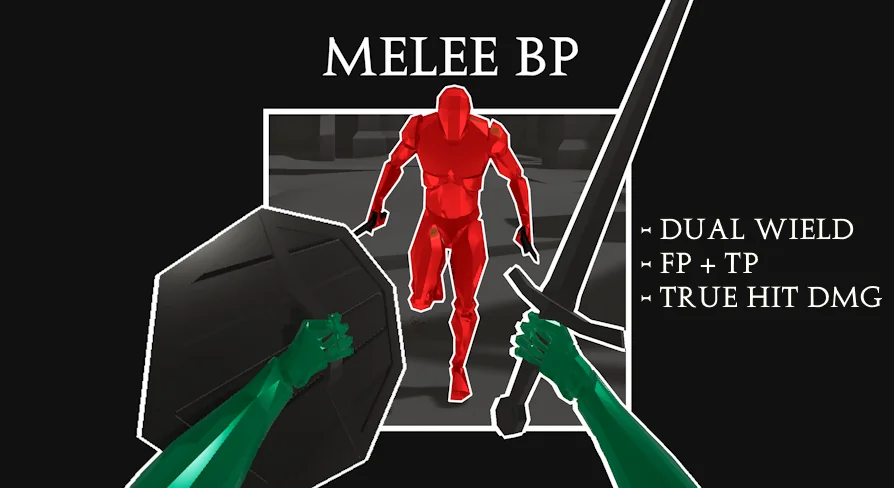
Melee+ is based on a flexible foundation: any weapon can be equipped on any hand. That rule anchors a blueprint framework that handles melee combat across two view modes, and it means editing a combat project starts with how you want characters to carry weapons rather than what the animation cycle permits. It has grown through updates that refocused the codebase around a single melee actor component, so it can be brought into a character blueprint without copy-pasting dozens of functions around the asset.
Any item on any hand, with a melee rule that stays consistent
The asset calls this Two Handed Combat. Rather than setting one weapon slot to a rigid left- or right-hand grip, Melee+ lets characters freely equip any item in any hand. That makes it easy to put a player's primary weapon where it feels right, or to change an enemy loadout by swapping the item that the melee actor is holding on a given side. The included animations are fully compatible and scaled to Epic's skeleton, so the movement set does not fight the standard UE character proportions.
Combat states also have room to breathe outside of combat. The first update added sheathe and unsheathe animations. When characters enter or leave an interaction area, they can put the weapon away and return to a neutral stance. The same update improved dodge rolling animation and introduced input buffering, so players can chain commands even if the exact frame timing was early or late on the preceding action.
Switching between first-person and third-person without a camera on the neck
Melee+ supports both first-person and third-person view modes. Switching between them is part of the core control scheme, not an added feature layered on top. One important detail about the first-person camera: it is not attached to the third-person mesh. In a typical melee system, switching to first-person means the camera sits inside or directly follows the same skeleton that handles dodges, impacts, and locomotion. In Melee+, the first-person camera is separate, so it doesn't inherit every head or bone rotation from the third-person character. This is a deliberate choice, as the asset states it exists to avoid motion sickness.
That difference matters in a fight full of dodges, strafes, and directional hit reactions. A detached first-person camera remains stable while the third-person body shifts, avoiding the disorienting roll or drift that many third-to-first person swaps introduce.
Damage is a physical contact test, not an animation timer
The combat feature list uses the phrase True Damage Hit Tracing with the warning: no smoke and mirrors. A weapon deals damage by physically hitting a surface in the game world. The system does not fake a hit when an animation reaches a particular frame, nor does it grant damage from a simple line-of-sight check. It checks the weapon's own trace and requires that trace to cross a surface. This has direct battlefield consequences: swings that pass wide, hit a wall, or land on another object will not damage a target standing behind that geometry.
Once contact happens, the reactions are not static either. The asset supports dynamic hit and death reactions. Characters can react authentically to the location and direction of the hit, and death forces include realistic bone impulses so bodies fall as physics pushes them. That makes the actual moment of impact feel like a consequence of the contact trace rather than a triggered animation.
AI combatants share the same melee rules
Melee combat systems often split into a fully designed player experience and a simpler simulation for enemies. Melee+ treats AI pawns as part of the same combat space. AI combatants are included, with team detection and four example classes for a head start. Team detection allows characters to be set on different sides, so allied and hostile guards can respond differently to surrounding actors. The four example classes provide skeleton AI setups that can be reskinned, rebuilt, or used to test player loadouts, rather than starting an AI controller from empty.
This is not a separate cutscene AI mode. The AI fighters use the same melee component architecture, and because the blueprint nodes are well structured and commented, it is possible to read through the flow and adjust behavior without migrating systems.
Update 2: integration moves into a single component
The update history marks a major shift in how Melee+ is meant to be installed. Update 2 is a complete code rewrite. The melee functionality is now neatly housed inside a melee actor component. Instead of connecting attack traces and hit events to several different blueprint interfaces or copy-pasting logic into each character, developers can add the component to an actor and wire the weapon into it. That plug-and-play setup is listed as the asset's easy integration path.
For a typical production workflow, this means the setup can be understood by reading a single component. A pick-up prompt system is tagged as removable, and feature examples are provided in commented blueprint nodes for teams that want to extend rather than inspect. The asset also includes a video tutorial for basic integration and a playable demo, which show how the component is meant to be applied before you open the graph.
A low-poly arena and a performance-first structure make testing direct
Practical validation is handled by a low-poly arena map included with the asset. Because the map is already there, combat testing does not depend on another level being complete. You can place an AI character, give them a weapon, and observe the first-person or third-person systems in a neutral environment.
The code's runtime behavior also supports heavy testing across multiple characters. The system is lightweight and performant, with performance as the top priority. Ticks are reserved for cosmetic elements, short duration tracing, and removable features such as pick-up prompts. The melee traces run for a short enough time that the system is not emitting collision checks on every actor for the entire swing. This keeps the generated combat loop easier on the frame budget than an always-on scan.
For projects that need restraint, optional features like dodge rolling and input buffering show the intended pattern: add only what the combat needs. Responsive combat is the stated priority; it emphasizes gameplay responsiveness over animation fidelity. The asset is labeled as universally adaptable, tailored to suit the melee combat needs of most projects and crafted to leave room for creative concepts. For gameplay programmers and blueprint tinkerers, Melee+ is a base that handles the dry fundamentals of grip, view, damage contact, and AI response so the first custom feature can be about the combat idea rather than the hit detection behind it.
 Humans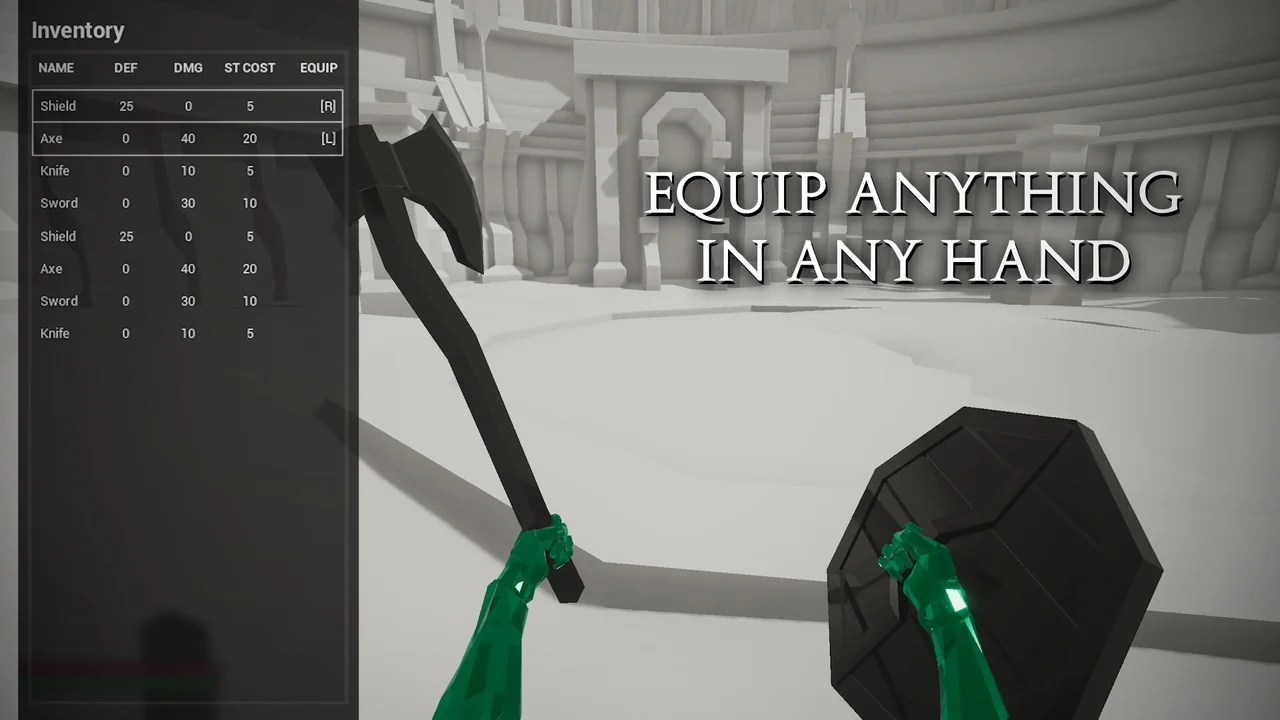
 Combat
 Combat
 Humans