"a338a1d501976271"{"id":"1001377","slug":"japanese-forest-grave","title":"Japanese Forest Grave","category":"Forest \u0026 Jungle","engine":"5.1+","assetVersion":"","engineVersion":"Engine Version: 5.1+","tag":"Forest \u0026 Jungle","accent":"blue","visual":"mech","summary":"Examine the technical layout, Lumen rendering configuration, and material pipeline built into the Japanese Forest Grave environment for Unreal Engine 5.1.","platform":"Unreal Engine","publishedAt":"2026-10-04T12:08:57.491Z","updatedAt":"2026-10-04T12:08:57.491Z","sourceNotes":[],"fileContents":[],"compatibility":["Unreal Engine","Engine Version: 5.1+"],"featuredImage":{"alt":"Japanese Forest Grave","src":"https://media.fab.com/image_previews/gallery_images/e2389a01-1d84-4621-a5f1-0256dcd58e6e/fcd3f77f-beee-4c8d-8100-2c82d4bd25d2.png"},"hasDownloadLink":true,"downloads":0,"terms":[{"taxonomy":"category","slug":"forest-and-jungle","name":"Forest \u0026 Jungle"}],"galleryImages":[{"src":"/wp-content/uploads/published/2026/10/c9372eaa1689-79665236-873e-45e7-96e9-b13e038c7963-a6145e6819.webp","alt":"Japanese Forest Grave"},{"src":"/wp-content/uploads/published/2026/10/632373c69376-1facda8f-34ea-48a6-a5b0-bbefadec18b8-7b52665e56.webp","alt":"Japanese Forest Grave"},{"src":"/wp-content/uploads/published/2026/10/da8e26ec70d1-f97d570a-0e25-4af2-9114-37ce63cd8c0c-debf4bc0c9.webp","alt":"Japanese Forest Grave"},{"src":"/wp-content/uploads/published/2026/10/ac7a4d2c6b59-f40e9d2e-da8b-4f80-be12-b191901d1bb8-c343257c38.webp","alt":"Japanese Forest Grave"},{"src":"/wp-content/uploads/published/2026/10/9b85df434e61-5dc546c3-c583-4e7c-b3a3-704977ac1e3d-7b969fa28d.webp","alt":"Japanese Forest Grave"},{"src":"/wp-content/uploads/published/2026/10/ac1a266c8ce9-c4ebb98a-b8a3-40bd-8540-9a340e570cd2-5d4a1ee3c9.webp","alt":"Japanese Forest Grave"},{"src":"/wp-content/uploads/published/2026/10/03e91616b078-12fe6e78-e3c3-43b4-95c1-f2f118130d5f-7722ff31af.webp","alt":"Japanese Forest Grave"},{"src":"/wp-content/uploads/published/2026/10/4e9858427712-4543e268-5ffe-420c-b3c9-b39ef26237a1-760c711dcb.webp","alt":"Japanese Forest Grave"},{"src":"/wp-content/uploads/published/2026/10/3b81a8147408-16dc4374-3b97-4ab7-aef0-70d781cf70ac-f8966fd0e0.webp","alt":"Japanese Forest Grave"}],"accessPanel":{"kind":"resource","title":"Download this resource","eyebrow":"Free Download","message":"Log in or create a free account to start your download.","fileName":"Content.7z","safetyNote":"Resources are manually reviewed before listing to improve quality and reduce obvious risks.","actionLabel":"Download Free","resourceType":"Resource archive"},"contentHtml":"\u003ch2\u003e114 Static Meshes for Forest and Grave Composition\u003c/h2\u003e\u003cp\u003eJapanese Forest Grave centers on a collection of 114 static meshes assembled to construct a realistic, atmospheric outdoor sanctuary. The asset library integrates standalone props, dense foliage elements such as grass and bamboo, ground scatter items, and rock formations. Every asset is structured to be game-ready out of the box, allowing individual elements to be arranged into custom cemetery layouts or natural woodland environments.\u003c/p\u003e\u003cp\u003eThe package organizes these 114 static assets across two core maps: an overview level and a fully dressed showcase scene. The overview level displays the structural assets, rock pieces, ground clutter, and plant models in isolation, making it straightforward to inspect mesh scale, pivot alignment, and individual geometric profiles. In contrast, the showcase scene demonstrates these elements assembled into a cohesive environment, combining natural landscape contours with stone grave props, bamboo stands, and varied ground cover.\u003c/p\u003e\u003ch2\u003eMaterial Setup and Vertex Blending Shader System\u003c/h2\u003e\u003cp\u003eThe visual quality across the environment relies on a tailored material pipeline constructed around masks and tileable textures rather than static, one-off texture sets. This approach allows large rock faces, stone monuments, and architectural props to maintain high surface clarity without demanding excessive unique texture memory.\u003c/p\u003e\u003cp\u003eKey material parameters are exposed directly within the shader master, giving direct control over surface responses. Artists can tweak roughness values to simulate damp, weathered stone or dry outdoor surfaces, adjust normal intensity to emphasize or soften surface crevices, and blend detail normal maps across base geometry to sustain close-up fidelity. For applicable meshes in the set, a vertex blending shader is integrated into the material structure. This setup allows smooth, natural transitions between stone, moss, or ground materials directly on the mesh vertices, preventing visible seams where props meet the forest floor.\u003c/p\u003e\u003ch2\u003eLumen Lighting and Essential Project Rendering Settings\u003c/h2\u003e\u003cp\u003eBecause the environment features high-density vegetation and complex light occlusion, it functions exclusively on Unreal Engine 5.1 and newer releases. The showcase scene is configured specifically for dynamic illumination through Lumen, requiring explicit project-level rendering settings to display correctly and perform efficiently.\u003c/p\u003e\u003cp\u003eTo support the high-resolution material blends and geometry density, Virtual Texturing must be activated across the project. This involves enabling both Virtual Texture Support and Virtual Texture Lightmaps inside the project rendering settings. Reflection Capture Resolution is set to 256 to ensure local reflection probes match the fidelity of the natural woodland surfaces.\u003c/p\u003e\u003cp\u003eLumen dynamic global illumination requires specific ray tracing configurations to handle the intricate plant cover and stone forms:\u003c/p\u003e\u003cul\u003e\u003cli\u003e\u003cstrong\u003eSoftware Ray Tracing Mode:\u003c/strong\u003e Set explicitly to Detail Tracing to capture thin foliage surfaces and narrow crevices across the rock and grave meshes.\u003c/li\u003e\u003cli\u003e\u003cstrong\u003eHardware Ray Tracing:\u003c/strong\u003e Support Hardware Ray Tracing must be enabled, with Use Hardware Ray Tracing When Available toggled on.\u003c/li\u003e\u003cli\u003e\u003cstrong\u003eOptimizations:\u003c/strong\u003e The Early Z-pass setting must be designated to Opaque and Masked Meshes to optimize depth testing against heavily layered foliage masks.\u003c/li\u003e\u003c/ul\u003e\u003cp\u003eAfter applying these rendering configurations within project settings, an engine restart is necessary for the virtual texturing pipeline and ray tracing passes to initialize properly.\u003c/p\u003e\u003ch2\u003eExposure Calibration and Cinematic Packaging Adjustments\u003c/h2\u003e\u003cp\u003eCorrect visual balance inside the showcase scene depends on a post-process volume named PPV_Main. The scene is calibrated around an exposure compensation value of 0. Setting the compensation to 0 aligns the real-time viewport directly with the intended visual presentation, balancing high-contrast canopy shadows against open sky illumination without washing out fine surface details on the grave props.\u003c/p\u003e\u003cp\u003eWhen moving projects toward packaged production builds, cinematics included in the environment require specific maintenance. Unreal Engine packaging passes can occasionally break references within cinematic tracks, causing cameras to detach from their rail tracks. Resolving this behavior requires manually checking the cinematic sequence and relinking the camera actors back to their corresponding rail components prior to the final cook.\u003c/p\u003e\u003ch2\u003eProduction Roles and Scene Lighting Practice\u003c/h2\u003e\u003cp\u003eBeyond acting as a ready-to-deploy thematic environment, the asset collection functions effectively as a benchmark space for lighting practice. Because the showcase scene already balances dense natural bamboo, ground scatter, and hard-surface stone under Lumen global illumination, it provides an immediate testbed for studying light transmission through leaf canopies, indirect bounce along shadowed terrain, and mood shifts between soft overcast ambiance and directional sunlight.\u003c/p\u003e\u003cp\u003eThe modular division of 114 meshes ensures that components can be broken down for smaller forest clearings or integrated into broader modular landscape workflows. By relying on mask-driven tileables and vertex-blended materials, the environment maintains consistent PBR fidelity across both individual prop placements and large-scale natural set dressings.\u003c/p\u003e\n\n\u003ch2\u003eRelated Resources Worth Checking\u003c/h2\u003e\n\u003cul\u003e\n\u003cli\u003e\u003ca href=\"https://3dcghub.com/stylized-landscape-5-biomes-stylized-low-poly-forest-orasot-bundle/\" title=\"Stylized Landscape 5 Biomes + Stylized + Low poly forest : Orasot Bundle\"\u003eStylized Landscape 5 Biomes + Stylized + Low poly forest : Orasot Bundle\u003c/a\u003e\u003c/li\u003e\n\u003cli\u003e\u003ca href=\"https://3dcghub.com/rain-forest-pack/\" title=\"Rain Forest Pack\"\u003eRain Forest Pack\u003c/a\u003e\u003c/li\u003e\n\u003cli\u003e\u003ca href=\"https://3dcghub.com/stylized-nature-vol-1-stylized-environment-bundle/\" title=\"Stylized Nature Vol. 1 | Stylized Environment Bundle\"\u003eStylized Nature Vol. 1 | Stylized Environment Bundle\u003c/a\u003e\u003c/li\u003e\n\u003cli\u003e\u003ca href=\"https://3dcghub.com/red-pine-biome/\" title=\"Red Pine Biome\"\u003eRed Pine Biome\u003c/a\u003e\u003c/li\u003e\n\u003cli\u003e\u003ca href=\"https://3dcghub.com/procedural-biomes/\" title=\"Procedural Biomes\"\u003eProcedural Biomes\u003c/a\u003e\u003c/li\u003e\n\u003c/ul\u003e","contentTextLength":5546,"navigation":{"current":24,"total":3338,"previous":{"id":"1001378","slug":"siege-of-ponthus-environment-medieval-fantasy-castle-medieval-castle-castle","title":"Siege of Ponthus Environment ( Medieval Fantasy Castle Medieval Castle Castle )","category":"Medieval","platform":"Unreal Engine","updatedAt":"2026-10-04T12:10:07.176Z"},"next":{"id":"1001376","slug":"contemporary-art-gallery","title":"Contemporary Art Gallery","category":"Interior","platform":"Unreal Engine","updatedAt":"2026-10-04T12:08:01.551Z"}},"relatedResources":[{"id":"1000892","slug":"stylized-landscape-5-biomes-stylized-low-poly-forest-orasot-bundle","title":"Stylized Landscape 5 Biomes + Stylized + Low poly forest : Orasot Bundle","category":"Forest \u0026 Jungle","engine":"5.2+","assetVersion":"","engineVersion":"Engine Version: 5.2+","tag":"Forest \u0026 Jungle","accent":"blue","visual":"city","summary":"This bundle merges stylized forest, five-biome landscape, and low-poly forest assets with a practical exposure fix for DefaultEngine.ini and virtual texture set","platform":"Unreal Engine","publishedAt":"2026-08-06T04:37:15.039Z","updatedAt":"2026-08-06T04:37:15.039Z","sourceNotes":[],"fileContents":[],"compatibility":["Unreal Engine","Engine Version: 5.2+"],"featuredImage":{"alt":"Stylized Landscape 5 Biomes + Stylized + Low poly forest : Orasot Bundle","src":"/wp-content/uploads/published/2026/08/d7e4432aba24-96cbb20e-4693-449f-94da-c2b94b1eecfe-b7d03925eb.webp"},"hasDownloadLink":true,"downloads":2},{"id":"1000481","slug":"stylized-nature-vol-1-stylized-environment-bundle","title":"Stylized Nature Vol. 1 | Stylized Environment Bundle","category":"Forest \u0026 Jungle","engine":"5.2+","assetVersion":"","engineVersion":"Engine Version: 5.2+","tag":"Forest \u0026 Jungle","accent":"blue","visual":"city","summary":"A stylized environment bundle for Unreal Engine featuring landscape tools for cliffs, grass distribution, runtime virtual textures, interactive foliage, and dyn","platform":"Unreal Engine","publishedAt":"2026-07-12T06:08:17.870Z","updatedAt":"2026-07-12T06:08:17.870Z","sourceNotes":[],"fileContents":[],"compatibility":["Unreal Engine","Engine Version: 5.2+"],"featuredImage":{"alt":"Stylized Nature Vol. 1 | Stylized Environment Bundle","src":"/wp-content/uploads/published/2026/07/26ef167c9a89-bc3026b6-a0c9-4dcc-82d5-8ee5de21e891-9887ed431f.webp"},"hasDownloadLink":true,"downloads":3},{"id":"1000256","slug":"rain-forest-pack","title":"Rain Forest Pack","category":"Forest \u0026 Jungle","engine":"5.0+","assetVersion":"","engineVersion":"Engine Version: 5.0+","tag":"Forest \u0026 Jungle","accent":"blue","visual":"mech","summary":"A fully procedural, photogrammetry-based tropical forest environment for Unreal Engine, featuring shader-based foliage interactivity and 4K textures.","platform":"Unreal Engine","publishedAt":"2026-06-30T22:45:14.446Z","updatedAt":"2026-06-30T22:45:14.446Z","sourceNotes":[],"fileContents":[],"compatibility":["Unreal Engine","Engine Version: 5.0+"],"featuredImage":{"alt":"Rain Forest Pack","src":"/wp-content/uploads/published/2026/06/73c675f710b9-a9b259e6-bdd0-4fa4-b8af-3c472531ddd4-559a55a7d4.webp"},"hasDownloadLink":true,"downloads":4}]}
Forest & Jungle
Japanese Forest Grave
Examine the technical layout, Lumen rendering configuration, and material pipeline built into the Japanese Forest Grave environment for Unreal Engine 5.1.
114 Static Meshes for Forest and Grave Composition
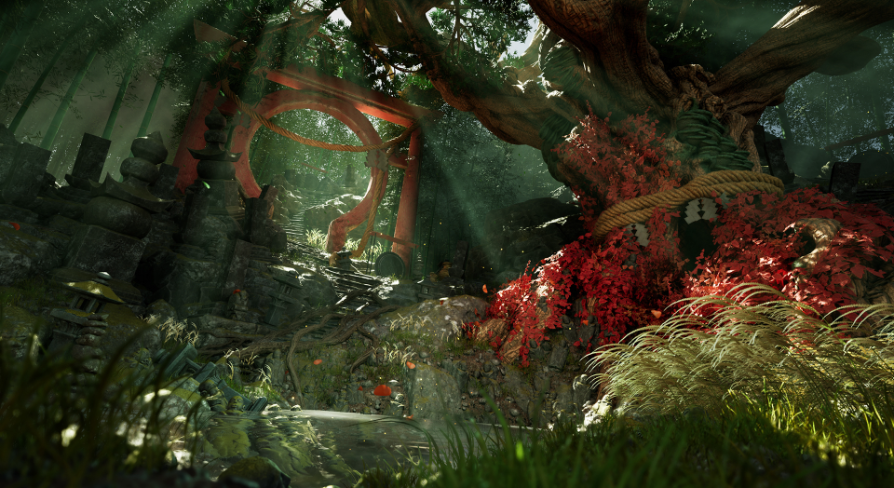
Japanese Forest Grave centers on a collection of 114 static meshes assembled to construct a realistic, atmospheric outdoor sanctuary. The asset library integrates standalone props, dense foliage elements such as grass and bamboo, ground scatter items, and rock formations. Every asset is structured to be game-ready out of the box, allowing individual elements to be arranged into custom cemetery layouts or natural woodland environments.
The package organizes these 114 static assets across two core maps: an overview level and a fully dressed showcase scene. The overview level displays the structural assets, rock pieces, ground clutter, and plant models in isolation, making it straightforward to inspect mesh scale, pivot alignment, and individual geometric profiles. In contrast, the showcase scene demonstrates these elements assembled into a cohesive environment, combining natural landscape contours with stone grave props, bamboo stands, and varied ground cover.
Material Setup and Vertex Blending Shader System
The visual quality across the environment relies on a tailored material pipeline constructed around masks and tileable textures rather than static, one-off texture sets. This approach allows large rock faces, stone monuments, and architectural props to maintain high surface clarity without demanding excessive unique texture memory.
Key material parameters are exposed directly within the shader master, giving direct control over surface responses. Artists can tweak roughness values to simulate damp, weathered stone or dry outdoor surfaces, adjust normal intensity to emphasize or soften surface crevices, and blend detail normal maps across base geometry to sustain close-up fidelity. For applicable meshes in the set, a vertex blending shader is integrated into the material structure. This setup allows smooth, natural transitions between stone, moss, or ground materials directly on the mesh vertices, preventing visible seams where props meet the forest floor.
Lumen Lighting and Essential Project Rendering Settings
Because the environment features high-density vegetation and complex light occlusion, it functions exclusively on Unreal Engine 5.1 and newer releases. The showcase scene is configured specifically for dynamic illumination through Lumen, requiring explicit project-level rendering settings to display correctly and perform efficiently.
To support the high-resolution material blends and geometry density, Virtual Texturing must be activated across the project. This involves enabling both Virtual Texture Support and Virtual Texture Lightmaps inside the project rendering settings. Reflection Capture Resolution is set to 256 to ensure local reflection probes match the fidelity of the natural woodland surfaces.
Lumen dynamic global illumination requires specific ray tracing configurations to handle the intricate plant cover and stone forms:
Software Ray Tracing Mode: Set explicitly to Detail Tracing to capture thin foliage surfaces and narrow crevices across the rock and grave meshes.
Hardware Ray Tracing: Support Hardware Ray Tracing must be enabled, with Use Hardware Ray Tracing When Available toggled on.
Optimizations: The Early Z-pass setting must be designated to Opaque and Masked Meshes to optimize depth testing against heavily layered foliage masks.
After applying these rendering configurations within project settings, an engine restart is necessary for the virtual texturing pipeline and ray tracing passes to initialize properly.
Exposure Calibration and Cinematic Packaging Adjustments
Correct visual balance inside the showcase scene depends on a post-process volume named PPV_Main. The scene is calibrated around an exposure compensation value of 0. Setting the compensation to 0 aligns the real-time viewport directly with the intended visual presentation, balancing high-contrast canopy shadows against open sky illumination without washing out fine surface details on the grave props.
When moving projects toward packaged production builds, cinematics included in the environment require specific maintenance. Unreal Engine packaging passes can occasionally break references within cinematic tracks, causing cameras to detach from their rail tracks. Resolving this behavior requires manually checking the cinematic sequence and relinking the camera actors back to their corresponding rail components prior to the final cook.
Production Roles and Scene Lighting Practice
Beyond acting as a ready-to-deploy thematic environment, the asset collection functions effectively as a benchmark space for lighting practice. Because the showcase scene already balances dense natural bamboo, ground scatter, and hard-surface stone under Lumen global illumination, it provides an immediate testbed for studying light transmission through leaf canopies, indirect bounce along shadowed terrain, and mood shifts between soft overcast ambiance and directional sunlight.
The modular division of 114 meshes ensures that components can be broken down for smaller forest clearings or integrated into broader modular landscape workflows. By relying on mask-driven tileables and vertex-blended materials, the environment maintains consistent PBR fidelity across both individual prop placements and large-scale natural set dressings.
 Forest & Jungle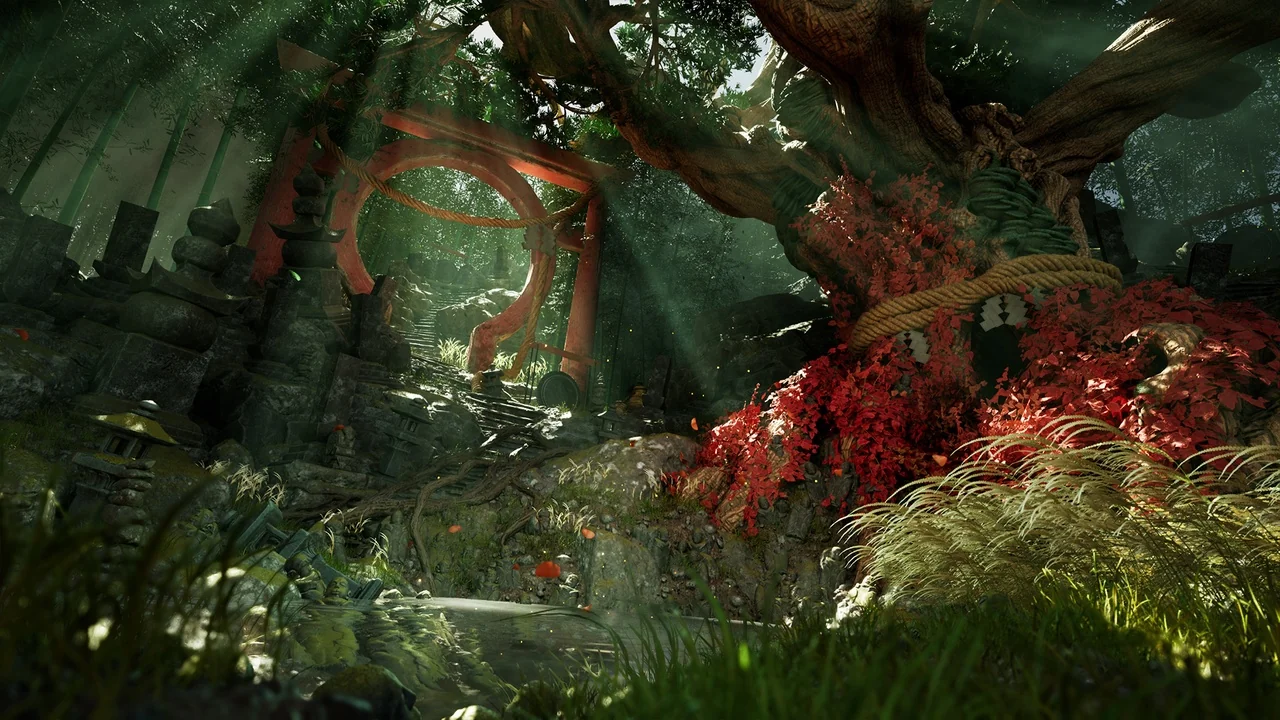
 Forest & Jungle
 Forest & Jungle
 Forest & Jungle