"f0d304d7232d0332"{"id":"1002736","slug":"sunset-modular-medieval-brick-buildings","title":"Sunset - Modular Medieval Brick Buildings","category":"Forest \u0026 Jungle","engine":"5.0+","assetVersion":"","engineVersion":"Engine Version: 5.0+","tag":"Forest \u0026 Jungle","accent":"blue","visual":"mech","summary":"Explore modular medieval architecture featuring Parallax Occlusion Mapping, atlas-free textures, and UE5 optimization strategies.","platform":"Unreal Engine","indexPolicy":"index","publishedAt":"2026-11-17T19:12:11.213Z","updatedAt":"2026-11-17T19:12:11.213Z","sourceNotes":[],"fileContents":[],"compatibility":["Unreal Engine","Engine Version: 5.0+"],"featuredImage":{"alt":"Sunset - Modular Medieval Brick Buildings","src":"/wp-content/uploads/published/2026/11/021893db4ed7-00faaad6-fa18-4913-86da-95944bf16a43-5de27744ea.webp"},"fileSizeBytes":5058329759,"hasDownloadLink":true,"downloads":0,"terms":[{"taxonomy":"category","slug":"forest-and-jungle","name":"Forest \u0026 Jungle"}],"galleryImages":[{"src":"/wp-content/uploads/published/2026/11/b5fd5114aa98-56ae5d73-f1cb-42bd-812e-a08434c028f6-e31d045d75.webp","alt":"Sunset - Modular Medieval Brick Buildings"},{"src":"/wp-content/uploads/published/2026/11/d4b630555d73-fe2f46fc-1f0f-4b8a-a7c4-bc2866741848-cbaf2afb7d.webp","alt":"Sunset - Modular Medieval Brick Buildings"},{"src":"/wp-content/uploads/published/2026/11/137b069c36d2-3d0987a9-068c-4ce0-82c6-c14ce3a08d01-98fd7e630f.webp","alt":"Sunset - Modular Medieval Brick Buildings"},{"src":"/wp-content/uploads/published/2026/11/ac4efbf9b146-b4cc6d79-b88c-4b24-a93c-3a261ec2ea41-cea3249c00.webp","alt":"Sunset - Modular Medieval Brick Buildings"},{"src":"/wp-content/uploads/published/2026/11/2f0045dcb9c6-33b974f5-6c86-488a-baac-57d9d9cc31a6-deb861dda0.webp","alt":"Sunset - Modular Medieval Brick Buildings"},{"src":"/wp-content/uploads/published/2026/11/a832bed1221b-d2cbdec7-aaa3-4ecd-a61b-245c6c7b3cd2-b6f502a055.webp","alt":"Sunset - Modular Medieval Brick Buildings"},{"src":"/wp-content/uploads/published/2026/11/b901f889624e-6201f62d-93f5-49cd-9c8b-80d999d404d1-28ebf76e93.webp","alt":"Sunset - Modular Medieval Brick Buildings"},{"src":"/wp-content/uploads/published/2026/11/769c00126289-95057336-0a07-44ec-be80-1e7731f3d0c2-5cbeb3b55c.webp","alt":"Sunset - Modular Medieval Brick Buildings"},{"src":"/wp-content/uploads/published/2026/11/43d54296975d-71608281-6b0a-418a-9230-1f697da08d79-a33dd592c9.webp","alt":"Sunset - Modular Medieval Brick Buildings"},{"src":"/wp-content/uploads/published/2026/11/88a498bf2c6f-1b8542cd-2c6a-4ac5-876e-665f58dcf48a-60a166f9da.webp","alt":"Sunset - Modular Medieval Brick Buildings"}],"accessPanel":{"kind":"resource","title":"Get this resource","safetyNote":"Resources are manually reviewed before listing to improve quality and reduce obvious risks.","fileName":"Content.7z","resourceType":"Resource archive","versions":[]},"contentHtml":"\u003ch2\u003eSurface Depth and Architectural Workflows in Sunset Environments\u003c/h2\u003e\u003cp\u003eConstructing believable historic masonry inside real-time scenes often hinges on balancing surface relief against tight geometric budgets. The architectural assets in Sunset - Modular Medieval Brick Buildings approach this balance by relying on Parallax Occlusion Mapping (POM) combined with Pixel Depth Offset (PDO). Rather than driving up silhouette geometry to depict recessed mortar joints and protruding stone, the architectural pieces channel physical depth through shader-driven offset. This technical pairing allows the surfaces to interact cleanly with surrounding geometry while retaining low polygon counts rooted in structural foundations originally authored in 2018.\u003c/p\u003e\u003cp\u003eA notable structural choice in the architectural pieces is the reliance on atlas-free texture setups. Because surfaces are not locked into shared atlas layouts, environmental artists can swap default stone and brick materials for bespoke textures or surface scans imported directly through Quixel Bridge. This makes the structural assets adaptable across different architectural themes without requiring unwrapping adjustments or UV remapping on the core modular blocks.\u003c/p\u003e\u003ch2\u003eConfiguring Modular Buildings and Parallax Materials\u003c/h2\u003e\u003cp\u003eReal-time material customization across the structural kit extends beyond swapping base surface textures. Shaders include parameter controls for color adjustments and surface distress, accompanied by vertex painting support to blend localized wear, grime, and degradation across individual walls, towers, and churches. Dressing elements, such as cloth banners, feature wind-response parameters that transition from a soft breeze to high-intensity stormy conditions, providing environmental coherence with changing scene weather.\u003c/p\u003e\u003cp\u003eImplementing Parallax Occlusion Mapping alongside Pixel Depth Offset introduces distinct lighting behaviors that require deliberate engine settings. Under dynamic lighting and hardware raytracing, POM materials can suffer from self-shadowing artifacts, creating visual inconsistencies along the surface plane. Remedying these artifacts involves specific adjustments depending on project rendering targets:\u003c/p\u003e\u003cul\u003e\u003cli\u003eDisable raytracing on dynamic light sources positioned close to parallax-mapped walls to prevent inaccurate surface shadowing.\u003c/li\u003e\u003cli\u003eSwitch the main sun or directional lighting from dynamic to static calculations, which avoids dynamic self-shadowing computation altogether.\u003c/li\u003e\u003cli\u003eReduce the overall pixel depth setting inside material instances to pull back the intensity of the displacement offset.\u003c/li\u003e\u003cli\u003eDisable Pixel Depth Offset entirely across materials when clean edge contact shadows are not strictly needed, or reduce parallax step counts to cut instruction cost.\u003c/li\u003e\u003cli\u003eTurn off both parallax occlusion and pixel depth offset completely when targeting mobile hardware, dropping back to standard texture mapping.\u003c/li\u003e\u003c/ul\u003e\u003ch2\u003eOptimizing Dense Vistas and Modular Geometry\u003c/h2\u003e\u003cp\u003eLarge-scale modular environments often introduce heavy performance demands, primarily driven by sheer actor volume, draw call counts, and broad mountain vista vistas. The demo environment supplied with the collection demonstrates castle layouts, village structures, and cluttered living spaces, but deploying these pieces into shipping game environments requires proactive budgeting.\u003c/p\u003e\u003cp\u003eBecause the demonstration layout is constructed purely out of individual modular meshes to showcase assembly flexibility, the resulting draw calls place substantial load on the CPU. Combining adjacent modular pieces into merged meshes constitutes the first step in stabilizing scenes suffering from CPU-side bottlenecks. Beyond mesh merging, level designers should implement early Z-pass within the engine project settings to drop occluded geometry calculations early in the render pipe.\u003c/p\u003e\u003cp\u003eDistance management across the expansive landscape plays an equally large role in framerate stabilization. Distant vista trees designated with \"LOD\" markers inside the foliage tool should be culled aggressively or pruned entirely if sightlines allow. Small clutter assets, decorative rocks, and ivy meshes also demand close culling volumes so that non-essential geometry drops out of memory and rendering loops at short distances from the player camera.\u003c/p\u003e\u003ch2\u003eEngine Lighting, Shadows, and Foliage Animation in Unreal Engine 5\u003c/h2\u003e\u003cp\u003eDeploying the collection within modern Unreal Engine 5 setups requires balancing modern illumination pipelines against material-level features. The demonstration level leverages Lumen for global illumination and reflections alongside volumetric clouds and volumetric height fog. While these systems create atmospheric fidelity, they compound the performance impact of heavy scene geometry, dense fires, and high-instruction shaders such as dynamic ocean water.\u003c/p\u003e\u003cp\u003eShadow settings across foliage form another critical optimization target. In default configurations, decorative plants, trees, and ivy cast dynamic shadows to maximize aesthetic fidelity across terrain. Toggling off dynamic shadow casting inside the foliage tool and switching to static shadow calculations drastically lowers GPU overhead, especially when vast swathes of low-poly flora cover exterior mountain slopes.\u003c/p\u003e\u003cp\u003eAlso, material-based wind animation presents specific rendering quirks in newer engine versions. Most foliage and banner meshes rely on World Position Offset (WPO) to drive movement. In Unreal Engine 5, WPO animation running alongside Lumen and raytraced global illumination can occasionally manifest as flickering surfaces or black splotches across animated leaves and banners. Maintaining these animations requires applying documented engine workarounds or constraining ambient wind amplitude to keep indirect lighting caches stable across moving vertices.\u003c/p\u003e\u003ch2\u003eExpanding Medieval Environments Across Updates\u003c/h2\u003e\u003cp\u003eThe 5.0 milestone update expanded the scope of the original asset release by introducing fresh clutter items, revised landscape elements, new foliage varieties, and an ocean material, alongside targeted visual overhauls across existing architectural materials. These additions—originally previewed in the 5.0 showcase materials and fifth-anniversary media—broadened the kit from simple standalone buildings into a cohesive regional landscape toolkit spanning castle interiors, church buildings, exterior mountain paths, and coastal bluffs.\u003c/p\u003e\u003cp\u003eFor projects running forward-rendering pathways rather than deferred setups, further shader and post-process hygiene is essential. Removing translucent elements and screen-space post-processing passes helps avoid pipeline hitches while maintaining the low-poly structural efficiency that underpins the mesh catalog.\u003c/p\u003e\n\n\u003ch2\u003eContinue Browsing Similar Packs\u003c/h2\u003e\n\u003cul\u003e\n\u003cli\u003e\u003ca href=\"https://3dcghub.com/225-square-km-procedural-forest/\" rel=\"noopener noreferrer\"\u003e225 Square Km Procedural Forest\u003c/a\u003e\u003c/li\u003e\n\u003cli\u003e\u003ca href=\"https://3dcghub.com/stylescape-stylized-environment-kit/\" rel=\"noopener noreferrer\"\u003eStylescape: Stylized Environment Kit\u003c/a\u003e\u003c/li\u003e\n\u003cli\u003e\u003ca href=\"https://3dcghub.com/landscape-vol-02/\" rel=\"noopener noreferrer\"\u003eLandscape VOL 02\u003c/a\u003e\u003c/li\u003e\n\u003cli\u003e\u003ca href=\"https://3dcghub.com/modular-gothic-temple-medieval-winter-snow/\" rel=\"noopener noreferrer\"\u003eModular Gothic Temple (medieval/winter/snow)\u003c/a\u003e\u003c/li\u003e\n\u003cli\u003e\u003ca href=\"https://3dcghub.com/medieval-houses-modular-vol-2/\" rel=\"noopener noreferrer\"\u003eMedieval Houses Modular Vol 2\u003c/a\u003e\u003c/li\u003e\n\u003c/ul\u003e","contentTextLength":6872,"navigation":{"current":4,"total":4660,"previous":{"id":"1002737","slug":"ucreate-gothic-cathedral-asset-pack","title":"UCreate - Gothic Cathedral Asset Pack","category":"Fantasy","platform":"Unreal Engine","updatedAt":"2026-11-17T19:13:11.094Z"},"next":{"id":"1002735","slug":"subtropical-waterbody-habitat-brush","title":"Subtropical Waterbody Habitat Brush","category":"Forest \u0026 Jungle","platform":"Unreal Engine","updatedAt":"2026-11-17T19:11:11.403Z"}},"relatedResources":[{"id":"8084","slug":"225-square-km-procedural-forest","title":"225 Square Km Procedural Forest","category":"Forest \u0026 Jungle","engine":"5.1+","assetVersion":"Engine version: 5.1+","engineVersion":"5.1","tag":"Forest \u0026 Jungle","accent":"blue","visual":"city","summary":"Create expansive, realistic natural environments with this comprehensive Unreal Engine 5 asset pack. It features Nanite-optimized meshes, smart auto-materials, and procedural tools for large-scale world building.","platform":"Unreal Engine","indexPolicy":"noindex","publishedAt":"2026-02-22T16:49:31.000Z","updatedAt":"2026-04-19T15:55:35.000Z","sourceNotes":[],"fileContents":[],"compatibility":["Unreal Engine","Engine version: 5.1+"],"featuredImage":{"alt":"225 Square Km Procedural Forest","src":"https://3dcghub.com/wp-content/uploads/2026/02/9ab8ba3c-4e3d-4fee-91a4-31b716d15cfd.webp"},"fileSizeBytes":2149106621,"hasDownloadLink":true,"downloads":1},{"id":"27966","slug":"stylescape-stylized-environment-kit","title":"Stylescape: Stylized Environment Kit","category":"Forest \u0026 Jungle","engine":"5.0+","assetVersion":"Engine version: 5.0+","engineVersion":"","tag":"Forest \u0026 Jungle","accent":"blue","visual":"city","summary":"Stylescape starts with a practical setup path: landscape tools, foliage systems, and a demo level that shows how the pieces come together. Its feature set focuses on stylized outdoor scene building with layered terrain, animated vegetation, RVT blending, an...","platform":"Unreal Engine","indexPolicy":"index","publishedAt":"2026-04-30T07:46:23.000Z","updatedAt":"2026-04-30T07:46:24.000Z","sourceNotes":[],"fileContents":[],"compatibility":["Unreal Engine","Engine version: 5.0+"],"featuredImage":{"alt":"Stylescape: Stylized Environment Kit","src":"https://3dcghub.com/wp-content/uploads/2026/04/919df961bd95_fa7d20f4-93b7-4cca-baea-d2f63da591a6.webp"},"fileSizeBytes":956611762,"hasDownloadLink":true,"downloads":0},{"id":"8176","slug":"landscape-vol-02","title":"Landscape VOL 02","category":"Forest \u0026 Jungle","engine":"4.26+,5.0+","assetVersion":"Engine version: 4.26+,5.0+","engineVersion":"4.20","tag":"Forest \u0026 Jungle","accent":"blue","visual":"city","summary":"Create stunning natural environments with Landscape VOL 02. This professional asset pack includes advanced materials and alpha brushes to streamline your world-building workflow.","platform":"Unreal Engine","indexPolicy":"noindex","publishedAt":"2026-02-23T15:38:27.000Z","updatedAt":"2026-04-19T15:55:32.000Z","sourceNotes":[],"fileContents":[],"compatibility":["Unreal Engine"],"featuredImage":{"alt":"Landscape VOL 02","src":"https://3dcghub.com/wp-content/uploads/2026/02/3898056f-7e42-4bad-8ff1-da5769895b8c.webp"},"fileSizeBytes":1589202719,"hasDownloadLink":true,"downloads":0}]}
Resource screenshots
1 / 10
Join our channel
Follow 3DCGHUB on Telegram for new resource drops, migration updates, and community notices.
Surface Depth and Architectural Workflows in Sunset Environments
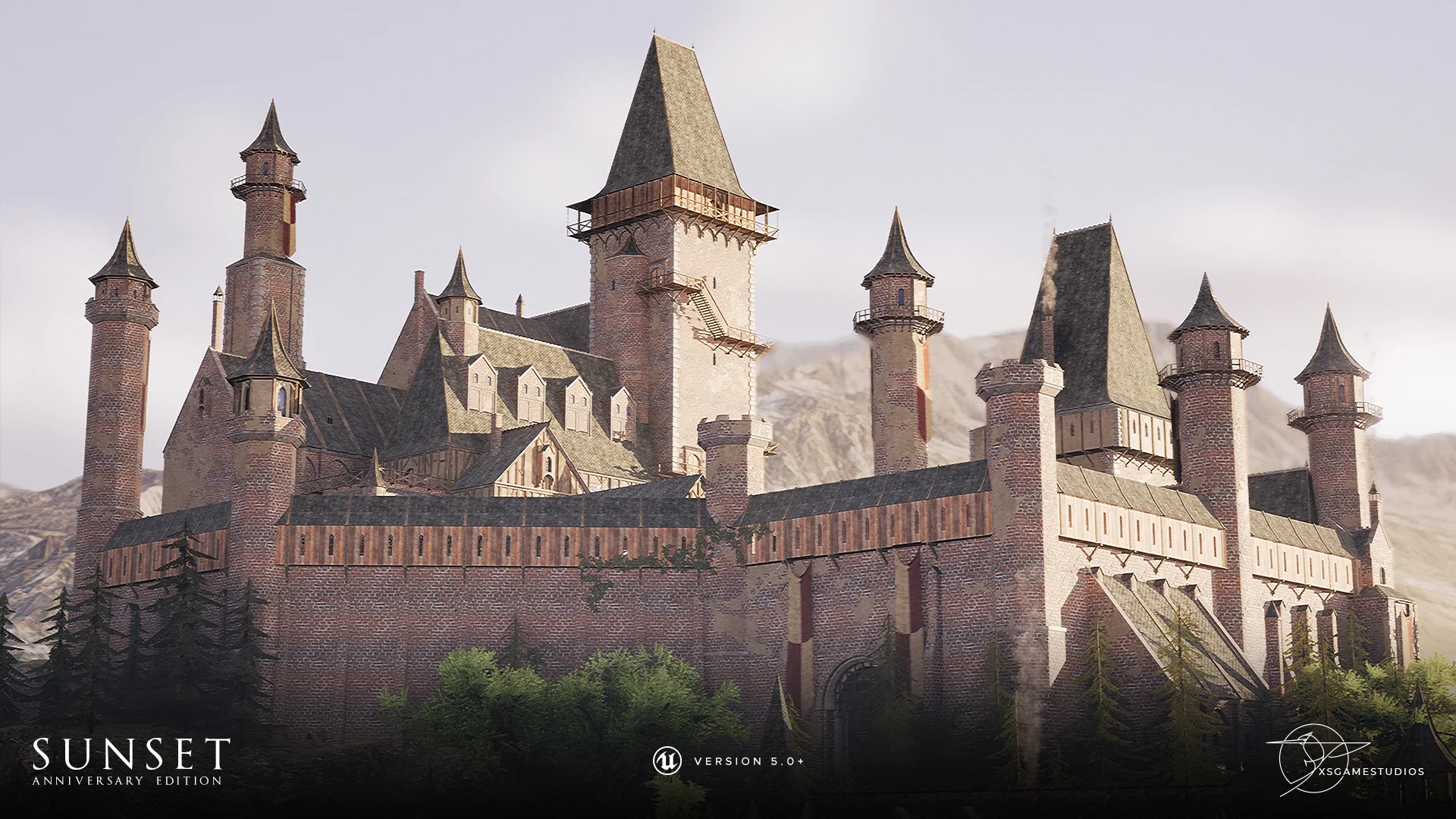
Constructing believable historic masonry inside real-time scenes often hinges on balancing surface relief against tight geometric budgets. The architectural assets in Sunset - Modular Medieval Brick Buildings approach this balance by relying on Parallax Occlusion Mapping (POM) combined with Pixel Depth Offset (PDO). Rather than driving up silhouette geometry to depict recessed mortar joints and protruding stone, the architectural pieces channel physical depth through shader-driven offset. This technical pairing allows the surfaces to interact cleanly with surrounding geometry while retaining low polygon counts rooted in structural foundations originally authored in 2018.
A notable structural choice in the architectural pieces is the reliance on atlas-free texture setups. Because surfaces are not locked into shared atlas layouts, environmental artists can swap default stone and brick materials for bespoke textures or surface scans imported directly through Quixel Bridge. This makes the structural assets adaptable across different architectural themes without requiring unwrapping adjustments or UV remapping on the core modular blocks.
Configuring Modular Buildings and Parallax Materials
Real-time material customization across the structural kit extends beyond swapping base surface textures. Shaders include parameter controls for color adjustments and surface distress, accompanied by vertex painting support to blend localized wear, grime, and degradation across individual walls, towers, and churches. Dressing elements, such as cloth banners, feature wind-response parameters that transition from a soft breeze to high-intensity stormy conditions, providing environmental coherence with changing scene weather.
Implementing Parallax Occlusion Mapping alongside Pixel Depth Offset introduces distinct lighting behaviors that require deliberate engine settings. Under dynamic lighting and hardware raytracing, POM materials can suffer from self-shadowing artifacts, creating visual inconsistencies along the surface plane. Remedying these artifacts involves specific adjustments depending on project rendering targets:
Disable raytracing on dynamic light sources positioned close to parallax-mapped walls to prevent inaccurate surface shadowing.
Switch the main sun or directional lighting from dynamic to static calculations, which avoids dynamic self-shadowing computation altogether.
Reduce the overall pixel depth setting inside material instances to pull back the intensity of the displacement offset.
Disable Pixel Depth Offset entirely across materials when clean edge contact shadows are not strictly needed, or reduce parallax step counts to cut instruction cost.
Turn off both parallax occlusion and pixel depth offset completely when targeting mobile hardware, dropping back to standard texture mapping.
Optimizing Dense Vistas and Modular Geometry
Large-scale modular environments often introduce heavy performance demands, primarily driven by sheer actor volume, draw call counts, and broad mountain vista vistas. The demo environment supplied with the collection demonstrates castle layouts, village structures, and cluttered living spaces, but deploying these pieces into shipping game environments requires proactive budgeting.
Because the demonstration layout is constructed purely out of individual modular meshes to showcase assembly flexibility, the resulting draw calls place substantial load on the CPU. Combining adjacent modular pieces into merged meshes constitutes the first step in stabilizing scenes suffering from CPU-side bottlenecks. Beyond mesh merging, level designers should implement early Z-pass within the engine project settings to drop occluded geometry calculations early in the render pipe.
Distance management across the expansive landscape plays an equally large role in framerate stabilization. Distant vista trees designated with "LOD" markers inside the foliage tool should be culled aggressively or pruned entirely if sightlines allow. Small clutter assets, decorative rocks, and ivy meshes also demand close culling volumes so that non-essential geometry drops out of memory and rendering loops at short distances from the player camera.
Engine Lighting, Shadows, and Foliage Animation in Unreal Engine 5
Deploying the collection within modern Unreal Engine 5 setups requires balancing modern illumination pipelines against material-level features. The demonstration level leverages Lumen for global illumination and reflections alongside volumetric clouds and volumetric height fog. While these systems create atmospheric fidelity, they compound the performance impact of heavy scene geometry, dense fires, and high-instruction shaders such as dynamic ocean water.
Shadow settings across foliage form another critical optimization target. In default configurations, decorative plants, trees, and ivy cast dynamic shadows to maximize aesthetic fidelity across terrain. Toggling off dynamic shadow casting inside the foliage tool and switching to static shadow calculations drastically lowers GPU overhead, especially when vast swathes of low-poly flora cover exterior mountain slopes.
Also, material-based wind animation presents specific rendering quirks in newer engine versions. Most foliage and banner meshes rely on World Position Offset (WPO) to drive movement. In Unreal Engine 5, WPO animation running alongside Lumen and raytraced global illumination can occasionally manifest as flickering surfaces or black splotches across animated leaves and banners. Maintaining these animations requires applying documented engine workarounds or constraining ambient wind amplitude to keep indirect lighting caches stable across moving vertices.
Expanding Medieval Environments Across Updates
The 5.0 milestone update expanded the scope of the original asset release by introducing fresh clutter items, revised landscape elements, new foliage varieties, and an ocean material, alongside targeted visual overhauls across existing architectural materials. These additions—originally previewed in the 5.0 showcase materials and fifth-anniversary media—broadened the kit from simple standalone buildings into a cohesive regional landscape toolkit spanning castle interiors, church buildings, exterior mountain paths, and coastal bluffs.
For projects running forward-rendering pathways rather than deferred setups, further shader and post-process hygiene is essential. Removing translucent elements and screen-space post-processing passes helps avoid pipeline hitches while maintaining the low-poly structural efficiency that underpins the mesh catalog.
 Forest & Jungle
 Forest & Jungle
 Forest & Jungle