"ae2217ad8e73450c"{"id":"1003035","slug":"grapple-component","title":"Grapple Component","category":"Gameplay Features","engine":"4.25+,5.0+","assetVersion":"","engineVersion":"Engine Version: 4.25+,5.0+","tag":"Gameplay Features","accent":"blue","visual":"mech","summary":"Explore the Grapple Component for Unreal Engine: a Blueprint toolkit for synchronized character interactions, multiplayer replication, and combat sequences.","platform":"Unreal Engine","indexPolicy":"index","publishedAt":"2026-11-25T16:38:42.473Z","updatedAt":"2026-11-25T16:38:42.473Z","sourceNotes":[],"fileContents":[],"compatibility":["Unreal Engine","Engine Version: 4.25+,5.0+"],"featuredImage":{"alt":"Grapple Component","src":"/wp-content/uploads/published/2026/11/4eda9f0b7108-dc9575df-215b-4cda-aeb9-fe764c3be629-35563611f7.webp"},"hasDownloadLink":true,"downloads":0,"terms":[{"taxonomy":"category","slug":"gameplay-features","name":"Gameplay Features"}],"galleryImages":[{"src":"/wp-content/uploads/published/2026/11/5c1f4595801b-86c7c4ca-82ab-4bda-940b-39cc6eb43e7c-fc826595c0.webp","alt":"Grapple Component"},{"src":"/wp-content/uploads/published/2026/11/6256b43189a1-904fb715-c73e-4482-b5ab-e3bdbb09989c-eef6d84528.webp","alt":"Grapple Component"},{"src":"/wp-content/uploads/published/2026/11/b252a6d2ba70-83fdc7b0-f452-48b6-ae37-7bceff941c31-2da3bfcbe9.webp","alt":"Grapple Component"},{"src":"/wp-content/uploads/published/2026/11/96ab5c96ea85-b7597116-bbb8-409f-8e7e-4015fb0f2fc5-73d6c27e95.webp","alt":"Grapple Component"},{"src":"/wp-content/uploads/published/2026/11/e04e09b0f6e3-51d2771c-19d9-4195-922b-96711f723155-cf15293541.webp","alt":"Grapple Component"},{"src":"/wp-content/uploads/published/2026/11/58ffbd41c3c2-01b2d74f-466f-40c4-b4b3-3874f5db24ed-e46b2d54d3.webp","alt":"Grapple Component"},{"src":"/wp-content/uploads/published/2026/11/a6f7e3eb46de-c9051097-6258-4f60-abe0-2951253b9e00-5bc98f5410.webp","alt":"Grapple Component"}],"accessPanel":{"kind":"resource","title":"Get this resource","safetyNote":"Resources are manually reviewed before listing to improve quality and reduce obvious risks.","fileName":"Content.7z","resourceType":"Resource archive","versions":[]},"contentHtml":"\u003ch2\u003eSynchronizing Character Interactions with the Grapple Component\u003c/h2\u003e\u003cp\u003eTwo characters locking into a shared physical exchange require precise technical choreography. Whether executing a martial arts throw, triggering a dynamic execution, or carrying out a cooperative revive, both skeletal meshes must coordinate their poses while the game updates their respective positions, states, and feedback cues. The Grapple Component addresses this exact challenge by establishing an interaction pipeline between participating characters. Rather than treating an attack as an independent hit reaction, the system pairs participants directly, driving synchronized animations across everyone involved in the sequence.\u003c/p\u003e\u003cp\u003eThese coordinated exchanges allow developers to orchestrate high-impact combat moves and cinematic sequences alike. In high-tempo fighting or action projects, moves such as throws, grabs, and wrestling maneuvers demand that the initiator and the receiver react in exact lockstep. Outside of offensive encounters, the same underlying pairing logic powers non-hostile interactions, including teammate revives, cooperative lifts, and scripted cinematic moments. During any of these interactions, the system delivers continuous player feedback to communicate impact, struggle, or sequence progression, maintaining physical clarity as the exchange unfolds.\u003c/p\u003e\u003ch2\u003eControlling Movement and Damage in Grapple Sequences\u003c/h2\u003e\u003cp\u003eGrapple Sequences do far more than play paired montages; they directly intervene in active gameplay parameters. When an interaction sequence fires, the component takes control of key character attributes to ensure the physical logic of the scene holds together. Repositioning is central to this behavior. During a throw or execution, characters must shift across the ground or pivot into designated relative offsets so that limb placement, center of mass, and contact points align correctly from start to finish.\u003c/p\u003e\u003cp\u003eAlongside spatial alignment, the sequence manages locomotion constraints by modifying movement capabilities. A character engaged in being thrown, pinned, or revived cannot retain standard directional input or sprint mechanics. The Grapple Component adjusts these movement capabilities dynamically throughout the duration of the event, restricting free movement or altering navigation rules until the sequence concludes or breaks. When the sequence involves combat, such as an aggressive strike or a wrestling throw, the framework also handles damage application, timing the health deductions directly to the moments of mechanical impact within the interaction.\u003c/p\u003e\u003ch2\u003eMultiplayer Networking and Built-in Replication\u003c/h2\u003e\u003cp\u003eCoordinating paired animations in a local, single-player environment is challenging on its own, but doing so in a networked context introduces latency, authority disputes, and positional desynchronization. If one client initiates a grapple while another client views the event from an offset vantage point, standard unlinked character movement often creates visual glitches or desynced hits. The Grapple Component addresses networked play by incorporating built-in replication, allowing projects to deploy complex character pairing in multiplayer environments.\u003c/p\u003e\u003cp\u003eBecause the network logic is integrated into the system, the replication layer synchronizes the paired interactions, relative character positions, and active animation states across the server and connected clients. The authoritative server orchestrates the sequence transitions, verifies movement suppression, and manages damage distribution, ensuring that client machines reflect the exact state of the wrestling hold, finishing move, or interactive revive simultaneously. This architecture allows developers building competitive brawlers or cooperative action titles to introduce close-quarters grabs and multi-character animations without writing network replication protocols from scratch.\u003c/p\u003e\u003ch2\u003eBlueprint Customizability Across the Grapple Component Logic\u003c/h2\u003e\u003cp\u003eThe Grapple Component is constructed entirely in Blueprint, keeping its functional graph accessible to technical designers and gameplay programmers who work directly in visual scripting. Being native to Blueprint allows developers to inspect, extend, and adapt the execution graphs to meet project-specific gameplay requirements. Every phase of an interaction—from initial initiation conditions and alignment checks to sequence resolution—can be adjusted to suit distinct character archetypes and combat paces.\u003c/p\u003e\u003cp\u003eBecause the implementation relies on modular component logic, adding grapple mechanics to an existing project involves attaching the component to character blueprints rather than overhauling the underlying character hierarchy. Teams retain deep control over customization parameters, enabling adjustments to how long interactions last, how characters orient themselves upon initiating a grab, when damage events trigger, and how external systems receive player feedback notifications. This flexibility ensures that the core mechanics scale cleanly across diverse combat systems, whether the game calls for rapid-fire combat counters, drawn-out wrestling holds, or measured, deliberate finishing moves.\u003c/p\u003e\u003ch2\u003eFunctional Architecture and Asset Integration\u003c/h2\u003e\u003cp\u003eDevelopers implementing the system must evaluate its scope as an operational framework rather than an art bundle. The Grapple Component functions strictly as a gameplay and animation synchronization toolkit. It does not provide an out-of-the-box library of production-ready animations. Instead, the logic expects creators to supply paired animation assets tailored to their project's aesthetic, such as specialized wrestling motions, paired takedowns, or character-specific revive clips.\u003c/p\u003e\u003cp\u003eIntegrating external animations into the component is straightforward. Once paired animations are authored or sourced, they are assigned to the component's sequence data structures, which then govern playback timing, positional offsets, and gameplay events. By separating the structural mechanics of interaction handling from raw animation files, the system maintains a clean boundary between art production and gameplay logic. Technical teams gain a robust network-ready backbone for character grabs and cinematic interactions, while animators retain complete creative freedom over visual style, motion fidelity, and character performance.\u003c/p\u003e\n\n\u003ch2\u003eMore From The Same Workflow\u003c/h2\u003e\n\u003cul\u003e\n\u003cli\u003e\u003ca href=\"https://3dcghub.com/mgt-multiplayer-gravity-template/\" rel=\"noopener noreferrer\"\u003eMGT Multiplayer Gravity Template\u003c/a\u003e\u003c/li\u003e\n\u003cli\u003e\u003ca href=\"https://3dcghub.com/basic-stealth-system/\" rel=\"noopener noreferrer\"\u003eBasic Stealth System\u003c/a\u003e\u003c/li\u003e\n\u003cli\u003e\u003ca href=\"https://3dcghub.com/fade-camera-occluders/\" rel=\"noopener noreferrer\"\u003eFade Camera Occluders\u003c/a\u003e\u003c/li\u003e\n\u003cli\u003e\u003ca href=\"https://3dcghub.com/advanced-multiplayer-lobby-system-v2/\" rel=\"noopener noreferrer\"\u003eAdvanced Multiplayer Lobby System V2\u003c/a\u003e\u003c/li\u003e\n\u003cli\u003e\u003ca href=\"https://3dcghub.com/advanced-character-camera-and-functions/\" rel=\"noopener noreferrer\"\u003eAdvanced Character Camera And Functions\u003c/a\u003e\u003c/li\u003e\n\u003c/ul\u003e","contentTextLength":6512,"navigation":{"current":9,"total":4964,"previous":{"id":"1003036","slug":"hammer-animation-pack","title":"Hammer Animation Pack","category":"Combat","platform":"Unreal Engine","updatedAt":"2026-11-25T16:40:12.269Z"},"next":{"id":"1003034","slug":"girl-martial-arts-animset","title":"Girl Martial Arts AnimSet","category":"Combat","platform":"Unreal Engine","updatedAt":"2026-11-25T16:36:17.879Z"}},"relatedResources":[{"id":"1000238","slug":"mgt-multiplayer-gravity-template","title":"MGT Multiplayer Gravity Template","category":"Gameplay Features","engine":"5.3+","assetVersion":"","engineVersion":"Engine Version: 5.3+","tag":"Gameplay Features","accent":"blue","visual":"mech","summary":"A dynamic gravity system for Unreal Engine utilizing the native character movement component to support full multiplayer replication for players, objects, and A","platform":"Unreal Engine","indexPolicy":"index","publishedAt":"2026-06-30T18:11:03.499Z","updatedAt":"2026-06-30T18:11:03.499Z","sourceNotes":[],"fileContents":[],"compatibility":["Unreal Engine","Engine Version: 5.3+"],"featuredImage":{"alt":"MGT Multiplayer Gravity Template","src":"/wp-content/uploads/published/2026/06/3e9b12a8f9cc-951e39e8-6c7b-4772-975c-e63141c701c5-5cf67fa1da.webp"},"fileSizeBytes":190077910,"hasDownloadLink":true,"downloads":0},{"id":"1002996","slug":"basic-stealth-system","title":"Basic Stealth System","category":"Gameplay Features","engine":"4.21+,5.0+","assetVersion":"","engineVersion":"Engine Version: 4.21+,5.0+","tag":"Gameplay Features","accent":"blue","visual":"mech","summary":"Blueprint component that swaps an actor for a customizable shimmer, with timers, glow, distortion, material functions, multiple meshes, and multiplayer support.","platform":"Unreal Engine","indexPolicy":"index","publishedAt":"2026-11-25T15:58:30.872Z","updatedAt":"2026-11-25T15:58:30.872Z","sourceNotes":[],"fileContents":[],"compatibility":["Unreal Engine","Engine Version: 4.21+,5.0+"],"featuredImage":{"alt":"Basic Stealth System","src":"/wp-content/uploads/published/2026/11/a4f0c90b4277-cf45c925-c320-41af-a8de-3d63c662a0d6-bf39b8e75c.webp"},"hasDownloadLink":true,"downloads":0},{"id":"1002017","slug":"fade-camera-occluders","title":"Fade Camera Occluders","category":"Gameplay Features","engine":"4.26+,5.0+","assetVersion":"","engineVersion":"Engine Version: 4.26+,5.0+","tag":"Gameplay Features","accent":"blue","visual":"mech","summary":"Keep characters visible with Fade Camera Occluders, a 100% Blueprint component that fades static and skeletal meshes blocking the camera view.","platform":"Unreal Engine","indexPolicy":"index","publishedAt":"2026-10-26T12:56:17.838Z","updatedAt":"2026-10-26T12:56:17.838Z","sourceNotes":[],"fileContents":[],"compatibility":["Unreal Engine","Engine Version: 4.26+,5.0+"],"featuredImage":{"alt":"Fade Camera Occluders","src":"/wp-content/uploads/published/2026/10/d9d34e7d5aaa-edc584d7-865e-4401-9925-8368ca97634b-e405fd6672.webp"},"fileSizeBytes":10392538,"hasDownloadLink":true,"downloads":0}]}[{"id":4225,"sourceId":4225,"taxonomyId":4225,"taxonomy":"category","slug":"asset-library","name":"Asset Library","parentId":null,"count":4817,"hasChildren":true,"href":"/","seoTitle":"Free Game Assets Library | 3DCGHUB","seoDescription":"Browse free Unreal Engine, Unity, Blender assets and game development tutorials on 3DCGHUB with previews, compatibility notes, and secure downloads.","sitemapEnabled":true,"children":[{"id":4227,"sourceId":4227,"taxonomyId":4227,"taxonomy":"category","slug":"blender-add-ons-plugins","name":"Blender Add-ons \u0026 Plugins","parentId":4225,"count":10,"hasChildren":false,"href":"/category/blender-add-ons-plugins/","seoTitle":"Free Blender Add-ons \u0026 Plugins | 3DCGHUB","seoDescription":"Browse free Blender Add-ons \u0026 Plugins tools for Blender on 3DCGHUB: curated downloads with preview images, compatibility notes and secure download access.","sitemapEnabled":true},{"id":514,"sourceId":514,"taxonomyId":514,"taxonomy":"category","slug":"unity-2","name":"Unity","parentId":4225,"count":453,"hasChildren":true,"href":"/category/unity-2/","seoTitle":"Free Unity Assets | 3DCGHUB","seoDescription":"Browse free Unity resources on 3DCGHUB: curated downloads with preview images, compatibility notes and secure download access.","sitemapEnabled":true,"children":[{"id":523,"sourceId":523,"taxonomyId":523,"taxonomy":"category","slug":"2d","name":"2D","parentId":514,"count":1,"hasChildren":true,"href":"/category/2d/","seoTitle":"Free Unity 2D | 3DCGHUB","seoDescription":"Browse free 2D assets for Unity on 3DCGHUB: curated downloads with preview images, compatibility notes and secure download access.","sitemapEnabled":true},{"id":515,"sourceId":515,"taxonomyId":515,"taxonomy":"category","slug":"3d-unity-2","name":"3D","parentId":514,"count":162,"hasChildren":true,"href":"/category/3d-unity-2/","seoTitle":"Free Unity 3D Assets | 3DCGHUB","seoDescription":"Browse free 3D assets for Unity on 3DCGHUB: curated downloads with preview images, compatibility notes and secure download access.","sitemapEnabled":true},{"id":565,"sourceId":565,"taxonomyId":565,"taxonomy":"category","slug":"add-ons","name":"Add-Ons","parentId":514,"count":2,"hasChildren":false,"href":"/category/add-ons/","seoTitle":"Free Unity Add-Ons | 3DCGHUB","seoDescription":"Browse free Add-Ons assets for Unity on 3DCGHUB: curated downloads with preview images, compatibility notes and secure download access.","sitemapEnabled":true},{"id":529,"sourceId":529,"taxonomyId":529,"taxonomy":"category","slug":"audio-unity-2","name":"Audio","parentId":514,"count":1,"hasChildren":true,"href":"/category/audio-unity-2/","seoTitle":"Free Unity Audio | 3DCGHUB","seoDescription":"Browse free Audio for Unity on 3DCGHUB: curated downloads with preview images, compatibility notes and secure download access.","sitemapEnabled":true},{"id":557,"sourceId":557,"taxonomyId":557,"taxonomy":"category","slug":"templates","name":"Templates","parentId":514,"count":36,"hasChildren":true,"href":"/category/templates/","seoTitle":"Free Unity Templates | 3DCGHUB","seoDescription":"Browse free Unity project templates on 3DCGHUB. Starter kits with previews, compatibility notes, and secure download access.","sitemapEnabled":true},{"id":533,"sourceId":533,"taxonomyId":533,"taxonomy":"category","slug":"tools-unity-2","name":"Tools","parentId":514,"count":0,"hasChildren":true,"href":"/category/tools-unity-2/","sitemapEnabled":true},{"id":554,"sourceId":554,"taxonomyId":554,"taxonomy":"category","slug":"vfx-unity-2","name":"VFX","parentId":514,"count":4,"hasChildren":true,"href":"/category/vfx-unity-2/","seoTitle":"Free Unity VFX | 3DCGHUB","seoDescription":"Browse free VFX for Unity on 3DCGHUB: curated downloads with preview images, compatibility notes and secure download access.","sitemapEnabled":true}]},{"id":511,"sourceId":511,"taxonomyId":511,"taxonomy":"category","slug":"unreal-engine-2","name":"Unreal Engine","parentId":4225,"count":4355,"hasChildren":true,"href":"/category/unreal-engine-2/","seoTitle":"Free Unreal Engine Assets | 3DCGHUB","seoDescription":"Browse free Unreal Engine resources on 3DCGHUB: curated downloads with preview images, compatibility notes and secure download access.","sitemapEnabled":true,"children":[{"id":54,"sourceId":54,"taxonomyId":54,"taxonomy":"category","slug":"3d","name":"3D","parentId":511,"count":2441,"hasChildren":true,"href":"/category/3d/","seoTitle":"Free Unreal Engine 3D | 3DCGHUB","seoDescription":"Browse free 3D assets for Unreal Engine on 3DCGHUB: curated downloads with preview images, compatibility notes and secure download access.","sitemapEnabled":true},{"id":441,"sourceId":441,"taxonomyId":441,"taxonomy":"category","slug":"animations","name":"Animations","parentId":511,"count":269,"hasChildren":true,"href":"/category/animations/","seoTitle":"Free Unreal Engine Animations | 3DCGHUB","seoDescription":"Browse free Animations for Unreal Engine on 3DCGHUB: curated downloads with preview images, compatibility notes and secure download access.","sitemapEnabled":true},{"id":446,"sourceId":446,"taxonomyId":446,"taxonomy":"category","slug":"audio","name":"Audio","parentId":511,"count":63,"hasChildren":true,"href":"/category/audio/","seoTitle":"Free Unreal Engine Audio Resources | 3DCGHUB","seoDescription":"Browse free Unreal Engine audio resources including sound effects, voices, dialogue, and ambient sounds. Curated free downloads on 3DCGHUB.","sitemapEnabled":true},{"id":466,"sourceId":466,"taxonomyId":466,"taxonomy":"category","slug":"game-systems","name":"Game Systems","parentId":511,"count":381,"hasChildren":true,"href":"/category/game-systems/","seoTitle":"Free Unreal Engine Game Systems | 3DCGHUB","seoDescription":"Browse free Game Systems tools for Unreal Engine on 3DCGHUB: curated downloads with preview images, compatibility notes and secure download access.","sitemapEnabled":true},{"id":478,"sourceId":478,"taxonomyId":478,"taxonomy":"category","slug":"game-templates","name":"Game Templates","parentId":511,"count":155,"hasChildren":true,"href":"/category/game-templates/","seoTitle":"Free Unreal Engine Game Templates | 3DCGHUB","seoDescription":"Browse free Game Templates for Unreal Engine on 3DCGHUB: curated downloads with preview images, compatibility notes and secure download access.","sitemapEnabled":true},{"id":432,"sourceId":432,"taxonomyId":432,"taxonomy":"category","slug":"hdri","name":"HDRI","parentId":511,"count":6,"hasChildren":true,"href":"/category/hdri/","seoTitle":"Free Unreal Engine HDRI | 3DCGHUB","seoDescription":"Browse free Unreal Engine HDRI skies and lighting maps on 3DCGHUB. Environment lighting with previews and secure downloads.","sitemapEnabled":true},{"id":228,"sourceId":228,"taxonomyId":228,"taxonomy":"category","slug":"material-and-textures","name":"Material \u0026 Textures","parentId":511,"count":172,"hasChildren":true,"href":"/category/material-and-textures/","seoTitle":"Free Unreal Engine Material \u0026 Textures | 3DCGHUB","seoDescription":"Browse free Material \u0026 Textures for Unreal Engine on 3DCGHUB: curated downloads with preview images, compatibility notes and secure download access.","sitemapEnabled":true},{"id":298,"sourceId":298,"taxonomyId":298,"taxonomy":"category","slug":"sprites-and-flipbooks","name":"Sprites \u0026 Flipbooks","parentId":511,"count":18,"hasChildren":true,"href":"/category/sprites-and-flipbooks/","seoTitle":"Free Unreal Engine Sprites \u0026 Flipbooks | 3DCGHUB","seoDescription":"Browse free Sprites \u0026 Flipbooks assets for Unreal Engine on 3DCGHUB: curated downloads with preview images, compatibility notes and secure download access.","sitemapEnabled":true},{"id":489,"sourceId":489,"taxonomyId":489,"taxonomy":"category","slug":"tools-and-plugins","name":"Tools \u0026 Plugins","parentId":511,"count":390,"hasChildren":true,"href":"/category/tools-and-plugins/","seoTitle":"Free Unreal Engine Tools \u0026 Plugins | 3DCGHUB","seoDescription":"Browse free Tools \u0026 Plugins for Unreal Engine on 3DCGHUB: curated downloads with preview images, compatibility notes and secure download access.","sitemapEnabled":true},{"id":459,"sourceId":459,"taxonomyId":459,"taxonomy":"category","slug":"ui","name":"UI","parentId":511,"count":47,"hasChildren":true,"href":"/category/ui/","seoTitle":"Free Unreal Engine UI | 3DCGHUB","seoDescription":"Browse free UI for Unreal Engine on 3DCGHUB: curated downloads with preview images, compatibility notes and secure download access.","sitemapEnabled":true},{"id":450,"sourceId":450,"taxonomyId":450,"taxonomy":"category","slug":"vfx","name":"VFX","parentId":511,"count":413,"hasChildren":true,"href":"/category/vfx/","seoTitle":"Free Unreal Engine VFX | 3DCGHUB","seoDescription":"Browse free VFX for Unreal Engine on 3DCGHUB: curated downloads with preview images, compatibility notes and secure download access.","sitemapEnabled":true}]}]},{"id":4222,"sourceId":4222,"taxonomyId":4222,"taxonomy":"category","slug":"tutorial-library","name":"Tutorial Library","parentId":null,"count":117,"hasChildren":false,"href":"/tutorials/","seoTitle":"Free Game Development Tutorial Library | 3DCGHUB","seoDescription":"Browse free game development tutorials for Unreal Engine, Unity, Blender, and more on 3DCGHUB with practical workflows and secure downloads.","sitemapEnabled":true}]
Resource screenshots
1 / 7
Asset drops
Daily Asset Drops
Follow 3DCGHUB on Telegram for daily Unreal, Unity & Blender drops and curated CC0 releases.
Resources are manually reviewed before listing to improve quality and reduce obvious risks.
Reviewed archive
Gameplay Features
Grapple Component
Explore the Grapple Component for Unreal Engine: a Blueprint toolkit for synchronized character interactions, multiplayer replication, and combat sequences.
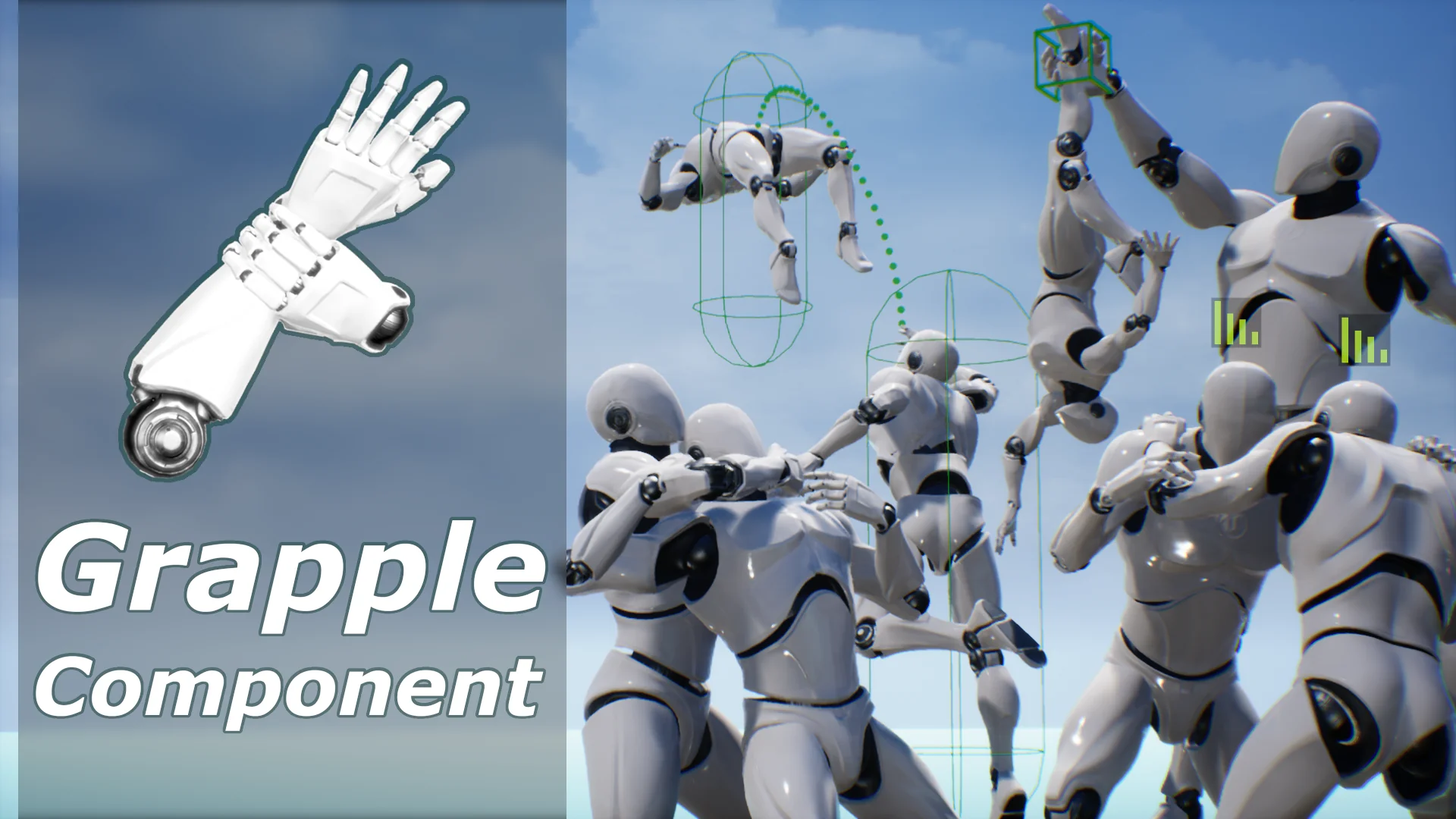
Synchronizing Character Interactions with the Grapple Component
Two characters locking into a shared physical exchange require precise technical choreography. Whether executing a martial arts throw, triggering a dynamic execution, or carrying out a cooperative revive, both skeletal meshes must coordinate their poses while the game updates their respective positions, states, and feedback cues. The Grapple Component addresses this exact challenge by establishing an interaction pipeline between participating characters. Rather than treating an attack as an independent hit reaction, the system pairs participants directly, driving synchronized animations across everyone involved in the sequence.
These coordinated exchanges allow developers to orchestrate high-impact combat moves and cinematic sequences alike. In high-tempo fighting or action projects, moves such as throws, grabs, and wrestling maneuvers demand that the initiator and the receiver react in exact lockstep. Outside of offensive encounters, the same underlying pairing logic powers non-hostile interactions, including teammate revives, cooperative lifts, and scripted cinematic moments. During any of these interactions, the system delivers continuous player feedback to communicate impact, struggle, or sequence progression, maintaining physical clarity as the exchange unfolds.
Controlling Movement and Damage in Grapple Sequences
Grapple Sequences do far more than play paired montages; they directly intervene in active gameplay parameters. When an interaction sequence fires, the component takes control of key character attributes to ensure the physical logic of the scene holds together. Repositioning is central to this behavior. During a throw or execution, characters must shift across the ground or pivot into designated relative offsets so that limb placement, center of mass, and contact points align correctly from start to finish.
Alongside spatial alignment, the sequence manages locomotion constraints by modifying movement capabilities. A character engaged in being thrown, pinned, or revived cannot retain standard directional input or sprint mechanics. The Grapple Component adjusts these movement capabilities dynamically throughout the duration of the event, restricting free movement or altering navigation rules until the sequence concludes or breaks. When the sequence involves combat, such as an aggressive strike or a wrestling throw, the framework also handles damage application, timing the health deductions directly to the moments of mechanical impact within the interaction.
Multiplayer Networking and Built-in Replication
Coordinating paired animations in a local, single-player environment is challenging on its own, but doing so in a networked context introduces latency, authority disputes, and positional desynchronization. If one client initiates a grapple while another client views the event from an offset vantage point, standard unlinked character movement often creates visual glitches or desynced hits. The Grapple Component addresses networked play by incorporating built-in replication, allowing projects to deploy complex character pairing in multiplayer environments.
Because the network logic is integrated into the system, the replication layer synchronizes the paired interactions, relative character positions, and active animation states across the server and connected clients. The authoritative server orchestrates the sequence transitions, verifies movement suppression, and manages damage distribution, ensuring that client machines reflect the exact state of the wrestling hold, finishing move, or interactive revive simultaneously. This architecture allows developers building competitive brawlers or cooperative action titles to introduce close-quarters grabs and multi-character animations without writing network replication protocols from scratch.
Blueprint Customizability Across the Grapple Component Logic
The Grapple Component is constructed entirely in Blueprint, keeping its functional graph accessible to technical designers and gameplay programmers who work directly in visual scripting. Being native to Blueprint allows developers to inspect, extend, and adapt the execution graphs to meet project-specific gameplay requirements. Every phase of an interaction—from initial initiation conditions and alignment checks to sequence resolution—can be adjusted to suit distinct character archetypes and combat paces.
Because the implementation relies on modular component logic, adding grapple mechanics to an existing project involves attaching the component to character blueprints rather than overhauling the underlying character hierarchy. Teams retain deep control over customization parameters, enabling adjustments to how long interactions last, how characters orient themselves upon initiating a grab, when damage events trigger, and how external systems receive player feedback notifications. This flexibility ensures that the core mechanics scale cleanly across diverse combat systems, whether the game calls for rapid-fire combat counters, drawn-out wrestling holds, or measured, deliberate finishing moves.
Functional Architecture and Asset Integration
Developers implementing the system must evaluate its scope as an operational framework rather than an art bundle. The Grapple Component functions strictly as a gameplay and animation synchronization toolkit. It does not provide an out-of-the-box library of production-ready animations. Instead, the logic expects creators to supply paired animation assets tailored to their project's aesthetic, such as specialized wrestling motions, paired takedowns, or character-specific revive clips.
Integrating external animations into the component is straightforward. Once paired animations are authored or sourced, they are assigned to the component's sequence data structures, which then govern playback timing, positional offsets, and gameplay events. By separating the structural mechanics of interaction handling from raw animation files, the system maintains a clean boundary between art production and gameplay logic. Technical teams gain a robust network-ready backbone for character grabs and cinematic interactions, while animators retain complete creative freedom over visual style, motion fidelity, and character performance.
 Gameplay Features
 Gameplay Features
 Gameplay Features